Introduction: Background on Akira SonicWall campaign
Between July and August 2025, security teams worldwide observed a surge in Akira ransomware incidents involving SonicWall SSL VPN devices [1]. Initially believed to be the result of an unknown zero-day vulnerability, SonicWall later released an advisory announcing that the activity was strongly linked to a previously disclosed vulnerability, CVE-2024-40766, first identified over a year earlier [2].
On August 20, 2025, Darktrace observed unusual activity on the network of a customer in the US. Darktrace detected a range of suspicious activity, including network scanning and reconnaissance, lateral movement, privilege escalation, and data exfiltration. One of the compromised devices was later identified as a SonicWall virtual private network (VPN) server, suggesting that the incident was part of the broader Akira ransomware campaign targeting SonicWall technology.
As the customer was subscribed to the Managed Detection and Response (MDR) service, Darktrace’s Security Operations Centre (SOC) team was able to rapidly triage critical alerts, restrict the activity of affected devices, and notify the customer of the threat. As a result, the impact of the attack was limited - approximately 2 GiB of data had been observed leaving the network, but any further escalation of malicious activity was stopped.
Threat Overview
CVE-2024-40766 and other misconfigurations
CVE-2024-40766 is an improper access control vulnerability in SonicWall’s SonicOS, affecting Gen 5, Gen 6, and Gen 7 devices running SonicOS version 7.0.1 5035 and earlier [3]. The vulnerability was disclosed on August 23, 2024, with a patch released the same day. Shortly after, it was reported to be exploited in the wild by Akira ransomware affiliates and others [4].
Almost a year later, the same vulnerability is being actively targeted again by the Akira ransomware group. In addition to exploiting unpatched devices affected by CVE-2024-40766, security researchers have identified three other risks potentially being leveraged by the group [5]:
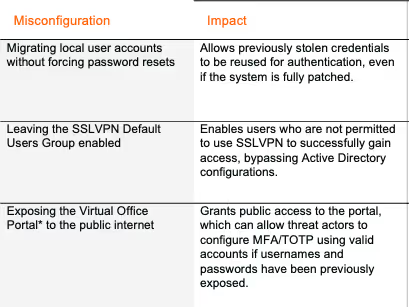
*The Virtual Office Portal can be used to initially set up MFA/TOTP configurations for SSLVPN users.
Thus, even if SonicWall devices were patched, threat actors could still target them for initial access by reusing previously stolen credentials and exploiting other misconfigurations.
Akira Ransomware
Akira ransomware was first observed in the wild in March 2023 and has since become one of the most prolific ransomware strains across the threat landscape [6]. The group operates under a Ransomware-as-a-Service (RaaS) model and frequently uses double extortion tactics, pressuring victims to pay not only to decrypt files but also to prevent the public release of sensitive exfiltrated data.
The ransomware initially targeted Windows systems, but a Linux variant was later observed targeting VMware ESXi virtual machines [7]. In 2024, it was assessed that Akira would continue to target ESXi hypervisors, making attacks highly disruptive due to the central role of virtualisation in large-scale cloud deployments. Encrypting the ESXi file system enables rapid and widespread encryption with minimal lateral movement or credential theft. The lack of comprehensive security protections on many ESXi hypervisors also makes them an attractive target for ransomware operators [8].
Victimology
Akira is known to target organizations across multiple sectors, most notably those in manufacturing, education, and healthcare. These targets span multiple geographic regions, including North America, Latin America, Europe and Asia-Pacific [9].
![Geographical distribution of organization’s affected by Akira ransomware in 2025 [9].](https://cdn.prod.website-files.com/626ff4d25aca2edf4325ff97/68e684a90c107be86fa5c2e0_Screenshot%202025-10-08%20at%207.53.20%E2%80%AFAM.avif)
Common Tactics, Techniques and Procedures (TTPs) [7][10]
Initial Access
Targets remote access services such as RDP and VPN through vulnerability exploitation or stolen credentials.
Reconnaissance
Uses network scanning tools like SoftPerfect and Advanced IP Scanner to map the environment and identify targets.
Lateral Movement
Moves laterally using legitimate administrative tools, typically via RDP.
Persistence
Employs techniques such as Kerberoasting and pass-the-hash, and tools like Mimikatz to extract credentials. Known to create new domain accounts to maintain access.
Command and Control
Utilizes remote access tools including AnyDesk, RustDesk, Ngrok, and Cloudflare Tunnel.
Exfiltration
Uses tools such as FileZilla, WinRAR, WinSCP, and Rclone. Data is exfiltrated via protocols like FTP and SFTP, or through cloud storage services such as Mega.
Darktrace’s Coverage of Akira ransomware
Reconnaissance
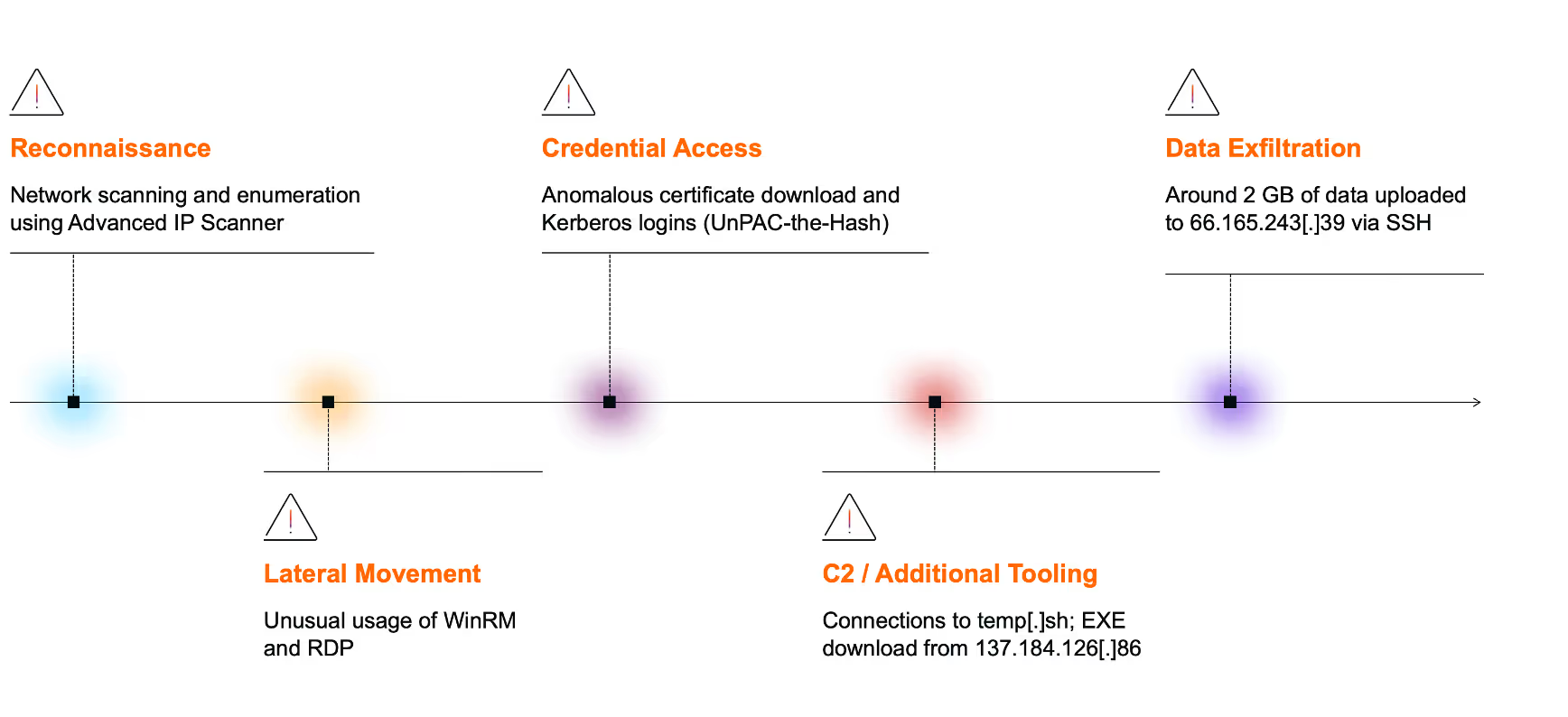
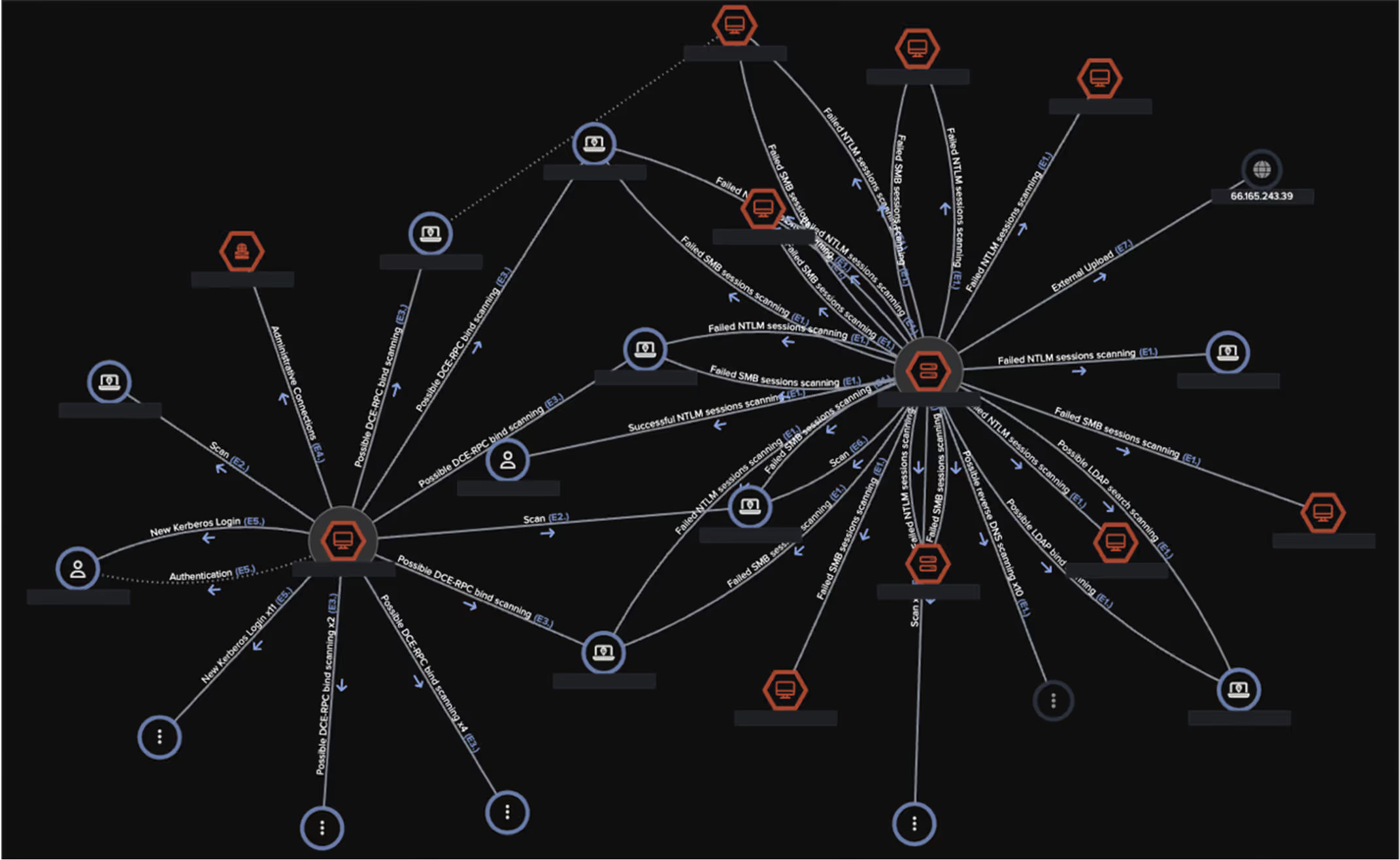
Darktrace first detected of unusual network activity around 05:10 UTC, when a desktop device was observed performing a network scan and making an unusual number of DCE-RPC requests to the endpoint mapper (epmapper) service. Network scans are typically used to identify open ports, while querying the epmapper service can reveal exposed RPC services on the network.
Multiple other devices were also later seen with similar reconnaissance activity, and use of the Advanced IP Scanner tool, indicated by connections to the domain advanced-ip-scanner[.]com.
Lateral movement
Shortly after the initial reconnaissance, the same desktop device exhibited unusual use of administrative tools. Darktrace observed the user agent “Ruby WinRM Client” and the URI “/wsman” as the device initiated a rare outbound Windows Remote Management (WinRM) connection to two domain controllers (REDACTED-dc1 and REDACTED-dc2). WinRM is a Microsoft service that uses the WS-Management (WSMan) protocol to enable remote management and control of network devices.
Darktrace also observed the desktop device connecting to an ESXi device (REDACTED-esxi1) via RDP using an LDAP service credential, likely with administrative privileges.
Credential access
At around 06:26 UTC, the desktop device was seen fetching an Active Directory certificate from the domain controller (REDACTED-dc1) by making a DCE-RPC request to the ICertPassage service. Shortly after, the device made a Kerberos login using the administrative credential.

Further investigation into the device’s event logs revealed a chain of connections that Darktrace’s researchers believe demonstrates a credential access technique known as “UnPAC the hash.”
This method begins with pre-authentication using Kerberos’ Public Key Cryptography for Initial Authentication (PKINIT), allowing the client to use an X.509 certificate to obtain a Ticket Granting Ticket (TGT) from the Key Distribution Center (KDC) instead of a password.
The next stage involves User-to-User (U2U) authentication when requesting a Service Ticket (ST) from the KDC. Within Darktrace's visibility of this traffic, U2U was indicated by the client and service principal names within the ST request being identical. Because PKINIT was used earlier, the returned ST contains the NTLM hash of the credential, which can then be extracted and abused for lateral movement or privilege escalation [11].
![Flowchart of Kerberos PKINIT pre-authentication and U2U authentication [12].](https://cdn.prod.website-files.com/626ff4d25aca2edf4325ff97/68e53a2b5e9394d5a5cbebb7_Screenshot%202025-10-07%20at%209.04.43%E2%80%AFAM.avif)
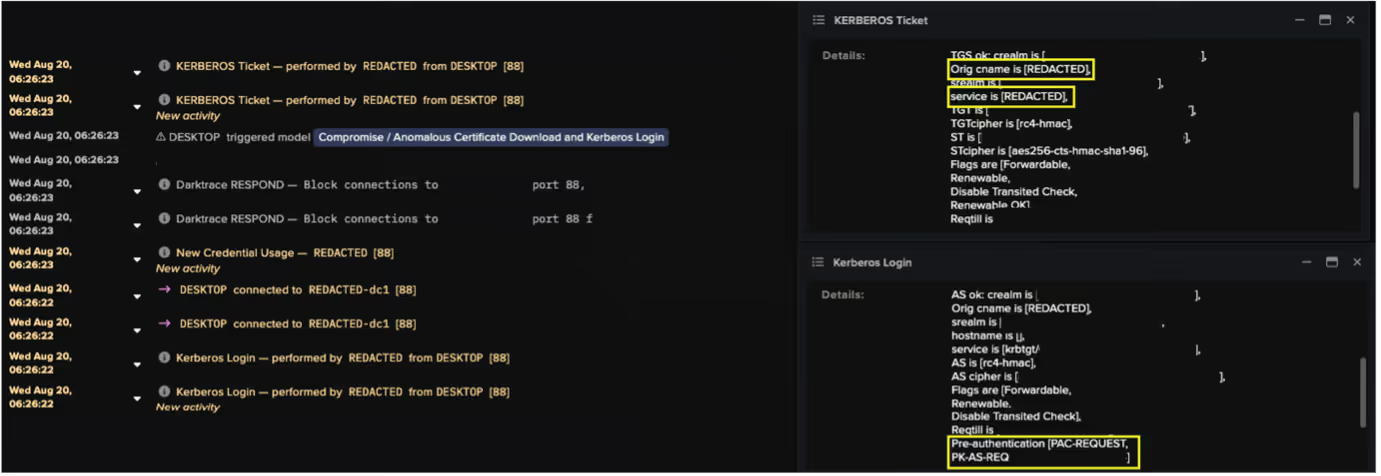
Analysis of the desktop device’s event logs revealed a repeated sequence of suspicious activity across multiple credentials. Each sequence included a DCE-RPC ICertPassage request to download a certificate, followed by a Kerberos login event indicating PKINIT pre-authentication, and then a Kerberos ticket event consistent with User-to-User (U2U) authentication.
Darktrace identified this pattern as highly unusual. Cyber AI Analyst determined that the device used at least 15 different credentials for Kerberos logins over the course of the attack.
By compromising multiple credentials, the threat actor likely aimed to escalate privileges and facilitate further malicious activity, including lateral movement. One of the credentials obtained via the “UnPAC the hash” technique was later observed being used in an RDP session to the domain controller (REDACTED-dc2).
C2 / Additional tooling
At 06:44 UTC, the domain controller (REDACTED-dc2) was observed initiating a connection to temp[.]sh, a temporary cloud hosting service. Open-source intelligence (OSINT) reporting indicates that this service is commonly used by threat actors to host and distribute malicious payloads, including ransomware [13].
Shortly afterward, the ESXi device was observed downloading an executable named “vmwaretools” from the rare external endpoint 137.184.243[.]69, using the user agent “Wget.” The repeated outbound connections to this IP suggest potential command-and-control (C2) activity.
![Cyber AI Analyst investigation into the suspicious file download and suspected C2 activity between the ESXI device and the external endpoint 137.184.243[.]69.](https://cdn.prod.website-files.com/626ff4d25aca2edf4325ff97/68e53a8ea01e348d5a62a6c3_Screenshot%202025-10-07%20at%209.06.31%E2%80%AFAM.avif)
![Packet capture (PCAP) of connections between the ESXi device and 137.184.243[.]69.](https://cdn.prod.website-files.com/626ff4d25aca2edf4325ff97/68e53ae5304f84a4192967db_Screenshot%202025-10-07%20at%209.07.53%E2%80%AFAM.avif)
Data exfiltration
The first signs of data exfiltration were observed at around 7:00 UTC. Both the domain controller (REDACTED-dc2) and a likely SonicWall VPN device were seen uploading approximately 2 GB of data via SSH to the rare external endpoint 66.165.243[.]39 (AS29802 HVC-AS). OSINT sources have since identified this IP as an indicator of compromise (IoC) associated with the Akira ransomware group, known to use it for data exfiltration [14].
![Cyber AI Analyst incident view highlighting multiple unusual events across several devices on August 20. Notably, it includes the “Unusual External Data Transfer” event, which corresponds to the anomalous 2 GB data upload to the known Akira-associated endpoint 66.165.243[.]39.](https://cdn.prod.website-files.com/626ff4d25aca2edf4325ff97/68e53b26d90343a0a6ab3bb2_Screenshot%202025-10-07%20at%209.09.02%E2%80%AFAM.avif)
Cyber AI Analyst
Throughout the course of the attack, Darktrace’s Cyber AI Analyst autonomously investigated the anomalous activity as it unfolded and correlated related events into a single, cohesive incident. Rather than treating each alert as isolated, Cyber AI Analyst linked them together to reveal the broader narrative of compromise. This holistic view enabled the customer to understand the full scope of the attack, including all associated activities and affected assets that might otherwise have been dismissed as unrelated.
Containing the attack
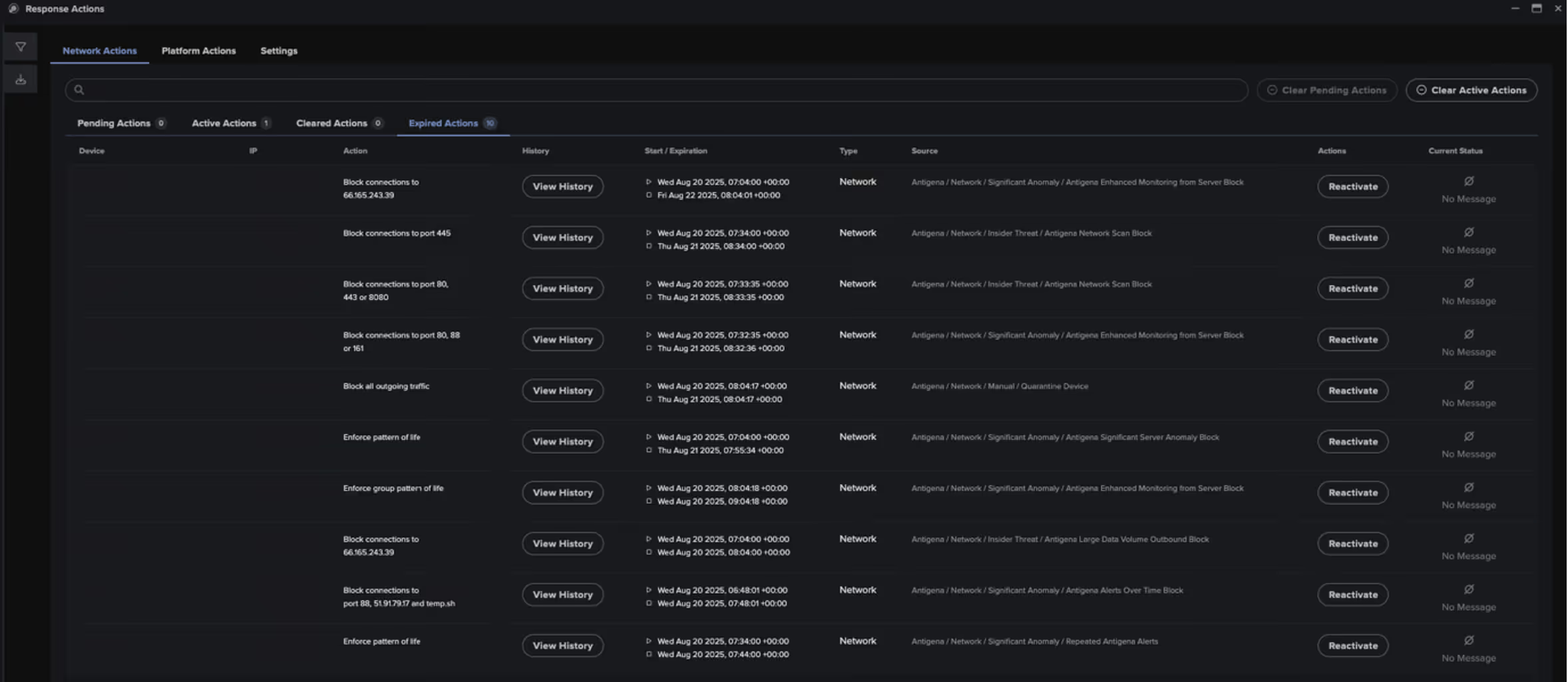
In response to the multiple anomalous activities observed across the network, Darktrace's Autonomous Response initiated targeted mitigation actions to contain the attack. These included:
- Blocking connections to known malicious or rare external endpoints, such as 137.184.243[.]69, 66.165.243[.]39, and advanced-ip-scanner[.]com.
- Blocking internal traffic to sensitive ports, including 88 (Kerberos), 3389 (RDP), and 49339 (DCE-RPC), to disrupt lateral movement and credential abuse.
- Enforcing a block on all outgoing connections from affected devices to contain potential data exfiltration and C2 activity.
Managed Detection and Response
As this customer was an MDR subscriber, multiple Enhanced Monitoring alerts—high-fidelity models designed to detect activity indicative of compromise—were triggered across the network. These alerts prompted immediate investigation by Darktrace’s SOC team.
Upon determining that the activity was likely linked to an Akira ransomware attack, Darktrace analysts swiftly acted to contain the threat. At around 08:05 UTC, devices suspected of being compromised were quarantined, and the customer was promptly notified, enabling them to begin their own remediation procedures without delay.
A wider campaign?
Darktrace’s SOC and Threat Research teams identified at least three additional incidents likely linked to the same campaign. All targeted organizations were based in the US, spanning various industries, and each have indications of using SonicWall VPN, indicating it had likely been targeted for initial access.
Across these incidents, similar patterns emerged. In each case, a suspicious executable named “vmwaretools” was downloaded from the endpoint 85.239.52[.]96 using the user agent “Wget”, bearing some resemblance to the file downloads seen in the incident described here. Data exfiltration was also observed via SSH to the endpoints 107.155.69[.]42 and 107.155.93[.]154, both of which belong to the same ASN also seen in the incident described in this blog: S29802 HVC-AS. Notably, 107.155.93[.]154 has been reported in OSINT as an indicator associated with Akira ransomware activity [15]. Further recent Akira ransomware cases have been observed involving SonicWall VPN, where no similar executable file downloads were observed, but SSH exfiltration to the same ASN was. These overlapping and non-overlapping TTPs may reflect the blurring lines between different affiliates operating under the same RaaS.
Lessons from the campaign
This campaign by Akira ransomware actors underscores the critical importance of maintaining up-to-date patching practices. Threat actors continue to exploit previously disclosed vulnerabilities, not just zero-days, highlighting the need for ongoing vigilance even after patches are released. It also demonstrates how misconfigurations and overlooked weaknesses can be leveraged for initial access or privilege escalation, even in otherwise well-maintained environments.
Darktrace’s observations further reveal that ransomware actors are increasingly relying on legitimate administrative tools, such as WinRM, to blend in with normal network activity and evade detection. In addition to previously documented Kerberos-based credential access techniques like Kerberoasting and pass-the-hash, this campaign featured the use of UnPAC the hash to extract NTLM hashes via PKINIT and U2U authentication for lateral movement or privilege escalation.
Credit to Emily Megan Lim (Senior Cyber Analyst), Vivek Rajan (Senior Cyber Analyst), Ryan Traill (Analyst Content Lead), and Sam Lister (Specialist Security Researcher)
Appendices
Darktrace Model Detections
Anomalous Connection / Active Remote Desktop Tunnel
Anomalous Connection / Data Sent to Rare Domain
Anomalous Connection / New User Agent to IP Without Hostname
Anomalous Connection / Possible Data Staging and External Upload
Anomalous Connection / Rare WinRM Incoming
Anomalous Connection / Rare WinRM Outgoing
Anomalous Connection / Uncommon 1 GiB Outbound
Anomalous Connection / Unusual Admin RDP Session
Anomalous Connection / Unusual Incoming Long Remote Desktop Session
Anomalous Connection / Unusual Incoming Long SSH Session
Anomalous Connection / Unusual Long SSH Session
Anomalous File / EXE from Rare External Location
Anomalous Server Activity / Anomalous External Activity from Critical Network Device
Anomalous Server Activity / Outgoing from Server
Anomalous Server Activity / Rare External from Server
Compliance / Default Credential Usage
Compliance / High Priority Compliance Model Alert
Compliance / Outgoing NTLM Request from DC
Compliance / SSH to Rare External Destination
Compromise / Large Number of Suspicious Successful Connections
Compromise / Sustained TCP Beaconing Activity To Rare Endpoint
Device / Anomalous Certificate Download Activity
Device / Anomalous SSH Followed By Multiple Model Alerts
Device / Anonymous NTLM Logins
Device / Attack and Recon Tools
Device / ICMP Address Scan
Device / Large Number of Model Alerts
Device / Network Range Scan
Device / Network Scan
Device / New User Agent To Internal Server
Device / Possible SMB/NTLM Brute Force
Device / Possible SMB/NTLM Reconnaissance
Device / RDP Scan
Device / Reverse DNS Sweep
Device / Suspicious SMB Scanning Activity
Device / UDP Enumeration
Unusual Activity / Unusual External Data to New Endpoint
Unusual Activity / Unusual External Data Transfer
User / Multiple Uncommon New Credentials on Device
User / New Admin Credentials on Client
User / New Admin Credentials on Server
Enhanced Monitoring Models
Compromise / Anomalous Certificate Download and Kerberos Login
Device / Initial Attack Chain Activity
Device / Large Number of Model Alerts from Critical Network Device
Device / Multiple Lateral Movement Model Alerts
Device / Suspicious Network Scan Activity
Unusual Activity / Enhanced Unusual External Data Transfer
Antigena/Autonomous Response Models
Antigena / Network / External Threat / Antigena File then New Outbound Block
Antigena / Network / External Threat / Antigena Suspicious Activity Block
Antigena / Network / External Threat / Antigena Suspicious File Block
Antigena / Network / Insider Threat / Antigena Large Data Volume Outbound Block
Antigena / Network / Insider Threat / Antigena Network Scan Block
Antigena / Network / Insider Threat / Antigena Unusual Privileged User Activities Block
Antigena / Network / Manual / Quarantine Device
Antigena / Network / Significant Anomaly / Antigena Alerts Over Time Block
Antigena / Network / Significant Anomaly / Antigena Controlled and Model Alert
Antigena / Network / Significant Anomaly / Antigena Enhanced Monitoring from Client Block
Antigena / Network / Significant Anomaly / Antigena Enhanced Monitoring from Server Block
Antigena / Network / Significant Anomaly / Antigena Significant Anomaly from Client Block
Antigena / Network / Significant Anomaly / Antigena Significant Server Anomaly Block
Antigena / Network / Significant Anomaly / Repeated Antigena Alerts
List of Indicators of Compromise (IoCs)
· 66.165.243[.]39 – IP Address – Data exfiltration endpoint
· 107.155.69[.]42 – IP Address – Probable data exfiltration endpoint
· 107.155.93[.]154 – IP Address – Likely Data exfiltration endpoint
· 137.184.126[.]86 – IP Address – Possible C2 endpoint
· 85.239.52[.]96 – IP Address – Likely C2 endpoint
· hxxp://85.239.52[.]96:8000/vmwarecli – URL – File download
· hxxp://137.184.126[.]86:8080/vmwaretools – URL – File download
MITRE ATT&CK Mapping
Initial Access – T1190 – Exploit Public-Facing Application
Reconnaissance – T1590.002 – Gather Victim Network Information: DNS
Reconnaissance – T1590.005 – Gather Victim Network Information: IP Addresses
Reconnaissance – T1592.004 – Gather Victim Host Information: Client Configurations
Reconnaissance – T1595 – Active Scanning
Discovery – T1018 – Remote System Discovery
Discovery – T1046 – Network Service Discovery
Discovery – T1083 – File and Directory Discovery
Discovery – T1135 – Network Share Discovery
Lateral Movement – T1021.001 – Remote Services: Remote Desktop Protocol
Lateral Movement – T1021.004 – Remote Services: SSH
Lateral Movement – T1021.006 – Remote Services: Windows Remote Management
Lateral Movement – T1550.002 – Use Alternate Authentication Material: Pass the Hash
Lateral Movement – T1550.003 – Use Alternate Authentication Material: Pass the Ticket
Credential Access – T1110.001 – Brute Force: Password Guessing
Credential Access – T1649 – Steal or Forge Authentication Certificates
Persistence, Privilege Escalation – T1078 – Valid Accounts
Resource Development – T1588.001 – Obtain Capabilities: Malware
Command and Control – T1071.001 – Application Layer Protocol: Web Protocols
Command and Control – T1105 – Ingress Tool Transfer
Command and Control – T1573 – Encrypted Channel
Collection – T1074 – Data Staged
Exfiltration – T1041 – Exfiltration Over C2 Channel
Exfiltration – T1048 – Exfiltration Over Alternative Protocol
References
[1] https://thehackernews.com/2025/08/sonicwall-investigating-potential-ssl.html
[3] https://psirt.global.sonicwall.com/vuln-detail/SNWLID-2024-0015
[6] https://www.ic3.gov/AnnualReport/Reports/2024_IC3Report.pdf
[7] https://www.cisa.gov/news-events/cybersecurity-advisories/aa24-109a
[8] https://blog.talosintelligence.com/akira-ransomware-continues-to-evolve/
[9] https://www.ransomware.live/map?year=2025&q=akira
[10] https://attack.mitre.org/groups/G1024/
[11] https://labs.lares.com/fear-kerberos-pt2/#UNPAC
[12] https://www.thehacker.recipes/ad/movement/kerberos/unpac-the-hash
[13] https://www.s-rminform.com/latest-thinking/derailing-akira-cyber-threat-intelligence)
[14] https://fieldeffect.com/blog/update-akira-ransomware-group-targets-sonicwall-vpn-appliances
Get the latest insights on emerging cyber threats
This report explores the latest trends shaping the cybersecurity landscape and what defenders need to know in 2026.
.avif)






.jpeg)