Darktrace AI Detects Anomalous Behavior in Empty Office
AI uncovered hackers mining cryptocurrency on a biometric server in a deserted office during COVID-19. Learn how Darktrace detected this attack in real-time.
Darktrace cyber analysts are world-class experts in threat intelligence, threat hunting and incident response, and provide 24/7 SOC support to thousands of Darktrace customers around the globe. Inside the SOC is exclusively authored by these experts, providing analysis of cyber incidents and threat trends, based on real-world experience in the field.
Written by
Max Heinemeyer
Global Field CISO
Share
09
Aug 2020
Darktrace recently detected a crypto-mining campaign that used the processing power of a corporate server to mine cryptocurrency at a manufacturing firm based in APAC. This server was in control of biometric door access within the client’s office and first downloaded a suspicious executable before beginning to mine for cryptocurrency. This occurred while the firm’s physical office was closed, with all employees working remotely due to COVID-19.
External-facing servers often face increased risk of compromise due to frequent touchpoints with the internet. It is vital that security teams are made aware of malicious activity on these devices as quickly as possible given their role in managing various business operations. Crypto-mining is difficult for many security tools to detect, particularly due to encrypted communications, and can go undetected on servers for long periods of time, slowing or damaging business operations.
Armed with an understanding of ‘normal’ for this manufacturing firm Darktrace’s AI was able to recognize the anomalous behavior, and the Cyber AI Analyst launched a fully autonomous investigation into the incident.
Figure 1: A timeline of the attack
The first signs of compromise
Darktrace identified an internet-facing server downloading a suspicious executable file, Securitcy.111, from a new external IP that had never been seen on the network before. The server had RDP, SMB, and SQL ports open externally – a successful incoming SQL connection from the external IP was seen shortly before the file download, suggesting a likely source of compromise. Successful RDP and SMB version 1 connections were also seen around the time of this activity.
Following this file download, the server began to repeatedly connect to external endpoints using self-signed TLS certificates. These endpoints are associated with mining pools for the digital currency Monero.
Darktrace’s detection
Despite a lack of threat intelligence on the external source of the file download, Darktrace’s AI easily detected that this behavior was highly unusual, alerting the firm to the serious emerging incident and enabling the customer to quickly take action. Instead of relying on known IoCs, the crypto-mining connections were immediately identified by Darktrace as suspicious due to their use of self-signed TLS certificates, alongside the statistical rarity of the endpoints for the business.
The new user agent was generic, and commonly associated with legitimate and malicious processes alike. This use of user agents means that C2 communication is less likely to be detected by the traditional security stack, however its unusual use was immediately flagged by Darktrace as suspicious.
AI Analyst coverage
Darktrace’s Cyber AI Analyst investigated this crypto-mining incident, providing an immediate indication that the device had been compromised.
Figure 2: Screenshot of AI Analyst detection of the crypto-mining
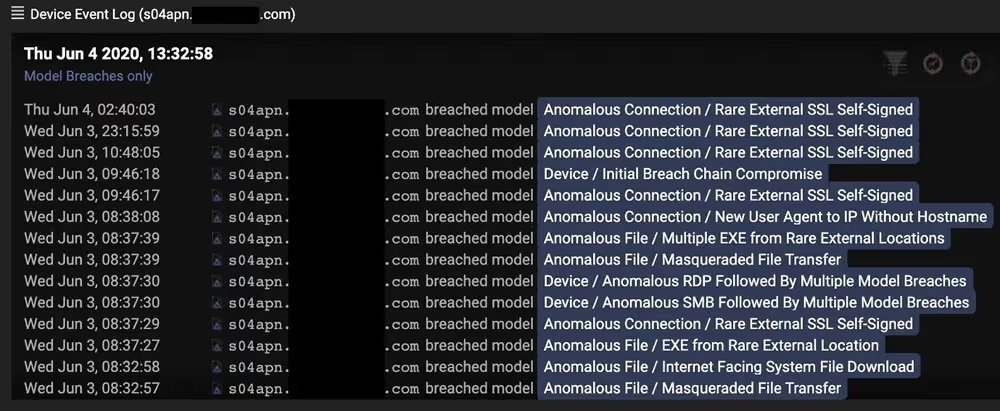
The below image shows the infected device over the same five-day period, with model breaches represented by dots and color indicating severity. The clear increase in model breaches on the device during this activity is a clear indication of compromise.
Figure 3: A graph showing a large increase in models breached by the device on 3 June
Figure 4: A sample of models breached by the server at the time of this compromise
As thousands of organizations moved to remote working this year – with the questions of when, how, and whether to return still unanswered – it is critical to ensure that physical IT infrastructure within offices remains secure. Internet-facing servers in particular must be able to withstand a multitude of external threats. This incident demonstrates the importance of security tools that can not only detect known IoCs, but emerging and unknown incidents.
Darktrace’s AI-powered approach was able to immediately detect the suspicious behavior and identify the compromise. Thanks to Darktrace’s quick detection, and the investigation of the Cyber AI Analyst, the client could remediate the crypto-mining infection.
Thanks to Darktrace analyst Emma Foulger for her insights on the above threat find.
Darktrace cyber analysts are world-class experts in threat intelligence, threat hunting and incident response, and provide 24/7 SOC support to thousands of Darktrace customers around the globe. Inside the SOC is exclusively authored by these experts, providing analysis of cyber incidents and threat trends, based on real-world experience in the field.
PHP Vulnerabilities, ARTEX and the Growing Role of AI in Cyber Attacks
The disclosure of CVE-2026-109618 and CVE-2026-109619 placed immediate pressure on organizations running PHP. Both vulnerabilities can allow unauthenticated remote code execution, including in products and appliances where PHP is embedded, and updates depend on third-party vendors [1].
Early guidance focused on patching internet-facing systems and monitoring for behavior associated with successful exploitation, including unexpected command execution, Webroot changes and outbound connections from PHP servers.
Darktrace observed widespread scanning across monitored environments involving hundreds of distinct source IP addresses that public reporting has associated with activity targeting the PHP vulnerabilities. The volume of scanning was significantly greater than the evidence available for successful exploitation. For analysts, that distinction is important. Scanning demonstrates interest in exposed infrastructure; establishing compromise requires evidence of subsequent behavior on the targeted system, including command execution, file modification or unexpected outbound communication.
PHP is not an isolated example. Imperva subsequently demonstrated remote code execution against a vulnerable Node.js build through malicious Brotli data, reproducing execution through compressed HTTP responses and configured request parsers. The same inputs were rejected by the patched runtime. Imperva linked its Node2Shell and PHP2Shell research to the increasing speed of vulnerability discovery and exploit development. [2]
While Darktrace has not observed direct evidence of CVE-2026-109618 or CVE-2026-109619 exploitation, on October 21st we observed a six-month high in detections consistent with zero-day exploitation activity, representing a 64% increase compared to historic data. This increase has not been confirmed as related to the PHP vulnerabilities. Darktrace’s behavioral approach is designed to detect anomalous activity without relying solely on rules written for a specific exploit. Comparable increases were observed around the Log4j disclosure and other globally significant vulnerability disclosures.
AI-assisted vulnerability research
The PHP disclosure arrives as AI systems have become more capable at vulnerability research [3]. OpenAI launched Daybreak in June 2026, combining GPT-5.5-Cyber, Codex Security and partnerships with security researchers and software maintainers. OpenAI says its models have been applied to discovering and generating patches for vulnerabilities in browsers, network infrastructure, FreeBSD and the Linux kernel. Darktrace joined the OpenAI Daybreak Cyber Partner Program in June to explore how OpenAI's cyber capabilities could be integrated within Darktrace products and services [4][10].
OpenAI reported in August that Codex Security Cloud had analyzed more than 30 million commits across more than 30,000 codebases. According to OpenAI, Cloudflare uses models accessed through Daybreak to investigate customer-authorized code and combines findings with live traffic and security signals to assess whether affected routes are active or receiving suspicious traffic, with proposed mitigations and patches remaining subject to customer review [5][6].
Faster discovery still leaves defenders with the work of locating affected software, testing fixes and completing remediation. The PHP case shows that gap clearly, particularly when vulnerable runtimes are embedded inside other products.
Enterprise agents as an attack surface
Darktrace Signal Labs has also examined how a trusted enterprise agent could be abused after an attacker has already obtained access to an environment. In a controlled simulation, researchers demonstrated that, in that post-compromise scenario, the Claude platform’s memory stores feature could be abused to establish a live C2 channel between an external operator and internal Claude Code agents. The external operator was able to dynamically assign network discovery, credential access, and data exfiltration tasks to the agents via this C2 channel. Detection of the agents’ activities relied on the correlation of process creation and network traffic activity from agent harness processes, alongside behavioral analysis to identify deviations from expected behavior. Darktrace has not claimed it observed this memory-store command-and-control technique in operational attacks [7].
AI-assisted attacks in Japan
Evidence from Japan indicates AI being used for vulnerability scanning and attacks outside controlled research. On 21 October, JPCERT/CC published findings from an investigation into recent unauthorized access incidents affecting organizations in Japan. JPCERT/CC states that it confirmed attackers had used AI to scan for known vulnerabilities and conduct attacks through APIs. According to JPCERT/CC, its examination of attack infrastructure found evidence of Android application analysis, API discovery and testing for weaknesses including server-side request forgery, and the infrastructure also targeted services intended for users outside Japan [8].
JPCERT/CC does not identify ARTEX by name in that publication. The named ARTEX attribution comes from separate investigations, including Microsoft's analysis of Storm-0940.
AI in offensive operations
Microsoft describes ARTEX as an open-source, multi-agent penetration-testing system capable of automating activity with limited human interaction. Microsoft reported that Storm-0940, which it assesses to be a China state-aligned actor active since 2021, used ARTEX against hundreds of organizations, and Microsoft attributed the ConnectWise supply-chain compromise [9].
Microsoft observed ARTEX accelerating scanning, reconnaissance, password spraying and OAuth application abuse. Several ARTEX-driven operations reached privileged cloud access less than three hours after initial targeting. Following the ConnectWise compromise, Storm-0940 attempted to authenticate to more than 2,250 tenants at rates of up to 2,900 attempts per minute [9].
Darktrace Threat Research found activity in its own telemetry involving infrastructure later associated with the campaign. On 13 October, Darktrace recorded failed authentication activity involving 144.172.64[.]128, one of the addresses Microsoft later identified as performing sign-ins and Microsoft Graph activity in ConnectWise customer environments. Darktrace analysis identified 65 failed authentication attempts in around 20 minutes.
Figure 1: Darktrace Advanced Search showing failed authentication events involving 144.172.64[.]128 on 13 October 2026, (customer-identifying information redacted).
The telemetry establishes repeated failed authentication from infrastructure later associated with the campaign. It does not establish ARTEX execution or successful compromise. At the time of observation, Microsoft's later attribution was unavailable. Analysts therefore had the behavior itself: repeated failed authentication from the same source over a short period, together with any related identity, application or network activity inside the environment.
Microsoft documented a wider password-spray campaign against 327 accounts across eight organizations between 10 and 14 October. It recorded more than 151,000 failed logons, including more than 111,000 on 11 October, but no successful authentication, token issuance, Graph call or directory change from that campaign. Microsoft also reported that most Storm-0940 targeting was unsuccessful [9].
Where the actor progressed beyond authentication, Microsoft observed service-principal sign-ins followed by Graph and directory operations. Activity included reconnaissance, application credential changes and attempts to modify privileges. Microsoft recommends correlating service-principal sign-ins with Graph activity, directory changes and resource access [9].
Behavior before attribution
The PHP and ARTEX cases begin with different information. PHP defenders knew which software required urgent remediation but initially had limited information about exploitation. Process execution, file modification and outbound communication could still provide evidence of compromise.
The PHP and ARTEX observations also illustrate the difference between volume and impact. Darktrace observed broad scanning around the PHP disclosure, while the ARTEX-associated infrastructure produced concentrated authentication activity. Neither observation independently demonstrates compromise and in each case examining the behavior that follows the initial interaction is the investigative clue.
The Darktrace ARTEX-related observation began with authentication behavior. Microsoft publicly attributed the source infrastructure eight days later. That attribution added context, but it did not change what had originally been recorded in the environment.
AI is now present at several points in this cycle. Daybreak applies models to vulnerability discovery and remediation. Darktrace Signal Labs demonstrated how a trusted enterprise agent could be co-opted in a controlled environment. JPCERT/CC confirmed AI-assisted vulnerability scanning and API attacks in recent incidents. Microsoft documented ARTEX being used by Storm-0940 in active operations [4][7][8][9].
Microsoft's findings also show why scale and impact must be assessed separately. One ARTEX-associated campaign produced more than 151,000 failed logons without successful access, while other operations reached privileged cloud access in less than three hours. Security teams have to distinguish high-volume attempts from activity that progresses through authentication, privilege changes and resource access.
The evidence required to assess these cases remains familiar: authentication records, process execution, application and directory changes, file activity and network communication. AI can increase the rate at which those behaviors occur. Defenders still need to establish their sequence and impact.
Credit to Emma Foulger, Sam Lister, Dylan Evans, Moishe Tajtelbaum
[3] Cyber Security Agency of Singapore, https://www.csa.gov.sg/alerts-and-advisories/alerts/al-2026-151/
[4] OpenAI, Daybreak: Tools for securing every organization in the world, 22 June 2026. https://openai.com/index/daybreak-securing-the-world/
[5] OpenAI Developers, Scaling cyber defenders with Daybreak, 21 August 2026. https://developers.openai.com/blog/scaling-cyber-defenders-with-daybreak
[6] OpenAI, Cloudflare links vulnerability discovery to defense with OpenAI, 21 October 2026. https://openai.com/index/cloudflare-cyber/
[7] Darktrace Signal Labs, Shared Memories as a Covert C2 Channel, draft research supplied for review.
[8] JPCERT/CC, Recent AI-Assisted Cyber Attacks in Japan: Investigating Attack Infrastructure and Techniques, 21 October 2026. https://blogs.jpcert.or.jp/en/2026/10/web_api_attacks.html
[9] Microsoft Security Research and Microsoft Threat Intelligence, AI-driven, large-scale nation-state campaign using ARTEX enables supply chain compromise, 21 October 2026. https://www.microsoft.com/en-us/security/blog/2026/10/21/storm-0940-uses-artex-agentic-ai-connectwise-supply-chain-compromise/
[10] Darktrace, Advancing the Use of Frontier AI in Cybersecurity: Darktrace Joins the OpenAI Daybreak Cyber Partner Program to Explore Defensive AI Integrations, 22 June 2026. https://www.darktrace.com/blog/advancing-the-use-of-frontier-ai-in-cybersecurity-darktrace-joins-the-openai-daybreak-cyber-partner-program-to-explore-defensive-ai-integrations
Beyond the Fridge: Exposed Industrial Control Systems
Introduction
In October 2026, hundreds of supermarkets across France were reportedly affected by a cyberattack targeting their refrigeration systems. According to public reports, the attackers gained access to internet-connected controllers and modified their settings, forcing refrigeration units into high and extremely low temperatures and causing significant disruption. Total losses have been reported to reach several million euros.
The incident drew attention to the security of industrial refrigeration systems, particularly older devices with exposed management interfaces and known vulnerabilities.
The exact details of how the attackers gained access have not been confirmed, however it is speculated that the public-facing web server could be accessed with the username “admin” and password being the current date. Researchers from Claroty’s Team82 identified a vulnerability in Danfoss AK-SM 8xxA Series in 2025, “CVE-2025-41450", allowing for administrative access using a time-based “code-of-the-day" for authentication [1].
Default credentials, outdated firmware and publicly accessible administrative interfaces have been an issue for years. And yet these systems continue to appear in internet scans and require little sophistication to gain admin access. A simple search of internet-connected devices shows a range of exposed devices from Programmable Logic Controllers (PLCs) and remote gateways, to, yes, more fridges.
Darktrace malware researchers identified hundreds of IoT and OT devices publicly exposed on the internet, many of which are configured with no authentication, weak credentials, or default credentials. As shown in Figure 1, an exposed Copeland XWEB web interface, used to manage Dixell equipment, including refrigerators, can provide the ability to remotely control connected devices.
Figure 1: Copeland XWEB interface used to control systems including refrigerators and air conditioning.
However, it’s not only fridges; web management interfaces for industrial controls are also publicly accessible, often protected only by weak credentials. Figure 2 shows an example of a publicly exposed WAGO interface. The WAGO management interface is a configuration and administration panel for controllers. Through it, a logged-in user can view device details and diagnostics, manage user accounts and passwords, update firmware, back up or restore the full configuration, set the clock, and manage SD card storage. While it typically doesn’t manage switch outputs or read live process values, someone with access could still disrupt operation by changing network or Modbus settings, loading bad firmware or configurations, or by resetting passwords and enabling insecure services.
Figure 2: WAGO Management interface.
The issue extends beyond management interfaces. During our research, we identified publicly accessible web interfaces belonging to PLCs, including Rockwell Automation Allen-Bradley devices. In each case, the risk arises from how the devices have been deployed and configured, not from a flaw in the vendors’ products.
Figure 3: Web interface for Allen-Bradley CompactLogix controller.
Figure 3 shows the web interface of an Allen-Bradley CompactLogix controller. Unlike the previous examples, this interface provides a view into the controller's operation, including running tasks, network connections, memory usage and diagnostic information. Rockwell Automation's CompactLogix controllers are commonly used to automate industrial processes, from manufacturing and packaging lines to water treatment and material handling systems. Depending on their configuration, these controllers can operate motors, pumps, valves and other physical equipment.
Although in this example the interface shown does not provide direct control over the PLC's logic, it exposes information about the model, firmware, network layout, and connections, which is useful reconnaissance for a bigger attack.
The concern is not necessarily that every exposed interface allows an attacker to immediately manipulate industrial processes. However, these devices are accessible from the public internet in the first place, providing information about systems that may be responsible for controlling physical equipment.
The attacks on refrigeration systems in France highlight the consequences of poorly secured industrial devices. As demonstrated throughout this research, publicly accessible management interfaces are not limited to refrigeration controllers but extend to PLCs and other systems used to manage industrial equipment.
Finding these devices requires little effort. Internet scanners make it possible to identify publicly exposed interfaces quickly, and in some cases these interfaces rely on publicly documented default credentials or have no authentication at all. As attackers increasingly use AI tools, such attacks may be identified and carried out faster and at a greater scale.
The consequences of this access depend on the device and the functionality exposed. While some interfaces provide little more than diagnostic information, others allow users to modify configurations, disrupt communications, or change settings that affect physical equipment. In industrial environments, this can result in operational downtime, damaged equipment and financial losses.
Weak passwords, default credentials and exposed administrative interfaces are not new security issues. Yet their continued presence on internet-connected industrial systems demonstrates how easily preventable weaknesses can leave physical operations vulnerable to attack.
Exposed devices often come from third-party suppliers and contractors, who frequently install refrigeration controllers, gateways and PLCs without the organization ever being aware they are connected to the internet. Asset visibility remains an important foundation, but organizations should assume that some unknown assets and services will exist. Effective security therefore also depends on continuous monitoring, anomaly detection, network segmentation and rapid response, so that risky exposure and unusual activity can be identified and addressed before it becomes disruptive.
Copeland, Dixell, WAGO, Rockwell Automation, Allen-Bradley and CompactLogix are trademarks of their respective owners. Their use here is for identification only and does not imply any affiliation with or endorsement by those owners.