

Blog
/
Network
/
November 12, 2025

Unmasking Vo1d: Inside Darktrace’s Botnet Detection

Earlier this year, Darktrace investigated the Vo1d malware campaign, tracing its activity from DGA-based DNS beaconing to major cloud infrastructure and ultimately to its C2 server communications. This blog explores how Darktrace detected Vo1d and presents a detailed timeline of Cyber AI Analyst’s investigation.
Inside the SOC
Darktrace cyber analysts are world-class experts in threat intelligence, threat hunting and incident response, and provide 24/7 SOC support to thousands of Darktrace customers around the globe. Inside the SOC is exclusively authored by these experts, providing analysis of cyber incidents and threat trends, based on real-world experience in the field.
Written by
Christina Kreza
Cyber Analyst
Unmasking Vo1d: Inside Darktrace’s Botnet DetectionDefault blog imageDefault blog imageDefault blog imageDefault blog imageDefault blog imageDefault blog image
12
Nov 2025

What is Vo1d APK malware?

Vo1d malware first appeared in the wild in September 2024 and has since evolved into one of the most widespread Android botnets ever observed. This large-scale Android malware primarily targets smart TVs and low-cost Android TV boxes. Initially, Vo1d was identified as a malicious backdoor capable of installing additional third-party software [1]. Its functionality soon expanded beyond the initial infection to include deploying further malicious payloads, running proxy services, and conducting ad fraud operations. By early 2025, it was estimated that Vo1d had infected 1.3 to 1.6 million devices worldwide [2].

From a technical perspective, Vo1d embeds components into system storage to enable itself to download and execute new modules at any time. External researchers further discovered that Vo1d uses Domain Generation Algorithms (DGAs) to create new command-and-control (C2) domains, ensuring that regardless of existing servers being taken down, the malware can quickly reconnect to new ones. Previous published analysis identified dozens of C2 domains and hundreds of DGA seeds, along with new downloader families. Over time, Vo1d has grown increasingly sophisticated with clear signs of stronger obfuscation and encryption methods designed to evade detection [2].

Darktrace’s coverage

Earlier this year, Darktrace observed a surge in Vo1d-related activity across customer environments, with the majority of affected customers based in South Africa. Devices that had been quietly operating as expected began exhibiting unusual network behavior, including excessive DNS lookups. Open-source intelligence (OSINT) has long highlighted South Africa as one of the countries most impacted by Vo1d infections [2].

What makes the recent activity particularly interesting is that the surge observed by Darktrace appears to be concentrated specifically in South African environments. This localized spike suggests that a significant number of devices may have been compromised, potentially due to vulnerable software, outdated firmware, or even preloaded malware. Regions with high prevalence of low-cost, often unpatched devices are especially susceptible, as these everyday consumer electronics can be quietly recruited into the botnet’s network. This specifically appears to be the case with South Africa, where public reporting has documented widespread use of low-cost boxes, such as non-Google-certified Android TV sticks, that frequently ship with outdated firmware [3].

The initial triage highlighted the core mechanism Vo1d uses to remain resilient: its use of DGA. A DGA deterministically creates a large list of pseudo-random domain names on a predictable schedule. This enables the malware to compute hundreds of candidate domains using the same algorithm, instead of using a hard-coded single C2 hostname that defenders could easily block or take down. To ensure reproducible from the infected device’s perspective, Vo1d utilizes DGA seeds. These seeds might be a static string, a numeric value, or a combination of underlying techniques that enable infected devices to generate the same list of candidate domains for a time window, provided the same DGA code, seed, and date are used.

Interestingly, Vo1d’s DGA seeds do not appear to be entirely unpredictable, and the generated domains lack fully random-looking endings. As observed in Figure 1, there is a clear pattern in the names generated. In this case, researchers identified that while the first five characters would change to create the desired list of domain names, the trailing portion remained consistent as part of the seed: 60b33d7929a, which OSINT sources have linked to the Vo1d botnet. [2]. Darktrace’s Threat Research team also identified a potential second DGA seed, with devices in some cases also engaging in activity involving hostnames matching the regular expression /[a-z]{5}fc975904fc9\.(com|top|net). This second seed has not been reported by any OSINT vendors at the time of writing.

Another recurring characteristic observed across multiple cases was the choice of top-level domains (TLDs), which included .com, .net, and .top.
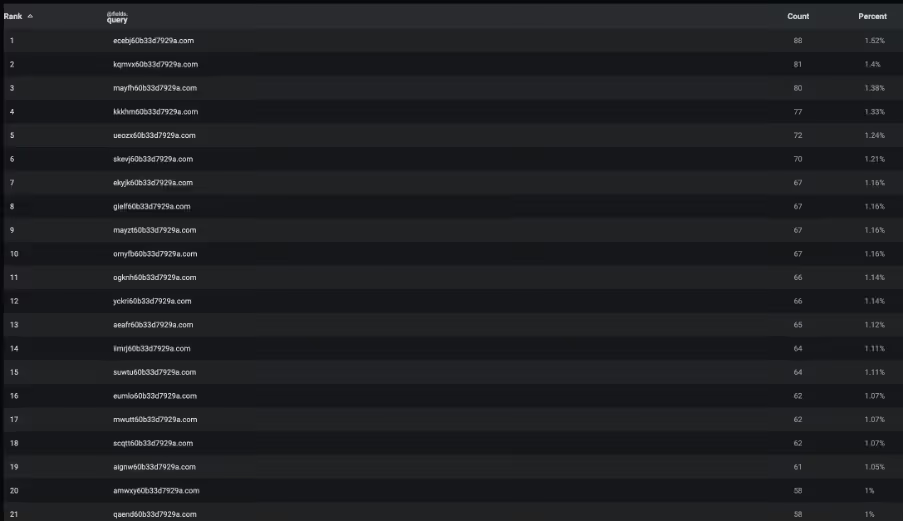
Figure 1: Advanced Search results showing DNS lookups, providing a glimpse on the DGA seed utilized.

The activity was detected by multiple models in Darktrace / NETWORK™, which triggered on devices making an unusually large volume of DNS requests for domains uncommon across the network.

During the network investigation, Darktrace analysts traced Vo1d’s infrastructure and uncovered an interesting pattern related to responder ASNs. A significant number of connections pointed to AS16509 (AMAZON-02). By hosting redirectors or C2 nodes inside major cloud environments, Vo1d is able to gain access to highly available and geographically diverse infrastructure. When one node is taken down or reported, operators can quickly enable a new node under a different IP within the same ASN. Another feature of cloud infrastructure that hardens Vo1d’s resilience is the fact that many organizations allow outbound connections to cloud IP ranges by default, assuming they are legitimate. Despite this, Darktrace was able to identify the rarity of these endpoints, identifying the unusualness of the activity.

Analysts further observed that once a generated domain successfully resolved, infected devices consistently began establishing outbound connections to ephemeral port ranges like TCP ports 55520 and 55521. These destination ports are atypical for standard web or DNS traffic. Even though the choice of high-numbered ports appears random, it is likely far from not accidental. Commonly used ports such as port 80 (HTTP) or 443 (HTTPS) are often subject to more scrutiny and deeper inspection or content filtering, making them riskier for attackers. On the other hand, unregistered ports like 55520 and 55521 are less likely to be blocked, providing a more covert channel that blends with outbound TCP traffic. This tactic helps evade firewall rules that focus on common service ports. Regardless, Darktrace was able to identify external connections on uncommon ports to locations that the network does not normally visit.

The continuation of the described activity was identified by Darktrace’s Cyber AI Analyst, which correlated individual events into a broader interconnected incident. It began with the multiple DNS requests for the algorithmically generated domains, followed by repeated connections to rare endpoints later confirmed as attacker-controlled infrastructure. Cyber AI Analyst’s investigation further enabled it to categorize the events as part of the “established foothold” phase of the attack.
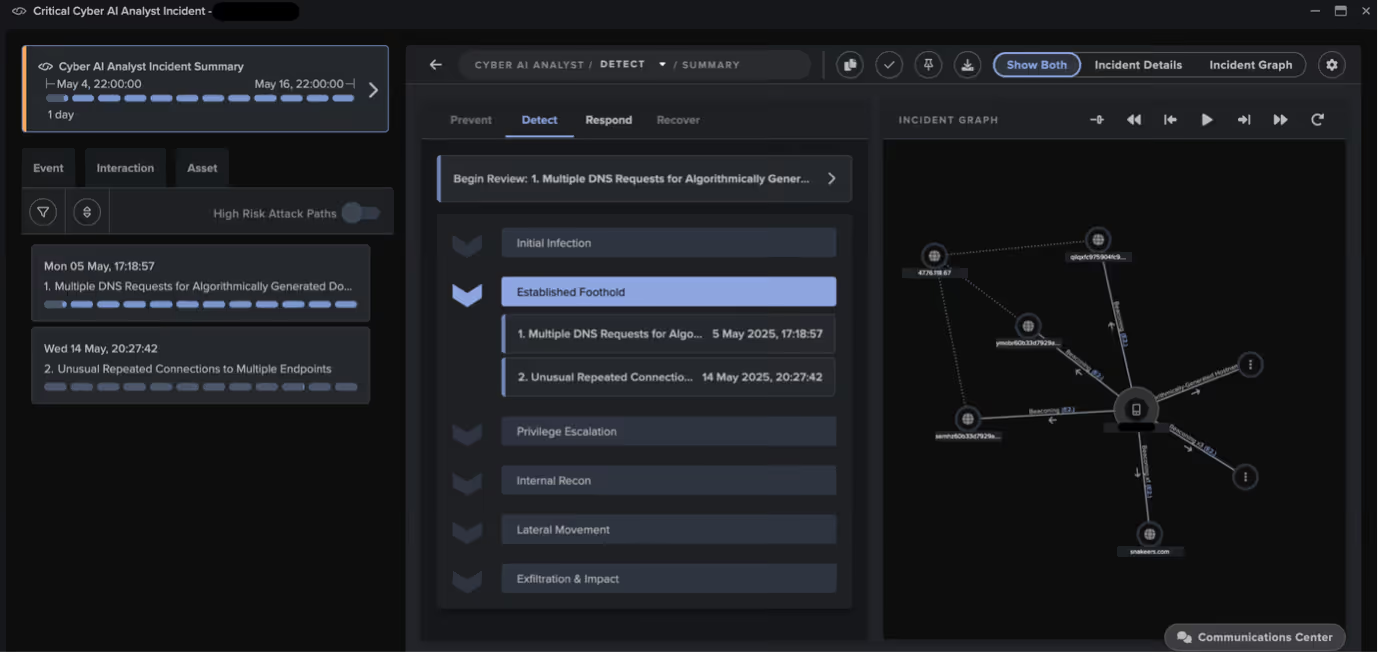
Figure 2: Cyber AI Analyst incident illustrating the transition from DNS requests for DGA domains to connections with resolved attacker-controlled infrastructure.

Conclusion

The observations highlighted in this blog highlight the precision and scale of Vo1d’s operations, ranging from its DGA-generated domains to its covert use of high-numbered ports. The surge in affected South African environments illustrate how regions with many low-cost, often unpatched devices can become major hubs for botnet activity. This serves as a reminder that even everyday consumer electronics can play a role in cybercrime, emphasizing the need for vigilance and proactive security measures.

Credit to Christina Kreza (Cyber Analyst & Team Lead) and Eugene Chua (Principal Cyber Analyst & Team Lead)

Edited by Ryan Traill (Analyst Content Lead)

Appendices

Darktrace Model Detections

  • Anomalous Connection / Devices Beaconing to New Rare IP
  • Anomalous Connection / Multiple Connections to New External TCP Port
  • Anomalous Connection / Multiple Failed Connections to Rare Endpoint
  • Compromise / DGA Beacon
  • Compromise / Domain Fluxing
  • Compromise / Fast Beaconing to DGA
  • Unusual Activity / Unusual External Activity

List of Indicators of Compromise (IoCs)

  • 3.132.75[.]97 – IP address – Likely Vo1d C2 infrastructure
  • g[.]sxim[.]me – Hostname – Likely Vo1d C2 infrastructure
  • snakeers[.]com – Hostname – Likely Vo1d C2 infrastructure

Selected DGA IoCs

  • semhz60b33d7929a[.]com – Hostname – Possible Vo1d C2 DGA endpoint
  • ggqrb60b33d7929a[.]com – Hostname – Possible Vo1d C2 DGA endpoint
  • eusji60b33d7929a[.]com – Hostname – Possible Vo1d C2 DGA endpoint
  • uacfc60b33d7929a[.]com – Hostname – Possible Vo1d C2 DGA endpoint
  • qilqxfc975904fc9[.]top – Hostname – Possible Vo1d C2 DGA endpoint

MITRE ATT&CK Mapping

  • T1071.004 – Command and Control – DNS
  • T1568.002 – Command and Control – Domain Generation Algorithms
  • T1568.001 – Command and Control – Fast Flux DNS
  • T1571 – Command and Control – Non-Standard Port

[1] https://news.drweb.com/show/?lng=en&i=14900

[2] https://blog.xlab.qianxin.com/long-live-the-vo1d_botnet/

[3] https://mybroadband.co.za/news/broadcasting/596007-warning-for-south-africans-using-specific-types-of-tv-sticks.html

The content provided in this blog is published by Darktrace for general informational purposes only and reflects our understanding of cybersecurity topics, trends, incidents, and developments at the time of publication. While we strive to ensure accuracy and relevance, the information is provided “as is” without any representations or warranties, express or implied. Darktrace makes no guarantees regarding the completeness, accuracy, reliability, or timeliness of any information presented and expressly disclaims all warranties.

Nothing in this blog constitutes legal, technical, or professional advice, and readers should consult qualified professionals before acting on any information contained herein. Any references to third-party organizations, technologies, threat actors, or incidents are for informational purposes only and do not imply affiliation, endorsement, or recommendation.

Darktrace, its affiliates, employees, or agents shall not be held liable for any loss, damage, or harm arising from the use of or reliance on the information in this blog.

The cybersecurity landscape evolves rapidly, and blog content may become outdated or superseded. We reserve the right to update, modify, or remove any content.

Inside the SOC
Darktrace cyber analysts are world-class experts in threat intelligence, threat hunting and incident response, and provide 24/7 SOC support to thousands of Darktrace customers around the globe. Inside the SOC is exclusively authored by these experts, providing analysis of cyber incidents and threat trends, based on real-world experience in the field.
Written by
Christina Kreza
Cyber Analyst

More in this series

No items found.

Blog

/

AI

/

December 23, 2025

How to Secure AI in the Enterprise: A Practical Framework for Models, Data, and Agents

How to secure AI in the enterprise: A practical framework for models, data, and agents Default blog imageDefault blog image

Introduction: Why securing AI is now a security priority

AI adoption is at the forefront of the digital movement in businesses, outpacing the rate at which IT and security professionals can set up governance models and security parameters. Adopting Generative AI chatbots, autonomous agents, and AI-enabled SaaS tools promises efficiency and speed but also introduces new forms of risk that traditional security controls were never designed to manage. For many organizations, the first challenge is not whether AI should be secured, but what “securing AI” actually means in practice. Is it about protecting models? Governing data? Monitoring outputs? Or controlling how AI agents behave once deployed?  

While demand for adoption increases, securing AI use in the enterprise is still an abstract concept to many and operationalizing its use goes far beyond just having visibility. Practitioners need to also consider how AI is sourced, built, deployed, used, and governed across the enterprise.

The goal for security teams: Implement a clear, lifecycle-based AI security framework. This blog will demonstrate the variety of AI use cases that should be considered when developing this framework and how to frame this conversation to non-technical audiences.  

What does “securing AI” actually mean?

Securing AI is often framed as an extension of existing security disciplines. In practice, this assumption can cause confusion.

Traditional security functions are built around relatively stable boundaries. Application security focuses on code and logic. Cloud security governs infrastructure and identity. Data security protects sensitive information at rest and in motion. Identity security controls who can access systems and services. Each function has clear ownership, established tooling, and well-understood failure modes.

AI does not fit neatly into any of these categories. An AI system is simultaneously:

  • An application that executes logic
  • A data processor that ingests and generates sensitive information
  • A decision-making layer that influences or automates actions
  • A dynamic system that changes behavior over time

As a result, the security risks introduced by AI cuts across multiple domains at once. A single AI interaction can involve identity misuse, data exposure, application logic abuse, and supply chain risk all within the same workflow. This is where the traditional lines between security functions begin to blur.

For example, a malicious prompt submitted by an authorized user is not a classic identity breach, yet it can trigger data leakage or unauthorized actions. An AI agent calling an external service may appear as legitimate application behavior, even as it violates data sovereignty or compliance requirements. AI-generated code may pass standard development checks while introducing subtle vulnerabilities or compromised dependencies.

In each case, no single security team “owns” the risk outright.

This is why securing AI cannot be reduced to model safety, governance policies, or perimeter controls alone. It requires a shared security lens that spans development, operations, data handling, and user interaction. Securing AI means understanding not just whether systems are accessed securely, but whether they are being used, trained, and allowed to act in ways that align with business intent and risk tolerance.

At its core, securing AI is about restoring clarity in environments where accountability can quickly blur. It is about knowing where AI exists, how it behaves, what it is allowed to do, and how its decisions affect the wider enterprise. Without this clarity, AI becomes a force multiplier for both productivity and risk.

The five categories of AI risk in the enterprise

A practical way to approach AI security is to organize risk around how AI is used and where it operates. The framework below defines five categories of AI risk, each aligned to a distinct layer of the enterprise AI ecosystem  

How to Secure AI in the Enterprise:

  • Defending against misuse and emergent behaviors
  • Monitoring and controlling AI in operation
  • Protecting AI development and infrastructure
  • Securing the AI supply chain
  • Strengthening readiness and oversight

Together, these categories provide a structured lens for understanding how AI risk manifests and where security teams should focus their efforts.

1. Defending against misuse and emergent AI behaviors

Generative AI systems and agents can be manipulated in ways that bypass traditional controls. Even when access is authorized, AI can be misused, repurposed, or influenced through carefully crafted prompts and interactions.

Key risks include:

  • Malicious prompt injection designed to coerce unwanted actions
  • Unauthorized or unintended use cases that bypass guardrails
  • Exposure of sensitive data through prompt histories
  • Hallucinated or malicious outputs that influence human behavior

Unlike traditional applications, AI systems can produce harmful outcomes without being explicitly compromised. Securing this layer requires monitoring intent, not just access. Security teams need visibility into how AI systems are being prompted, how outputs are consumed, and whether usage aligns with approved business purposes

2. Monitoring and controlling AI in operation

Once deployed, AI agents operate at machine speed and scale. They can initiate actions, exchange data, and interact with other systems with little human oversight. This makes runtime visibility critical.

Operational AI risks include:

  • Agents using permissions in unintended ways
  • Uncontrolled outbound connections to external services or agents
  • Loss of forensic visibility into ephemeral AI components
  • Non-compliant data transmission across jurisdictions

Securing AI in operation requires real-time monitoring of agent behavior, centralized control points such as AI gateways, and the ability to capture agent state for investigation. Without these capabilities, security teams may be blind to how AI systems behave once live, particularly in cloud-native or regulated environments.

3. Protecting AI development and infrastructure

Many AI risks are introduced long before deployment. Development pipelines, infrastructure configurations, and architectural decisions all influence the security posture of AI systems.

Common risks include:

  • Misconfigured permissions and guardrails
  • Insecure or overly complex agent architectures
  • Infrastructure-as-Code introducing silent misconfigurations
  • Vulnerabilities in AI-generated code and dependencies

AI-generated code adds a new dimension of risk, as hallucinated packages or insecure logic may be harder to detect and debug than human-written code. Securing AI development means applying security controls early, including static analysis, architectural review, and continuous configuration monitoring throughout the build process.

4. Securing the AI supply chain

AI supply chains are often opaque. Models, datasets, dependencies, and services may come from third parties with varying levels of transparency and assurance.

Key supply chain risks include:

  • Shadow AI tools used outside approved controls
  • External AI agents granted internal access
  • Suppliers applying AI to enterprise data without disclosure
  • Compromised models, training data, or dependencies

Securing the AI supply chain requires discovering where AI is used, validating the provenance and licensing of models and data, and assessing how suppliers process and protect enterprise information. Without this visibility, organizations risk data leakage, regulatory exposure, and downstream compromise through trusted integrations.

5. Strengthening readiness and oversight

Even with strong technical controls, AI security fails without governance, testing, and trained teams. AI introduces new incident scenarios that many security teams are not yet prepared to handle.

Oversight risks include:

  • Lack of meaningful AI risk reporting
  • Untested AI systems in production
  • Security teams untrained in AI-specific threats

Organizations need AI-aware reporting, red and purple team exercises that include AI systems, and ongoing training to build operational readiness. These capabilities ensure AI risks are understood, tested, and continuously improved, rather than discovered during a live incident.

Reframing AI security for the boardroom

AI security is not just a technical issue. It is a trust, accountability, and resilience issue. Boards want assurance that AI-driven decisions are reliable, explainable, and protected from tampering.

Effective communication with leadership focuses on:

  • Trust: confidence in data integrity, model behavior, and outputs
  • Accountability: clear ownership across teams and suppliers
  • Resilience: the ability to operate, audit, and adapt under attack or regulation

Mapping AI security efforts to recognized frameworks such as ISO/IEC 42001 and the NIST AI Risk Management Framework helps demonstrate maturity and aligns AI security with broader governance objectives.

Conclusion: Securing AI is a lifecycle challenge

The same characteristics that make AI transformative also make it difficult to secure. AI systems blur traditional boundaries between software, users, and decision-making, expanding the attack surface in subtle but significant ways.

Securing AI requires restoring clarity. Knowing where AI exists, how it behaves, who controls it, and how it is governed. A framework-based approach allows organizations to innovate with AI while maintaining trust, accountability, and control.

The journey to secure AI is ongoing, but it begins with understanding the risks across the full AI lifecycle and building security practices that evolve alongside the technology.

Continue reading
About the author
Brittany Woodsmall
Product Marketing Manager, AI & Attack Surface

Blog

/

AI

/

December 22, 2025

The Year Ahead: AI Cybersecurity Trends to Watch in 2026

2026 cyber threat trendsDefault blog imageDefault blog image

Introduction: 2026 cyber trends

Each year, we ask some of our experts to step back from the day-to-day pace of incidents, vulnerabilities, and headlines to reflect on the forces reshaping the threat landscape. The goal is simple:  to identify and share the trends we believe will matter most in the year ahead, based on the real-world challenges our customers are facing, the technology and issues our R&D teams are exploring, and our observations of how both attackers and defenders are adapting.  

In 2025, we saw generative AI and early agentic systems moving from limited pilots into more widespread adoption across enterprises. Generative AI tools became embedded in SaaS products and enterprise workflows we rely on every day, AI agents gained more access to data and systems, and we saw glimpses of how threat actors can manipulate commercial AI models for attacks. At the same time, expanding cloud and SaaS ecosystems and the increasing use of automation continued to stretch traditional security assumptions.

Looking ahead to 2026, we’re already seeing the security of AI models, agents, and the identities that power them becoming a key point of tension – and opportunity -- for both attackers and defenders. Long-standing challenges and risks such as identity, trust, data integrity, and human decision-making will not disappear, but AI and automation will increase the speed and scale of the cyber risk.  

Here's what a few of our experts believe are the trends that will shape this next phase of cybersecurity, and the realities organizations should prepare for.  

Agentic AI is the next big insider risk

In 2026, organizations may experience their first large-scale security incidents driven by agentic AI behaving in unintended ways—not necessarily due to malicious intent, but because of how easily agents can be influenced. AI agents are designed to be helpful, lack judgment, and operate without understanding context or consequence. This makes them highly efficient—and highly pliable. Unlike human insiders, agentic systems do not need to be socially engineered, coerced, or bribed. They only need to be prompted creatively, misinterpret legitimate prompts, or be vulnerable to indirect prompt injection. Without strong controls around access, scope, and behavior, agents may over-share data, misroute communications, or take actions that introduce real business risk. Securing AI adoption will increasingly depend on treating agents as first-class identities—monitored, constrained, and evaluated based on behavior, not intent.

-- Nicole Carignan, SVP of Security & AI Strategy

Prompt Injection moves from theory to front-page breach

We’ll see the first major story of an indirect prompt injection attack against companies adopting AI either through an accessible chatbot or an agentic system ingesting a hidden prompt. In practice, this may result in unauthorized data exposure or unintended malicious behavior by AI systems, such as over-sharing information, misrouting communications, or acting outside their intended scope. Recent attention on this risk—particularly in the context of AI-powered browsers and additional safety layers being introduced to guide agent behavior—highlights a growing industry awareness of the challenge.  

-- Collin Chapleau, Senior Director of Security & AI Strategy

Humans are even more outpaced, but not broken

When it comes to cyber, people aren’t failing; the system is moving faster than they can. Attackers exploit the gap between human judgment and machine-speed operations. The rise of deepfakes and emotion-driven scams that we’ve seen in the last few years reduce our ability to spot the familiar human cues we’ve been taught to look out for. Fraud now spans social platforms, encrypted chat, and instant payments in minutes. Expecting humans to be the last line of defense is unrealistic.

Defense must assume human fallibility and design accordingly. Automated provenance checks, cryptographic signatures, and dual-channel verification should precede human judgment. Training still matters, but it cannot close the gap alone. In the year ahead, we need to see more of a focus on partnership: systems that absorb risk so humans make decisions in context, not under pressure.

-- Margaret Cunningham, VP of Security & AI Strategy

AI removes the attacker bottleneck—smaller organizations feel the impact

One factor that is currently preventing more companies from breaches is a bottleneck on the attacker side: there’s not enough human hacker capital. The number of human hands on a keyboard is a rate-determining factor in the threat landscape. Further advancements of AI and automation will continue to open that bottleneck. We are already seeing that. The ostrich approach of hoping that one’s own company is too obscure to be noticed by attackers will no longer work as attacker capacity increases.  

-- Max Heinemeyer, Global Field CISO

SaaS platforms become the preferred supply chain target

Attackers have learned a simple lesson: compromising SaaS platforms can have big payouts. As a result, we’ll see more targeting of commercial off-the-shelf SaaS providers, which are often highly trusted and deeply integrated into business environments. Some of these attacks may involve software with unfamiliar brand names, but their downstream impact will be significant. In 2026, expect more breaches where attackers leverage valid credentials, APIs, or misconfigurations to bypass traditional defenses entirely.

-- Nathaniel Jones, VP of Security & AI Strategy

Increased commercialization of generative AI and AI assistants in cyber attacks

One trend we’re watching closely for 2026 is the commercialization of AI-assisted cybercrime. For example, cybercrime prompt playbooks sold on the dark web—essentially copy-and-paste frameworks that show attackers how to misuse or jailbreak AI models. It’s an evolution of what we saw in 2025, where AI lowered the barrier to entry. In 2026, those techniques become productized, scalable, and much easier to reuse.  

-- Toby Lewis, Global Head of Threat Analysis

Conclusion

Taken together, these trends underscore that the core challenges of cybersecurity are not changing dramatically -- identity, trust, data, and human decision-making still sit at the core of most incidents. What is changing quickly is the environment in which these challenges play out. AI and automation are accelerating everything: how quickly attackers can scale, how widely risk is distributed, and how easily unintended behavior can create real impact. And as technology like cloud services and SaaS platforms become even more deeply integrated into businesses, the potential attack surface continues to expand.  

Predictions are not guarantees. But the patterns emerging today suggest that 2026 will be a year where securing AI becomes inseparable from securing the business itself. The organizations that prepare now—by understanding how AI is used, how it behaves, and how it can be misused—will be best positioned to adopt these technologies with confidence in the year ahead.

Learn more about how to secure AI adoption in the enterprise without compromise by registering to join our live launch webinar on February 3, 2026.  

Continue reading
About the author
The Darktrace Community
Your data. Our AI.
Elevate your network security with Darktrace AI