Blog
/
Network
/
April 22, 2025

Obfuscation Overdrive: Next-Gen Cryptojacking with Layers

Docker is a prime target for malware, with new strains emerging daily. This blog explores a novel campaign showcasing advanced obfuscation and cryptojacking techniques.
Inside the SOC
Darktrace cyber analysts are world-class experts in threat intelligence, threat hunting and incident response, and provide 24/7 SOC support to thousands of Darktrace customers around the globe. Inside the SOC is exclusively authored by these experts, providing analysis of cyber incidents and threat trends, based on real-world experience in the field.
Written by
Nate Bill
Threat Researcher
man looking at multiple computer screensDefault blog image
22
Apr 2025

Out of all the services honeypotted by Darktrace, Docker is the most commonly attacked, with new strains of malware emerging daily. This blog will analyze a novel malware campaign with a unique obfuscation technique and a new cryptojacking technique.

What is obfuscation?

Obfuscation is a common technique employed by threat actors to prevent signature-based detection of their code, and to make analysis more difficult. This novel campaign uses an interesting technique of obfuscating its payload.

Docker image analysis

The attack begins with a request to launch a container from Docker Hub, specifically the kazutod/tene:ten image. Using Docker Hub’s layer viewer, an analyst can quickly identify what the container is designed to do. In this case, the container is designed to run the ten.py script which is built into itself.

 Docker Hub Image Layers, referencing the script ten.py.
Figure 1: Docker Hub Image Layers, referencing the script ten.py.

To gain more information on the Python file, Docker’s built in tooling can be used to download the image (docker pull kazutod/tene:ten) and then save it into a format that is easier to work with (docker image save kazutod/tene:ten -o tene.tar). It can then be extracted as a regular tar file for further investigation.
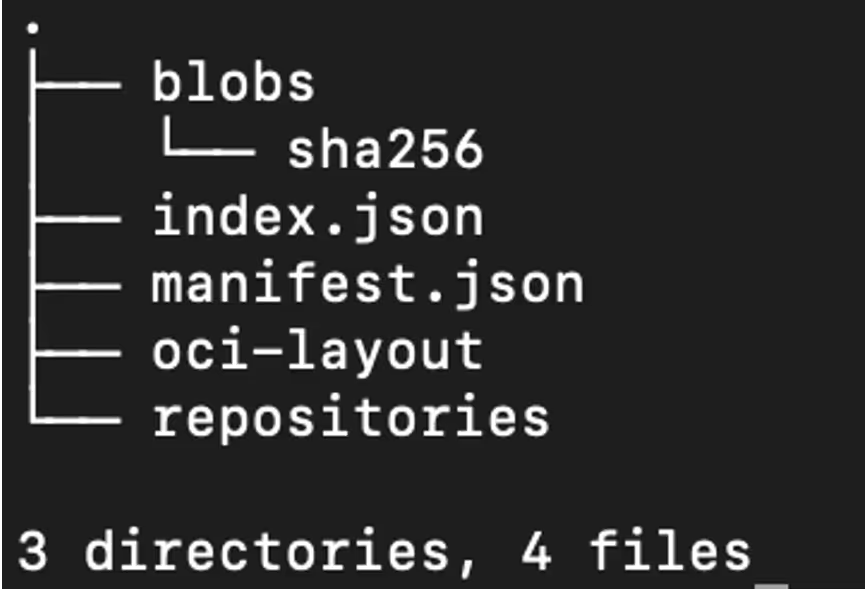
Extraction of the resulting tar file.
Figure 2: Extraction of the resulting tar file.

The Docker image uses the OCI format, which is a little different to a regular file system. Instead of having a static folder of files, the image consists of layers. Indeed, when running the file command over the sha256 directory, each layer is shown as a tar file, along with a JSON metadata file.

Output of the file command over the sha256 directory.
Figure 3: Output of the file command over the sha256 directory.

As the detailed layers are not necessary for analysis, a single command can be used to extract all of them into a single directory, recreating what the container file system would look like:

find blobs/sha256 -type f -exec sh -c 'file "{}" | grep -q "tar archive" && tar -xf "{}" -C root_dir' \;

Result of running the command above.
Figure 4: Result of running the command above.

The find command can then be used to quickly locate where the ten.py script is.

find root_dir -name ten.py

root_dir/app/ten.py

Details of the above ten.py script.
Figure 5: Details of the above ten.py script.

This may look complicated at first glance, however after breaking it down, it is fairly simple. The script defines a lambda function (effectively a variable that contains executable code) and runs zlib decompress on the output of base64 decode, which is run on the reversed input. The script then runs the lambda function with an input of the base64 string, and then passes it to exec, which runs the decoded string as Python code.

To help illustrate this, the code can be cleaned up to this simplified function:

def decode(input):
   reversed = input[::-1]

   decoded = base64.decode(reversed)
   decompressed = zlib.decompress(decoded)
   return decompressed

decoded_string = decode(the_big_text_blob)
exec(decoded_string) # run the decoded string

This can then be set up as a recipe in Cyberchef, an online tool for data manipulation, to decode it.

Use of Cyberchef to decode the ten.py script.
Figure 6: Use of Cyberchef to decode the ten.py script.

The decoded payload calls the decode function again and puts the output into exec. Copy and pasting the new payload into the input shows that it does this another time. Instead of copy-pasting the output into the input all day, a quick script can be used to decode this.

The script below uses the decode function from earlier in order to decode the base64 data and then uses some simple string manipulation to get to the next payload. The script will run this over and over until something interesting happens.

# Decode the initial base64

decoded = decode(initial)
# Remove the first 11 characters and last 3

# so we just have the next base64 string

clamped = decoded[11:-3]

for i in range(1, 100):
   # Decode the new payload

   decoded = decode(clamped)
   # Print it with the current step so we

   # can see what’s going on

   print(f"Step {i}")

   print(decoded)
   # Fetch the next base64 string from the

   # output, so the next loop iteration will

   # decode it

   clamped = decoded[11:-3]

Result of the 63rd iteration of this script.
Figure 7: Result of the 63rd iteration of this script.

After 63 iterations, the script returns actual code, accompanied by an error from the decode function as a stopping condition was never defined. It not clear what the attacker’s motive to perform so many layers of obfuscation was, as one round of obfuscation versus several likely would not make any meaningful difference to bypassing signature analysis. It’s possible this is an attempt to stop analysts or other hackers from reverse engineering the code. However,  it took a matter of minutes to thwart their efforts.

Cryptojacking 2.0?

Cleaned up version of the de-obfuscated code.
Figure 8: Cleaned up version of the de-obfuscated code.

The cleaned up code indicates that the malware attempts to set up a connection to teneo[.]pro, which appears to belong to a Web3 startup company.

Teneo appears to be a legitimate company, with Crunchbase reporting that they have raised USD 3 million as part of their seed round [1]. Their service allows users to join a decentralized network, to “make sure their data benefits you” [2]. Practically, their node functions as a distributed social media scraper. In exchange for doing so, users are rewarded with “Teneo Points”, which are a private crypto token.

The malware script simply connects to the websocket and sends keep-alive pings in order to gain more points from Teneo and does not do any actual scraping. Based on the website, most of the rewards are gated behind the number of heartbeats performed, which is likely why this works [2].

Checking out the attacker’s dockerhub profile, this sort of attack seems to be their modus operandi. The most recent container runs an instance of the nexus network client, which is a project to perform distributed zero-knowledge compute tasks in exchange for cryptocurrency.

Typically, traditional cryptojacking attacks rely on using XMRig to directly mine cryptocurrency, however as XMRig is highly detected, attackers are shifting to alternative methods of generating crypto. Whether this is more profitable remains to be seen. There is not currently an easy way to determine the earnings of the attackers due to the more “closed” nature of the private tokens. Translating a user ID to a wallet address does not appear to be possible, and there is limited public information about the tokens themselves. For example, the Teneo token is listed as “preview only” on CoinGecko, with no price information available.

Conclusion

This blog explores an example of Python obfuscation and how to unravel it. Obfuscation remains a ubiquitous technique employed by the majority of malware to aid in detection/defense evasion and being able to de-obfuscate code is an important skill for analysts to possess.

We have also seen this new avenue of cryptominers being deployed, demonstrating that attackers’ techniques are still evolving - even tried and tested fields. The illegitimate use of legitimate tools to obtain rewards is an increasingly common vector. For example,  as has been previously documented, 9hits has been used maliciously to earn rewards for the attack in a similar fashion.

Docker remains a highly targeted service, and system administrators need to take steps to ensure it is secure. In general, Docker should never be exposed to the wider internet unless absolutely necessary, and if it is necessary both authentication and firewalling should be employed to ensure only authorized users are able to access the service. Attacks happen every minute, and even leaving the service open for a short period of time may result in a serious compromise.

References

1. https://www.crunchbase.com/funding_round/teneo-protocol-seed--a8ff2ad4

2. https://teneo.pro/

Inside the SOC
Darktrace cyber analysts are world-class experts in threat intelligence, threat hunting and incident response, and provide 24/7 SOC support to thousands of Darktrace customers around the globe. Inside the SOC is exclusively authored by these experts, providing analysis of cyber incidents and threat trends, based on real-world experience in the field.
Written by
Nate Bill
Threat Researcher

More in this series

No items found.

Blog

/

/

September 4, 2026

Darktrace Advances Incident Investigation and AI-Agent Security with OpenAI Daybreak Models

Default blog imageDefault blog image

Earlier this year, Darktrace joined OpenAI’s Daybreak Defense Network to explore how their cyber capabilities can be integrated within Darktrace products and services to transform how security teams move from signal to action.

At the heart of this work is Darktrace's behavioral understanding of customer environments and identification of complex security incidents, combined with OpenAI models that can add context to help explain why an incident matters and its potential impact on the business. By bringing these capabilities into defensive workflows security teams already use, the goal is to give defenders not just greater visibility, but the context and guidance they need to act with confidence.

Since joining the program, we've been working with OpenAI to explore how these capabilities can address specific security challenges for defenders.

The problem we're solving

Attackers continue to change how they operate, including by using AI to increase the speed and scale of some techniques. Security teams are already managing a large volume of alerts, and the question isn't just what's happening, but how it could affect the organization. Even when an incident is fully investigated and correlated, technical severity alone doesn't tell a security team how much it actually matters to the business. That same challenge extends to internal AI adoption. As organizations adopt more AI systems and agents, security teams need visibility into their behavior, access and activity, along with the broader business context needed to identify and investigate potential risk.

Darktrace's Adaptive AI™ builds a detailed, organization-specific picture of what's normal for each environment, and uses that picture to investigate threats and identify complex security activity across domains. OpenAI's models can build on Darktrace's correlated, technically prioritized incidents by adding context that can help defenders understand what may be at stake.

What we're building

Our work is focused on two areas: supporting security investigation and response, and helping defenders identify risky behavior across enterprise AI systems and agents.

The first aligns Darktrace's behavioral understanding with OpenAI models to support  security investigation and prioritization. Darktrace's Adaptive AI continuously learns the unique patterns of normal behavior within each customer it protects, creating a deep, organization-specific understanding of its digital estate. When unusual activity emerges, OpenAI's models can draw on that context to help analysts investigate the incident, understand its significance and assess potential business consequences — reducing the need to manually assemble context from fragmented signals.

Second, we are exploring how these capabilities can support AI-agent and runtime security through Darktrace / SECURE AI™. OpenAI’s Daybreak models can build on the detections and visibility Darktrace / SECURE AI provides, connecting signals across a customer's environment and help defenders identify potentially risky behavior involving AI systems and agents. Activity that might appear isolated can instead be connected with related signals, helping defenders investigate the broader context and determine appropriate remediation.

Darktrace brings deep cybersecurity expertise, an evolving understanding of each customer's environment, and AI-driven identification of threats across the digital estate. Through the Daybreak Defense Network, Darktrace is exploring how OpenAI models can augment those capabilities in defensive security workflows — supporting incident investigation and response and improving visibility into AI-agent and runtime risk.

These capabilities are still in development, and we're excited to continue building on this work.

To learn more about how Darktrace continues to innovate to meet today's most pressing security challenges, register for our upcoming launch broadcast here.

Continue reading
About the author

Blog

/

OT

/

September 4, 2026

Botnet Behind the Camera: Mirai Katana Activity on a Video Recording Device

Default blog imageDefault blog image

Key takeaways

  • Darktrace identified a camera device infected with the Mirai/Katana botnet in a sports-sector customer environment, showing how exposed IoT devices can become active participants in wider attack chains.
  • The compromise involved suspicious Wget behavior, file downloads from rare external IPs, unusual incoming HTTP connections to video recorder management interfaces, and large outbound data transfers to infrastructure associated with botnet activity.
  • The incident highlights the importance of extending visibility and response beyond traditional endpoints, as unmanaged or overlooked connected devices can be exploited for command-and-control, malware delivery, and data exfiltration.

Mirai and the Katana variant

Mirai is a botnet that first emerged in August 2016 and is well known for launching large-scale distributed-denial-of-service (DDoS) attacks, typically targeting exposed Internet of Things (IoT) devices. It identifies vulnerable IoT devices ,often by abusing default credentials or exposed services, and recruiting them into a remotely controlled botnet that can be used in DDoS campaigns [1].

Katana, one of the many variants that arose after Mirai’s source code was released publicly, was first observed in late 2020 and has been seen using more advanced capabilities, including custom command-and-control (C2), persistence mechanisms, and DDoS functionality [2].

In March 2026, research from the Nokia Deepfield Emergency Response Team (ERT) identified Katana as a Mirai-derived DDoS botnet targeting Android-based TV set-top boxes through exposed Android Debug Bridge (ADB) access.  Observed capabilities included custom C2, runtime domain rotation, multiple DDoS methods, and an on-device compiled kernel rootkit used for persistence and stealth [3].

Darktrace’s detection of Mirai Botnet activity on a camera device

In early 2026, Darktrace identified a Network/Digital Video Recorder (NVR/DVR) on the network of a sports-sector customer that had been infected with the Mirai Katana botnet and subsequently used to exfiltrate data from the customer’s environment. Seemingly related follow-up activity was observed on the same device several months later.

In both instances, the Darktrace Security Operations Centre (SOC) alerted the customer as part of the Managed Threat Detection (MTD) service. However, as Darktrace’s Autonomous Response capability was not fully enabled on the affected device, Darktrace was unable to proactively block the suspicious activity or prevent the compromise from continuing and recurring.

The initial compromise appears to have occurred when the affected device was seen using Wget to download Linux-based Executable and Linkable Format (ELF) files from a rare external IP, 195.177.94[.]105, which had not previously been observed in the customer’s network. Further analysis downloaded file hashes identified files related to the Mirai botnet.

Figure 1: Darktrace’s Real-Time AI Analyst investigation into the unusual outbound connection where the ELF files were downloaded.

Within a few hours, Darktrace detected the device uploading close to 3GB of data to another external IP, 50.7.49[.]4:3017 (ASN AS30058 FDCSERVERS), suggesting that the activity was likely routed via a virtual private server (VPS) hosted by FDC Servers [2]. Attackers often abuse VPS infrastructure from legitimate cloud providers to blend in with legitimate traffic and evade IP reputation and geolocation-based detections.

Figure 2:  Darktrace’s detection of the unusual data upload activity by the affected camera device.

Darktrace continued to observe similar data transfers to multiple rare endpoints  including 171.225.223[.]53, 95.161.128[.]62, 61.7.209[.]88, 95.161.128[.]62, which have been linked to Mirai by open-source intelligence (OSINT).

Figure 3: Darktrace’s detection of spikes in unusual external data transfer activity from the camera device.

Exploitation continued

Several months later, Darktrace identified the same exfiltration pattern on the device again, this time with stronger indications of associations with Mirai Katana botnet infection.

The device received incoming HTTP connections from 129.121.114[.]124, an external IP known to be associated with the Katana botnet IP [3]. The connections targeted the ‘/dvr/cmd’ path using the root username and user agent Mozilla/5.0 (Windows NT 10.0; Win64; x64) AppleWebKit/537.36 (KHTML, like Gecko) Chrome/42.0.2311.135 Safari/537.36 Edge/12.246.

The ‘/dvr/cmd’ path appears to be associated with the affected device’s web management functionality. This API endpoint has historically been targeted by Mirai and other IoT botnets through the exploitation of critical command injection vulnerabilities and automated botnet exploitation [4].

Figure 4: Darktrace’s  detection of HTTP connectivity from the external IP associated with Mirai Katana Botnet.

A few days later, Darktrace observed the Wget utility being used to download ELF files, including “/lil”,  from the IP 129.121.114[.]124. OSINT reporting has since associated this IP address with the Mirai Katana botnet. Notably, the IP observed earlier in the year, 195.177.94[.]105, had also hosted a file named “lil”, indicating a link between the observed activity.

Over the following days, the device received a sudden spike in connections from multiple rare external endpoints, suggesting a possible successful brute force attack. Darktrace also observed the device exfiltrating just under 4GB of data to another Mirai-associated IP address,  66.92.198[.]194, over ports 3344, 954922, and 80. Finally, the device was seen uploading data to the Mirai botnet IP 5.175.249[.]53 over port138 and exhibited an increase in UDP connections to 34.18.28[.]10 over port 9068.

Following both file download events, Darktrace identified spikes in external data transfers and connection attempts to rare destinations. While Darktrace’s Threat Research team could not confirm with high confidence that this to activity was directly associated with Mirai, it may indicate that Mirai Katana includes data exfiltration functionality.

Darktrace’s threat researchers also identified an internet-facing NTP server belonging to a separate customer receiving incoming connection attempts from the same initially observed IP, 195.177.94[.]105,over the port 123. This suggests that Mirai Katana may not exclusively target IoT devices.

Conclusion

This case demonstrates how threat actors can exploit overlooked IoT and OT devices to support broader malicious objectives. Here, a camera device infected with a botnet was used to exfiltrate data from the customer's environment, showing how peripheral assets can become active participants in an attack chain.

This case also reinforces a challenge many organizations face today: extending security visibility beyond traditional endpoints and servers. Cameras, sensors, and other connected devices often operate with limited monitoring and may fall outside established security processes, despite maintaining network connectivity and access to potentially sensitive environments. This is particularly relevant in the sports sector, where growing reliance on connected cameras, smart stadium technologies, and other IoT devices continues to expand the attack surface, as highlighted in Darktrace's Sports Sector Threat Report.

As botnets like Kata and Mirai continue to evolve, defenders need visibility across unmanaged IoT and edge devices, as well as security solutions that can recognize subtle deviations in device behavior that may indicate an emerging compromise.

Credit to Parvatha Ananthakannan (Cyber Analyst), Signe Zaharka (Principal Analyst)

Edited by Ryan Traill (Content Manager)

Appendices

Darktrace Model Detections

·      Anomalous File / EXE from Rare External Location

·      Anomalous File / Multiple EXE from Rare External Locations

·      Device / Initial Attack Chain Activity

·      Unusual Activity / Unusual External Data to New Endpoint

·      Anomalous Connection / Data Sent to Rare Domain

·      Unusual Activity / Enhanced Unusual External Data Transfer

·      Anomalous Connection / Uncommon 1 GiB Outbound

·      Device / Significant UDP Increase

·      Anomalous Connection / Low and Slow Exfiltration to IP

·      Compromise / Large Number of Suspicious Failed Connections

·      Compromise / Large Number of Suspicious Successful Connections

·      Unusual Activity / Unusual External Activity

·      Compliance / SSH to Rare External Destination

·      Unusual Activity / Unusual DNS

·      Device / External Network Scan

·      Device / Suspicious DNS Activity

·      Device / Large Number of Model Alerts

List of Indicators of Compromise (IoCs)

Indicator of Compromise Type Description
195.177.94[.]105 IP C2 endpoint
50.7.49[.]4:30171 IP Possible C2 endpoint
129.121.114[.]124 IP C2 endpoint
hxxp://195.177.94[.]105/n3 URL Likely C2 endpoint
hxxp://195.177.94[.]105/n2 URL Likely C2 endpoint
hxxp://129.121.114[.]124/lil URL Likely C2 endpoint
hxxp://129.121.114[.]124/HHn URL Possible C2 endpoint
hxxp://129.121.114[.]124/JFc URL Possible C2 endpoint
hxxp://129.121.114[.]124/jum URL Likely C2 endpoint
hxxp://129.121.114[.]124/OaSf URL Likely C2 endpoint
hxxp://129.121.114[.]124/OPWg URL Possible C2 endpoint
hxxp://129.121.114[.]124/vHwK URL Possible C2 endpoint
hxxp://129.121.114[.]124/VLv URL Possible C2 endpoint
hxxp://129.121.114[.]124/WbJ URL Possible C2 endpoint
hxxp://129.121.114[.]124/zkR URL Possible C2 endpoint
Ab17883ae4c3bc6afa18c439166eeeb4b03186e3093d984e3a95f573e0fcb7d8 SHA-256 Mirai payload
3d587e809dac49d34a3f717e072fd0aebe5e71db63333e45c81577d6b4266f87 SHA-256 Mirai payload
Bf6e81733a7e209d3dce80d15bf3c5d300752d961fae6b45d90c9bbe7f8c89a2 SHA-256 Possible payload
f25488303813ab1ec0eaa71562938601aac185e8aaf93adb84522557f7cf4dd6 SHA-256 Possible payload
0cb4ff6b71f4423184bfa35c34e9090297637208b0e30205d4b224e56abde2ef SHA-256 Possible payload
19c24cbeaf06b2e7697083f33a85521a9315105c784691bde7420fde4cc69410 SHA-256 Likely Mirai payload
1e74f734fff8df91f4f7172d0de10c421eca78aeb800e8a48e16bc5dbde5d20e SHA-256 Possible payload
6e71f7763d1f29d5712106ebb122e281c32787540aa2342b0fe5351d585d18d7 SHA-256 Possible payload
71f4ff7cdb6d6a7d2673c543c5d2535093afbd707b20a5b9ddf735466c1105c1 SHA-256 Possible payload
76db7ee73ebf15e48a3cb24a074d92248671ef2c6ed3bc3e708377341fb7674d SHA-256 Possible payload
da87a65f7beb438e61f0b61964fed8aa305a380f569042f84c55eca8fa7929b8 SHA-256 Possible payload
e15809eb6ba66477175270d62cfa53e4bf278595f69938708c81c4bc457930fe SHA-256 Mirai payload

MITRE ATT&CK Mapping

Tactic Technique ID Technique / Sub-technique
Initial Access T1659 Content Injection
T1189 Drive-by Compromise
Exfiltration T1041 Exfiltration Over C2 Channel
T1048.003 Exfiltration Over Unencrypted Non-C2 Protocol
Command and Control T1105 Ingress Tool Transfer
T1095 Non-Application Layer Protocol
T1571 Non-Standard Port
Reconnaissance T1595.001 Scanning IP Blocks
Continue reading
About the author
Parvatha Ananthakannan
Cyber Analyst
Your data. Our AI.
Elevate your network security with Darktrace AI