Darktrace cyber analysts are world-class experts in threat intelligence, threat hunting and incident response, and provide 24/7 SOC support to thousands of Darktrace customers around the globe. Inside the SOC is exclusively authored by these experts, providing analysis of cyber incidents and threat trends, based on real-world experience in the field.
Written by
Max Heinemeyer
Global Field CISO
Share
03
Aug 2020
Cyber-criminals are increasingly impersonating trusted SaaS platforms and suppliers with their attacks. Recently, Darktrace has detected threats leveraging QuickBooks, WeTransfer and Microsoft Teams brand names. Many of these emails attempt to coax a recipient into clicking a malicious link that leads to a page containing credential-harvesting malware. This blog post demonstrates a possible next phase in an attack – what happens after an employee enters their details on this malicious webpage and has their account compromised.
Even just one compromised internal account can greatly increase the success rate of a phishing campaign. Attackers can use a compromised Microsoft 365 account to gain access to multiple other accounts within hours.
Darktrace’s AI was monitoring over 9,000 devices at a leading technology firm in the APAC region when one employee became victim to a Microsoft 365 account takeover over the weekend. This account was then used to send hundreds of phishing emails to both internal and external contacts. Darktrace detected the early signs of account compromise and raised a high-confidence alert to the security team well before these emails were sent. If the security team had acted quickly in response to the alert, the delivery of the phishing emails – and a second account compromise – could have been avoided.
Timeline of the attack
Figure 1: A timeline of the attack
We can see in the timeline that the attacker only spent three hours performing research before acting. This raises questions on the nature of this threat. Was the attack automated? Had the attacker done preliminary research? Did they know what they were after?
A bespoke and targeted attack
Darktrace first alerted to the security incident when the AI detected that someone was logging in from an unusual geographical location, promptly setting up new inbox rules, and viewing several shared files. The attacker then proceeded to send out over 200 phishing emails to internal and external recipients.
The emails contained a link to a Microsoft OneDrive landing page titled “Contract & Proposal – Customer,” indicating the page was specifically built for this attack. The page contained a phishing link hidden under the display text “Click to Review Fax Document.” Less than one hour after the phishing emails were sent, Darktrace’s AI detected an an unusual login from the same IP to a second account in the organization, indicating this account had likely also been compromised.
How did the attack bypass the rest of the security stack?
The attacker leveraged compromised M365 credentials, with the initial entry likely via compromised credentials from a previous phishing campaign before Darktrace’s AI was deployed;
Traditional email security software trusts internal emails;
Phishing emails contained a OneDrive link, a trusted SaaS platform, so other email security products would not have identified these links as suspicious.
AI Analyst investigates
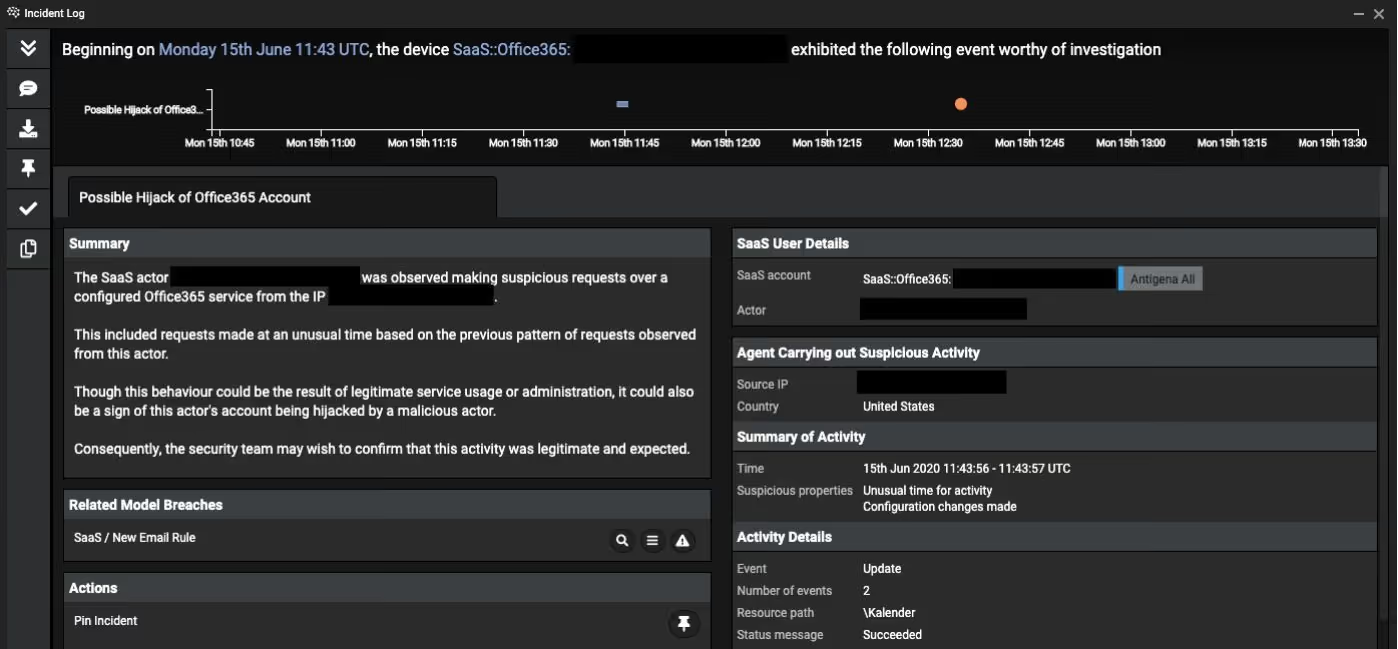
The technology firm had deployed Darktrace’s Enterprise Immune System across their network and SaaS applications, and consequently had real-time visibility across every event in this attack as it unfolded. Additionally, when the unusual login location was detected, Darktrace’s Cyber AI Analyst immediately launched an automated investigation into the malicious activity, generating a natural language summary of the events and other crucial information to help with incident review.
Figure 2: An excerpt of Cyber AI Analyst’s report of the account hijack
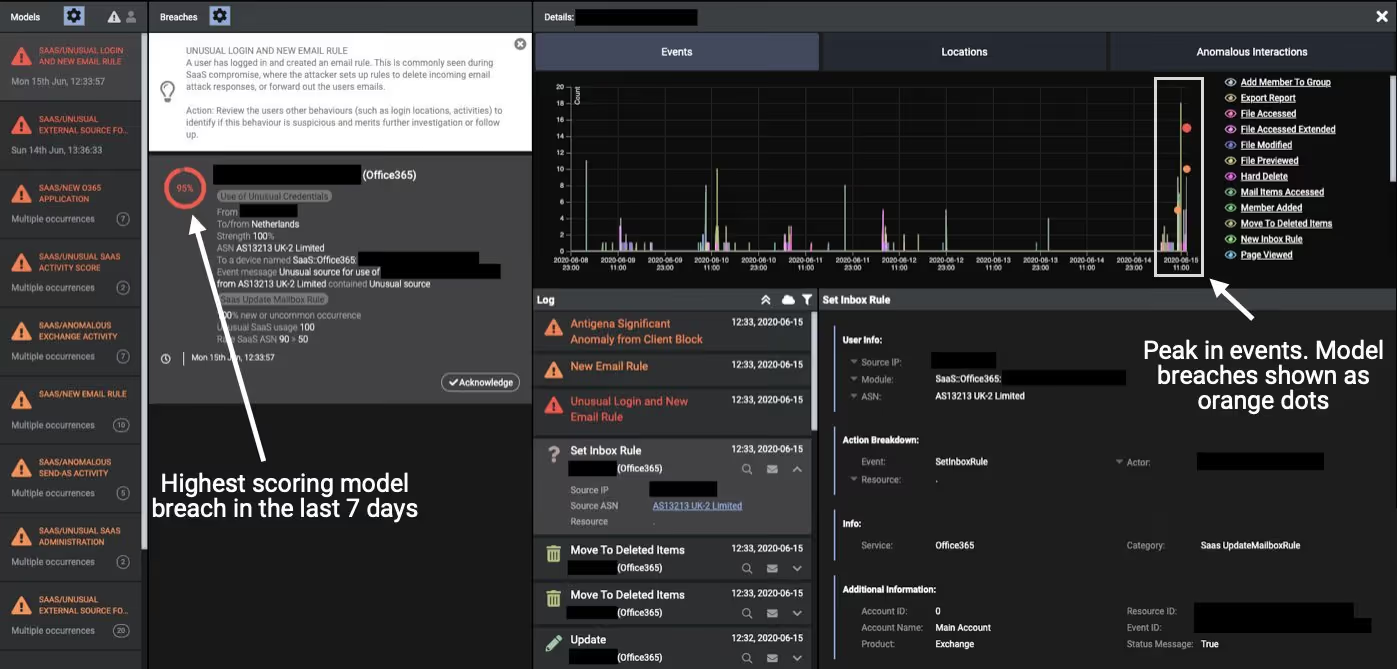
Darktrace’s SaaS Console also reported on the event in the context of activity on that device over the previous week.
Figure 3: Darktrace’s SaaS dashboard displaying an overview of the incident
This attack is another example of the changing nature of cyber-threats in the context of digital transformation. It is not devices, but identities that are increasingly being targeted and attacked.
Darktrace’s real-time alerting on the evolving situation could have enabled the security team to isolate the initial compromised account and change the credentials before the attack escalated further. The initial rare login destination caused Darktrace’s Cyber AI Analyst to launch an ongoing investigation into the compromised account, such that an alert was raised just three minutes after new processing rules were set up by the attacker. With eyes on the technology, a more serious breach could have been avoided, and the breach remeditated in minutes.
Thanks to Darktrace analyst Stefan Rowe for his insights on the above threat find.
For eight more case studies of cyber-threats detected within SaaS environments, read the White Paper.
IoCs:
IoCCommentcovingtonok[.]buzzUsed to host fake login page
Darktrace model detections:
SaaS / Unusual External Source for SaaS Credential Use
Darktrace cyber analysts are world-class experts in threat intelligence, threat hunting and incident response, and provide 24/7 SOC support to thousands of Darktrace customers around the globe. Inside the SOC is exclusively authored by these experts, providing analysis of cyber incidents and threat trends, based on real-world experience in the field.
From One Alert to a Wider Campaign: Uncovering Novel Threats Through Behavioral Analysis
Key Findings
Darktrace’s Threat Research team is exploring a new method to identify malicious campaigns by correlating similar anomalous activity across its customer fleet.
The method uses unsupervised clustering to identify shared behavioral patterns across multiple customer deployments without relying on prior indicators of compromise (IoCs).
The approach identified shared infrastructure across dozens of customers, with activity linked to the likely POPA botnet.
A second cluster identified anomalous activity associated with Monero cryptocurrency mining.
How does Darktrace conduct threat research?
The Darktrace Threat Research team aims to identify malicious campaign activity affecting multiple customers. By their nature, these campaigns will lead to shared behavioral patterns across multiple victims.
In this piece, we describe a method for identifying malicious campaign activity that uses this simple observation as a guiding principle. We begin by outlining a few key facts about the modern threat landscape and why behavioral detection is necessary to meet the challenges it presents. We then explore how fleet-wide behavioral detections can be leveraged using the principle above to systematically identify multi-deployment campaigns impacting the Darktrace customer fleet. Finally, we demonstrate that this research is not purely theoretical, using real examples of campaign activity detected through this novel approach.
Shifting to a behavioral-focused approach
The modern era of cyber-defense necessitates detection capabilities beyond traditional signature-based methods. Technologies such as antivirus signatures, hash-based malware identification, and IP blocklists have historically been successful in defending against known threats. However, they are easily circumvented by attackers and inherently limited in defending against the novel attack techniques that today's threat landscape is producing.
Recent breakthroughs in AI represent a transformational risk multiplier that cannot be ignored. AI systems do not merely execute existing attacks at machine speed; there are signs they can also synthesize novel tradecraft [1], increasing the likelihood that defenders will encounter attack patterns that have never previously been observed. Meanwhile vulnerability disclosures continue to accelerate. More than 48,000 CVEs were published in 2025, and published statistics to date indicate that 2026 is already on track to significantly exceed that figure [2]. While multiple factors may contribute to vulnerability discovery, AI is seen as a key factor in this rapid growth. Organizations should expect a growing proportion of malicious activity to fall outside the scope of detections that rely solely on prior knowledge of known threats.
By design, Darktrace’s behavioral and anomaly-focused detection capabilities are well-suited to this testing landscape. With a focus on detecting unknown and unexpected activity that deviates from the baseline of “normal” behavior, detection of CVE exploitation without prior knowledge of the vulnerability and before public disclosure, for example, is achievable [3][4].
Darktrace’s diverse customer base benefits from a further layer of protection: working with only deidentified alert metadata, our threat researchers hunt proactively across the fleet. Beyond the level of the individual customer, there is a second, larger vantage to be leveraged.
Darktrace data provides unique insight into the unexpected behavioral patterns that occur across its customer fleet. What can we see if we look at this fleet-wide telemetry and hunt for systematic behavioral campaigns that impact our customer base?
Correlating across the customer base
At the deployment level, Darktrace focuses on whether activity is unusual in the context of an organization's normal behavior, but as we zoom out and look at these alerts at the fleet level, the problem fundamentally changes . We are no longer seeking anomalies in largely normal data; we are seeking systematic patterns within data already known to be anomalous. An isolated behavior anomaly may be notable for a single customer; the same fingerprint across dozens is a signal of a structured campaign. Hunting for such campaigns and sharing our findings are key areas of focus for Darktrace’s Threat Research team. In this spirit, Darktrace is actively exploring a a new research approach that leverages deidentified alert metadata to increase campaign detection ability.
This approach is based on the premise that an expert human analyst presented with a set of alerts will identify likely related activity by assessing whether the metadata fields indicate a relationship. For example, two connections to a rare endpoint that exhibits naming structure that is likely from a single algorithm are a strong indicator, as is the use of an unusual port carrying a given protocol (e.g. port 6000 for SSL). Darktrace’s approach to campaign detection encodes this expert human judgement process through deterministic embedding functions that obtain reproducible vector representations of alert data. Unsupervised clustering is then applied to these vector representations to obtain groups of alerts that describe semantically similar alert data across multiple customers. These clusters therefore represent similar anomalous activity that has occurred across multiple customers. In other words, these clusters are candidates for malicious campaign activity.
Figure 1: Layers of AI-based analysis provided through Darktrace products and cross-customer correlation.
Case study 1 – unusual connections to shared underlying infrastructure
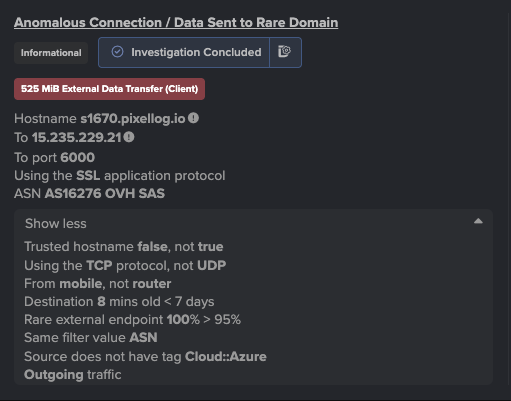
In one recent case, the clustering produced several tight groups of alerts spanning dozens of customers. Each group centered on a single domain whose subdomains were algorithmically generated (e.g. s01699, s1736, s91). Examined side by side, these clusters shared an unmistakable behavioral shape: each involved a domain with a clear naming pattern (e.g. s016841786.net-echo[.]com, s1670.pixellog[.]io, s217.pixellog[.]io) , with connections over SSL on the unusual port 6000 to servers hosted by non-mainstream providers (e.g. OVH, Hetzner, GTHost, Leaseweb), rather than generally expected content-delivery networks.
Figure 2: An example model alert triggering on unusual outbound connections and data transfer to s1670.pixellog[.]io.
Closer inspection revealed that the same subdomain label appeared under different domains (e.g. s1786.net-echo[.]com and s1786.pixellog[.]io). Following this lead, Darktrace’s threat researchers pivoted across the customer base and found numerous distinct subdomain labels reused under more than one registered domain. In several cases, the same label resolved to the same IP across different domains (e.g. s1704 under both pixellog[.]io and net-echo[.]com → 148.113.222[.]244; s01684 → 15.235.67[.]95), suggesting the use of ephemeral subdomain infrastructure in an attempt to avoid signature-based defense techniques.
This example demonstrates how multi-deployment data can uncover shared infrastructure that may be difficult to identify at the individual deployment level alone. In particular, the presented method facilitated this discovery by producing coherent, tight clusters of geometrically similar vector embeddings of malicious activity from large-scale fleet data, which could then be presented to a researcher for further investigation. This activity highlighted across the Darktrace customer base was ultimately linked to likely POPA botnet activity through use of open-source intelligence (OSINT) [5].
Case Study 2 – anomalous user agent and txt URI
A second example shows the method surfacing a single, self-contained cluster. The clustering was not given any indicators to look for; instead, it grouped devices that shared an unusual combination of features. On inspection, that shared consisted of:
- unusual user agent (tes)
- specific request path (/md5_GIP.txt)
- uncommon destination port (83)
- hostname impersonating Google (matching regular expression ^www\.google\.com\.[a-zA-Z0-9]+\.fast-dns-host\.com$)
Treating these shared features as IoCs, Darktrace’s threat researchers then pivoted to an exploration across the customer base to investigate the full breadth of the campaign. This search identified further commonalities; additional domains which shared the same IP as the domain family highlighted in the cluster, as well as evidence of cryptocurrency mining on affected devices. Additional OSINT research also aligned with these findings, linking the discovered payloads and infrastructure to Monero cryptocurrency mining [6].
Conclusion
The method outlined in this blog is under active development, with ongoing technical refinement providing opportunities to further enhance its capabilities. While the capability continues to mature, this approach to threat hunting leverages the powerful vantage point of fleetwide telemetry across a diverse customer base to help protect Darktrace customers. This method allows campaigns that at the deployment level appear as isolated alerts to be seen at their true scale and spread. It enables proactive fleet-wide analysis without prior IoCs to identify campaigns impacting Darktrace customers.
This is possible because of what the method is built on: the atomic unit is the Darktrace alert, a signal that encodes years of cyber expertise, while the multi-deployment nature of the method allows organizations to indirectly benefit from findings from other networks through shared intelligence by Darktrace’s Threat Research team.
Credit to Daniel Levy (Threat Hunting Data Scientist), Paul Jennings (Principal Cyber Analyst), Emma Foulger (Global Head, Threat Operations)
PHP Vulnerabilities, ARTEX and the Growing Role of AI in Cyber Attacks
The disclosure of CVE-2026-109618 and CVE-2026-109619 placed immediate pressure on organizations running PHP. Both vulnerabilities can allow unauthenticated remote code execution, including in products and appliances where PHP is embedded, and updates depend on third-party vendors [1].
Early guidance focused on patching internet-facing systems and monitoring for behavior associated with successful exploitation, including unexpected command execution, Webroot changes and outbound connections from PHP servers.
Darktrace observed widespread scanning across monitored environments involving hundreds of distinct source IP addresses that public reporting has associated with activity targeting the PHP vulnerabilities. The volume of scanning was significantly greater than the evidence available for successful exploitation. For analysts, that distinction is important. Scanning demonstrates interest in exposed infrastructure; establishing compromise requires evidence of subsequent behavior on the targeted system, including command execution, file modification or unexpected outbound communication.
PHP is not an isolated example. Imperva subsequently demonstrated remote code execution against a vulnerable Node.js build through malicious Brotli data, reproducing execution through compressed HTTP responses and configured request parsers. The same inputs were rejected by the patched runtime. Imperva linked its Node2Shell and PHP2Shell research to the increasing speed of vulnerability discovery and exploit development. [2]
While Darktrace has not observed direct evidence of CVE-2026-109618 or CVE-2026-109619 exploitation, on October 21st we observed a six-month high in detections consistent with zero-day exploitation activity, representing a 64% increase compared to historic data. This increase has not been confirmed as related to the PHP vulnerabilities. Darktrace’s behavioral approach is designed to detect anomalous activity without relying solely on rules written for a specific exploit. Comparable increases were observed around the Log4j disclosure and other globally significant vulnerability disclosures.
AI-assisted vulnerability research
The PHP disclosure arrives as AI systems have become more capable at vulnerability research [3]. OpenAI launched Daybreak in June 2026, combining GPT-5.5-Cyber, Codex Security and partnerships with security researchers and software maintainers. OpenAI says its models have been applied to discovering and generating patches for vulnerabilities in browsers, network infrastructure, FreeBSD and the Linux kernel. Darktrace joined the OpenAI Daybreak Cyber Partner Program in June to explore how OpenAI's cyber capabilities could be integrated within Darktrace products and services [4][10].
OpenAI reported in August that Codex Security Cloud had analyzed more than 30 million commits across more than 30,000 codebases. According to OpenAI, Cloudflare uses models accessed through Daybreak to investigate customer-authorized code and combines findings with live traffic and security signals to assess whether affected routes are active or receiving suspicious traffic, with proposed mitigations and patches remaining subject to customer review [5][6].
Faster discovery still leaves defenders with the work of locating affected software, testing fixes and completing remediation. The PHP case shows that gap clearly, particularly when vulnerable runtimes are embedded inside other products.
Enterprise agents as an attack surface
Darktrace Signal Labs has also examined how a trusted enterprise agent could be abused after an attacker has already obtained access to an environment. In a controlled simulation, researchers demonstrated that, in that post-compromise scenario, the Claude platform’s memory stores feature could be abused to establish a live C2 channel between an external operator and internal Claude Code agents. The external operator was able to dynamically assign network discovery, credential access, and data exfiltration tasks to the agents via this C2 channel. Detection of the agents’ activities relied on the correlation of process creation and network traffic activity from agent harness processes, alongside behavioral analysis to identify deviations from expected behavior. Darktrace has not claimed it observed this memory-store command-and-control technique in operational attacks [7].
AI-assisted attacks in Japan
Evidence from Japan indicates AI being used for vulnerability scanning and attacks outside controlled research. On 21 October, JPCERT/CC published findings from an investigation into recent unauthorized access incidents affecting organizations in Japan. JPCERT/CC states that it confirmed attackers had used AI to scan for known vulnerabilities and conduct attacks through APIs. According to JPCERT/CC, its examination of attack infrastructure found evidence of Android application analysis, API discovery and testing for weaknesses including server-side request forgery, and the infrastructure also targeted services intended for users outside Japan [8].
JPCERT/CC does not identify ARTEX by name in that publication. The named ARTEX attribution comes from separate investigations, including Microsoft's analysis of Storm-0940.
AI in offensive operations
Microsoft describes ARTEX as an open-source, multi-agent penetration-testing system capable of automating activity with limited human interaction. Microsoft reported that Storm-0940, which it assesses to be a China state-aligned actor active since 2021, used ARTEX against hundreds of organizations, and Microsoft attributed the ConnectWise supply-chain compromise [9].
Microsoft observed ARTEX accelerating scanning, reconnaissance, password spraying and OAuth application abuse. Several ARTEX-driven operations reached privileged cloud access less than three hours after initial targeting. Following the ConnectWise compromise, Storm-0940 attempted to authenticate to more than 2,250 tenants at rates of up to 2,900 attempts per minute [9].
Darktrace Threat Research found activity in its own telemetry involving infrastructure later associated with the campaign. On 13 October, Darktrace recorded failed authentication activity involving 144.172.64[.]128, one of the addresses Microsoft later identified as performing sign-ins and Microsoft Graph activity in ConnectWise customer environments. Darktrace analysis identified 65 failed authentication attempts in around 20 minutes.
Figure 1: Darktrace Advanced Search showing failed authentication events involving 144.172.64[.]128 on 13 October 2026, (customer-identifying information redacted).
The telemetry establishes repeated failed authentication from infrastructure later associated with the campaign. It does not establish ARTEX execution or successful compromise. At the time of observation, Microsoft's later attribution was unavailable. Analysts therefore had the behavior itself: repeated failed authentication from the same source over a short period, together with any related identity, application or network activity inside the environment.
Microsoft documented a wider password-spray campaign against 327 accounts across eight organizations between 10 and 14 October. It recorded more than 151,000 failed logons, including more than 111,000 on 11 October, but no successful authentication, token issuance, Graph call or directory change from that campaign. Microsoft also reported that most Storm-0940 targeting was unsuccessful [9].
Where the actor progressed beyond authentication, Microsoft observed service-principal sign-ins followed by Graph and directory operations. Activity included reconnaissance, application credential changes and attempts to modify privileges. Microsoft recommends correlating service-principal sign-ins with Graph activity, directory changes and resource access [9].
Behavior before attribution
The PHP and ARTEX cases begin with different information. PHP defenders knew which software required urgent remediation but initially had limited information about exploitation. Process execution, file modification and outbound communication could still provide evidence of compromise.
The PHP and ARTEX observations also illustrate the difference between volume and impact. Darktrace observed broad scanning around the PHP disclosure, while the ARTEX-associated infrastructure produced concentrated authentication activity. Neither observation independently demonstrates compromise and in each case examining the behavior that follows the initial interaction is the investigative clue.
The Darktrace ARTEX-related observation began with authentication behavior. Microsoft publicly attributed the source infrastructure eight days later. That attribution added context, but it did not change what had originally been recorded in the environment.
AI is now present at several points in this cycle. Daybreak applies models to vulnerability discovery and remediation. Darktrace Signal Labs demonstrated how a trusted enterprise agent could be co-opted in a controlled environment. JPCERT/CC confirmed AI-assisted vulnerability scanning and API attacks in recent incidents. Microsoft documented ARTEX being used by Storm-0940 in active operations [4][7][8][9].
Microsoft's findings also show why scale and impact must be assessed separately. One ARTEX-associated campaign produced more than 151,000 failed logons without successful access, while other operations reached privileged cloud access in less than three hours. Security teams have to distinguish high-volume attempts from activity that progresses through authentication, privilege changes and resource access.
The evidence required to assess these cases remains familiar: authentication records, process execution, application and directory changes, file activity and network communication. AI can increase the rate at which those behaviors occur. Defenders still need to establish their sequence and impact.
Credit to Emma Foulger, Sam Lister, Dylan Evans, Moishe Tajtelbaum
[3] Cyber Security Agency of Singapore, https://www.csa.gov.sg/alerts-and-advisories/alerts/al-2026-151/
[4] OpenAI, Daybreak: Tools for securing every organization in the world, 22 June 2026. https://openai.com/index/daybreak-securing-the-world/
[5] OpenAI Developers, Scaling cyber defenders with Daybreak, 21 August 2026. https://developers.openai.com/blog/scaling-cyber-defenders-with-daybreak
[6] OpenAI, Cloudflare links vulnerability discovery to defense with OpenAI, 21 October 2026. https://openai.com/index/cloudflare-cyber/
[7] Darktrace Signal Labs, Shared Memories as a Covert C2 Channel, draft research supplied for review.
[8] JPCERT/CC, Recent AI-Assisted Cyber Attacks in Japan: Investigating Attack Infrastructure and Techniques, 21 October 2026. https://blogs.jpcert.or.jp/en/2026/10/web_api_attacks.html
[9] Microsoft Security Research and Microsoft Threat Intelligence, AI-driven, large-scale nation-state campaign using ARTEX enables supply chain compromise, 21 October 2026. https://www.microsoft.com/en-us/security/blog/2026/10/21/storm-0940-uses-artex-agentic-ai-connectwise-supply-chain-compromise/
[10] Darktrace, Advancing the Use of Frontier AI in Cybersecurity: Darktrace Joins the OpenAI Daybreak Cyber Partner Program to Explore Defensive AI Integrations, 22 June 2026. https://www.darktrace.com/blog/advancing-the-use-of-frontier-ai-in-cybersecurity-darktrace-joins-the-openai-daybreak-cyber-partner-program-to-explore-defensive-ai-integrations