

Blog
/
Network
/
February 23, 2024

Quasar Remote Access Tool and Its Security Risks

Discover how the Quasar remote access tool can become a vulnerability in the wrong hands and strategies to mitigate these risks.
Inside the SOC
Darktrace cyber analysts are world-class experts in threat intelligence, threat hunting and incident response, and provide 24/7 SOC support to thousands of Darktrace customers around the globe. Inside the SOC is exclusively authored by these experts, providing analysis of cyber incidents and threat trends, based on real-world experience in the field.
Written by
Nicole Wong
Cyber Security Analyst
Default blog imageDefault blog imageDefault blog imageDefault blog imageDefault blog imageDefault blog image
23
Feb 2024

The threat of interoperability

As the “as-a-Service” market continues to grow, indicators of compromise (IoCs) and malicious infrastructure are often interchanged and shared between multiple malware strains and attackers. This presents organizations and their security teams with a new threat: interoperability.

Interoperable threats not only enable malicious actors to achieve their objectives more easily by leveraging existing infrastructure and tools to launch new attacks, but the lack of clear attribution often complicates identification for security teams and incident responders, making it challenging to mitigate and contain the threat.

One such threat observed across the Darktrace customer base in late 2023 was Quasar, a legitimate remote administration tool that has becoming increasingly popular for opportunistic attackers in recent years. Working in tandem, the anomaly-based detection of Darktrace DETECT™ and the autonomous response capabilities of Darktrace RESPOND™ ensured that affected customers were promptly made aware of any suspicious activity on the attacks were contained at the earliest possible stage.

What is Quasar?

Quasar is an open-source remote administration tool designed for legitimate use; however, it has evolved to become a popular tool used by threat actors due to its wide array of capabilities.  

How does Quasar work?

For instance, Quasar can perform keylogging, take screenshots, establish a reverse proxy, and download and upload files on a target device [1].  A report released towards the end of 2023 put Quasar back on threat researchers’ radars as it disclosed the new observation of dynamic-link library (DLL) sideloading being used by malicious versions of this tool to evade detection [1].  DLL sideloading involves configuring legitimate Windows software to run a malicious file rather than the legitimate file it usually calls on as the software loads.  The evolving techniques employed by threat actors using Quasar highlights defenders’ need for anomaly-based detections that do not rely on pre-existing knowledge of attacker techniques, and can identify and alert for unusual behavior, even if it is performed by a legitimate application.

Although Quasar has been used by advanced persistent threat (APT) groups for global espionage operations [2], Darktrace observed the common usage of default configurations for Quasar, which appeared to use shared malicious infrastructure, and occurred alongside other non-compliant activity such as BitTorrent use and cryptocurrency mining.  

Quasar Attack Overview and Darktrace Coverage

Between September and October 2023, Darktrace detected multiple cases of malicious Quasar activity across several customers, suggesting probable campaign activity.  

Quasar infections can be difficult to detect using traditional network or host-based tools due to the use of stealthy techniques such as DLL side-loading and encrypted SSL connections for command-and control (C2) communication, that traditional security tools may not be able to identify.  The wide array of capabilities Quasar possesses also suggests that attacks using this tool may not necessarily be modelled against a linear kill chain. Despite this, the anomaly-based detection of Darktrace DETECT allowed it to identify IoCs related to Quasar at multiple stages of the kill chain.

Quasar Initial Infection

During the initial infection stage of a Quasar compromise observed on the network of one customer, Darktrace detected a device downloading several suspicious DLL and executable (.exe) files from multiple rare external sources using the Xmlst user agent, including the executable ‘Eppzjtedzmk[.]exe’.  Analyzing this file using open-source intelligence (OSINT) suggests this is a Quasar payload, potentially indicating this represented the initial infection through DLL sideloading [3].

Interestingly, the Xmlst user agent used to download the Quasar payload has also been associated with Raccoon Stealer, an information-stealing malware that also acts as a dropper for other malware strains [4][5]. The co-occurrence of different malware components is increasingly common across the threat landscape as MaaS operating models increases in popularity, allowing attackers to employ cross-functional components from different strains.

Figure 1: Cyber AI Analyst Incident summarizing the multiple different downloads in one related incident, with technical details for the Quasar payload included. The incident event for Suspicious File Download is also linked to Possible HTTP Command and Control, suggesting escalation of activity following the initial infection.  

Quasar Establishing C2 Communication

During this phase, devices on multiple customer networks were identified making unusual external connections to the IP 193.142.146[.]212, which was not commonly seen in their networks. Darktrace analyzed the meta-properties of these SSL connections without needing to decrypt the content, to alert the usage of an unusual port not typically associated with the SSL protocol, 4782, and the usage of self-signed certificates.  Self-signed certificates do not provide any trust value and are commonly used in malware communications and ill-reputed web servers.  

Further analysis into these alerts using OSINT indicated that 193.142.146[.]212 is a Quasar C2 server and 4782 is the default port used by Quasar [6][7].  Expanding on the self-signed certificate within the Darktrace UI (see Figure 3) reveals a certificate subject and issuer of “CN=Quasar Server CA”, which is also the default self-signed certificate compiled by Quasar [6].

Figure 2: Cyber AI Analyst Incident summarizing the repeated external connections to a rare external IP that was later associated with Quasar.
Figure 3: Device Event Log of the affected device, showing Darktrace’s analysis of the SSL Certificate associated with SSL connections to 193.142.146[.]212.

A number of insights can be drawn from analysis of the Quasar C2 endpoints detected by Darktrace across multiple affected networks, suggesting a level of interoperability in the tooling used by different threat actors. In one instance, Darktrace detected a device beaconing to the endpoint ‘bittorrents[.]duckdns[.]org’ using the aforementioned “CN=Quasar Server CA” certificate. DuckDNS is a dynamic DNS service that could be abused by attackers to redirect users from their intended endpoint to malicious infrastructure, and may be shared or reused in multiple different attacks.

Figure 4: A device’s Model Event Log, showing the Quasar Server CA SSL certificate used in connections to 41.233.139[.]145 on port 5, which resolves via passive replication to ‘bittorrents[.]duckdns[.]org’.  

The sharing of malicious infrastructure among threat actors is also evident as several OSINT sources have also associated the Quasar IP 193.142.146[.]212, detected in this campaign, with different threat types.

While 193.142.146[.]212:4782 is known to be associated with Quasar, 193.142.146[.]212:8808 and 193.142.146[.]212:6606 have been associated with AsyncRAT [11], and the same IP on port 8848 has been associated with RedLineStealer [12].  Aside from the relative ease of using already developed tooling, threat actors may prefer to use open-source malware in order to avoid attribution, making the true identity of the threat actor unclear to incident responders [1][13].  

Quasar Executing Objectives

On multiple customer deployments affected by Quasar, Darktrace detected devices using BitTorrent and performing cryptocurrency mining. While these non-compliant, and potentially malicious, activities are not necessarily specific IoCs for Quasar, they do suggest that affected devices may have had greater attack surfaces than others.

For instance, one affected device was observed initiating connections to 162.19.139[.]184, a known Minergate cryptomining endpoint, and ‘zayprostofyrim[.]zapto[.]org’, a dynamic DNS endpoint linked to the Quasar Botnet by multiple OSINT vendors [9].

Figure 5: A Darktrace DETECT Event Log showing simultaneous connections to a Quasar endpoint and a cryptomining endpoint 162.19.139[.]184.

Not only does cryptocurrency mining use a significant amount of processing power, potentially disrupting an organization’s business operations and racking up high energy bills, but the software used for this mining is often written to a poor standard, thus increasing the attack surfaces of devices using them. In this instance, Quasar may have been introduced as a secondary payload from a user or attacker-initiated download of cryptocurrency mining malware.

Similarly, it is not uncommon for malicious actors to attach malware to torrented files and there were a number of examples of Darktrace detect identifying non-compliant activity, like BitTorrent connections, overlapping with connections to external locations associated with Quasar. It is therefore important for organizations to establish and enforce technical and policy controls for acceptable use on corporate devices, particularly when remote working introduces new risks.  

Figure 6: A device’s Event Log filtered by Model Breaches, showing a device connecting to BitTorrent shortly before making new or repeated connections to unusual endpoints, which were subsequently associated to Quasar.

In some cases observed by Darktrace, devices affected by Quasar were also being used to perform data exfiltration. Analysis of a period of unusual external connections to the aforementioned Quasar C2 botnet server, ‘zayprostofyrim[.]zapto[.]org’, revealed a small data upload, which may have represented the exfiltration of some data to attacker infrastructure.

Darktrace’s Autonomous Response to Quasar Attacks

On customer networks that had Darktrace RESPOND™ enabled in autonomous response mode, the threat of Quasar was mitigated and contained as soon as it was identified by DETECT. If RESPOND is not configured to respond autonomously, these actions would instead be advisory, pending manual application by the customer’s security team.

For example, following the detection of devices downloading malicious DLL and executable files, Darktrace RESPOND advised the customer to block specific connections to the relevant IP addresses and ports. However, as the device was seen attempting to download further files from other locations, RESPOND also suggested enforced a ‘pattern of life’ on the device, meaning it was only permitted to make connections that were part its normal behavior. By imposing a pattern of life, Darktrace RESPOND ensures that a device cannot perform suspicious behavior, while not disrupting any legitimate business activity.

Had RESPOND been configured to act autonomously, these mitigative actions would have been applied without any input from the customer’s security team and the Quasar compromise would have been contained in the first instance.
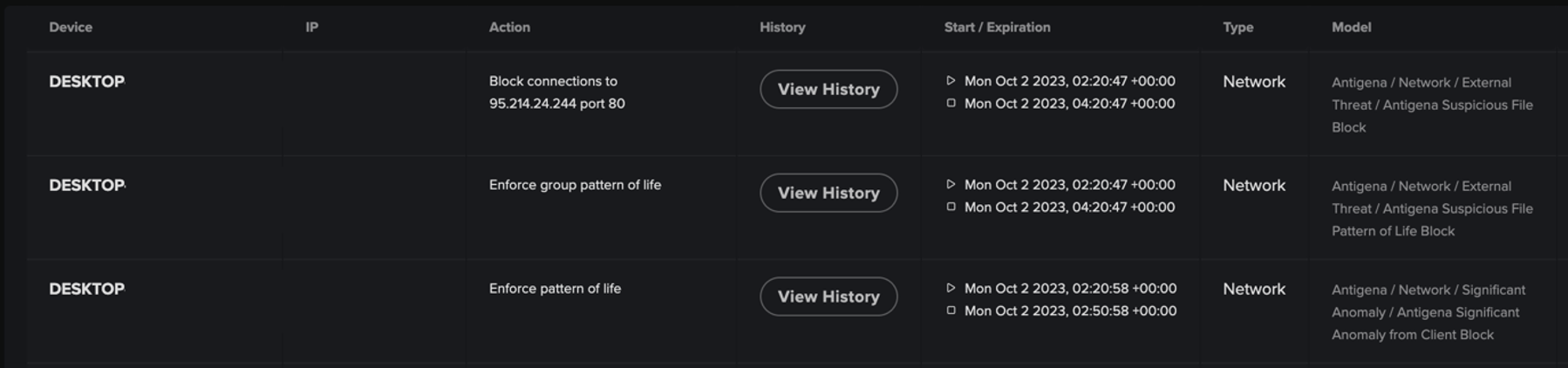
Figure 7: The advisory actions Darktrace RESPOND initiated to block specific connections to a malicious IP and to enforce the device’s normal patterns of life in response to the different anomalies detected on the device.

In another case, one customer affected by Quasar did have enabled RESPOND to take autonomous action, whilst also integrating it with a firewall. Here, following the detection of a device connecting to a known Quasar IP address, RESPOND initially blocked it from making connections to the IP via the customer’s firewall. However, as the device continued to perform suspicious activity after this, RESPOND escalated its response by blocking all outgoing connections from the device, effectively preventing any C2 activity or downloads.
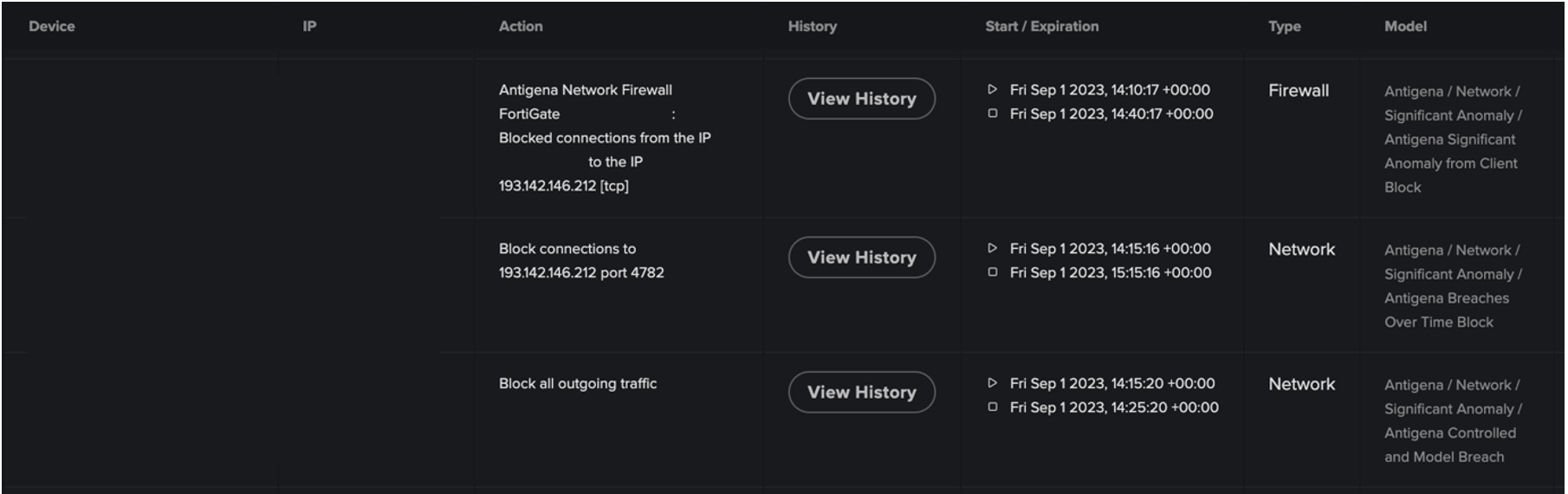
Figure 8: RESPOND actions triggered to action via integrated firewall and TCP Resets.

Conclusion

When faced with a threat like Quasar that utilizes the infrastructure and tools of both legitimate services and other malicious malware variants, it is essential for security teams to move beyond relying on existing knowledge of attack techniques when safeguarding their network. It is no longer enough for organizations to rely on past attacks to defend against the attacks of tomorrow.

Crucially, Darktrace’s unique approach to threat detection focusses on the anomaly, rather than relying on a static list of IoCs or "known bads” based on outdated threat intelligence. In the case of Quasar, alternative or future strains of the malware that utilize different IoCs and TTPs would still be identified by Darktrace as anomalous and immediately alerted.

By learning the ‘normal’ for devices on a customer’s network, Darktrace DETECT can recognize the subtle deviations in a device’s behavior that could indicate an ongoing compromise. Darktrace RESPOND is subsequently able to follow this up with swift and targeted actions to contain the attack and prevent it from escalating further.

Credit to Nicole Wong, Cyber Analyst, Vivek Rajan Cyber Analyst

Appendices

Darktrace DETECT Model Breaches

  • Anomalous Connection / Multiple Failed Connections to Rare Endpoint
  • Anomalous Connection / Anomalous SSL without SNI to New External
  • Anomalous Connection / Application Protocol on Uncommon Port
  • Anomalous Connection / Rare External SSL Self-Signed
  • Compromise / New or Repeated to Unusual SSL Port
  • Compromise / Beaconing Activity To External Rare
  • Compromise / High Volume of Connections with Beacon Score
  • Compromise / Large Number of Suspicious Failed Connections
  • Unusual Activity / Unusual External Activity

List of IoCs

IP:Port

193.142.146[.]212:4782 -Quasar C2 IP and default port

77.34.128[.]25: 8080 - Quasar C2 IP

Domain

zayprostofyrim[.]zapto[.]org - Quasar C2 Botnet Endpoint

bittorrents[.]duckdns[.]org - Possible Quasar C2 endpoint

Certificate

CN=Quasar Server CA - Default certificate used by Quasar

Executable

Eppzjtedzmk[.]exe - Quasar executable

IP Address

95.214.24[.]244 - Quasar C2 IP

162.19.139[.]184 - Cryptocurrency Miner IP

41.233.139[.]145[VR1] [NW2] - Possible Quasar C2 IP

MITRE ATT&CK Mapping

Command and Control

T1090.002: External Proxy

T1071.001: Web Protocols

T1571: Non-Standard Port

T1001: Data Obfuscation

T1573: Encrypted Channel

T1071: Application Layer Protocol

Resource Development

T1584: Compromise Infrastructure

References

[1] https://thehackernews.com/2023/10/quasar-rat-leverages-dll-side-loading.html

[2] https://symantec-enterprise-blogs.security.com/blogs/threat-intelligence/cicada-apt10-japan-espionage

[3]https://www.virustotal.com/gui/file/bd275a1f97d1691e394d81dd402c11aaa88cc8e723df7a6aaf57791fa6a6cdfa/community

[4] https://twitter.com/g0njxa/status/1691826188581298389

[5] https://www.linkedin.com/posts/grjk83_raccoon-stealer-announce-return-after-hiatus-activity-7097906612580802560-1aj9

[6] https://community.netwitness.com/t5/netwitness-community-blog/using-rsa-netwitness-to-detect-quasarrat/ba-p/518952

[7] https://www.cisa.gov/news-events/analysis-reports/ar18-352a

[8]https://any.run/report/6cf1314c130a41c977aafce4585a144762d3fb65f8fe493e836796b989b002cb/7ac94b56-7551-4434-8e4f-c928c57327ff

[9] https://threatfox.abuse.ch/ioc/891454/

[10] https://www.virustotal.com/gui/ip-address/41.233.139.145/relations

[11] https://raw.githubusercontent.com/stamparm/maltrail/master/trails/static/malware/asyncrat.txt

[12] https://sslbl.abuse.ch/ssl-certificates/signature/RedLineStealer/

[13] https://www.botconf.eu/botconf-presentation-or-article/hunting-the-quasar-family-how-to-hunt-a-malware-family/

Inside the SOC
Darktrace cyber analysts are world-class experts in threat intelligence, threat hunting and incident response, and provide 24/7 SOC support to thousands of Darktrace customers around the globe. Inside the SOC is exclusively authored by these experts, providing analysis of cyber incidents and threat trends, based on real-world experience in the field.
Written by
Nicole Wong
Cyber Security Analyst

More in this series

No items found.

Blog

/

Network

/

March 26, 2026

Phantom Footprints: Tracking GhostSocks Malware

Default blog imageDefault blog image

Why are attackers using residential proxies?

In today's threat landscape, blending in to normal activity is the key to success for attackers and the growing reliance on residential proxies shows a significant shift in how threat actors are attempting to bypass IP detection tools.

The increasing dependency on residential proxies has exposed how prevalent proxy services are and how reliant a diverse range of threat actors are on them. From cybercriminal groups to state‑sponsored actors, the need to bypass IP detection tools is fundamental to the success of these groups. One malware that has quietly become notorious for its ability to avoid anomaly detection is GhostSocks, a malware that turns compromised devices into residential proxies.

What is GhostSocks?

Originally marketed on the Russian underground forum xss[.]is as a Malware‑as‑a‑Service (MaaS), GhostSocks enables threat actors to turn compromised devices into residential proxies, leveraging the victim's internet bandwidth to route malicious traffic through it.

How does Ghostsocks malware work? 

The malware offers the threat actor a “clean” IP address, making it look like it is coming from a household user. This enables the bypassing of geographic restrictions and IP detection tools, a perfect tool for avoiding anomaly detection. It wasn’t until 2024, when a partnership was announced with the infamous information stealer Lumma Stealer, that GhostSocks surged into widespread adoption and alluded to who may be the author of the proxy malware.

Written in GoLang, GhostSocks utilizes the SOCKS5 proxy protocol, creating a SOCKS5 connection on infected devices. It uses a relay‑based C2 implementation, where an intermediary server sits in between the real command-and-control (C2) server and the infected device.

How does Ghostsocks malware evade detection?

To further increase evasion, the Ghostsocks malware wraps its SOCKS5 tunnels in TLS encryption, allowing its malicious traffic to blend into normal network traffic.

Early variants of GhostSocks do not implement a persistence mechanism; however, later versions achieve persistence via registry run keys, ensuring sustained proxy operational time [1].

While proxying is its primary purpose, GhostSocks also incorporates backdoor functionality, enabling malicious actors to run arbitrary commands and download and deploy additional malicious payloads. This was evident with the well‑known ransomware group Black Basta, which reportedly used GhostSocks as a way of maintaining long‑term access to victims’ networks [1].

Darktrace’s detection of GhostSocks Malware

Darktrace observed a steady increase in GhostSocks activity across its customer base from late 2025, with its Threat Research team identifying multiple incidents involving the malware. In one notable case from December 2025, Darktrace detected GhostSocks operating alongside Lumma Stealer, reinforcing that the partnership between Lumma and GhostSocks remains active despite recent attempts to disrupt Lumma’s infrastructure.

Darktrace’s first detection of GhostSocks‑related activity came when a device on the network of a customer in the education sector began making connections to an endpoint with a suspicious self‑signed certificate that had never been seen on the network before.

The endpoint in question, 159.89.46[.]92 with the hostname retreaw[.]click, has been flagged by multiple open‑source intelligence (OSINT) sources as being associated with Lumma Stealer’s C2 infrastructure [2], indicating its likely role in the delivery of malicious payloads.

Darktrace’s detection of suspicious SSL connections to retreaw[.]click, indicating an attempted link to Lumma C2 infrastructure.
Figure 1: Darktrace’s detection of suspicious SSL connections to retreaw[.]click, indicating an attempted link to Lumma C2 infrastructure.

Less than two minutes later, Darktrace observed the same device downloading the executable (.exe) file “Renewable.exe” from the IP 86.54.24[.]29, which Darktrace recognized as 100% rare for this network.

Darktrace’s detection of a device downloading the unusual executable file “Renewable.exe”.
Figure 2: Darktrace’s detection of a device downloading the unusual executable file “Renewable.exe”.

Both the file MD5 hash and the executable itself have been identified by multiple OSINT vendors as being associated with the GhostSocks malware [3], with the executable likely the backdoor component of the GhostSocks malware, facilitating the distribution of additional malicious payloads [4].

Following this detection, Darktrace’s Autonomous Response capability recommended a blocking action for the device in an early attempt to stop the malicious file download. In this instance, Darktrace was configured in Human Confirmation Mode, meaning the customer’s security team was required to manually apply any mitigative response actions. Had Autonomous Response been fully enabled at the time of the attack, the connections to 86.54.24[.]29 would have been blocked, rendering the malware ineffective at reaching its C2 infrastructure and halting any further malicious communication.

 Darktrace’s Autonomous Response capability suggesting blocking the suspicious connections to the unusual endpoint from which the malicious executable was downloaded.
Figure 3: Darktrace’s Autonomous Response capability suggesting blocking the suspicious connections to the unusual endpoint from which the malicious executable was downloaded.

As the attack was able to progress, two days later the device was detected downloading additional payloads from the endpoint www.lbfs[.]site (23.106.58[.]48), including “Setup.exe”, “,.exe”, and “/vp6c63yoz.exe”.

Darktrace’s detection of a malicious payload being downloaded from the endpoint www.lbfs[.]site.
Figure 4: Darktrace’s detection of a malicious payload being downloaded from the endpoint www.lbfs[.]site.

Once again, Darktrace recognized the anomalous nature of these downloads and suggested that a “group pattern of life” be enforced on the offending device in an attempt to contain the activity. By enforcing a pattern of life on a device, Darktrace restricts its activity to connections and behaviors similar to those performed by peer devices within the same group, while still allowing it to carry out its expected activity, effectively preventing deviations indicative of compromise while minimizing disruption. As mentioned earlier, these mitigative actions required manual implementation, so the activity was able to continue. Darktrace proceeded to suggest further actions to contain subsequent malicious downloads, including an attempt to block all outbound traffic to stop the attack from progressing.

An overview of download activity and the Autonomous Response actions recommended by Darktrace to block the downloads.
Figure 5: An overview of download activity and the Autonomous Response actions recommended by Darktrace to block the downloads.

Around the same time, a third executable download was detected, this time from the hostname hxxp[://]d2ihv8ymzp14lr.cloudfront.net/2021-08-19/udppump[.]exe, along with the file “udppump.exe”.While GhostSocks may have been present only to facilitate the delivery of additional payloads, there is no indication that these CloudFront endpoints or files are functionally linked to GhostSocks. Rather, the evidence points to broader malicious file‑download activity.

Shortly after the multiple executable files had been downloaded, Darktrace observed the device initiating a series of repeated successful connections to several rare external endpoints, behavior consistent with early-stage C2 beaconing activity.

Cyber AI Analyst’s investigation

Darktrace’s detection of additional malicious file downloads from malicious CloudFront endpoints.
Figure 7: Darktrace’s detection of additional malicious file downloads from malicious CloudFront endpoints.

Throughout the course of this attack, Darktrace’s Cyber AI Analyst carried out its own autonomous investigation, piecing together seemingly separate events into one wider incident encompassing the first suspicious downloads beginning on December 4, the unusual connectivity to many suspicious IPs that followed, and the successful beaconing activity observed two days later. By analyzing these events in real-time and viewing them as part of the bigger picture, Cyber AI Analyst was able to construct an in‑depth breakdown of the attack to aid the customer’s investigation and remediation efforts.

Cyber AI Analyst investigation detailing the sequence of events on the compromised device, highlighting its extensive connectivity to rare endpoints, the related malicious file‑download activity, and finally the emergence of C2 beaconing behavior.
Figure 8: Cyber AI Analyst investigation detailing the sequence of events on the compromised device, highlighting its extensive connectivity to rare endpoints, the related malicious file‑download activity, and finally the emergence of C2 beaconing behavior.

Conclusion

The versatility offered by GhostSocks is far from new, but its ability to convert compromised devices into residential proxy nodes, while enabling long‑term, covert network access—illustrates how threat actors continue to maximise the value of their victims’ infrastructure. Its growing popularity, coupled with its ongoing partnership with Lumma, demonstrates that infrastructure takedowns alone are insufficient; as long as threat actors remain committed to maintaining anonymity and can rapidly rebuild their ecosystems, related malware activity is likely to persist in some form.

Credit to Isabel Evans (Cyber Analyst), Gernice Lee (Associate Principal Analyst & Regional Consultancy Lead – APJ)
Edited by Ryan Traill (Content Manager)

Appendices

References

1.    https://bloo.io/research/malware/ghostsocks

2.    https://www.virustotal.com/gui/domain/retreaw.click/community

3.    https://synthient.com/blog/ghostsocks-from-initial-access-to-residential-proxy

4.    https://www.joesandbox.com/analysis/1810568/0/html

5. https://www.virustotal.com/gui/url/fab6525bf6e77249b74736cb74501a9491109dc7950688b3ae898354eb920413

Darktrace Model Detections

Real-time Detection Models

Anomalous Connection / Suspicious Self-Signed SSL

Anomalous Connection / Rare External SSL Self-Signed

Anomalous File / EXE from Rare External Location

Anomalous File / Multiple EXE from Rare External Locations

Compromise / Possible Fast Flux C2 Activity

Compromise / Large Number of Suspicious Successful Connections

Compromise / Large Number of Suspicious Failed Connections

Compromise / Sustained SSL or HTTP Increase

Autonomous Response Models

Antigena / Network / Significant Anomaly / Antigena Significant Anomaly from Client Block

Antigena / Network / External Threat / Antigena Suspicious File Block

Antigena / Network / Significant Anomaly / Antigena Controlled and Model Alert

Antigena / Network / External Threat / Antigena File then New Outbound Block

Antigena / Network / Significant Anomaly / Antigena Alerts Over Time Block

Antigena / Network / External Threat / Antigena Suspicious Activity Block

MITRE ATT&CK Mapping

Tactic – Technique – Sub-Technique

Resource Development – T1588 - Malware

Initial Access - T1189 - Drive-by Compromise

Persistence – T1112 – Modify Registry

Command and Control – T1071 – Application Layer Protocol

Command and Control – T1095 – Non-application Layer Protocol

Command and Control – T1071 – Web Protocols

Command and Control – T1571 – Non-Standard Port

Command and Control – T1102 – One-Way Communication

List of Indicators of Compromise (IoCs)

86.54.24[.]29 - IP - Likely GhostSocks C2

http[://]86.54.24[.]29/Renewable[.]exe - Hostname - GhostSocks Distribution Endpoint

http[://]d2ihv8ymzp14lr.cloudfront[.]net/2021-08-19/udppump[.]exe - CDN - Payload Distribution Endpoint

www.lbfs[.]site - Hostname - Likely C2 Endpoint

retreaw[.]click - Hostname - Lumma C2 Endpoint

alltipi[.]com - Hostname - Possible C2 Endpoint

w2.bruggebogeyed[.]site - Hostname - Possible C2 Endpoint

9b90c62299d4bed2e0752e2e1fc777ac50308534 - SHA1 file hash – Likely GhostSocks payload

3d9d7a7905e46a3e39a45405cb010c1baa735f9e - SHA1 file hash - Likely follow-up payload

10f928e00a1ed0181992a1e4771673566a02f4e3 - SHA1 file hash - Likely follow-up payload

Continue reading
About the author
Gernice Lee
Associate Principal Analyst & Regional Consultancy Lead

Blog

/

AI

/

March 27, 2026

State of AI Cybersecurity 2026: 92% of security professionals concerned about the impact of AI agents

Default blog imageDefault blog image

The findings in this blog are taken from Darktrace's annual State of AI Cybersecurity Report 2026.

AI is already embedded in day-to-day enterprise activity, with 78% of participants in one recent survey reporting that their organizations are using generative AI in at least one business function. Generative AI now acts as an always-on assistant, researcher, creator, and coach across an expanding array of departments and functions. Autonomous agents are performing multi-step operational workflows from end to end. AI features have been layered on top of every SaaS application. And vibe coding is making it possible for employees without deep technical expertise to build their own AI-powered automations.

According to Gartner, more than 80% of enterprises will have deployed GenAI models, applications, or APIs in production environments by the end of this year, up from less than 5% in 2023. Companies report a 130% increase in spending on AI over the same period, with 72% of business leaders using AI tools at least weekly. The outsized efficiency and productivity gains that were once a future vision are quickly becoming everyday reality.

AI is currently driving business growth and innovation, and organizations risk falling behind peers if they don’t keep up with the pace of adoption, but it is also quietly expanding the enterprise attack surface. The modern CISO is challenged to both enable innovation and protect the business from these emerging threats.

AI agents introduce new risks and vulnerabilities

AI agents are playing growing roles in enterprise production environments. In many cases, these agents act with broad permissions across multiple software systems and platforms. This means they’re granted far-reaching access – to sensitive data, business-critical applications, tokens and APIs, and IT and security tools. With this access comes risk for security leaders – 92% are concerned about the use of AI agents across the workforce and their impact on security.

These agents must be governed as identities, with least-privilege access and ongoing monitoring. They can’t be thought of as invisible aspects of the application estate. Understanding how AI agents behave, and how to manage their permissions, control their behavior, and limit their data access will be a top security priority throughout 2026.

Generative AI prompts: The next frontier

Prompts are how users – both human and agentic – interact with AI systems, and they’re where natural language gets translated into model behavior. Natural language is infinite in its potential combinations and permutations, making this aspect of the attack surface open-ended and far more complex than traditional CVEs. With carefully crafted prompts, bad actors may be able to coax models into disclosing sensitive data, bypassing guardrails, or initiating undesirable actions.

Among security leaders, the biggest worries about AI usage in their environments all involve ways that systems might be manipulated to bypass traditional controls.

  • 61% are most concerned about the exposure of sensitive data
  • 56% are most concerned about potential data security and policy violations
  • 51% are most concerned about the misuse or abuse of AI tools

The more employees rely on AI in their day-to-day workflows, the more critical it becomes for security teams to understand how prompt behavior determines model behavior – and where that behavior could go wrong.

What does “securing AI” mean in practice?

AI adoption opens new security risks that blur the boundaries between traditional security disciplines. A single malicious interaction with an AI model could involve identity misuse, sensitive data exposure, application logic abuse, and supply chain risk – all within a single workflow. Protecting this dynamic and rapidly evolving attack surface requires an approach that spans identity security, cloud security, application security, data security, software development security, and more.

The task for security leaders is to implement the tools, policies, and frameworks to mitigate these novel, expansive, and cross-disciplinary risks.

However, within most enterprises, AI policy creation remains in its infancy. Just 37% of security leaders report that their organization has a formal AI policy, representing a small but worrisome decrease from last year. Conversations about AI abound: in 52% of organizations, there’s discussion about an AI policy. Still, talk is cheap, and leaders will need to take action if they’re to successfully enable secure AI innovation.

To govern and protect their AI systems, organizations must take a multi-pronged approach. This requires building out policies, but it also demands that they are able to:

  • Monitor the prompts driving GenAI assistants and agents in real time. Organizations must be able to inspect prompts, sessions, and responses across enterprise GenAI tools, low- and high-code environments, and SaaS and SASE so that they can detect clever conversational prompt attacks and malicious chaining.
  • Secure all business AI agent identities. Security teams need to identify all the agents acting within their environment and supply chain, map their connections and interactions via MCP and services like Amazon S3, and audit their behavior across the cloud, SaaS environments, and on the network and endpoint devices.
  • Maintain centralized, comprehensive visibility. Understanding intent, assessing risks, and enforcing policies all require that security teams have a single view that spans AI interactions across the entire business.
  • Discover and control shadow AI. Teams need to be able to identify unsanctioned AI activities, distinguish the misuse of legitimate tools from their appropriate use, and apply policies to protect data, while guiding users towards approved solutions.

Scaling AI safely and responsibly

The approach that most cybersecurity vendors have taken – using historical patterns to predict future threats – doesn’t work well for AI systems. Because AI changes its behavior in response to the information it encounters while taking action, previous patterns don’t indicate what it will do next. Looking at past attacks can’t tell you how complex models will behave in your individual business.

Securing AI requires interpreting ambiguous interactions, uncovering subtleties that reveal intent within extended conversations, understanding how access accumulates over time, and recognizing when behavior – both human and machine – begins to drift towards areas of risk. To do this, you need to understand what “normal” looks like in each unique organization: how users, systems, applications, and AI agents behave, how they communicate, and how data flows between them.

Darktrace has spent more than a decade designing AI-powered solutions that can understand and adapt to evolving behavior in complex environments. This technology learns directly from the environment it protects, identifying malicious actions that deviate from normal operations, so that it can stop AI-related threats on the very first encounter.

As AI adoption reshapes enterprise operations, humans and machines will collaborate more and more often. This collaboration might dramatically expand the attack surface, but it also has the potential to be a force multiplier for defenders.

Explore the full State of AI Cybersecurity 2026 report for deeper insights into how security leaders are responding to AI-driven risks.

Learn more about securing AI in your enterprise.

[related-resource]

Continue reading
About the author
The Darktrace Community
Your data. Our AI.
Elevate your network security with Darktrace AI