Darktrace cyber analysts are world-class experts in threat intelligence, threat hunting and incident response, and provide 24/7 SOC support to thousands of Darktrace customers around the globe. Inside the SOC is exclusively authored by these experts, providing analysis of cyber incidents and threat trends, based on real-world experience in the field.
Written by
Nahisha Nobregas
SOC Analyst
Share
30
Jan 2023
In June 2022, Darktrace observed a surge in Qakbot infections across its client base. The detected Qakbot infections, which in some cases led to the delivery of secondary payloads such as Cobalt Strike and Dark VNC, were initiated through novel delivery methods birthed from Microsoft’s default blocking of XL4 and VBA macros in early 2022 [1]/[2]/[3]/[4] and from the public disclosure in May 2022 [5] of the critical Follina vulnerability (CVE-2022-30190) in Microsoft Support Diagnostic Tool (MSDT). Despite the changes made to Qakbot’s delivery methods, Qakbot infections still inevitably resulted in unusual patterns of network activity. In this blog, we will provide details of these network activities, along with Darktrace/Network’s coverage of them.
Qakbot Background
Qakbot emerged in 2007 as a banking trojan designed to steal sensitive data such as banking credentials. Since then, Qakbot has developed into a highly modular triple-threat powerhouse used to not only steal information, but to also drop malicious payloads and to serve as a backdoor. The malware is also versatile, with its delivery methods regularly changing in response to the changing threat landscape.
Threat actors deliver Qakbot through email-based delivery methods. In the first half of 2022, Microsoft started rolling out versions of Office which block XL4 and VBA macros by default. Prior to this change, Qakbot email campaigns typically consisted in the spreading of deceitful emails with Office attachments containing malicious macros. Opening these attachments and then enabling the macros within them would lead users’ devices to install Qakbot.
Actors who deliver Qakbot onto users’ devices may either sell their access to other actors, or they may leverage Qakbot’s capabilities to pursue their own objectives [6]. A common objective of actors that use Qakbot is to drop Cobalt Strike beacons onto infected systems. Actors will then leverage the interactive access provided by Cobalt Strike to conduct extensive reconnaissance and lateral movement activities in preparation for widespread ransomware deployment. Qakbot’s close ties to ransomware activity, along with its modularity and versatility, make the malware a significant threat to organisations’ digital environments.
Activity Details and Qakbot Delivery Methods
During the month of June, variationsof the following pattern of network activity were observed in several client networks:
1. User’s device contacts an email service such as outlook.office[.]com or mail.google[.]com
2. User’s device makes an HTTP GET request to 185.234.247[.]119 with an Office user-agent string and a ‘/123.RES' target URI. The request is responded to with an HTML file containing a exploit for the Follina vulnerability (CVE-2022-30190)
3. User’s device makes an HTTP GET request with a cURL User-Agent string and a target URI ending in ‘.dat’ to an unusual external endpoint. The request is responded to with a Qakbot DLL sample
4. User’s device contacts Qakbot Command and Control servers over ports such as 443, 995, 2222, and 32101
In some cases, only steps 1 and 4 were seen, and in other cases, only steps 1, 3, and 4 were seen. The different variations of the pattern correspond to different Qakbot delivery methods.
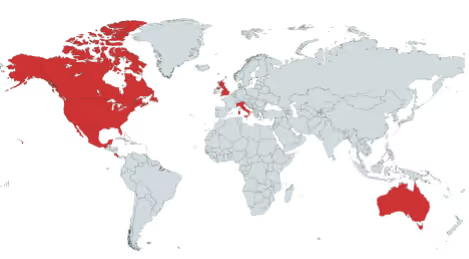
Figure 1: Geographic distribution of Darktrace clients affected by Qakbot
Qakbot is known to be delivered via malicious email attachments [7]. The Qakbot infections observed across Darktrace’s client base during June were likely initiated through HTML smuggling — a method which consists in embedding malicious code into HTML attachments. Based on open-source reporting [8]-[14] and on observed patterns of network traffic, we assess with moderate to high confidence that the Qakbot infections observed across Darktrace’s client base during June 2022 were initiated via one of the following three methods:
User opens HTML attachment which drops a ZIP file on their device. ZIP file contains a LNK file, which when opened, causes the user's device to make an external HTTP GET request with a cURL User-Agent string and a '.dat' target URI. If successful, the HTTP GET request is responded to with a Qakbot DLL.
User opens HTML attachment which drops a ZIP file on their device. ZIP file contains a docx file, which when opened, causes the user's device to make an HTTP GET request to 185.234.247[.]119 with an Office user-agent string and a ‘/123.RES' target URI. If successful, the HTTP GET request is responded to with an HTML file containing a Follina exploit. The Follina exploit causes the user's device to make an external HTTP GET with a '.dat' target URI. If successful, the HTTP GET request is responded to with a Qakbot DL.
User opens HTML attachment which drops a ZIP file on their device. ZIP file contains a Qakbot DLL and a LNK file, which when opened, causes the DLL to run.
The usage of these delivery methods illustrate how threat actors are adopting to a post-macro world [4], with their malware delivery techniques shifting from usage of macros-embedding Office documents to usage of container files, Windows Shortcut (LNK) files, and exploits for novel vulnerabilities.
The Qakbot infections observed across Darktrace’s client base did not only vary in terms of their delivery methods — they also differed in terms of their follow-up activities. In some cases, no follow-up activities were observed. In other cases, however, actors were seen leveraging Qakbot to exfiltrate data and to deliver follow-up payloads such as Cobalt Strike and Dark VNC. These follow-up activities were likely preparation for the deployment of ransomware. Darktrace’s early detection of Qakbot activity within client environments enabled security teams to take actions which likely prevented the deployment of ransomware.
Darktrace Coverage
Users’ interactions with malicious email attachments typically resulted in their devices making cURL HTTP GET requests with empty Host headers and target URIs ending in ‘.dat’ (such as as ‘/24736.dat’ and ‘/noFindThem.dat’) to rare, external endpoints. In cases where the Follina vulnerability is believed to have been exploited, users’ devices were seen making HTTP GET requests to 185.234.247[.]119 with a Microsoft Office User-Agent string before making cURL HTTP GET requests. The following Darktrace DETECT/Network models typically breached as a result of these HTTP activities:
Device / New User Agent
Anomalous Connection / New User Agent to IP Without Hostname
Device / New User Agent and New IP
Anomalous File / EXE from Rare External Location
Anomalous File / Numeric Exe Download
These DETECT models were able to capture the unusual usage of Office and cURL User-Agent strings on affected devices, as well as the downloads of the Qakbot DLL from rare external endpoints. These models look for unusual activity that falls outside a device’s usual pattern of behavior rather than for activity involving User-Agent strings, URIs, files, and external IPs which are known to be malicious.
When enabled, Darktrace RESPOND/Network autonomously intervened, taking actions such as ‘Enforce group pattern of life’ and ‘Block connections’ to quickly intercept connections to Qakbot infrastructure.
Figure 2: This ‘New User Agent to IP Without Hostname’ model breach highlights an example of Darktrace’s detection of a device attempting to download a file containing a Follina exploit
Figure 3: This ‘New User Agent to IP Without Hostname’ model breach highlights an example of Darktrace’s detection of a device attempting to download Qakbot
Figure 4: The Event Log for an infected device highlights the moment a connection to the endpoint outlook.office365[.]com was made. This was followed by an executable file transfer detection and use of a new User-Agent, curl/7.9.1
After installing Qakbot, users’ devices started making connections to Command and Control (C2) endpoints over ports such as 443, 22, 990, 995, 1194, 2222, 2078, 32101. Cobalt Strike and Dark VNC may have been delivered over some of these C2 connections, as evidenced by subsequent connections to endpoints associated with Cobalt Strike and Dark VNC. These C2 activities typically caused the following Darktrace DETECT/Network models to breach:
Anomalous Connection / Application Protocol on Uncommon Port
Anomalous Connection / Multiple Connections to New External TCP Port
Compromise / Suspicious Beaconing Behavior
Anomalous Connection / Multiple Failed Connections to Rare Endpoint
Compromise / Large Number of Suspicious Successful Connections
Anomalous Connection / Anomalous SSL without SNI to New External
Compromise / SSL Beaconing to Rare Destination
Compromise / Suspicious TLS Beaconing To Rare External
Compromise / Slow Beaconing Activity To External Rare
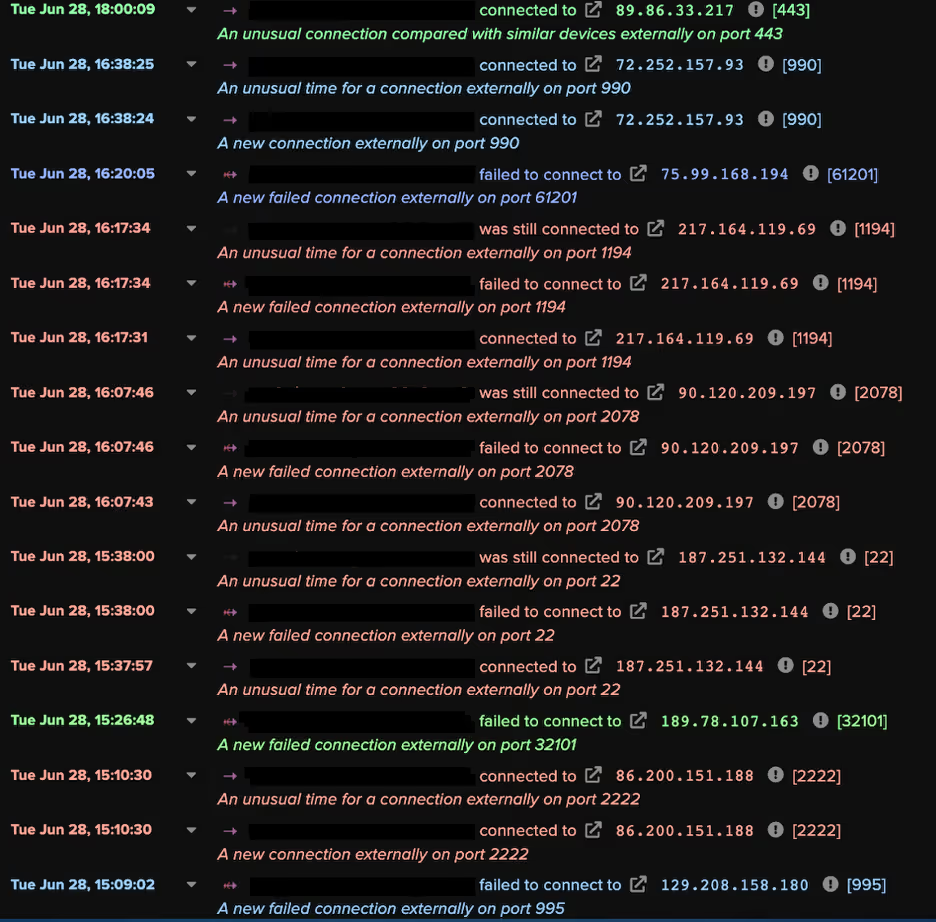
Figure 5: This Device Event Log illustrates the Command and Control activity displayed by a Qakbot-infected device
The Darktrace DETECT/Network models which detected these C2 activities do not look for devices making connections to known, malicious endpoints. Rather, they look for devices deviating from their ordinary patterns of activity, making connections to external endpoints which internal devices do not usually connect to, over ports which devices do not normally connect over.
In some cases, actors were seen exfiltrating data from Qakbot-infected systems and dropping Cobalt Strike in order to conduct extensive discovery. These exfiltration activities typically caused the following models to breach:
Anomalous Connection / Data Sent to Rare Domain
Unusual Activity / Enhanced Unusual External Data Transfer
Anomalous Connection / Uncommon 1 GiB Outbound
Anomalous Connection / Low and Slow Exfiltration to IP
Unusual Activity / Unusual External Data to New Endpoints
The reconnaissance and brute-force activities carried out by actors typically resulted in breaches of the following models:
Device / ICMP Address Scan
Device / Network Scan
Anomalous Connection / SMB Enumeration
Device / New or Uncommon WMI Activity
Unusual Activity / Possible RPC Recon Activity
Device / Possible SMB/NTLM Reconnaissance
Device / SMB Lateral Movement
Device / Increase in New RPC Services
Device / Spike in LDAP Activity
Device / Possible SMB/NTLM Brute Force
Device / SMB Session Brute Force (Non-Admin)
Device / SMB Session Brute Force (Admin)
Device / Anomalous NTLM Brute Force
Conclusion
June 2022 saw Qakbot swiftly mould itself in response to Microsoft's default blocking of macros and the public disclosure of the Follina vulnerability. The evolution of the threat landscape in the first half of 2022 caused Qakbot to undergo changes in its delivery methods, shifting from delivery via macros-based methods to delivery via HTML smuggling methods. The effectiveness of these novel delivery methods where highlighted in Darktrace's client base, where large volumes of Qakbot infections were seen during June 2022. Leveraging Self-Learning AI, Darktrace DETECT/Network was able to detect the unusual network behaviors which inevitably resulted from these novel Qakbot infections. Given that the actors behind these Qakbot infections were likely seeking to deploy ransomware, these detections, along with Darktrace RESPOND/Network’s autonomous interventions, ultimately helped to protect affected Darktrace clients from significant business disruption.
Darktrace cyber analysts are world-class experts in threat intelligence, threat hunting and incident response, and provide 24/7 SOC support to thousands of Darktrace customers around the globe. Inside the SOC is exclusively authored by these experts, providing analysis of cyber incidents and threat trends, based on real-world experience in the field.
Darktrace researchers observed threat actors exploiting reports of Venezuelan President Maduro’s arrest to deliver backdoor malware. Attackers often use ongoing world events make their malicious content appear more credible, increasingly the likelihood of a successful attack.
Under Medusa’s Gaze: How Darktrace Uncovers RMM Abuse in Ransomware Campaigns
Medusa ransomware increasingly exploits remote monitoring and management (RMM) tools for persistence, lateral movement, and data exfiltration. This blog explores Medusa’s tactics, real-world detections, and how anomaly-based solutions with Autonomous Response can stop attacks.
React2Shell: How Opportunist Attackers Exploited CVE-2025-55182 Within Hours
Darktrace observed opportunistic exploitation of the React2Shell vulnerability within minutes of honeypot deployment. Attackers leveraged shell scripts, HTTP beaconing, and cryptomining activity, highlighting rapid adaptation to unpatched flaws.
Threat actors frequently exploit ongoing world events to trick users into opening and executing malicious files. Darktrace security researchers recently identified a threat group using reports around the arrest of Venezuelan President Nicolàs Maduro on January 3, 2025, as a lure to deliver backdoor malware.
Technical Analysis
While the exact initial access method is unknown, it is likely that a spear-phishing email was sent to victims, containing a zip archive titled “US now deciding what’s next for Venezuela.zip”. This file included an executable named “Maduro to be taken to New York.exe” and a dynamic-link library (DLL), “kugou.dll”.
The binary “Maduro to be taken to New York.exe” is a legitimate binary (albeit with an expired signature) related to KuGou, a Chinese streaming platform. Its function is to load the DLL “kugou.dll” via DLL search order. In this instance, the expected DLL has been replaced with a malicious one with the same name to load it.
Figure 1: DLL called with LoadLibraryW.
Once the DLL is executed, a directory is created C:\ProgramData\Technology360NB with the DLL copied into the directory along with the executable, renamed as “DataTechnology.exe”. A registry key is created for persistence in “HKCU\Software\Microsoft\Windows\CurrentVersion\Run\Lite360” to run DataTechnology.exe --DATA on log on.
Figure 2. Registry key added for persistence.
Figure 3: Folder “Technology360NB” created.
During execution, a dialog box appears with the caption “Please restart your computer and try again, or contact the original author.”
Figure 4. Message box prompting user to restart.
Prompting the user to restart triggers the malware to run from the registry key with the command --DATA, and if the user doesn't, a forced restart is triggered. Once the system is reset, the malware begins periodic TLS connections to the command-and-control (C2) server 172.81.60[.]97 on port 443. While the encrypted traffic prevents direct inspection of commands or data, the regular beaconing and response traffic strongly imply that the malware has the ability to poll a remote server for instructions, configuration, or tasking.
Conclusion
Threat groups have long used geopolitical issues and other high-profile events to make malicious content appear more credible or urgent. Since the onset of the war in Ukraine, organizations have been repeatedly targeted with spear-phishing emails using subject lines related to the ongoing conflict, including references to prisoners of war [1]. Similarly, the Chinese threat group Mustang Panda frequently uses this tactic to deploy backdoors, using lures related to the Ukrainian war, conventions on Tibet [2], the South China Sea [3], and Taiwan [4].
The activity described in this blog shares similarities with previous Mustang Panda campaigns, including the use of a current-events archive, a directory created in ProgramData with a legitimate executable used to load a malicious DLL and run registry keys used for persistence. While there is an overlap of tactics, techniques and procedures (TTPs), there is insufficient information available to confidently attribute this activity to a specific threat group. Users should remain vigilant, especially when opening email attachments.
Credit to Tara Gould (Malware Research Lead) Edited by Ryan Traill (Analyst Content Lead)
Indicators of Compromise (IoCs)
172.81.60[.]97 8f81ce8ca6cdbc7d7eb10f4da5f470c6 - US now deciding what's next for Venezuela.zip 722bcd4b14aac3395f8a073050b9a578 - Maduro to be taken to New York.exe aea6f6edbbbb0ab0f22568dcb503d731 - kugou.dll
Under Medusa’s Gaze: How Darktrace Uncovers RMM Abuse in Ransomware Campaigns
What is Medusa Ransomware in 2025?
In 2025, the Medusa Ransomware-as-a-Service (RaaS) emerged as one of the top 10 most active ransomware threat actors [1]. Its growing impact prompted a joint advisory from the US Cybersecurity and Infrastructure Security Agency (CISA) and the Federal Bureau of Investigation (FBI) [3]. As of January 2026, more than 500 organizations have fallen victim to Medusa ransomware [2].
Darktrace previously investigated Medusa in a 2024 blog, but the group’s rapid expansion and new intelligence released in late 2025 has lead Darktrace’s Threat Research team to investigate further. Recent findings include Microsoft’s research on Medusa actors exploiting a vulnerability in Fortra’s GoAnywhere MFT License Servlet (CVE-2025-10035)[4] and Zencec’s report on Medusa’s abuse of flaws in SimpleHelp’s remote support software (CVE-2024-57726, CVE-2024-57727, CVE-2024-57728) [5].
Reports vary on when Medusa first appeared in the wild. Some sources mention June 2021 as the earliest sightings, while others point to late 2022, when its developers transitioned to the RaaS model, as the true beginning of its operation [3][11].
Madusa Ransomware history and background
The group behind Medusa is known by several aliases, including Storm-1175 and Spearwing [4] [7]. Like its mythological namesake, Medusa has many “heads,” collaborating with initial access brokers (IABs) and, according to some evidence, affiliating with Big Game Hunting (BGH) groups such as Frozen Spider, as well as the cybercriminal group UNC7885 [3][6][13].
Use of Cyrillic in its scripts, activity on Russian-language cybercrime forums, slang unique to Russian criminal subcultures, and avoidance of targets in Commonwealth of Independent States (CIS) countries suggest that Medusa operates from Russia or an allied state [11][12].
Medusa ransomware should not be confused with other similarly named malware, such as the Medusa Android Banking Trojan, the Medusa Botnet/Medusa Stealer, or MedusaLocker ransomware. It is easily distinguishable from these variants because it appends the extension .MEDUSA to encrypted files and drops the ransom note !!!READ_ME_MEDUSA!!!.txt on compromised systems [8].
Who does Madusa Ransomware target?
The group appears to show little restraint, indiscriminately attacking organizations across all sectors, including healthcare, and is known to employ triple extortion tactics whereby sensitive data is encrypted, victims are threatened with data leaks, and additional pressure is applied through DDoS attacks or contacting the victim’s customers, rather than the more common double extortion model [13].
Madusa Ransomware TTPs
To attain initial access, Medusa actors typically purchase access to already compromised devices or accounts via IABs that employ phishing, credential stuffing, or brute-force attacks, and also target vulnerable or misconfigured Internet-facing systems.
Between December 2023 and November 2025, Darktrace observed multiple cases of file encryption related to Medusa ransomware across its customer base. When enabled, Darktrace’s Autonomous Response capability intervened early in the attack chain, blocking malicious activity before file encryption could begin.
Some of the affected were based in Europe, the Middle East and Africa (EMEA), others in the Americas (AMS), and the remainder in the Asia-Pacific and Japan region. The most impacted sectors were financial services and the automotive industry, followed by healthcare, and finally organizations in arts, entertainment and recreation, ICT, and manufacturing.
Remote Monitoring and Management (RMM) tool abuse
In most customer environments where Medusa file encryption attempts were observed, and in one case where the compromise was contained before encryption, unusual external HTTP connections associated with JWrapper were also detected. JWrapper is a legitimate tool designed to simplify the packaging, distribution, and management of Java applications, enabling the creation of executables that run across different operating systems. Many of the destination IP addresses involved in this activity were linked to SimpleHelp servers or associated with Atera.
Medusa actors appear to favor RMM tools such as SimpleHelp. Unpatched or misconfigured SimpleHelp RMM servers can serve as an initial access vector to the victims’ infrastructure. After gaining access to SimpleHelp management servers, the threat actors edit server configuration files to redirect existing SimpleHelp RMM agents to communicate with unauthorized servers under their control.
The SimpleHelp tool is not only used for command-and-control (C2) and enabling persistence but is also observed during lateral movement within the network, downloading additional attack tools, data exfiltration, and even ransomware binary execution. Other legitimate remote access tools abused by Medusa in a similar manner to evade detection include Atera, AnyDesk, ScreenConnect, eHorus, N-able, PDQ Deploy/Inventory, Splashtop, TeamViewer, NinjaOne, Navicat, and MeshAgent [4][5][15][16][17].
Data exfiltration
Another correlation among Darktrace customers affected by Medusa was observed during the data exfiltration phase. In several environments, data was exfiltrated to the endpoints erp.ranasons[.]com or pruebas.pintacuario[.]mx (143.110.243[.]154, 144.217.181[.]205) over ports 443, 445, and 80. erp.ranasons[.]com was seemingly active between November 2024 and September 2025, while pruebas.pintacuario[.]mx was seen from November 2024 to March 2025. Evidence suggests that pruebas.pintacuario[.]mx previously hosted a SimpleHelp server [22][23].
Apart from RMM tools, Medusa is also known to use Rclone and Robocopy for data exfiltration [3][19]. During one Medusa compromise detected in mid-2024, the customer’s data was exfiltrated to external destinations associated with the Ngrok proxy service using an SSH-2.0-rclone client.
Medusa Compromise Leveraging SimpleHelp
In Q4 2025, Darktrace assisted a European company impacted by Medusa ransomware. The organization had partial Darktrace / NETWORK coverage and had configured Darktrace’s Autonomous Response capability to require manual confirmation for all actions. Despite these constraints, data received through the customer’s security integration with CrowdStrike Falcon enabled Darktrace analysts to reconstruct the attack chain, although the initial access vector remains unclear due to limited visibility.
In late September 2025, a device out of the scope of Darktrace's visibility began scanning the network and using RDP, NTLM/SMB, DCE_RPC, and PowerShell for lateral movement.
CrowdStrike “Defense Evasion: Disable or Modify Tools” alerts related to a suspicious driver (c:\windows\[0-9a-b]{4}.exe) and a PDQ Deploy executable (share=\\<device_hostname>\ADMIN$ file=AdminArsenal\PDQDeployRunner\service-1\exec\[0-9a-b]{4}.exe) suggest that the attackers used the Bring Your Own Vulnerable Driver (BYOVD) technique to terminate antivirus processes on network devices, leveraging tools such as KillAV or AbyssWorker along with the PDQ Software Deployment solution [19][26].
A few hours later, Darktrace observed the same device that had scanned the network writing Temp\[a-z]{2}.exe over SMB to another device on the same subnet. According to data from the CrowdStrike alert, this executable was linked to an RMM application located at C:\Users\<compromised_user>\Documents\[a-z]{2}.exe. The same compromised user account later triggered a CrowdStrike “Command and Control: Remote Access Tools” alert when accessing C:\ProgramData\JWrapper-Remote Access\JWrapper-Remote Access Bundle-[0-9]{11}\JWrapperTemp-[0-9]{10}-[0-9]{1}-app\bin\windowslauncher.exe [27].
Figure 1: An executable file associated with the SimpleHelp RMM tool being written to other devices using the SMB protocol, as detected by Darktrace.
Soon after, the destination device and multiple other network devices began establishing connections to 31.220.45[.]120 and 213.183.63[.]41, both of which hosted malicious SimpleHelp RMM servers. These C2 connections continued for more than 20 days after the initial compromise.
CrowdStrike integration alerts for the execution of robocopy . "c:\windows\\" /COPY:DT /E /XX /R:0 /W:0 /NP /XF RunFileCopy.cmd /IS /IT commands on several Windows servers, suggested that this utility was likely used to stage files in preparation for data exfiltration [19].
Around two hours later, Darktrace detected another device connecting to the attacker’s SimpleHelp RMM servers. This internal server had ‘doc’ in its hostname, indicating it was likely a file server. It was observed downloading documents from another internal server over SMB and uploading approximately 70 GiB of data to erp.ranasons[.]com (143.110.243[.]154:443).
Figure 2: Data uploaded to erp.ranasons[.]com and the number of model alerts from the exfiltrating device, represented by yellow and orange dots.
Darktrace’s Cyber AI Analyst autonomously investigated the unusual connectivity, correlating the separate C2 and data exfiltration events into a single incident, providing greater visibility into the ongoing attack.
Figure 3: Cyber AI Analyst identified a file server making C2 connections to an attacker-controlled SimpleHelp server (213.183.63[.]41) and exfiltrating data to erp.ranasons[.]com.
Figure 4: The same file server that connected to 213.183.63[.]41 and exfiltrated data to erp.ranasons[.]com was also observed attempting to connect to an IP address associated with Moscow, Russia (193.37.69[.]154:7070).
One of the devices connecting to the attacker's SimpleHelp RMM servers was also observed downloading 35 MiB from [0-9]{4}.filemail[.]com. Filemail, a legitimate file-sharing service, has reportedly been abused by Medusa actors to deliver additional malicious payloads [11].
Figure 5: A device controlled remotely via SimpleHelp downloading additional tooling from the Filemail file-sharing service.
Finally, integration alerts related to the ransomware binary, such as c:\windows\system32\gaze.exe and <device_hostname>\ADMIN$ file=AdminArsenal\PDQDeployRunner\service-1\exec\gaze.exe, along with “!!!READ_ME_MEDUSA!!!.txt” ransom notes were observed on network devices. This indicates that file encryption in this case was most likely carried out directly on the victim hosts rather than via the SMB protocol [3].
Conclusion
Threat actors, including nation-state actors and ransomware groups like Medusa, have long abused legitimate commercial RMM tools, typically used by system administrators for remote monitoring, software deployment, and device configuration, instead of relying on remote access trojans (RATs).
Attackers employ existing authorized RMM tools or install new remote administration software to enable persistence, lateral movement, data exfiltration, and ingress tool transfer. By mimicking legitimate administrative behavior, RMM abuse enables attackers to evade detection, as security software often implicitly trusts these tools, allowing attackers to bypass traditional security controls [28][29][30].
To mitigate such risks, organizations should promptly patch publicly exposed RMM servers and adopt anomaly-based detection solutions, like Darktrace / NETWORK, which can distinguish legitimate administrative activity from malicious behavior, applying rapid response measures through its Autonomous Response capability to stop attacks in their tracks.
Darktrace delivers comprehensive network visibility and Autonomous Response capabilities, enabling real-time detection of anomalous activity and rapid mitigation, even if an organization fall under Medusa’s gaze.
Credit to Signe Zaharka (Principal Cyber Analyst) and Emma Foulger (Global Threat Research Operations Lead
Edited by Ryan Traill (Analyst Content Lead)
Appendices
List of Indicators of Compromise (IoCs)
IoC - Type - Description + Confidence + Time Observed
185.108.129[.]62 IP address Malicious SimpleHelp server observed during Medusa attacks (High confidence) - March 7, 2023
185.126.238[.]119 IP address Malicious SimpleHelp server observed during Medusa attacks (High confidence) - November 26-27, 2024
213.183.63[.]41 IP address Malicious SimpleHelp server observed during Medusa attacks (High confidence) - November 28, 2024 - Sep 30, 2025
213.183.63[.]42 IP address Malicious SimpleHelp server observed during Medusa attacks (High confidence) - July 4 -9 , 2024
31.220.45[.]120 IP address Malicious SimpleHelp server observed during Medusa attacks (High confidence) - September 12 - Oct 20 , 2025
91.92.246[.]110 IP address Malicious SimpleHelp server observed during Medusa attacks (High confidence) - May 24, 2024
45.9.149[.]112:15330 IP address Malicious SimpleHelp server observed during Medusa attacks (High confidence) - June 21, 2024
89.36.161[.]12 IP address Malicious SimpleHelp server observed during Medusa attacks (High confidence) - June 26-28, 2024
193.37.69[.]154:7070 IP address Suspicious RU IP seen on a device being controlled via SimpleHelp and exfiltrating data to a Medusa related endpoint - September 30 - October 20, 2025
erp.ranasons[.]com·143.110.243[.]154 Hostname Data exfiltration destination - November 27, 2024 - September 30, 2025
pruebas.pintacuario[.]mx·144.217.181[.]205 - Hostname Data exfiltration destination - November 27, 2024 - March 26, 2025
lirdel[.]com · 44.235.83[.]125/a.msi (1b9869a2e862f1e6a59f5d88398463d3962abe51e19a59) File & hash Atera related file downloaded with PowerShell - June 20, 2024
wizarr.manate[.]ch/108.215.180[.]161:8585/$/1dIL5 File Suspicious file observed on one of the devices exhibiting unusual activity during a Medusa compromise - February 28, 2024
!!!READ_ME_MEDUSA!!!.txt" File - Ransom note
*.MEDUSA - File extension File extension added to encrypted files
gaze.exe – File - Ransomware binary
Darktrace Model Coverage
Darktrace / NETWORK model detections triggered during connections to attacker controlled SimpleHelp servers:
Anomalous Connection/Anomalous SSL without SNI to New External
Anomalous Connection/Multiple Connections to New External UDP Port
Anomalous Connection/New User Agent to IP Without Hostname