
Blog
/
Network
/
February 3, 2026

Darktrace Malware Analysis: Unpacking SnappyBee

his blog details how to unpack malware like SnappyBee, a modular backdoor linked to Salt Typhoon, revealing its custom packing, DLL sideloading, dynamic API resolution, and multi‑stage in‑memory decryption. It provides analysts with a step‑by‑step guide to extract hidden payloads and understand advanced evasion techniques by sophisticated malware strains.
Inside the SOC
Darktrace cyber analysts are world-class experts in threat intelligence, threat hunting and incident response, and provide 24/7 SOC support to thousands of Darktrace customers around the globe. Inside the SOC is exclusively authored by these experts, providing analysis of cyber incidents and threat trends, based on real-world experience in the field.
Written by
Nathaniel Bill
Malware Research Engineer
darktace malware analysis snappybeeDefault blog image
03
Feb 2026

Introduction

The aim of this blog is to be an educational resource, documenting how an analyst can perform malware analysis techniques such as unpacking. This blog will demonstrate the malware analysis process against well-known malware, in this case SnappyBee.

SnappyBee (also known as Deed RAT) is a modular backdoor that has been previously attributed to China-linked cyber espionage group Salt Typhoon, also known as Earth Estries [1] [2]. The malware was first publicly documented by TrendMicro in November 2024 as part of their investigation into long running campaigns targeting various industries and governments by China-linked threat groups.

In these campaigns, SnappyBee is deployed post-compromise, after the attacker has already obtained access to a customer's system, and is used to establish long-term persistence as well as deploying further malware such as Cobalt Strike and the Demodex rootkit.

To decrease the chance of detection, SnappyBee uses a custom packing routine. Packing is a common technique used by malware to obscure its true payload by hiding it and then stealthily loading and executing it at runtime. This hinders analysis and helps the malware evade detection, especially during static analysis by both human analysts and anti-malware services.

This blog is a practical guide on how an analyst can unpack and analyze SnappyBee, while also learning the necessary skills to triage other malware samples from advanced threat groups.

First principles

Packing is not a new technique, and threat actors have generally converged on a standard approach. Packed binaries typically feature two main components: the packed data and an unpacking stub, also called a loader, to unpack and run the data.

Typically, malware developers insert a large blob of unreadable data inside an executable, such as in the .rodata section. This data blob is the true payload of the malware, but it has been put through a process such as encryption, compression, or another form of manipulation to render it unreadable. Sometimes, this data blob is instead shipped in a different file, such as a .dat file, or a fake image. When this happens, the main loader has to read this using a syscall, which can be useful for analysis as syscalls can be easily identified, even in heavily obfuscated binaries.

In the main executable, malware developers will typically include an unpacking stub that takes the data blob, performs one or more operations on it, and then triggers its execution. In most samples, the decoded payload data is loaded into a newly allocated memory region, which will then be marked as executable and executed. In other cases, the decoded data is instead dropped into a new executable on disk and run, but this is less common as it increases the likelihood of detection.

Finding the unpacking routine

The first stage of analysis is uncovering the unpacking routine so it can be reverse engineered. There are several ways to approach this, but it is traditionally first triaged via static analysis on the initial stages available to the analyst.

SnappyBee consists of two components that can be analyzed:

  • A Dynamic-link Library (DLL) that acts as a loader, responsible for unpacking the malicious code
  • A data file shipped alongside the DLL, which contains the encrypted malicious code

Additionally, SnappyBee includes a legitimate signed executable that is vulnerable to DLL side-loading. This means that when the executable is run, it will inadvertently load SnappyBee’s DLL instead of the legitimate one it expects. This allows SnappyBee to appear more legitimate to antivirus solutions.

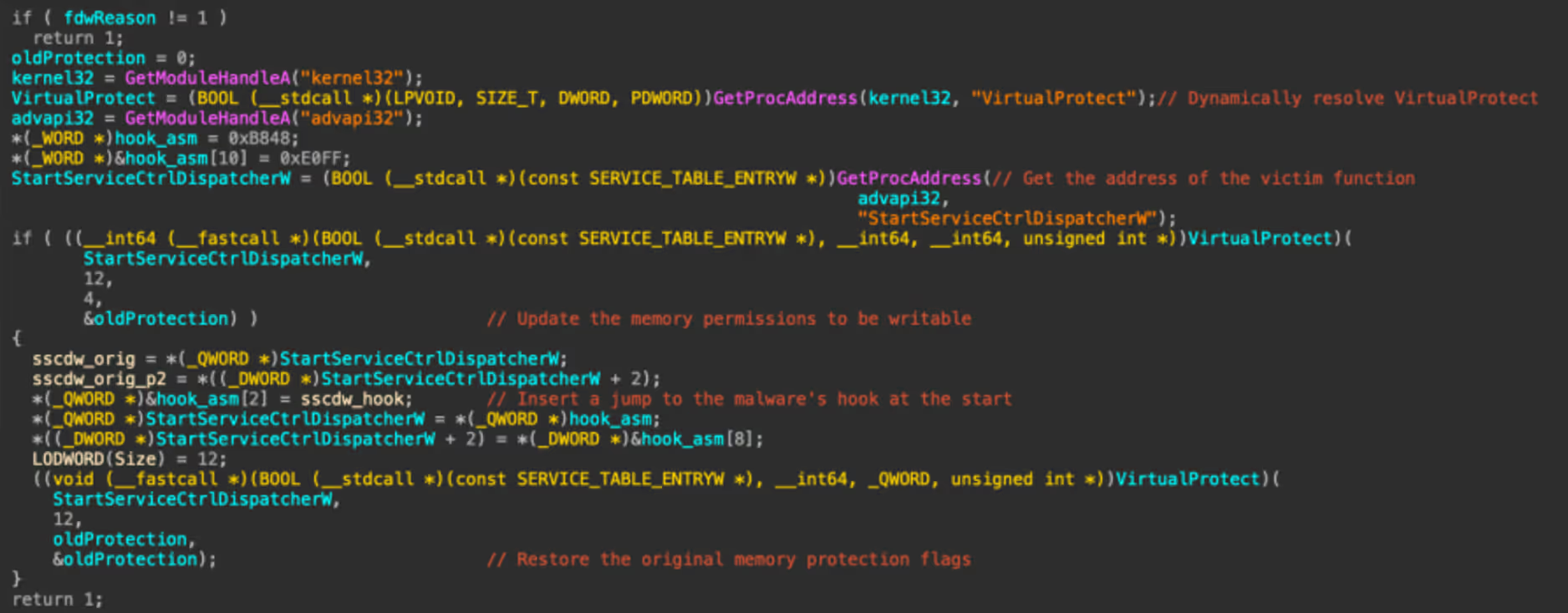
The first stage of analysis is performing static analysis of the DLL. This can be done by opening the DLL within a disassembler such as IDA Pro. Upon opening the DLL, IDA will display the DllMain function, which is the malware’s initial entry point and the first code executed when the DLL is loaded.
The DllMain function
Figure 1: The DllMain function

First, the function checks if the variable fdwReason is set to 1, and exits if it is not. This variable is set by Windows to indicate why the DLL was loaded. According to Microsoft Developer Network (MSDN), a value of 1 corresponds to DLL_PROCESS_ATTACH, meaning “The DLL is being loaded into the virtual address space of the current process as a result of the process starting up or as a result of a call to LoadLibrary” [3]. Since SnappyBee is known to use DLL sideloading for execution, DLL_PROCESS_ATTACH is the expected value when the legitimate executable loads the malicious DLL.

SnappyBee then uses the GetModule and GetProcAddress to dynamically resolve the address of the VirtualProtect in kernel32 and StartServiceCtrlDispatcherW in advapi32. Resolving these dynamically at runtime prevents them from showing up as a static import for the module, which can help evade detection by anti-malware solutions. Different regions of memory have different permissions to control what they can be used for, with the main ones being read, write, and execute. VirtualProtect is a function that changes the permissions of a given memory region.

SnappyBee then uses VirtualProtect to set the memory region containing the code for the StartServiceCtrlDispatcherW function as writable. It then inserts a jump instruction at the start of this function, redirecting the control flow to one of the SnappyBee DLL’s other functions, and then restores the old permissions.

In practice, this means when the legitimate executable calls StartServiceCtrlDispatcherW, it will immediately hand execution back to SnappyBee. Meanwhile, the call stack now appears more legitimate to outside observers such as antimalware solutions.

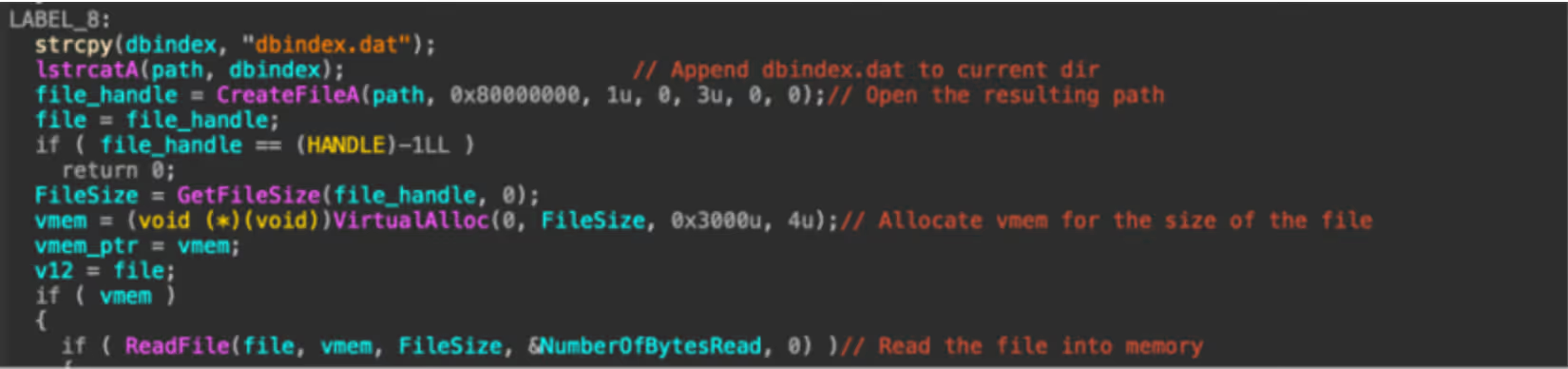
The hooked-in function then reads the data file that is shipped with SnappyBee and loads it into a new memory allocation. This pattern of loading the file into memory likely means it is responsible for unpacking the next stage.
The start of the unpacking routine that reads in dbindex.dat.
Figure 2: The start of the unpacking routine that reads in dbindex.dat.

SnappyBee then proceeds to decrypt the memory allocation and execute the code.

The memory decryption routine.
Figure 3: The memory decryption routine.

This section may look complex, however it is fairly straight forward. Firstly, it uses memset to zero out a stack variable, which will be used to store the decryption key. It then uses the first 16 bytes of the data file as a decryption key to initialize the context from.

SnappyBee then calls the mbed_tls_arc4_crypt function, which is a function from the mbedtls library. Documentation for this function can be found online and can be referenced to better understand what each of the arguments mean [4].
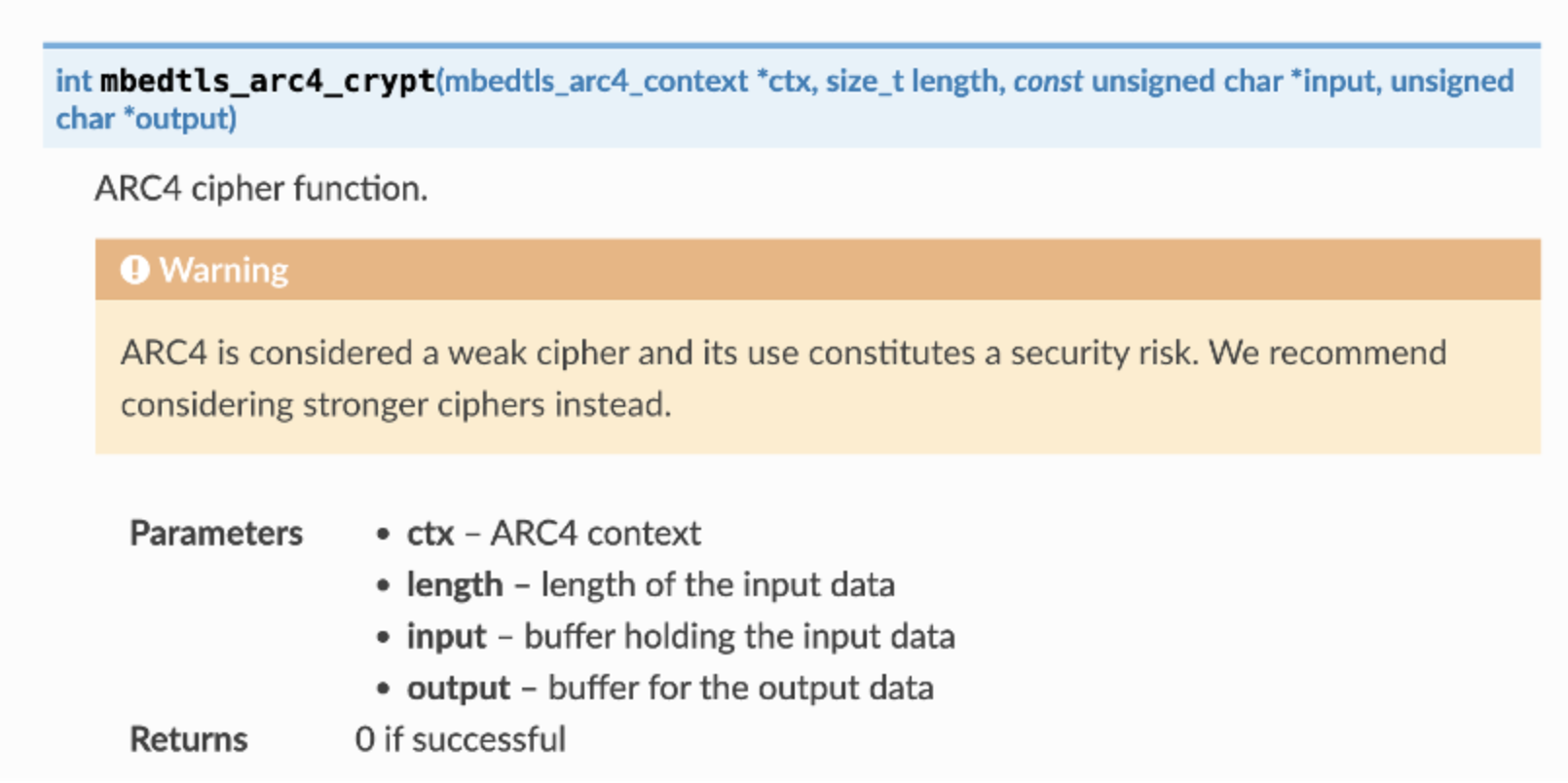
The documentation for mbedtls_arc4_crypt.
Figure 4: The documentation for mbedtls_arc4_ crypt.

Comparing the decompilation with the documentation, the arguments SnappyBee passes to the function can be decoded as:

  • The context derived from 16-byte key at the start of the data is passed in as the context in the first parameter
  • The file size minus 16 bytes (to account for the key at the start of the file) is the length of the data to be decrypted
  • A pointer to the file contents in memory, plus 16 bytes to skip the key, is used as the input
  • A pointer to a new memory allocation obtained from VirtualAlloc is used as the output

So, putting it all together, it can be concluded that SnappyBee uses the first 16 bytes as the key to decrypt the data that follows , writing the output into the allocated memory region.

SnappyBee then calls VirtualProtect to set the decrypted memory region as Read + Execute, and subsequently executes the code at the memory pointer. This is clearly where the unpacked code containing the next stage will be placed.

Unpacking the malware

Understanding how the unpacking routine works is the first step. The next step is obtaining the actual code, which cannot be achieved through static analysis alone.

There are two viable methods to retrieve the next stage. The first method is implementing the unpacking routine from scratch in a language like Python and running it against the data file.

This is straightforward in this case, as the unpacking routine in relatively simple and would not require much effort to re-implement. However, many unpacking routines are far more complex, which leads to the second method: allowing the malware to unpack itself by debugging it and then capturing the result. This is the approach many analysts take to unpacking, and the following will document this method to unpack SnappyBee.

As SnappyBee is 32-bit Windows malware, debugging can be performed using x86dbg in a Windows sandbox environment to debug SnappyBee. It is essential this sandbox is configured correctly, because any mistake during debugging could result in executing malicious code, which could have serious consequences.

Before debugging, it is necessary to disable the DYNAMIC_BASE flag on the DLL using a tool such as setdllcharacteristics. This will stop ASLR from randomizing the memory addresses each time the malware runs and ensures that it matches the addresses observed during static analysis.

The first place to set a breakpoint is DllMain, as this is the start of the malicious code and the logical place to pause before proceeding. Using IDA, the functions address can be determined; in this case, it is at offset 10002DB0. This can be used in the Goto (CTRL+G) dialog to jump to the offset and place a breakpoint. Note that the “Run to user code” button may need to be pressed if the DLL has not yet been loaded by x32dbg, as it spawns a small process to load the DLL as DLLs cannot be executed directly.

The program can then run until the breakpoint, at which point the program will pause and code recognizable from static analysis can be observed.
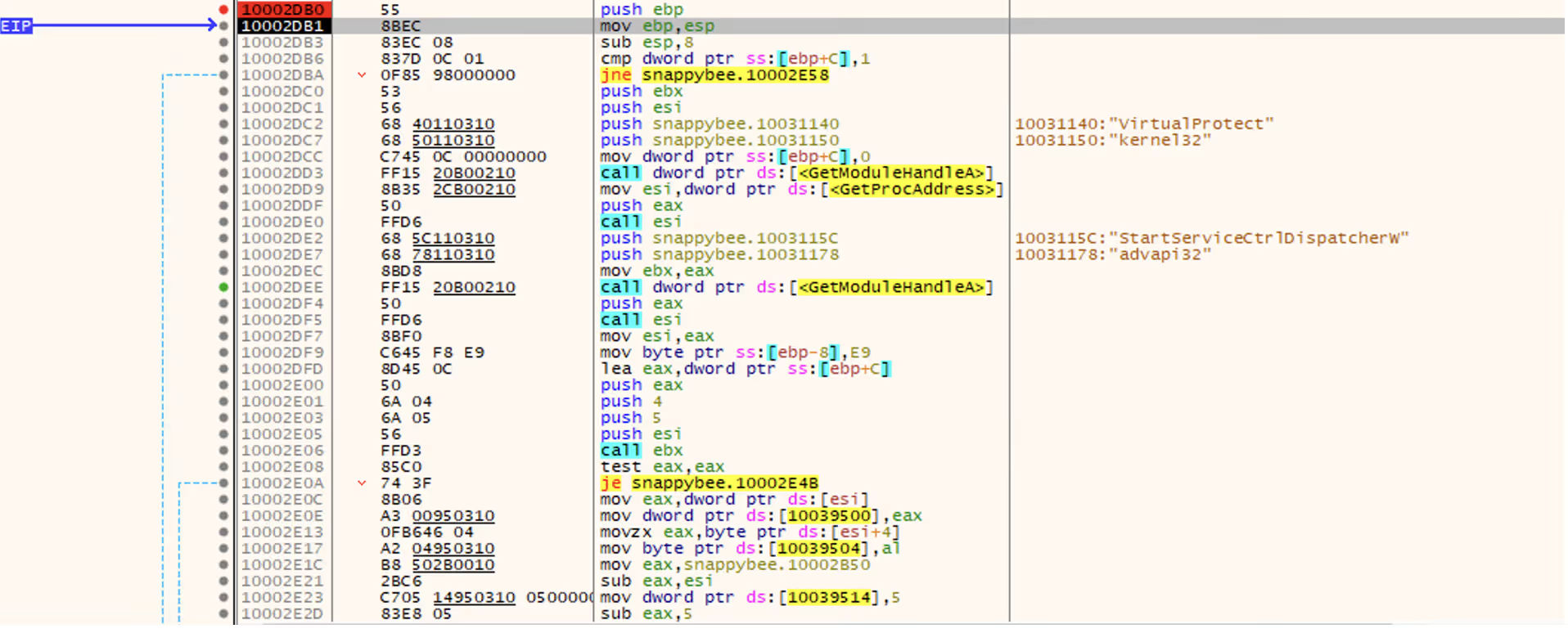
Figure 5: The x32dbg dissassembly listing forDllMain.

In the previous section, this function was noted as responsible for setting up a hook, and in the disassembly listing the hook address can be seen being loaded at offset 10002E1C. It is not necessary to go through the whole hooking process, because only the function that gets hooked in needs to be run. This function will not be naturally invoked as the DLL is being loaded directly rather than via sideloading as it expects. To work around this, the Extended Instruction Pointer (EIP) register can be manipulated to point to the start of the hook function instead, which will cause it to run instead of the DllMain function.

To update EIP, the CRTL+G dialog can again be used to jump to the hook function address (10002B50), and then the EIP register can be set to this address by right clicking the first instruction and selecting “Set EIP here”. This will make the hook function code run next.
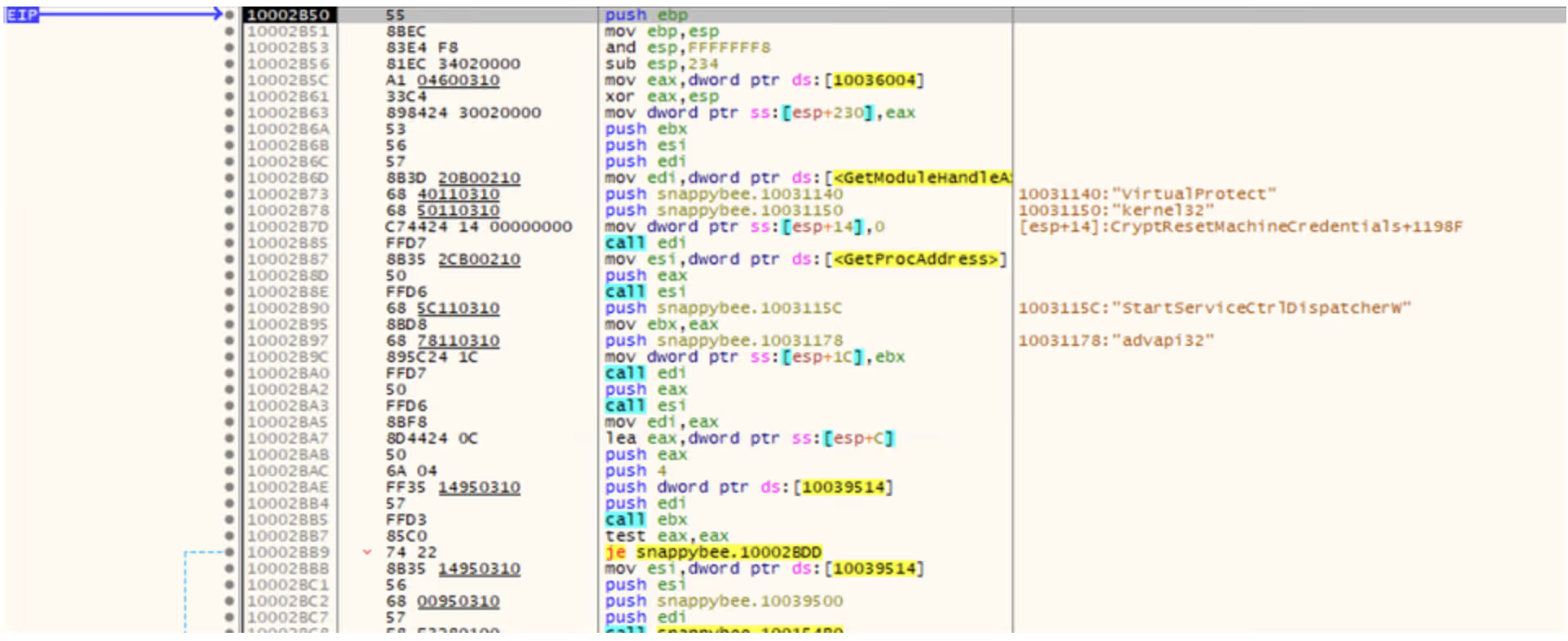
Figure 6: The start of the hookedin-in function

Once in this function, there are a few addresses where breakpoints should be set in order to inspect the state of the program at critical points in the unpacking process. These are:

-              10002C93, which allocates the memory for the data file and final code

-              10002D2D, which decrypts the memory

-              10002D81, which runs the unpacked code

Setting these can be done by pressing the dot next to the instruction listing, or via the CTRL+G Goto menu.

At the first breakpoint, the call to VirtualAlloc will be executed. The function returns the memory address of the created memory region, which is stored in the EAX register. In this case, the region was allocated at address 00700000.

Figure 7: The result of the VirtualAlloc call.

It is possible to right click the address and press “Follow in dump” to pin the contents of the memory to the lower pane, which makes it easy to monitor the region as the unpacking process continues.
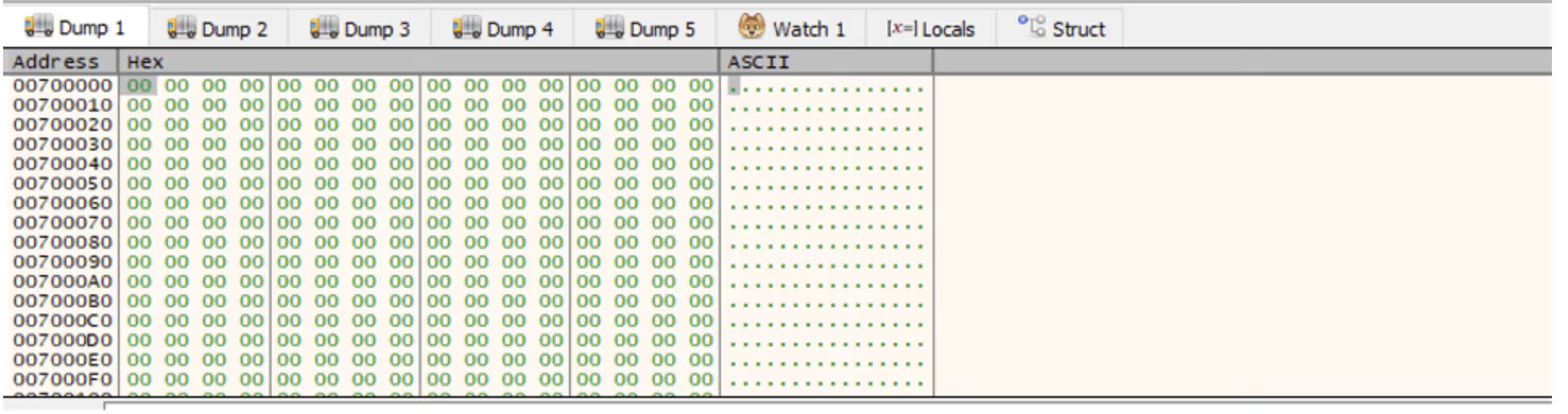
Figure 8: The allocated memory region shown in x32dbg’s dump.

Single-stepping through the application from this point eventually reaches the call to ReadFile, which loads the file into the memory region.

Figure 9: The allocated memory region after the file is read into it, showing high entropy data.

The program can then be allowed to run until the next breakpoint, which after single-stepping will execute the call to mbedtls_arc4_crypt to decrypt the memory. At this point, the data in the dump will have changed.
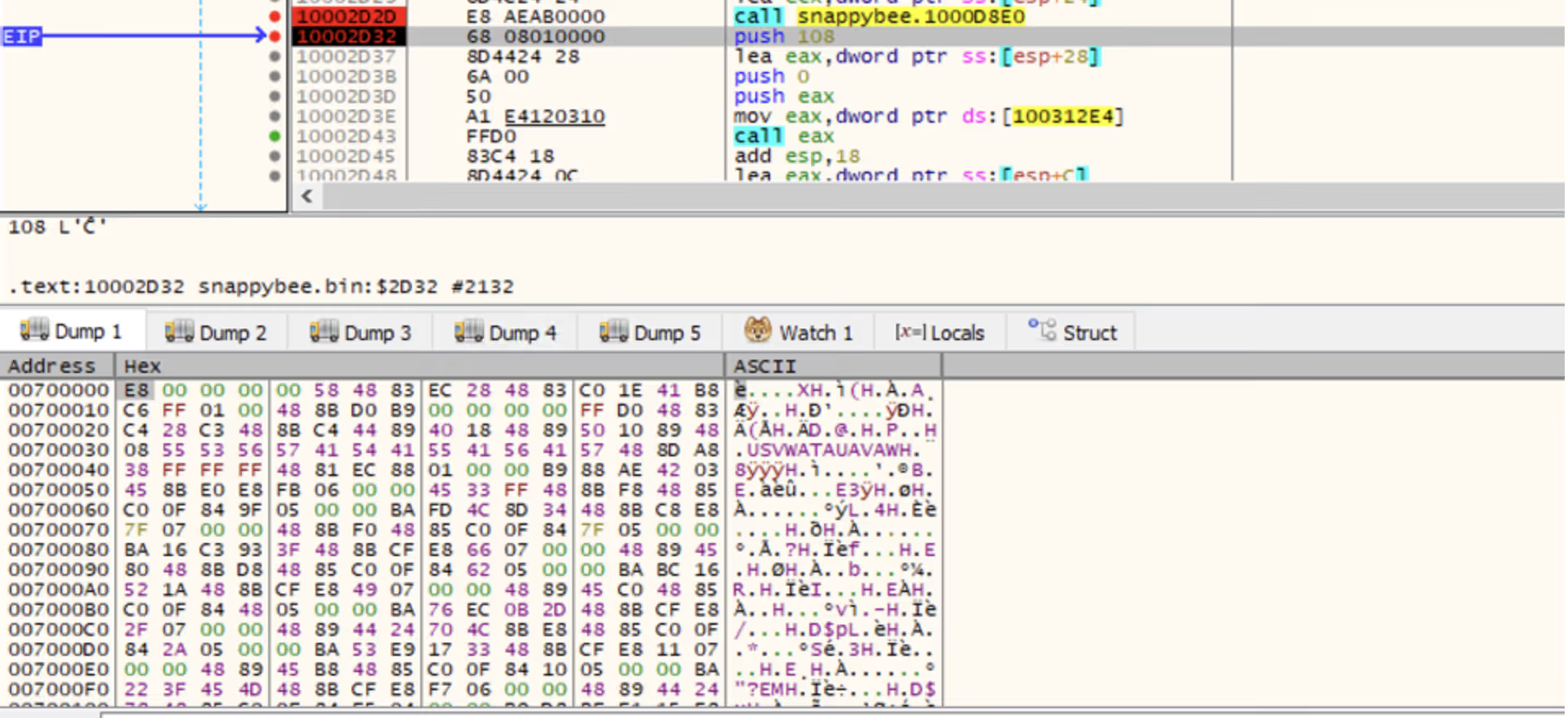
Figure 10: The same memory region after the decryption is run, showing lower entropy data.

Right-clicking in the dump and selecting "Disassembly” will disassemble the data. This yields valid shell code, indicating that the unpacking succeeded, whereas corrupt or random data would be expected if the unpacking had failed.
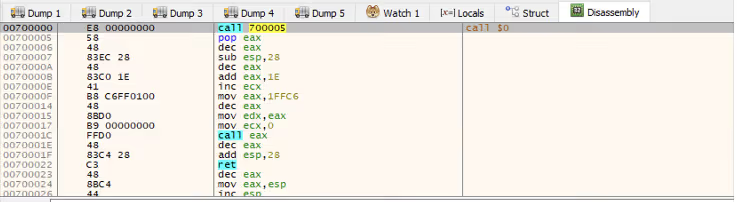
Figure 11: The disassembly view of the allocated memory.

Right-clicking and selecting “Follow in memory map” will show the memory allocation under the memory map view. Right-clicking this then provides an option to dump the entire memory block to file.

Figure 12: Saving the allocated memory region.

This dump can then be opened in IDA, enabling further static analysis of the shellcode. Reviewing the shellcode, it becomes clear that it performs another layer of unpacking.

As the debugger is already running, the sample can be allowed to execute up to the final breakpoint that was set on the call to the unpacked shellcode. Stepping into this call will then allow debugging of the new shellcode.

The simplest way to proceed is to single-step through the code, pausing on each call instruction to consider its purpose. Eventually, a call instruction that points to one of the memory regions that were assigned will be reached, which will contain the next layer of unpacked code. Using the same disassembly technique as before, it can be confirmed that this is more unpacked shellcode.
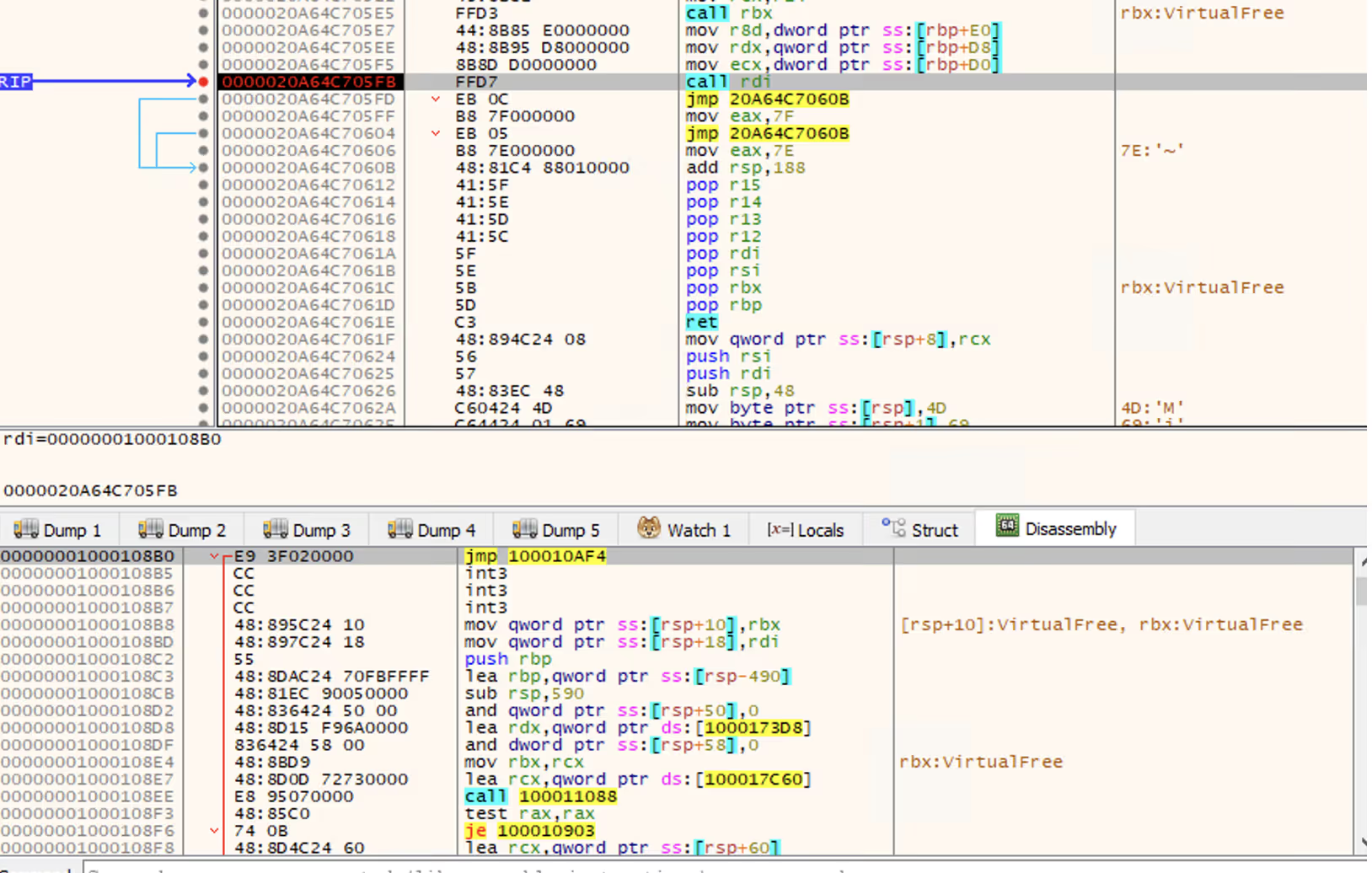
Figure 13: The unpacked shellcode’s call to RDI, which points to more unpacked shellcode. Note this screenshot depicts the 64-bit variant of SnappyBee instead of 32-bit, however the theory is the same.

Once again, this can be dumped out and analyzed further in IDA. In this case, it is the final payload used by the SnappyBee malware.

Conclusion

Unpacking remains one of the most common anti-analysis techniques and is a feature of most sophisticated malware from threat groups. This technique of in-memory decryption reduces the forensic “surface area” of the malware, helping it to evade detection from anti-malware solutions. This blog walks through one such example and provides practical knowledge on how to unpack malware for deeper analysis.

In addition, this blog has detailed several other techniques used by threat actors to evade analysis, such as DLL sideloading to execute code without arising suspicion, dynamic API resolving to bypass static heuristics, and multiple nested stages to make analysis challenging.

Malware such as SnappyBee demonstrates a continued shift towards highly modular and low-friction malware toolkits that can be reused across many intrusions and campaigns. It remains vital for security teams  to maintain the ability to combat the techniques seen in these toolkits when responding to infections.

While the technical details of these techniques are primarily important to analysts, the outcomes of this work directly affect how a Security Operations Centre (SOC) operates at scale. Without the technical capability to reliably unpack and observe these samples, organizations are forced to respond without the full picture.

The techniques demonstrated here help close that gap. This enables security teams to reduce dwell time by understanding the exact mechanisms of a sample earlier, improve detection quality with behavior-based indicators rather than relying on hash-based detections, and increase confidence in response decisions when determining impact.

Credit to Nathaniel Bill (Malware Research Engineer)
Edited by Ryan Traill (Analyst Content Lead)

Indicators of Compromise (IoCs)

SnappyBee Loader 1 - 25b9fdef3061c7dfea744830774ca0e289dba7c14be85f0d4695d382763b409b

SnappyBee Loader 2 - b2b617e62353a672626c13cc7ad81b27f23f91282aad7a3a0db471d84852a9ac          

SnappyBee Payload - 1a38303fb392ccc5a88d236b4f97ed404a89c1617f34b96ed826e7bb7257e296

References

[1] https://www.trendmicro.com/en_gb/research/24/k/earth-estries.html

[2] https://www.darktrace.com/blog/salty-much-darktraces-view-on-a-recent-salt-typhoon-intrusion

[3] https://learn.microsoft.com/en-us/windows/win32/dlls/dllmain#parameters

[4] https://mbed-tls.readthedocs.io/projects/api/en/v2.28.4/api/file/arc4_8h/#_CPPv418mbedtls_arc4_cryptP20mbedtls_arc4_context6size_tPKhPh

Inside the SOC
Darktrace cyber analysts are world-class experts in threat intelligence, threat hunting and incident response, and provide 24/7 SOC support to thousands of Darktrace customers around the globe. Inside the SOC is exclusively authored by these experts, providing analysis of cyber incidents and threat trends, based on real-world experience in the field.
Written by
Nathaniel Bill
Malware Research Engineer

More in this series

No items found.

Blog

/

Network

/

October 15, 2026

CikaBika Bot: Inside a Discord RAT

Default blog imageDefault blog image

‍

Key Takeaways

·      Darktrace malware researchers have found an ongoing malware campaign using a document-themed lure containing a malicious LNK file and a PDF with an embedded payload.

·      The Nim based loader deploys a Rust-based remote access trojan (RAT), using a UAC bypass and DLL search-order hijacking technique targeting Microsoft Edge.

·      The RAT uses Discord for C2, creating dedicated channels to manage infected devices and execute commands.

·      CikaBika Bot supports system reconnaissance, remote command execution, screenshot capture, and file transfers.

‍

Introduction

In a threat landscape where attackers continue to rely on social engineering techniques to deliver malware, legitimate services are increasingly being abused to support malicious operations. Communications platforms like Discord can provide attackers with a ready-made channel for command-and-control (C2), allowing them to manage compromised devices without establishing dedicated infrastructure.

Malware researchers at Darktrace have identified a campaign distributing CikaBika, a Rust-based RAT that uses Discord for C2. The infection chain begins with a disk image and a malicious Windows shortcut. A Nim loader extracts the final payload and attempts to plant it in Microsoft Edge’s installation directory using a PowerShell UAC bypass. Once running, the RAT collects host information, registers the device with Discord, and accepts commands through a dedicated channel.

Technical Analysis

‍

Figure 1: Contents of Proposition_Projet.img.

‍

Initial access and PDF payload

The malware is packaged within a disk image named Proposition_Projet.img. Inside are a PDF titled “Presentation_Generale.pdf.pdf” and a Windows shortcut (LNK) disguised as a Word document, “Proposition_Projet_Personnalisable.docx”. The delivery method has not been confirmed; however, the filenames and document-themed lure are consistent with a phishing campaign.

‍

Figure 2: PowerShell command embedded in the malicious shortcut.


Opening the shortcut launches a hidden PowerShell process while displaying the PDF as a decoy. The French-language document explains how to produce a written summary or contraction of a text. In the background, PowerShell reads the PDF as bytes and uses the value at offset 239 (0x20) as an XOR key to decode an embedded executable. The resulting payload is written to %TEMP%\IfyuUapz.txt and executed using cmd /c.

Nim loader and UAC bypass

“IfyuUapz.txt” is a Nim-based loader that contains two Base64-encoded blobs: a Rust dynamic-link library (DLL)  and a PowerShell deployment script. Both are decoded and written to temporary files, referenced to within the loader as “dllFile” and “copyPs1”. The loader runs the script through a hidden PowerShell process using an encoded command, then attempts to load the DLL using Nim’s loadLib function. If loading fails, it invokes regsvr32.exe and retries.

Figure 3: Silent DLL deployer.

The PowerShell component is responsible for moving the DLL to C:\Program Files (x86)\Microsoft\Edge\Application\dbghelp.dll. It first copies the DLL to C:\Windows\Temp\dbghelp.tmp, then modifies HKCU\Software\Classes\ms-settings\shell\open\command so that launching computerdefaults.exe can trigger a command to move the staged DLL into the protected Edge directory. This is an attempt to bypass User Account Control (UAC), which depends on the target’s Windows configuration.

The script also compiles a small C# helper that calls ShowWindow to hide windows associated with Windows Settings and ApplicationFrameHost. It launches the bypass helper three times, checks for the presence of the destination DLL, and attempts to delete the temporary scripts, intermediate DLL, and associated registry changes.

‍

Figure 4: Legitimate msedge.exe function to load the legitimate dbghelp.dll.

‍

The legitimate msedge.exe has a delay-loaded dependency on dbghelp.dll, and the malicious DLL exports a subset of the functions associated with Microsoft’s debugging library. The attacker appears to be exploiting this dependency through DLL search-order hijacking. However, it does not export every function in Edge’s delay-import table, meaning its compatibility with the host is incomplete. The observed code establishes the intended sideloading route, rather than proving that Edge successfully loaded the planted DLL.

‍

Rust RAT payload

Figure 5: Discord configuration within the RAT.

The malicious dbghelp.dll (IfyuUapz.txt) is a Rust-based RAT. At startup, the RAT registers the compromised device with Discord and begins collecting information about the host. Its reconnaissance routine gathers system details, runs tasklist to enumerate processes, executes ipconfig to obtain network configuration, and attempts to take a screenshot. The resulting artifacts include tasklist_startup.txt, network_info.txt, and screenshot.png.

Figure 6: Network configuration notification in Discord channel.

‍

Figure 7: Network configuration output from network_info.txt.

‍

Discord C2

The RAT uses Discord channels to send commands and report results. The operator can send commands to the device’s channel and receive the resulting output in the same conversation. This gives the attacker an interactive command interface without having to operate and maintain a dedicated C2 server.

Figure 8: Commands available in Discord.

The command set includes !shell for remote command execution; !sysinfo and !info for host details; !isOn for status checks; !tasklist and !ps for process enumeration; and !kill for process termination. File-transfer commands include !upload and !download. Additional strings and command handlers reference screenshots (!src), camera access (!camera), streaming (!stream), and broadcasting (!broadcast).

‍

Figure 9: Device registration in Discord.

During device registration, the malware retrieves the victim’s public IP address using ipify.com. The registration message records the device ID, hostname, registration time, private and public IP addresses, status, uptime, and the Discord channel assigned to that device.

Operator activity and exfiltration

Figure 10: Powershell commands sent through Discord to exfiltrate data.

Once a device is registered, the attacker can issue commands through its dedicated Discord channel. In the observed activity, the attacker compressed a directory into a ZIP and exfiltrated it using ngrok.

Figure 11: Download command to retrieve a document from the target.

‍

The operator can also use !download to retrieve files from target. The example above displays a request for a specific document on the victim’s desktop. The requested file is then returned through the device’s Discord channel, giving the attacker a direct way to store and access selected data.

Conclusion

CikaBika Bot demonstrates how attackers continue to rely on social engineering techniques to deliver malware. Although the initial distribution method has not been confirmed, the use of a disk image containing a shortcut disguised as a Word document, alongside a legitimate-looking PDF, suggests the campaign was designed for phishing.

While Nim is less commonly encountered than C in Windows malware, it has increasingly appeared in malicious tooling. In this case, Nim is used to unpack and deploy a Rust-based RAT, adding another layer to the infection chain.

Once installed, CikaBika Bot uses Discord as its C2 platform, allowing the attacker to manage compromised devices, execute commands, and retrieve files without maintaining dedicated C2 infrastructure. The observed use of Discord channels for individual victims, alongside additional data exfiltration through ngrok, shows how legitimate services can be repurposed to support malicious operations.

Credit to Tara Gould (Malware Research Lead)

Indicators of Compromise (IoCs)

Presentation_Generale.pdf.pdf - eeb52cb95113a131c2c7713c17872da6

Proposition_Projet_Personnalisable.docx.lnk - 62e3e85eca78a0cd7e6669e9f33d936d

dbghelp.dll - c66858718d883bcfb9ce2c19b59f96c9

IfyuUapz.txt - 2deb724a709b0b892248405323350e9b

MITRE ATTACK

T1204.002 – User Execution: Malicious File
T1036.007 – Masquerading: Double File Extension
T1059.001 – PowerShell
T1027 – Obfuscated Files or Information
T1140 – Deobfuscate/Decode Files or Information
T1548.002 – Bypass User Account Control
T1112 – Modify Registry
T1574.001 – DLL Search Order Hijacking
T1036.005 – Masquerading: Match Legitimate Resource Name or Location
T1082 – System Information Discovery
T1016 – System Network Configuration Discovery
T1057 – Process Discovery
T1113 – Screen Capture
T1059.003 – Command and Scripting Interpreter: Windows Command Shell
T1102.002 – Web Service: Bidirectional Communication
T1560.001 – Archive Collected Data: Archive via Utility
T1567 – Exfiltration Over Web Service
T1070.004 – Indicator Removal: File Deletion
T1218.010 – Regsvr32
T1005 – Data from Local System
T1074.001 – Data Staged: Local Data Staging
T1041 – Exfiltration Over C2 Channel
T1564.003 – Hide Artifacts: Hidden Window
T1027.013 – Encrypted/Encoded File

Continue reading
About the author
Tara Gould
Malware Research Lead

Blog

/

/

October 5, 2026

AI-Assisted Attacks Still Leave a Behavioral Trace  

Default blog imageDefault blog image

Key Insights

  • Darktrace identified behavioral indicators associated with two campaigns linked to AI-assisted threat activity, highlighting the growing role of AI in modern cyber-attacks.
  • Observed activity involved suspicious WebDAV file transfers, disguised executable downloads, beaconing to rare infrastructure, unusual process execution, and communications with C2 infrastructure linked to active intrusion campaigns.

Introduction

Just as organizations are incorporating AI into their operations to take advantage of its benefits, threat actors are doing the same, creating new challenges for defenders.

Much of the discussion around AI risk has focused on the expanding attack surface created by AI systems within organizations. These systems are often granted privileged access and heightened permissions to carry out their duties, introducing new security risks and unintended consequences.

At the same time, threat actors are learning to leverage AI to enable malicious activities such as vulnerability discovery, exploit creation, and progressing through the Cyber Kill Chain more quickly. By accelerating development, adaptation, and scaling, AI enables attackers to operate more efficiently while making some capabilities more accessible to less skilled operators.

Whether AI is the target or the enabler, the resulting activity still manifests through networks, identities, endpoints and cloud services. Those interactions create observable signals that defenders can investigate, regardless of how the attack was developed.

AI as part of the attacker’s workflow

Darktrace has previously documented how threat actors are increasingly incorporating AI into offensive operations [1]. Two recent investigations from open-source intelligence (OSINT) illustrate this. In both cases, researchers identified the role of AI within malicious operations. Separately, Darktrace detected activity in customer environments that aligned with the infrastructure and techniques reported in those campaigns. These perspectives provide a view of both attacker workflow and operational consequences.

Although AI played different roles in each campaign, it did not remove the need for the attackers to interact with their targets. Payloads still had to be delivered, processes executed, and command-and-control (C2) connections established, creating behavioral anomalies that Darktrace was able to identify.

‍

Case 1: A Mexican government impersonation campaign with LLM-assisted malware development

Rapid7 reported on a malware delivery operation that used generative AI to assist development, testing, documentation and refinement of attacker infrastructure. Between May and June 2026, Darktrace similarly observed two chains of suspicious activity across customer environments in the Americas that exhibited clear similarities in behavior.

In both cases Darktrace observed:

  • WebDAV communication with onedrive[.]cv·138.124.123[.]87, retrieving a file from the path /Downloads/CURP/
  • Transfer of a masqueraded .scr executable
  • Subsequent communication with google.services[.]ug·77.110.127[.]205 over unusual high ports
  • Additional Darktrace detections correlating the unusual behavior seen spanning payload delivery and C2 communication
  • Darktrace’s Autonomous Response capability alerted across multiple stages of the attack

The infrastructure and behavior observed by Darktrace closely aligned with a campaign reported by Rapid7, in which a WebDAV malware delivery environment was exposed. Rapid7 assessed that threat actors had used generative AI to support the development, testing, documentation and refinement of the operation. The observed activity also aligned with reporting on a campaign in which impersonation of Mexico’s government Unique Population Registry Code (CURP) identity-record service led to delivery of PureRAT, a .NET-based information stealer and remote access trojan (RAT) [2]. The infrastructure overlap and consistent behavioural sequence provides strong alignment and offers a view of how an AI-assisted development pipeline ultimately manifested inside target environments.

Case 2: A suspected China-linked intrusion campaign with AI-assisted automation

In July 2026, Hunt.io published research into a suspected China-based intrusion operation targeting government and financial services organizations [3]. Material recovered from exposed attacker infrastructure by Hunt.io indicated that Claude Code and DeepSeek-v4-pro were being used as active components of the attacker’s workflow. According to the research, the models supported activities including attack reasoning, script generation, execution, exploit adaptation, and phishing-page development.

The investigation identified 192.229.115[.]229 and 192.229.115[.]230 as infrastructure associated with suspected TencShell operations and a possible second C2 framework known as Gshell [3].

Darktrace identified likely related activity within a financial services customer environment involving a newly observed laptop running the Windows 11 Pro operating system. Over a six-day period in July, the device made repeated outbound connections to 192.229.115[.]229 over port 8083.

Darktrace recognized the destination was highly rare for the environment, and the connectivity exhibited beaconing characteristics. During the same timeframe, Darktrace also identified suspicious process behavior associated with process chains involving svchost.exe and cmd.exe. The device repeatedly communicated with infrastructure identified in the Hunt.io research while exhibiting beaconing characteristics and suspicious process activity, strengthening the assessment that the activity likely was associated with the same operation.

Unlike many previous examples of AI-assisted cybercrime, the Hunt.io investigation provided rare visibility into how large language models were being incorporated directly into operational workflows rather than being used solely for content generation. Darktrace, meanwhile, observed how activity associated with that operation ultimately manifested inside a target environment, providing a complementary view of its operational impact.

Operational consequences of AI-assisted attacks

These investigations provide two complementary perspectives on AI-assisted cyber operations. OSINT research revealed how AI was incorporated into attacker workflows, while Darktrace observed the resulting activity within customer environments.

Although AI played different roles in each campaign, it did not remove the need for attackers to interact with their targets, deliver payloads, execute processes, and communicate with C2, all of which generated observable signals.

In these cases, Darktrace identified suspicious file delivery, unusual process behavior, beaconing activity, and communication with rare external infrastructure that aligned with campaigns later linked to AI-assisted operations. While AI may influence how attacks are developed, adapted, and scaled, it does not make them operationally invisible.

For defenders, the broader lesson extends beyond these specific campaigns. As AI becomes increasingly embedded within both enterprise operations and attacker workflows, understanding what a model was asked to do is often less important than understanding the actions it ultimately took and the consequences those actions produced. Whether the actor is human, AI-assisted, or increasingly autonomous, activity still manifests through identities, endpoints, applications, cloud services and network infrastructure.

Credit to Angel Arribas Lopez (Associate Principal Cyber Analyst), Emma Foulger (Global Threat Research Operations Lead), Nathaniel Jones, SVP Global Threat Intelligence
Edited by Ryan Traill (Content Manager)

‍

Appendices

Darktrace Model Detections

Case 1

Anomalous File / Masqueraded File Transfer from New External Endpoint

Anomalous File / Script from Rare External Location

Anomalous File / EXE from Rare External Location

Anomalous File / Script and EXE from Rare External

Anomalous Connection / Multiple Failed Connections to Rare Endpoint

Anomalous Connection / Rare External SSL Self-Signed

Compromise / New or Repeated to Unusual SSL Port

Compromise / Large Number of Suspicious Failed Connections

Device / Initial Attack Chain Activity

Antigena / Network / External Threat::Antigena Suspicious File Block

Antigena / Network / Significant Anomaly::Antigena Enhanced Monitoring from Client Block

Antigena / Network / Significant Anomaly::Antigena Controlled and Model Alert

Antigena / Network / External Threat::Antigena File then New Outbound Block

Antigena / Network / Significant Anomaly::Antigena Significant Anomaly from Client Block

Antigena / Network / Significant Anomaly::Antigena Alerts Over Time Block

Case 2

Anomalous Connection / Multiple Failed Connections to Rare Endpoint

Compromise / High Volume of Connections with Beacon Score

Compromise / Large Number of Suspicious Failed Connections

‍

Indicators of Compromise (IoCs)

‍

Case 1

                                                                                                                                                                                                                                                 
IoCTypeDescription + Confidence
onedrive[.]cvHostnameLikely C2 server
138.124.123[.]87IP AddressPossible C2 server
hXXp://onedrive[.]cv/Downloads/CURP/ReportFinal.%E2%80%AE%E1%BA%9D%D4%81%EF%BD%90.scrURIPossible payload
google.services[.]ugHostnameLikely C2 server
77.110.127[.]205IP AddressLikely C2 server
google.services[.]ug:57666Hostname + PortLikely C2 communication
google.services[.]ug:57888Hostname + PortLikely C2 communication
google.services[.]ug:56001Hostname + PortLikely C2 communication

‍

Case 2

IoC Type Description + Confidence
192.229.115[.]229 IP Address Likely C2 communication
Continue reading
About the author
Angel Arribas Lopez
Associate Principal Cyber Analyst
Your data. Our AI.
Elevate your network security with Darktrace AI