

Blog
/
Network
/
February 3, 2026

Darktrace Malware Analysis: Unpacking SnappyBee

his blog details how to unpack malware like SnappyBee, a modular backdoor linked to Salt Typhoon, revealing its custom packing, DLL sideloading, dynamic API resolution, and multi‑stage in‑memory decryption. It provides analysts with a step‑by‑step guide to extract hidden payloads and understand advanced evasion techniques by sophisticated malware strains.
Inside the SOC
Darktrace cyber analysts are world-class experts in threat intelligence, threat hunting and incident response, and provide 24/7 SOC support to thousands of Darktrace customers around the globe. Inside the SOC is exclusively authored by these experts, providing analysis of cyber incidents and threat trends, based on real-world experience in the field.
Written by
Nathaniel Bill
Malware Research Engineer
darktace malware analysis snappybeeDefault blog imageDefault blog imageDefault blog imageDefault blog imageDefault blog imageDefault blog image
03
Feb 2026

Introduction

The aim of this blog is to be an educational resource, documenting how an analyst can perform malware analysis techniques such as unpacking. This blog will demonstrate the malware analysis process against well-known malware, in this case SnappyBee.

SnappyBee (also known as Deed RAT) is a modular backdoor that has been previously attributed to China-linked cyber espionage group Salt Typhoon, also known as Earth Estries [1] [2]. The malware was first publicly documented by TrendMicro in November 2024 as part of their investigation into long running campaigns targeting various industries and governments by China-linked threat groups.

In these campaigns, SnappyBee is deployed post-compromise, after the attacker has already obtained access to a customer's system, and is used to establish long-term persistence as well as deploying further malware such as Cobalt Strike and the Demodex rootkit.

To decrease the chance of detection, SnappyBee uses a custom packing routine. Packing is a common technique used by malware to obscure its true payload by hiding it and then stealthily loading and executing it at runtime. This hinders analysis and helps the malware evade detection, especially during static analysis by both human analysts and anti-malware services.

This blog is a practical guide on how an analyst can unpack and analyze SnappyBee, while also learning the necessary skills to triage other malware samples from advanced threat groups.

First principles

Packing is not a new technique, and threat actors have generally converged on a standard approach. Packed binaries typically feature two main components: the packed data and an unpacking stub, also called a loader, to unpack and run the data.

Typically, malware developers insert a large blob of unreadable data inside an executable, such as in the .rodata section. This data blob is the true payload of the malware, but it has been put through a process such as encryption, compression, or another form of manipulation to render it unreadable. Sometimes, this data blob is instead shipped in a different file, such as a .dat file, or a fake image. When this happens, the main loader has to read this using a syscall, which can be useful for analysis as syscalls can be easily identified, even in heavily obfuscated binaries.

In the main executable, malware developers will typically include an unpacking stub that takes the data blob, performs one or more operations on it, and then triggers its execution. In most samples, the decoded payload data is loaded into a newly allocated memory region, which will then be marked as executable and executed. In other cases, the decoded data is instead dropped into a new executable on disk and run, but this is less common as it increases the likelihood of detection.

Finding the unpacking routine

The first stage of analysis is uncovering the unpacking routine so it can be reverse engineered. There are several ways to approach this, but it is traditionally first triaged via static analysis on the initial stages available to the analyst.

SnappyBee consists of two components that can be analyzed:

  • A Dynamic-link Library (DLL) that acts as a loader, responsible for unpacking the malicious code
  • A data file shipped alongside the DLL, which contains the encrypted malicious code

Additionally, SnappyBee includes a legitimate signed executable that is vulnerable to DLL side-loading. This means that when the executable is run, it will inadvertently load SnappyBee’s DLL instead of the legitimate one it expects. This allows SnappyBee to appear more legitimate to antivirus solutions.

The first stage of analysis is performing static analysis of the DLL. This can be done by opening the DLL within a disassembler such as IDA Pro. Upon opening the DLL, IDA will display the DllMain function, which is the malware’s initial entry point and the first code executed when the DLL is loaded.
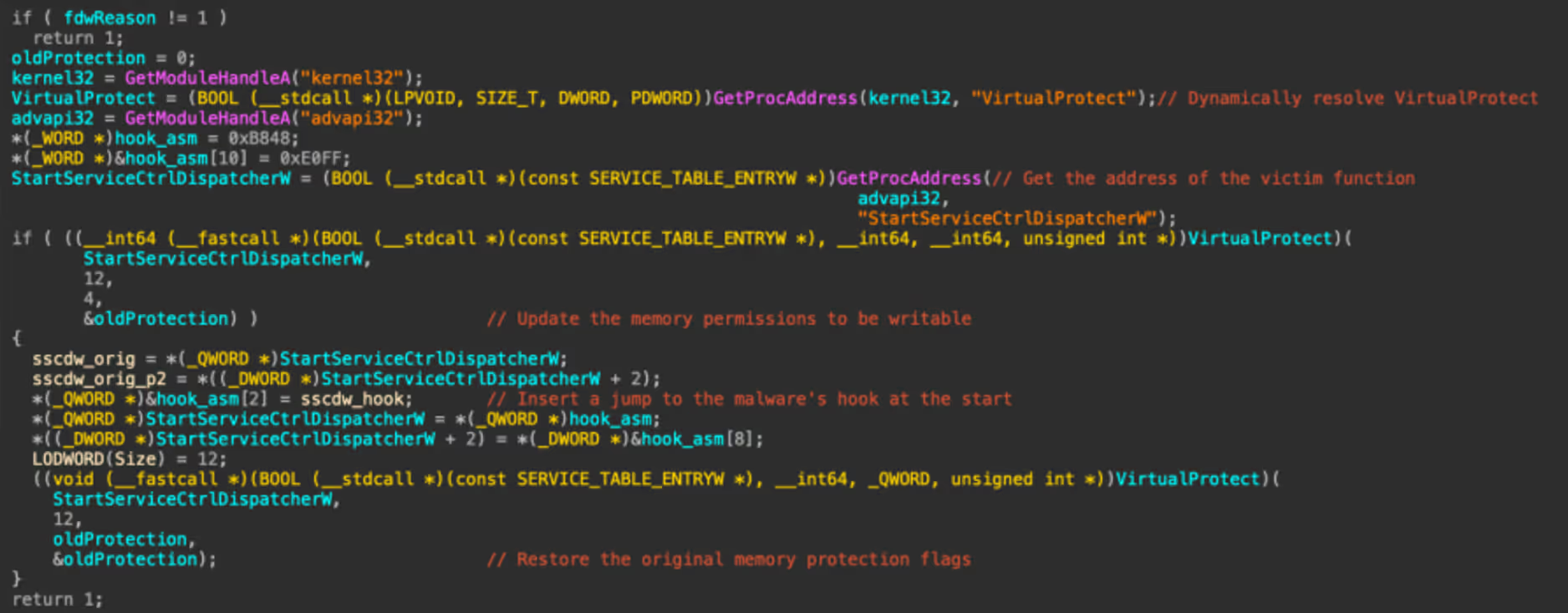
The DllMain function
Figure 1: The DllMain function

First, the function checks if the variable fdwReason is set to 1, and exits if it is not. This variable is set by Windows to indicate why the DLL was loaded. According to Microsoft Developer Network (MSDN), a value of 1 corresponds to DLL_PROCESS_ATTACH, meaning “The DLL is being loaded into the virtual address space of the current process as a result of the process starting up or as a result of a call to LoadLibrary” [3]. Since SnappyBee is known to use DLL sideloading for execution, DLL_PROCESS_ATTACH is the expected value when the legitimate executable loads the malicious DLL.

SnappyBee then uses the GetModule and GetProcAddress to dynamically resolve the address of the VirtualProtect in kernel32 and StartServiceCtrlDispatcherW in advapi32. Resolving these dynamically at runtime prevents them from showing up as a static import for the module, which can help evade detection by anti-malware solutions. Different regions of memory have different permissions to control what they can be used for, with the main ones being read, write, and execute. VirtualProtect is a function that changes the permissions of a given memory region.

SnappyBee then uses VirtualProtect to set the memory region containing the code for the StartServiceCtrlDispatcherW function as writable. It then inserts a jump instruction at the start of this function, redirecting the control flow to one of the SnappyBee DLL’s other functions, and then restores the old permissions.

In practice, this means when the legitimate executable calls StartServiceCtrlDispatcherW, it will immediately hand execution back to SnappyBee. Meanwhile, the call stack now appears more legitimate to outside observers such as antimalware solutions.

The hooked-in function then reads the data file that is shipped with SnappyBee and loads it into a new memory allocation. This pattern of loading the file into memory likely means it is responsible for unpacking the next stage.
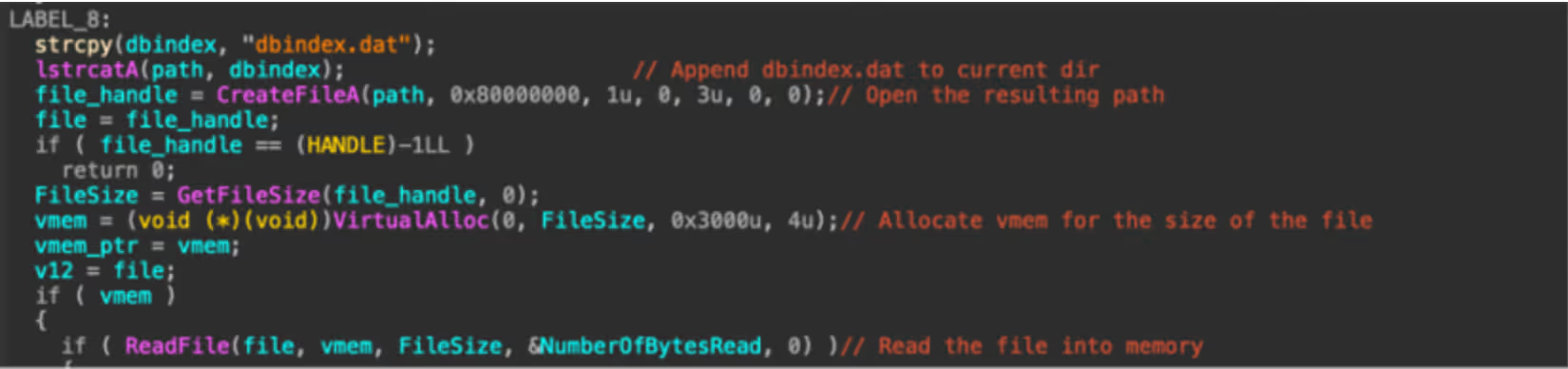
The start of the unpacking routine that reads in dbindex.dat.
Figure 2: The start of the unpacking routine that reads in dbindex.dat.

SnappyBee then proceeds to decrypt the memory allocation and execute the code.

The memory decryption routine.
Figure 3: The memory decryption routine.

This section may look complex, however it is fairly straight forward. Firstly, it uses memset to zero out a stack variable, which will be used to store the decryption key. It then uses the first 16 bytes of the data file as a decryption key to initialize the context from.

SnappyBee then calls the mbed_tls_arc4_crypt function, which is a function from the mbedtls library. Documentation for this function can be found online and can be referenced to better understand what each of the arguments mean [4].
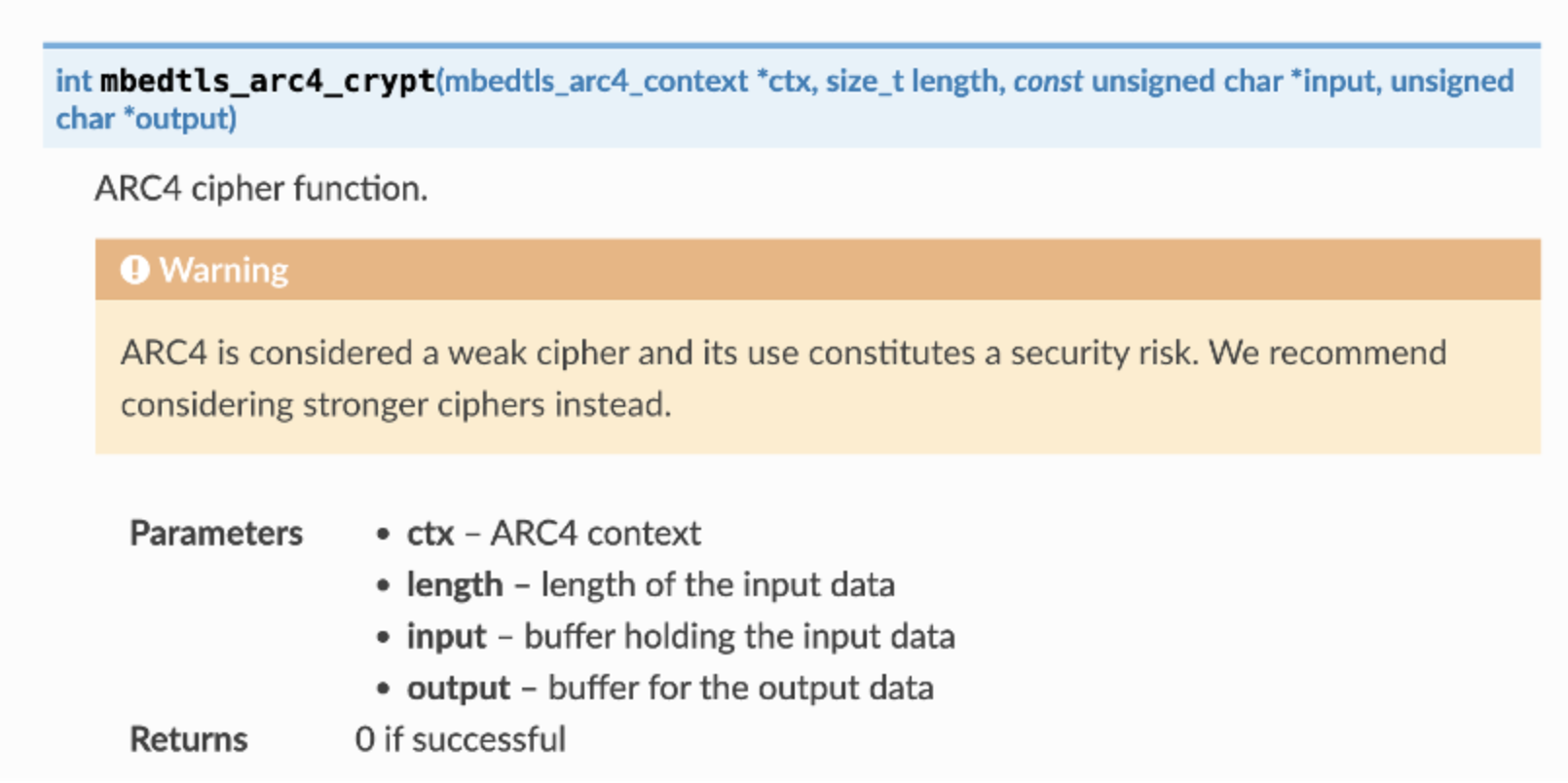
The documentation for mbedtls_arc4_crypt.
Figure 4: The documentation for mbedtls_arc4_ crypt.

Comparing the decompilation with the documentation, the arguments SnappyBee passes to the function can be decoded as:

  • The context derived from 16-byte key at the start of the data is passed in as the context in the first parameter
  • The file size minus 16 bytes (to account for the key at the start of the file) is the length of the data to be decrypted
  • A pointer to the file contents in memory, plus 16 bytes to skip the key, is used as the input
  • A pointer to a new memory allocation obtained from VirtualAlloc is used as the output

So, putting it all together, it can be concluded that SnappyBee uses the first 16 bytes as the key to decrypt the data that follows , writing the output into the allocated memory region.

SnappyBee then calls VirtualProtect to set the decrypted memory region as Read + Execute, and subsequently executes the code at the memory pointer. This is clearly where the unpacked code containing the next stage will be placed.

Unpacking the malware

Understanding how the unpacking routine works is the first step. The next step is obtaining the actual code, which cannot be achieved through static analysis alone.

There are two viable methods to retrieve the next stage. The first method is implementing the unpacking routine from scratch in a language like Python and running it against the data file.

This is straightforward in this case, as the unpacking routine in relatively simple and would not require much effort to re-implement. However, many unpacking routines are far more complex, which leads to the second method: allowing the malware to unpack itself by debugging it and then capturing the result. This is the approach many analysts take to unpacking, and the following will document this method to unpack SnappyBee.

As SnappyBee is 32-bit Windows malware, debugging can be performed using x86dbg in a Windows sandbox environment to debug SnappyBee. It is essential this sandbox is configured correctly, because any mistake during debugging could result in executing malicious code, which could have serious consequences.

Before debugging, it is necessary to disable the DYNAMIC_BASE flag on the DLL using a tool such as setdllcharacteristics. This will stop ASLR from randomizing the memory addresses each time the malware runs and ensures that it matches the addresses observed during static analysis.

The first place to set a breakpoint is DllMain, as this is the start of the malicious code and the logical place to pause before proceeding. Using IDA, the functions address can be determined; in this case, it is at offset 10002DB0. This can be used in the Goto (CTRL+G) dialog to jump to the offset and place a breakpoint. Note that the “Run to user code” button may need to be pressed if the DLL has not yet been loaded by x32dbg, as it spawns a small process to load the DLL as DLLs cannot be executed directly.

The program can then run until the breakpoint, at which point the program will pause and code recognizable from static analysis can be observed.
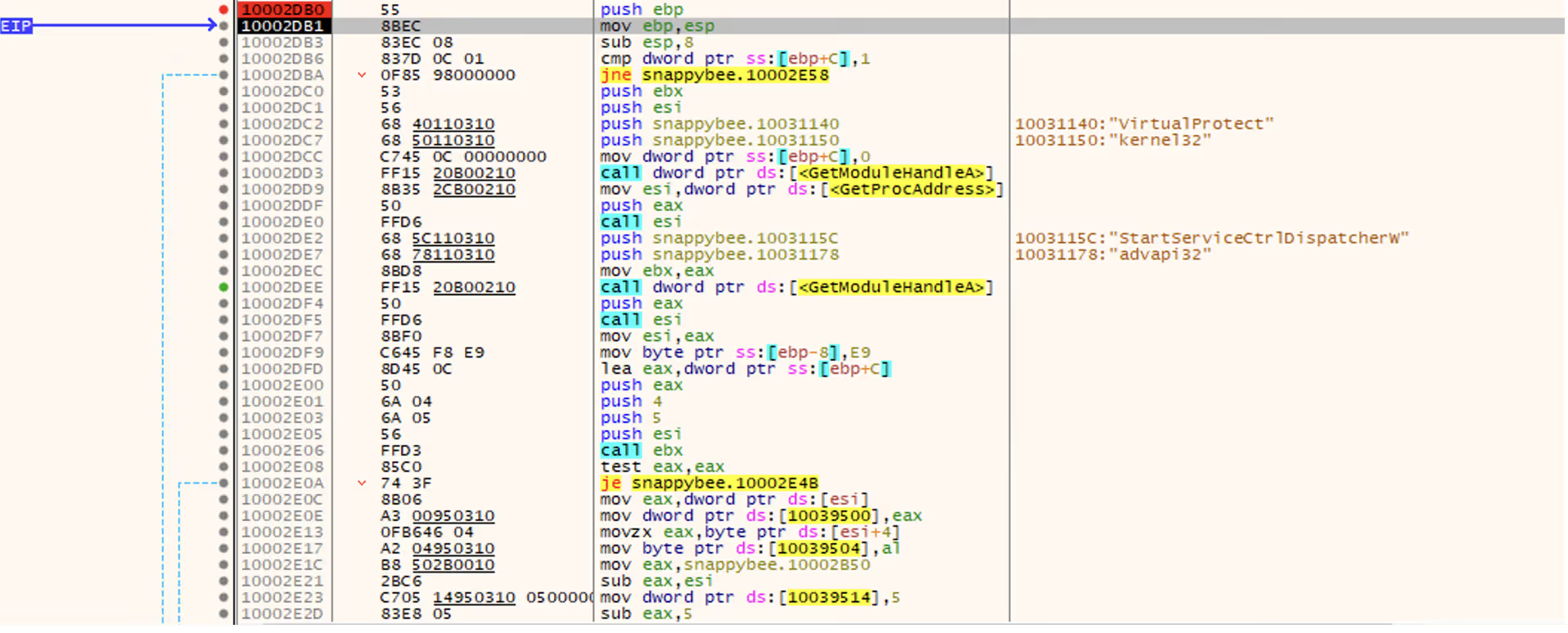
Figure 5: The x32dbg dissassembly listing forDllMain.

In the previous section, this function was noted as responsible for setting up a hook, and in the disassembly listing the hook address can be seen being loaded at offset 10002E1C. It is not necessary to go through the whole hooking process, because only the function that gets hooked in needs to be run. This function will not be naturally invoked as the DLL is being loaded directly rather than via sideloading as it expects. To work around this, the Extended Instruction Pointer (EIP) register can be manipulated to point to the start of the hook function instead, which will cause it to run instead of the DllMain function.

To update EIP, the CRTL+G dialog can again be used to jump to the hook function address (10002B50), and then the EIP register can be set to this address by right clicking the first instruction and selecting “Set EIP here”. This will make the hook function code run next.
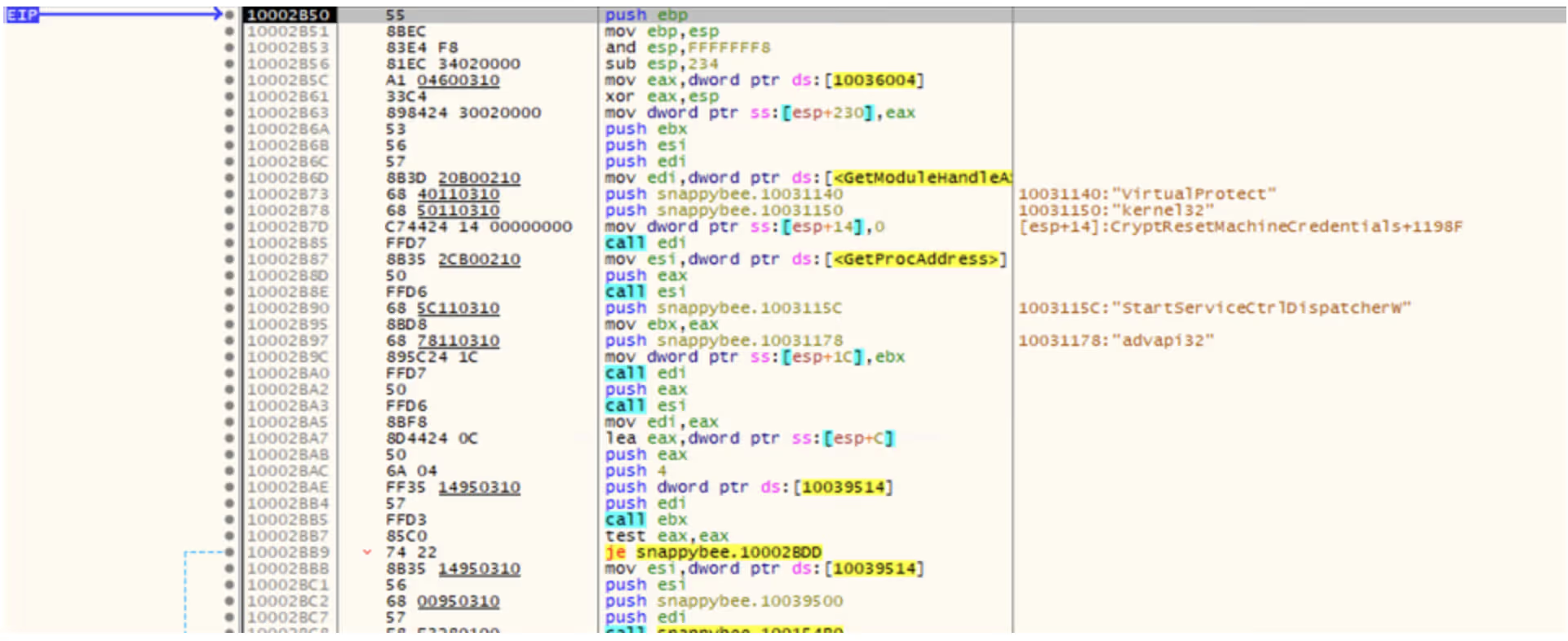
Figure 6: The start of the hookedin-in function

Once in this function, there are a few addresses where breakpoints should be set in order to inspect the state of the program at critical points in the unpacking process. These are:

-              10002C93, which allocates the memory for the data file and final code

-              10002D2D, which decrypts the memory

-              10002D81, which runs the unpacked code

Setting these can be done by pressing the dot next to the instruction listing, or via the CTRL+G Goto menu.

At the first breakpoint, the call to VirtualAlloc will be executed. The function returns the memory address of the created memory region, which is stored in the EAX register. In this case, the region was allocated at address 00700000.

Figure 7: The result of the VirtualAlloc call.

It is possible to right click the address and press “Follow in dump” to pin the contents of the memory to the lower pane, which makes it easy to monitor the region as the unpacking process continues.
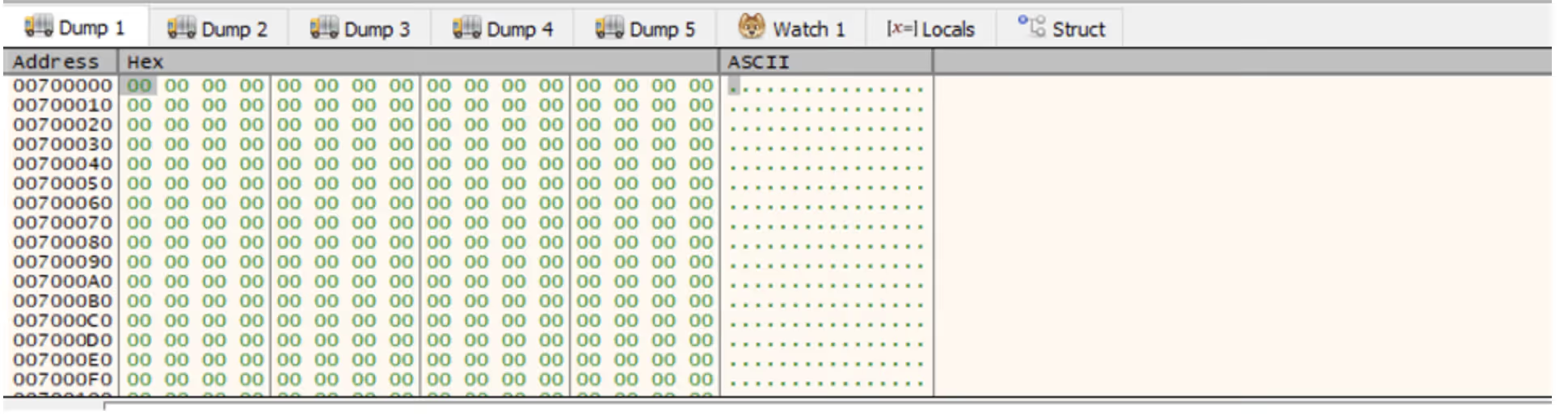
Figure 8: The allocated memory region shown in x32dbg’s dump.

Single-stepping through the application from this point eventually reaches the call to ReadFile, which loads the file into the memory region.

Figure 9: The allocated memory region after the file is read into it, showing high entropy data.

The program can then be allowed to run until the next breakpoint, which after single-stepping will execute the call to mbedtls_arc4_crypt to decrypt the memory. At this point, the data in the dump will have changed.
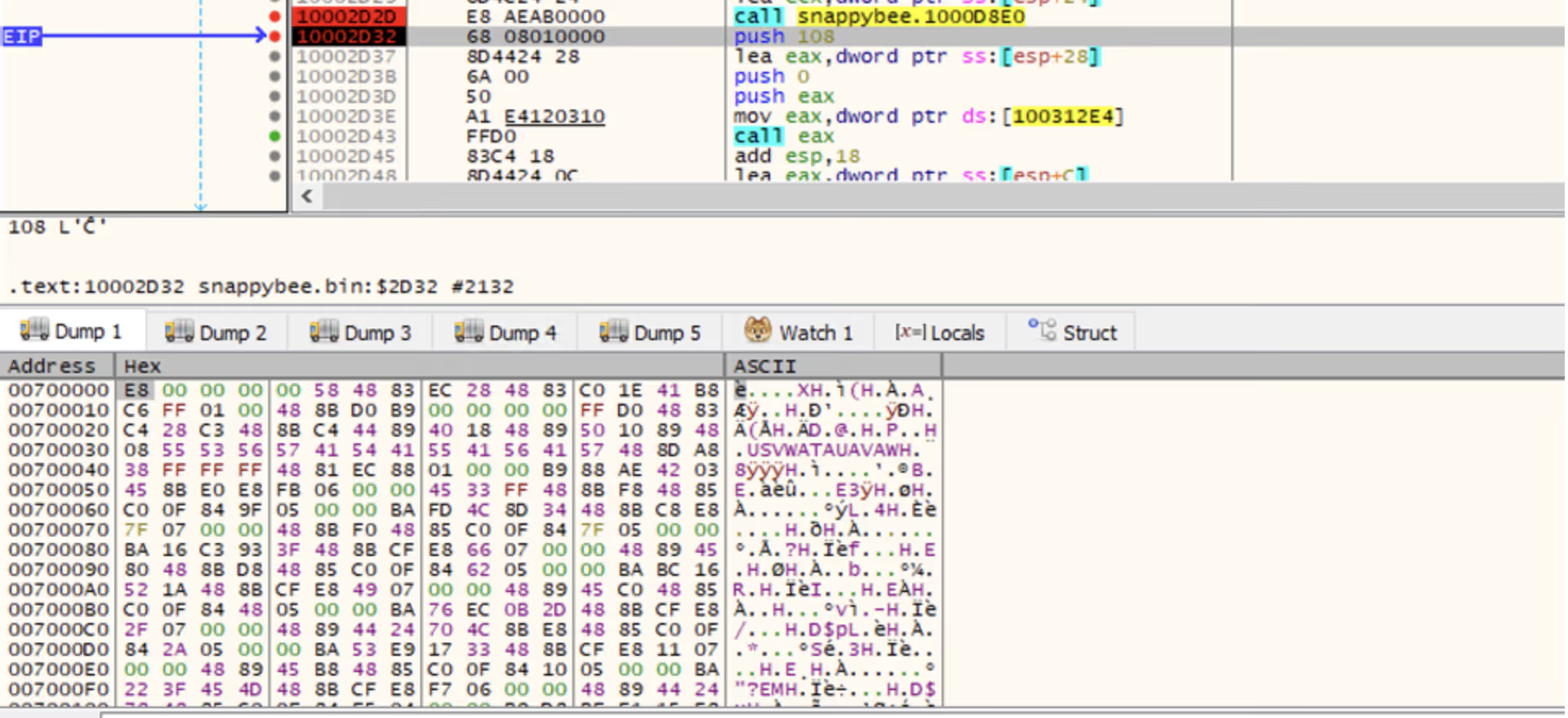
Figure 10: The same memory region after the decryption is run, showing lower entropy data.

Right-clicking in the dump and selecting "Disassembly” will disassemble the data. This yields valid shell code, indicating that the unpacking succeeded, whereas corrupt or random data would be expected if the unpacking had failed.
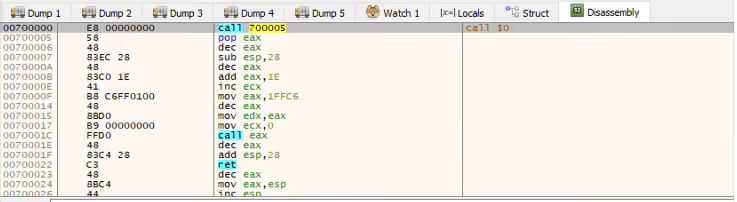
Figure 11: The disassembly view of the allocated memory.

Right-clicking and selecting “Follow in memory map” will show the memory allocation under the memory map view. Right-clicking this then provides an option to dump the entire memory block to file.

Figure 12: Saving the allocated memory region.

This dump can then be opened in IDA, enabling further static analysis of the shellcode. Reviewing the shellcode, it becomes clear that it performs another layer of unpacking.

As the debugger is already running, the sample can be allowed to execute up to the final breakpoint that was set on the call to the unpacked shellcode. Stepping into this call will then allow debugging of the new shellcode.

The simplest way to proceed is to single-step through the code, pausing on each call instruction to consider its purpose. Eventually, a call instruction that points to one of the memory regions that were assigned will be reached, which will contain the next layer of unpacked code. Using the same disassembly technique as before, it can be confirmed that this is more unpacked shellcode.
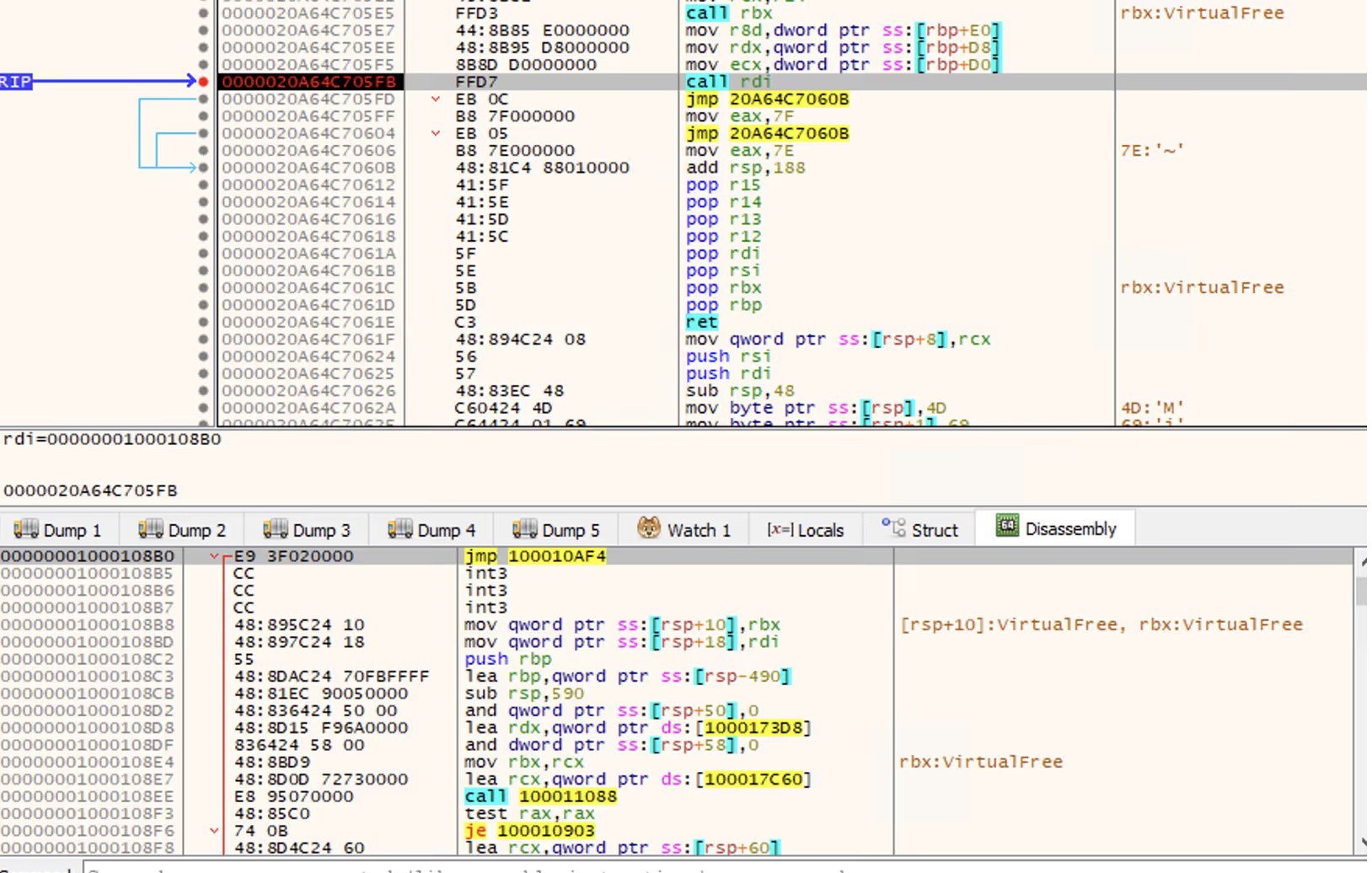
Figure 13: The unpacked shellcode’s call to RDI, which points to more unpacked shellcode. Note this screenshot depicts the 64-bit variant of SnappyBee instead of 32-bit, however the theory is the same.

Once again, this can be dumped out and analyzed further in IDA. In this case, it is the final payload used by the SnappyBee malware.

Conclusion

Unpacking remains one of the most common anti-analysis techniques and is a feature of most sophisticated malware from threat groups. This technique of in-memory decryption reduces the forensic “surface area” of the malware, helping it to evade detection from anti-malware solutions. This blog walks through one such example and provides practical knowledge on how to unpack malware for deeper analysis.

In addition, this blog has detailed several other techniques used by threat actors to evade analysis, such as DLL sideloading to execute code without arising suspicion, dynamic API resolving to bypass static heuristics, and multiple nested stages to make analysis challenging.

Malware such as SnappyBee demonstrates a continued shift towards highly modular and low-friction malware toolkits that can be reused across many intrusions and campaigns. It remains vital for security teams  to maintain the ability to combat the techniques seen in these toolkits when responding to infections.

While the technical details of these techniques are primarily important to analysts, the outcomes of this work directly affect how a Security Operations Centre (SOC) operates at scale. Without the technical capability to reliably unpack and observe these samples, organizations are forced to respond without the full picture.

The techniques demonstrated here help close that gap. This enables security teams to reduce dwell time by understanding the exact mechanisms of a sample earlier, improve detection quality with behavior-based indicators rather than relying on hash-based detections, and increase confidence in response decisions when determining impact.

Credit to Nathaniel Bill (Malware Research Engineer)
Edited by Ryan Traill (Analyst Content Lead)

Indicators of Compromise (IoCs)

SnappyBee Loader 1 - 25b9fdef3061c7dfea744830774ca0e289dba7c14be85f0d4695d382763b409b

SnappyBee Loader 2 - b2b617e62353a672626c13cc7ad81b27f23f91282aad7a3a0db471d84852a9ac          

SnappyBee Payload - 1a38303fb392ccc5a88d236b4f97ed404a89c1617f34b96ed826e7bb7257e296

References

[1] https://www.trendmicro.com/en_gb/research/24/k/earth-estries.html

[2] https://www.darktrace.com/blog/salty-much-darktraces-view-on-a-recent-salt-typhoon-intrusion

[3] https://learn.microsoft.com/en-us/windows/win32/dlls/dllmain#parameters

[4] https://mbed-tls.readthedocs.io/projects/api/en/v2.28.4/api/file/arc4_8h/#_CPPv418mbedtls_arc4_cryptP20mbedtls_arc4_context6size_tPKhPh

Inside the SOC
Darktrace cyber analysts are world-class experts in threat intelligence, threat hunting and incident response, and provide 24/7 SOC support to thousands of Darktrace customers around the globe. Inside the SOC is exclusively authored by these experts, providing analysis of cyber incidents and threat trends, based on real-world experience in the field.
Written by
Nathaniel Bill
Malware Research Engineer

More in this series

No items found.

Blog

/

Network

/

May 14, 2026

Chinese APT Campaign Targets Entities with Updated FDMTP Backdoor

Default blog imageDefault blog image

Darktrace have identified activity consistent with Chinese-nexus operations, a Twill Typhoon-linked campaign targeting customer environments, primarily within the Asia-Pacific & Japan (APJ) region

Beginning in late September 2025, multiple affected hosts were observed making requests to domains impersonating content delivery networks (CDNs), including infrastructure masquerading as Yahoo- and Apple-affiliated services. Across these cases, Darktrace identified a consistent behavioral execution pattern: the retrieval of legitimate binaries alongside malicious Dynamic Link Libraries (DLLs), enabling sideloading and execution of a modular .NET-based Remote Access Trojan (RAT) framework.

The activity aligns with patterns described in Darktrace’s previous Chinese-nexus operations report, Crimson Echo. In this case, observed modular intrusion chains built on legitimate software, and staged payload delivery. Threat actors retrieve legitimate binaries alongside configuration files and malicious DLLs to enable sideloading of a .NET-based RAT.

Observed Campaign

Across cases, the same ordered sequence appears: retrieval of a legitimate executable, (2) retrieval of a matching .config file, (3) retrieval of the malicious

DLL, (4) repeated DLL downloads over time, and (5) command-and-control (C2) communication. The .config file retrieves a malicious binary, while the legitimate binary provides a legitimate process to run it in.

Darktrace assesses with moderate confidence that this activity aligns with publicly reported Twill Typhoon tradecraft. The observed use of FDMTP, DLL sideloading, and overlapping infrastructure is consistent with previously observed operations, though not unique to a single actor. While initial access was not directly observed, previous Twill Typhoon campaigns have typically involved spear-phishing.

What Darktrace Observed

Since late September 2025, Darktrace has observed multiple customer environments making HTTP GET requests to infrastructure presenting as “CDN” endpoints for well-known platforms (including Yahoo and Apple lookalikes). Across cases, the affected hosts retrieved legitimate executables, then matching .config files (same base filename), then DLLs intended for sideloading. The sequencing of a legitimate binary + configuration + DLL  has been previously observed in campaigns linked to China-nexus threat actors.

In several cases, affected hosts also issued outbound requests to a /GetCluster endpoint, including the protocol=Dotnet-Tcpdmtp parameter. This activity was repeatedly followed by retrieval of DLL content that was subsequently used for search-order hijacking within legitimate processes.

In the September–October 2025 cases, Darktrace alerting commonly surfaced early-stage registration and C2 setup behaviors, followed by retrieval of a DLL (e.g., Client.dll) from the same external host, sometimes repeatedly over multiple days, consistent with establishing and maintaining the execution chain.

In April 2026, a finance-sector endpoint initiated a series of GET requests to yahoo-cdn[.]it[.]com, first fetching legitimate binaries (including vshost.exe and dfsvc.exe), then repeatedly retrieving associated configuration and DLL components (including dfsvc.exe.config and dnscfg.dll) over an 11-day window. The use of both Visual Studio hosting and OneClick (dfsvc.exe) paths are used to ensure the malware can run in the targeted environment.

Technical Analysis

Initial staging and execution

While the initial access method is unknown, Darktrace security researchers identified multiple archives containing the malware.

A representative example includes a ZIP archive (“test.zip”) containing:

  • A legitimate executable: biz_render.exe (Sogou Pinyin IME)
  • A malicious DLL: browser_host.dll

Contained within the zip archive named “test.zip” is the legitimate binary “biz_render.exe”, a popular Chinese Input Method Editor (IME) Sogou Pinyin.

Alongside the legitimate binary is a malicious DLL named “browser_host.dll”. As the legitimate binary loads a legitimate DLL named “browser_host.dll” via LoadLibraryExW, the malicious DLL has been named the same to sideload the malicious DLL into biz_render.exe. By supplying a malicious DLL with an identical name, the actor hijacks execution flow, enabling the payload to execute within a trusted process.

Figure 1: Biz_render.exe loading browser_host.dll.

The legitimate binary invokes the function GetBrowserManagerInstance from the sideloaded “browser_host.dll”, which then performs XOR-based decryption of embedded strings (key 0x90) to resolve and dynamically load mscoree.dll.

The DLL uses the Windows Common Language Runtime (CLR) to execute managed .NET code inside the process rather than relying solely on native binaries. During execution, the loader loads a payload directly into memory as .NET assemblies, enabling an in-memory execution.

C2 Registration

A GET request is made to:

GET /GetCluster?protocol=DotNet-TcpDmtp&tag={0}&uid={1}

with the custom header:

Verify_Token: Dmtp

This returns Base64-encoded and gzip-compressed IP addresses used for subsequent communication.

Figure 2: Decoded IPs.

Staged payload retrieval

Subsequent activity includes retrieval of multiple components from yahoo-cdn.it[.]com. The following GET requests are made:

/dfsvc.exe

/dnscfg.dll

/dfsvc.exe.config

/vhost.exe

/Microsoft.VisualStudio.HostingProcess.Utilities.Sync.dll

/config.etl

ClickOnce and AppDomain hijacking

Dfsvc.exe is the legitimate Windows ClickOnce Engine, part of the .NET framework used for updating ClickOnce Applications. Accompanying dfsvc.exe is a legitimate dfsvc.exe.config file that is used to store configuration data for the application. However, in this instance the malware has replaced the legitimate dfsvc.exe.config with the one retrieved from the server in: C:\Windows\Microsoft.NET\Framework64\v4.0.30319.

Additionally, vhost.exe the legitimate Visual Studio hosting process is retrieved from the server, along with “Microsoft.VisualStudio.HostingProcess.Utilities.Sync.dll” and “config.etl”. The DLL is used to decrypt the AES encrypted payload in config.etl and load it. The encrypted payload is dnscfg.dll, which can be loaded into vshost instead of dfsvc, and may be used if the environment does not support .NET.

Figure 3: ClickOnce configuration.

The malicious configuration disables logging, forces the application to load dnscfg.dll from the remote server, and uses a custom AppDomainManager to ensure the DLL is executed during initialization of dfsvc.exe. To ensure persistence, a scheduled task is added for %APPDATA%\Local\Microsoft\WindowsApps\dfsvc.exe.

Core payload

The DLL dnscfg.dll is a .NET binary named Client.TcpDmtp.dll. The payload is a heavily obfuscated backdoor that generates its logic at runtime and communicates with the command and control (C2) over custom TCP, DMTP (Duplex Message Transport Protocol) and appears to be an updated version of FDMTP to version 3.2.5.1

Figure 4: InitializeNewDomain.

The payload:

  • Uses cluster-based resolution (GetHostFromCluster)
  • Implements token validation
  • Enters a persistent execution loop (LoopMessage)
  • Supports structured remote tasking over DMTP

Once connected, the malware enters a persistent loop (LoopMessage), enabling it to receive commands from the remote server.

Figure 5: DMTP Connect function.

Rather than referencing values directly, they are retrieved through containers that are resolved at runtime. String values are stored in an encrypted byte array (_0) and decrypted by a custom XOR-based string decryption routine (dcsoft). The lower 16 bits of the provided key are XORed with 0xA61D (42525) to derive the initial XOR key, while subsequent bits define the string length and offset into the encrypted byte array. Each character is reconstructed from two encrypted bytes and XORed with the incrementing key value, producing the plaintext string used by the payload.

Figure 6: Decrypted strings.

Embedded in the resources section are multiple compressed binaries, the majority of which are library files. The only exceptions are client.core.dll and client.dmtpframe.dll.

Figure 7: Resources.

Modular framework and plugins

The payload embeds multiple compressed libraries, notably:

  • client.core.dll
  • client.dmtpframe.dll

Client.core.dll is a core library used for system profiling, C2 communication and plugin execution. The implant has the functionality to retrieve information including antivirus products, domain name, HWID, CLR version, administrator status, hardware details, network details, operating system, and user.

Figure 8: Client.Core.Info functions.

Additionally, the component is responsible for loading plugins, with support for both binary and JSON-based plugin execution. This allows plugins to receive commands and parameters in different formats depending on the task being performed.

The framework handles details such as plugin hashes, method names, task identifiers, caller tracking, and argument processing, allowing plugins to be executed consistently within the environment. In addition to execution management, the library also provides plugins with access to common runtime functionality such as logging, communication, and process handling.

Figure 9: Client.core functions.

client.dmtpframe.dll handles:

  • DMTP communication
  • Heartbeats and reconnection
  • Plugin persistence via registry:

HKCU\Software\Microsoft\IME\{id}

Client.dmtpframe.dll is built on the TouchSocket DMTP networking library and continues to manage the remote plugins. The DLL implements remote communication features including heartbeat maintenance, reconnection handling, RPC-style messaging, SSL support, and token-based verification. The DLL also has the ability to add plugins to the registry under HKCU/Software/Microsoft/IME/{id} for persistence.

Plugins observed

While the full set of plugins remains unknown, researchers were able to identify four plugins, including:

  • Persist.WpTask.dll - used to create, remove and trigger scheduled Windows tasks remotely.
  • Persist.registry.dll - used to manage registry persistence with the ability to create, and delete registry values, along with hidden persistence keys.
  • Persist.extra.dll - used to load and persist the main framework.
  • Assist.dll - used to remotely retrieve files or commands, as well as manipulate system processes.
Figure 10: Plugins stored in IME registry.
Figure 11: Obfuscated script in plugin resources.

Persist.extra.dll is a module that is used to load a script “setup.log” to load and persist the main framework. Stored within the resources section of the binary is an obfuscated script that creates a .NET COM object that is added to the registry key HKCU\Software\Classes\TypeLib\ {9E175B61-F52A-11D8-B9A5-505054503030} \1.0\1\Win64 for persistence. After deobfuscating this script, another DLL is revealed named “WindowsBase.dll”.

Figure 12: Registry entry for script.

The binary checks in with icloud-cdn[.]net every five minutes, retrieves a version string, downloads an encrypted payload named checksum.bin, saves it locally as C:\ProgramData\USOShared\Logs\checksum.etl, decrypts it with AES using the hardcoded key POt_L[Bsh0=+@0a., and loads the decrypted assembly directly from memory via Assembly.Load(byte[]). The version.txt file acts as an update marker so it only re-downloads when the remote version changes, while the mutex prevents duplicate instances.

Figure 13: USOShared/Logs.

Checksum.etl is decrypted with AES and loaded into memory, loading another .NET DLL named “Client.dll”. This binary is the same as “dnscfg.dll” mentioned at the start and allows the threat actors to update the main framework based on the version.

Conclusion

Across cases, Darktrace consistently observed the following sequence:

  • Retrieval of legitimate executables
  • Retrieval of DLLs for sideloading
  • C2 registration via /GetCluster

This approach is consistent with broader China-nexus tradecraft. As outlined in Darktrace’s Crimson Echo report, the stable feature of this activity is behavioral. Infrastructure rotates and payloads can change, but the execution model persists. For defenders, the implication is straightforward: detection anchored to individual indicators will degrade quickly. Detection anchored to a behavioral sequence offer a far more durable approach.

Credit to Tara Gould (Malware Research Lead), Adam Potter (Senior Cyber Analyst), Emma Foulger (Global Threat Research Operations Lead), Nathaniel Jones (VP, Security & AI Strategy)

Edited by Ryan Traill (Content Manager)


Appendices

A detailed list of detection models and triggered indicators is provided alongside IoCs.

Indicators of Compromise (IoCs)

Test.zip - fc3959ebd35286a82c662dc81ca658cb

Dnscfg.dll - b2c8f1402d336963478f4c5bc36c961a

Client.TcpDmtp.dll - c52b4a16d93a44376f0407f1c06e0b

Browser_host.dll - c17f39d25def01d5c87615388925f45a

Client.DmtpFrame.dll - 482cc72e01dfa54f30efe4fefde5422d

Persist.Extra - 162F69FE29EB7DE12B684E979A446131

Persist.Registry - 067FBAD4D6905D6E13FDC19964C1EA52

Assist - 2CD781AB63A00CE5302ED844CFBECC27

Persist.WpTask - DF3437C88866C060B00468055E6FA146

Microsoft.VisualStudio.HostingProcess.Utilities.Sync.dll - c650a624455c5222906b60aac7e57d48

www.icloud-cdn[.]net

www.yahoo-cdn.it[.]com

154.223.58[.]142[AP8] [EF9]

MITRE ATT&CK Techniques

T1106 – Native API

T1053.005 - Scheduled Task

T1546.16 - Component Object Model Hijacking

T1547.001 - Registry Run Keys

T1511.001 - Dynamic Link Library Injection

T1622 – Debugger Evasion

T1140 – Deobfuscate/Decode Files or Information

T1574.001 - Hijack Execution Flow: DLL

T1620 – Reflective Code Loading

T1082 – System Information Discovery

T1007 – System Service Discovery

T1030 – System Owner/User Discovery

T1071.001 - Web Protocols

T1027.007 - Dynamic API Resolution

T1095 – Non-Application Layer Protocol

Darktrace Model Alerts

·      Compromise / Beaconing Activity To External Rare

·      Compromise / HTTP Beaconing to Rare Destination

·      Anomalous File / Script from Rare External Location

·      Compromise / Sustained SSL or HTTP Increase

·      Compromise / Agent Beacon to New Endpoint

·      Anomalous File / EXE from Rare External Location

·      Anomalous File / Multiple EXE from Rare External Locations

·      Compromise / Quick and Regular Windows HTTP Beaconing

·      Compromise / High Volume of Connections with Beacon Score

·      Anomalous File / Anomalous Octet Stream (No User Agent)

·      Compromise / Repeating Connections Over 4 Days

·      Device / Large Number of Model Alerts

·      Anomalous Connection / Multiple Connections to New External TCP Port

·      Compromise / Large Number of Suspicious Failed Connections

·      Anomalous Connection / Multiple Failed Connections to Rare Endpoint

·      Device / Increased External Connectivity

Continue reading
About the author
Tara Gould
Malware Research Lead

Blog

/

/

May 12, 2026

Resilience at the Speed of AI: Defending the Modern Campus with Darktrace

Default blog imageDefault blog image

Why higher education is a different cybersecurity battlefield

After four decades in IT, now serving as both CIO and CISO, I’ve learned one simple truth: cybersecurity is never “done.” It’s a constant game of cat and mouse. Criminals evolve. Technologies advance. Regulations expand. But in higher education, the challenge is uniquely complex.

Unlike a bank or a military installation, we can’t lock down networks to a narrow set of approved applications. Higher education environments are open by design. Students collaborate globally, faculty conduct cutting-edge research, and administrators manage critical operations, all of which require seamless access to the internet, global networks, cloud platforms, and connected systems.

Combine that openness with expanding regulatory mandates and tight budgets, and the balancing act becomes clear.

Threat actors don’t operate under the same constraints. Often well-funded and sponsored by nation-states with significant resources, they’re increasingly organized, strategic, and innovative.

That sophistication shows up in the tactics we face every day, from social engineering and ransomware to AI-driven impersonation attacks. We’re dealing with massive volumes of data, countless signals, and a very small window between detection and damage.

No human team, no matter how talented or how numerous, can manually sift through that noise at the speed required.

Discovering a force multiplier

Nothing in cybersecurity is 100% foolproof. I never “set it and forget it.” But for institutions balancing rising threats and finite resources, the Darktrace ActiveAI Security Platform™ offers something incredibly valuable: peace of mind through speed and scale.

It closes the gap between detection and response in a way humans can’t possibly match. At the speed of light, it can quarantine, investigate, and contain anomalous activity.

I’ve purchased and deployed Darktrace three separate times at three different institutions because I’ve seen firsthand what it can do and what it enables teams like mine to achieve.

I first encountered Darktrace while serving as CIO for a large multi-campus college system. What caught my attention was Darktrace's Self-Learning AI, and its ability to learn what "normal" looked like across our network. Instead of relying solely on static signatures or rigid rules, Darktrace built a behavioral baseline unique to our environment and alerted us in real time when something simply didn’t look right.

In higher education, where strict lockdowns aren’t realistic, that behavioral model made all the difference. We deployed it across five campuses, and the impact was immediate. Operating 24/7, Darktrace surfaced threats in ways our team couldn’t replicate manually.

Over time, the Darktrace platform evolved alongside the changing threat landscape, expanding into intrusion prevention, cloud visibility, and email security. At subsequent institutions, including Washington College, Darktrace was one of my first strategic investments.

Revealing the hidden threat other tools missed

One of the most surprising investigations of my career involved a data leak. Leadership suspected sensitive information from high-level meetings was being exposed, but our traditional tools couldn’t provide any answers.

Using Darktrace’s deep network visibility, down to packet-level data, we traced unusual connections to our CCTV camera system, which had been configured with a manufacturer’s default password. A small group of employees had hacked into the CCTV cameras, accessed audio-enabled recordings from boardroom meetings, and stored copies locally.

No other tool in our environment could have surfaced those connections the way Darktrace did. It was a clear example of why using AI to deeply understand how your organization, systems, and tools normally behave, matters: threats and risks don’t always look the way we expect.

Elevating a D-rating into a A-level security program

When I arrived at my last CISO role, the institution had recently experienced a significant ransomware attack. Attackers located  data  which informed their setting  ransom demands to an amount they knew would likely result in payment. It was a sobering example of how calculated and strategic modern cybercriminals have become.

Third-party cyber ratings reflected that reality, with a  D rating.

To raise the bar, we implemented a comprehensive security program and integrated layered defenses; -deploying state of the art tools and methods-  across the environment, with Darktrace at its core.

After a 90-day learning period to establish our behavioral baseline, we transitioned the platform into fully autonomous mode. In a single 30-day span, Darktrace conducted more than 2,500 investigations and autonomously resolved 92% of all false positives.

For a small team, that’s transformative. Instead of drowning in alerts, my staff focused on less than  200 meaningful cases that warranted human review.

Today, we maintain a perfect A rating from third-party assessors and have remained cybersafe.

Peace of mind isn’t about complacency

The effect of Darktrace as a force multiplier has a real human impact.

With the time reclaimed through automation, we expanded community education programs and implemented simulated phishing exercises. Through sustained training and awareness efforts, we reduced social engineering susceptibility from nearly 45% to under 5%.

On a personal level, Darktrace allows me to sleep better at night and take time off knowing we have intelligent systems monitoring and responding around the clock. For any CIO or CISO carrying institutional risk on their shoulders, that matters.

The next era: AI vs. AI

A new chapter in cybersecurity is unfolding as adversaries leverage AI to enhance scale, speed, and believability. Phishing campaigns are more personalized, impersonation attempts are more precise, and deepfake video technology, including live video, is disturbingly authentic. At the same time, organizations are rapidly adopting AI across their own environments —from GenAI assistants to embedded tools to autonomous agents. These systems don’t operate within fixed rules. They act across email, cloud, SaaS, and identity systems, often with broad permissions, and their behavior can evolve over time in ways that are difficult to predict or control.

That creates a new kind of security challenge. It’s not just about defending against AI-powered threats but understanding and governing how AI behaves within your environment, including what it can access, how it acts, and where risk begins to emerge.

From my perspective, this is a natural next step for Darktrace.

Darktrace brings a level of maturity and behavioral understanding uniquely suited to the complexity of AI environments. Self-Learning AI learns the normal patterns of each business to interpret context, uncover subtle intent, and detect meaningful deviations without relying on predefined rules or signatures. Extending into securing AI by bringing real-time visibility and control to GenAI assistants, AI agents, development environments and Shadow AI, feels like the logical evolution of what Darktrace already does so well.

Just as importantly, Darktrace is already built for dynamic, cross-domain environments where risk doesn’t sit in a single tool or control plane. In higher education, activity already spans multiple systems and, with AI, that interconnection only accelerates.

Having deployed Darktrace multiple times, I have confidence it’s uniquely positioned to lead in this space and help organizations adopt AI with greater visibility and control.

---

Since authoring this blog, Irving Bruckstein has transitioned to the role of Chief Executive Officer of the Cyberaigroup.

Continue reading
About the author
Irving Bruckstein
CEO CyberAIgroup
Your data. Our AI.
Elevate your network security with Darktrace AI