Blog
/
Identity
/
December 15, 2023

How Darktrace Halted A DarkGate in MS Teams

Discover how Darktrace thwarted DarkGate malware in Microsoft Teams. Stay informed on the latest cybersecurity measures and protect your business.
Inside the SOC
Darktrace cyber analysts are world-class experts in threat intelligence, threat hunting and incident response, and provide 24/7 SOC support to thousands of Darktrace customers around the globe. Inside the SOC is exclusively authored by these experts, providing analysis of cyber incidents and threat trends, based on real-world experience in the field.
Written by
Natalia Sánchez Rocafort
Cyber Security Analyst
Default blog image
15
Dec 2023

Securing Microsoft Teams and SharePoint

Given the prevalence of the Microsoft Teams and Microsoft SharePoint platforms in the workplace in recent years, it is essential that organizations stay vigilant to the threat posed by applications vital to hybrid and remote work and prioritize the security and cyber hygiene of these services. For just as the use of these platforms has increased exponentially with the rise of remote and hybrid working, so too has the malicious use of them to deliver malware to unassuming users.

Researchers across the threat landscape have begun to observe these legitimate services being leveraged by malicious actors as an initial access method. Microsoft Teams can easily be exploited to send targeted phishing messages to individuals within an organization, while appearing legitimate and safe. Although the exact contents of these messages may vary, the messages frequently use social engineering techniques to lure users to click on a SharePoint link embedded into the message. Interacting with the malicious link will then download a payload [1].

Darktrace observed one such malicious attempt to use Microsoft Teams and SharePoint in September 2023, when a device was observed downloading DarkGate, a commercial trojan that is known to deploy other strains of malware, also referred to as a commodity loader [2], after clicking on SharePoint link. Fortunately for the customer, Darktrace’s suite of products was perfectly poised to identify the initial signs of suspicious activity and Darktrace RESPOND™ was able to immediately halt the advancement of the attack.

DarkGate Attack Overview

On September 8, 2023, Darktrace DETECT™ observed around 30 internal devices on a customer network making unusual SSL connections to an external SharePoint site which contained the name of a person, 'XXXXXXXX-my.sharepoint[.]com' (107.136[.]8, 13.107.138[.]8). The organization did not have any employees who went by this name and prior to this activity, no internal devices had been seen contacting the endpoint.

At first glance, this initial attack vector would have appeared subtle and seemingly trustworthy to users. Malicious actors likely sent various users a phishing message via Microsoft Teams that contained the spoofed SharePoint link to the personalized SharePoint link ''XXXXXXXX-my.sharepoint[.]com'.

Figure 1: Advanced Search query showing a sudden spike in connections to ''XXXXXXXX -my.sharepoint[.]com'.

Darktrace observed around 10 devices downloading approximately 1 MB of data during their connections to the Sharepoint endpoint. Darktrace DETECT observed some of the devices making subsequent HTTP GET requests to a range of anomalous URIs. The devices utilized multiple user-agents for these connections, including ‘curl’, a command line tool that allows individuals to request and transfer data from a specific URL. The connections were made to the IP 5.188.87[.]58, an endpoint that has been flagged as an indicator of compromise (IoC) for DarkGate malware by multiple open-source intelligence (OSINT) sources [3], commonly associated with HTTP GET requests:

  1. GET request over port 2351 with the User-Agent header 'Mozilla/4.0 (compatible; Win32; WinHttp.WinHttpRequest.5)' and the target URI '/bfyxraav' to 5.188.87[.]58
  2. GET request over port 2351 with the user-agent header 'curl' and the target URI '/' to 5.188.87[.]58
  3. GET request over port 2351 with the user-agent header 'curl/8.0.1' and the target URI '/msibfyxraav' to 5.188.87[.]58

The HTTP GET requests made with the user-agent header 'curl' and the target URI '/' to 5.188.87[.]58 were responded to with a filename called 'Autoit3.exe'. The other requests received script files with names ending in '.au3, such as 'xkwtvq.au3', 'otxynh.au3', and 'dcthbq.au3'. DarkGate malware has been known to make use of legitimate AutoIt files, and typically runs multiple AutoIt scripts (‘.au3’) [4].

Following these unusual file downloads, the devices proceeded to make hundreds of HTTP POST requests to the target URI '/' using the user-agent header 'Mozilla/4.0 (compatible; Synapse)' to 5.188.87[.]58. The contents of these requests, along with the contents of the responses, appear to be heavily obfuscated.

Figure 2: Example of obfuscated response, as shown in a packet capture downloaded from Darktrace.

While Microsoft’s Safe Attachments and Safe Links settings were unable to detect this camouflaged malicious activity, Darktrace DETECT observed the unusual over-the-network connectivity that occurred. While Darktrace DETECT identified multiple internal devices engaging in this anomalous behavior throughout the course of the compromise, the activity observed on one device in particular best showcases the overall kill chain of this attack.

The device in question was observed using two different user agents (curl/8.0.1 and Mozilla/4.0 (compatible; Win32; WinHttp.WinHttpRequest.5)) when connecting to the endpoint 5.188.87[.]58 and target URI ‘/bfyxraav’. Additionally, Darktrace DETECT recognized that it was unusual for this device to be making these HTTP connections via destination port 2351.

As a result, Darktrace’s Cyber AI Analyst™ launched an autonomous investigation into the suspicious activity and was able to connect the unusual external connections together, viewing them as one beaconing incident as opposed to isolated series of connections.

Figure 3: Cyber AI Analyst investigation summarizing the unusual repeated connections made to 5.188.87[.]58 via destination port 2351.

Darktrace then observed the device downloading the ‘Autoit3.exe’ file. Darktrace RESPOND took swift mitigative action by blocking similar connections to this endpoint, preventing the device from downloading any additional suspicious files.

Figure 4: Suspicious ‘Autoit3.exe’ downloaded by the source device from the malicious external endpoint.

Just one millisecond later, Darktrace observed the device making suspicious HTTP GET requests to URIs including ‘/msibfyxraav’. Darktrace recognized that the device had carried out several suspicious actions within a relatively short period of time, breaching multiple DETECT models, indicating that it may have been compromised. As a result, RESPOND took action against the offending device by preventing it from communicating externally [blocking all outbound connections] for a period of one hour, allowing the customer’s security team precious time to address the issue.

It should be noted that, at this point, had the customer subscribed to Darktrace’s Proactive Threat Notification (PTN) service, the Darktrace Security Operations Center (SOC) would have investigated these incidents in greater detail, and likely would have sent a notification directly to the customer to inform them of the suspicious activity.

Additionally, AI Analyst collated various distinct events and suggested that these stages were linked as part of an attack. This type of augmented understanding of events calculated at machine speed is extremely valuable since it likely would have taken a human analyst hours to link all the facets of the incident together.  

Figure 5: AI Analyst investigation showcasing the use of the ‘curl’ user agent to connect to the target URI ‘/msibfyxraav’.
Figure 6: Darktrace RESPOND moved to mitigate any following connections by blocking all outgoing traffic for 1 hour.

Following this, an automated investigation was launched by Microsoft Defender for Endpoint. Darktrace is designed to coordinate with multiple third-party security tools, allowing for information on ongoing incidents to be seamlessly exchanged between Darktrace and other security tools. In this instance, Microsoft Defender identified a ‘low severity’ incident on the device, this automatically triggered a corresponding alert within DETECT, presented on the Darktrace Threat Visuallizer.

The described activity occurred within milliseconds. At each step of the attack, Darktrace RESPOND took action either by enforcing expected patterns of life [normality] on the affected device, blocking connections to suspicious endpoints for a specified amount of time, and/or blocking all outgoing traffic from the device. All the relevant activity was detected and promptly stopped for this device, and other compromised devices, thus containing the compromise and providing the security team invaluable remediation time.

Figure 7: Overview of the compromise activity, all of which took place within a matter of miliseconds.

Darktrace identified similar activity on other devices in this customer’s network, as well as across Darktrace’s fleet around the same time in early September.

On a different customer environment, Darktrace DETECT observed more than 25 ‘.au3’ files being downloaded; this activity can be seen in Figure 9.

Figure 8: High volume of file downloads following GET request and 'curl' commands.

Figure 9 provides more details of this activity, including the source and destination IP addresses (5.188.87[.]58), the destination port, the HTTP method used and the MIME/content-type of the file

Figure 9: Additional information of the anomalous connections.

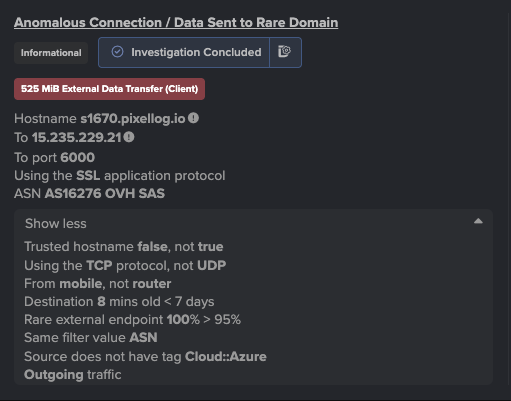
A compromised server in another customer deployment was seen establishing unusual connections to the external IP address 80.66.88[.]145 – an endpoint that has been associated with DarkGate by OSINT sources [5]. This activity was identified by Darktrace/DETECT as a new connection for the device via an unusual destination port, 2840. As the device in question was a critical server, Darktrace DETECT treated it with suspicion and generated an ‘Anomalous External Activity from Critical Network Device’ model breach.  

Figure 10: Model breach and model breach event log for suspicious connections to additional endpoint.

Conclusion

While Microsoft Teams and SharePoint are extremely prominent tools that are essential to the business operations of many organizations, they can also be used to compromise via living off the land, even at initial intrusion. Any Microsoft Teams user within a corporate setting could be targeted by a malicious actor, as such SharePoint links from unknown senders should always be treated with caution and should not automatically be considered as secure or legitimate, even when operating within legitimate Microsoft infrastructure.

Malicious actors can leverage these commonly used platforms as a means to carry out their cyber-attacks, therefore organizations must take appropriate measures to protect and secure their digital environments. As demonstrated here, threat actors can attempt to deploy malware, like DarkGate, by targeting users with spoofed Microsoft Teams messages. By masking malicious links as legitimate SharePoint links, these attempts can easily convince targets and bypass traditional security tools and even Microsoft’s own Safe Links and Safe Attachments security capabilities.

When the chain of events of an attack escalates within milliseconds, organizations must rely on AI-driven tools that can quickly identify and automatically respond to suspicious events without latency. As such, the value of Darktrace DETECT and Darktrace RESPOND cannot be overstated. Given the efficacy and efficiency of Darktrace’s detection and autonomous response capabilities, a more severe network compromise in the form of the DarkGate commodity loader was ultimately averted.

Credit to Natalia Sánchez Rocafort, Cyber Security Analyst, Zoe Tilsiter.

Appendices

Darktrace DETECT Model Detections

  • [Model Breach: Device / Initial Breach Chain Compromise 100% –– Breach URI: /#modelbreach/114039 ] (Enhanced Monitoring)·      [Model Breach: Device / Initial Breach Chain Compromise 100% –– Breach URI: /#modelbreach/114124 ] (Enhanced Monitoring)
  • [Model Breach: Device / New User Agent and New IP 62% –– Breach URI: /#modelbreach/114030 ]
  • [Model Breach: Anomalous Connection / Application Protocol on Uncommon Port 46% –– Breach URI: /#modelbreach/114031 ]
  • [Model Breach: Anomalous Connection / New User Agent to IP Without Hostname 62% –– Breach URI: /#modelbreach/114032 ]
  • [Model Breach: Device / New User Agent 32% –– Breach URI: /#modelbreach/114035 ]
  • [Model Breach: Device / Three Or More New User Agents 31% –– Breach URI: /#modelbreach/114036 ]
  • [Model Breach: Anomalous Server Activity / Anomalous External Activity from Critical Network Device 62% –– Breach URI: /#modelbreach/612173 ]
  • [Model Breach: Anomalous File / EXE from Rare External Location 61% –– Breach URI: /#modelbreach/114037 ]
  • [Model Breach: Anomalous Connection / Multiple Connections to New External TCP Port 61% –– Breach URI: /#modelbreach/114042 ]
  • [Model Breach: Security Integration / Integration Ransomware Detected 100% –– Breach URI: /#modelbreach/114049 ]
  • [Model Breach: Compromise / Beaconing Activity To External Rare 62% –– Breach URI: /#modelbreach/114059 ]
  • [Model Breach: Compromise / HTTP Beaconing to New Endpoint 30% –– Breach URI: /#modelbreach/114067 ]
  • [Model Breach: Security Integration / C2 Activity and Integration Detection 100% –– Breach URI: /#modelbreach/114069 ]
  • [Model Breach: Anomalous File / EXE from Rare External Location 55% –– Breach URI: /#modelbreach/114077 ]
  • [Model Breach: Compromise / High Volume of Connections with Beacon Score 66% –– Breach URI: /#modelbreach/114260 ]
  • [Model Breach: Security Integration / Low Severity Integration Detection 59% –– Breach URI: /#modelbreach/114293 ]
  • [Model Breach: Security Integration / Low Severity Integration Detection 33% –– Breach URI: /#modelbreach/114462 ]
  • [Model Breach: Security Integration / Integration Ransomware Detected 100% –– Breach URI: /#modelbreach/114109 ]·      [Model Breach: Device / Three Or More New User Agents 31% –– Breach URI: /#modelbreach/114118 ]·      [Model Breach: Anomalous Connection / Application Protocol on Uncommon Port 46% –– Breach URI: /#modelbreach/114113 ] ·      [Model Breach: Anomalous Connection / New User Agent to IP Without Hostname 62% –– Breach URI: /#modelbreach/114114 ]·      [Model Breach: Device / New User Agent 32% –– Breach URI: /#modelbreach/114117 ]·      [Model Breach: Anomalous File / EXE from Rare External Location 61% –– Breach URI: /#modelbreach/114122 ]·      [Model Breach: Security Integration / Low Severity Integration Detection 54% –– Breach URI: /#modelbreach/114310 ]
  • [Model Breach: Security Integration / Integration Ransomware Detected 65% –– Breach URI: /#modelbreach/114662 ]Darktrace/Respond Model Breaches
  • [Model Breach: Antigena / Network::External Threat::Antigena Suspicious File Block 61% –– Breach URI: /#modelbreach/114033 ]
  • [Model Breach: Antigena / Network::External Threat::Antigena File then New Outbound Block 100% –– Breach URI: /#modelbreach/114038 ]
  • [Model Breach: Antigena / Network::Significant Anomaly::Antigena Enhanced Monitoring from Client Block 100% –– Breach URI: /#modelbreach/114040 ]
  • [Model Breach: Antigena / Network::Significant Anomaly::Antigena Significant Anomaly from Client Block 87% –– Breach URI: /#modelbreach/114041 ]
  • [Model Breach: Antigena / Network::Significant Anomaly::Antigena Controlled and Model Breach 87% –– Breach URI: /#modelbreach/114043 ]
  • [Model Breach: Antigena / Network::External Threat::Antigena Ransomware Block 100% –– Breach URI: /#modelbreach/114052 ]
  • [Model Breach: Antigena / Network::Significant Anomaly::Antigena Significant Security Integration and Network Activity Block 87% –– Breach URI: /#modelbreach/114070 ]
  • [Model Breach: Antigena / Network::Significant Anomaly::Antigena Breaches Over Time Block 87% –– Breach URI: /#modelbreach/114071 ]
  • [Model Breach: Antigena / Network::External Threat::Antigena Suspicious Activity Block 87% –– Breach URI: /#modelbreach/114072 ]
  • [Model Breach: Antigena / Network::External Threat::Antigena Suspicious File Block 53% –– Breach URI: /#modelbreach/114079 ]
  • [Model Breach: Antigena / Network::Significant Anomaly::Antigena Breaches Over Time Block 64% –– Breach URI: /#modelbreach/114539 ]
  • [Model Breach: Antigena / Network::External Threat::Antigena Ransomware Block 66% –– Breach URI: /#modelbreach/114667 ]
  • [Model Breach: Antigena / Network::External Threat::Antigena Suspicious Activity Block 79% –– Breach URI: /#modelbreach/114684 ]·      
  • [Model Breach: Antigena / Network::External Threat::Antigena Ransomware Block 100% –– Breach URI: /#modelbreach/114110 ]·      
  • [Model Breach: Antigena / Network::Significant Anomaly::Antigena Significant Anomaly from Client Block 87% –– Breach URI: /#modelbreach/114111 ]·      
  • [Model Breach: Antigena / Network::Significant Anomaly::Antigena Controlled and Model Breach 87% –– Breach URI: /#modelbreach/114115 ]·      
  • [Model Breach: Antigena / Network::Significant Anomaly::Antigena Breaches Over Time Block 87% –– Breach URI: /#modelbreach/114116 ]·      
  • [Model Breach: Antigena / Network::External Threat::Antigena Suspicious File Block 61% –– Breach URI: /#modelbreach/114121 ]·      
  • [Model Breach: Antigena / Network::External Threat::Antigena File then New Outbound Block 100% –– Breach URI: /#modelbreach/114123 ]·      
  • [Model Breach: Antigena / Network::Significant Anomaly::Antigena Enhanced Monitoring from Client Block 100% –– Breach URI: /#modelbreach/114125 ]

List of IoCs

IoC - Type - Description + Confidence

5.188.87[.]58 - IP address - C2 endpoint

80.66.88[.]145 - IP address - C2 endpoint

/bfyxraav - URI - Possible C2 endpoint URI

/msibfyxraav - URI - Possible C2 endpoint URI

Mozilla/4.0 (compatible; Win32; WinHttp.WinHttpRequest.5) - User agent - Probable user agent leveraged

curl - User agent - Probable user agent leveraged

curl/8.0.1 - User agent - Probable user agent leveraged

Mozilla/4.0 (compatible; Synapse) - User agent - Probable user agent leveraged

Autoit3.exe - Filename - Exe file

CvUYLoTv.au3    

eDVeqcCe.au3

FeLlcFRS.au3

FTEZlGhe.au3

HOrzcEWV.au3

rKlArXHH.au3

SjadeWUz.au3

ZgOLxJQy.au3

zSrxhagw.au3

ALOXitYE.au3

DKRcfZfV.au3

gQZVKzek.au3

JZrvmJXK.au3

kLECCtMw.au3

LEXCjXKl.au3

luqWdAzF.au3

mUBNrGpv.au3

OoCdHeJT.au3

PcEJXfIl.au3

ssElzrDV.au3

TcBwRRnp.au3

TFvAUIgu.au3

xkwtvq.au3

otxynh.au3

dcthbq.au3 - Filenames - Possible exe files delivered in response to curl/8.0.1 GET requests with Target URI '/msibfyxraav

f3a0a85fe2ea4a00b3710ef4833b07a5d766702b263fda88101e0cb804d8c699 - SHA256 file hash - Possible SHA256 hashes of 'Autoit3.exe' files

afa3feea5964846cd436b978faa7d31938e666288ffaa75d6ba75bfe6c12bf61 - SHA256 file hash - Possible SHA256 hashes of 'Autoit3.exe' files

63aeac3b007436fa8b7ea25298362330423b80a4cb9269fd2c3e6ab1b1289208 - SHA256 file hash - Possible SHA256 hashes of 'Autoit3.exe' files

ab6704e836a51555ec32d1ff009a79692fa2d11205f9b4962121bda88ba55486 - SHA256 file hash - Possible SHA256 hashes of 'Autoit3.exe' files

References

1. https://www.truesec.com/hub/blog/darkgate-loader-delivered-via-teams

2. https://feedit.cz/wp-content/uploads/2023/03/YiR2022_onepager_ransomware_loaders.pdf

3. https://www.virustotal.com/gui/ip-address/5.188.87[.]58

4. https://www.forescout.com/resources/darkgate-loader-malspam-campaign/

5. https://otx.alienvault.com/indicator/ip/80.66.88[.]145

Inside the SOC
Darktrace cyber analysts are world-class experts in threat intelligence, threat hunting and incident response, and provide 24/7 SOC support to thousands of Darktrace customers around the globe. Inside the SOC is exclusively authored by these experts, providing analysis of cyber incidents and threat trends, based on real-world experience in the field.
Written by
Natalia Sánchez Rocafort
Cyber Security Analyst

More in this series

No items found.

Blog

/

Compliance

/

May 26, 2026

The CIP-015 Countdown: What Utilities Should Be Doing Before October 2028

cip-015, utilities, cybersecurityDefault blog imageDefault blog image

CIP-015 what you need to know

The electric sector already knows CIP-015 is coming. The better question is whether utilities are using the time before October 1, 2028 to build an Internal Network Security Monitoring program that is defensible, auditable, and operationally useful.

I have spent most of my OT cybersecurity career around the power sector, from early NERC CIP program work as an asset owner, to consulting with utilities ranging from small municipalities and rural cooperatives to some of the largest power companies in the country, to now working with technology that helps organizations improve visibility and detection across IT and OT. One lesson has been consistent across all of those roles: compliance is not just about having a control in place. It is about being able to prove the control works.

That is where CIP-015 becomes important.

The standard is not simply asking utilities to deploy a tool inside the Electronic Security Perimeter and call the job done. CIP-015 is about improving the probability of detecting anomalous or unauthorized network activity so that organizations can improve response and recovery from an attack. That purpose is directly stated in the standard itself. (NERC)

The real work between now and October 2028 is not just buying technology. It is building an INSM capability that can collect the right data, detect meaningful activity, support evaluation, retain the right evidence, and protect that evidence from unauthorized deletion or modification.

Why CIP-015 exists

CIP-015 exists because perimeter security alone does not solve the internal visibility problem.

For years, many CIP controls have focused heavily on access management, segmentation, patching, logging, training, and other security practices that help reduce the likelihood of unauthorized access. Those controls still matter. But they do not fully answer what happens after an attacker, insider, compromised vendor account, misused credential, or malicious activity is already operating inside a trusted environment.

NERC’s technical rationale explains that Internal Network Security Monitoring focuses on the collection and analysis of network communications inside a “trust zone,” such as an ESP. In other words, CIP-015 is not only about defending the edge. It is about understanding what is happening inside the environment once traffic is already within the trusted zone. (NERC)

That is the internal visibility gap utilities need to close.

Why traditional security monitoring does not fully satisfy CIP-015

One mistake utilities should avoid is assuming that existing security event monitoring automatically solves CIP-015.

Many organizations already have logging programs tied to CIP-007, SIEM use cases, host-level security events, authentication logs, malware alerts, and incident response workflows. Those capabilities remain valuable, but they are not the same as Internal Network Security Monitoring.

Security event monitoring often tells you what happened on or to a system. INSM is intended to help show what is happening between systems, across network communications, devices, connections, and internal traffic patterns. That distinction is especially important in OT environments where adversaries may use legitimate pathways, valid credentials, native protocols, remote access, engineering workstations, or trusted systems to move inside the environment.

CIP-015 pushes utilities toward a different level of visibility: not just “did a system log something,” but “can we see and evaluate anomalous or unauthorized activity occurring inside the ESP?”

What CIP-015 requires

At a high level, CIP-015-1 requires three core capabilities.

Requirement R1: Monitoring internal network activity  

First, under Requirement R1, Responsible Entities must implement, using a risk-based rationale, network data feeds to monitor network activity, including connections, devices, and network communications. They must also implement one or more methods to detect anomalous network activity using those feeds, and one or more methods to evaluate detected anomalous activity to determine further actions.

Requirement R2: Retaining INSM data for investigations

Second, under Requirement R2, entities must retain INSM data associated with anomalous network activity at least until the related evaluation and action are complete. The standard also notes that entities are not required to retain INSM data that is not relevant to detected anomalous activity.

Requirement R3: Protecting monitoring data from tampering

Third, under Requirement R3, entities must protect INSM data collected for R1 and retained for R2 from unauthorized deletion or modification.

Those requirements may sound straightforward, but implementation is where the challenge begins.

What should utilities be asking themselves for CIP-015?

  • Where are we collecting network data inside the ESP, and why are those feeds defensible?
  • What methods are we using to detect anomalous network activity?
  • How do we distinguish meaningful anomalous behavior from normal operational change?
  • Who evaluates detections, and how are decisions documented?
  • What data is retained, and how is it protected from unauthorized deletion or modification?
  • Can we produce evidence that proves this process has worked over time?

Those answers matter because auditors will not be looking for marketing claims. They will be looking for evidence.

Why anomaly detection is central to CIP-015 compliance

One of the most important parts of CIP-015 is also one of the easiest to oversimplify: the word anomalous.

NERC’s technical rationale provides useful context. It explains that, as used in CIP-015, “anomalous” refers to unexpected, undesired, unusual, or undetermined network traffic. It also makes clear that the term does not refer to any single proprietary technology commonly marketed as “anomaly detection.”

Understanding static baselines vs true anomaly detection

A static baseline is not the same thing as meaningful anomaly detection. If a platform observes traffic for a limited period of time, assumes that observed behavior is “normal,” and then flags future deviations without deeper context, the result can be noisy, brittle, and operationally frustrating.

In real OT environments, “normal” is not fixed. Maintenance windows, vendor access, failovers, engineering changes, testing activity, backup jobs, and operational shifts can all change behavior. Detection has to keep learning and understand context. Otherwise, the organization may end up with alerts that are technically anomalous but not practically useful.

CIP-015 is not just about producing anomalies. It is about producing meaningful detections that can be evaluated, documented, and acted upon.

What should utilities consider when looking for anomaly detection tools

Some technologies were built around behavioral analysis and anomaly detection long before CIP-015 existed. What practitioners should look for is if the technology behind the phrase can identify meaningful deviations, provide context, reduce noise, and support the evaluation and evidence expectations of the standard.

Utilities should be cautious of vendor positioning that treats “anomaly” as a simple compliance keyword. This is especially important when evaluating tools historically built around signature-based, threat-based, or rule-based detection methods that are now being positioned as anomaly detection because CIP-015 uses the term.

A platform does not solve CIP-015 simply because it can baseline traffic or generate alerts when something changes.

The question is not: Can this tool create alerts?

The question is: Can this tool identify meaningful anomalous activity with enough context, prioritization, and evidence to support evaluation and response?

Why evidence and audit readiness matter for CIP-015

In NERC CIP, the control is only part of the story. Evidence is the part that proves the control existed, worked, and was followed.

That is why CIP-015 readiness should not be treated as a simple deployment project. It should be treated as a compliance operations and evidence program.

What auditors will expect utilities to prove

For R1, examples of evidence include documentation of network data feeds and the risk-based rationale for selecting them, anomalous network detection events, INSM configuration settings, communication baselines or other detection methods, methods used to evaluate anomalous activity, and actions taken in response to detected anomalies.

For R2, evidence may include documentation of the retention process, system configurations, or system-generated reports showing retention timelines sufficient to support evaluation. For R3, evidence may include documentation showing how INSM data is protected from unauthorized deletion or modification.

Common evidence gaps that can create compliance risk

If an entity implements a platform that generates noisy detections, lacks context, does not retain the right data, cannot demonstrate how data is protected, or cannot produce useful audit evidence, the issue may not become obvious until much later. By then, an organization may discover during an audit that it cannot prove what it thought it had implemented.

That is a bad place to be.

CIP evidence gaps can create exposure that goes back over time, not just to the day the audit finding is discovered. This is why utilities need to validate the process early. Do not wait until an audit cycle to find out whether your INSM approach can stand up to scrutiny.

How utilities should prepare for CIP-015 before 2028

October 2028 may sound far away, but in utility planning terms, it is not.

Utilities should already be moving through a structured readiness process.

Assessing internal network visibility across trusted environments

Start with scope. Identify the applicable High and Medium Impact BES Cyber Systems, the relevant ESPs, and the environments where INSM requirements will apply. Then map current visibility. Where do you already have useful network monitoring? Where are you relying mostly on logs, perimeter controls, or assumptions? Where do you have limited east-west visibility inside trusted environments?

Building a defensible network data feed strategy

Next, define the network data feed strategy. CIP-015 requires a risk-based rationale, so the organization should be able to explain why specific feeds were selected and how they support detection of anomalous activity across relevant connections, devices, and communications.

Validating anomaly detection workflows

Then validate the detection method. This is where utilities need to go deeper than vendor claims. Ask how the platform identifies anomalous activity. Ask how it reduces noise. Ask what context is provided for evaluation. Ask how it handles changes in normal operations. Ask what evidence is retained and how that evidence can be produced.

Testing evidence retention and protection processes

After that, build the evaluation workflow. Who reviews detections? How are anomalies classified as benign, abnormal but not suspicious, suspicious, or potentially malicious? When does an event move into CIP-008 incident response? What documentation is created during that process?

Finally, test evidence production. Utilities should be able to show detection records, configuration settings, evaluation notes, response actions, retention records, and data protection controls before an auditor asks for them.

Where Darktrace Fits into CIP-015

This is where technology matters, but only as part of the broader program.

Darktrace was built on self-learning anomaly detection long before CIP-015 created a new compliance driver around anomalous network activity. Its value is rooted in continuous behavioral understanding, multiple analytical techniques, and the ability to identify meaningful deviations across complex IT and OT environments. That matters because CIP-015 requires more than basic alerting. It requires detection that supports evaluation, evidence, and action.

This IT and OT visibility is especially important in power utility environments. High and Medium Impact environments are not made up only of industrial protocols and field devices. Control centers, operational workstations, engineering workstations, servers, remote access systems, domain services, printers, and other enterprise-class assets often sit inside or adjacent to critical operational environments. A useful INSM capability should understand a wide range of communications across both IT and OT, not only traditional industrial protocols like Modbus, DNP3, or IEC 61850.

That distinction matters because “protocol support” can mean very different things. Identifying that a protocol is present is not the same as performing deeper packet analysis that can provide behavioral context, richer protocol understanding, and meaningful detection across the communications actually used inside the environment. For CIP-015, utilities should be asking whether a platform can help evaluate activity across both enterprise and industrial communications, because real power utility environments are rarely “OT-only.”

This is also why utilities should look carefully at how vendors use the word “anomaly.” Some platforms were designed around behavioral understanding and anomaly detection long before CIP-015 created a new compliance driver. Others may now be adopting the language because the standard uses the term. The difference matters. Utilities should ask whether the platform’s detection approach is foundational to the technology, or simply a new label applied to existing signature-based, threat-based, or rule-based methods.

In OT environments, detection quality matters. Utilities do not need more noise. They need visibility into internal communications, confidence in what is normal, context when something changes, and prioritization that helps security and operations teams focus on what matters.

A strong INSM program should help utilities move from raw monitoring to operational confidence. It should support east-west visibility, better anomaly evaluation, defensible evidence retention, protection of monitoring data, and alignment between compliance and security outcomes.

That is the right way to think about CIP-015.

Not as “deploy a tool and move on.”But as “build a capability that can be trusted, operated, and proven.”

CIP-015 is about proving your INSM capability works

The CIP-015 countdown is real, but the countdown itself is not the whole story.

The real story is what utilities do with the time that remains.

Organizations that treat CIP-015 as a checkbox may be able to say they deployed something. But organizations that treat it as an opportunity to close the internal visibility gap will gain something much more valuable: better detection, better response, better evidence, and stronger operational resilience.

The question utilities should be asking now is not whether they can produce more alerts before October 2028.

The question is whether they can prove their INSM capability actually works.

Continue reading
About the author
Jeffrey Macre
Principal Industrial Security Solutions Architect

Blog

/

Email

/

May 26, 2026

Journey of a Threat: How Multi-Layered AI Works in Darktrace / EMAIL

Man at a computerDefault blog imageDefault blog image

Darktrace / EMAIL is an implementation of the Darktrace methodology – a multi-layered AI system built into a single product. As with other Darktrace products, Darktrace / EMAIL learns the expected behaviours of an organization and its employees to identify novel threats and anomalous activity.

The diagram below represents the architecture of Darktrace / EMAIL’s multi-layered AI: a structured visualization of how intelligence is built, step by step, from raw data to actionable insight. Each layer plays a distinct role, feeding into the next: collecting data, understanding behaviour, analysing intent, making decisions, and presenting clear outcomes.

It all starts with an email

In this blog, we’ll follow a malicious email as it passes through the Darktrace / EMAIL system, showing exactly what happens as it travels through each layer of the pyramid, from basic data extraction to AI-powered metric creation, and finally deciding on any autonomous actions.

Let’s take this example email. As an end-user, you can see that this is an obvious extortion attempt where an adversary is threatening legal action if money isn’t paid within 24 hours, but how does Darktrace figure that out?

Part 1: Data Gathering

Processing of an email begins on point-of-transit for all inbound, outbound, or lateral emails. The first step is to extract information directly. This includes taking information from the headers (such as sending and receiving addresses, sender IP address, routing, and authentication protocols), as well as extraction of raw HTML and CSS data from the email itself.

This directly extracted information only allows for immediate surface level analysis, such as identifying signature-based attacks (known malicious addresses / domains), but is insufficient for identifying novel threats, complex attacks, or potential email or vendor compromise. This is where Darktrace’s AI analysis shines.

In this example, the SPF, DKIM, and DMARC authentication all passed successfully, showing that even malicious emails can still bypass these signature-based checks. Even with this success, Darktrace will continue to analyse the email.

Diving deeper into the technical information, we can see further information extracted from the headers, including aggregations from the header information, historical calculations such as the frequency and volume of emails to and from a particular domain, and much more.

Part 2: Social Graphing

Social Graphing involves the analysis of sending and receiving behaviours of different mailboxes to create peer-groups. Mailboxes who often send and receive to and from the same mailboxes, or exhibit other correlated behaviours, will be clustered together using a collection of unsupervised AI clustering systems. These groups may represent uses in the same teams who perform similar activity, groups of external facing mailboxes which often receive unsolicited emails, or groups of VIP users (such as C-suite or executives).

Social graphing is an essential component of Darktrace’s pattern of life analysis. This clustering allows Darktrace to understand the responsibilities of individuals – for example, behaviours which are anomalous for one group of users may be completely expected of another group.

In our example, the email was sent to 3 different users within the organization. As part of the social graphing, an “Association Anomaly” is calculated which indicates the likelihood that these users would receive emails from this user or domain, based on historical patterns.

Part 3: Metric Calculation

Metrics are calculated for every email, representing more complex characteristics of an email which can’t be directly extracted. Darktrace / EMAIL features over 1000 unique metrics, calculated both algorithmically and using an ensemble of AI systems.

Algorithmically calculated (non-AI) metrics include further historical calculations, and counts of features such as code blocks, and hidden text, to name a few.

AI-driven metrics include Inducement Classification which uses Natural Language Processing to identify potential phishing, solicitation, or extortion attempts; Named Entity Recognition to identify PII and other sensitive data within an email to support Data Loss Prevention; and many more.

We can follow our example email through this process and view the outcome of these metric calculations. Looking at the language metrics for this email, we can see that our email has reported a high extortion inducement, along with identification of banking information and language indicating urgency.

Part 4: Evaluation and Combination Engine (models)

Once all metrics have been calculated for an email, it gets sent to an evaluation and combination engine where the metrics are compared against blocks of logic to determine if an email contains a threat. One key model which alerted for this example message was a model to tag and block extortion attempts.

Since our example email has a high inducement score for extortion, along the presence of a bitcoin wallet address in the message, this model alerts. When a model in the engine is activated, actions are taken – in this case adding a tag to the email to flag it as extortion in the console and hold the email to prevent it from reaching the end-user mailbox.

Part 5: Meta-Modelling and Actions

Once the models have been run, the actions are taken against the email. If the email hasn’t been blocked or held, this is the point where it will reach the end-user's mailbox.

In the Darktrace / EMAIL UI, all actions models which alerted for an email and actions taken as a result can be seen. At the top of this page, you can see the alert indicating an extortion attempt along with the action to hold the message.

Alongside this, a meta-classifier is used to calculate an overall anomaly score for each email, based on how much the email differs from the pattern of life for the user. The score of the email is boosted by any actions that have taken place.

Part 6: Campaign Clustering

All emails are passed through the Darktrace / EMAIL campaign clustering system. This system creates clusters based on related features within the emails to identify groups of emails with the same sender or intent.

In our case, the email was identified as part of a campaign, alongside other emails which were also identified as extortion attempts against a small group of recipients.

Email campaigns may have additional actions applied to them if the campaign is deemed malicious, and in this case, you can see that the autonomous response was to hold all emails in the campaign. This means that if an email manages to avoid being blocked in the evaluation and combination engine but gets identified as part of the campaign, the hold action will be applied to it retroactively.

Part 7: Cyber AI Analyst

Darktrace’s Cyber AI Analyst presents key information and anomaly indicators for each email, such as further information about authentication, specific metrics, or other identified anomalies and mismatches.

Cyber AI Analyst can also utilize data from Darktrace / EMAIL to enhance its investigation of incidents from other Darktrace products, correlating relevant information to build a fuller picture. More information about the Cyber AI Analyst is available in the Darktrace AI Arsenal.

Part 8: Data Presentation (UI)

Once all processing has taken place against the email, it is presented in the Darktrace / EMAIL UI. Here, members of the SOC team can investigate incidents and anomalies, interact with malicious emails to see why they were blocked, and much more.

Our email stands out here with its 100 anomaly score. Every email which passes through a Darktrace / EMAIL will undergo the same thorough and rigorous analysis to identify potential risks, apply autonomous actions where required, and will ultimately be assigned a score to be displayed here. By providing a single overall score in the UI, rather than presenting emails in full, Darktrace / EMAIL allows SOC teams to more easily identify which emails are most important to investigate, increasing efficiency and reducing alert fatigue.

Take the next step

Many email security tools on the market that claim to be AI-driven are in fact bolting AI onto attack-centric approaches, which rely on automating the identification of known threats. These approaches struggle, and will continue to struggle, with adapting to novel, AI-generated threats.

By analyzing every email within its deeply integrated, multi-layered AI system, Darktrace / EMAIL is able to identify the subtle threats that others miss. This depth not only improves detection accuracy, but enables confident, autonomous action, giving security teams clearer insight into AI outcomes and greater control while supporting users.

For a full deep dive into each stage of the AI system, check out the white paper: A Guide to the Multi-Layered AI in Darktrace / EMAIL

Learn more about securing AI in your enterprise.

[related-resource]

Continue reading
About the author
Jamie Bali
Technical Author (AI) Developer
Your data. Our AI.
Elevate your network security with Darktrace AI