
Darktrace cyber analysts are world-class experts in threat intelligence, threat hunting and incident response, and provide 24/7 SOC support to thousands of Darktrace customers around the globe. Inside the SOC is exclusively authored by these experts, providing analysis of cyber incidents and threat trends, based on real-world experience in the field.
Written by
David Masson
VP, Field CISO
Share
24
Jun 2020
In recent weeks, the security industry has become acutely aware of the challenges surrounding OT protection, with the EKANS ransomware attacks on Honda and the Enel Group demonstrating how novel threats continue to slip through the cracks of security systems in ICS environments. What’s more, with such attacks resulting in loss of productivity and damage to critical infrastructure, the need for a cyber security strategy that bridges both OT and IT technology is increasingly urgent.
The recent EKANS ransomware has been making waves in security circles because of its ability to target 64 specific ICS mechanisms in its ‘kill chain’. Standard attacks target ICS environments through vulnerabilities in IT infrastructure, pivoting through unpatched software to reach OT machinery, rather than heading straight for the jugular. The EKANS ransomware targeted ICS vulnerabilities directly and can be considered the first of its kind – marking a significant evolution in attacker techniques. Before now, ICS machinery-specific ransomware had either been an academic theory or a marketing tool.
Technical analysis
Written in the Go programming language, EKANS has additional obfuscation abilities compared to other ransomware strains, which enable it to better evade detection. As will be seen in this analysis, the power of EKANS ransomware is two-fold – it is able to disguise its attack in the beginning stages, and when it does strike, it is targeted at industrial pain points.
The ransomware’s first port of call is to check if the victim has already been encrypted. If not, standard encryption library functions ensue. These involve both the execution of encryption operations and the deletion of Volume Shadow Copy back-ups – meaning the victim cannot simply retrieve duplicated data copies and circumvent the ransom.
Before the relevant files are encrypted, EKANS ransomware kills various ICS processes listed in a pre-programmed, hard-coded list. The affected applications include GE’s Proficy data historian, GE Fanuc automation software, FLEXNet licensing server instance, Thingworx monitoring and management software, and Honeywell’s HMIWeb application – all specific to ICS environments.
Figure 1: A small excerpt of the ICS-related processes targeted in the EKANS ‘kill list’
While stalling these processes doesn’t necessarily bring industrial plants crashing to a halt, it does reduce visibility and potentially make machine operations unpredictable. In the case of Honda’s attack, manufacturing operations across the US, the UK, and Turkey were suspended. With a workforce of 220,000 people worldwide, shutting down several factories and sending employees home results in a dramatic loss of production hours and employee salaries – not to mention the costs of getting systems up and running without giving in to ransom demands.
EKANS then goes one stage further. Once this initial kill chain has been executed, the ransomware starts encrypting data. Five randomly generated letters are added at the end of each original file extension. This in itself is unusual, as most ransomware encrypts data with a specific key.
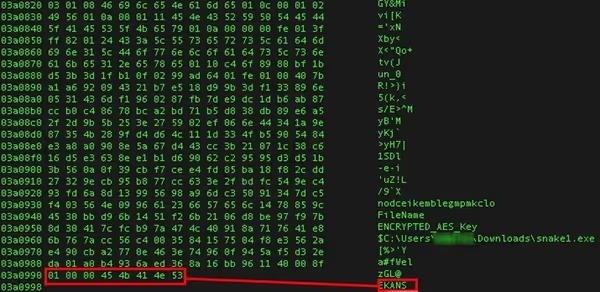
Figure 2: Encryption results of EKANS ransomware
Rather than targeting specific devices or systems, EKANS ransomware looks to take down the entire network, which is part of what makes it such an aggressive style of ransomware. However, it lacks a self-propagating mechanism, so it has to be manually introduced to ICS environments. Malicious payloads hidden in links and attachments within emails are the primary mechanism used to introduce the ransomware. From there, EKANS exploits vulnerable and unpatched services, seeding itself across the entire business via script.
When the encryption process has been completed, a ransom note is displayed, requesting a covert financial exchange for a decryption key over the encrypted email platform CTemplar. In the case of both Honda and the Enel Group, they were told to contact CarrolBidell@tutanota[.]com for further information. The attackers also offered to send several decrypted files to prove the legitimacy of the encryption key.
| What happened to your files? -------------------------------------------- We breached your corporate network and encrypted the data on your computers. The encrypted data includes documents, databases, photos and more – all were encrypted using a military grade encryption algorithms (AES-256 and RSA-2048). You cannot access those files right now. But dont worry! You can still get those files back and be up and running again in no time. -------------------------------------------- | How to contact us to get your files back? -------------------------------------------- The only way to restore your files is by purchasing a decryption tool loaded with a private key we created specifically for your network. Once run on an effected computer, the tool will decrypt all encrypted files – and you resume day-to-day operations, preferably with better cyber security in mind. If you are interested in purchasing the decryption tool contact us at %s -------------------------------------------- | How can you be certain we have the decryption tool? -------------------------------------------- In your mail to us attach up to 3 files (up to 3MB, no databases or spreadsheets).
Figure 3: Partial view of EKANS ransomware note
Honda has refrained from stating what specific plant capabilities were affected by the EKANS attack, however it has publicly affirmed that production operations have been affected in multiple factories across the world. Their visibility and control systems were disrupted significantly enough to suspend manufacturing.
Becoming immune to ransomware
While the EKANS ransomware leverages fairly crude techniques and is only able to halt processes rather than control ICS mechanisms, it represents a new frontier in OT cyber-attacks. ICS offensives will continue to evolve – with greater control over machinery a likely avenue of exploration for cyber-criminals.
What is clear from the Honda attack is that even some of the world’s largest global conglomerates are susceptible to these kind of ransomware attacks. What is needed to protect factory floors from such attacks is a cyber security solution that can detect the most subtle signals of threat, learning on the job to understand what is ‘normal’ for each unique ICS environment.
Darktrace’s AI learns the normal ‘patterns of life’ for every user, device, and controller across both OT and IT. By continuously analyzing data across organizations’ systems, the AI’s unique understanding of how each facet of a business and a dynamic workforce interacts ensures that any malicious activity is detected seconds after it emerges. In the case of EKANS, this self-learning approach would have identified a number of anomalous behaviors pertaining to the originally infected device, including beaconing to a rare destination and the unusual connections to encryption software.
Complementing Darktrace’s threat detection is the AI’s Autonomous Response abilities, which neutralize threats with surgical precision – allowing business activity to continue as normal. Autonomous Response has already proven itself successful in stopping ransomware attacks, preventing damaging operational outages at manufacturing facilities, hospitals, and municipalities around the world.
Conclusion
EKANS revealed that attackers are beginning to successfully target both IT and OT systems with one attack, making the need for security programs that can bridge this gap more urgent than ever. The ability to defend both environments with a single security solution ensures holistic protection for the entire organization. By correlating disparate data points across SaaS, email, cloud, traditional network, and OT environments, Cyber AI can identify and stop even the most sophisticated attacks.
The reality is that threats in the OT sphere will continue to evolve, becoming faster and more furious than ever. Given the potential damage ransomware can cause, security that can defend industrial systems along with dynamic workforces – detecting and stopping fast-acting threats across a complex business – has become more important than ever. The functionality of industrial systems depends on it.
Darktrace cyber analysts are world-class experts in threat intelligence, threat hunting and incident response, and provide 24/7 SOC support to thousands of Darktrace customers around the globe. Inside the SOC is exclusively authored by these experts, providing analysis of cyber incidents and threat trends, based on real-world experience in the field.
Threat actors frequently exploit ongoing world events to trick users into opening and executing malicious files. Darktrace security researchers recently identified a threat group using reports around the arrest of Venezuelan President Nicolàs Maduro on January 3, 2025, as a lure to deliver backdoor malware.
Technical Analysis
While the exact initial access method is unknown, it is likely that a spear-phishing email was sent to victims, containing a zip archive titled “US now deciding what’s next for Venezuela.zip”. This file included an executable named “Maduro to be taken to New York.exe” and a dynamic-link library (DLL), “kugou.dll”.
The binary “Maduro to be taken to New York.exe” is a legitimate binary (albeit with an expired signature) related to KuGou, a Chinese streaming platform. Its function is to load the DLL “kugou.dll” via DLL search order. In this instance, the expected DLL has been replaced with a malicious one with the same name to load it.
Figure 1: DLL called with LoadLibraryW.
Once the DLL is executed, a directory is created C:\ProgramData\Technology360NB with the DLL copied into the directory along with the executable, renamed as “DataTechnology.exe”. A registry key is created for persistence in “HKCU\Software\Microsoft\Windows\CurrentVersion\Run\Lite360” to run DataTechnology.exe --DATA on log on.
Figure 2. Registry key added for persistence.
Figure 3: Folder “Technology360NB” created.
During execution, a dialog box appears with the caption “Please restart your computer and try again, or contact the original author.”
Figure 4. Message box prompting user to restart.
Prompting the user to restart triggers the malware to run from the registry key with the command --DATA, and if the user doesn't, a forced restart is triggered. Once the system is reset, the malware begins periodic TLS connections to the command-and-control (C2) server 172.81.60[.]97 on port 443. While the encrypted traffic prevents direct inspection of commands or data, the regular beaconing and response traffic strongly imply that the malware has the ability to poll a remote server for instructions, configuration, or tasking.
Conclusion
Threat groups have long used geopolitical issues and other high-profile events to make malicious content appear more credible or urgent. Since the onset of the war in Ukraine, organizations have been repeatedly targeted with spear-phishing emails using subject lines related to the ongoing conflict, including references to prisoners of war [1]. Similarly, the Chinese threat group Mustang Panda frequently uses this tactic to deploy backdoors, using lures related to the Ukrainian war, conventions on Tibet [2], the South China Sea [3], and Taiwan [4].
The activity described in this blog shares similarities with previous Mustang Panda campaigns, including the use of a current-events archive, a directory created in ProgramData with a legitimate executable used to load a malicious DLL and run registry keys used for persistence. While there is an overlap of tactics, techniques and procedures (TTPs), there is insufficient information available to confidently attribute this activity to a specific threat group. Users should remain vigilant, especially when opening email attachments.
Credit to Tara Gould (Malware Research Lead) Edited by Ryan Traill (Analyst Content Lead)
Indicators of Compromise (IoCs)
172.81.60[.]97 8f81ce8ca6cdbc7d7eb10f4da5f470c6 - US now deciding what's next for Venezuela.zip 722bcd4b14aac3395f8a073050b9a578 - Maduro to be taken to New York.exe aea6f6edbbbb0ab0f22568dcb503d731 - kugou.dll
Under Medusa’s Gaze: How Darktrace Uncovers RMM Abuse in Ransomware Campaigns
What is Medusa Ransomware in 2025?
In 2025, the Medusa Ransomware-as-a-Service (RaaS) emerged as one of the top 10 most active ransomware threat actors [1]. Its growing impact prompted a joint advisory from the US Cybersecurity and Infrastructure Security Agency (CISA) and the Federal Bureau of Investigation (FBI) [3]. As of January 2026, more than 500 organizations have fallen victim to Medusa ransomware [2].
Darktrace previously investigated Medusa in a 2024 blog, but the group’s rapid expansion and new intelligence released in late 2025 has lead Darktrace’s Threat Research team to investigate further. Recent findings include Microsoft’s research on Medusa actors exploiting a vulnerability in Fortra’s GoAnywhere MFT License Servlet (CVE-2025-10035)[4] and Zencec’s report on Medusa’s abuse of flaws in SimpleHelp’s remote support software (CVE-2024-57726, CVE-2024-57727, CVE-2024-57728) [5].
Reports vary on when Medusa first appeared in the wild. Some sources mention June 2021 as the earliest sightings, while others point to late 2022, when its developers transitioned to the RaaS model, as the true beginning of its operation [3][11].
Madusa Ransomware history and background
The group behind Medusa is known by several aliases, including Storm-1175 and Spearwing [4] [7]. Like its mythological namesake, Medusa has many “heads,” collaborating with initial access brokers (IABs) and, according to some evidence, affiliating with Big Game Hunting (BGH) groups such as Frozen Spider, as well as the cybercriminal group UNC7885 [3][6][13].
Use of Cyrillic in its scripts, activity on Russian-language cybercrime forums, slang unique to Russian criminal subcultures, and avoidance of targets in Commonwealth of Independent States (CIS) countries suggest that Medusa operates from Russia or an allied state [11][12].
Medusa ransomware should not be confused with other similarly named malware, such as the Medusa Android Banking Trojan, the Medusa Botnet/Medusa Stealer, or MedusaLocker ransomware. It is easily distinguishable from these variants because it appends the extension .MEDUSA to encrypted files and drops the ransom note !!!READ_ME_MEDUSA!!!.txt on compromised systems [8].
Who does Madusa Ransomware target?
The group appears to show little restraint, indiscriminately attacking organizations across all sectors, including healthcare, and is known to employ triple extortion tactics whereby sensitive data is encrypted, victims are threatened with data leaks, and additional pressure is applied through DDoS attacks or contacting the victim’s customers, rather than the more common double extortion model [13].
Madusa Ransomware TTPs
To attain initial access, Medusa actors typically purchase access to already compromised devices or accounts via IABs that employ phishing, credential stuffing, or brute-force attacks, and also target vulnerable or misconfigured Internet-facing systems.
Between December 2023 and November 2025, Darktrace observed multiple cases of file encryption related to Medusa ransomware across its customer base. When enabled, Darktrace’s Autonomous Response capability intervened early in the attack chain, blocking malicious activity before file encryption could begin.
Some of the affected were based in Europe, the Middle East and Africa (EMEA), others in the Americas (AMS), and the remainder in the Asia-Pacific and Japan region. The most impacted sectors were financial services and the automotive industry, followed by healthcare, and finally organizations in arts, entertainment and recreation, ICT, and manufacturing.
Remote Monitoring and Management (RMM) tool abuse
In most customer environments where Medusa file encryption attempts were observed, and in one case where the compromise was contained before encryption, unusual external HTTP connections associated with JWrapper were also detected. JWrapper is a legitimate tool designed to simplify the packaging, distribution, and management of Java applications, enabling the creation of executables that run across different operating systems. Many of the destination IP addresses involved in this activity were linked to SimpleHelp servers or associated with Atera.
Medusa actors appear to favor RMM tools such as SimpleHelp. Unpatched or misconfigured SimpleHelp RMM servers can serve as an initial access vector to the victims’ infrastructure. After gaining access to SimpleHelp management servers, the threat actors edit server configuration files to redirect existing SimpleHelp RMM agents to communicate with unauthorized servers under their control.
The SimpleHelp tool is not only used for command-and-control (C2) and enabling persistence but is also observed during lateral movement within the network, downloading additional attack tools, data exfiltration, and even ransomware binary execution. Other legitimate remote access tools abused by Medusa in a similar manner to evade detection include Atera, AnyDesk, ScreenConnect, eHorus, N-able, PDQ Deploy/Inventory, Splashtop, TeamViewer, NinjaOne, Navicat, and MeshAgent [4][5][15][16][17].
Data exfiltration
Another correlation among Darktrace customers affected by Medusa was observed during the data exfiltration phase. In several environments, data was exfiltrated to the endpoints erp.ranasons[.]com or pruebas.pintacuario[.]mx (143.110.243[.]154, 144.217.181[.]205) over ports 443, 445, and 80. erp.ranasons[.]com was seemingly active between November 2024 and September 2025, while pruebas.pintacuario[.]mx was seen from November 2024 to March 2025. Evidence suggests that pruebas.pintacuario[.]mx previously hosted a SimpleHelp server [22][23].
Apart from RMM tools, Medusa is also known to use Rclone and Robocopy for data exfiltration [3][19]. During one Medusa compromise detected in mid-2024, the customer’s data was exfiltrated to external destinations associated with the Ngrok proxy service using an SSH-2.0-rclone client.
Medusa Compromise Leveraging SimpleHelp
In Q4 2025, Darktrace assisted a European company impacted by Medusa ransomware. The organization had partial Darktrace / NETWORK coverage and had configured Darktrace’s Autonomous Response capability to require manual confirmation for all actions. Despite these constraints, data received through the customer’s security integration with CrowdStrike Falcon enabled Darktrace analysts to reconstruct the attack chain, although the initial access vector remains unclear due to limited visibility.
In late September 2025, a device out of the scope of Darktrace's visibility began scanning the network and using RDP, NTLM/SMB, DCE_RPC, and PowerShell for lateral movement.
CrowdStrike “Defense Evasion: Disable or Modify Tools” alerts related to a suspicious driver (c:\windows\[0-9a-b]{4}.exe) and a PDQ Deploy executable (share=\\<device_hostname>\ADMIN$ file=AdminArsenal\PDQDeployRunner\service-1\exec\[0-9a-b]{4}.exe) suggest that the attackers used the Bring Your Own Vulnerable Driver (BYOVD) technique to terminate antivirus processes on network devices, leveraging tools such as KillAV or AbyssWorker along with the PDQ Software Deployment solution [19][26].
A few hours later, Darktrace observed the same device that had scanned the network writing Temp\[a-z]{2}.exe over SMB to another device on the same subnet. According to data from the CrowdStrike alert, this executable was linked to an RMM application located at C:\Users\<compromised_user>\Documents\[a-z]{2}.exe. The same compromised user account later triggered a CrowdStrike “Command and Control: Remote Access Tools” alert when accessing C:\ProgramData\JWrapper-Remote Access\JWrapper-Remote Access Bundle-[0-9]{11}\JWrapperTemp-[0-9]{10}-[0-9]{1}-app\bin\windowslauncher.exe [27].
Figure 1: An executable file associated with the SimpleHelp RMM tool being written to other devices using the SMB protocol, as detected by Darktrace.
Soon after, the destination device and multiple other network devices began establishing connections to 31.220.45[.]120 and 213.183.63[.]41, both of which hosted malicious SimpleHelp RMM servers. These C2 connections continued for more than 20 days after the initial compromise.
CrowdStrike integration alerts for the execution of robocopy . "c:\windows\\" /COPY:DT /E /XX /R:0 /W:0 /NP /XF RunFileCopy.cmd /IS /IT commands on several Windows servers, suggested that this utility was likely used to stage files in preparation for data exfiltration [19].
Around two hours later, Darktrace detected another device connecting to the attacker’s SimpleHelp RMM servers. This internal server had ‘doc’ in its hostname, indicating it was likely a file server. It was observed downloading documents from another internal server over SMB and uploading approximately 70 GiB of data to erp.ranasons[.]com (143.110.243[.]154:443).
Figure 2: Data uploaded to erp.ranasons[.]com and the number of model alerts from the exfiltrating device, represented by yellow and orange dots.
Darktrace’s Cyber AI Analyst autonomously investigated the unusual connectivity, correlating the separate C2 and data exfiltration events into a single incident, providing greater visibility into the ongoing attack.
Figure 3: Cyber AI Analyst identified a file server making C2 connections to an attacker-controlled SimpleHelp server (213.183.63[.]41) and exfiltrating data to erp.ranasons[.]com.
Figure 4: The same file server that connected to 213.183.63[.]41 and exfiltrated data to erp.ranasons[.]com was also observed attempting to connect to an IP address associated with Moscow, Russia (193.37.69[.]154:7070).
One of the devices connecting to the attacker's SimpleHelp RMM servers was also observed downloading 35 MiB from [0-9]{4}.filemail[.]com. Filemail, a legitimate file-sharing service, has reportedly been abused by Medusa actors to deliver additional malicious payloads [11].
Figure 5: A device controlled remotely via SimpleHelp downloading additional tooling from the Filemail file-sharing service.
Finally, integration alerts related to the ransomware binary, such as c:\windows\system32\gaze.exe and <device_hostname>\ADMIN$ file=AdminArsenal\PDQDeployRunner\service-1\exec\gaze.exe, along with “!!!READ_ME_MEDUSA!!!.txt” ransom notes were observed on network devices. This indicates that file encryption in this case was most likely carried out directly on the victim hosts rather than via the SMB protocol [3].
Conclusion
Threat actors, including nation-state actors and ransomware groups like Medusa, have long abused legitimate commercial RMM tools, typically used by system administrators for remote monitoring, software deployment, and device configuration, instead of relying on remote access trojans (RATs).
Attackers employ existing authorized RMM tools or install new remote administration software to enable persistence, lateral movement, data exfiltration, and ingress tool transfer. By mimicking legitimate administrative behavior, RMM abuse enables attackers to evade detection, as security software often implicitly trusts these tools, allowing attackers to bypass traditional security controls [28][29][30].
To mitigate such risks, organizations should promptly patch publicly exposed RMM servers and adopt anomaly-based detection solutions, like Darktrace / NETWORK, which can distinguish legitimate administrative activity from malicious behavior, applying rapid response measures through its Autonomous Response capability to stop attacks in their tracks.
Darktrace delivers comprehensive network visibility and Autonomous Response capabilities, enabling real-time detection of anomalous activity and rapid mitigation, even if an organization fall under Medusa’s gaze.
Credit to Signe Zaharka (Principal Cyber Analyst) and Emma Foulger (Global Threat Research Operations Lead
Edited by Ryan Traill (Analyst Content Lead)
Appendices
List of Indicators of Compromise (IoCs)
IoC - Type - Description + Confidence + Time Observed
185.108.129[.]62 IP address Malicious SimpleHelp server observed during Medusa attacks (High confidence) - March 7, 2023
185.126.238[.]119 IP address Malicious SimpleHelp server observed during Medusa attacks (High confidence) - November 26-27, 2024
213.183.63[.]41 IP address Malicious SimpleHelp server observed during Medusa attacks (High confidence) - November 28, 2024 - Sep 30, 2025
213.183.63[.]42 IP address Malicious SimpleHelp server observed during Medusa attacks (High confidence) - July 4 -9 , 2024
31.220.45[.]120 IP address Malicious SimpleHelp server observed during Medusa attacks (High confidence) - September 12 - Oct 20 , 2025
91.92.246[.]110 IP address Malicious SimpleHelp server observed during Medusa attacks (High confidence) - May 24, 2024
45.9.149[.]112:15330 IP address Malicious SimpleHelp server observed during Medusa attacks (High confidence) - June 21, 2024
89.36.161[.]12 IP address Malicious SimpleHelp server observed during Medusa attacks (High confidence) - June 26-28, 2024
193.37.69[.]154:7070 IP address Suspicious RU IP seen on a device being controlled via SimpleHelp and exfiltrating data to a Medusa related endpoint - September 30 - October 20, 2025
erp.ranasons[.]com·143.110.243[.]154 Hostname Data exfiltration destination - November 27, 2024 - September 30, 2025
pruebas.pintacuario[.]mx·144.217.181[.]205 - Hostname Data exfiltration destination - November 27, 2024 - March 26, 2025
lirdel[.]com · 44.235.83[.]125/a.msi (1b9869a2e862f1e6a59f5d88398463d3962abe51e19a59) File & hash Atera related file downloaded with PowerShell - June 20, 2024
wizarr.manate[.]ch/108.215.180[.]161:8585/$/1dIL5 File Suspicious file observed on one of the devices exhibiting unusual activity during a Medusa compromise - February 28, 2024
!!!READ_ME_MEDUSA!!!.txt" File - Ransom note
*.MEDUSA - File extension File extension added to encrypted files
gaze.exe – File - Ransomware binary
Darktrace Model Coverage
Darktrace / NETWORK model detections triggered during connections to attacker controlled SimpleHelp servers:
Anomalous Connection/Anomalous SSL without SNI to New External
Anomalous Connection/Multiple Connections to New External UDP Port
Anomalous Connection/New User Agent to IP Without Hostname