ブログ
/
AI
/
July 16, 2025

サイバーセキュリティのためのAI成熟度モデルの紹介

サイバーセキュリティのためのAI成熟度モデルは、実際のユースケースとエキスパートの知見に基づいた、この種の指針の中でも最も詳細なガイドです。CISOが戦略的な意思決定を行うための力となり、どのAIを導入すべきかだけではなく、組織を段階的に強化し優れた成果を得るためにどのように進めるべきかを知ることができます。
Inside the SOC
Darktrace cyber analysts are world-class experts in threat intelligence, threat hunting and incident response, and provide 24/7 SOC support to thousands of Darktrace customers around the globe. Inside the SOC is exclusively authored by these experts, providing analysis of cyber incidents and threat trends, based on real-world experience in the field.
Written by
Ashanka Iddya
Senior Director, Product Marketing
Default blog imageDefault blog imageDefault blog imageDefault blog imageDefault blog imageDefault blog image
16
Jul 2025

サイバーセキュリティへのAIの導入:宣伝文句を超えて

今日のセキュリティオペレーションはパラドックスに直面しています。業界ではAI(Artificial Intelligence)が全面的な変革を約束し、ルーチンタスクを自動化することにより検知と対処が強化されると言われています。しかしその一方で、セキュリティリーダーは意味のあるイノベーションとベンダーの宣伝文句を区別しなければならないという大きなプレッシャーに直面しています。

CISOとセキュリティチームがこの状況を乗り越えるのを支援するため、私たちは業界で最も詳細、かつアクション可能なAI成熟度モデルを作成しました。AIおよびサイバーセキュリティ分野のエキスパートと協力して作成したこの枠組みは、セキュリティライフサイクル全体を通じてAIの導入を理解し、測定し、進めていくためのしっかりとした道筋を提供します。

なぜ成熟度モデル?なぜ今必要?

セキュリティリーダー達との対話と調査の中で繰り返し浮かび上がってきたテーマがあります。

それは、AIソリューションはまったく不足していないが、AIのユースケースの明瞭性と理解が不足している、ということです。

事実、Gartner社は「2027年までに、エージェント型AIプロジェクトの40%以上が、コスト上昇、不明瞭なビジネス上の価値、あるいは不十分なリスク制御を理由として打ち切られるだろう」と予測しています。多くのセキュリティチームが実験を行っていますが、その多くは意味のある成果を得られていません。セキュリティの向上を評価し情報に基づいた投資を行うための、標準化された方法に対する必要性はかつてなく高まっています。

AI成熟度モデルが作成されたのはこのような背景によるものであり、これは次を行うための戦略的枠組みです:

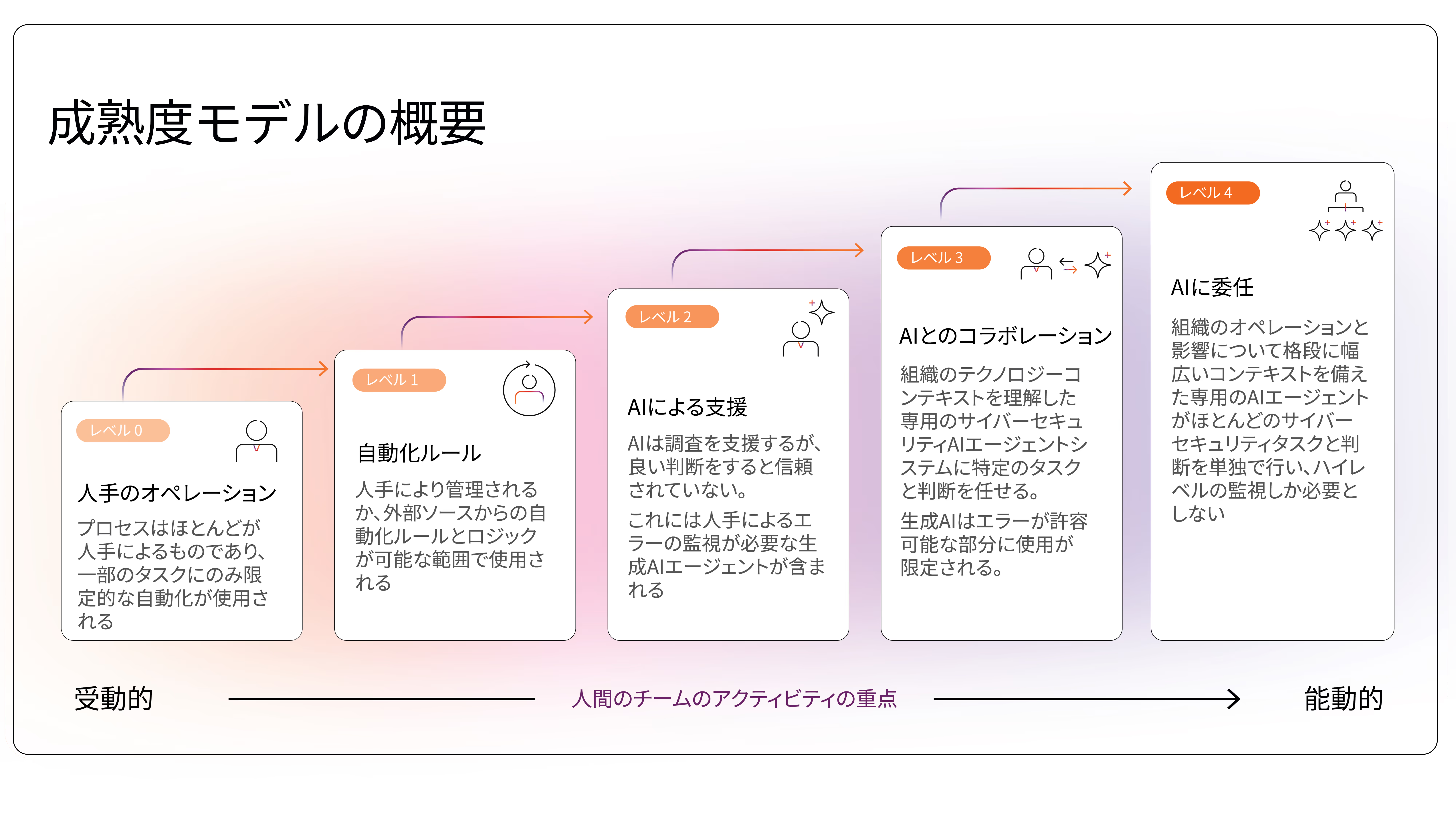
  • 人手によるプロセス(L0)からAIへの委任(L4)に至る5段階の明確なAI成熟度を定義
  • エージェント型生成AIと専用AIエージェントシステムから得られる結果を区別
  • リスク管理、脅威検知、アラートトリアージ、インシデント対応といった中核的な機能にわたって評価
  • AI成熟度を、リスクの削減、効率の向上、スケーラブルなオペレーションなど、現実の成果に対応させる

[related-resource]

このモデルで成熟度はどのように評価されるか?

「サイバーセキュリティにおけるAI成熟度モデル」は、世界で10,000社に及ぶDarktraceの自己学習型AIおよびCyber AI Analystの導入例から得られたセキュリティオペレーションの知見に基づいています。抽象的な理論やベンダーのベンチマークに頼るのではなく、このモデルは実際にセキュリティチームが直面している課題に基づき、AIがどこに導入されているか、どのように使用されているか、そしてどのような成果をもたらしているかを反映しています。

こうした現実に即した基盤により、このモデルはAI成熟度に対する実務的な、体験に基づいた視点を提供します。セキュリティチームが現在の状態を把握し、同じような組織がどのように進化しているかに基づいて現実的な次のステップを知るのに役立ちます。

Darktraceを選ぶ理由

AIは2013年のダークトレースの設立以来そのミッションの中心であり、単なる機能ではなく、企業の基盤です。10年以上にわたりAIを開発し現実のセキュリティ環境にAIを適用してきた経験から、私たちはAIがどこに有効で、どこに有効でないか、そしてAIから最も大きな価値を得るにはどうすべきかを学びました。

私たちは、現代のビジネスが膨大な、相互に接続されたエコシステム内で動いていること、そしてそこには従来のサイバーセキュリティアプローチの維持を不可能にする新たな複雑さや脆弱さが生まれていることを知っています。多くのベンダーは機械学習を使用していますが、AIツールはそれぞれ異なり、どれも同じように作られているわけではありません。

Darktraceの自己学習型AIは多層的なAIアプローチを使用して、それぞれの組織から学習することにより、現代の高度な脅威に対するプロアクティブかつリジリエントな防御を提供します。機械学習、深層学習、LLM、自然言語処理を含む多様なAIテクニックを戦略的に組み合わせ、連続的、階層的に統合することにより、私たちの多層的AIアプローチはそれぞれの組織専用の、変化する脅威ランドスケープに適応する強力な防御メカニズムを提供します。

この成熟度モデルはこうした知見を反映し、セキュリティリーダーが組織の人、プロセス、ツールに適した適切な道筋を見つけるのに役立ちます。

今日のセキュリティチームは次のような重要な問いに直面しています:

  • AIを具体的に何のために使うべきか?
  • 他のチームはどのように使っているのか?そして何が機能しているのか?
  • ベンダーはどのようなツールを提供しているのか、そして何が単なる宣伝文句なのか?
  • AIはSOCの人員を置き換える可能性があるのか?

これらはもっともな質問ですが、簡単に答えられるとは限りません。それが、私たちがこのモデルを作成した理由です。セキュリティリーダーが単なるバズワードに惑わされず、SOC全体にAIを適用するための明確かつ現実的な計画を作成するのを助けるために、このモデルが作成されました。

構成:実験から自律性まで

このモデルは5つの成熟段階で構成されています:

L0 –  人手によるオペレーション:プロセスはほとんどが人手によるものであり、一部のタスクにのみ限定的な自動化が使用されます。

L1 –  自動化ルール:人手により管理されるか、外部ソースからの自動化ルールとロジックが可能な範囲で使用されます。    

L2 –  AIによる支援:AIは調査を支援するが、良い判断をするかどうかは信頼されていません。これには人手によるエラーの監視が必要な生成AIエージェントが含まれます。    

L3 –  AIコラボレーション:組織のテクノロジーコンテキストを理解した専用のサイバーセキュリティAIエージェントシステムに特定のタスクと判断を任せます。生成AIはエラーが許容可能な部分に使用が限定されます。  

L4 –  AIに委任:組織のオペレーションと影響について格段に幅広いコンテキストを備えた専用のAIエージェントがほとんどのサイバーセキュリティタスクと判断を単独で行い、ハイレベルの監督しか必要としません。

それぞれの段階が、テクノロジーだけではなく、人とプロセスもシフトすることを表しています。AIが成熟するにつれ、アナリストの役割は実行者から戦略的監督者へと進化します。

セキュリティリーダーにとっての戦略上の利益

成熟度モデルの目的はテクノロジーの導入だけではなく、AIへの投資を測定可能なオペレーションの成果に結びつけることです。AIによって次のことが可能になります:

SOCの疲労は切実、AIが軽減に貢献

ほとんどのセキュリティチームは現在もアラートの量、調査の遅延、受け身のプロセスに苦労しています。しかしAIの導入には一貫性がなく、多くの場合サイロ化しています。上手く統合すれば、AIはセキュリティチームの効率を高めるための、意味のある違いをもたらすことができます。

生成AIはエラーが起こりやすく、人間による厳密な監視が必要

生成AIを使ったエージェント型システムについては多くの誇大広告が見られますが、セキュリティチームはエージェント型生成AIシステムの不正確性とハルシネーションの可能性についても考慮に入れる必要があります。

AIの本当の価値はセキュリティの進化にある

AI導入の最も大きな成果は、リスク対策から検知、封じ込め、修復に至るまで、セキュリティライフサイクル全体にAIを統合することから得られます。

AIへの信頼と監督は初期段階で必須となるが次第に変化する

導入の初期段階では、人間が完全にコントロールします。L3からL4に到達する頃には、AIシステムは決められた境界内で独立して機能するようになり、人間の役割は戦略的監督になります。

人間の役割が意味のあるものに変化する

AIが成熟すると、アナリストの役割は労働集約的な作業から高価値な意思決定へと引き上げられ、重要な、ビジネスへの影響が大きいアクティビティやプロセスの改良、AIに対するガバナンスなどに集中できるようになります。

成熟度を定義するのは宣伝文句ではなく成果

AIの成熟度は単にテクノロジーが存在しているかどうかではなく、リスク削減、対処時間、オペレーションのリジリエンスに対して測定可能な効果が見られるかどうかで決まります。

[related-resource]

AI成熟度モデルの各段階の成果

セキュリティ組織は人手によるオペレーションからAIへの委任へと進むにつれてサイバーセキュリティの進化を体験するでしょう。成熟度の各レベルは、効率、精度、戦略的価値の段階的変化を表しています。

L0 – 人手によるオペレーション

この段階では、アナリストが手動でトリアージ、調査、パッチ適用、報告を、基本的な自動化されていないツールを使って行います。その結果、受け身の労働集約的なオペレーションになり、ほとんどのアラートは未調査のままとなり、リスク管理にも一貫性がありません。

L1 – 自動化ルール

この段階では、アナリストがSOARあるいはXDRといったルールベースの自動化ツールを管理します。これにより多少の効率化は図れますが、頻繁な調整を必要とします。オペレーションは依然として人員数と事前に定義されたワークフローに制限されます。

L2 – AIによる支援

この段階では、AIが調査、まとめ、トリアージを支援し、アナリストの作業負荷を軽減しますが、エラーの可能性もあるためきめ細かな監督が必要です。検知は向上しますが、自律的な意思決定に対する信頼度は限定的です。

L3 – AIコラボレーション

この段階では、AIが調査全体を行いアクションを提示します。アナリストは高リスクの判断を行うことと、検知戦略の精緻化に集中します。組織のテクノロジーコンテキストを考慮した専用のエージェント型AIエージェントシステムに特定のタスクが任され、精度と優先度の判断が向上します。

L4 – AIに委任

この段階では、専用のAIエージェントシステムが単独でほとんどのセキュリティタスクをマシンスピードで処理し、人間のチームはハイレベルの戦略的監督を行います。このことは、人間のセキュリティチームが最も時間と労力を使うアクティビティはプロアクティブな活動に向けられ、AIがルーチンのサイバーセキュリティ作業を処理することを意味します。

専用のAIエージェントシステムはビジネスへの影響を含めた深いコンテキストを理解して動作し、高速かつ効果的な判断を行います。

AI成熟度モデルのどこに位置しているかを調べる

「サイバーセキュリティのためのAI成熟度モデル」 ホワイトペーパーを入手し、評価を行ってみましょう。自社の現在の成熟段階をベンチマークし、主なギャップがどこにあるのかを調べ、次のステップの優先順位を特定するためににお役立てください。

Inside the SOC
Darktrace cyber analysts are world-class experts in threat intelligence, threat hunting and incident response, and provide 24/7 SOC support to thousands of Darktrace customers around the globe. Inside the SOC is exclusively authored by these experts, providing analysis of cyber incidents and threat trends, based on real-world experience in the field.
Written by
Ashanka Iddya
Senior Director, Product Marketing

More in this series

No items found.

Blog

/

Network

/

March 11, 2026

NetSupport RAT: How Legitimate Tools Can Be as Damaging as Malware

Default blog imageDefault blog image

What is NetSupport Manager?

NetSupport Manager is a legitimate IT tool used by system administrators for remote support, monitoring, and management. In use since 1989, NetSupport Manager enables users to remotely access and navigate systems across different platforms and operating systems [1].

What is NetSupport RAT?

Although NetSupport Manager is a legitimate tool that can be used by IT and security professionals, there has been a rising number of cases in which it is abused to gain unauthorized access to victim systems. This misuse has become so prevalent that, in recent years, security researchers have begun referring to NetSupport as a Remote Access Trojan (RAT), a term typically used for malware that enables a threat actor to remotely access or control an infected device [2][3][4].

NetSupport RAT activity summary

The initial stages of NetSupport RAT infection may vary depending on the source of the initial compromise. Using tactics such as the social engineering tactic ClickFix, threat actors attempt to trick users into inadvertently executing malicious PowerShell commands under the guise of resolving a non-existent issue or completing a fake CAPTCHA verification [5]. Other attack vectors such as phishing emails, fake browser updates, malicious websites, search engine optimization (SEO) poisoning, malvertising and drive-by downloads are also employed to direct users to fraudulent pages and fake reCAPTCHA verification checks, ultimately inducing them to execute malicious PowerShell commands [5][6][7]. This leads to the successful installation of NetSupport Manager on the compromised device, which is often placed in non-standard directories such as AppData, ProgramData, or Downloads [3][8].

Once installed, the adversary is able to gain remote access to the affected machine, monitor user activity, exfiltrate data, communicate with the command-and-control (C2) server, and maintain persistence [5]. External research has also highlighted that post-exploitation of NetSupport RAT has involved the additional download of malicious payloads [2][5].

Attack flow diagram highlighting key events across each phase of the attack phase
Figure 1: Attack flow diagram highlighting key events across each phase of the attack phase [2][5].

Darktrace coverage

In November of 2025, suspicious behavior indicative of the malicious abuse of NetSupport Manager was observed on multiple customers across Europe, the Middle East, and Africa (EMEA) and the Americas (AMS).

While open-source intelligence (OSINT) has reported that, in a recent campaign, a threat actor impersonated government entities to trick users in organizations in the Information Technology, Government and Financial Services sectors in Central Asia into downloading NetSupport Manager [8], approximately a third of Darktrace’s affected customers in November were based in the US while the rest were based in EMEA. This contrast underscores how widely NetSupport Manager is leveraged by threat actors and highlights its accessibility as an initial access tool.  

The Darktrace customers affected were in sectors including Information and Communication, Manufacturing and Arts, entertainment and recreation.

The ClickFix social engineering tactic typically used to distribute the NetSupport RAT is known to target multiple industries, including Technology, Manufacturing and Energy sectors [9]. It also reflects activity observed in the campaign targeting Central Asia, where the Information Technology sector was among those affected [8].

The prevalence of affected Education customers highlights NetSupport’s marketing focus on the Education sector [10]. This suggests that threat actors are also aware of this marketing strategy and have exploited the trust it creates to deploy NetSupport Manager and gain access to their targets’ systems. While the execution of the PowerShell commands that led to the installation of NetSupport Manager falls outside of Darktrace's purview in cases identified, Darktrace was still able to identify a pattern of devices making connections to multiple rare external domains and IP addresses associated with the NetSupport RAT, using a wide range of ports over the HTTP protocol. A full list of associated domains and IP addresses is provided in the Appendices of this blog.

Although OSINT identifies multiple malicious domains and IP addresses as used as C2 servers, signature-based detections of NetSupport RAT indicators of compromise (IoCs) may miss broader activity, as new malicious websites linked to the RAT continue to appear.

Darktrace’s anomaly‑based approach allows it to establish a normal ‘pattern of life’ for each device on a network and identify when behavior deviates from this baseline, enabling the detection of unusual activity even when it does not match known IoCs or tactics, techniques and procedures (TTPs).

In one customer environment in late 2025, Darktrace / NETWORK detected a device initiating new connections to the rare external endpoint, thetavaluemetrics[.]com (74.91.125[.]57), along with the use of a previously unseen user agent, which it recognized as highly unusual for the network.

Darktrace’s detection of HTTP POST requests to a suspicious URI and new user agent usage.
Figure 2: Darktrace’s detection of HTTP POST requests to a suspicious URI and new user agent usage.

Darktrace identified that user agent present in connections to this endpoint was the ‘NetSupport Manager/1.3’, initially suggesting legitimate NetSupport Manager activity. Subsequent investigation, however, revealed that the endpoint was in fact a malicious NetSupportRAT C2 endpoint [12]. Shortly after, Darktrace detected the same device performing HTTP POST requests to the URI fakeurl[.]htm. This pattern of activity is consistent with OSINT reporting that details communication between compromised devices and NetSupport Connectivity Gateways functioning as C2 servers [11].

Conclusion

As seen not only with NetSupport Manager but with any legitimate or open‑source software used by IT and security professionals, the legitimacy of a tool does not prevent it from being abused by threat actors. Open‑source software, especially tools with free or trial versions such as NetSupport Manager, remains readily accessible for malicious use, including network compromise. In an age where remote work is still prevalent, validating any anomalous use of software and remote management tools is essential to reducing opportunities for unauthorized access.

Darktrace’s anomaly‑based detection enables security teams to identify malicious use of legitimate tools, even when clear signatures or indicators of compromise are absent, helping to prevent further impact on a network.


Credit to George Kim (Analyst Consulting Lead – AMS), Anna Gilbertson (Senior Cyber Analyst)

Edited by Ryan Traill (Analyst Content Lead)

Appendices

Darktrace Model Alerts

·       Compromise / Suspicious HTTP and Anomalous Activity

·       Compromise / New User Agent and POST

·       Device / New User Agent

·       Anomalous Connection / New User Agent to IP Without Hostname

·       Anomalous Connection / Posting HTTP to IP Without Hostname

·       Anomalous Connection / Multiple Failed Connections to Rare Endpoint

·       Anomalous Connection / Application Protocol on Uncommon Port

·       Anomalous Connection / Multiple HTTP POSTs to Rare Hostname

·       Compromise / Beaconing Activity To External Rare

·       Compromise / HTTP Beaconing to Rare Destination

·       Compromise / Agent Beacon (Medium Period)

·       Compromise / Agent Beacon (Long Period)

·       Compromise / Quick and Regular Windows HTTP Beaconing

·       Compromise / Sustained TCP Beaconing Activity To Rare Endpoint

·       Compromise / POST and Beacon to Rare External

Indicators of Compromise (IoCs)

Indicator           Type     Description

/fakeurl.htm URI            NetSupportRAT C2 URI

thetavaluemetrics[.]com        Connection hostname              NetSupportRAT C2 Endpoint

westford-systems[.]icu            Connection hostname              NetSupportRAT C2 Endpoint

holonisz[.]com                Connection hostname              NetSupportRAT C2 Endpoint

heaveydutyl[.]com      Connection hostname              NetSupportRAT C2 Endpoint

nsgatetest1[.]digital   Connection hostname              NetSupportRAT C2 Endpoint

finalnovel[.]com            Connection hostname              NetSupportRAT C2 Endpoint

217.91.235[.]17              IP             NetSupportRAT C2 Endpoint

45.94.47[.]224                 IP             NetSupportRAT C2 Endpoint

74.91.125[.]57                 IP             NetSupportRAT C2 Endpoint

88.214.27[.]48                 IP             NetSupportRAT C2 Endpoint

104.21.40[.]75                 IP             NetSupportRAT C2 Endpoint

38.146.28[.]242              IP             NetSupportRAT C2 Endpoint

185.39.19[.]233              IP             NetSupportRAT C2 Endpoint

45.88.79[.]237                 IP             NetSupportRAT C2 Endpoint

141.98.11[.]224              IP             NetSupportRAT C2 Endpoint

88.214.27[.]166              IP             NetSupportRAT C2 Endpoint

107.158.128[.]84          IP             NetSupportRAT C2 Endpoint

87.120.93[.]98                 IP             Rhadamanthys C2 Endpoint

References

  1. https://mspalliance.com/netsupport-debuts-netsupport-24-7/
  2. https://blogs.vmware.com/security/2023/11/netsupport-rat-the-rat-king-returns.html
  3. https://redcanary.com/threat-detection-report/threats/netsupport-manager/
  4. https://www.elastic.co/guide/en/security/8.19/netsupport-manager-execution-from-an-unusual-path.html
  5. https://rewterz.com/threat-advisory/netsupport-rat-delivered-through-spoofed-verification-pages-active-iocs
  6. https://thehackernews.com/2025/11/new-evalusion-clickfix-campaign.html
  7. https://corelight.com/blog/detecting-netsupport-manager-abuse
  8. https://thehackernews.com/2025/11/bloody-wolf-expands-java-based.html
  9. https://unit42.paloaltonetworks.com/preventing-clickfix-attack-vector
  10. https://www.netsupportsoftware.com/education-solutions
  11. https://www.esentire.com/blog/unpacking-netsupport-rat-loaders-delivered-via-clickfix
  12. https://threatfox.abuse.ch/browse/malware/win.netsupportmanager_rat/
  13. https://www.virustotal.com/gui/url/5fe6936a69c786c9ded9f31ed1242c601cd64e1d90cecd8a7bb03182c47906c2

Continue reading
About the author
George Kim
Analyst Consulting Lead – AMS

Blog

/

Cloud

/

March 5, 2026

Inside Cloud Compromise: Investigating Attacker Activity with Darktrace / Forensic Acquisition & Investigation

Default blog imageDefault blog image

Investigating Cloud Attacks with Forensic Acquisition & Investigation

Darktrace / Forensic Acquisition & Investigation™ is the industry’s first truly automated forensic solution purpose-built for the cloud. This blog will demonstrate how an investigation can be carried out against a compromised cloud server in minutes, rather than hours or days.

The compromised server investigated in this case originates from Darktrace’s Cloudypots system, a global honeypot network designed to observe adversary activity in real time across a wide range of cloud services. Whenever an attacker successfully compromises one of these honeypots, a forensic copy of the virtual server's disk is preserved for later analysis. Using Forensic Acquisition & Investigation, analysts can then investigate further and obtain detailed insights into the compromise including complete attacker timelines and root cause analysis.

Forensic Acquisition & Investigation supports importing artifacts from a variety of sources, including EC2 instances, ECS, S3 buckets, and more. The Cloudypots system produces a raw disk image whenever an attack is detected and stores it in an S3 bucket. This allows the image to be directly imported into Forensic Acquisition & Investigation using the S3 bucket import option.

As Forensic Acquisition & Investigation runs cloud-natively, no additional configuration is required to add a specific S3 bucket. Analysts can browse and acquire forensic assets from any bucket that the configured IAM role is permitted to access. Operators can also add additional IAM credentials, including those from other cloud providers, to extend access across multiple cloud accounts and environments.

Figure 1: Forensic Acquisition & Investigation import screen.

Forensic Acquisition & Investigation then retrieves a copy of the file and automatically begins running the analysis pipeline on the artifact. This pipeline performs a full forensic analysis of the disk and builds a timeline of the activity that took place on the compromised asset. By leveraging Forensic Acquisition & Investigation’s cloud-native analysis system, this process condenses hour of manual work into just minutes.

Successful import of a forensic artifact and initiation of the analysis pipeline.
Figure 2: Successful import of a forensic artifact and initiation of the analysis pipeline.

Once processing is complete, the preserved artifact is visible in the Evidence tab, along with a summary of key information obtained during analysis, such as the compromised asset’s hostname, operating system, cloud provider, and key event count.

The Evidence overview showing the acquired disk image.
Figure 3: The Evidence overview showing the acquired disk image.

Clicking on the “Key events” field in the listing opens the timeline view, automatically filtered to show system- generated alarms.

The timeline provides a chronological record of every event that occurred on the system, derived from multiple sources, including:

  • Parsed log files such as the systemd journal, audit logs, application specific logs, and others.
  • Parsed history files such as .bash_history, allowing executed commands to be shown on the timeline.
  • File-specific events, such as files being created, accessed, modified, or executables being run, etc.

This approach allows timestamped information and events from multiple sources to be aggregated and parsed into a single, concise view, greatly simplifying the data review process.

Alarms are created for specific timeline events that match either a built-in system rule, curated by Darktrace’s Threat Research team or an operator-defined created at the project level. These alarms help quickly filter out noise and highlight on events of interest, such as the creation of a file containing known malware, access to sensitive files like Amazon Web Service (AWS) credentials, suspicious arguments or commands, and more.

 The timeline view filtered to alarm_severity: “1” OR alarm_severity: “3”, showing only events that matched an alarm rule.
Figure 4: The timeline view filtered to alarm_severity: “1” OR alarm_severity: “3”, showing only events that matched an alarm rule.

In this case, several alarms were generated for suspicious Base64 arguments being passed to Selenium. Examining the event data, it appears the attacker spawned a Selenium Grid session with the following payload:

"request.payload": "[Capabilities {browserName: chrome, goog:chromeOptions: {args: [-cimport base64;exec(base64...], binary: /usr/bin/python3, extensions: []}, pageLoadStrategy: normal}]"

This is a common attack vector for Selenium Grid. The chromeOptions object is intended to specify arguments for how Google Chrome should be launched; however, in this case the attacker has abused the binary field to execute the Python3 binary instead of Chrome. Combined with the option to specify command-line arguments, the attacker can use Python3’s -c option to execute arbitrary Python code, in this instance, decoding and executing a Base64 payload.

Selenium’s logs truncate the Arguments field automatically, so an alternate method is required to retrieve the full payload. To do this, the search bar can be used to find all events that occurred around the same time as this flagged event.

Pivoting off the previous event by filtering the timeline to events within the same window using timestamp: [“2026-02-18T09:09:00Z” TO “2026-02-18T09:12:00Z”].
Figure 5: Pivoting off the previous event by filtering the timeline to events within the same window using timestamp: [“2026-02-18T09:09:00Z” TO “2026-02-18T09:12:00Z”].

Scrolling through the search results, an entry from Java’s systemd journal can be identified. This log contains the full, unaltered payload. GCHQ’s CyberChef can then be used to decode the Base64 data into the attacker’s script, which will ultimately be executed.[NJ9]

Continue reading
About the author
Nathaniel Bill
Malware Research Engineer
あなたのデータ × DarktraceのAI
唯一無二のDarktrace AIで、ネットワークセキュリティを次の次元へ