Darktrace cyber analysts are world-class experts in threat intelligence, threat hunting and incident response, and provide 24/7 SOC support to thousands of Darktrace customers around the globe. Inside the SOC is exclusively authored by these experts, providing analysis of cyber incidents and threat trends, based on real-world experience in the field.
Figure 1: An interactive snapshot of Antigena Email’s user interface
Antigena Email recently detected a malicious email sent from a legitimate corporate email account – presumably that of a supplier – that had been subject to an account takeover. The email claimed to be a ShareFile notification, but contained links to malicious domains previously associated with phishing attacks. These webpages are commonly designed to trick users into downloading malware or leaking sensitive corporate information.
Figure 2: A subset of the breached models and associated actions
Why was this attack effective?
This attack combined an account takeover with a typical impersonation attack. At first glance, all of the email’s elements appear legitimate, from the ShareFile notification, to the genuine and trusted corporate email address, to the subject line.
The email contained an additional misleading link featuring an email address seemingly associated with the recipient, but that also redirected a user to a malicious webpage. Believing that the email contained genuine ShareFile content, given past legitimate business interactions with the supplier, a user may have easily clicked on one of the malicious links and entered sensitive information on the phishing page.
Sender information
The sender’s name was listed as “share_file®”, but the email address was associated with a compromised account from a Ukrainian electronic components company.
Why did this attack bypass other email security solutions?
As the email came from a genuine corporation and trusted supplier known to the organization, it would have passed the Sender Policy Framework (SPF) authentication technique and been considered legitimate. The fact that the account sending the email had not yet been reported as compromised meant that the email was not flagged as spam by traditional security solutions, and would have been able to distribute malicious content to employees.
AI email security that evolves with you
Antigena Email recognized that the suspicious link in the email fell outside of both the sender and recipient’s normal ‘patterns of life.’ The AI took the strongest possible action, preventing the targets from engaging with the email and malicious link contained within. Compromised accounts can be some of the most difficult attacks to detect, because of the trusted relationships that exist with other organizations. This attack demonstrates the power of AI email security that continuously evolves with a business.
Thanks to Darktrace analyst Lucas O’Donohue for his insights on the above threat find.
Darktrace cyber analysts are world-class experts in threat intelligence, threat hunting and incident response, and provide 24/7 SOC support to thousands of Darktrace customers around the globe. Inside the SOC is exclusively authored by these experts, providing analysis of cyber incidents and threat trends, based on real-world experience in the field.
Why Kubernetes Security Needs A Behavioral Approach
Kubernetes has become a foundational technology for modern cloud-native infrastructure. It can orchestrate everything from customer-facing applications to data pipelines and, increasingly, AI workloads. This is due to the highly scalable nature of Kubernetes, making it cost efficient and reliable.
Gartner projects that by 2028, 95% of new AI deployments will run on Kubernetes, up from less than 30% today1. However, the same qualities that make Kubernetes powerful also make it uniquely challenging to secure, leaving many organizations with limited visibility into their clusters. This lack of visibility increases risk - it’s difficult to secure what you can’t see.
However, this risk is often looked at as purely a posture management challenge. While Cloud Security Posture Management (CSPM) solutions can tell you how a cluster should be configured, they don’t tell you what it is doing in real time. This requires runtime behavioral monitoring of clusters to detect active threats.
Yet existing approaches to securing Kubernetes by most Cloud Detection and Response (CDR) and Network Detection and Response (NDR) vendors often have limited coverage or require a third-party integration to forward traffic and metadata. This means that capabilities can be limited and detections can lack the context of the wider environment, which slows down triage, investigation and response.
Why Kubernetes is hard to secure
Traditional security tooling was built for persistent, long-term infrastructure such as servers and virtual machines with fixed identities that last months or years. Some elements of Kubernetes environments can have a much shorter lifespan, breaking many assumptions those tools rely on:
Increased complexity
Kubernetes environments can be complex in comparison to traditional infrastructure, with many different elements to consider such as nodes, clusters, containers, pods and the workloads themselves.
Ephemeral by design
Kubernetes pods can spin up and terminate in seconds. A container that was compromised may no longer exist by the time a deeper investigation is required, leaving no artifact to analyze. This poses a unique challenge for security operations.
Weaker workload boundaries
Kubernetes containers use lightweight, shared-kernel isolation rather than separate virtual machines, improving efficiency but reducing separation between workloads and the host. As a result, a compromised container may have a greater potential impact on the node and neighboring workloads than a compromised virtual machine (VM).2
Recent vulnerabilities have shown that threat actors can escape a container and gain access to the underlying host.3, 4
Everything is API-driven
Dozens or hundreds of microservices communicate over internal APIs, and the Kubernetes control plane itself is an API. This creates a large and dynamic attack surface, making it difficult to distinguish legitimate activity from malicious behavior.
Without identity-aware runtime visibility, threat actors can move laterally between pods and exploit misconfigured role-based access controls (RBAC) with little chance of detection.
Rising to the challenge of securing Kubernetes
With the release of Darktrace 7.2, Darktrace / HYBRID NETWORK can extend behavioral security into Kubernetes, delivering visibility, detection and response capabilities across runtime activity. Darktrace addresses the challenges of securing Kubernetes environments in several ways.
Behavioral detection, not static rules
Many Kubernetes runtime tools rely on predefined rules and signatures - a fixed list of “bad” behaviors to match against. That approach struggles with novel attacks and generates noise at scale. Darktrace takes a different approach: our Adaptive AI builds a Unique Behavioral Profile for each organization from the ground up, learning the normal behavior of every workload, node and identity in your cluster. It then uses this understanding to detect meaningful deviations from expected behavior, which serves as the basis for surfacing suspicious and malicious activity.
A pod reaching out to an unfamiliar destination, an unexpected executable launching inside a workload, or an identity performing an action it has never performed, all surface as anomalies without anyone having to write a rule in advance.
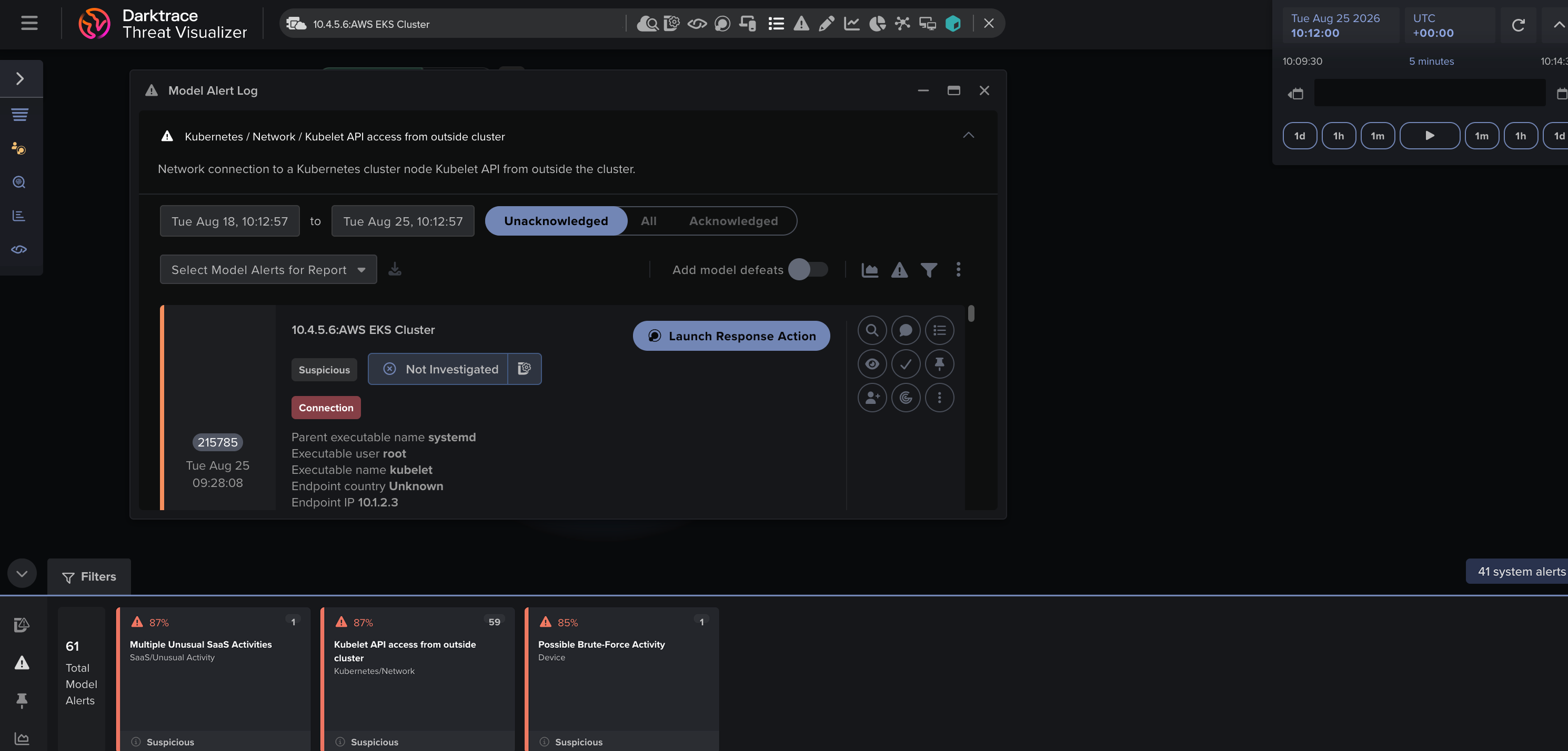
Darktrace surfaces unexpected Kubernetes activity that does not align with an organization’s Unique Behavioral Profile
Visibility across the network, the process, and the control plane
Darktrace monitors Kubernetes at three levels that together provide comprehensive runtime visibility:
Network-layer
Traffic between pods, across nodes and out to the internet. This helps to detect lateral movement and unusual connectivity, whether internal or external.
Process-layer
What is executing inside your containers. If a process reads a sensitive credential file or spawns an unexpected shell inside a production pod, Darktrace can identify that activity and use it as context for further detections.
Controlplane
Activity against the Kubernetes API itself: someone executes a command in a running pod, RBAC changes, or unusual administrative actions. Many high-impact security events involve the control plane, an area that is often less visible to solutions that only analyze or scan network-layer telemetry.
Misconfiguration and vulnerability awareness
Runtime detection is strongest when combined with posture and exposure management. Darktrace surfaces risky pod configurations, such as privileged containers, host networking, and over-permissive service accounts as workloads are deployed, and links CVEs from images to the workloads running them. Security teams can go beyond simply knowing that a vulnerability exists and see exactly where it is in the cluster. When combined with behavior-based detections, this provides invaluable context that can help prioritize incidents and proactively identify areas that need further attention. For example, anomalous workload behavior on its own might not be very interesting to a security team at first, but if that same workload is known to host sensitive data, is known to have critical vulnerabilities associated with it, or is publicly accessible, then this narrative becomes much more suspicious and demanding of their attention.
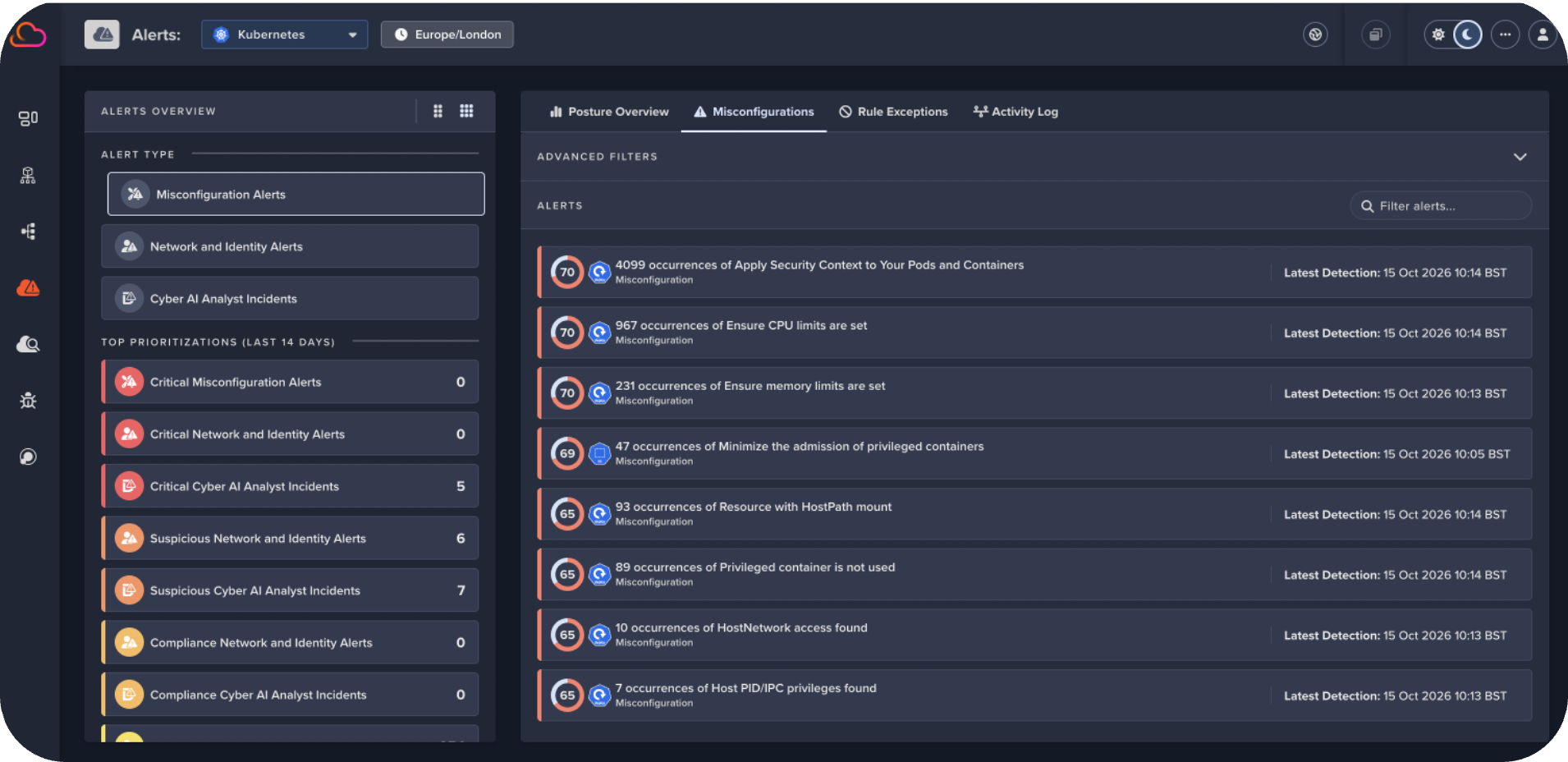
Darktrace highlights Kubernetes misconfigurations such as privileged containers, host networking, and missing security controls, helping teams prioritize runtime alerts with valuable exposure and risk context
Response, tailored to Kubernetes
Detection is most effective when paired with response. Darktrace can take precise actions on Kubernetes workloads, including blocking a malicious connection at the pod level, helping to safely contain threats while security teams investigate. Response actions can be taken fully autonomously or via a human-in-the-loop process, which is completely configurable depending on the desired level of autonomy and scope. Darktrace is expanding the number of Kubernetes-native response actions to give customers even more flexibility when containing threats.
Forensics that survive the workload
Because containers are so short-lived, evidence disappears fast and this can make it very difficult to answer questions related to the initial detections. Darktrace solves this with Forensic Acquisition & Investigation capabilities that extend to Kubernetes containers, allowing investigations to be triggered manually by an analyst, or automatically from an alert, preserving evidence before the workload is gone.
For incident responders, this addresses a key challenge in container security: being able to answer “what actually happened?” after an ephemeral workload has vanished.
One platform, not another silo
Kubernetes doesn't exist in isolation, and neither should its security. Darktrace correlates cluster activity with the surrounding cloud environment, including AWS, Azure and GCP identities, network activity and cloud assets, allowing analysts to pivot between a Kubernetes workload and its wider context. A single anomalous action can be traced from the control plane to the pod, and from the pod to the cloud identity behind it, all within a single investigation workflow. This can also include alerts from other areas of hybrid infrastructure or third-party sources where relevant, adding more context to investigations and speeding up workflows for human analysts.
Built to deploy easily
Operational complexity can be a barrier to security adoption. Darktrace / HYBRID NETWORK for Kubernetes installs with a single command, and for teams that manage their infrastructure as code, it supports raw manifests so the deployment can live in a Git repository and be managed through existing GitOps workflows. The same deployment approach works across Kubernetes environments in AWS, Azure, Google Cloud, and on-premises infrastructure. Early adopters of Darktrace’s Kubernetes capabilities have highlighted the simplicity of deployment and time to value.
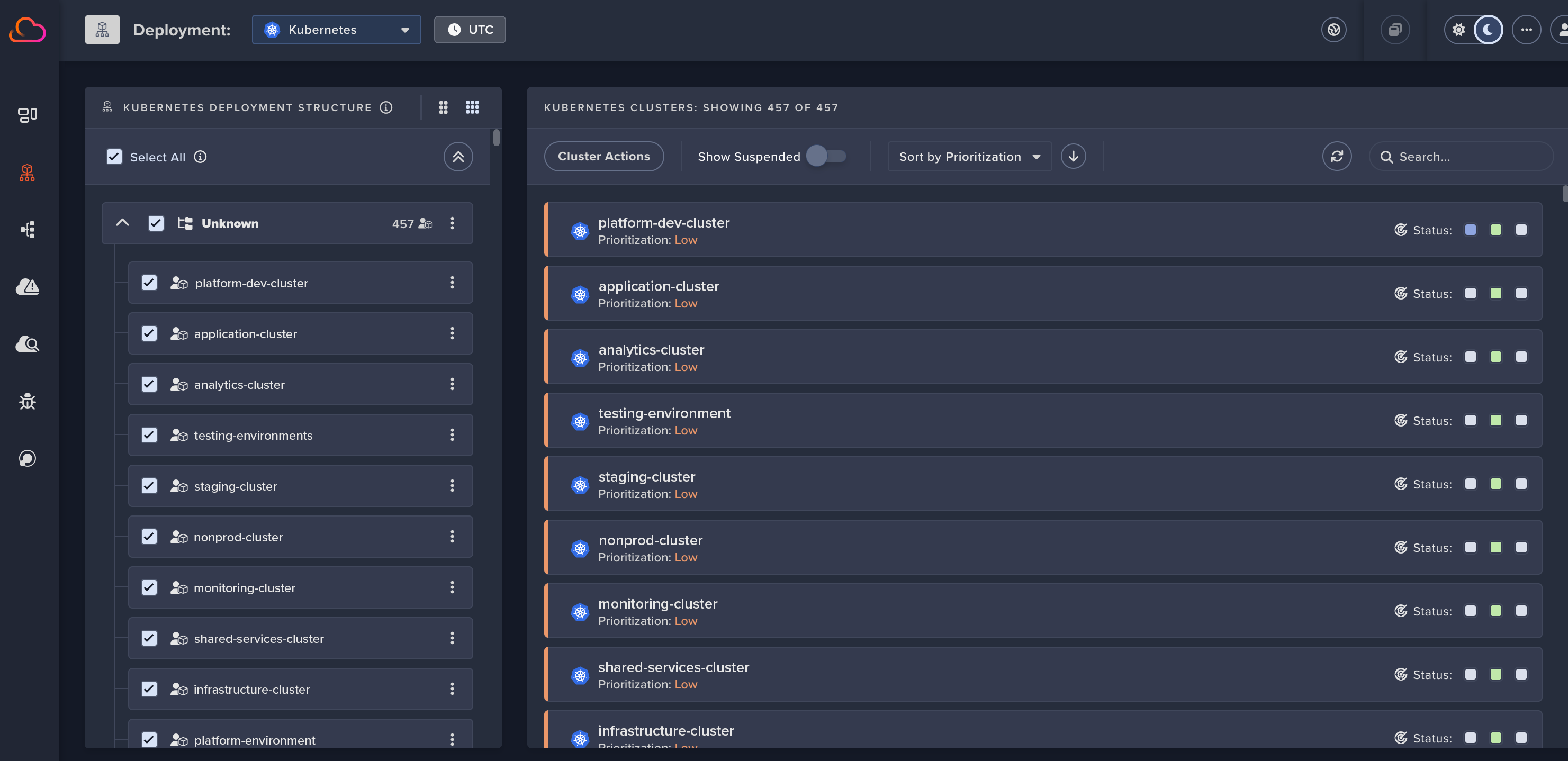
Darktrace can deploy across your Kubernetes environment and wider hybrid infrastructure, while also providing visibility into Kubernetes deployment structure and status
Next steps
Kubernetes environments are dynamic, ephemeral and API-driven in ways that challenge traditional security tooling. With Kubernetes usage increasing due to widespread AI adoption, it is essential to secure Kubernetes environments as part of securing what AI can do. Darktrace / HYBRID NETWORK addresses these challenges by learning normal behavior in Kubernetes environments across network, process and control-plane layers, identifying meaningful threats and enabling targeted response. Combined with the context of wider hybrid infrastructure and forensic investigation capabilities, Darktrace provides visibility into both emerging threats and active incidents.
To see how Darktrace can help secure your Kubernetes environment and your wider hybrid infrastructure, get in touch to arrange your free trial. Existing customers can contact their Darktrace Account Team for more information about deployment options and licensing.
Sources
[1] Gartner, Container Management research, 2025: "By 2028, 95% of new AI deployments will use Kubernetes, up from less than 30% today." https://www.gartner.com/en/documents/7913109. (quote reproduced under Gartner reprint at https://www.kubermatic.com/magic-quadrant-and-critical-capabilities-for-container-management/)
· Darktrace malware researchers have found an ongoing malware campaign using a document-themed lure containing a malicious LNK file and a PDF with an embedded payload.
· The Nim based loader deploys a Rust-based remote access trojan (RAT), using a UAC bypass and DLL search-order hijacking technique targeting Microsoft Edge.
· The RAT uses Discord for C2, creating dedicated channels to manage infected devices and execute commands.
· CikaBika Bot supports system reconnaissance, remote command execution, screenshot capture, and file transfers.
Introduction
In a threat landscape where attackers continue to rely on social engineering techniques to deliver malware, legitimate services are increasingly being abused to support malicious operations. Communications platforms like Discord can provide attackers with a ready-made channel for command-and-control (C2), allowing them to manage compromised devices without establishing dedicated infrastructure.
Malware researchers at Darktrace have identified a campaign distributing CikaBika, a Rust-based RAT that uses Discord for C2. The infection chain begins with a disk image and a malicious Windows shortcut. A Nim loader extracts the final payload and attempts to plant it in Microsoft Edge’s installation directory using a PowerShell UAC bypass. Once running, the RAT collects host information, registers the device with Discord, and accepts commands through a dedicated channel.
Technical Analysis
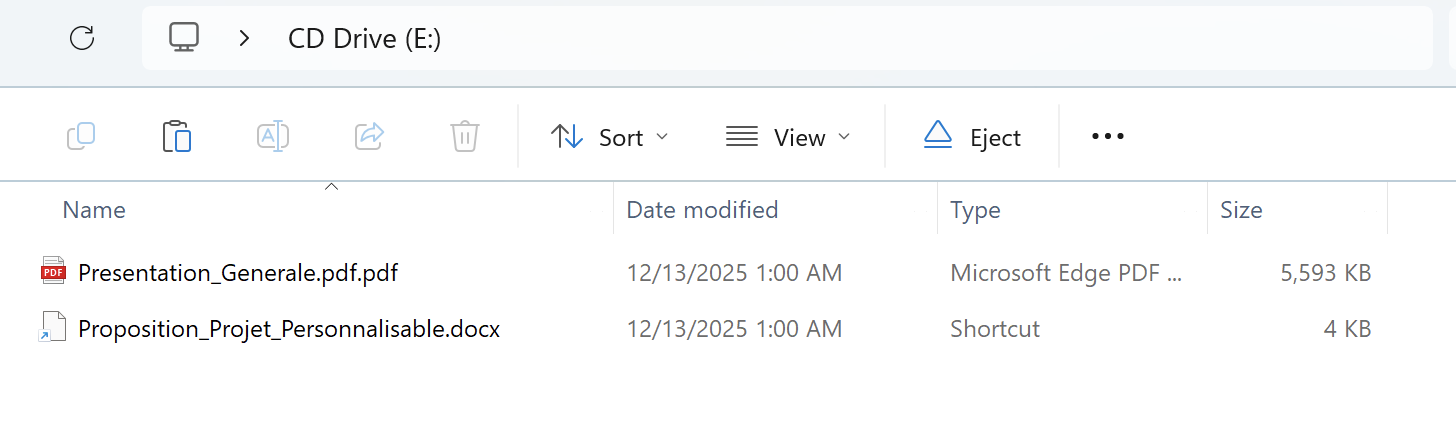
Figure 1: Contents of Proposition_Projet.img.
Initial access and PDF payload
The malware is packaged within a disk image named Proposition_Projet.img. Inside are a PDF titled “Presentation_Generale.pdf.pdf” and a Windows shortcut (LNK) disguised as a Word document, “Proposition_Projet_Personnalisable.docx”. The delivery method has not been confirmed; however, the filenames and document-themed lure are consistent with a phishing campaign.
Figure 2: PowerShell command embedded in the malicious shortcut.
Opening the shortcut launches a hidden PowerShell process while displaying the PDF as a decoy. The French-language document explains how to produce a written summary or contraction of a text. In the background, PowerShell reads the PDF as bytes and uses the value at offset 239 (0x20) as an XOR key to decode an embedded executable. The resulting payload is written to %TEMP%\IfyuUapz.txt and executed using cmd /c.
Nim loader and UAC bypass
“IfyuUapz.txt” is a Nim-based loader that contains two Base64-encoded blobs: a Rust dynamic-link library (DLL) and a PowerShell deployment script. Both are decoded and written to temporary files, referenced to within the loader as “dllFile” and “copyPs1”. The loader runs the script through a hidden PowerShell process using an encoded command, then attempts to load the DLL using Nim’s loadLib function. If loading fails, it invokes regsvr32.exe and retries.
Figure 3: Silent DLL deployer.
The PowerShell component is responsible for moving the DLL to C:\Program Files (x86)\Microsoft\Edge\Application\dbghelp.dll. It first copies the DLL to C:\Windows\Temp\dbghelp.tmp, then modifies HKCU\Software\Classes\ms-settings\shell\open\command so that launching computerdefaults.exe can trigger a command to move the staged DLL into the protected Edge directory. This is an attempt to bypass User Account Control (UAC), which depends on the target’s Windows configuration.
The script also compiles a small C# helper that calls ShowWindow to hide windows associated with Windows Settings and ApplicationFrameHost. It launches the bypass helper three times, checks for the presence of the destination DLL, and attempts to delete the temporary scripts, intermediate DLL, and associated registry changes.
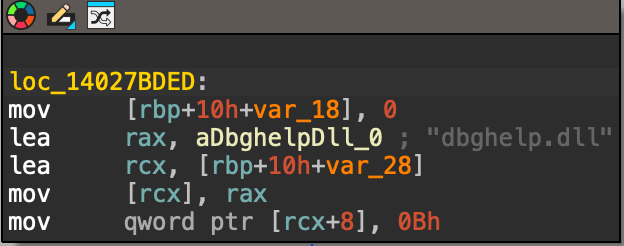
Figure 4: Legitimate msedge.exe function to load the legitimate dbghelp.dll.
The legitimate msedge.exe has a delay-loaded dependency on dbghelp.dll, and the malicious DLL exports a subset of the functions associated with Microsoft’s debugging library. The attacker appears to be exploiting this dependency through DLL search-order hijacking. However, it does not export every function in Edge’s delay-import table, meaning its compatibility with the host is incomplete. The observed code establishes the intended sideloading route, rather than proving that Edge successfully loaded the planted DLL.
Rust RAT payload
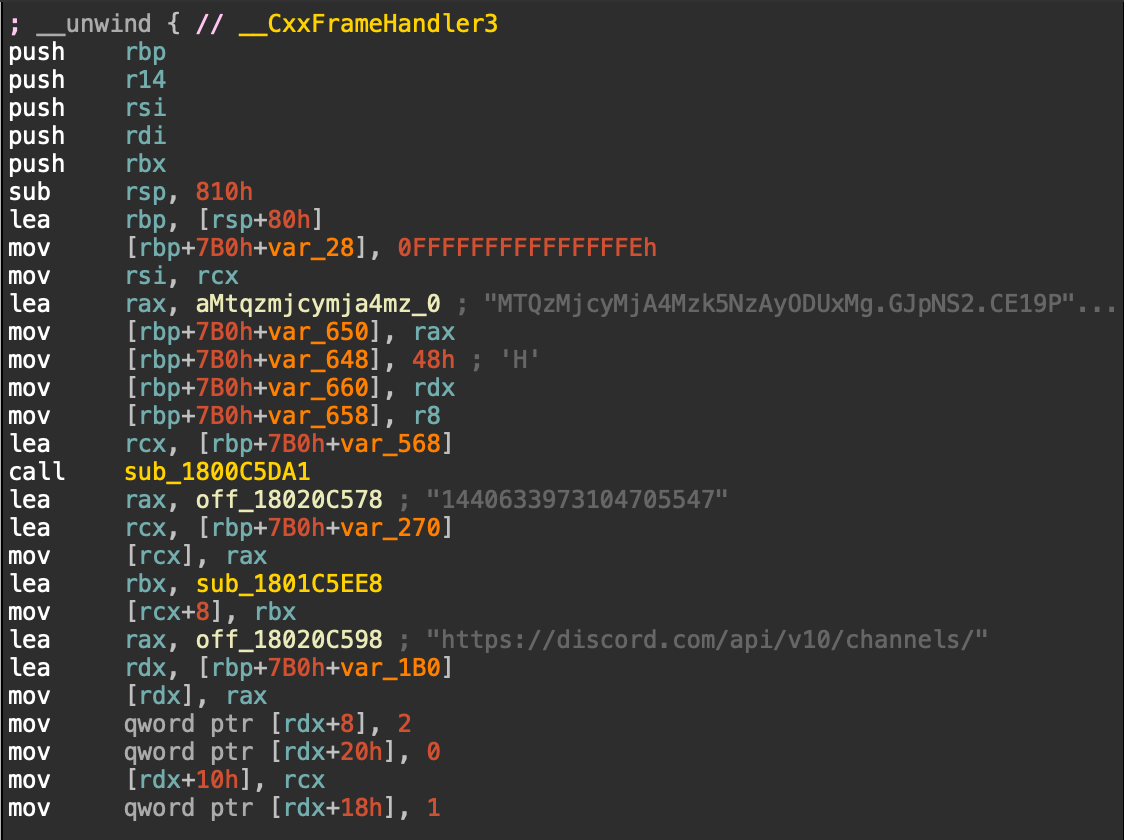
Figure 5: Discord configuration within the RAT.
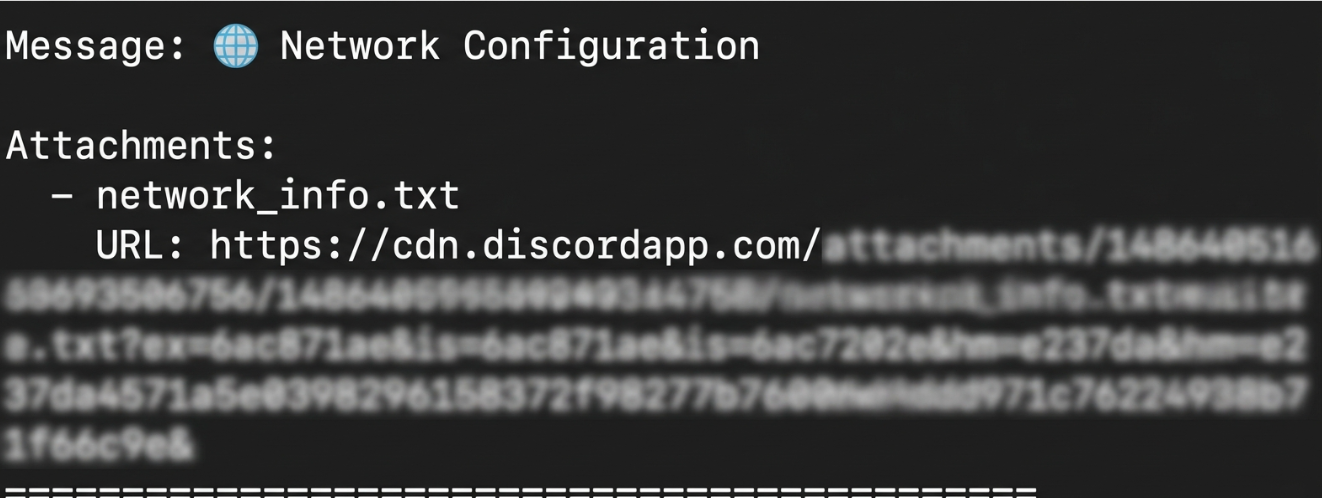
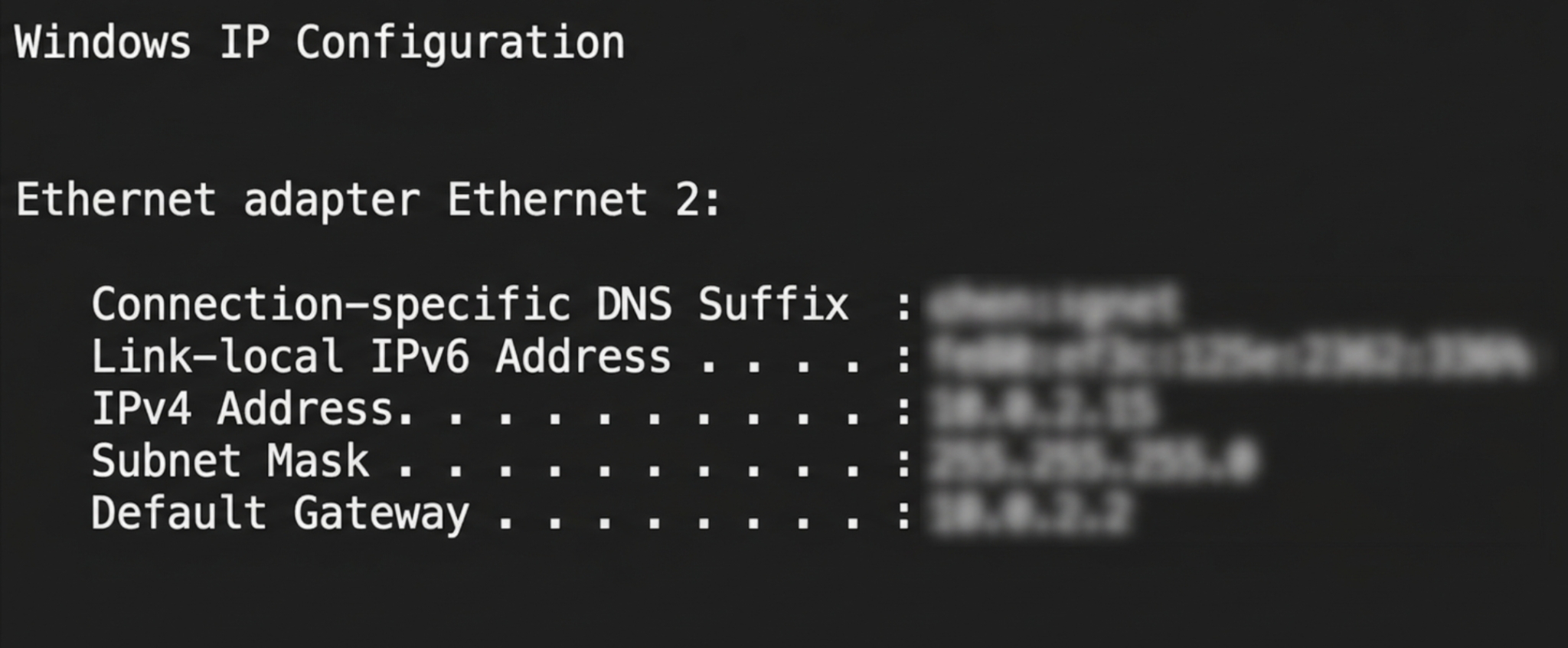
The malicious dbghelp.dll (IfyuUapz.txt) is a Rust-based RAT. At startup, the RAT registers the compromised device with Discord and begins collecting information about the host. Its reconnaissance routine gathers system details, runs tasklist to enumerate processes, executes ipconfig to obtain network configuration, and attempts to take a screenshot. The resulting artifacts include tasklist_startup.txt, network_info.txt, and screenshot.png.
Figure 6: Network configuration notification in Discord channel.
Figure 7: Network configuration output from network_info.txt.
Discord C2
The RAT uses Discord channels to send commands and report results. The operator can send commands to the device’s channel and receive the resulting output in the same conversation. This gives the attacker an interactive command interface without having to operate and maintain a dedicated C2 server.
Figure 8: Commands available in Discord.
The command set includes !shell for remote command execution; !sysinfo and !info for host details; !isOn for status checks; !tasklist and !ps for process enumeration; and !kill for process termination. File-transfer commands include !upload and !download. Additional strings and command handlers reference screenshots (!src), camera access (!camera), streaming (!stream), and broadcasting (!broadcast).
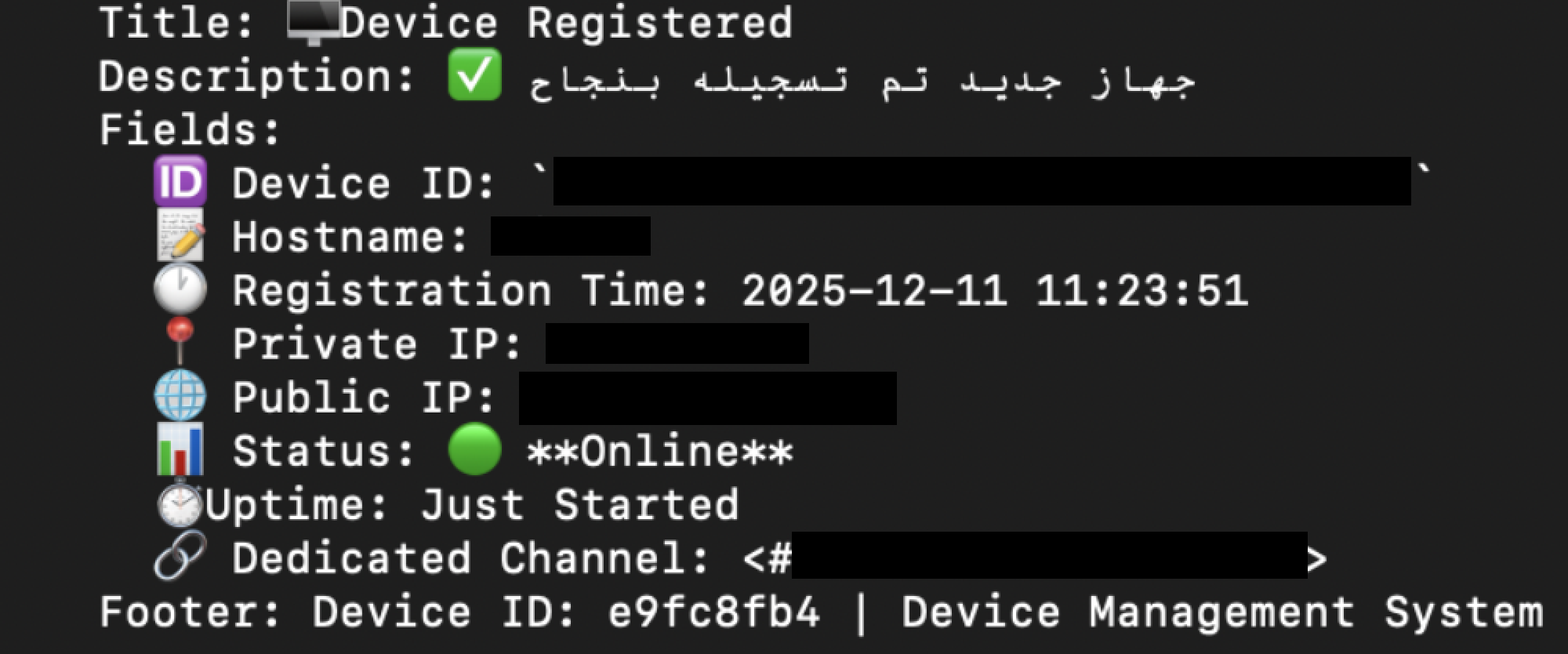
Figure 9: Device registration in Discord.
During device registration, the malware retrieves the victim’s public IP address using ipify.com. The registration message records the device ID, hostname, registration time, private and public IP addresses, status, uptime, and the Discord channel assigned to that device.
Operator activity and exfiltration
Figure 10: Powershell commands sent through Discord to exfiltrate data.
Once a device is registered, the attacker can issue commands through its dedicated Discord channel. In the observed activity, the attacker compressed a directory into a ZIP and exfiltrated it using ngrok.
Figure 11: Download command to retrieve a document from the target.
The operator can also use !download to retrieve files from target. The example above displays a request for a specific document on the victim’s desktop. The requested file is then returned through the device’s Discord channel, giving the attacker a direct way to store and access selected data.
Conclusion
CikaBika Bot demonstrates how attackers continue to rely on social engineering techniques to deliver malware. Although the initial distribution method has not been confirmed, the use of a disk image containing a shortcut disguised as a Word document, alongside a legitimate-looking PDF, suggests the campaign was designed for phishing.
While Nim is less commonly encountered than C in Windows malware, it has increasingly appeared in malicious tooling. In this case, Nim is used to unpack and deploy a Rust-based RAT, adding another layer to the infection chain.
Once installed, CikaBika Bot uses Discord as its C2 platform, allowing the attacker to manage compromised devices, execute commands, and retrieve files without maintaining dedicated C2 infrastructure. The observed use of Discord channels for individual victims, alongside additional data exfiltration through ngrok, shows how legitimate services can be repurposed to support malicious operations.
T1204.002 – User Execution: Malicious File T1036.007 – Masquerading: Double File Extension T1059.001 – PowerShell T1027 – Obfuscated Files or Information T1140 – Deobfuscate/Decode Files or Information T1548.002 – Bypass User Account Control T1112 – Modify Registry T1574.001 – DLL Search Order Hijacking T1036.005 – Masquerading: Match Legitimate Resource Name or Location T1082 – System Information Discovery T1016 – System Network Configuration Discovery T1057 – Process Discovery T1113 – Screen Capture T1059.003 – Command and Scripting Interpreter: Windows Command Shell T1102.002 – Web Service: Bidirectional Communication T1560.001 – Archive Collected Data: Archive via Utility T1567 – Exfiltration Over Web Service T1070.004 – Indicator Removal: File Deletion T1218.010 – Regsvr32 T1005 – Data from Local System T1074.001 – Data Staged: Local Data Staging T1041 – Exfiltration Over C2 Channel T1564.003 – Hide Artifacts: Hidden Window T1027.013 – Encrypted/Encoded File













.png)