ブログ
/
Network
/
August 3, 2022

The Risks of Remote Access Tools

Discover how remote access tools in exploitations across OT/ICS and corporate environments benefit from Darktrace's product suite.
Inside the SOC
Darktrace cyber analysts are world-class experts in threat intelligence, threat hunting and incident response, and provide 24/7 SOC support to thousands of Darktrace customers around the globe. Inside the SOC is exclusively authored by these experts, providing analysis of cyber incidents and threat trends, based on real-world experience in the field.
Written by
Dylan Hinz
Cyber Analyst
Default blog image
03
Aug 2022

Understanding remote access tools

In 2022, remote access tools continue to provide versatile support to organizations. By controlling devices remotely from across the globe, IT teams save on response costs, travel times, and can receive remote support from external parties like contractors [1 & 2]. This is particularly relevant in cases involving specialty machines such as OT/ICS systems where physical access is sometimes limited. These tools, however, come with their own risks. The following blog will discuss these risks and how they can be addressed (particularly in OT environments) by looking at two exploit examples from the popular sphere and within the Darktrace customer base. 

What are remote access tools?

One of the most popular remote tools is TeamViewer, a comprehensive videoconferencing and remote management tool which can be used on both desktop and handheld devices[3]. Like other sophisticated tools, when it works as intended, it can seem like magic. However, remote access tools can be exploited and may grant privileged network access to potential threat actors. Although TeamViewer needs to be installed on both perpetrator and victim devices, if an attacker has access to a misconfigured TeamViewer device, it becomes trivial to establish a foothold and deploy malware. 

How secure is remote access?

Security vulnerabilities in remote access tools

In early 2021, remote access tooling was seen on a new scale against the City of Oldsmar’s water treatment plant [4] (Figure 1). Oldsmar manages chemical concentration levels in the water for a 15,000-person city. The water treatment plant had been using TeamViewer to allow employees to share screens and work through IT issues. However, in February an employee noticed he had lost control of his mouse cursor. Initially he was unconcerned; the employee assumed that the cursor was being controlled by his boss, who regularly connected to the computer to monitor the facility’s systems. A few hours later though, the employee again saw his cursor moving out of his control and this time noticed that it was attempting to change levels of sodium hydroxide in the water supply (which is extremely dangerous for human consumption). Thankfully, the employee was able to quickly spot the changes and return them to their normal level. When looking back at the event, the key question posed by officials was where exactly the vulnerability was located in their security stack. [5]. The answer was unclear.

Photograph of compromised water plant in Florida 
Figure 1: Photograph of compromised water plant in Florida 

Tactics and strategies

When attackers get initial network access, the primary challenge for any enterprise is identifying a) that a device compromise has happened and b) how it happened. These were the same challenges seen in the Oldsmar attack. When the first physical signs of compromise occurred (cursor movement), the impacted user was still unsure whether the activity was malicious. A detailed investigation from Dragos revealed the how: evidence of a watering hole, reconnaissance activity a month prior, a targeted variant of the Tofsee botnet, and the potential presence of two separate threat actors [6 & 7]. The answer to both questions pointed to a complex attack. However, with Darktrace these questions become less important. 

How Darktrace stops compromised remote access

Darktrace does not rely on signatures but instead has AI-based models for live detection of these tools and anomalies within the wider network. Regardless of the security ‘hole’, live detection gives security teams the potential to respond in near-live time.

According to Darktrace’s Chief Product Officer, Max Heinemeyer, the Oldsmar attack was possible because it “Abused off-the-shelf tools that were already used by the client, specifically TeamViewer. This tactic, which targeted the domain controller as the initial vector, made the malware deployment easy and effective.” [8]. 

Darktrace has multiple DETECT models to provide visibility over anomalous TeamViewer or remote access tool usage:

·      Compliance / Incoming Remote Access Tool

·      Compliance / Remote Management Tool On Client

·      Compliance / Remote Management Tool On Server

·      Device / Activity Identifier / Teamviewer 

General incoming privileged connections:

·      Compliance / Incoming Remote Desktop

·      Compliance / Incoming SSH

Industrial DETECT can also highlight any new or unusual changes in ICS/OT systems:

·      ICS / Incoming ICS Command

·      ICS / Incoming RDP And ICS Commands

·      ICS / Uncommon ICS Error

Darktrace gives security teams the opportunity for a proactive response, and it is up to those teams to utilize that opportunity. In recent months our SOC Team have also seen remote access controls being abused for high-profile threats. In one example, Darktrace detected a ransomware attack supported by the installation of AnyDesk. 

Initial detection of compromise

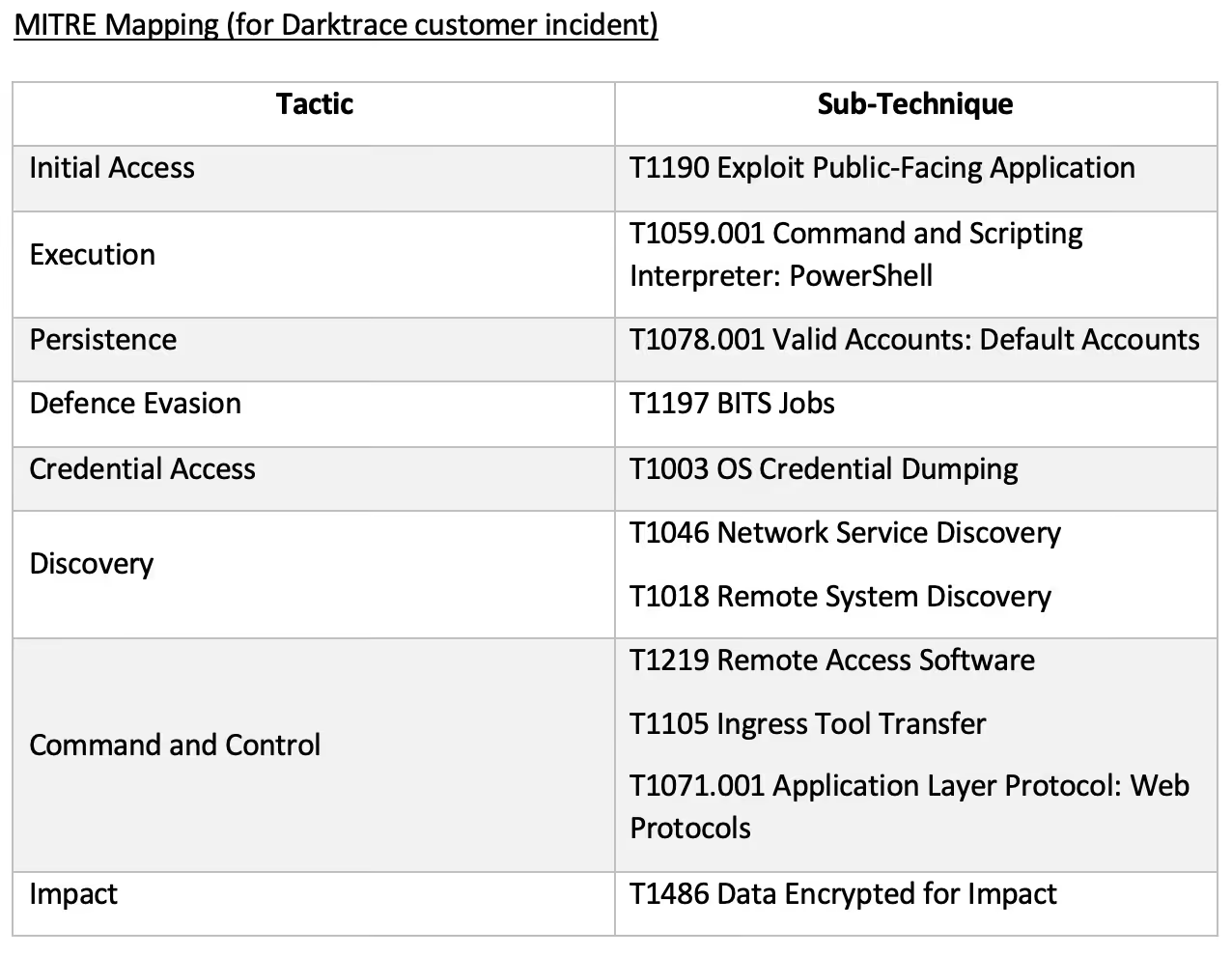
In May a company’s mail server was detected making multiple external requests for an unusual file ‘106.exe’ using a PowerShell agent (6b79549200af33bf0322164f8a4d56a0fa08a5a62ab6a5c93a6eeef2065430ce). Although some requests were directed to sinkholes, many were otherwise successful. Subsequently a DDL file with hash f126ce9014ee87de92e734c509e1b5ab71ffb2d5a8b27171da111f96f3ba0e75 (marked by VirusTotal as malicious) was downloaded. This was followed by the installation of AnyDesk: a remote access tool likely deployed for backdoor purposes during further compromises. It is clear the threat actor then moved on to reconnaissance, with new Mimikatz use and a large volume of ICMP and SMBv.1 scanning sessions using a default credential. DCE-RPC calls were also made to the Netlogon service, suggesting a possible attempt to exploit 2020’s Zerologon vulnerability (CVE-2020-1472) [9]. When the customer then discovered a ransom note pertaining to LV (repurposed REvil), Darktrace analysts helped them to re-configure Darktrace RESPOND and turn it to active rather than human confirmation mode (Figure 2). 
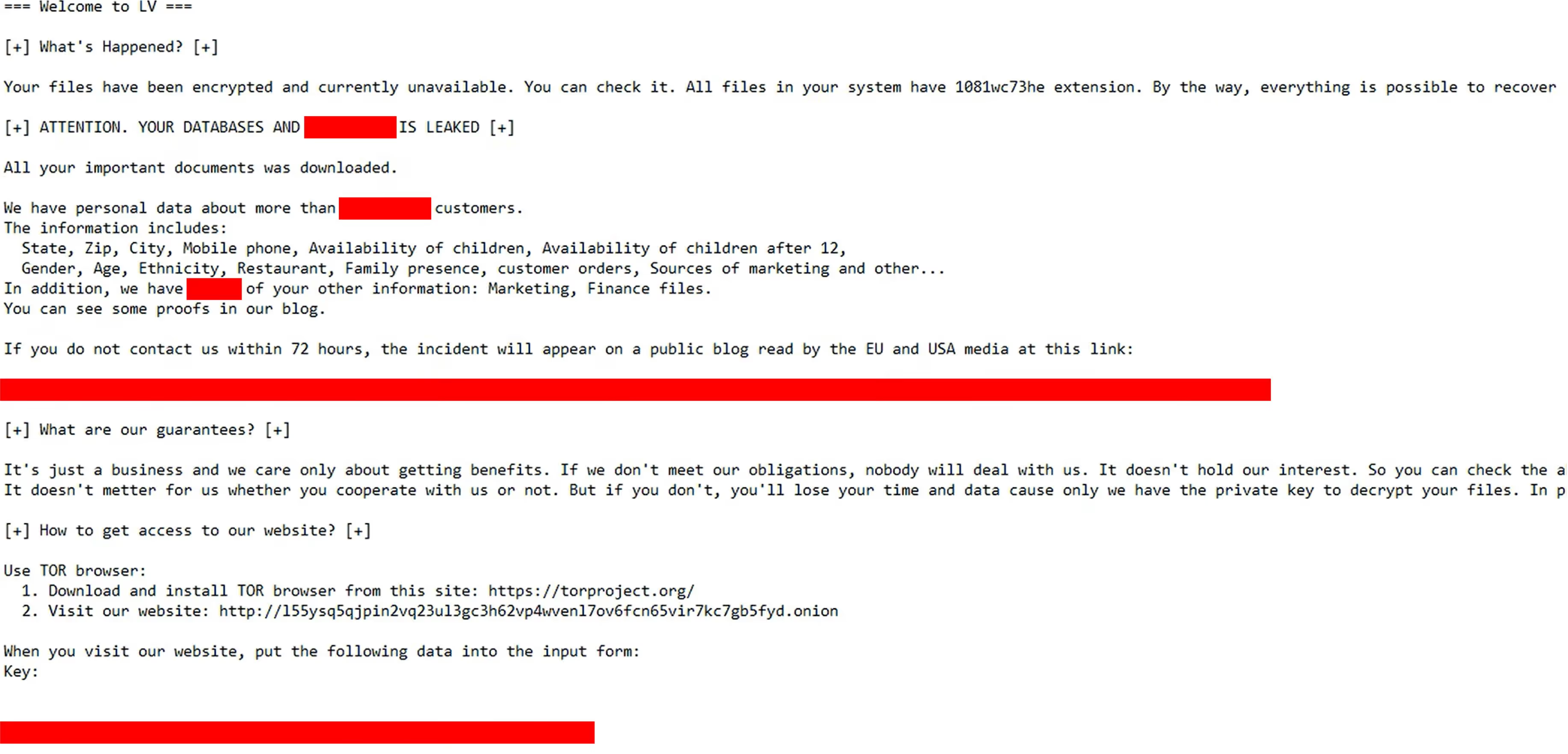
Figure 2: Capture of LV ransom note provided by customer

Whilst in this instance the tool was not used for initial access, it was still an important contingency tool to ensure the threat actor’s persistency as the customer tried to respond to the ongoing breach. Yet it was the visibility provided by Darktrace model detection and changes to RESPOND configuration which ensured the customer kept up with this actor and reduced the impact of the attack. 

Looking back at Oldsmar, it is clear that being aware of remote access tools is only half the battle. More importantly, most organizations are asking if their use in attacks can be prevented in the first place. As an off-the-shelf tool, restricting TeamViewer use seems like an easy solution but such tools are often essential for maintenance and support operations. Even if limited to privileged users, these accounts are also subject to potential compromise. Instead, companies can take a large-scale view and consider the environment in which the Oldsmar attack occurred. 

How IT & OT convergence complicated this attack

In this context, the separation of OT and IT systems is a potential solution - if attackers cannot access at-risk systems, then they also cannot attack those systems. However, with recent discourse around the IT-OT convergence and increased use of IoT devices, this separation is increasingly challenging to implement [10]. Complex networking designs, stringent patching requirements and ever-changing business/operational needs are all big considerations when establishing industrial security. In fact, Tenable’s CEO Amit Yoran encouraged less separation following Oldsmar: “There’s business reasons and efficiency reasons that you might want to connect those to be able to predict when parts are going to fail or when outages are going to occur [sic].” [11]. 

When neither addressing remote access use or industrial set-up provides a quick solution, then security teams need to look to third-party support to stop similar attacks. In addition to Darktrace DETECT, our Darktrace PREVENT range with PREVENT/Attack Surface Management (ASM) can also alert security teams to internet-facing devices at risk of remote access exploitation. ASM actively queries the Shodan API for open ports on company websites and exposed servers. This highlights those assets which might be vulnerable to this type of remote access.   

Conclusion

In conclusion, TeamViewer and other remote access tools offer a lot of convenience for security teams but also for attackers. Attackers can remotely access important systems including those in the industrial network and install malware using remote access tools as leverage. Security teams need to know both their normal authorized activities and how to enforce them. With Darktrace DETECT, the tools are given transparency, with Darktrace RESPOND they can be blocked, and now Darktrace PREVENT/ASM helps to mitigate the risk of attack before it happens. As the professional world continues to embrace hybrid working, it becomes increasingly crucial to embrace these types of products and ensure protection against the dangers of unwanted remote access. 

Thanks to Connor Mooney for his contributions to this blog.

Appendices
References 

[1] https://goabacus.com/advantages-and-disadvantages-of-remote-access-service/ 

[2] https://blog.ericom.com/advantages-of-remote-access/ 

[3] https://www.teamviewer.com/en/documents/ 

[4] https://www.wired.com/story/oldsmar-florida-water-utility-hack/ 

[5 & 11] https://www.bankinfosecurity.com/ot-it-integration-raises-risk-for-water-providers-experts-say-a-18841 

[6] https://www.dragos.com/blog/industry-news/a-new-water-watering-hole/ 

[7] https://www.dragos.com/blog/industry-news/recommendations-following-the-oldsmar-water-treatment-facility-cyber-attack/

[8] https://customerportal.darktrace.com/darktrace-blogs/get-blog/53  

[9] https://www.crowdstrike.com/blog/cve-2020-1472-zerologon-security-advisory/

[10] https://www.mckinsey.com/business-functions/operations/our-insights/converge-it-and-ot-to-turbocharge-business-operations-scaling-power

Inside the SOC
Darktrace cyber analysts are world-class experts in threat intelligence, threat hunting and incident response, and provide 24/7 SOC support to thousands of Darktrace customers around the globe. Inside the SOC is exclusively authored by these experts, providing analysis of cyber incidents and threat trends, based on real-world experience in the field.
Written by
Dylan Hinz
Cyber Analyst

More in this series

No items found.

Blog

/

Email

/

June 26, 2026

How Darktrace Transformed Cybersecurity at Our Health Center: A CIO’s Perspective

Default blog imageDefault blog image

How Darktrace Transformed Cybersecurity at Our Health Center: A CIO’s Perspective

In my role as CIO, I bring years of experience leading IT for healthcare organizations. I’ve seen firsthand the unique cybersecurity challenges that nonprofit health centers face: limited budgets, small IT teams, and the constant pressure to prioritize patient care over technology investments. Yet, the threat landscape for health is relentless, and the stakes for protecting patient data and ensuring operational continuity have never been higher. It’s a balancing act.

The search for a better solution

Like many nonprofits, organizations I work at start with Microsoft’s security stack. The discounted pricing for nonprofits makes it an obvious choice, and Microsoft Defender provided a solid foundation for endpoint and email security. However, I quickly realized that relying on a single vendor, even one as robust as Microsoft, left gaps in our defenses. Cybersecurity is never one-size-fits-all, which is why my preference was to layer an additional solution on top of our native security to improve our security posture.

Teams needed a solution that could layer seamlessly on top of Microsoft, without adding complexity or draining limited resources. That’s when I found Darktrace. I had heard of their reputation after seeing how other organizations used Darktrace to secure their infrastructure and was impressed by their AI-native, agentless approach and agreed to a proof of value (POV).

Our goal was to elavate Microsoft with an additional layer of intelligence- one that could seamlessly integrate, operate autonomously, and support a small team without increasing overhead. We turned to Darktrace because its AI-native, agentless approach offered a fundamentally different way to detect and respond to threats, learning our environment in real time and filling gaps that traditional tools can miss. With a quick POV, we were able to validate how effectively Darktrace works alongside Microsoft to deliver a more complete and resilient security architecture.

Why Darktrace stood out

From the start, Darktrace differentiated itself in several critical ways:

  • Deep visibility: Unlike other solutions that rely simply on host-based monitoring with endpoint agents, Darktrace operates passively at the network layer and integrates via APIs for email and identity security. This gave full visibility into network traffic that we previously didn’t have, going beyond our existing endpoint-based tools without adding additional maintenance overhead for our small IT team.
  • AI-native from the ground up: Darktrace wasn’t just layering AI on top of an existing product; it was built with AI at its core. Their autonomous detection and response to threats immediately reduced the need for constant human supervision. In a world where cyber-attacks are increasingly sophisticated and subtle, having an AI that learns our environment and adapts in real time is invaluable.
  • Comprehensive coverage: We started with a POV focused on email security, but quickly expanded to full deployment across our entire infrastructure. Darktrace’s products now protect our email, network, and identity layers, providing visibility and defense against lateral movement and abnormal behavior that traditional tools often miss.

Integration and workflow: Smooth and simple

One of the most impressive aspects of Darktrace is how easy it was to integrate into an existing environment. For network security, it was as simple as plugging an appliance into our top-of-rack switch – no downtime, no complex configuration. For email and identity, API integrations meant we could be up and running in hours, not weeks.

This simplicity extended to day-to-day operations. Our IT team received regular security reports, and any time we had questions or needed to adjust policies, Darktrace’s support team was there with white-glove service. Their responsiveness- even in the middle of the night- gave us confidence that we had true partners, not just a vendor.

Real-world impact: Threats stopped, time saved

The results spoke for themselves. During the time with Darktrace, I did not experience any security incidents. The team slept better at night knowing that Darktrace was monitoring for anomalies and proactively blocking suspicious activity, alerting us even before we noticed anything was wrong.

A memorable example was during an Electronic Health Record (EHR) upgrade, when my team forgot to adjust the policy in advance. Darktrace’s autonomous response was so effective that it blocked our upgrade activities- proof that nothing, not even internal changes, could slip by unnoticed. This level of vigilance meant that ransomware, data exfiltration attempts, or insider threats would be detected and contained before causing harm.

While I can’t share specific ROI numbers, the value was clear: we’ve avoided costly breaches, reduced the time spent investigating alerts, and eliminated the performance drag of agent-based tools. With Darktrace layered on top of Microsoft, I’ve hit the right balance of maximum protection with minimal spending. The cost of Darktrace / EMAIL was competitive, especially when factoring in the included Managed Detection and Response (MDR) service, which provides expert human oversight on top of the AI.

Key differentiators over the competition

  • Extending visibility beyond the endpoint: Traditional host-based monitoring solutions, such as EDR, play a critical role in securing individual devices. By adding a network detection and response (NDR) layer, we gained visibility into activity across our wider digital environment, surfacing threats that move laterally, operate between devices, or bypass endpoint controls. Darktrace also stood out for its ability to learn our normal patterns of behavior and identify subtle deviations in real time, not just known indicators of compromise. Because this is delivered through passive, non-disruptive monitoring, we were able to strengthen our defenses without adding complexity or impacting performance.
  • Layered security without complexity: Darktrace elevated our Microsoft foundation without creating conflicts or requiring us to disable existing protections. This layered approach maximized our security posture without adding operational burden.
  • Expert partnership: Beyond technology, Darktrace’s team acted as true partners, guiding us through deployment, providing ongoing support, and helping us interpret findings. This partnership was as valuable as the technology itself.

Advice for other nonprofits

If you’re an IT leader in a nonprofit, my advice is simple: look for solutions that are easy to deploy, intelligent in their response, and cost-effective. Don’t settle for more endpoint based tools that overlap with what you already have. Seek out a layered approach that covers your blind spots – especially at the network and email layers- at a price point that suits your organization.

Most importantly, don’t be afraid to evaluate new solutions. Even if you’re inundated with vendor pitches, you owe it to your organization to explore options that could save you time, money, and sleepless nights.

For organizations I work at, combining Microsoft’s security stack with Darktrace’s AI-native, platform struck the right balance between protection and practicality. We gained enterprise-grade security without sacrificing performance or stretching our budget. In the end, that meant more resources for what matters most: delivering care to our patients. If you’re facing similar challenges, I encourage you to consider how Darktrace could transform your security posture, and give your team the peace of mind they deserve.

For the organization I work in, combining Microsoft with Darktrace delivered a clear step-change in our security posture. Microsoft provided the foundation, while Darktrace’s behavioral intelligence added visibility into the unknown, surfacing emerging threats based on deviations in real-time activity, not just known indicators.

The result was enterprise-grade protection without added overhead, allowing us to stay focused on patient outcomes, not security operations. For organizations facing similar pressures, this layered approach offers a smarter, more efficient path to securing modern environments.

Continue reading
About the author
Mice Chen
Chief Information Security Officer

Blog

/

AI

/

June 25, 2026

Shadow AI Detection: The First Step Toward Securing AI

Default blog imageDefault blog image

Why shadow AI is emerging  

Imagine you’re an employee under pressure, deadlines stacking up, repetitive tasks piling higher by the day. You find a free AI tool online that promises to automate the work in seconds; no approvals are needed. It feels like a simple win, paste in some data, write a quick prompt, and move faster.

But in that moment, something changed.  

Sensitive customer information is entered into a tool your organization doesn’t monitor, doesn’t govern, and can’t see and suddenly, that data is no longer where it should be, and no one knows where it’s gone.

This is the reality of Shadow AI: employees using unsanctioned AI tools to move faster, while unintentionally creating risk that exists entirely outside visibility and control.  

This is not just a one off case, research across businesses indicate that nearly half of employees report using unsanctioned AI tools, often prioritizing speed and productivity over security. Additionally, 51% of employees report connecting AI tools to work systems or apps without IT approval, creating significant operational risk where the average cost of security incidents in organizations with a high level of shadow AI usage can reach $670k.

While shadow AI is often top of mind for security professionals, it is just one component of how AI use can increase risk. Understanding and managing shadow AI use should be considered as part of a broader, comprehensive risk management strategy that aims to secure AI systems, including human and agent identities, interactions, human-AI partnerships, and behaviors operating across the digital enterprise from visibility and governance through detection, response, and recovery.  

Effective risk management calls for a layered and interdisciplinary strategy. It requires addressing issues across governance and visibility; identity, access and agent control, data security and privacy, secure MLOps / LLMOps, runtime security, behavior-based detection, autonomous response and recovery.  

This blog explores a specific governance and visibility use case linked to shadow AI and reveals the challenges it presents as well as the defensive strategies that security teams can adopt.

Why shadow AI is hard to detect  

When it comes to AI, what organizations can easily see does not always reflect the full scope of AI activity occurring within the tools, applications, and workflows used across an enterprise. As a result, organizations using traditional rule-based methods to flag unusual activity may struggle to distinguish unsanctioned AI usage from legitimate operational behavior, particularly as SaaS applications, APIs, and orchestration layers increasingly have AI embedded into normal business workflows. Identifying threats using previously observed intelligence or depending on hard to maintain allow and block lists does not provide a dynamic enough strategy to manage risk. Also, many organizations are focusing on identifying Shadow AI in their governed infrastructure, like gateways, endpoints, or SASE, which is foundational. But, organizations require visibility and Shadow AI detection across all networked infrastructure from on-prem, hybrid, data centers, and cloud infrastructure that may not have endpoint agent visibility. This uncovers the utilization of MCP, data flows, and autonomous agents across these domains.

For example, employees interact with AI assistants across approved SaaS platforms every day. However, browser extensions and other types of plug-ins can route prompts that include enterprise data to embedded AI services in ways that are not visible to the security team. AI enabled workflows may invoke multiple APIs, orchestration layers, and cloud services behind the scenes, making it difficult for traditional security tooling to determine where data is processed, stored, or retransmitted. Because much of this activity occurs within trusted browser sessions and encrypted SaaS traffic, conventional network monitoring, DLP, and application allowlisting controls often lack the context needed to accurately identify or govern these interactions

Identifying AI tools in the environment is one part of the equation. Understanding the behavior surrounding their use is where the real challenge lies. An AI application is not inherently risky, but the way users or other assets interact with it may be. Sensitive data exposure, abnormal access patterns, and misuse of AI-assisted workflows often appear legitimate in isolation and only become visible through behavioral analysis across the broader environment.  

What Shadow AI visibility does and doesn’t show

Comprehensive Shadow AI visibility allows organizations to answer several important questions:

  • What types of AI are we using? What AI platforms, agents, MCP clients/servers, and services are active across the enterprise?  
  • Who is using AI services? Which users, business units, or systems are interacting with those AI services?  
  • Is our data safe? Is sensitive or regulated data being exposed through prompts, workflows, or integrations?  
  • Are AI systems behaving as expected? Are AI systems behaving anomalously or operating outside approved governance processes?  
  • Are our AI systems under attack? Is an attacker attempting to manipulate prompts, influence agent behavior, or abuse AI-enabled workflows?

Answering these questions is foundational to broader AI governance efforts. However, it is limited to helping teams understand initial interactions and fails to offer insight into dependencies and outcomes that are critical to securing AI across an enterprise.  

Deeper visibility that includes the ability to understand dependencies and outcomes are not always available in AI security point products. Answering the questions below requires understanding runtime behavior and operational outcomes:  

  • What actions did the AI interaction trigger?  
  • What systems, applications, or data did it access? Did the AI operate beyond its intended permissions or scope?  
  • Could a low-risk interaction lead to high-risk outcomes?  
  • What is the risk and context understanding of an anomalous activity to assist in prioritization of analysis and autonomous response action?

The distinction between these two sets of questions offers two different layers of AI security. The first set of questions focuses on discovery and interaction visibility. The second set focuses on providing visibility that includes the context and outcomes that are critical for managing follow-on risks associated with obfuscated downstream activities.  

Together, these layers help organizations move beyond simply identifying AI usage toward understanding how AI behaves operationally across the enterprise.

How organizations are addressing shadow AI

Most organizations still approach shadow AI as an application control problem, relying on policies, browser restrictions, and allow/block lists. However, AI adoption is evolving faster than most governance processes can realistically keep pace with. New assistants, plugins, and embedded AI features appear continuously, creating pressure to enable business productivity while simultaneously containing risk.  

Existing governance processes were designed for a more traditional SaaS adoption cycle, where new applications could be reviewed, approved, and monitored over longer time horizons. AI adoption operates differently. New capabilities can appear overnight inside existing platforms employees already use, making it difficult for security and governance teams to maintain an accurate understanding of enterprise AI exposure. This means that many organizations are experiencing significant operational overhead, particularly in large environments where AI usage is decentralized across teams, departments, and third-party services.  

Where should organizations start when securing their AI systems?

Shadow AI identification is an on-going critical component for AI Risk/Governance Boards as well as security organizations. As organizations seek AI certifications like ISO 42001 AI Management Systems, visibility into all AI adoption from enterprise use to custom innovation and development is crucial. Shadow AI identification provides organizations with the visibility needed to decide whether an AI tool should be brought into governed environments to reduce data loss (DLP) risks or whether policies should be established and enforced to restrict their use.

As organizations rapidly innovate and adopt AI, they are taking on more and more risk. Organizations need to have a strategy in place to mitigate the assumed risk, especially with third-party adoption. Visibility, monitoring, governance enforcement, behavioral-based detection of non-deterministic systems, and autonomous investigation and containment becomes critical to mitigating the risk of AI systems.  

How Darktrace secures AI and shadow AI

Attackers are using AI to move faster, scale tactics, and make threats more adaptive and convincing. Internally, organizations are grappling with new forms of risk created by generative AI, autonomous agents, shadow AI, and increasingly complex digital environments.

Darktrace helps organizations protect both people and AI in a world where AI is now central to how business gets done. Darktrace / SECURE AI helps organizations discover and control shadow AI by surfacing unsanctioned or unexpected AI activity where it appears – including MCP detections, distinguishing misuse of legitimate tools and unapproved services, and applying policy to contain data exposure while guiding users toward sanctioned options.

Stay up to date on AI security

Sign up for the Secure AI Readiness Program here: This gives you exclusive access to the latest news on the latest AI threats, updates on emerging approaches shaping AI security, and insights into the latest innovations, including Darktrace’s ongoing work in this area.

Ready to talk with a Darktrace expert on securing AI? Register here to receive practical guidance on the AI risks that matter most to your business, paired with clarity on where to focus first across governance, visibility, risk reduction, and long-term readiness.  

Continue reading
About the author
あなたのデータ × DarktraceのAI
唯一無二のDarktrace AIで、ネットワークセキュリティを次の次元へ