What is an Adversary-in-the-middle (AiTM) attack?
Adversary-in-the-Middle (AiTM) attacks are a sophisticated technique often paired with phishing campaigns to steal user credentials. Unlike traditional phishing, which multi-factor authentication (MFA) increasingly mitigates, AiTM attacks leverage reverse proxy servers to intercept authentication tokens and session cookies. This allows attackers to bypass MFA entirely and hijack active sessions, stealthily maintaining access without repeated logins.
This blog examines a real-world incident detected during a Darktrace customer trial, highlighting how Darktrace / EMAILTM and Darktrace / IDENTITYTM identified the emerging compromise in a customer’s email and software-as-a-service (SaaS) environment, tracked its progression, and could have intervened at critical moments to contain the threat had Darktrace’s Autonomous Response capability been enabled.
What does an AiTM attack look like?
Inbound phishing email
Attacks typically begin with a phishing email, often originating from the compromised account of a known contact like a vendor or business partner. These emails will often contain malicious links or attachments leading to fake login pages designed to spoof legitimate login platforms, like Microsoft 365, designed to harvest user credentials.
Proxy-based credential theft and session hijacking
When a user clicks on a malicious link, they are redirected through an attacker-controlled proxy that impersonates legitimate services. This proxy forwards login requests to Microsoft, making the login page appear legitimate. After the user successfully completes MFA, the attacker captures credentials and session tokens, enabling full account takeover without the need for reauthentication.
Follow-on attacks
Once inside, attackers will typically establish persistence through the creation of email rules or registering OAuth applications. From there, they often act on their objectives, exfiltrating sensitive data and launching additional business email compromise (BEC) campaigns. These campaigns can include fraudulent payment requests to external contacts or internal phishing designed to compromise more accounts and enable lateral movement across the organization.
Darktrace’s detection of an AiTM attack
At the end of September 2025, Darktrace detected one such example of an AiTM attack on the network of a customer trialling Darktrace / EMAIL and Darktrace / IDENTITY.
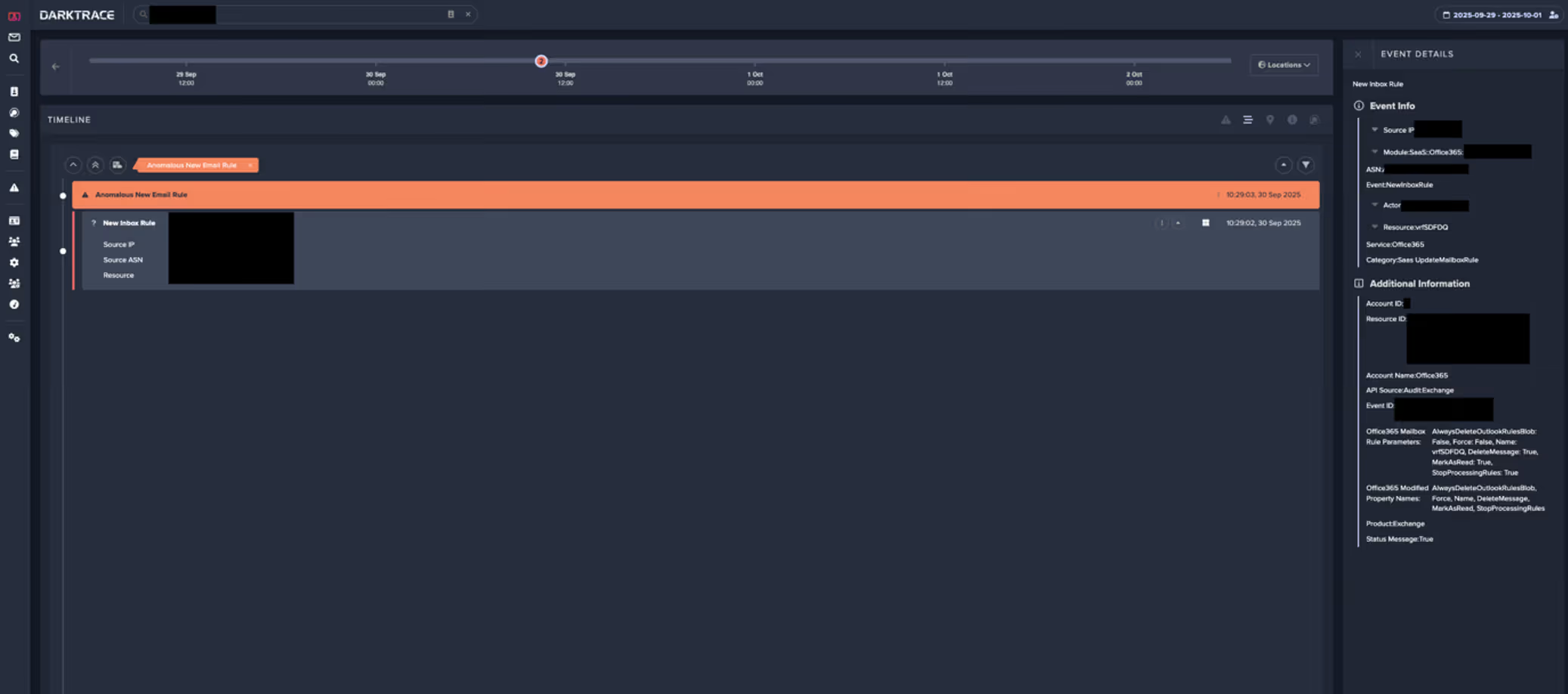
In this instance, the first indicator of compromise observed by Darktrace was the creation of a malicious email rule on one of the customer’s Office 365 accounts, suggesting the account had likely already been compromised before Darktrace was deployed for the trial.
Darktrace / IDENTITY observed the account creating a new email rule with a randomly generated name, likely to hide its presence from the legitimate account owner. The rule marked all inbound emails as read and deleted them, while ignoring any existing mail rules on the account. This rule was likely intended to conceal any replies to malicious emails the attacker had sent from the legitimate account owner and to facilitate further phishing attempts.
Internal and external phishing
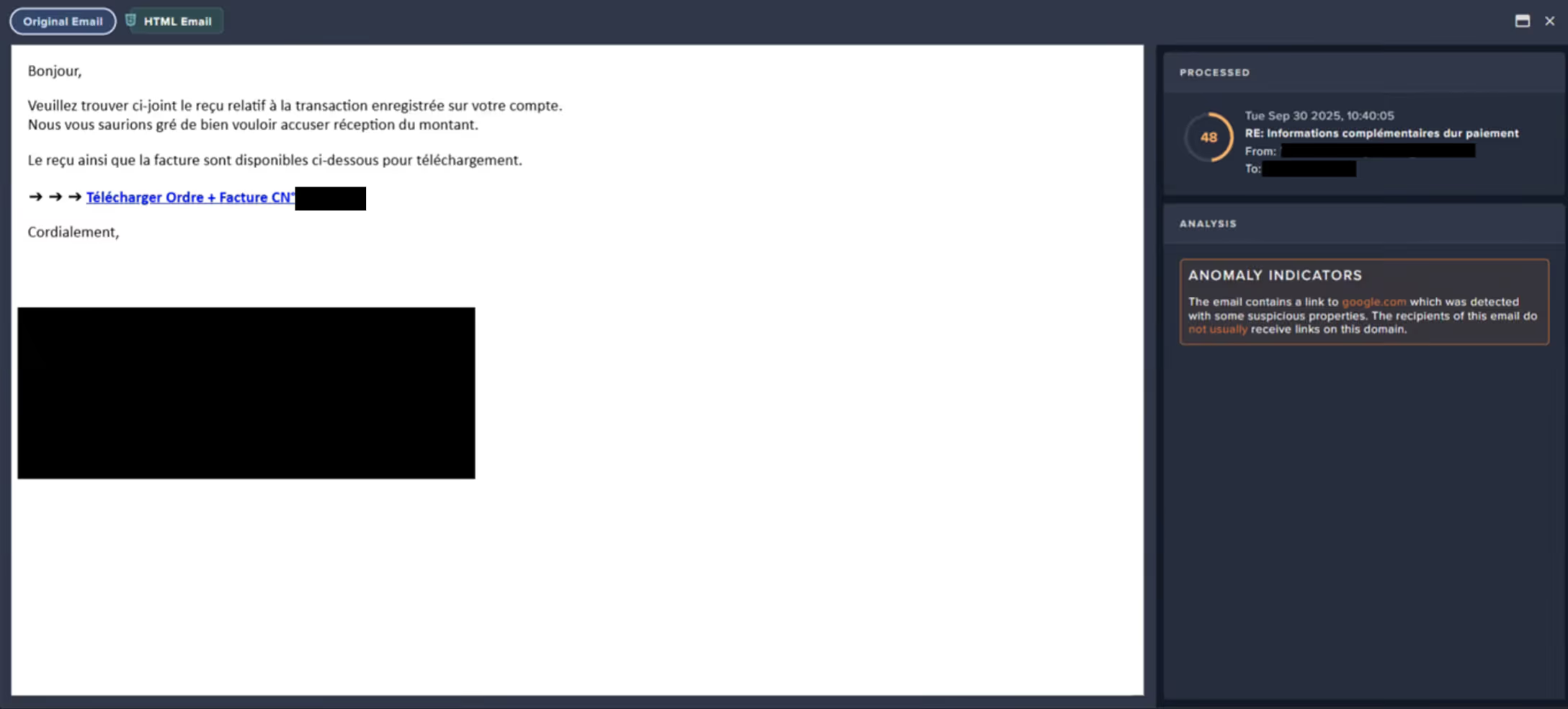
Following the creation of the email rule, Darktrace / EMAIL observed a surge of suspicious activity on the user’s account. The account sent emails with subject lines referencing payment information to over 9,000 different external recipients within just one hour. Darktrace also identified that these emails contained a link to an unusual Google Drive endpoint, embedded in the text “download order and invoice”.


As Darktrace / EMAIL flagged the message with the ‘Compromise Indicators’ tag (Figure 2), it would have been held automatically if the customer had enabled default Data Loss Prevention (DLP) Action Flows in their email environment, preventing any external phishing attempts.
Darktrace analysis revealed that, after clicking the malicious link in the email, recipients would be redirected to a convincing landing page that closely mimicked the customer’s legitimate branding, including authentic imagery and logos, where prompted to download with a PDF named “invoice”.
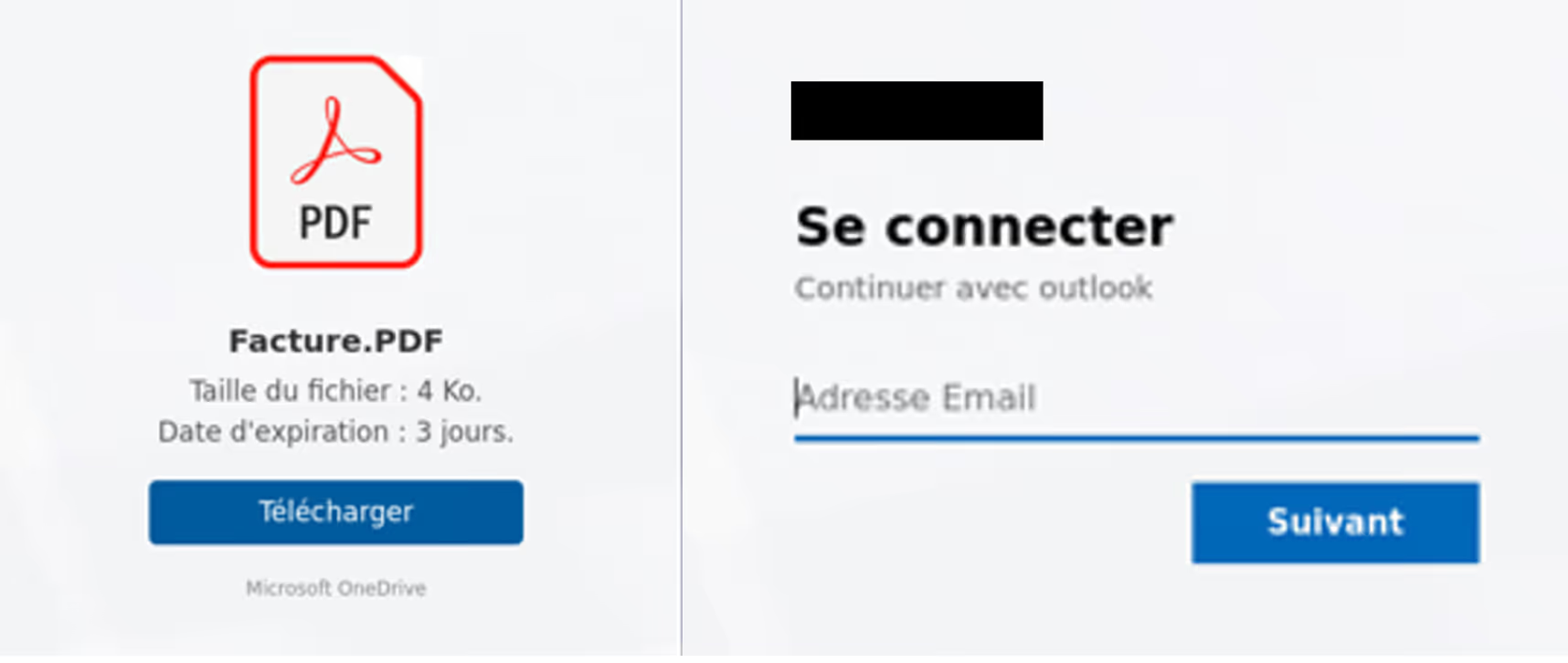
After clicking the “Download” button, users would be prompted to enter their company credentials on a page that was likely a credential-harvesting tool, designed to steal corporate login details and enable further compromise of SaaS and email accounts.
Darktrace’s Response
In this case, Darktrace’s Autonomous Response was not fully enabled across the customer’s email or SaaS environments, allowing the compromise to progress, as observed by Darktrace here.
Despite this, Darktrace / EMAIL’s successful detection of the malicious Google Drive link in the internal phishing emails prompted it to suggest ‘Lock Link’, as a recommended action for the customer’s security team to manually apply. This action would have automatically placed the malicious link behind a warning or screening page blocking users from visiting it.

Furthermore, if active in the customer’s SaaS environment, Darktrace would likely have been able to mitigate the threat even earlier, at the point of the first unusual activity: the creation of a new email rule. Mitigative actions would have included forcing the user to log out, terminating any active sessions, and disabling the account.
Conclusion
AiTM attacks represent a significant evolution in credential theft techniques, enabling attackers to bypass MFA and hijack active sessions through reverse proxy infrastructure. In the real-world case we explored, Darktrace’s AI-driven detection identified multiple stages of the attack, from anomalous email rule creation to suspicious internal email activity, demonstrating how Autonomous Response could have contained the threat before escalation.
MFA is a critical security measure, but it is no longer a silver bullet. Attackers are increasingly targeting session tokens rather than passwords, exploiting trusted SaaS environments and internal communications to remain undetected. Behavioral AI provides a vital layer of defense by spotting subtle anomalies that traditional tools often miss
Security teams must move beyond static defenses and embrace adaptive, AI-driven solutions that can detect and respond in real time. Regularly review SaaS configurations, enforce conditional access policies, and deploy technologies that understand “normal” behavior to stop attackers before they succeed.
Credit to David Ison (Cyber Analyst), Bertille Pierron (Solutions Engineer), Ryan Traill (Analyst Content Lead)
Appendices
Models
SaaS / Anomalous New Email Rule
Tactic – Technique – Sub-Technique
Phishing - T1566
Adversary-in-the-Middle - T1557




.avif)







.png)