Blog
/
Network
/
November 5, 2025

Tracking a Dragon: Investigating a DragonForce-affiliated ransomware attack with Darktrace

Darktrace investigates a DragonForce-affiliated ransomware attack targeting the manufacturing sector. The blog details the attack lifecycle, from network scanning and credential brute-forcing to data exfiltration and file encryption.
Inside the SOC
Darktrace cyber analysts are world-class experts in threat intelligence, threat hunting and incident response, and provide 24/7 SOC support to thousands of Darktrace customers around the globe. Inside the SOC is exclusively authored by these experts, providing analysis of cyber incidents and threat trends, based on real-world experience in the field.
Written by
Justin Torres
Cyber Analyst
Tracking a Dragon: Investigating a DragonForce-affiliated ransomware attack with Darktrace Default blog imageDefault blog imageDefault blog imageDefault blog imageDefault blog imageDefault blog image
05
Nov 2025

What is DragonForce?

DragonForce is a Ransomware-as-a-Service (RaaS) platform that emerged in late 2023, offering broad-scale capabilities and infrastructure to threat actors. Recently, DragonForce has been linked to attacks targeting the UK retail sector, resulting in several high-profile cases [1][2]. Moreover, the group launched an affiliate program offering a revenue share of roughly 20%, significantly lower than commissions reported across other RaaS platforms [3].

This Darktrace case study examines a DragonForce-linked RaaS infection within the manufacturing industry. The earliest signs of compromise were observed during working hours in August 2025, where an infected device started performing network scans and attempted to brute-force administrative credentials. After eight days of inactivity, threat actors returned and multiple devices began encrypting files via the SMB protocol using a DragonForce-associated file extension. Ransom notes referencing the group were also dropped, suggesting the threat actor is claiming affiliation with DragonForce, though this has not been confirmed.

Despite Darktrace’s detection of the attack in its early stages, the customer’s deployment did not have Darktrace’s Autonomous Response capability configured, allowing the threat to progress to data exfiltration and file encryption.

Darktrace's Observations

While the initial access vector was not clearly defined in this case study, it was likely achieved through common methods previously employed out by DragonForce affiliates. These include phishing emails leveraging social engineering tactics, exploitation of public-facing applications with known vulnerabilities, web shells, and/or the abuse of remote management tools.

Darktrace’s analysis identified internal devices performing internal network scanning, brute-forcing credentials, and executing unusual Windows Registry operations. Notably, Windows Registry events involving "Schedule\Taskcache\Tasks" contain subkeys for individual tasks, storing GUIDs that can be used to locate and analyze scheduled tasks. Additionally, Control\WMI\Security holds security descriptors for WMI providers and Event Tracing loggers that use non-default security settings respectively.

Furthermore, Darktrace identified data exfiltration activity over SSH, including connections to an ASN associated with a malicious hosting service geolocated in Russia.
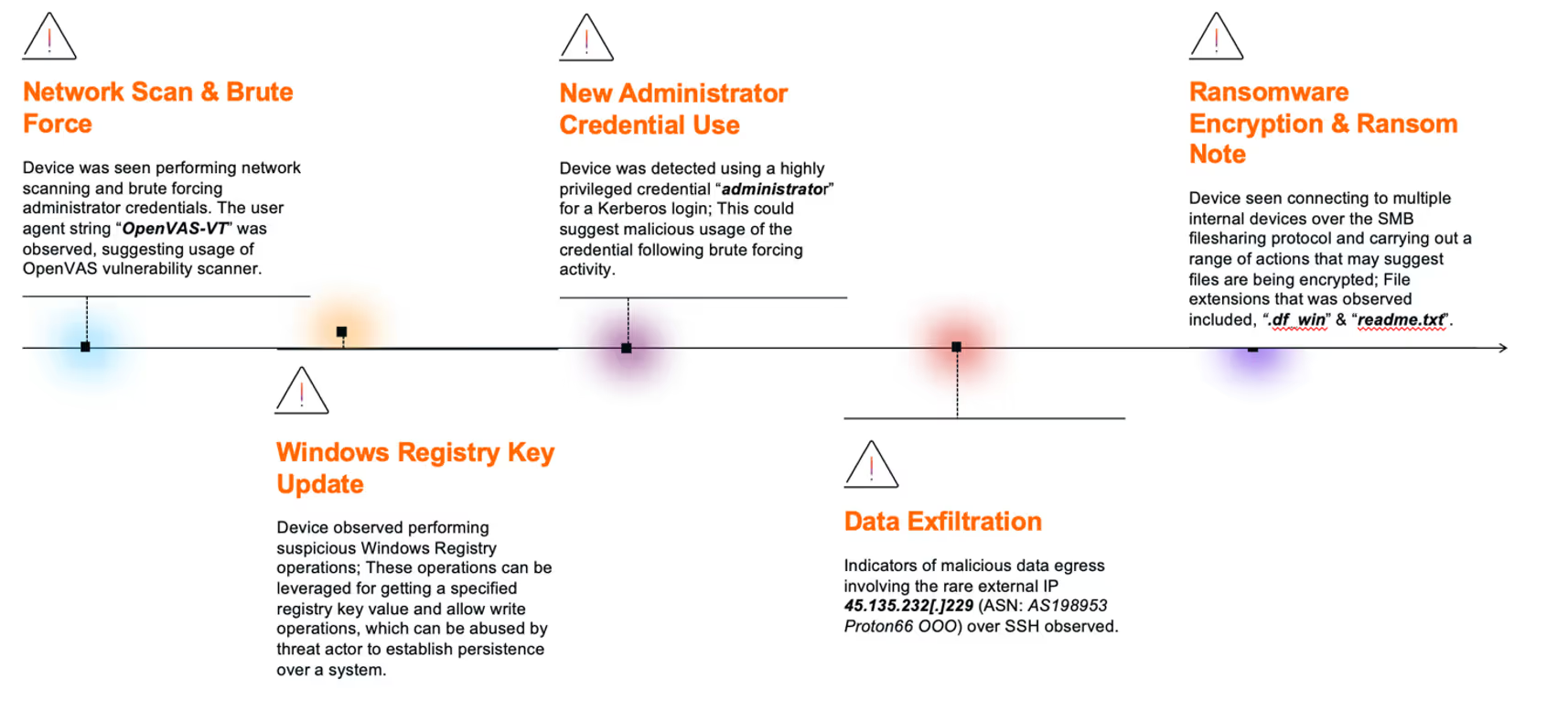
1. Network Scan & Brute Force

Darktrace identified anomalous behavior in late August to early September 2025, originating from a source device engaging in internal network scanning followed by brute-force attempts targeting administrator credential, including “administrator”, “Admin”, “rdpadmin”, “ftpadmin”.

Upon further analysis, one of the HTTP connections seen in this activity revealed the use of the user agent string “OpenVAS-VT”, suggesting that the device was using the OpenVAS vulnerability scanner. Subsequently, additional devices began exhibiting network scanning behavior. During this phase, a file named “delete.me” was deleted by multiple devices using SMB protocol. This file is commonly associated with network scanning and penetration testing tool NetScan.

2. Windows Registry Key Update

Following the scanning phase, Darktrace observed the initial device then performing suspicious Winreg operations. This included the use of the ”BaseRegOpenKey” function across multiple registry paths.

Additional operations such as “BaseRegOpenKey” and “BaseRegQueryValue” were also seen around this time. These operations are typically used to retrieve specific registry key values and allow write operations to registry keys.

The registry keys observed included “SYSTEM\CurrentControlSet\Control\WMI\Security” and “Software\Microsoft\Windows NT\CurrentVersion\Schedule\Taskcache\Tasks”. These keys can be leveraged by malicious actors to update WMI access controls and schedule malicious tasks, respectively, both of which are common techniques for establishing persistence within a compromised system.

3. New Administrator Credential Usage

Darktrace subsequently detected the device using a highly privileged credential, “administrator”, via a successful Kerberos login for the first time. Shortly after, the same credential was used again for a successful SMB session.

These marked the first instances of authentication using the “administrator” credential across the customer’s environment, suggesting potential malicious use of the credential following the earlier brute-force activity.
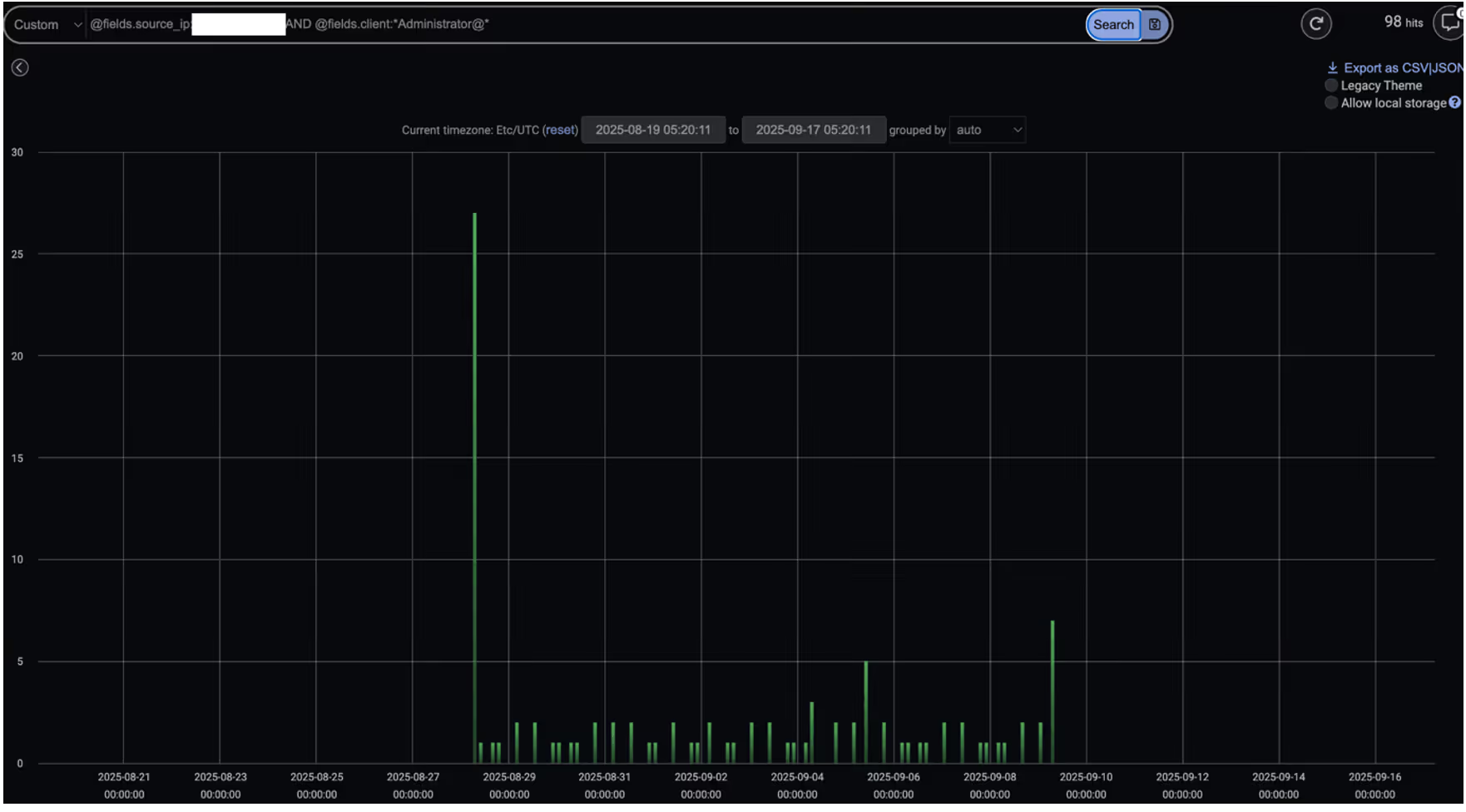
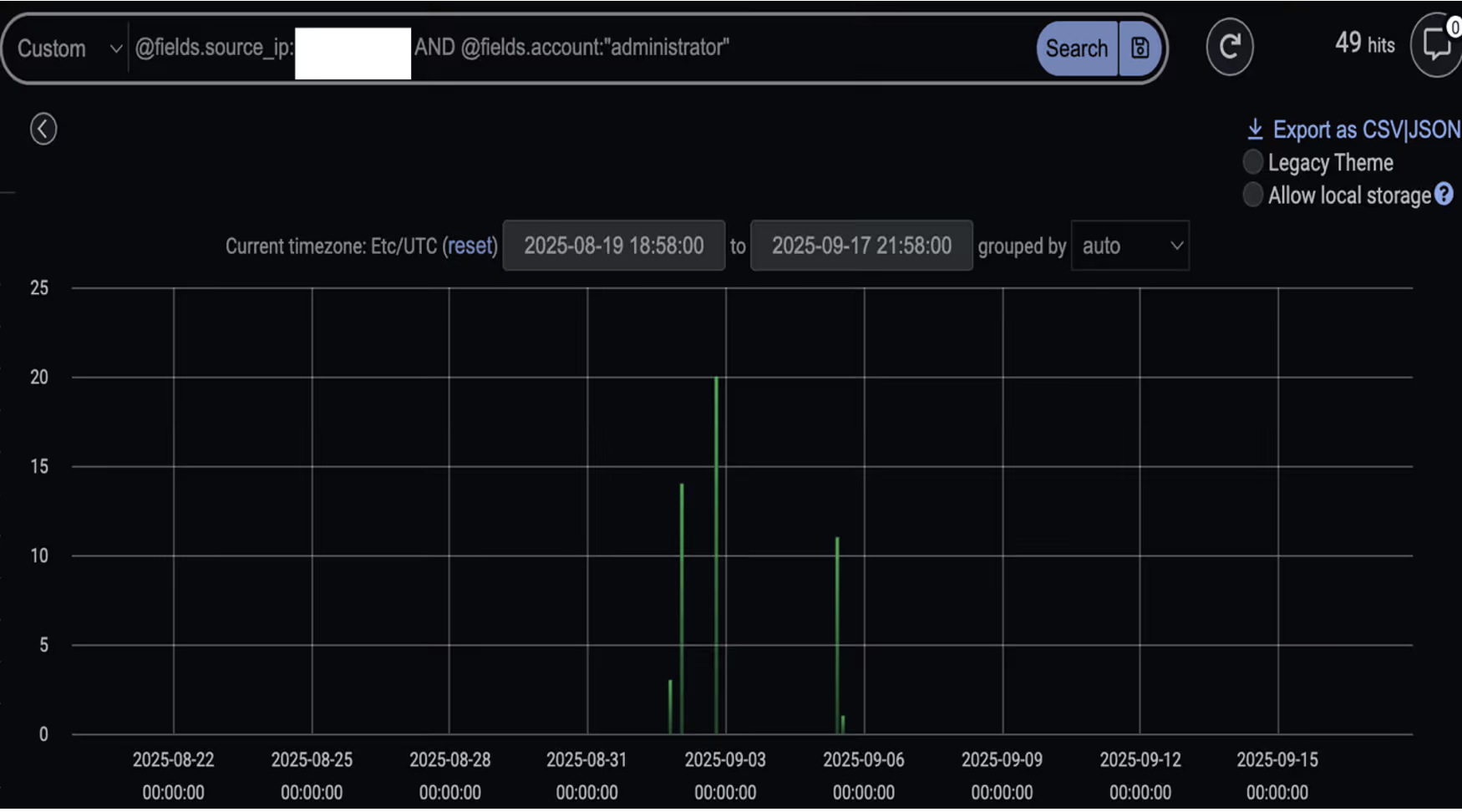
Darktrace’s detection of administrator credentials being used in Kerberos login events by an infected device.
Figure 1: Darktrace’s detection of administrator credentials being used in Kerberos login events by an infected device.
Darktrace’s detection of administrator credentials being used in SMB sessions by an infected device.
Figure 2: Darktrace’s detection of administrator credentials being used in SMB sessions by an infected device.

4. Data Exfiltration

Prior to ransomware deployment, several infected devices were observed exfiltrating data to the malicious IP 45.135.232[.]229 via SSH connections [7][8]. This was followed by the device downloading data from other internal devices and transferring an unusually large volume of data to the same external endpoint.

The IP address was first seen on the network on September 2, 2025 - the same date as the observed data exfiltration activity preceding ransomware deployment and encryption.

Further analysis revealed that the endpoint was geolocated in Russia and registered to the malicious hosting provider Proton66. Multiple external researchers have reported malicious activity involving the same Proton66 ASN (AS198953 Proton66 OOO) as far back as April 2025. These activities notably included vulnerability scanning, exploitation attempts, and phishing campaigns, which ultimately led to malware [4][5][6].

Data Exfiltration Endpoint details.

  • Endpoint: 45.135.232[.]229
  • ASN: AS198953 Proton66 OOO
  • Transport protocol: TCP
  • Application protocol: SSH
  • Destination port: 22
Darktrace’s summary of the external IP 45.135.232[.]229, first detected on September 2, 2025. The right-hand side showcases model alerts triggered related to this endpoint including multiple data exfiltration related model alerts.
Figure 3: Darktrace’s summary of the external IP 45.135.232[.]229, first detected on September 2, 2025. The right-hand side showcases model alerts triggered related to this endpoint including multiple data exfiltration related model alerts.

Further investigation into the endpoint using open-source intelligence (OSINT) revealed that it led to a Microsoft Internet Information Services (IIS) Manager console webpage. This interface is typically used to configure and manage web servers. However, threat actors have been known to exploit similar setups, using fake certificate warnings to trick users into downloading malware, or deploying malicious IIS modules to steal credentials.

Live screenshot of the destination (45.135.232[.]229), captured via OSINT sources, displaying a Microsoft IIS Manager console webpage.
Figure 4: Live screenshot of the destination (45.135.232[.]229), captured via OSINT sources, displaying a Microsoft IIS Manager console webpage.

5. Ransomware Encryption & Ransom Note

Multiple devices were later observed connecting to internal devices via SMB and performing a range of actions indicative of file encryption. This suspicious activity prompted Darktrace’s Cyber AI Analyst to launch an autonomous investigation, during which it pieced together associated activity and provided concrete timestamps of events for the customer’s visibility.

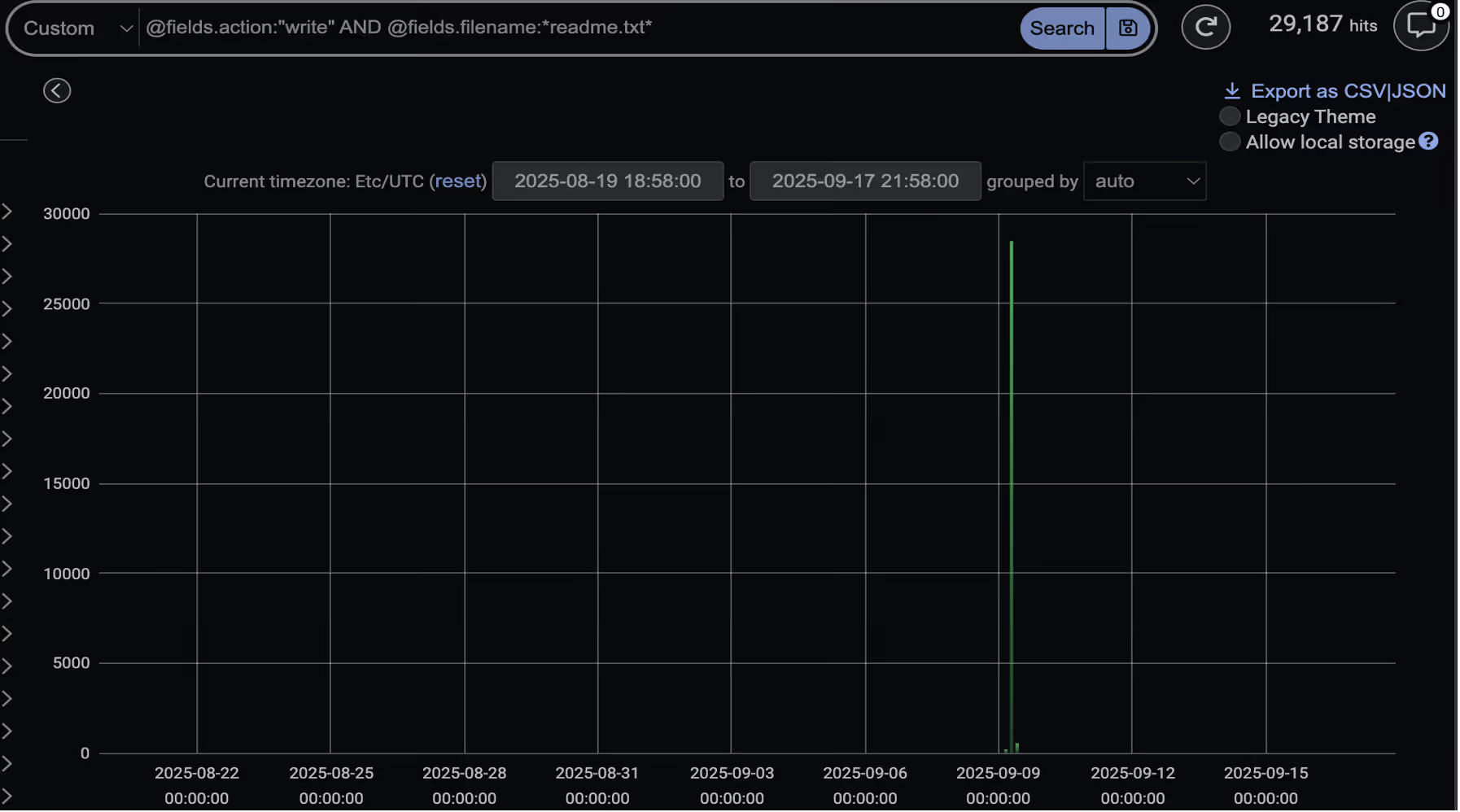
During this activity, several devices were seen writing a file named “readme.txt” to multiple locations, including network-accessible webroot paths such as inetpub\ and wwwroot\. This “readme.txt” file, later confirmed to be the ransom note, claimed the threat actors were affiliated with DragonForce.

At the same time, devices were seen performing SMB Move, Write and ReadWrite actions involving files with the “.df_win” extension across other internal devices, suggesting that file encryption was actively occurring.
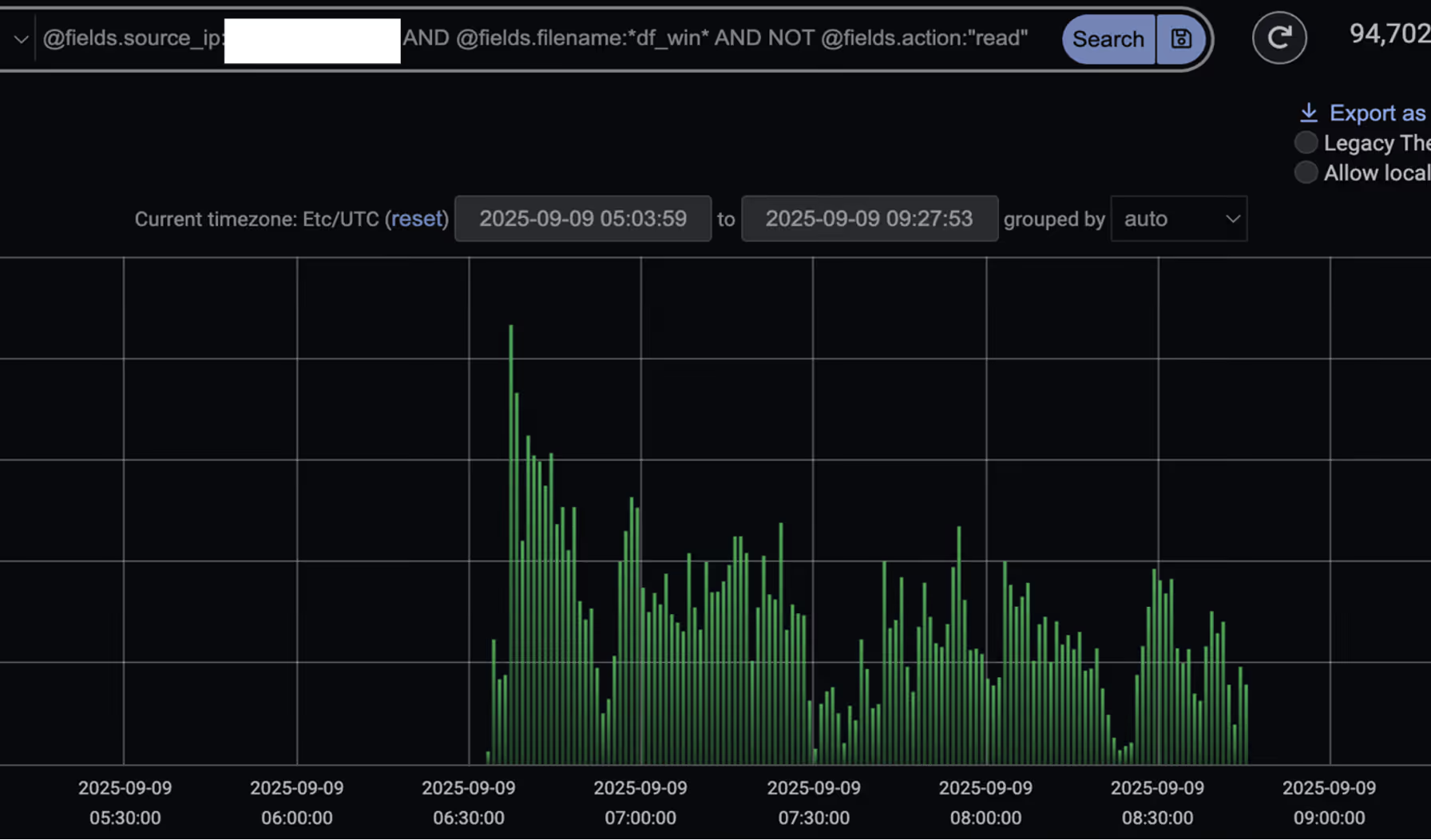
Darktrace’s detection of SMB events (excluding Read events) where the device was seen moving or writing files with the “.df_win” extension.
Figure 5: Darktrace’s detection of SMB events (excluding Read events) where the device was seen moving or writing files with the “.df_win” extension.
Darktrace’s detection of a spike in SMB Write events with the filename “readme.txt” on September 9, indicating the start of file encryption.
Figure 6: Darktrace’s detection of a spike in SMB Write events with the filename “readme.txt” on September 9, indicating the start of file encryption.

Conclusion

The rise of Ransomware-as-a-Service (RaaS) and increased attacker customization is fragmenting tactics, techniques, and procedures (TTPs), making it increasingly difficult for security teams to prepare for and defend against each unique intrusion. RaaS providers like DragonForce further complicate this challenge by enabling a wide range of affiliates, each with varying levels of sophistication [9].

In this instance, Darktrace was able to identify several stages of the attack kill chain, including network scanning, the first-time use of privileged credentials, data exfiltration, and ultimately ransomware encryption. Had the customer enabled Darktrace’s Autonomous Response capability, it would have taken timely action to interrupt the attack in its early stages, preventing the eventual data exfiltration and ransomware detonation.

Credit to Justin Torres, Senior Cyber Analyst, Nathaniel Jones, VP, Security & AI Strategy, FCISO, & Emma Foulger, Global Threat Research Operations Lead.

Edited by Ryan Traill (Analyst Content Lead)

Appendices

References:

1. https://www.infosecurity-magazine.com/news/dragonforce-goup-ms-coop-harrods/

2. https://www.picussecurity.com/resource/blog/dragonforce-ransomware-attacks-retail-giants

3. https://blog.checkpoint.com/security/dragonforce-ransomware-redefining-hybrid-extortion-in-2025/

4. https://www.trustwave.com/en-us/resources/blogs/spiderlabs-blog/proton66-part-1-mass-scanning-and-exploit-campaigns/

5. https://www.trustwave.com/en-us/resources/blogs/spiderlabs-blog/proton66-part-2-compromised-wordpress-pages-and-malware-campaigns/

6. https://www.broadcom.com/support/security-center/protection-bulletin/proton66-infrastructure-tied-to-expanding-malware-campaigns-and-c2-operations

7. https://www.virustotal.com/gui/ip-address/45.135.232.229

8. https://spur.us/context/45.135.232.229

9. https://www.group-ib.com/blog/dragonforce-ransomware/

IoC - Type - Description + Confidence

·      45.135.232[.]229 - Endpoint Associated with Data Exfiltration

·      .readme.txt – Ransom Note File Extension

·      .df_win – File Encryption Extension Observed

MITRE ATT&CK Mapping

DragonForce TTPs vs Darktrace Models

Initial Access:

·      Anomalous Connection::Callback on Web Facing Device

Command and Control:

·      Compromise::SSL or HTTP Beacon

·      Compromise::Beacon to Young Endpoint

·      Compromise::Beaconing on Uncommon Port

·      Compromise::Suspicious SSL Activity

·      Anomalous Connection::Devices Beaconing to New Rare IP

·      Compromise::Suspicious HTTP and Anomalous Activity

·      DNS Tunnel with TXT Records

Tooling:

·      Anomalous File::EXE from Rare External Location

·      Anomalous File::Masqueraded File Transfer

·      Anomalous File::Numeric File Download

·      Anomalous File::Script from Rare External Location

·      Anomalous File::Uncommon Microsoft File then Exe

·      Anomalous File::Zip or Gzip from Rare External Location

·      Anomalous File::Uncommon Microsoft File then Exe

·      Anomalous File::Internet Facing System File Download

Reconnaissance:

·      Device::Suspicious SMB Query

·      Device::ICMP Address Scan

·      Anomalous Connection::SMB Enumeration

·      Device::Possible SMB/NTLM Reconnaissance

·      Anomalous Connection::Possible Share Enumeration Activity

·      Device::Possible Active Directory Enumeration

·      Anomalous Connection::Large Volume of LDAP Download

·      Device::Suspicious LDAP Search Operation

Lateral Movement:

·      User::Suspicious Admin SMB Session

·      Anomalous Connection::Unusual Internal Remote Desktop

·      Anomalous Connection::Unusual Long Remote Desktop Session

·      Anomalous Connection::Unusual Admin RDP Session

·      User::New Admin Credentials on Client

·      User::New Admin Credentials on Server

·      Multiple Device Correlations::Spreading New Admin Credentials

·      Anomalous Connection::Powershell to Rare External

·      Device::New PowerShell User Agent

·      Anomalous Active Directory Web Services

·      Compromise::Unusual SVCCTL Activity

Evasion:

·      Unusual Activity::Anomalous SMB Delete Volume

·      Persistence

·      Device::Anomalous ITaskScheduler Activity

·      Device::AT Service Scheduled Task

·      Actions on Objectives

·      Compromise::Ransomware::Suspicious SMB Activity (EM)

·      Anomalous Connection::Sustained MIME Type Conversion

·      Compromise::Ransomware::SMB Reads then Writes with Additional Extensions

·      Compromise::Ransomware::Possible Ransom Note Write

·      Data Sent to Rare Domain

·      Uncommon 1 GiB Outbound

·      Enhanced Unusual External Data Transfer

Darktrace Cyber AI Analyst Coverage/Investigation Events:

·      Web Application Vulnerability Scanning of Multiple Devices

·      Port Scanning

·      Large Volume of SMB Login Failures

·      Unusual RDP Connections

·      Widespread Web Application Vulnerability Scanning

·      Unusual SSH Connections

·      Unusual Repeated Connections

·      Possible Application Layer Reconnaissance Activity

·      Unusual Administrative Connections

·      Suspicious Remote WMI Activity

·      Extensive Unusual Administrative Connections

·      Suspicious Directory Replication Service Activity

·      Scanning of Multiple Devices

·      Unusual External Data Transfer

·      SMB Write of Suspicious File

·      Suspicious Remote Service Control Activity

·      Access of Probable Unencrypted Password Files

·      Internal Download and External Upload

·      Possible Encryption of Files over SMB

·      SMB Writes of Suspicious Files to Multiple Devices

The content provided in this blog is published by Darktrace for general informational purposes only and reflects our understanding of cybersecurity topics, trends, incidents, and developments at the time of publication. While we strive to ensure accuracy and relevance, the information is provided “as is” without any representations or warranties, express or implied. Darktrace makes no guarantees regarding the completeness, accuracy, reliability, or timeliness of any information presented and expressly disclaims all warranties.

Nothing in this blog constitutes legal, technical, or professional advice, and readers should consult qualified professionals before acting on any information contained herein. Any references to third-party organizations, technologies, threat actors, or incidents are for informational purposes only and do not imply affiliation, endorsement, or recommendation.

Darktrace, its affiliates, employees, or agents shall not be held liable for any loss, damage, or harm arising from the use of or reliance on the information in this blog.

The cybersecurity landscape evolves rapidly, and blog content may become outdated or superseded. We reserve the right to update, modify, or remove any content.

Inside the SOC
Darktrace cyber analysts are world-class experts in threat intelligence, threat hunting and incident response, and provide 24/7 SOC support to thousands of Darktrace customers around the globe. Inside the SOC is exclusively authored by these experts, providing analysis of cyber incidents and threat trends, based on real-world experience in the field.
Written by
Justin Torres
Cyber Analyst

More in this series

No items found.

Blog

/

/

December 22, 2025

The Year Ahead: AI Cybersecurity Trends to Watch in 2026

2026 cyber threat trendsDefault blog imageDefault blog image

Introduction: 2026 cyber trends

Each year, we ask some of our experts to step back from the day-to-day pace of incidents, vulnerabilities, and headlines to reflect on the forces reshaping the threat landscape. The goal is simple:  to identify and share the trends we believe will matter most in the year ahead, based on the real-world challenges our customers are facing, the technology and issues our R&D teams are exploring, and our observations of how both attackers and defenders are adapting.  

In 2025, we saw generative AI and early agentic systems moving from limited pilots into more widespread adoption across enterprises. Generative AI tools became embedded in SaaS products and enterprise workflows we rely on every day, AI agents gained more access to data and systems, and we saw glimpses of how threat actors can manipulate commercial AI models for attacks. At the same time, expanding cloud and SaaS ecosystems and the increasing use of automation continued to stretch traditional security assumptions.

Looking ahead to 2026, we’re already seeing the security of AI models, agents, and the identities that power them becoming a key point of tension – and opportunity -- for both attackers and defenders. Long-standing challenges and risks such as identity, trust, data integrity, and human decision-making will not disappear, but AI and automation will increase the speed and scale of the cyber risk.  

Here's what a few of our experts believe are the trends that will shape this next phase of cybersecurity, and the realities organizations should prepare for.  

Agentic AI is the next big insider risk

In 2026, organizations may experience their first large-scale security incidents driven by agentic AI behaving in unintended ways—not necessarily due to malicious intent, but because of how easily agents can be influenced. AI agents are designed to be helpful, lack judgment, and operate without understanding context or consequence. This makes them highly efficient—and highly pliable. Unlike human insiders, agentic systems do not need to be socially engineered, coerced, or bribed. They only need to be prompted creatively, misinterpret legitimate prompts, or be vulnerable to indirect prompt injection. Without strong controls around access, scope, and behavior, agents may over-share data, misroute communications, or take actions that introduce real business risk. Securing AI adoption will increasingly depend on treating agents as first-class identities—monitored, constrained, and evaluated based on behavior, not intent.

-- Nicole Carignan, SVP of Security & AI Strategy

Prompt Injection moves from theory to front-page breach

We’ll see the first major story of an indirect prompt injection attack against companies adopting AI either through an accessible chatbot or an agentic system ingesting a hidden prompt. In practice, this may result in unauthorized data exposure or unintended malicious behavior by AI systems, such as over-sharing information, misrouting communications, or acting outside their intended scope. Recent attention on this risk—particularly in the context of AI-powered browsers and additional safety layers being introduced to guide agent behavior—highlights a growing industry awareness of the challenge.  

-- Collin Chapleau, Senior Director of Security & AI Strategy

Humans are even more outpaced, but not broken

When it comes to cyber, people aren’t failing; the system is moving faster than they can. Attackers exploit the gap between human judgment and machine-speed operations. The rise of deepfakes and emotion-driven scams that we’ve seen in the last few years reduce our ability to spot the familiar human cues we’ve been taught to look out for. Fraud now spans social platforms, encrypted chat, and instant payments in minutes. Expecting humans to be the last line of defense is unrealistic.

Defense must assume human fallibility and design accordingly. Automated provenance checks, cryptographic signatures, and dual-channel verification should precede human judgment. Training still matters, but it cannot close the gap alone. In the year ahead, we need to see more of a focus on partnership: systems that absorb risk so humans make decisions in context, not under pressure.

-- Margaret Cunningham, VP of Security & AI Strategy

AI removes the attacker bottleneck—smaller organizations feel the impact

One factor that is currently preventing more companies from breaches is a bottleneck on the attacker side: there’s not enough human hacker capital. The number of human hands on a keyboard is a rate-determining factor in the threat landscape. Further advancements of AI and automation will continue to open that bottleneck. We are already seeing that. The ostrich approach of hoping that one’s own company is too obscure to be noticed by attackers will no longer work as attacker capacity increases.  

-- Max Heinemeyer, Global Field CISO

SaaS platforms become the preferred supply chain target

Attackers have learned a simple lesson: compromising SaaS platforms can have big payouts. As a result, we’ll see more targeting of commercial off-the-shelf SaaS providers, which are often highly trusted and deeply integrated into business environments. Some of these attacks may involve software with unfamiliar brand names, but their downstream impact will be significant. In 2026, expect more breaches where attackers leverage valid credentials, APIs, or misconfigurations to bypass traditional defenses entirely.

-- Nathaniel Jones, VP of Security & AI Strategy

Increased commercialization of generative AI and AI assistants in cyber attacks

One trend we’re watching closely for 2026 is the commercialization of AI-assisted cybercrime. For example, cybercrime prompt playbooks sold on the dark web—essentially copy-and-paste frameworks that show attackers how to misuse or jailbreak AI models. It’s an evolution of what we saw in 2025, where AI lowered the barrier to entry. In 2026, those techniques become productized, scalable, and much easier to reuse.  

-- Toby Lewis, Global Head of Threat Analysis

Conclusion

Taken together, these trends underscore that the core challenges of cybersecurity are not changing dramatically -- identity, trust, data, and human decision-making still sit at the core of most incidents. What is changing quickly is the environment in which these challenges play out. AI and automation are accelerating everything: how quickly attackers can scale, how widely risk is distributed, and how easily unintended behavior can create real impact. And as technology like cloud services and SaaS platforms become even more deeply integrated into businesses, the potential attack surface continues to expand.  

Predictions are not guarantees. But the patterns emerging today suggest that 2026 will be a year where securing AI becomes inseparable from securing the business itself. The organizations that prepare now—by understanding how AI is used, how it behaves, and how it can be misused—will be best positioned to adopt these technologies with confidence in the year ahead.

Learn more about how to secure AI adoption in the enterprise without compromise by registering to join our live launch webinar on February 3, 2026.  

Continue reading
About the author
The Darktrace Community

Blog

/

Email

/

December 22, 2025

Why Organizations are Moving to Label-free, Behavioral DLP for Outbound Email

Man at laptopDefault blog imageDefault blog image

Why outbound email DLP needs reinventing

In 2025, the global average cost of a data breach fell slightly — but remains substantial at USD 4.44 million (IBM Cost of a Data Breach Report 2025). The headline figure hides a painful reality: many of these breaches stem not from sophisticated hacks, but from simple human error: mis-sent emails, accidental forwarding, or replying with the wrong attachment. Because outbound email is a common channel for sensitive data leaving an organization, the risk posed by everyday mistakes is enormous.

In 2025, 53% of data breaches involved customer PII, making it the most commonly compromised asset (IBM Cost of a Data Breach Report 2025). This makes “protection at the moment of send” essential. A single unintended disclosure can trigger compliance violations, regulatory scrutiny, and erosion of customer trust –consequences that are disproportionate to the marginal human errors that cause them.

Traditional DLP has long attempted to mitigate these impacts, but it relies heavily on perfect labelling and rigid pattern-matching. In reality, data loss rarely presents itself as a neat, well-structured pattern waiting to be caught – it looks like everyday communication, just slightly out of context.

How data loss actually happens

Most data loss comes from frustratingly familiar scenarios. A mistyped name in auto-complete sends sensitive data to the wrong “Alex.” A user forwards a document to a personal Gmail account “just this once.” Someone shares an attachment with a new or unknown correspondent without realizing how sensitive it is.

Traditional, content-centric DLP rarely catches these moments. Labels are missing or wrong. Regexes break the moment the data shifts formats. And static rules can’t interpret the context that actually matters – the sender-recipient relationship, the communication history, or whether this behavior is typical for the user.

It’s the everyday mistakes that hurt the most. The classic example: the Friday 5:58 p.m. mis-send, when auto-complete selects Martin, a former contractor, instead of Marta in Finance.

What traditional DLP approaches offer (and where gaps remain)

Most email DLP today follows two patterns, each useful but incomplete.

  • Policy- and label-centric DLP works when labels are correct — but content is often unlabeled or mislabeled, and maintaining classification adds friction. Gaps appear exactly where users move fastest
  • Rule and signature-based approaches catch known patterns but miss nuance: human error, new workflows, and “unknown unknowns” that don’t match a rule

The takeaway: Protection must combine content + behavior + explainability at send time, without depending on perfect labels.

Your technology primer: The three pillars that make outbound DLP effective

1) Label-free (vs. data classification)

Protects all content, not just what’s labeled. Label-free analysis removes classification overhead and closes gaps from missing or incorrect tags. By evaluating content and context at send time, it also catches misdelivery and other payload-free errors.

  • No labeling burden; no regex/rule maintenance
  • Works when tags are missing, wrong, or stale
  • Detects misdirected sends even when labels look right

2) Behavioral (vs. rules, signatures, threat intelligence)

Understands user behavior, not just static patterns. Behavioral analysis learns what’s normal for each person, surfacing human error and subtle exfiltration that rules can’t. It also incorporates account signals and inbound intel, extending across email and Teams.

  • Flags risk without predefined rules or IOCs
  • Catches misdelivery, unusual contacts, personal forwards, odd timing/volume
  • Blends identity and inbound context across channels

3) Proprietary DSLM (vs. generic LLM)

Optimized for precise, fast, explainable on-send decisions. A DSLM understands email/DLP semantics, avoids generative risks, and stays auditable and privacy-controlled, delivering intelligence reliably without slowing mail flow.

  • Low-latency, on-send enforcement
  • Non-generative for predictable, explainable outcomes
  • Governed model with strong privacy and auditability

The Darktrace approach to DLP

Darktrace / EMAIL – DLP stops misdelivery and sensitive data loss at send time using hold/notify/justify/release actions. It blends behavioral insight with content understanding across 35+ PII categories, protecting both labeled and unlabeled data. Every action is paired with clear explainability: AI narratives show exactly why an email was flagged, supporting analysts and helping end-users learn. Deployment aligns cleanly with existing SOC workflows through mail-flow connectors and optional Microsoft Purview label ingestion, without forcing duplicate policy-building.

Deployment is simple: Microsoft 365 routes outbound mail to Darktrace for real-time, inline decisions without regex or rule-heavy setup.

A buyer’s checklist for DLP solutions

When choosing your DLP solution, you want to be sure that it can deliver precise, explainable protection at the moment it matters – on send – without operational drag.  

To finish, we’ve compiled a handy list of questions you can ask before choosing an outbound DLP solution:

  • Can it operate label free when tags are missing or wrong? 
  • Does it truly learn per user behavior (no shortcuts)? 
  • Is there a domain specific model behind the content understanding (not a generic LLM)? 
  • Does it explain decisions to both analysts and end users? 
  • Will it integrate with your label program and SOC workflows rather than duplicate them? 

For a deep dive into Darktrace’s DLP solution, check out the full solution brief.

[related-resource]

Continue reading
About the author
Carlos Gray
Senior Product Marketing Manager, Email
Your data. Our AI.
Elevate your network security with Darktrace AI