
Blog
/
Email
/
September 30, 2025

Out of Character: Detecting Vendor Compromise and Trusted Relationship Abuse with Darktrace

Phishing emails from compromised vendors are increasingly difficult to distinguish from genuine correspondence. They challenge workers, security teams and traditional email SEGs alike. Anomaly detection can be a game-changer in spotting the subtle signs of these meticulous attacks.
No items found.
Inside the SOC
Darktrace cyber analysts are world-class experts in threat intelligence, threat hunting and incident response, and provide 24/7 SOC support to thousands of Darktrace customers around the globe. Inside the SOC is exclusively authored by these experts, providing analysis of cyber incidents and threat trends, based on real-world experience in the field.
No items found.
vendor email compromiseDefault blog imageDefault blog imageDefault blog imageDefault blog imageDefault blog imageDefault blog image
30
Sep 2025

What is Vendor Email Compromise?

Vendor Email Compromise (VEC) refers to an attack where actors breach a third-party provider to exploit their access, relationships, or systems for malicious purposes. The initially compromised entities are often the target’s existing partners, though this can extend to any organization or individual the target is likely to trust.

It sits at the intersection of supply chain attacks and business email compromise (BEC), blending technical exploitation with trust-based deception. Attackers often infiltrate existing conversations, leveraging AI to mimic tone and avoid common spelling and grammar pitfalls. Malicious content is typically hosted on otherwise reputable file sharing platforms, meaning any shared links initially seem harmless.

While techniques to achieve initial access may have evolved, the goals remain familiar. Threat actors harvest credentials, launch subsequent phishing campaigns, attempt to redirect invoice payments for financial gain, and exfiltrate sensitive corporate data.

Why traditional defenses fall short

These subtle and sophisticated email attacks pose unique challenges for defenders. Few busy people would treat an ongoing conversation with a trusted contact with the same level of suspicion as an email from the CEO requesting ‘URGENT ASSISTANCE!’ Unfortunately, many traditional secure email gateways (SEGs) struggle with this too. Detecting an out-of-character email, when it does not obviously appear out of character, is a complex challenge. It’s hardly surprising, then, that 83% of organizations have experienced a security incident involving third-party vendors [1].  

This article explores how Darktrace detected four different vendor compromise campaigns for a single customer, within a two-week period in 2025.  Darktrace / EMAIL successfully identified the subtle indicators that these seemingly benign emails from trusted senders were, in fact, malicious. Due to the configuration of Darktrace / EMAIL in this customer’s environment, it was unable to take action against the malicious emails. However, if fully enabled to take Autonomous Response, it would have held all offending emails identified.

How does Darktrace detect vendor compromise?

The answer lies at the core of how Darktrace operates: anomaly detection. Rather than relying on known malicious rules or signatures, Darktrace learns what ‘normal’ looks like for an environment, then looks for anomalies across a wide range of metrics. Despite the resourcefulness of the threat actors involved in this case, Darktrace identified many anomalies across these campaigns.

Different campaigns, common traits

A wide variety of approaches was observed. Individuals, shared mailboxes and external contractors were all targeted. Two emails originated from compromised current vendors, while two came from unknown compromised organizations - one in an associated industry. The sender organizations were either familiar or, at the very least, professional in appearance, with no unusual alphanumeric strings or suspicious top-level domains (TLDs). Subject line, such as “New Approved Statement From [REDACTED]” and “[REDACTED] - Proposal Document” appeared unremarkable and were not designed to provoke heightened emotions like typical social engineering or BEC attempts.

All emails had been given a Microsoft Spam Confidence Level of 1, indicating Microsoft did not consider them to be spam or malicious [2]. They also passed authentication checks (including SPF, and in some cases DKIM and DMARC), meaning they appeared to originate from an authentic source for the sender domain and had not been tampered with in transit.  

All observed phishing emails contained a link hosted on a legitimate and commonly used file-sharing site. These sites were often convincingly themed, frequently featuring the name of a trusted vendor either on the page or within the URL, to appear authentic and avoid raising suspicion. However, these links served only as the initial step in a more complex, multi-stage phishing process.
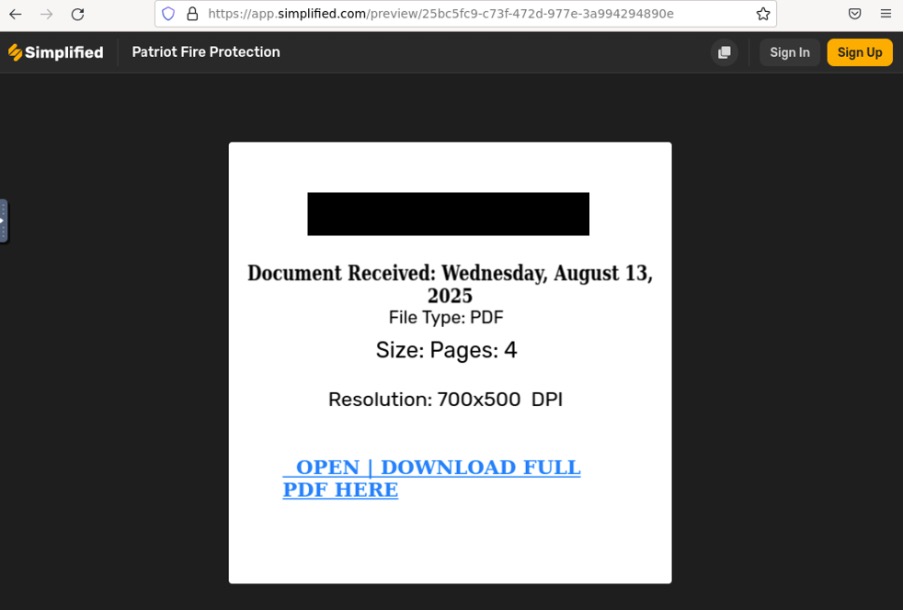
A legitimate file sharing site used in phishing emails to host a secondary malicious link.
Figure 1: A legitimate file sharing site used in phishing emails to host a secondary malicious link.
Another example of a legitimate file sharing endpoint sent in a phishing email and used to host a malicious link.
Figure 2: Another example of a legitimate file sharing endpoint sent in a phishing email and used to host a malicious link.

If followed, the recipient would be redirected, sometimes via CAPTCHA, to fake Microsoft login pages designed to capturing credentials, namely http://pub-ac94c05b39aa4f75ad1df88d384932b8.r2[.]dev/offline[.]html and https://s3.us-east-1.amazonaws[.]com/s3cure0line-0365cql0.19db86c3-b2b9-44cc-b339-36da233a3be2ml0qin/s3cccql0.19db86c3-b2b9-44cc-b339-36da233a3be2%26l0qn[.]html#.

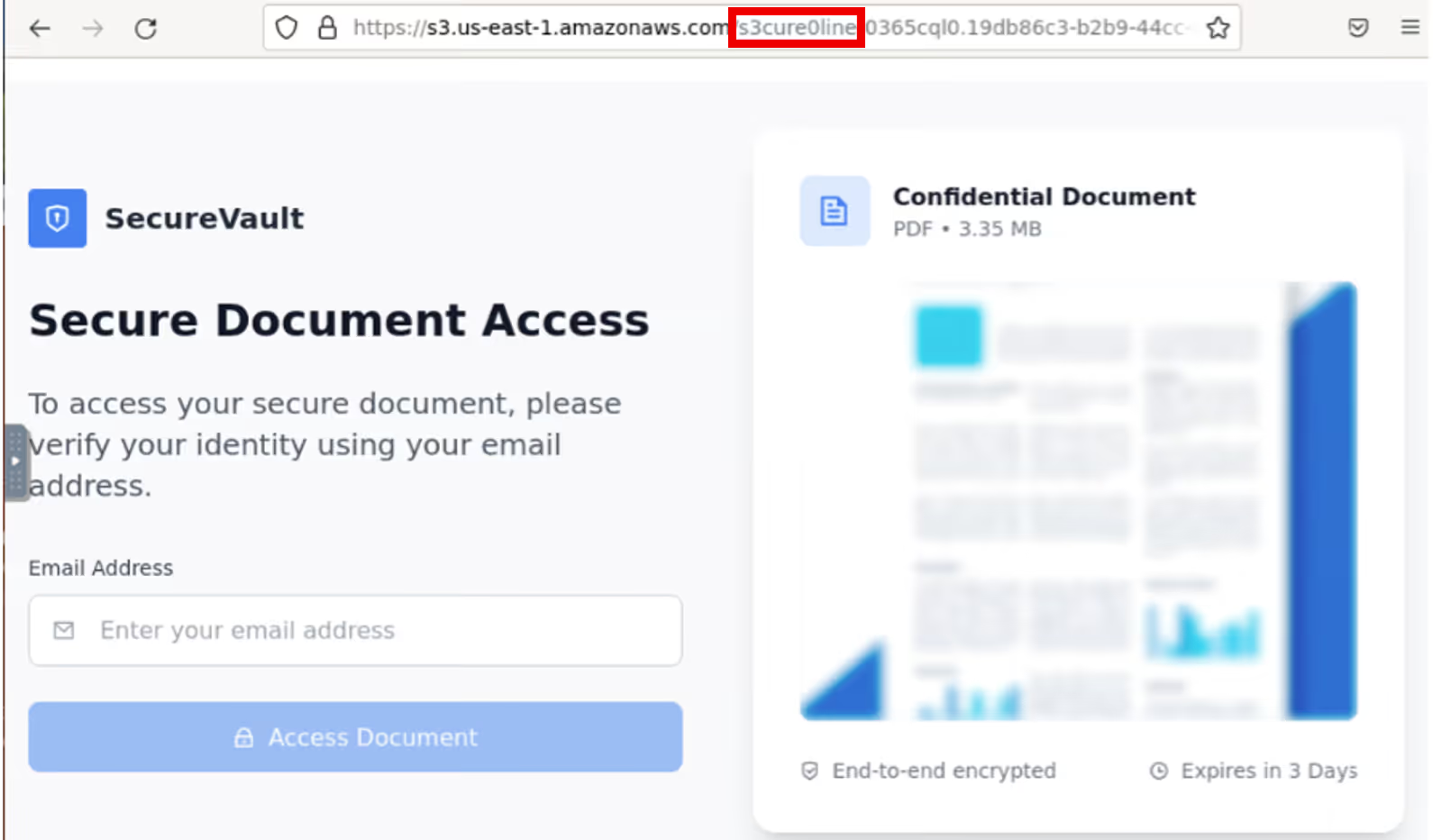
The latter made use of homoglyphs to deceive the user, with a link referencing ‘s3cure0line’, rather than ‘secureonline’. Post-incident investigation using open-source intelligence (OSINT) confirmed that the domains were linked to malicious phishing endpoints [3] [4].
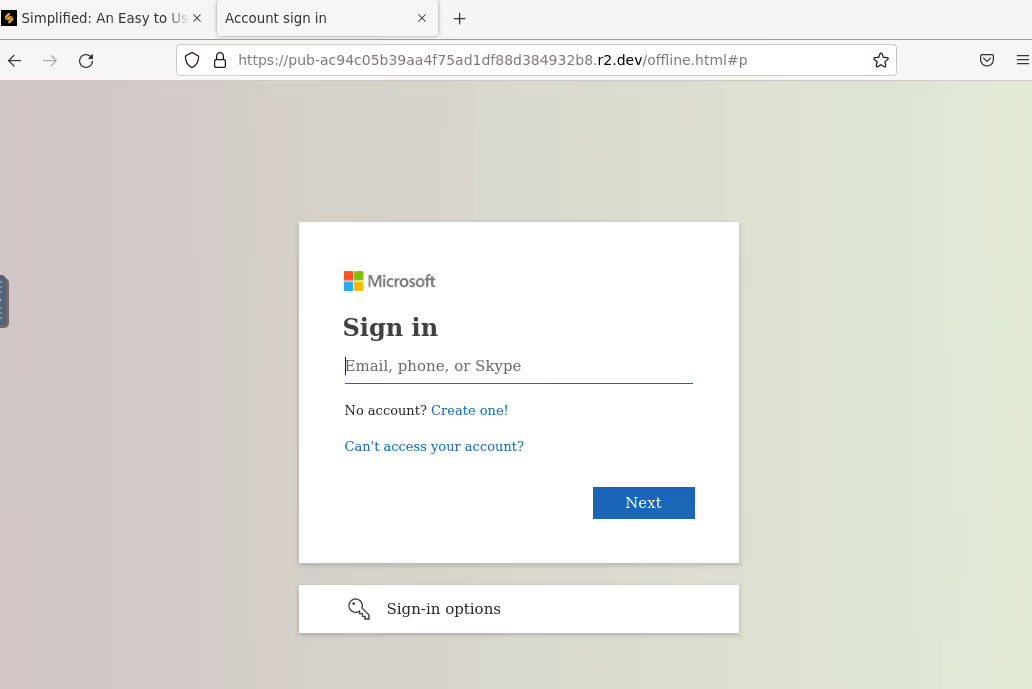
Fake Microsoft login page designed to harvest credentials.
Figure 3: Fake Microsoft login page designed to harvest credentials.
Phishing kit with likely AI-generated image, designed to harvest user credentials. The URL uses ‘s3cure0line’ instead of ‘secureonline’, a subtle misspelling intended to deceive users.
Figure 4: Phishing kit with likely AI-generated image, designed to harvest user credentials. The URL uses ‘s3cure0line’ instead of ‘secureonline’, a subtle misspelling intended to deceive users.

Darktrace Anomaly Detection

Some senders were unknown to the network, with no previous outbound or inbound emails. Some had sent the email to multiple undisclosed recipients using BCC, an unusual behavior for a new sender.  

Where the sender organization was an existing vendor, Darktrace recognized out-of-character behavior, in this case it was the first time a link to a particular file-sharing site had been shared. Often the links themselves exhibited anomalies, either being unusually prominent or hidden altogether - masked by text or a clickable image.

Crucially, Darktrace / EMAIL is able to identify malicious links at the time of processing the emails, without needing to visit the URLs or analyze the destination endpoints, meaning even the most convincing phishing pages cannot evade detection – meaning even the most convincing phishing emails cannot evade detection. This sets it apart from many competitors who rely on crawling the endpoints present in emails. This, among other things, risks disruption to user experience, such as unsubscribing them from emails, for instance.

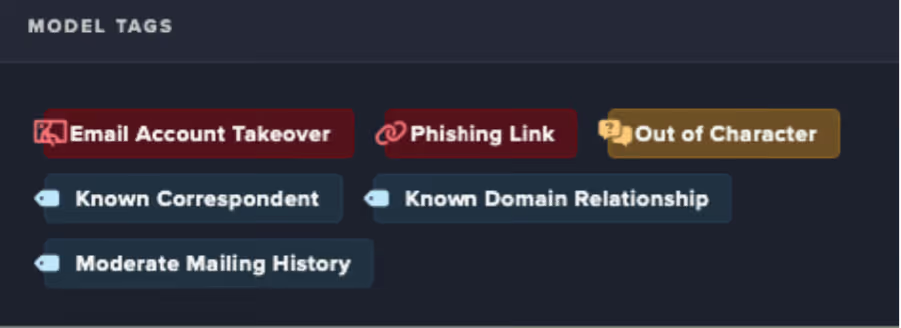
Darktrace was also able to determine that the malicious emails originated from a compromised mailbox, using a series of behavioral and contextual metrics to make the identification. Upon analysis of the emails, Darktrace autonomously assigned several contextual tags to highlight their concerning elements, indicating that the messages contained phishing links, were likely sent from a compromised account, and originated from a known correspondent exhibiting out-of-character behavior.
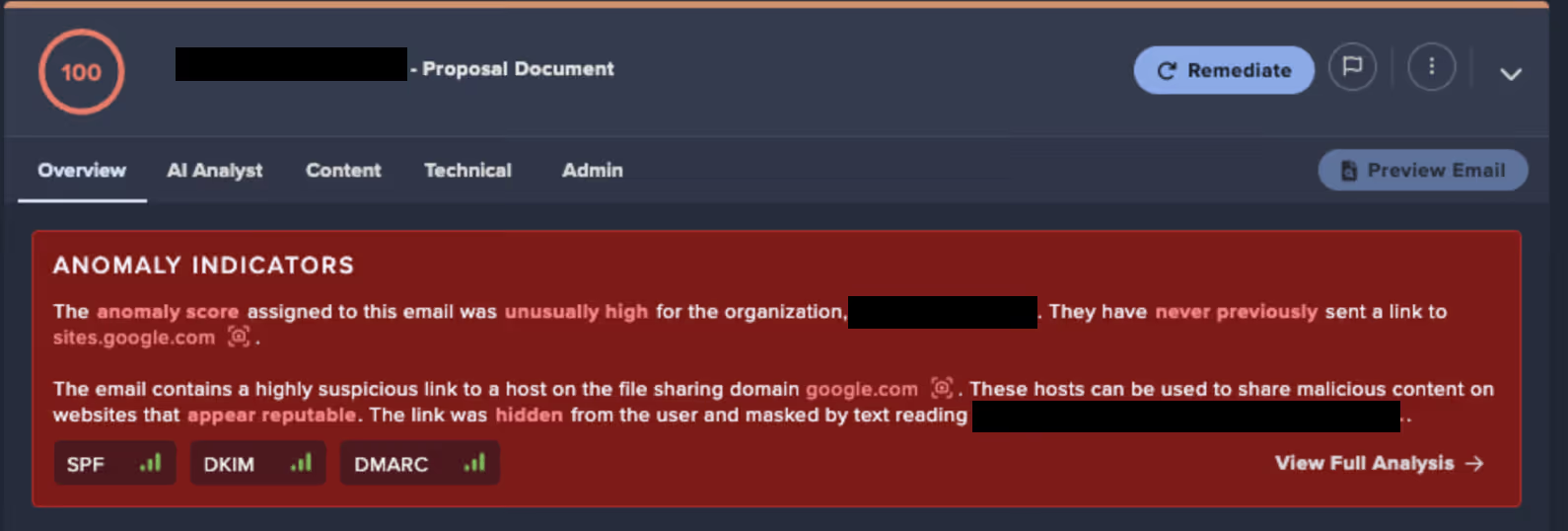
A summary of the anomalous email, confirming that it contained a highly suspicious link.
Figure 5: Tags assigned to offending emails by Darktrace / EMAIL.

Figure 6: A summary of the anomalous email, confirming that it contained a highly suspicious link.

Out-of-character behavior caught in real-time

In another customer environment around the same time Darktrace / EMAIL detected multiple emails with carefully crafted, contextually appropriate subject lines sent from an established correspondent being sent to 30 different recipients. In many cases, the attacker hijacked existing threads and inserted their malicious emails into an ongoing conversation in an effort to blend in and avoid detection. As in the previous, the attacker leveraged a well-known service, this time ClickFunnels, to host a document containing another malicious link. Once again, they were assigned a Microsoft Spam Confidence Level of 1, indicating that they were not considered malicious.
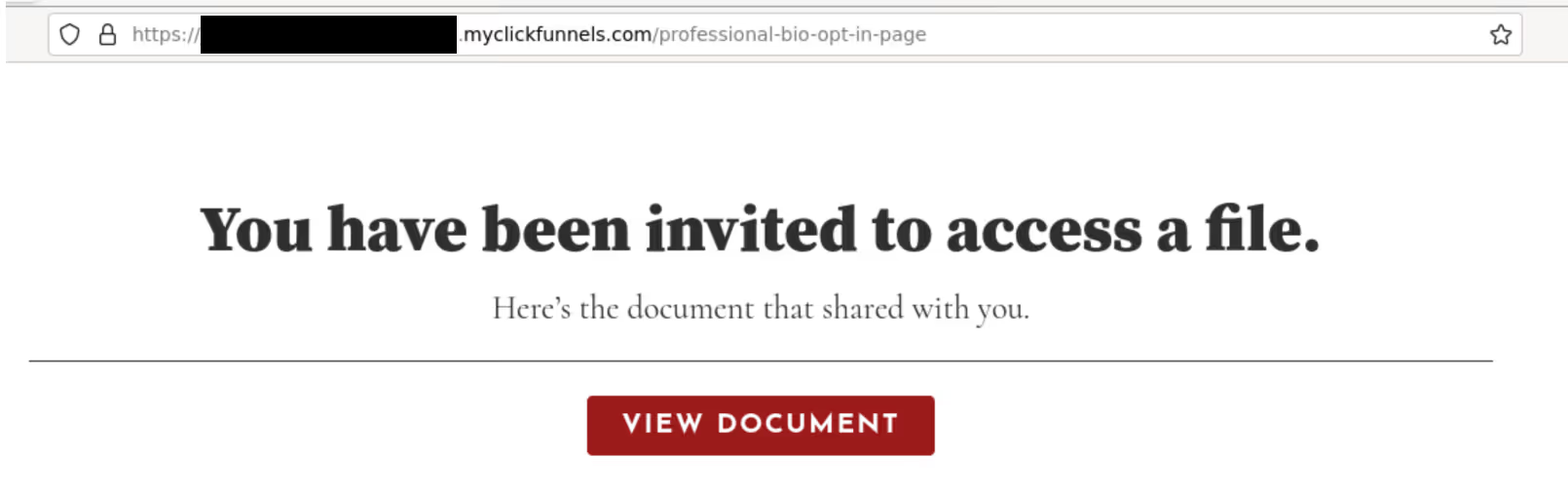
The legitimate ClickFunnels page used to host a malicious phishing link.
Figure 7: The legitimate ClickFunnels page used to host a malicious phishing link.

This time, however, the customer had Darktrace / EMAIL fully enabled to take Autonomous Response against suspicious emails. As a result, when Darktrace detected the out-of-character behavior, specifically, the sharing of a link to a previously unused file-sharing domain, and identified the likely malicious intent of the message, it held the email, preventing it from reaching recipients’ inboxes and effectively shutting down the attack.
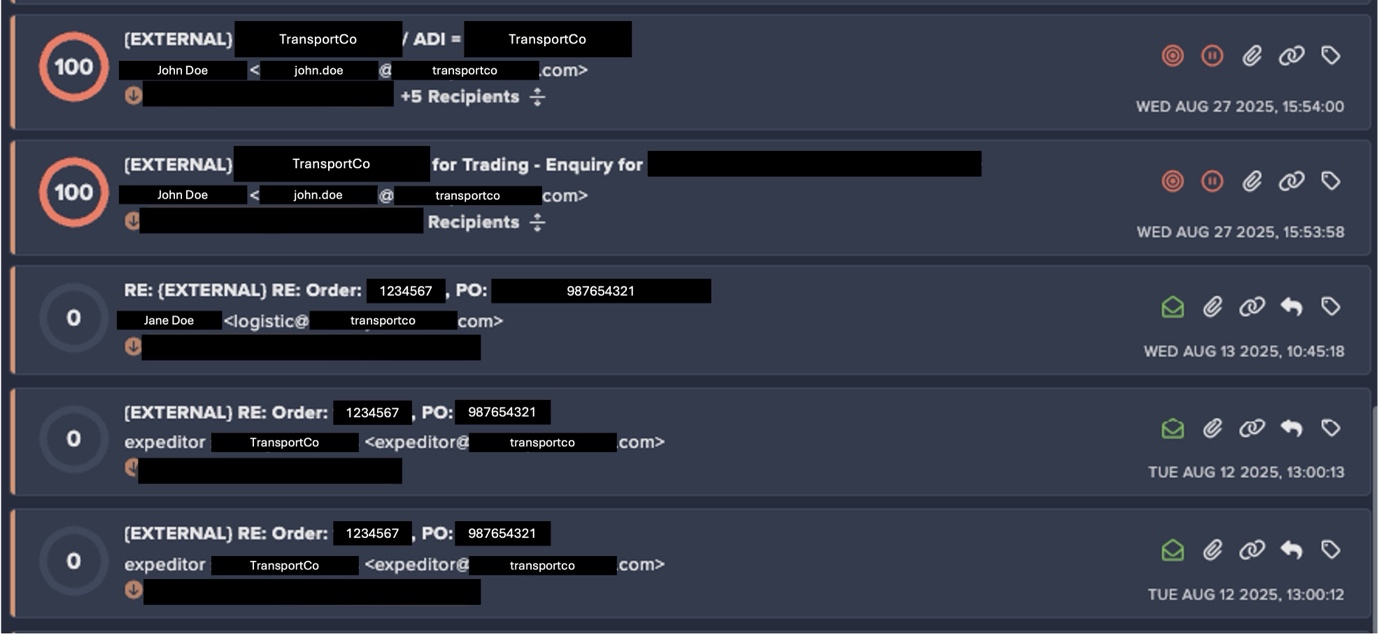
Figure 8: Darktrace / EMAIL’s detection of malicious emails inserted into an existing thread.*

*To preserve anonymity, all real customer names, email addresses, and other identifying details have been redacted and replaced with fictitious placeholders.

Legitimate messages in the conversation were assigned an Anomaly Score of 0, while the newly inserted malicious emails identified and were flagged with the maximum score of 100.

Key takeaways for defenders

Phishing remains big business, and as the landscape evolves, today’s campaigns often look very different from earlier versions. As with network-based attacks, threat actors are increasingly leveraging legitimate tools and exploiting trusted relationships to carry out their malicious goals, often staying under the radar of security teams and traditional email defenses.

As attackers continue to exploit trusted relationships between organizations and their third-party associates, security teams must remain vigilant to unexpected or suspicious email activity. Protecting the digital estate requires an email solution capable of identifying malicious characteristics, even when they originate from otherwise trusted senders.

Credit to Jennifer Beckett (Cyber Analyst), Patrick Anjos (Senior Cyber Analyst), Ryan Traill (Analyst Content Lead), Kiri Addison (Director of Product)

Appendices

IoC - Type - Description + Confidence  

- http://pub-ac94c05b39aa4f75ad1df88d384932b8.r2[.]dev/offline[.]html#p – fake Microsoft login page

- https://s3.us-east-1.amazonaws[.]com/s3cure0line-0365cql0.19db86c3-b2b9-44cc-b339-36da233a3be2ml0qin/s3cccql0.19db86c3-b2b9-44cc-b339-36da233a3be2%26l0qn[.]html# - link to domain used in homoglyph attack

MITRE ATT&CK Mapping  

Tactic – Technique – Sub-Technique  

Initial Access - Phishing – (T1566)  

References

1.     https://gitnux.org/third-party-risk-statistics/

2.     https://learn.microsoft.com/en-us/defender-office-365/anti-spam-spam-confidence-level-scl-about

3.     https://www.virustotal.com/gui/url/5df9aae8f78445a590f674d7b64c69630c1473c294ce5337d73732c03ab7fca2/detection

4.     https://www.virustotal.com/gui/url/695d0d173d1bd4755eb79952704e3f2f2b87d1a08e2ec660b98a4cc65f6b2577/details

The content provided in this blog is published by Darktrace for general informational purposes only and reflects our understanding of cybersecurity topics, trends, incidents, and developments at the time of publication. While we strive to ensure accuracy and relevance, the information is provided “as is” without any representations or warranties, express or implied. Darktrace makes no guarantees regarding the completeness, accuracy, reliability, or timeliness of any information presented and expressly disclaims all warranties.

Nothing in this blog constitutes legal, technical, or professional advice, and readers should consult qualified professionals before acting on any information contained herein. Any references to third-party organizations, technologies, threat actors, or incidents are for informational purposes only and do not imply affiliation, endorsement, or recommendation.

Darktrace, its affiliates, employees, or agents shall not be held liable for any loss, damage, or harm arising from the use of or reliance on the information in this blog.

The cybersecurity landscape evolves rapidly, and blog content may become outdated or superseded. We reserve the right to update, modify, or remove any content

The Darktrace / EMAIL Solution Brief

Learn more about how Darktrace / EMAIL stops block novel threats up to 13 days earlier than other tools

No items found.
Inside the SOC
Darktrace cyber analysts are world-class experts in threat intelligence, threat hunting and incident response, and provide 24/7 SOC support to thousands of Darktrace customers around the globe. Inside the SOC is exclusively authored by these experts, providing analysis of cyber incidents and threat trends, based on real-world experience in the field.
No items found.

More in this series

No items found.

Blog

/

/

January 15, 2026

React2Shell Reflections: Cloud Insights, Finance Sector Impacts, and How Threat Actors Moved So Quickly

React2Shell Default blog imageDefault blog image

Introduction

Last month’s disclosure of CVE 2025-55812, known as React2Shell, provided a reminder of how quickly modern threat actors can operationalize newly disclosed vulnerabilities, particularly in cloud-hosted environments.

The vulnerability was discovered on December 3, 2025, with a patch made available on the same day. Within 30 hours of the patch, a publicly available proof-of-concept emerged that could be used to exploit any vulnerable server. This short timeline meant many systems remained unpatched when attackers began actively exploiting the vulnerability.  

Darktrace researchers rapidly deployed a new honeypot to monitor exploitation of CVE 2025-55812 in the wild.

Within two minutes of deployment, Darktrace observed opportunistic attackers exploiting this unauthenticated remote code execution flaw in React Server Components, leveraging a single crafted request to gain control of exposed Next.js servers. Exploitation quickly progressed from reconnaissance to scripted payload delivery, HTTP beaconing, and cryptomining, underscoring how automation and pre‑positioned infrastructure by threat actors now compress the window between disclosure and active exploitation to mere hours.

For cloud‑native organizations, particularly those in the financial sector, where Darktrace observed the greatest impact, React2Shell highlights the growing disconnect between patch availability and attacker timelines, increasing the likelihood that even short delays in remediation can result in real‑world compromise.

Cloud insights

In contrast to traditional enterprise networks built around layered controls, cloud architectures are often intentionally internet-accessible by default. When vulnerabilities emerge in common application frameworks such as React and Next.js, attackers face minimal friction.  No phishing campaign, no credential theft, and no lateral movement are required; only an exposed service and exploitable condition.

The activity Darktrace observed during the React2shell intrusions reflects techniques that are familiar yet highly effective in cloud-based attacks. Attackers quickly pivot from an exposed internet-facing application to abusing the underlying cloud infrastructure, using automated exploitation to deploy secondary payloads at scale and ultimately act on their objectives, whether monetizing access through cryptomining or to burying themselves deeper in the environment for sustained persistence.

Cloud Case Study

In one incident, opportunistic attackers rapidly exploited an internet-facing Azure virtual machine (VM) running a Next.js application, abusing the React/next.js vulnerability to gain remote command execution within hours of the service becoming exposed. The compromise resulted in the staged deployment of a Go-based remote access trojan (RAT), followed by a series of cryptomining payloads such as XMrig.

Initial Access

Initial access appears to have originated from abused virtual private network (VPN) infrastructure, with the source IP (146.70.192[.]180) later identified as being associated with Surfshark

The IP address above is associated with VPN abuse leveraged for initial exploitation via Surfshark infrastructure.
Figure 1: The IP address above is associated with VPN abuse leveraged for initial exploitation via Surfshark infrastructure.

The use of commercial VPN exit nodes reflects a wider trend of opportunistic attackers leveraging low‑cost infrastructure to gain rapid, anonymous access.

Parent process telemetry later confirmed execution originated from the Next.js server, strongly indicating application-layer compromise rather than SSH brute force, misused credentials, or management-plane abuse.

Payload execution

Shortly after successful exploitation, Darktrace identified a suspicious file and subsequent execution. One of the first payloads retrieved was a binary masquerading as “vim”, a naming convention commonly used to evade casual inspection in Linux environments. This directly ties the payload execution to the compromised Next.js application process, reinforcing the hypothesis of exploit-driven access.

Command-and-Control (C2)

Network flow logs revealed outbound connections back to the same external IP involved in the inbound activity. From a defensive perspective, this pattern is significant as web servers typically receive inbound requests, and any persistent outbound callbacks — especially to the same IP — indicate likely post-exploitation control. In this case, a C2 detection model alert was raised approximately 90 minutes after the first indicators, reflecting the time required for sufficient behavioral evidence to confirm beaconing rather than benign application traffic.

Cryptominers deployment and re-exploitation

Following successful command execution within the compromised Next.js workload, the attackers rapidly transitioned to monetization by deploying cryptomining payloads. Microsoft Defender observed a shell command designed to fetch and execute a binary named “x” via either curl or wget, ensuring successful delivery regardless of which tooling was availability on the Azure VM.

The binary was written to /home/wasiluser/dashboard/x and subsequently executed, with open-source intelligence (OSINT) enrichment strongly suggesting it was a cryptominer consistent with XMRig‑style tooling. Later the same day, additional activity revealed the host downloading a static XMRig binary directly from GitHub and placing it in a hidden cache directory (/home/wasiluser/.cache/.sys/).

The use of trusted infrastructure and legitimate open‑source tooling indicates an opportunistic approach focused on reliability and speed. The repeated deployment of cryptominers strongly suggests re‑exploitation of the same vulnerable web application rather than reliance on traditional persistence mechanisms. This behavior is characteristic of cloud‑focused attacks, where publicly exposed workloads can be repeatedly compromised at scale more easily.

Financial sector spotlight

During the mass exploitation of React2Shell, Darktrace observed targeting by likely North Korean affiliated actors focused on financial organizations in the United Kingdom, Sweden, Spain, Portugal, Nigeria, Kenya, Qatar, and Chile.

The targeting of the financial sector is not unexpected, but the emergence of new Democratic People’s Republic of Korea (DPRK) tooling, including a Beavertail variant and EtherRat, a previously undocumented Linux implant, highlights the need for updated rules and signatures for organizations that rely on them.

EtherRAT uses Ethereum smart contracts for C2 resolution, polling every 500 milliseconds and employing five persistence mechanisms. It downloads its own Node.js runtime from nodejs[.]org and queries nine Ethereum RPC endpoints in parallel, selecting the majority response to determine its C2 URL. EtherRAT also overlaps with the Contagious Interview campaign, which has targeted blockchain developers since early 2025.

Read more finance‑sector insights in Darktrace’s white paper, The State of Cyber Security in the Finance Sector.

Threat actor behavior and speed

Darktrace’s honeypot was exploited just two minutes after coming online, demonstrating how automated scanning, pre-positioned infrastructure and staging, and C2 infrastructure traced back to “bulletproof” hosting reflects a mature, well‑resourced operational chain.

For financial organizations, particularly those operating cloud‑native platforms, digital asset services, or internet‑facing APIs, this activity demonstrates how rapidly geopolitical threat actors can weaponize newly disclosed vulnerabilities, turning short patching delays into strategic opportunities for long‑term access and financial gain. This underscores the need for a behavioral-anomaly-led security posture.

Credit to Nathaniel Jones (VP, Security & AI Strategy, Field CISO) and Mark Turner (Specialist Security Researcher)

Edited by Ryan Traill (Analyst Content Lead)

Appendices

Indicators of Compromise (IoCs)

146.70.192[.]180 – IP Address – Endpoint Associated with Surfshark

References

https://www.darktrace.com/resources/the-state-of-cybersecurity-in-the-finance-sector

Continue reading
About the author
Nathaniel Jones
VP, Security & AI Strategy, Field CISO

Blog

/

/

January 13, 2026

Runtime Is Where Cloud Security Really Counts: The Importance of Detection, Forensics and Real-Time Architecture Awareness

runtime, cloud security, cnaapDefault blog imageDefault blog image

Introduction: Shifting focus from prevention to runtime

Cloud security has spent the last decade focused on prevention; tightening configurations, scanning for vulnerabilities, and enforcing best practices through Cloud Native Application Protection Platforms (CNAPP). These capabilities remain essential, but they are not where cloud attacks happen.

Attacks happen at runtime: the dynamic, ephemeral, constantly changing execution layer where applications run, permissions are granted, identities act, and workloads communicate. This is also the layer where defenders traditionally have the least visibility and the least time to respond.

Today’s threat landscape demands a fundamental shift. Reducing cloud risk now requires moving beyond static posture and CNAPP only approaches and embracing realtime behavioral detection across workloads and identities, paired with the ability to automatically preserve forensic evidence. Defenders need a continuous, real-time understanding of what “normal” looks like in their cloud environments, and AI capable of processing massive data streams to surface deviations that signal emerging attacker behavior.

Runtime: The layer where attacks happen

Runtime is the cloud in motion — containers starting and stopping, serverless functions being called, IAM roles being assumed, workloads auto scaling, and data flowing across hundreds of services. It’s also where attackers:

  • Weaponize stolen credentials
  • Escalate privileges
  • Pivot programmatically
  • Deploy malicious compute
  • Manipulate or exfiltrate data

The challenge is complex: runtime evidence is ephemeral. Containers vanish; critical process data disappears in seconds. By the time a human analyst begins investigating, the detail required to understand and respond to the alert, often is already gone. This volatility makes runtime the hardest layer to monitor, and the most important one to secure.

What Darktrace / CLOUD Brings to Runtime Defence

Darktrace / CLOUD is purpose-built for the cloud execution layer. It unifies the capabilities required to detect, contain, and understand attacks as they unfold, not hours or days later. Four elements define its value:

1. Behavioral, real-time detection

The platform learns normal activity across cloud services, identities, workloads, and data flows, then surfaces anomalies that signify real attacker behavior, even when no signature exists.

2. Automated forensic level artifact collection

The moment Darktrace detects a threat, it can automatically capture volatile forensic evidence; disk state, memory, logs, and process context, including from ephemeral resources. This preserves the truth of what happened before workloads terminate and evidence disappears.

3. AI-led investigation

Cyber AI Analyst assembles cloud behaviors into a coherent incident story, correlating identity activity, network flows, and Cloud workload behavior. Analysts no longer need to pivot across dashboards or reconstruct timelines manually.

4. Live architectural awareness

Darktrace continuously maps your cloud environment as it operates; including services, identities, connectivity, and data pathways. This real-time visibility makes anomalies clearer and investigations dramatically faster.

Together, these capabilities form a runtime-first security model.

Why CNAPP alone isn’t enough

CNAPP platforms excel at pre deployment checks all the way down to developer workstations, identifying misconfigurations, concerning permission combinations, vulnerable images, and risky infrastructure choices. But CNAPP’s breadth is also its limitation. CNAPP is about posture. Runtime defense is about behavior.

CNAPP tells you what could go wrong; runtime detection highlights what is going wrong right now.

It cannot preserve ephemeral evidence, correlate active behaviors across domains, or contain unfolding attacks with the precision and speed required during a real incident. Prevention remains essential, but prevention alone cannot stop an attacker who is already operating inside your cloud environment.

Real-world AWS Scenario: Why Runtime Monitoring Wins

A recent incident detected by Darktrace / CLOUD highlights how cloud compromises unfold, and why runtime visibility is non-negotiable. Each step below reflects detections that occur only when monitoring behavior in real time.

1. External Credential Use

Detection: Unusual external source for credential use: An attacker logs into a cloud account from a never-before-seen location, the earliest sign of account takeover.

2. AWS CLI Pivot

Detection: Unusual CLI activity: The attacker switches to programmatic access, issuing commands from a suspicious host to gain automation and stealth.

3. Credential Manipulation

Detection: Rare password reset: They reset or assign new passwords to establish persistence and bypass existing security controls.

4. Cloud Reconnaissance

Detection: Burst of resource discovery: The attacker enumerates buckets, roles, and services to map high value assets and plan next steps.

5. Privilege Escalation

Detection: Anomalous IAM update: Unauthorized policy updates or role changes grant the attacker elevated access or a backdoor.

6. Malicious Compute Deployment

Detection: Unusual EC2/Lambda/ECS creation: The attacker deploys compute resources for mining, lateral movement, or staging further tools.

7. Data Access or Tampering

Detection: Unusual S3 modifications: They alter S3 permissions or objects, often a prelude to data exfiltration or corruption.

Only some of these actions would appear in a posture scan, crucially after the fact.
Every one of these runtime detections is visible only through real-time behavioral monitoring while the attack is in progress.

The future of cloud security Is runtime-first

Cloud defense can no longer revolve solely around prevention. Modern attacks unfold in runtime, across a fast-changing mesh of workloads, services, and — critically — identities. To reduce risk, organizations must be able to detect, understand, and contain malicious activity as it happens, before ephemeral evidence disappears and before attacker's pivot across identity layers.

Darktrace / CLOUD delivers this shift by turning runtime, the most volatile and consequential layer in the cloud, into a fully defensible control point through unified visibility across behavior, workloads, and identities. It does this by providing:

  • Real-time behavior detection across workloads and identity activity
  • Autonomous response actions for rapid containment
  • Automated forensic level artifact preservation the moment events occur
  • AI-driven investigation that separates weak signals from true attacker patterns
  • Live cloud environment insight to understand context and impact instantly

Cloud security must evolve from securing what might go wrong to continuously understanding what is happening; in runtime, across identities, and at the speed attackers operate. Unifying runtime and identity visibility is how defenders regain the advantage.

[related-resource]

Continue reading
About the author
Adam Stevens
Senior Director of Product, Cloud | Darktrace
Your data. Our AI.
Elevate your network security with Darktrace AI