ブログ
/
Cloud
/
August 22, 2024

From the Depths: Analyzing the Cthulhu Stealer Malware for macOS

Cado Security (now part of Darktrace) analyzed "Cthulhu Stealer," a macOS malware-as-a-service written in Go. It impersonates legitimate software, prompts for user and MetaMask passwords, and steals credentials, cryptocurrency wallets, and game accounts. Functionally similar to Atomic Stealer, Cthulhu was rented via an underground marketplace, but its operators faced complaints and a ban for alleged exit scamming.
Inside the SOC
Darktrace cyber analysts are world-class experts in threat intelligence, threat hunting and incident response, and provide 24/7 SOC support to thousands of Darktrace customers around the globe. Inside the SOC is exclusively authored by these experts, providing analysis of cyber incidents and threat trends, based on real-world experience in the field.
Written by
Tara Gould
Malware Research Lead
Default blog imageDefault blog imageDefault blog imageDefault blog imageDefault blog imageDefault blog image
22
Aug 2024

Introduction

For years there has been a general belief that macOS systems are immune to malware. While MacOS has a reputation for being secure, macOS malware has been trending up in recent years with the emergence of Silver Sparrow [1],  KeRanger [2], and Atomic Stealer [3], among others. Recently, Cado Security has identified a malware-as-a-service (MaaS) targeting macOS users named “Cthulhu Stealer”. This blog will explore the functionality of this malware and provide insight into how its operators carry out their activities.

Technical analysis

File details:

Language: Go

Not signed

Stripped

Multiarch: x86_64 and arm
Screenshot
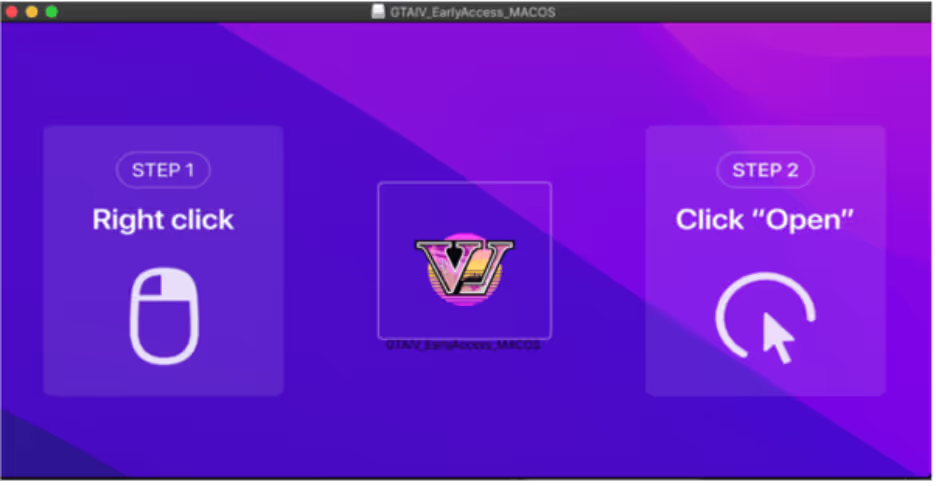
Figure 1: Screenshot of disk image when mounted

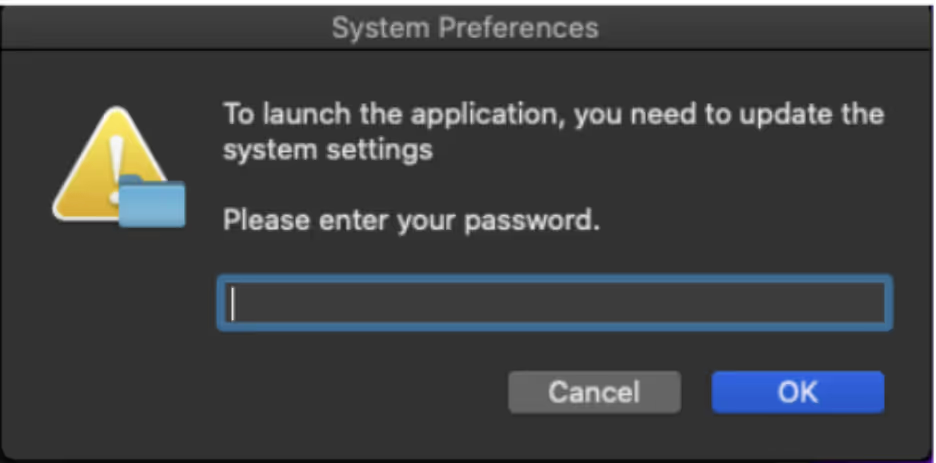
Cthulhu Stealer is an Apple disk image (DMG) that is bundled with two binaries, depending on the architecture. The malware is written in GoLang and disguises itself as legitimate software. Once the user mounts the dmg, the user is prompted to open the software. After opening the file, “osascript”, the macOS command-line tool for running AppleScript and JavaScript is used to prompt the user for their password. 
Password Prompt
Figure 2: Password Prompt 
Osascript
Figure 3: Osascript prompting user for password

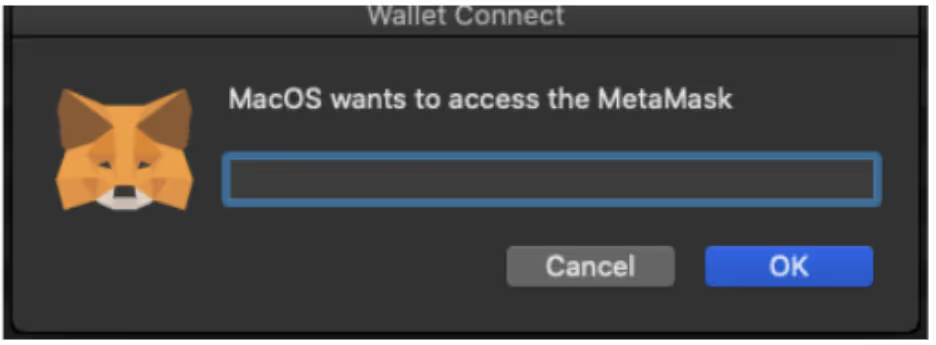
Once the user enters their password, a second prompt requests the user’s MetaMask [4] password. A directory is created in ‘/Users/Shared/NW’ with the credentials stored in textfiles. Chainbreak [5] is used to dump Keychain passwords and stores the details in “Keychain.txt”.
Wallet Connect Password prompt
Figure 4: Password prompt for MetaMask
Directory
Figure 5: Directory /Users/Shared/NW with created files

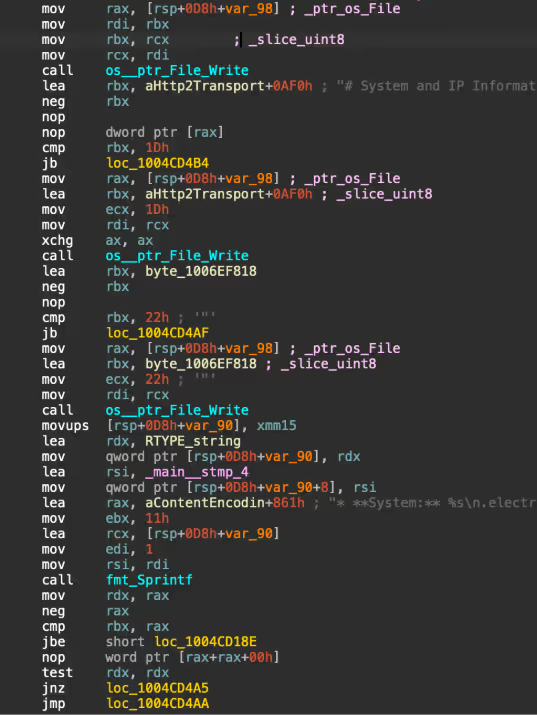
A zip file containing the stolen data is created in: “/Users/Shared/NW/[CountryCode]Cthulhu_Mac_OS_[date]_[time].zip.” Additionally, a notification is sent to the C2, to alert to new logs. The malware fingerprints the victim’s system, gathering information including IP, with IP details that are retrieved from ipinfo.io.  

System information including system name, OS version, hardware and software information is also gathered and stored in a text file.
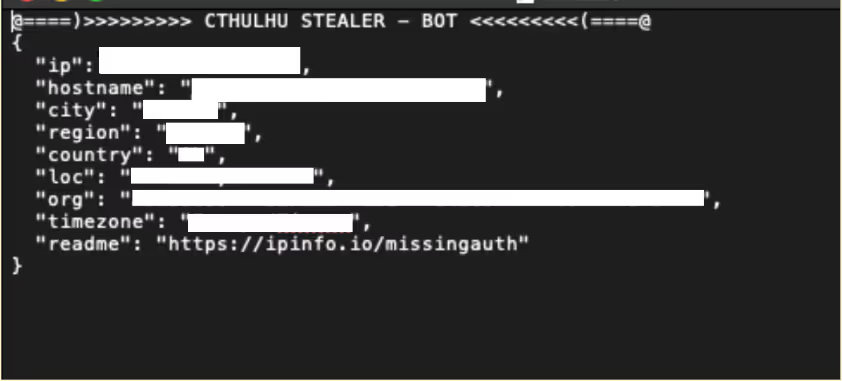
Parsed IP Details
Figure 6: Parsed IP Details 
Cthulhu Stealer
Figure 7: Contents of ‘Userinfo.txt’
Code
Figure 8: Part of the function saving system information to text file
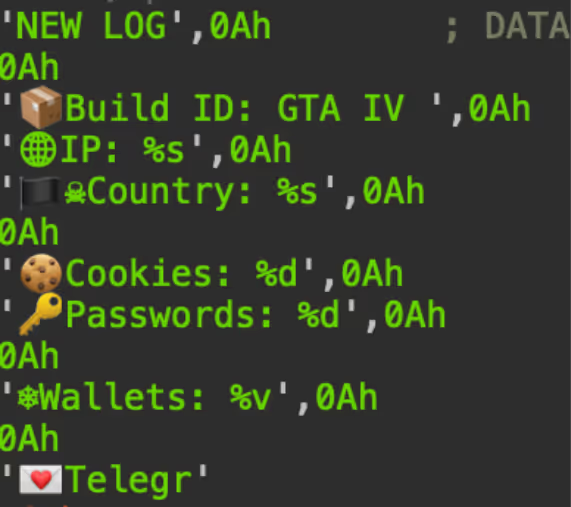
Log Alert
Figure 9: Alert of Log that is sent to operators

Cthulhu Stealer impersonates disk images of legitimate software that include:

  • CleanMyMac
  • Grand Theft Auto IV (appears to be a typo for VI)
  • Adobe GenP

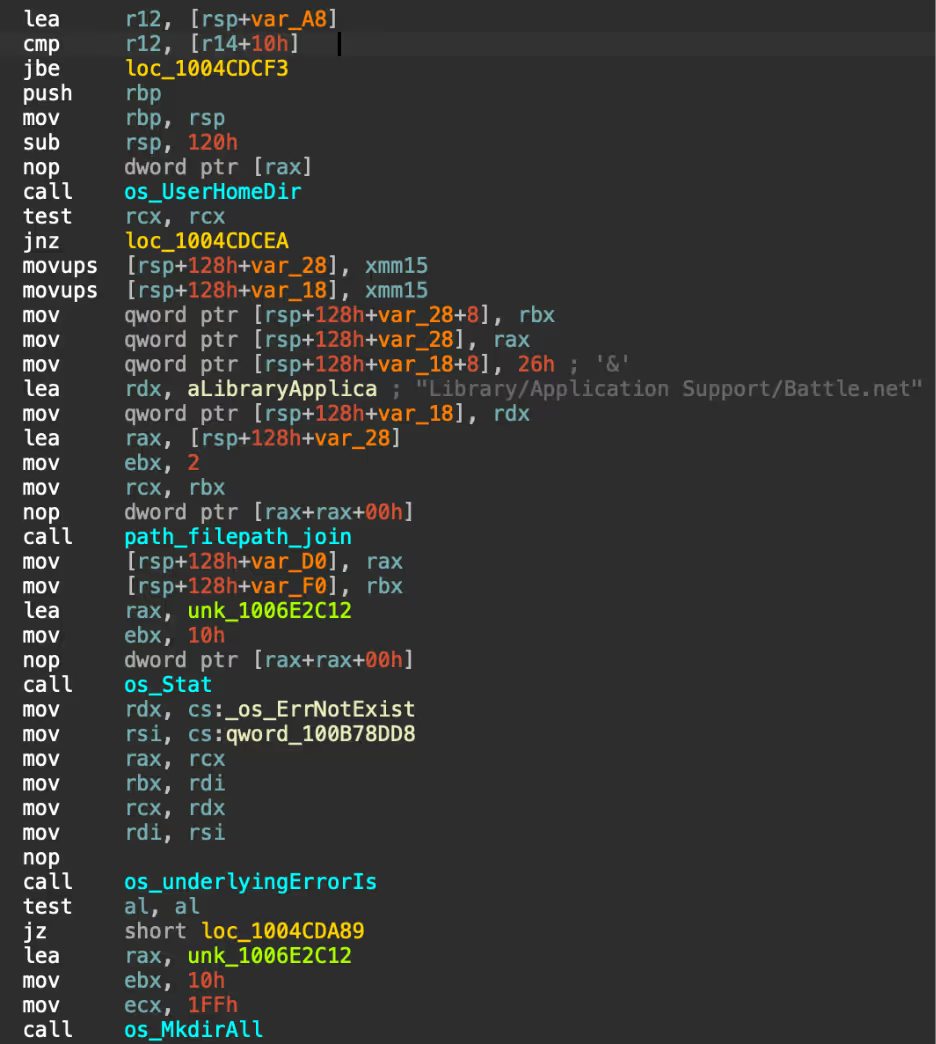
The main functionality of Cthulhu Stealer is to steal credentials and cryptocurrency wallets from various stores, including game accounts. Shown in Figure 10, there are multiple checker functions that check in the installation folders of targeted file stores, typically in “Library/Application Support/[file store]”. A directory is created in “/Users/Shared/NW” and the contents of the installation folder are dumped into text files for each store.
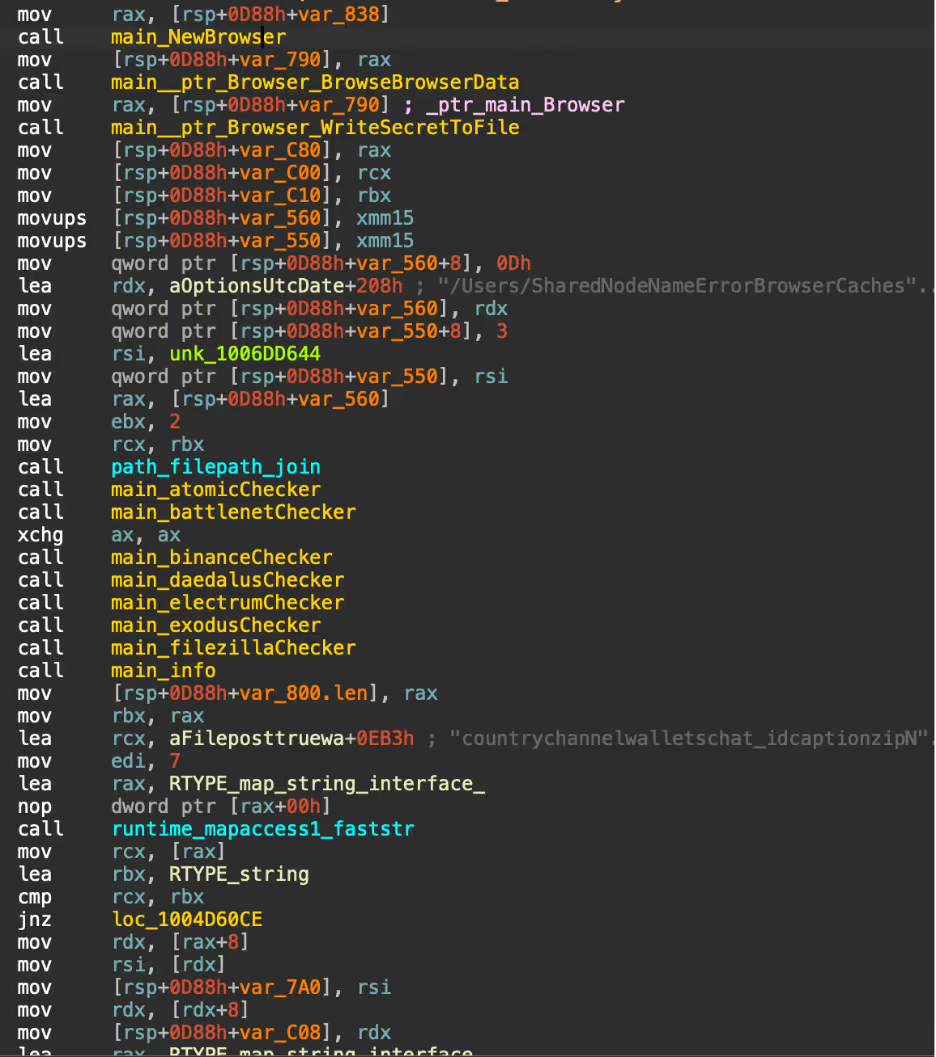
Code
Figure 10: “Checker” functions being called in main function
Code
Figure 11: Function BattleNetChecker

A list of stores Cthulhu Stealer steals from is shown in the list below:

  • Browser Cookies
  • Coinbase Wallet
  • Chrome Extension Wallets
  • Telegram Tdata account information
  • Minecraft user information
  • Wasabi Wallet
  • MetaMask Wallet
  • Keychain Passwords
  • SafeStorage Passwords
  • Battlenet game, cache and log data
  • Firefox Cookies
  • Daedalus Wallet
  • Electrum Wallet
  • Atomic Wallet
  • Binanace Wallet
  • Harmony Wallet
  • Electrum Wallet
  • Enjin Wallet
  • Hoo Wallet
  • Dapper Wallet
  • Coinomi Wallet
  • Trust Wallet

Comparison to atomic stealer

Atomic Stealer [6] is an information-stealer that targets macOS written in Go that was first identified in 2023. Atomic Stealer steals crypto wallets, browser credentials, and keychain. The stealer is sold on Telegram to affiliates for $1,000 per month. The functionality and features of Cthulhu Stealer are very similar to Atomic Stealer, indicating the developer of Cthulhu Stealer probably took Atomic Stealer and modified the code. The use of “osascript”  to prompt the user for their password is similar in Atomic Stealer and Cthulhu, even including the same spelling mistakes. 

Forum and operators

The developers and affiliates of Cthulhu Stealer operate as “Cthulhu Team” using Telegram for communications. The stealer appears to be being rented out to individuals for $500 USD/month, with the main developer paying out a percentage of earnings to affiliates based on their deployment. Each affiliate of the stealer is responsible for the deployment of the malware. Cado has found Cthulhu Stealer sold on two well-known malware marketplaces which are used for communication, arbitration and advertising of the stealer, along with Telegram. The user “Cthulhu” (also known as Balaclavv), first started advertising Cthulhu Stealer at the end of 2023 and appeared to be operating for the first few months of 2024, based on timestamps from the binaries. 

Various affiliates of the stealer started lodging complaints against Cthulhu in 2024 with regards to payments not being received. Users complained that Cthulhu had stolen money that was owed to them and accused the threat actor of being a scammer or participating in an exit scam. As a result, the threat actor received a permanent ban from the marketplace.

Screenshot
Figure 12: Screenshot of an arbitration an affiliate lodged against Cthulhu

Key takeaways 

In conclusion, while macOS has long been considered a secure system, the existence of malware targeting Mac users remains an increasing security concern. Although Cthulhu Team no longer appears to be active, this serves as a reminder that Apple users are not immune to cyber threats. It’s crucial to remain vigilant and exercise caution, particularly when installing software from unofficial sources.

To protect yourself from potential threats, always download software from trusted sources, such as the Apple App Store or the official websites of reputable developers. Enable macOS’s built-in security features such as Gatekeeper, which helps prevent the installation of unverified apps. Keep your system and applications up to date with the latest security patches. Additionally, consider using reputable antivirus software to provide an extra layer of protection.

By staying informed and taking proactive steps, you can significantly reduce the risk of falling victim to Mac malware and ensure your system remains secure.

Indicators of compromise

Launch.dmg  

6483094f7784c424891644a85d5535688c8969666e16a194d397dc66779b0b12  

GTAIV_EarlyAccess_MACOS_Release.dmg  

e3f1e91de8af95cd56ec95737669c3512f90cecbc6696579ae2be349e30327a7  

AdobeGenP.dmg  

f79b7cbc653696af0dbd867c0a5d47698bcfc05f63b665ad48018d2610b7e97b  

Setup2024.dmg  

de33b7fb6f3d77101f81822c58540c87bd7323896913130268b9ce24f8c61e24  

CleanMyMac.dmg  

96f80fef3323e5bc0ce067cd7a93b9739174e29f786b09357125550a033b0288  

Network indicators  

89[.]208.103.185  

89[.]208.103.185:4000/autocheckbytes  

89[.]208.103.185:4000/notification_archive  

MITRE ATTACK  

User Execution  

T1204  

Command and Scripting Interpreter: Apple Script  

T1059.002  

Credentials From Password Stores  

T1555  

Credentials From Password Stores: Keychain  

T1555.001  

Credentials From Password Stores: Credentials From Web Browser  

T1555.003  

Account Discovery   

T1087  

System Information Discovery  

T1082  

Data Staged  

T1074  

Data From Local System  

T1005  

Exfiltration Over C2 Channel  

T1041  

Financial Theft  

Detection

Yara

rule MacoOS_CthulhuStealer {   
meta:       
 Description = "Detects Cthulhu MacOS Stealer Binary"       
 author = "Cado Security"       
 date = "14/08/2024"       
 md5 = "897384f9a792674b969388891653bb58" strings:           
 $mach_o_x86_64 = {CF FA ED FE 07 00 00 01 00 00 00 00 00 00 00 00}           
 $mach_o_arm64 = {CF FA ED FE 0C 00 00 01 00 00 00 00 00 00 00 00}          $c2 = "http://89.208.103.185:4000"           
 $path1 = "/Users/Shared/NW" fullword          $path2 = "/Users/admin/Desktop/adwans/Builder/6987368329/generated_script.go" fullword          $path3 = "ic.png" fullword           
 $zip = "@====)>>>>>>>>> CTHULHU STEALER - BOT <<<<<<<<<(====@\n" fullword          $func1 = "copyKeychainFile"           
 $func2 = "grabberA1"           
 $func3 = "grabberA2"          
 $func4 = "decodeIPInfo"           
 $func5 = "battlenetChecker"           
 $func6 = "binanceChecker"          
 $func7 = "daedalusChecker"           
 $func8 = "CCopyFFolderContents"           
 $func9 = "electrumChecker"         
 
condition:         
 $mach_o_x86_64 or $mach_o_arm64           
 and any of ($func*) or any of ($path*) or ($c2) or ($zip) } 

References

[1] https://redcanary.com/blog/threat-intelligence/clipping-silver-sparrows-wings/

[2] https://unit42.paloaltonetworks.com/new-os-x-ransomware-keranger-infected-transmission-bittorrent-client-installer/

[3] https://www.sentinelone.com/blog/atomic-stealer-threat-actor-spawns-second-variant-of-macos-malware-sold-on-telegram/


[4] https://metamask.io/

[5] https://github.com/n0fate/chainbreaker

[6] https://www.sentinelone.com/blog/atomic-stealer-threat-actor-spawns-second-variant-of-macos-malware-sold-on-telegram/

Inside the SOC
Darktrace cyber analysts are world-class experts in threat intelligence, threat hunting and incident response, and provide 24/7 SOC support to thousands of Darktrace customers around the globe. Inside the SOC is exclusively authored by these experts, providing analysis of cyber incidents and threat trends, based on real-world experience in the field.
Written by
Tara Gould
Malware Research Lead

More in this series

No items found.

Blog

/

Cloud

/

March 5, 2026

Inside Cloud Compromise: Investigating Attacker Activity with Darktrace / Forensic Acquisition & Investigation

Default blog imageDefault blog image

Investigating Cloud Attacks with Forensic Acquisition & Investigation

Darktrace / Forensic Acquisition & Investigation™ is the industry’s first truly automated forensic solution purpose-built for the cloud. This blog will demonstrate how an investigation can be carried out against a compromised cloud server in minutes, rather than hours or days.

The compromised server investigated in this case originates from Darktrace’s Cloudypots system, a global honeypot network designed to observe adversary activity in real time across a wide range of cloud services. Whenever an attacker successfully compromises one of these honeypots, a forensic copy of the virtual server's disk is preserved for later analysis. Using Forensic Acquisition & Investigation, analysts can then investigate further and obtain detailed insights into the compromise including complete attacker timelines and root cause analysis.

Forensic Acquisition & Investigation supports importing artifacts from a variety of sources, including EC2 instances, ECS, S3 buckets, and more. The Cloudypots system produces a raw disk image whenever an attack is detected and stores it in an S3 bucket. This allows the image to be directly imported into Forensic Acquisition & Investigation using the S3 bucket import option.

As Forensic Acquisition & Investigation runs cloud-natively, no additional configuration is required to add a specific S3 bucket. Analysts can browse and acquire forensic assets from any bucket that the configured IAM role is permitted to access. Operators can also add additional IAM credentials, including those from other cloud providers, to extend access across multiple cloud accounts and environments.

Figure 1: Forensic Acquisition & Investigation import screen.

Forensic Acquisition & Investigation then retrieves a copy of the file and automatically begins running the analysis pipeline on the artifact. This pipeline performs a full forensic analysis of the disk and builds a timeline of the activity that took place on the compromised asset. By leveraging Forensic Acquisition & Investigation’s cloud-native analysis system, this process condenses hour of manual work into just minutes.

Successful import of a forensic artifact and initiation of the analysis pipeline.
Figure 2: Successful import of a forensic artifact and initiation of the analysis pipeline.

Once processing is complete, the preserved artifact is visible in the Evidence tab, along with a summary of key information obtained during analysis, such as the compromised asset’s hostname, operating system, cloud provider, and key event count.

The Evidence overview showing the acquired disk image.
Figure 3: The Evidence overview showing the acquired disk image.

Clicking on the “Key events” field in the listing opens the timeline view, automatically filtered to show system- generated alarms.

The timeline provides a chronological record of every event that occurred on the system, derived from multiple sources, including:

  • Parsed log files such as the systemd journal, audit logs, application specific logs, and others.
  • Parsed history files such as .bash_history, allowing executed commands to be shown on the timeline.
  • File-specific events, such as files being created, accessed, modified, or executables being run, etc.

This approach allows timestamped information and events from multiple sources to be aggregated and parsed into a single, concise view, greatly simplifying the data review process.

Alarms are created for specific timeline events that match either a built-in system rule, curated by Darktrace’s Threat Research team or an operator-defined created at the project level. These alarms help quickly filter out noise and highlight on events of interest, such as the creation of a file containing known malware, access to sensitive files like Amazon Web Service (AWS) credentials, suspicious arguments or commands, and more.

 The timeline view filtered to alarm_severity: “1” OR alarm_severity: “3”, showing only events that matched an alarm rule.
Figure 4: The timeline view filtered to alarm_severity: “1” OR alarm_severity: “3”, showing only events that matched an alarm rule.

In this case, several alarms were generated for suspicious Base64 arguments being passed to Selenium. Examining the event data, it appears the attacker spawned a Selenium Grid session with the following payload:

"request.payload": "[Capabilities {browserName: chrome, goog:chromeOptions: {args: [-cimport base64;exec(base64...], binary: /usr/bin/python3, extensions: []}, pageLoadStrategy: normal}]"

This is a common attack vector for Selenium Grid. The chromeOptions object is intended to specify arguments for how Google Chrome should be launched; however, in this case the attacker has abused the binary field to execute the Python3 binary instead of Chrome. Combined with the option to specify command-line arguments, the attacker can use Python3’s -c option to execute arbitrary Python code, in this instance, decoding and executing a Base64 payload.

Selenium’s logs truncate the Arguments field automatically, so an alternate method is required to retrieve the full payload. To do this, the search bar can be used to find all events that occurred around the same time as this flagged event.

Pivoting off the previous event by filtering the timeline to events within the same window using timestamp: [“2026-02-18T09:09:00Z” TO “2026-02-18T09:12:00Z”].
Figure 5: Pivoting off the previous event by filtering the timeline to events within the same window using timestamp: [“2026-02-18T09:09:00Z” TO “2026-02-18T09:12:00Z”].

Scrolling through the search results, an entry from Java’s systemd journal can be identified. This log contains the full, unaltered payload. GCHQ’s CyberChef can then be used to decode the Base64 data into the attacker’s script, which will ultimately be executed.[NJ9]

Continue reading
About the author
Nathaniel Bill
Malware Research Engineer

Blog

/

Network

/

February 19, 2026

CVE-2026-1731: How Darktrace Sees the BeyondTrust Exploitation Wave Unfolding

Default blog imageDefault blog image

Note: Darktrace's Threat Research team is publishing now to help defenders. We will continue updating this blog as our investigations unfold.

Background

On February 6, 2026, the Identity & Access Management solution BeyondTrust announced patches for a vulnerability, CVE-2026-1731, which enables unauthenticated remote code execution using specially crafted requests.  This vulnerability affects BeyondTrust Remote Support (RS) and particular older versions of Privileged Remote Access (PRA) [1].

A Proof of Concept (PoC) exploit for this vulnerability was released publicly on February 10, and open-source intelligence (OSINT) reported exploitation attempts within 24 hours [2].

Previous intrusions against Beyond Trust technology have been cited as being affiliated with nation-state attacks, including a 2024 breach targeting the U.S. Treasury Department. This incident led to subsequent emergency directives from  the Cybersecurity and Infrastructure Security Agency (CISA) and later showed attackers had chained previously unknown vulnerabilities to achieve their goals [3].

Additionally, there appears to be infrastructure overlap with React2Shell mass exploitation previously observed by Darktrace, with command-and-control (C2) domain  avg.domaininfo[.]top seen in potential post-exploitation activity for BeyondTrust, as well as in a React2Shell exploitation case involving possible EtherRAT deployment.

Darktrace Detections

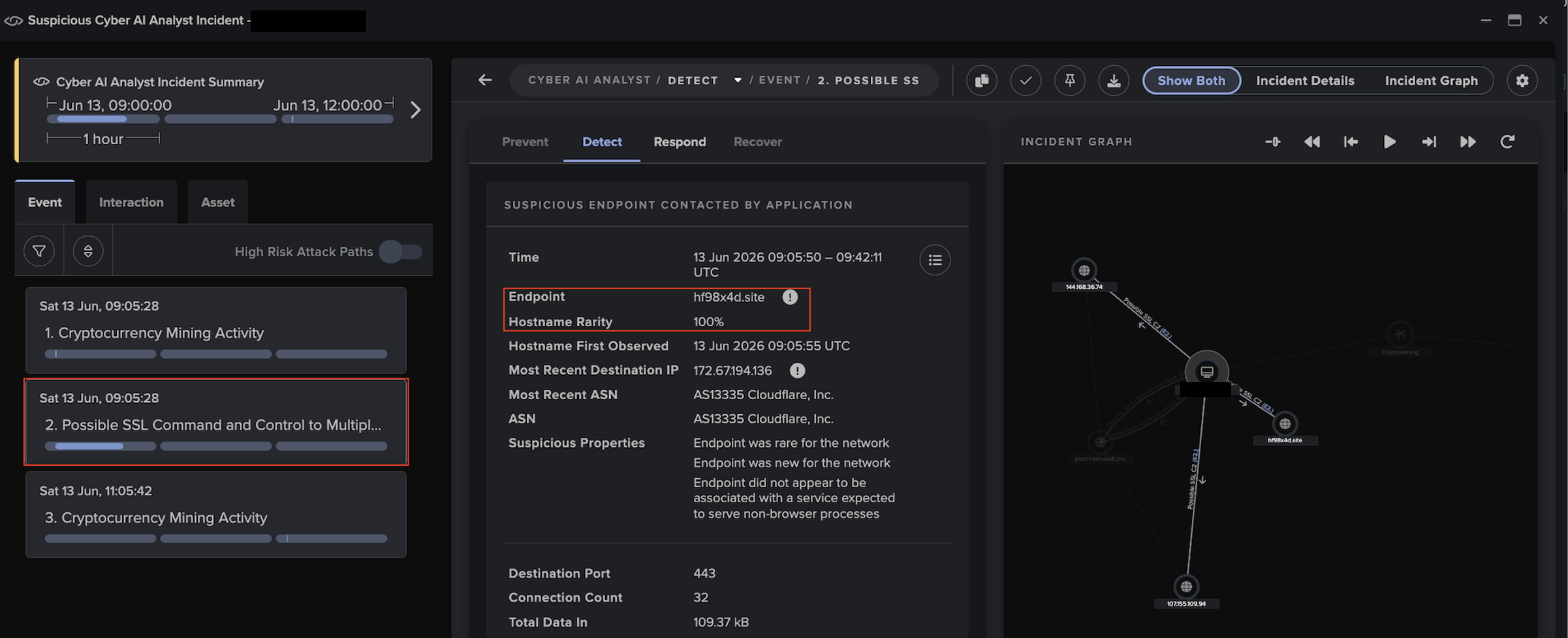
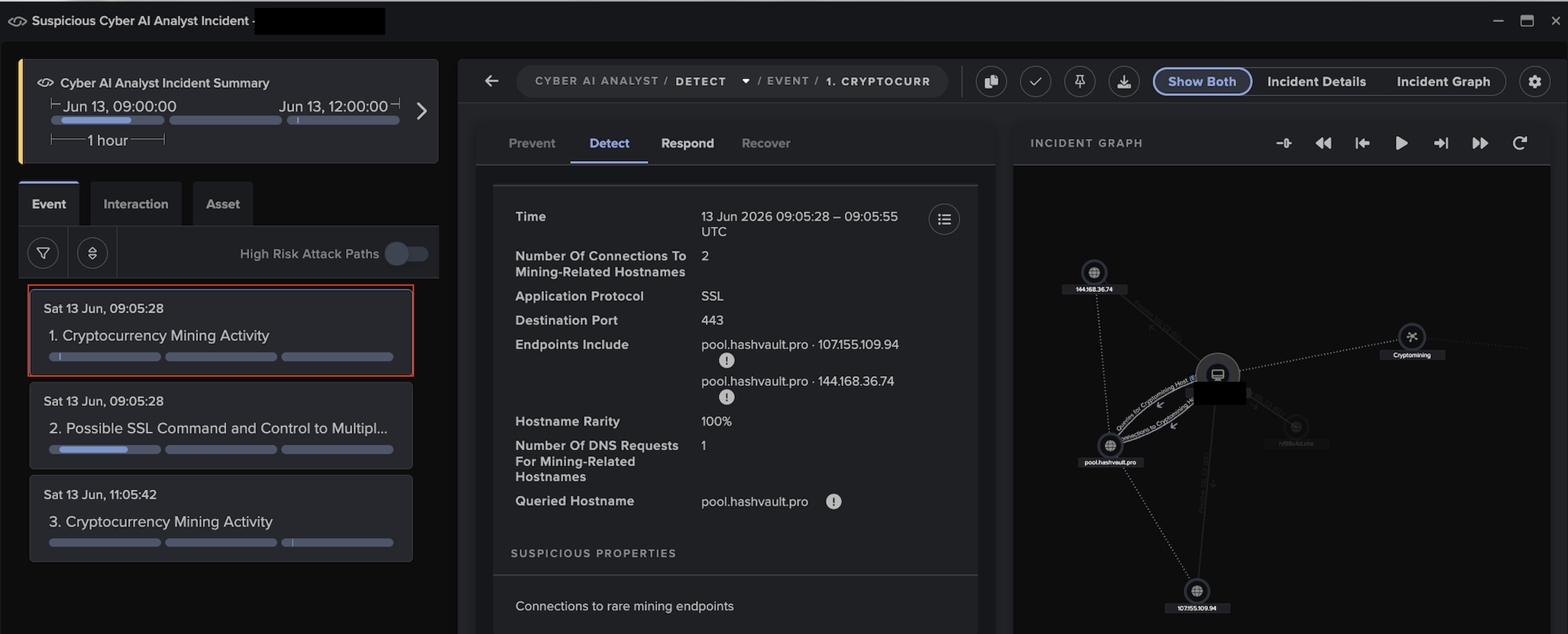
Darktrace’s Threat Research team has identified highly anomalous activity across several customers that may relate to exploitation of BeyondTrust since February 10, 2026. Observed activities include:

Outbound connections and DNS requests for endpoints associated with Out-of-Band Application Security Testing; these services are commonly abused by threat actors for exploit validation.  Associated Darktrace models include:

  • Compromise / Possible Tunnelling to Bin Services

Suspicious executable file downloads. Associated Darktrace models include:

  • Anomalous File / EXE from Rare External Location

Outbound beaconing to rare domains. Associated Darktrace models include:

  • Compromise / Agent Beacon (Medium Period)
  • Compromise / Agent Beacon (Long Period)
  • Compromise / Sustained TCP Beaconing Activity To Rare Endpoint
  • Compromise / Beacon to Young Endpoint
  • Anomalous Server Activity / Rare External from Server
  • Compromise / SSL Beaconing to Rare Destination

Unusual cryptocurrency mining activity. Associated Darktrace models include:

  • Compromise / Monero Mining
  • Compromise / High Priority Crypto Currency Mining

And model alerts for:

  • Compromise / Rare Domain Pointing to Internal IP

IT Defenders: As part of best practices, we highly recommend employing an automated containment solution in your environment. For Darktrace customers, please ensure that Autonomous Response is configured correctly. More guidance regarding this activity and suggested actions can be found in the Darktrace Customer Portal.  

Appendices

Potential indicators of post-exploitation behavior:

·      217.76.57[.]78 – IP address - Likely C2 server

·      hXXp://217.76.57[.]78:8009/index.js - URL -  Likely payload

·      b6a15e1f2f3e1f651a5ad4a18ce39d411d385ac7  - SHA1 - Likely payload

·      195.154.119[.]194 – IP address – Likely C2 server

·      hXXp://195.154.119[.]194/index.js - URL – Likely payload

·      avg.domaininfo[.]top – Hostname – Likely C2 server

·      104.234.174[.]5 – IP address - Possible C2 server

·      35da45aeca4701764eb49185b11ef23432f7162a – SHA1 – Possible payload

·      hXXp://134.122.13[.]34:8979/c - URL – Possible payload

·      134.122.13[.]34 – IP address – Possible C2 server

·      28df16894a6732919c650cc5a3de94e434a81d80 - SHA1 - Possible payload

References:

1.        https://nvd.nist.gov/vuln/detail/CVE-2026-1731

2.        https://www.securityweek.com/beyondtrust-vulnerability-targeted-by-hackers-within-24-hours-of-poc-release/

3.        https://www.rapid7.com/blog/post/etr-cve-2026-1731-critical-unauthenticated-remote-code-execution-rce-beyondtrust-remote-support-rs-privileged-remote-access-pra/

Continue reading
About the author
Emma Foulger
Global Threat Research Operations Lead
あなたのデータ × DarktraceのAI
唯一無二のDarktrace AIで、ネットワークセキュリティを次の次元へ